
കൂൾഗീക്ക് B0DD41WKCH
COOLGEEK Portable Stereo CD Player Boombox User Manual
മോഡൽ: B0DD41WKCH
1. ആമുഖം
വാങ്ങിയതിന് നന്ദി.asing the COOLGEEK Portable Stereo CD Player Boombox. This versatile device combines a vertical CD player, Bluetooth speaker, and FM radio into a single, stylish unit. Designed for both home and outdoor use, it offers high-fidelity audio and extended battery life. Please read this manual carefully to ensure proper operation and to maximize your enjoyment of the product.

Image: The COOLGEEK Portable Stereo CD Player Boombox, showcasing അതിന്റെ ഒതുക്കമുള്ള രൂപകൽപ്പനയും സംയോജിത ഹാൻഡിലും.
2. ബോക്സിൽ എന്താണുള്ളത്?
- വിൻtage CD Player (Main Unit)
- പവർ അഡാപ്റ്റർ
- ഇൻസ്ട്രക്ഷൻ മാനുവൽ
3. ഉൽപ്പന്നം കഴിഞ്ഞുview
Familiarize yourself with the various components and controls of your COOLGEEK Boombox.
3.1 ഫ്രണ്ട് പാനലും നിയന്ത്രണങ്ങളും
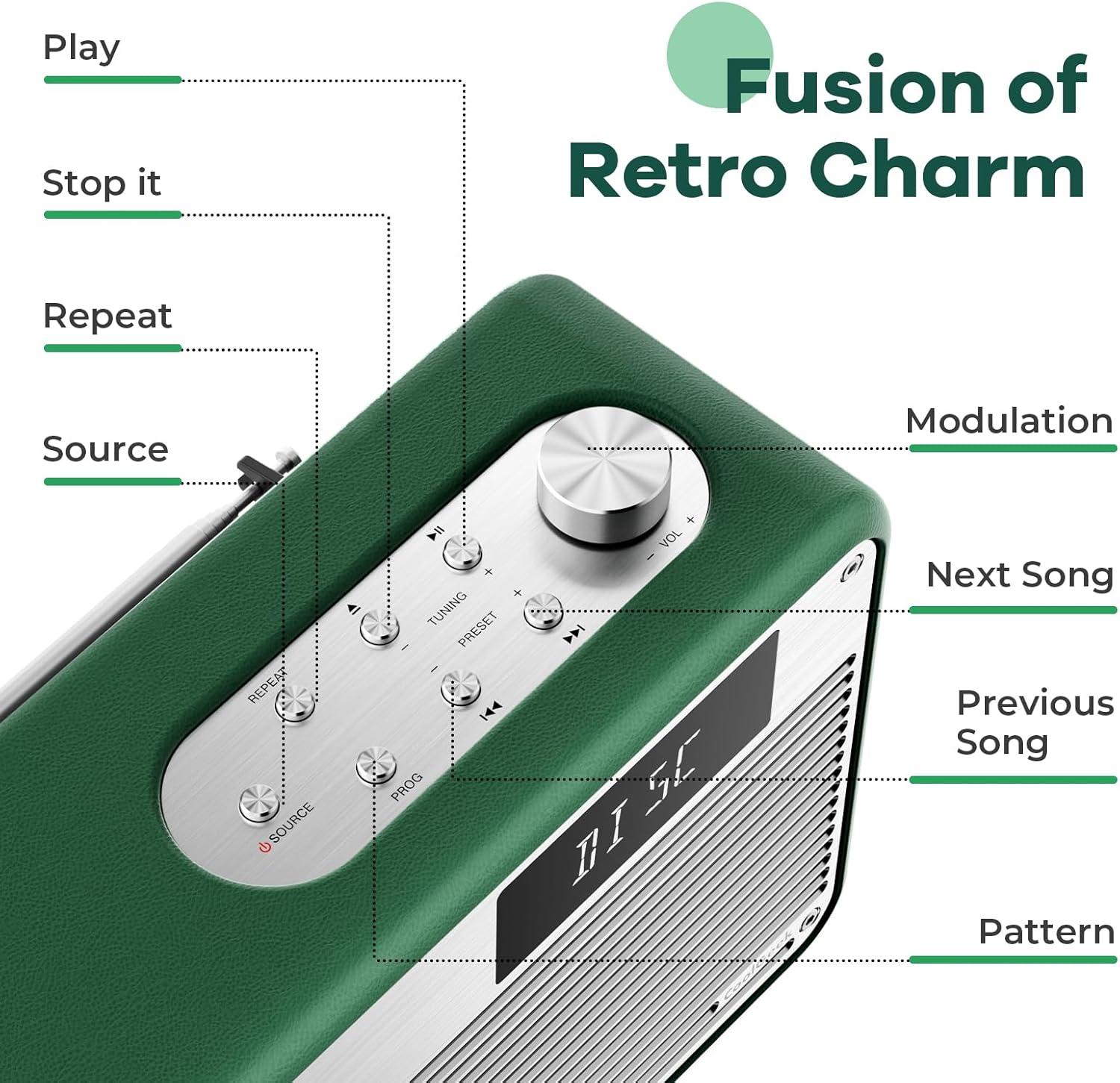
ചിത്രം: വിശദമായത് view of the control panel, highlighting buttons for Play, Stop, Repeat, Source, Modulation, Next Song, Previous Song, and Pattern.
- സിഡി സ്ലോട്ട്: Vertical slot for inserting CDs.
- ഡിസ്പ്ലേ സ്ക്രീൻ: Shows current mode, track number, time, FM frequency, and Bluetooth status.
- വോളിയം നോബ്: വോളിയം ക്രമീകരിക്കാൻ തിരിക്കുക.
- ഉറവിട ബട്ടൺ: Press to switch between CD, FM, and Bluetooth modes.
- പ്ലേ/താൽക്കാലികമായി നിർത്തുക ബട്ടൺ: പ്ലേബാക്ക് ആരംഭിക്കുകയോ താൽക്കാലികമായി നിർത്തുകയോ ചെയ്യുന്നു.
- ബട്ടൺ നിർത്തുക: പ്ലേബാക്ക് നിർത്തുന്നു.
- ആവർത്തിക്കുക ബട്ടൺ: Toggles repeat modes for CD playback.
- Tuning Buttons (+/-): എഫ്എം റേഡിയോ ട്യൂണിംഗിനായി.
- Preset Buttons (+/-): For navigating saved FM radio presets.
- മുമ്പത്തെ/അടുത്ത ട്രാക്ക് ബട്ടണുകൾ: Skips to the previous or next track on CD, or changes FM frequency/preset.
- PROG ബട്ടൺ: For programming CD playback order.
3.2 Rear Panel and Features

Image: Close-up of the boombox's leather handle and aluminum shell, highlighting the premium materials.
- എഫ്എം ആന്റിന: Extendable antenna for improved FM radio reception.
- പവർ ഇൻപുട്ട്: DC 12V/3A input for the power adapter.
- Rear Phase Inverter Hole: Enhances bass performance for a richer sound experience.
4. സജ്ജീകരണം
4.1 ഉപകരണം ചാർജ് ചെയ്യുന്നു
Before first use, fully charge the boombox. Connect the provided power adapter to the DC 12V/3A input on the rear of the unit and plug it into a wall outlet. A full charge takes approximately 2.5 hours and provides over 18 hours of wireless playback.

Image: The boombox highlighting its long battery life for extended use.
4.2 പ്രാരംഭ പ്ലേസ്മെന്റ്
Place the boombox on a stable, flat surface. For optimal sound, especially bass, consider placing it near a wall or in a corner. Ensure adequate ventilation around the unit.
5. പ്രവർത്തന നിർദ്ദേശങ്ങൾ
5.1 പവർ ഓൺ/ഓഫ്
അമർത്തിപ്പിടിക്കുക ഉറവിടം യൂണിറ്റ് ഓണാക്കാനോ ഓഫാക്കാനോ ഉള്ള ബട്ടൺ.
5.2 മോഡ് തിരഞ്ഞെടുക്കൽ
അമർത്തുക ഉറവിടം button repeatedly to cycle through the available modes: CD, FM Radio, and Bluetooth (BT).
5.3 സിഡി പ്ലേബാക്ക്
ഒരു സിഡി പ്ലേ ചെയ്യാൻ:
- Ensure the unit is in CD mode (display shows "DISC" or "READING").
- Carefully insert a CD into the vertical CD slot. The disc will automatically begin to spin and read.
- ഉപയോഗിക്കുക പ്ലേ/താൽക്കാലികമായി നിർത്തുക, നിർത്തുക, മുമ്പത്തെ/അടുത്ത ട്രാക്ക്, ഒപ്പം ആവർത്തിക്കുക പ്ലേബാക്ക് നിയന്ത്രിക്കുന്നതിനുള്ള ബട്ടണുകൾ.
The boombox supports various types of CDs. For optimal performance, handle CDs by their edges to avoid scratches.
Video: Demonstrates the operation of the COOLGEEK CD Player, including inserting a CD, switching modes, and adjusting volume.
5.4 എഫ്എം റേഡിയോ പ്രവർത്തനം
എഫ്എം റേഡിയോ കേൾക്കാൻ:
- ഉപയോഗിച്ച് FM മോഡിലേക്ക് മാറുക ഉറവിടം button (display shows "FM" and frequency).
- മികച്ച സ്വീകരണത്തിനായി യൂണിറ്റിന്റെ പിൻഭാഗത്തുള്ള എഫ്എം ആന്റിന നീട്ടുക.
- ഉപയോഗിക്കുക Tuning (+/-) ആവശ്യമുള്ള ആവൃത്തിയിലേക്ക് സ്വമേധയാ ട്യൂൺ ചെയ്യാൻ ബട്ടണുകൾ.
- To save a preset, press and hold the PROG ബട്ടൺ, തുടർന്ന് ഉപയോഗിക്കുക Preset (+/-) ഒരു പ്രീസെറ്റ് നമ്പർ തിരഞ്ഞെടുക്കാൻ ബട്ടണുകൾ അമർത്തുക PROG സ്ഥിരീകരിക്കാൻ വീണ്ടും.
- ഉപയോഗിക്കുക Preset (+/-) സംരക്ഷിച്ച സ്റ്റേഷനുകളിലൂടെ നാവിഗേറ്റ് ചെയ്യുന്നതിനുള്ള ബട്ടണുകൾ.
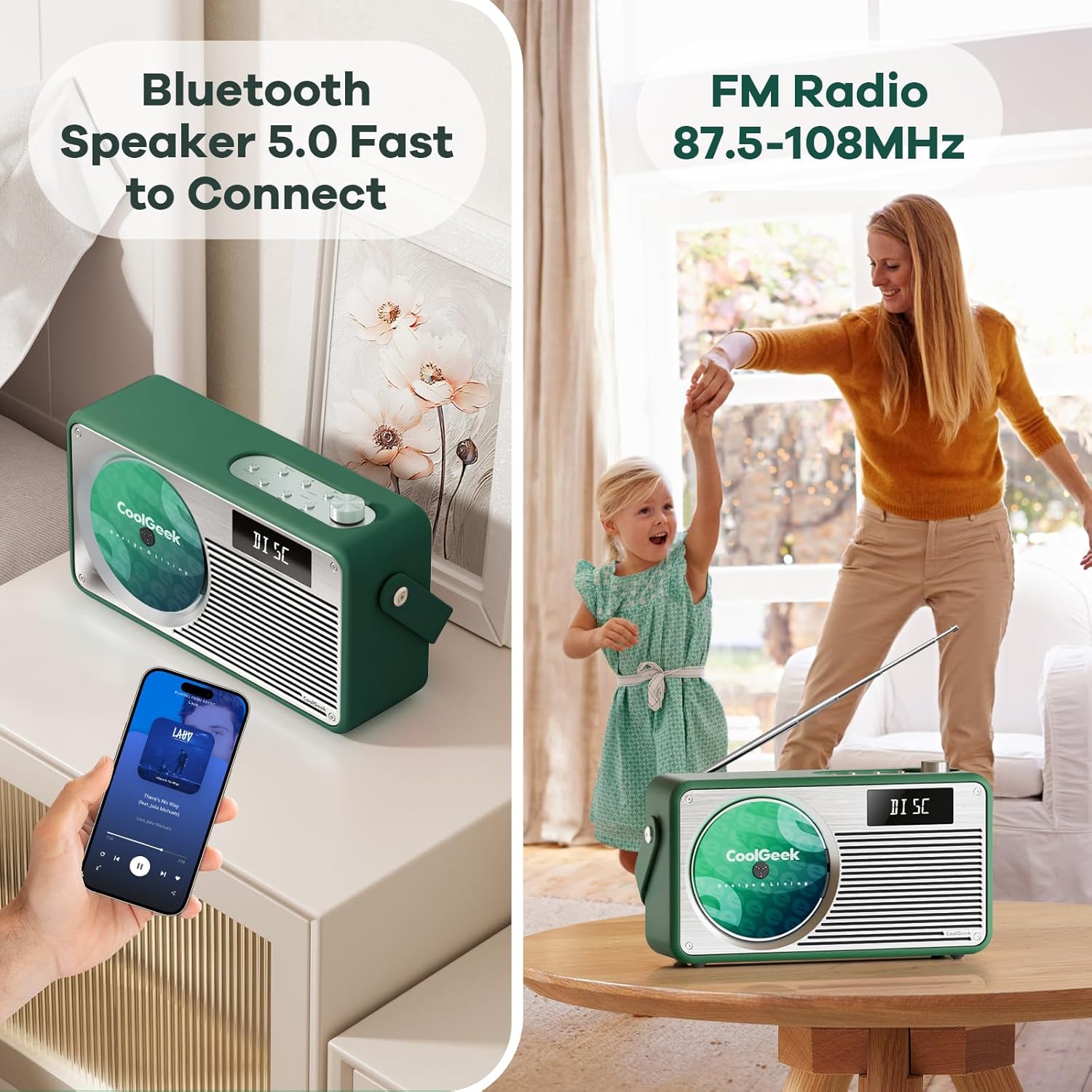
Image: The boombox displaying its Bluetooth and FM radio capabilities, showing a phone connected via Bluetooth and the FM antenna extended.
5.5 ബ്ലൂടൂത്ത് മോഡ്
ബ്ലൂടൂത്ത് വഴി ബന്ധിപ്പിക്കാൻ:
- ഉപയോഗിച്ച് ബ്ലൂടൂത്ത് മോഡിലേക്ക് മാറുക ഉറവിടം button (display shows "BT"). The unit will automatically enter pairing mode.
- On your mobile device, enable Bluetooth and search for "CoolGeek VS-02" (or similar).
- Select the device to pair. Once connected, the display will indicate a successful connection.
- You can now play audio from your device through the boombox. Use your device or the boombox's പ്ലേ/താൽക്കാലികമായി നിർത്തുക ഒപ്പം മുമ്പത്തെ/അടുത്ത ട്രാക്ക് പ്ലേബാക്ക് നിയന്ത്രിക്കുന്നതിനുള്ള ബട്ടണുകൾ.
5.6 വോളിയം നിയന്ത്രണം
തിരിക്കുക വോളിയം നോബ് ശബ്ദം കൂട്ടാൻ ഘടികാരദിശയിലും കുറയ്ക്കാൻ എതിർ ഘടികാരദിശയിലും.
6. പരിപാലനം
- വൃത്തിയാക്കൽ: യൂണിറ്റിന്റെ പുറംഭാഗം വൃത്തിയാക്കാൻ മൃദുവായതും ഉണങ്ങിയതുമായ തുണി ഉപയോഗിക്കുക. ലിക്വിഡ് ക്ലീനറുകളോ ഉരച്ചിലുകളുള്ള വസ്തുക്കളോ ഉപയോഗിക്കരുത്.
- സിഡി കെയർ: Always handle CDs by their edges. Store them in their cases to prevent scratches and dust accumulation.
- സംഭരണം: When not in use for extended periods, store the boombox in a cool, dry place away from direct sunlight and extreme temperatures.
- ബാറ്ററി: ബാറ്ററി ലൈഫ് വർദ്ധിപ്പിക്കാൻ, ബാറ്ററി ഇടയ്ക്കിടെ പൂർണ്ണമായും ഡിസ്ചാർജ് ചെയ്യുന്നത് ഒഴിവാക്കുക. തുടർച്ചയായ ഉപയോഗത്തിലല്ലെങ്കിൽ പോലും പതിവായി ചാർജ് ചെയ്യുക.
7. പ്രശ്നപരിഹാരം
| പ്രശ്നം | സാധ്യമായ കാരണം | പരിഹാരം |
|---|---|---|
| യൂണിറ്റ് പവർ ഓണാക്കുന്നില്ല. | ബാറ്ററി തീർന്നു; പവർ അഡാപ്റ്റർ ബന്ധിപ്പിച്ചിട്ടില്ല അല്ലെങ്കിൽ തകരാറുണ്ട്. | Charge the unit fully. Ensure power adapter is securely connected and working. |
| സിഡി ഒഴിവാക്കുന്നു അല്ലെങ്കിൽ പ്ലേ ചെയ്യുന്നില്ല. | CD is dirty, scratched, or inserted incorrectly; Unit is on an unstable surface. | Clean the CD with a soft cloth. Re-insert the CD correctly. Place the unit on a stable surface. |
| മോശം എഫ്എം റേഡിയോ സ്വീകരണം. | Antenna not extended; Weak signal in the area. | എഫ്എം ആന്റിന പൂർണ്ണമായും നീട്ടുക. മികച്ച സിഗ്നലിനായി യൂണിറ്റ് പുനഃസ്ഥാപിക്കാൻ ശ്രമിക്കുക. |
| ബ്ലൂടൂത്ത് കണക്റ്റ് ചെയ്യുന്നില്ല. | Unit not in Bluetooth mode; Device not discoverable; Already connected to another device. | Ensure unit is in BT mode. Make sure your device's Bluetooth is on and discoverable. Disconnect from other devices. |
| ശബ്ദമില്ല. | Volume too low; Mute activated; Incorrect mode selected. | Increase volume. Check if unit is muted. Ensure correct mode (CD, FM, BT) is selected. |
8 സ്പെസിഫിക്കേഷനുകൾ
| ഫീച്ചർ | വിശദാംശങ്ങൾ |
|---|---|
| ഉൽപ്പന്ന അളവുകൾ | 17 x 9.5 x 6.7 ഇഞ്ച് |
| ഇനത്തിൻ്റെ ഭാരം | 8.5 പൗണ്ട് |
| ബാറ്ററികൾ | 1 ലിഥിയം അയോൺ ബാറ്ററി (ഉൾപ്പെടുത്തിയിരിക്കുന്നു) |
| കണക്റ്റിവിറ്റി ടെക്നോളജി | ബ്ലൂടൂത്ത് 5.0 |
| നിറം | പച്ച |
| സ്പീക്കർ തരം | സ്റ്റീരിയോ |
| എഫ്എം റേഡിയോ ഫ്രീക്വൻസി | 87.5 മുതൽ 108 MHz വരെ |
| ബാറ്ററി ലൈഫ് | Over 18 hours (wireless playback) |
| ചാർജിംഗ് സമയം | ഏകദേശം 2.5 മണിക്കൂർ |
9. വാറൻ്റിയും പിന്തുണയും
COOLGEEK is committed to customer satisfaction. If you encounter any issues with your product or have questions, please contact our customer support team directly. We will do our best to resolve any problems you may have.
For support, please refer to the contact information provided on the product packaging or the official COOLGEEK webസൈറ്റ്.
Ask a question about this manual
Ask about setup, troubleshooting, compatibility, parts, safety, or missing instructions. Manuals+ will review the question and use this page’s manual context to help answer it.