
Q16 പ്രോ
Q16 Pro Over Ear Open Ear Bluetooth 5.4 Earbuds User Manual
Model: Q16 Pro | Brand: generic
1. ആമുഖം
The Q16 Pro Over Ear Open Ear Bluetooth 5.4 Earbuds are designed to provide a comfortable and immersive audio experience. Featuring a full-color LCD touch screen for intuitive control, these true wireless earbuds offer adaptive active noise reduction, an adjustable equalizer, and Bluetooth 5.4 connectivity for stable and high-quality sound transmission. The open-ear design ensures comfort during extended wear while allowing awareness of your surroundings.
2. പാക്കേജ് ഉള്ളടക്കം
The Q16 Pro package typically includes the following items:
- Q16 Pro Over Ear Earbuds (1 pair)
- Charging Case with Touch Screen Display
- യുഎസ്ബി ടൈപ്പ്-സി ചാർജിംഗ് കേബിൾ
- ഉപയോക്തൃ മാനുവൽ
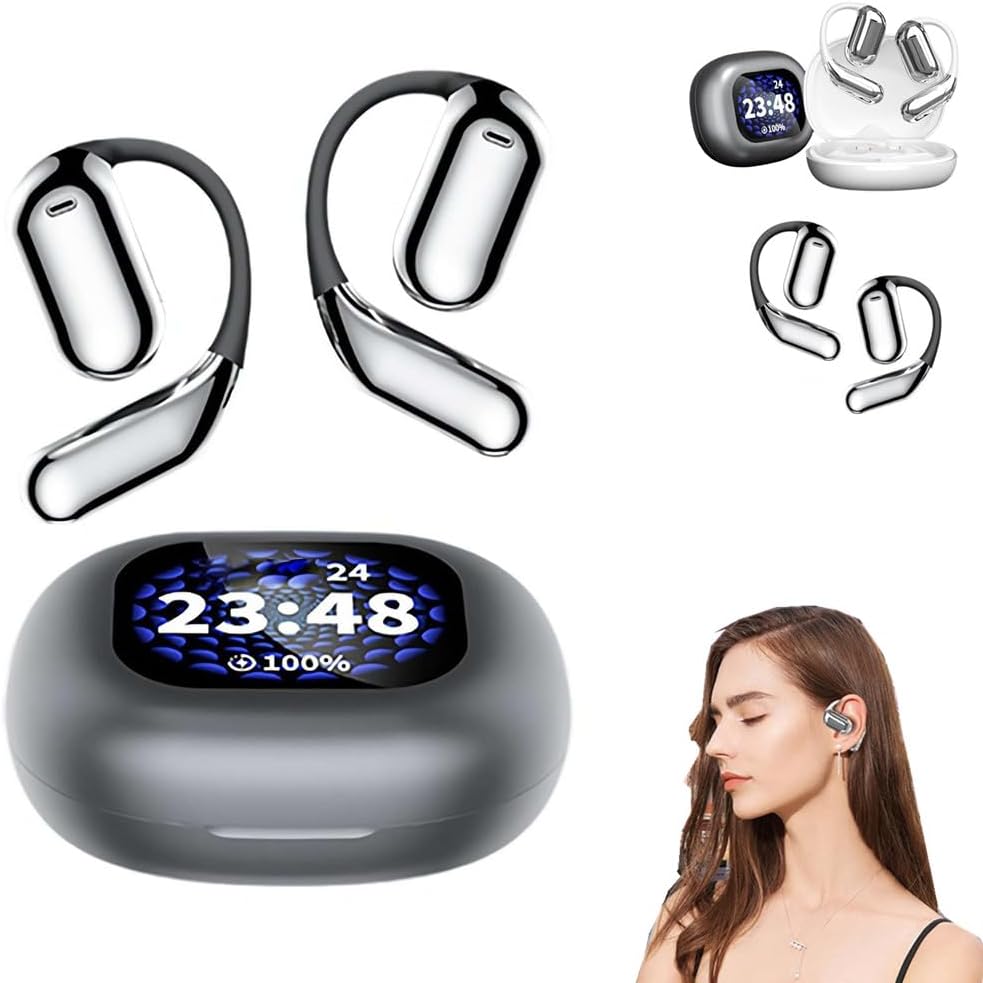
Image: The Q16 Pro earbuds and their charging case, showcasing the integrated display and the comfortable over-ear design.
3. സജ്ജീകരണ ഗൈഡ്
3.1 ഉപകരണം ചാർജ് ചെയ്യുന്നു
Before first use, fully charge the Q16 Pro earbuds and their charging case. The charging case has a built-in battery that can recharge the earbuds multiple times.
- നൽകിയിരിക്കുന്ന യുഎസ്ബി ടൈപ്പ്-സി കേബിൾ കേസിലെ ചാർജിംഗ് പോർട്ടുമായി ബന്ധിപ്പിക്കുക.
- കേബിളിന്റെ മറ്റേ അറ്റം അനുയോജ്യമായ ഒരു USB പവർ അഡാപ്റ്ററുമായി (ഉൾപ്പെടുത്തിയിട്ടില്ല) അല്ലെങ്കിൽ കമ്പ്യൂട്ടറിന്റെ USB പോർട്ടുമായി ബന്ധിപ്പിക്കുക.
- The display on the charging case will indicate the charging status. A full charge for the case takes approximately 1.5 hours.
- Place the earbuds into their respective slots in the charging case. They will begin charging automatically. The case display will show the earbud battery levels.
3.2 ബ്ലൂടൂത്ത് ജോടിയാക്കൽ
To connect your Q16 Pro earbuds to a Bluetooth-enabled device:
- ഇയർബഡുകൾ ചാർജ് ചെയ്തിട്ടുണ്ടെന്നും ചാർജിംഗ് കെയ്സിനുള്ളിൽ വച്ചിട്ടുണ്ടെന്നും ഉറപ്പാക്കുക.
- ചാർജിംഗ് കേസ് തുറക്കുക. ഇയർബഡുകൾ സ്വയമേവ ജോടിയാക്കൽ മോഡിലേക്ക് പ്രവേശിക്കും.
- നിങ്ങളുടെ ഉപകരണത്തിൽ (സ്മാർട്ട്ഫോൺ, ടാബ്ലെറ്റ്, കമ്പ്യൂട്ടർ), ബ്ലൂടൂത്ത് ക്രമീകരണങ്ങളിലേക്ക് നാവിഗേറ്റ് ചെയ്യുക.
- ഇതിനായി തിരയുക available devices. Select "Q16 Pro" from the list.
- Once connected, the earbuds will indicate successful pairing, and the case display may show a connection icon.
- ഉപകരണത്തിൽ ബ്ലൂടൂത്ത് പ്രവർത്തനക്ഷമമാക്കിയിട്ടുണ്ടെങ്കിൽ, കേസിൽ നിന്ന് നീക്കം ചെയ്യുമ്പോൾ ഇയർബഡുകൾ അവസാനമായി ജോടിയാക്കിയ ഉപകരണവുമായി യാന്ത്രികമായി വീണ്ടും കണക്റ്റുചെയ്യും.

Image: Depiction of the advanced Bluetooth 5.4 chip, highlighting its role in faster and more stable signal transmission for the Q16 Pro earbuds.
4. ഓപ്പറേഷൻ
4.1 ടച്ച് സ്ക്രീൻ നിയന്ത്രണങ്ങൾ
The Q16 Pro features a full-color LCD touch screen on the charging case, allowing for intuitive control of various functions without needing to access your paired device. Functions include:
- സംഗീത പ്ലേബാക്ക്: പ്ലേ ചെയ്യുക, താൽക്കാലികമായി നിർത്തുക, ട്രാക്കുകൾ ഒഴിവാക്കുക.
- വോളിയം നിയന്ത്രണം: ഓഡിയോ വോളിയം ക്രമീകരിക്കുക.
- ശബ്ദം കുറയ്ക്കൽ നിയന്ത്രണം: Toggle Adaptive Active Noise Reduction (ANC) on/off or adjust levels.
- സമനില മാറൽ: Select from various preset equalizer modes (e.g., Bass, Jazz, Vocal).
- സ്പേഷ്യൽ സൗണ്ട് ഇഫക്റ്റുകൾ: Switch between intelligent music, game, and movie modes for an immersive experience.
- കോൾ മാനേജ്മെൻ്റ്: കോളുകൾക്ക് മറുപടി നൽകുക, അവസാനിപ്പിക്കുക അല്ലെങ്കിൽ നിരസിക്കുക.

Image: The Q16 Pro charging case display, illustrating the full-color touch screen and various features like active noise reduction, stereo sound, and HiFi audio.

Image: The Q16 Pro charging case display showing multiple interface options for controlling music, settings, and other functions with a single finger.
4.2 ഓഡിയോ സവിശേഷതകൾ
The Q16 Pro earbuds are equipped with advanced audio technologies for a superior listening experience:
- Adaptive Active Noise Reduction (ANC): Effectively blocks external noise, allowing for a tranquil listening environment.
- Adjustable Equalizer: നിങ്ങളുടെ സൗണ്ട് പ്രോ ഇഷ്ടാനുസൃതമാക്കുകfile with various presets to match your music preferences, enhancing bass, jazz, or vocal clarity.
- സ്പേഷ്യൽ സൗണ്ട് ഇഫക്റ്റുകൾ: Experience immersive audio with dedicated modes for music, gaming, and movies, creating a sense of presence.
- ENC കോൾ നോയ്സ് റിഡക്ഷൻ: Ensures clear voice calls by reducing environmental noise during conversations.
- High Precision Laminated Horn: Delivers sound-grade surround sound with high elastic magnetic bass moving coil and polymeric ceramic treble single units.

Image: Visual representation of the Q16 Pro's spatial audio capabilities, creating an immersive and realistic sound field.

ചിത്രം: പൊട്ടിത്തെറിച്ച ഒരു view illustrating the internal components of the Q16 Pro earbud, highlighting the high-precision laminated horn and sound-grade surround sound technology.
4.3 കംഫർട്ട് ധരിക്കൽ
The Q16 Pro earbuds are designed for comfort and extended wear. Weighing approximately 8 grams per ear, their open-ear design avoids direct insertion into the ear canal, reducing discomfort and allowing you to remain aware of your surroundings while enjoying audio.

Image: A comparison showing the Q16 Pro's comfortable over-ear design versus traditional in-ear headphones, emphasizing reduced ear pain and secure fit.
5. പരിപാലനം
Proper maintenance ensures the longevity and optimal performance of your Q16 Pro earbuds.
- വൃത്തിയാക്കൽ: Use a soft, dry, lint-free cloth to wipe the earbuds and charging case. Do not use abrasive cleaners, alcohol, or chemical solvents.
- സംഭരണം: ഉപയോഗത്തിലില്ലാത്തപ്പോൾ, പൊടിയിൽ നിന്നും കേടുപാടുകളിൽ നിന്നും സംരക്ഷിക്കാൻ ഇയർബഡുകൾ അവയുടെ ചാർജിംഗ് കേസിൽ സൂക്ഷിക്കുക. നേരിട്ടുള്ള സൂര്യപ്രകാശത്തിൽ നിന്നും കടുത്ത താപനിലയിൽ നിന്നും മാറി തണുത്തതും വരണ്ടതുമായ സ്ഥലത്ത് സൂക്ഷിക്കുക.
- വെള്ളം ഒഴിവാക്കുക: ഇയർബഡുകൾ വാട്ടർപ്രൂഫ് അല്ല. വെള്ളം, മഴ, അമിതമായ ഈർപ്പം എന്നിവയിൽ സമ്പർക്കം ഒഴിവാക്കുക.
6. പ്രശ്നപരിഹാരം
If you encounter issues with your Q16 Pro earbuds, refer to the following common problems and solutions:
| പ്രശ്നം | സാധ്യമായ കാരണം | പരിഹാരം |
|---|---|---|
| ഇയർബഡുകൾ ചാർജ് ചെയ്യുന്നില്ല | Charging cable not connected properly; dirty charging contacts; low power adapter. | Ensure cable is securely connected. Clean charging contacts on earbuds and case with a dry cotton swab. Use a standard 5V USB power adapter. |
| ഉപകരണവുമായി ജോടിയാക്കാൻ കഴിയില്ല | ഇയർബഡുകൾ ജോടിയാക്കൽ മോഡിൽ ഇല്ല; ഉപകരണത്തിൽ ബ്ലൂടൂത്ത് ഓഫാണ്; മുമ്പ് ജോടിയാക്കിയ ഉപകരണം തടസ്സപ്പെടുത്തുന്നു. | Ensure earbuds are in pairing mode (open case). Turn Bluetooth off and on again on your device. Forget "Q16 Pro" from your device's Bluetooth list and re-pair. |
| ശബ്ദമോ കുറഞ്ഞ വോളിയമോ ഇല്ല | Volume too low on device/earbuds; earbuds not properly seated; connection issue. | Increase volume on both your device and via the earbud touch controls. Ensure earbuds are securely in your ears. Reconnect Bluetooth. |
| ഇടവിട്ടുള്ള കണക്ഷൻ | Too far from device; interference; low earbud battery. | Stay within 10 meters (33 feet) of your device. Avoid strong electromagnetic interference. Charge earbuds fully. |
7 സ്പെസിഫിക്കേഷനുകൾ
| ഫീച്ചർ | വിശദാംശങ്ങൾ |
|---|---|
| ഉൽപ്പന്ന മോഡൽ | Q16 പ്രോ |
| ബ്ലൂടൂത്ത് പതിപ്പ് | V5.4 |
| ഫ്രീക്വൻസി റേഞ്ച് | 2.4Ghz~2.48Ghz |
| ട്രാൻസ്മിഷൻ ദൂരം | >10 മീ (തടസ്സരഹിതം) |
| ചാർജിംഗ് ഇൻ്റർഫേസ് | ടൈപ്പ്-സി ഇൻ്റർഫേസ് |
| ബാറ്ററി ശേഷി (കേസ്) | 500mAh |
| ബാറ്ററി ലൈഫ് (ഇയർബഡുകൾ) | 40 മണിക്കൂർ വരെ (ചാർജിംഗ് കേസ് ഉപയോഗിച്ച്) |
| ചാർജിംഗ് സമയം (കേസ്) | ഏകദേശം 1.5 മണിക്കൂർ |
| നിയന്ത്രണ രീതി | Touch Screen, Media Control |
| ചെവി പ്ലേസ്മെൻ്റ് | തുറന്ന ചെവി |
| ഫോം ഫാക്ടർ | ഓവർ ഇയർ, ഇൻ ഇയർ |
| നിറം | കറുപ്പ് |
| നിർമ്മാതാവ് | ജനറിക് |
| മാതൃരാജ്യം | ചൈന |
8. വാറൻ്റിയും പിന്തുണയും
This product comes with a standard manufacturer's warranty. For specific warranty terms and conditions, please refer to the documentation provided with your purchase or contact the seller directly.
For technical support, troubleshooting assistance beyond this manual, or warranty claims, please contact the retailer or manufacturer through the contact information provided at the point of purchase. Please have your product model (Q16 Pro) and purchase details ready when contacting support.
Ask a question about this manual
Ask about setup, troubleshooting, compatibility, parts, safety, or missing instructions. Manuals+ will review the question and use this page’s manual context to help answer it.