
1. ആമുഖം
The ORICO 9828U3 is a 2-bay external enclosure designed for 3.5-inch SATA Hard Disk Drives (HDDs). It provides a reliable and efficient solution for expanding your storage capacity, backing up data, and managing large files. Featuring a USB 3.0 interface, it offers high-speed data transfer and broad compatibility with various operating systems. This manual will guide you through the installation, operation, and maintenance of your device.

Image: The ORICO 9828U3 2-Bay HDD Enclosure, showcasing its sleek design and dual drive bays.
2. പാക്കേജ് ഉള്ളടക്കം
പാക്കേജ് തുറക്കുമ്പോൾ, എല്ലാ ഇനങ്ങളും ഉണ്ടെന്ന് ഉറപ്പാക്കാൻ അതിന്റെ ഉള്ളടക്കം പരിശോധിക്കുക:
- ORICO 9828U3 HDD Enclosure
- USB-A മുതൽ B വരെയുള്ള കേബിൾ
- പവർ അഡാപ്റ്റർ (12V/4A)
- Screws (for HDD mounting, if applicable)
- നിർദ്ദേശ മാനുവൽ (ഈ പ്രമാണം)
- Driver (if required, typically for specific RAID modes or older OS)
3. സജ്ജീകരണം
3.1. HDD ഇൻസ്റ്റാളേഷൻ
The ORICO 9828U3 features a tool-free design for easy installation of 3.5-inch SATA HDDs. Follow these steps:
- എൻക്ലോഷർ ഓഫ് ചെയ്തിട്ടുണ്ടെന്നും നിങ്ങളുടെ കമ്പ്യൂട്ടറിൽ നിന്ന് വിച്ഛേദിക്കപ്പെട്ടിട്ടുണ്ടെന്നും ഉറപ്പാക്കുക.
- Locate the drive bay doors on the front of the enclosure.
- Gently pull the lever on the drive bay door to open it.
- Slide your 3.5-inch SATA HDD into the open bay until it is securely seated. Ensure the SATA connectors align properly.
- Close the drive bay door until it clicks into place.
- Repeat for the second HDD if installing two drives.
- Utilize the integrated safety lock mechanism to prevent accidental drive ejection. Insert the key and turn to lock the drive bays.

Image: Illustrates the push-pull installation of a 3.5-inch HDD into the enclosure and the safety lock mechanism.
3.2. നിങ്ങളുടെ കമ്പ്യൂട്ടറുമായി ബന്ധിപ്പിക്കുന്നു
After installing the HDDs, connect the enclosure to your computer:
- Connect one end of the provided USB-A to B cable to the USB 3.0 port on the back of the enclosure.
- Connect the other end of the USB-A to B cable to an available USB 3.0 port on your computer.
- Connect the power adapter to the DC IN port on the back of the enclosure.
- ഒരു മതിൽ ഔട്ട്ലെറ്റിലേക്ക് പവർ അഡാപ്റ്റർ പ്ലഗ് ചെയ്യുക.
- Turn on the power switch on the back of the enclosure. The LED indicators on the front will illuminate, indicating power and drive activity.

Image: Shows the power adapter and USB cable connected to the rear ports of the ORICO HDD enclosure.
4. പ്രവർത്തന നിർദ്ദേശങ്ങൾ
4.1. പവർ ഓൺ/ഓഫ്
- To power on: Ensure all cables are connected, then flip the power switch on the back of the enclosure to the "ON" position.
- To power off: Safely eject the drives from your operating system first, then flip the power switch to the "OFF" position.
4.2. ഡാറ്റ കൈമാറ്റം
Once connected and powered on, your computer should recognize the installed HDDs. You can then drag and drop files, copy, or move data to and from the drives as you would with any other external storage device. The USB 3.0 interface supports data transfer speeds up to 5Gbps, with mechanical hard drives typically achieving around 230 MB/s.

Image: Depicts data being transferred from a computer to the ORICO enclosure at high speed (230MB/s).
4.3. ഇന്റലിജന്റ് സ്ലീപ്പ് മോഡ്
The enclosure features an intelligent sleep mode. If there is no data activity for 10 minutes, the device will automatically enter sleep mode to conserve power and extend the lifespan of your hard drives. It will wake up automatically upon data access.

Image: Shows the enclosure connected to a laptop, with an overlay indicating the 10-minute intelligent sleep feature.
5 പ്രധാന സവിശേഷതകൾ
5.1. Large Storage Capacity
The ORICO 9828U3 supports two 3.5-inch SATA hard drives, with each bay accommodating up to 22TB. This provides a total storage capacity of up to 44TB, ideal for large engineering projects, high-resolution video storage, and other extensive data needs.

Image: Illustrates the 44TB storage capacity of the 2-bay enclosure, showing various data types like HD photos, 3.6K videos, and music files.
5.2. Efficient Heat Dissipation
To ensure stable and long-term operation, the enclosure is equipped with excellent heat dissipation features. It includes front and rear ventilation slots, a built-in 50mm silent cooling fan, and an aluminum alloy body that effectively accelerates heat transfer. This design improves internal airflow and maintains optimal operating temperatures for your HDDs.
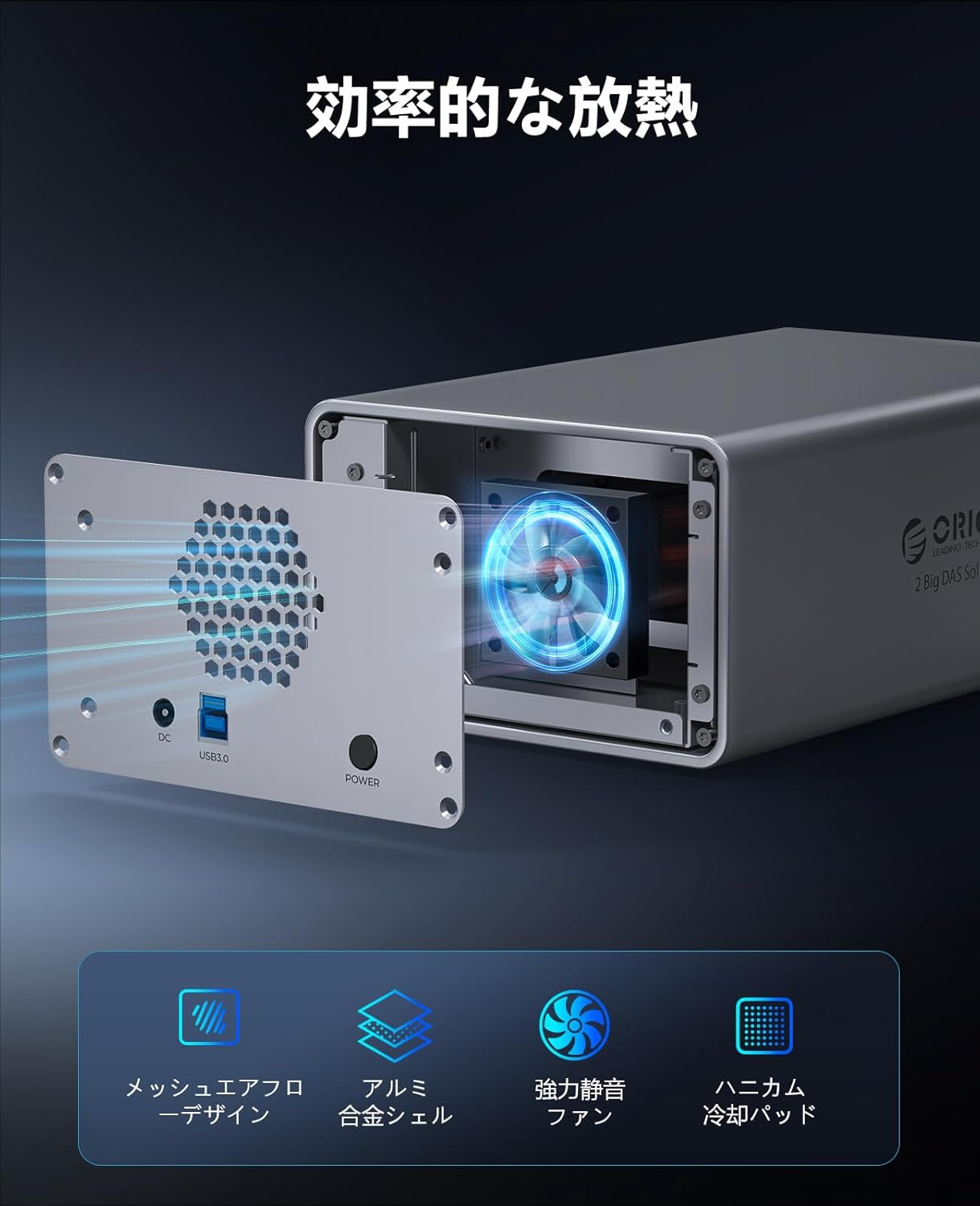
Image: Shows the rear of the enclosure with the cooling fan and ventilation mesh, highlighting the airflow for efficient heat dissipation.
5.3. High-Speed Data Transfer
The USB 3.0 interface is fully compatible with the SATA protocol, enabling high-speed data transfer. Mechanical hard drives can achieve transfer speeds of up to 230 MB/s, making it efficient for moving large files and performing backups.
5.4. Stable 48W Power Supply
Equipped with a 12V/4A (48W) power adapter, the enclosure provides sufficient and stable power for simultaneous reading and writing operations on multiple hard drives. This enhances the safety and extends the operational life of the device and its installed drives.

Image: Illustrates the 12V4A power supply connected to the enclosure, emphasizing its 48W output for stable operation.
5.5. Broad Compatibility
The ORICO 9828U3 is compatible with common operating systems including Windows, Mac OS, and Linux. It can be used with various devices such as desktop computers, laptops, and other compatible systems.

Image: Displays various operating system logos (Windows, Mac OS, Linux, Android) and device types (laptops, desktops, NAS, monitoring systems) indicating broad compatibility.
5.6. Safety Lock Design
An independent safety lock mechanism is integrated into each drive bay to effectively prevent accidental ejection of hard drives, ensuring data security and reliability.
5.7. എൽഇഡി ലൈറ്റ് ഇൻഡിക്കേറ്ററുകൾ
Each drive bay is equipped with an LED indicator light, allowing you to monitor the operational status of your hard drives at a glance.

Image: Close-up of the enclosure's front, showing the LED indicator lights on each drive bay.
6 സ്പെസിഫിക്കേഷനുകൾ
| ഫീച്ചർ | വിശദാംശങ്ങൾ |
|---|---|
| ബ്രാൻഡ് | ഒറിക്കോ |
| മോഡൽ നമ്പർ | 9828U3 |
| ഹാർഡ്വെയർ ഇന്റർഫേസ് | USB 3.0 |
| നിറം | സ്പേസ് ഗ്രേ |
| ഉൽപ്പന്ന അളവുകൾ (L x W x H) | 23.3 x 14.3 x 9 സെ.മീ |
| ഹാർഡ്വെയർ പ്ലാറ്റ്ഫോം | യൂണിവേഴ്സൽ |
| പരമാവധി മെമ്മറി ശേഷി | 44 TB (2 x 22TB) |
| അനുയോജ്യമായ ഉപകരണങ്ങൾ | ഡെസ്ക്ടോപ്പ്, ലാപ്ടോപ്പ് |
| ഹാർഡ് ഡിസ്ക് ഫോം ഫാക്ടർ | 3.5 ഇഞ്ച് |
| Number of Supported Devices | 2 |
| ഡാറ്റ കൈമാറ്റ നിരക്ക് | 5 Gigabits per second (USB 3.0) |
| ബാഹ്യ മെറ്റീരിയൽ | അലുമിനിയം അലോയ് |
| നിർമ്മാതാവിന്റെ മോഡൽ നമ്പർ | ORICO-9828U3-JP-GY-BP |
7. പ്രശ്നപരിഹാരം
- HDD Not Recognized:
- പവർ അഡാപ്റ്റർ സുരക്ഷിതമായി ബന്ധിപ്പിച്ചിട്ടുണ്ടെന്നും എൻക്ലോഷർ ഓണാക്കിയിട്ടുണ്ടെന്നും ഉറപ്പാക്കുക.
- Verify the USB cable is firmly connected to both the enclosure and your computer.
- Check if the HDDs are properly seated in their bays.
- For new HDDs, they may need to be initialized, partitioned, and formatted in your operating system's Disk Management (Windows) or Disk Utility (Mac OS) before they appear.
- Try connecting the enclosure to a different USB port or computer to rule out port or system issues.
- കുറഞ്ഞ ഡാറ്റാ ട്രാൻസ്ഫർ വേഗത:
- നിങ്ങളുടെ കമ്പ്യൂട്ടറിൽ ഒരു USB 3.0 പോർട്ടുമായി ബന്ധിപ്പിച്ചിട്ടുണ്ടെന്ന് ഉറപ്പാക്കുക. USB 2.0 പോർട്ടുകൾ വേഗത ഗണ്യമായി കുറയ്ക്കും.
- Check the condition of your USB cable; a faulty cable can affect performance.
- The performance of mechanical HDDs can vary. Ensure your HDDs are healthy and not fragmented.
- എൻക്ലോഷർ ക്രമരഹിതമായി വിച്ഛേദിക്കുന്നു:
- Ensure the power supply is stable. Avoid connecting to overloaded power strips.
- യുഎസ്ബി കേബിളിന് കേടുപാടുകൾ സംഭവിച്ചിട്ടുണ്ടോ എന്ന് പരിശോധിക്കുക.
- Disable USB selective suspend settings in your computer's power options (Windows) or energy saver settings (Mac OS) if applicable.
- അസാധാരണമായ ശബ്ദങ്ങൾ:
- A slight hum from the cooling fan is normal.
- Loud clicking or grinding noises from the HDDs may indicate a drive failure. Back up your data immediately and replace the drive.
8. വാറൻ്റിയും പിന്തുണയും
The ORICO 9828U3 HDD Enclosure comes with a 1 വർഷത്തെ വാറൻ്റി വാങ്ങിയ തീയതി മുതൽ. സാധാരണ ഉപയോഗത്തിലുള്ള നിർമ്മാണ വൈകല്യങ്ങളും തകരാറുകളും ഈ വാറന്റി ഉൾക്കൊള്ളുന്നു.
For technical support, warranty claims, or further assistance, please contact ORICO customer service through the retailer where you purchased the product or visit the official ORICO webബന്ധപ്പെടാനുള്ള വിവരങ്ങൾക്കുള്ള സൈറ്റ്.
വാറന്റി ആവശ്യങ്ങൾക്കായി നിങ്ങളുടെ വാങ്ങിയതിന്റെ തെളിവ് സൂക്ഷിക്കുക.
9. ഉൽപ്പന്നം കഴിഞ്ഞുview വീഡിയോ
ഒരു വിഷ്വൽ ഓവറിനായി ഈ വീഡിയോ കാണുകview of the ORICO 9828U3 HDD Enclosure, demonstrating its design and features.
വീഡിയോ: ഒരു ഔദ്യോഗിക ഉൽപ്പന്നം അവസാനിച്ചുview video from ORICO, showcasing the 9828U3 HDD enclosure and its various features and applications.