
1. ആമുഖം
Thank you for choosing the HOSTACK 71" Pantry Cabinet with Charging Station. This manual provides essential information for the safe assembly, operation, and maintenance of your new furniture. Please read these instructions carefully before beginning assembly and retain them for future reference.
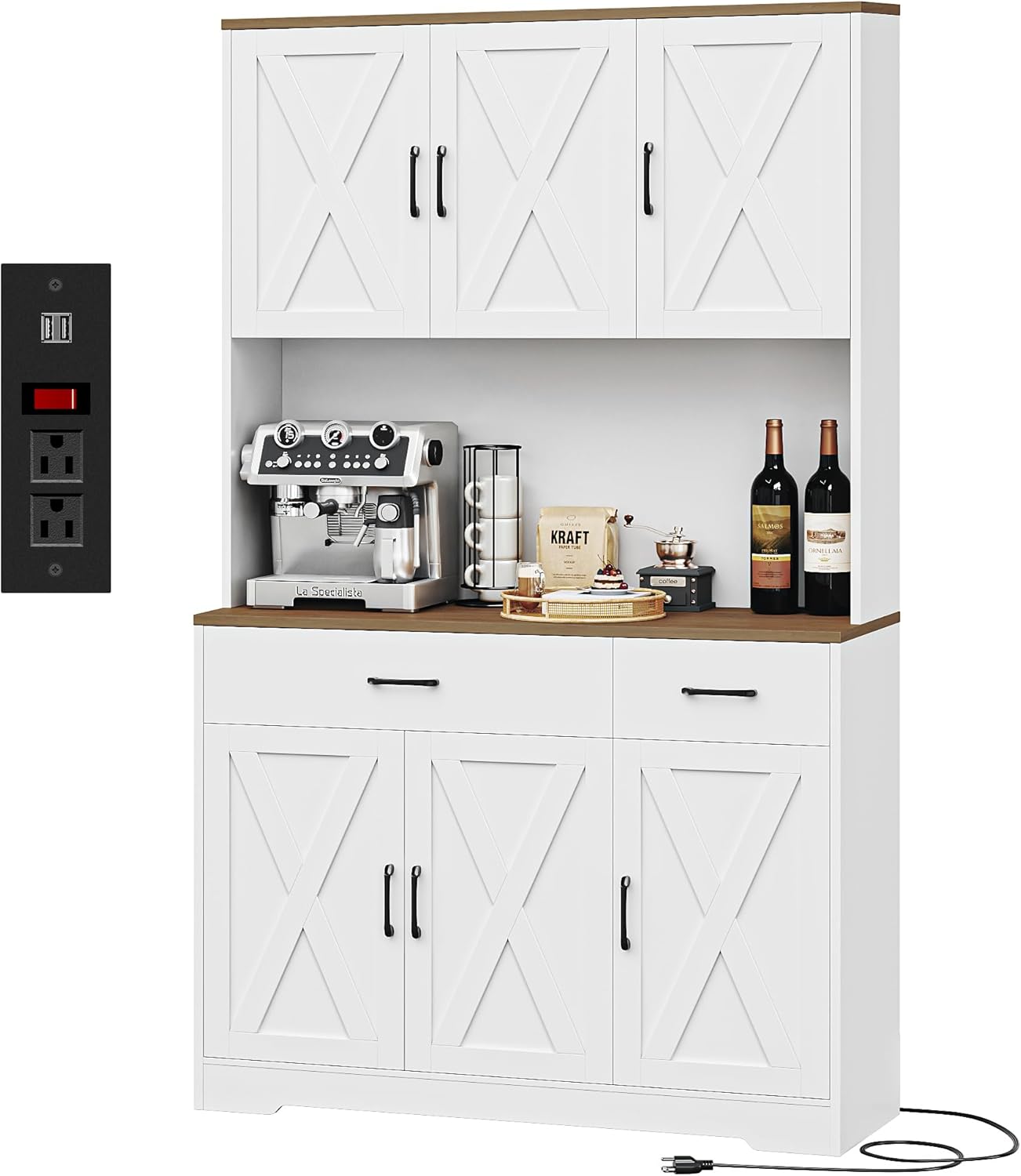
Image 1.1: The HOSTACK 71" Pantry Cabinet with Charging Station in a kitchen setting.
2 പ്രധാനപ്പെട്ട സുരക്ഷാ വിവരങ്ങൾ
To ensure safe use and prevent damage, please observe the following:
- Always assemble and mount the cabinet according to the provided instructions.
- Keep the cabinet away from heat sources and ensure it is stable and secure before use.
- Be cautious when opening and closing the doors and drawers to prevent pinching or injury.
- Always unplug the charging station before cleaning or performing any maintenance.
- An anti-tipping device is included. It is crucial to install this device to prevent accidental tipping, especially in households with children or pets.
3. പാക്കേജ് ഉള്ളടക്കം
Before assembly, verify that all parts and hardware are present. Refer to the detailed parts list included in your assembly guide. If any components are missing or damaged, please contact customer support.
4. സജ്ജീകരണവും അസംബ്ലിയും
Assembly of the HOSTACK Pantry Cabinet requires careful attention to the provided step-by-step instructions. All parts are labeled for ease of identification.
4.1 അസംബ്ലി ഘട്ടങ്ങൾ
- പോറലുകൾ ഉണ്ടാകാതിരിക്കാൻ എല്ലാ ഘടകങ്ങളും അൺപാക്ക് ചെയ്ത് വൃത്തിയുള്ളതും മൃദുവായതുമായ ഒരു പ്രതലത്തിൽ വയ്ക്കുക.
- Identify each part using the labels and the assembly diagram.
- Follow the numerical sequence in the included assembly manual to connect components.
- Secure all fasteners tightly, but do not overtighten.
- Install the anti-tipping device to a wall stud using the provided hardware. This step is critical for safety.
4.2 അളവുകൾ
Refer to the diagram below for detailed product dimensions to ensure proper placement and fit within your space.

Image 4.1: Detailed dimensions of the pantry cabinet.
5. പ്രവർത്തന നിർദ്ദേശങ്ങൾ
This section details the functionality of your HOSTACK Pantry Cabinet.
5.1 Storage Compartments and Adjustable Shelves
The cabinet features multiple storage compartments and adjustable shelves to accommodate various item sizes. To adjust a shelf, remove any items, lift the shelf, and reposition the shelf pegs to the desired height. Ensure the shelf is securely seated before placing items on it.

ചിത്രം 5.1: ഉൾഭാഗം view demonstrating storage capacity and adjustable shelves.
5.2 ചാർജിംഗ് സ്റ്റേഷൻ
The integrated charging station provides convenient power access for your appliances. It includes 2 AC outlets (120V/12A) and 2 USB ports (5V/2A), controlled by an on-off switch. Connect the cabinet's power cord to a standard wall outlet. Use the switch to power the outlets on or off as needed.

Image 5.2: Detail of the charging station with AC outlets, USB ports, and power switch.
5.3 ഡ്രോയറുകൾ
The cabinet includes smooth-gliding drawers for organized storage of smaller items. Ensure drawers are closed completely after use.

Image 5.3: Drawers for organized storage.
6. പരിപാലനം
ശരിയായ പരിചരണം നിങ്ങളുടെ കാബിനറ്റിന്റെ ആയുസ്സും രൂപവും വർദ്ധിപ്പിക്കും.
- വൃത്തിയാക്കൽ: മൃദുവായ, ഡി ഉപയോഗിച്ച് ഉപരിതലങ്ങൾ തുടയ്ക്കുകamp cloth. Avoid harsh chemicals or abrasive cleaners that may damage the finish. For the charging station, always unplug the unit from the wall outlet before cleaning.
- ഹാർഡ്വെയർ: എല്ലാ സ്ക്രൂകളും ഫാസ്റ്റനറുകളും ഇറുകിയതാണെന്ന് ഉറപ്പാക്കാൻ ഇടയ്ക്കിടെ പരിശോധിക്കുക. ആവശ്യാനുസരണം വീണ്ടും മുറുക്കുക.
- ചോർച്ച: തടിയുടെ ഉപരിതലത്തിൽ കറയോ കേടുപാടുകളോ ഉണ്ടാകാതിരിക്കാൻ ചോർച്ച ഉടനടി വൃത്തിയാക്കുക.
7. പ്രശ്നപരിഹാരം
നിങ്ങൾ നേരിട്ടേക്കാവുന്ന പൊതുവായ പ്രശ്നങ്ങളെ ഈ വിഭാഗം അഭിസംബോധന ചെയ്യുന്നു.
7.1 Crooked Doors or Drawers
If doors or drawers appear crooked or do not close properly, adjustments can often be made using the hinges. Most cabinet hinges have adjustment screws that allow for minor alignment corrections. Refer to the specific hinge adjustment instructions in your assembly manual or consult online resources for common hinge types.
7.2 ചാർജിംഗ് സ്റ്റേഷൻ പ്രവർത്തിക്കുന്നില്ല
- Ensure the cabinet's power cord is securely plugged into a functional wall outlet.
- Verify that the on-off switch on the charging station is in the 'on' position.
- Check if the wall outlet itself is working by plugging in another device.
- പ്രശ്നം നിലനിൽക്കുകയാണെങ്കിൽ, ഉപയോഗം നിർത്തി ഉപഭോക്തൃ പിന്തുണയുമായി ബന്ധപ്പെടുക.
8 സ്പെസിഫിക്കേഷനുകൾ
| ഫീച്ചർ | വിശദാംശങ്ങൾ |
|---|---|
| ബ്രാൻഡ് | HOSTACK |
| നിറം | White/Rustic Brown |
| ഉൽപ്പന്ന അളവുകൾ | 14.96"D x 41.73"W x 70.86"H |
| പ്രത്യേക സവിശേഷതകൾ | Adjustable Shelves, Charging Station (2 AC Outlets, 2 USB Ports, On-Off Switch), Power Cable: 4.8ft |
| മൗണ്ടിംഗ് തരം | ഫ്രീസ്റ്റാൻഡിംഗ് |
| മുറിയുടെ തരം | Dining Room, Entryway, Hallway, Kitchen, Living Room |
| വാതിൽ ശൈലി | കളപ്പുരയുടെ വാതിലുകൾ |
| ഭാര പരിധി | 450 പൗണ്ട് |
| ഉൾപ്പെടുത്തിയ ഘടകങ്ങൾ | അലമാരകൾ |
| ഫിനിഷ് തരം | ചായം പൂശി |
| ഷെൽഫുകളുടെ എണ്ണം | 3 |
| ഇനത്തിൻ്റെ ഭാരം | 114 പൗണ്ട് |
| മികച്ച മെറ്റീരിയൽ തരം | എഞ്ചിനീയറിംഗ് വുഡ് |
| ഹാൻഡിൽ മെറ്റീരിയൽ | ലോഹം |
| ഫ്രെയിം മെറ്റീരിയൽ | എഞ്ചിനീയറിംഗ് വുഡ് |
| കമ്പാർട്ടുമെന്റുകളുടെ എണ്ണം | 8 |
| അസംബ്ലി ആവശ്യമാണ് | അതെ |
9. വാറൻ്റിയും പിന്തുണയും
For information regarding product warranty, please refer to the documentation included with your purchase or visit the official HOSTACK website. For any questions, missing parts, or assistance with assembly, please contact HOSTACK customer support via the "Contact Seller" option on Amazon. Our support team is available to assist you.
Optional protection plans are available for purchase separately to extend coverage beyond the standard warranty period. These plans typically offer 2-year or 3-year coverage options.