
ആമുഖം
This manual provides detailed instructions for the safe and efficient operation of your HOVOYNN HC030 Portable Bluetooth CD Player. Please read this manual thoroughly before using the device and retain it for future reference.
ഉൽപ്പന്നം കഴിഞ്ഞുview
The HOVOYNN HC030 is a versatile audio device featuring CD playback, Bluetooth 5.3 (transmit and receive), FM radio, USB playback, and AUX input/output. It includes built-in dual stereo speakers and a rechargeable battery for portable use.
പാക്കേജ് ഉള്ളടക്കം
- സിഡി പ്ലെയർ
- ടൈപ്പ്-സി കേബിൾ
- AUX കേബിൾ
- എസി അഡാപ്റ്റർ
- ഉപയോക്തൃ മാനുവൽ
ഉപകരണ ലേഔട്ടും നിയന്ത്രണങ്ങളും
Familiarize yourself with the main components and controls of your CD player.

The front panel features an LCD color display, EQ, REPEAT, VOL-, VOL+, MODE buttons, and playback controls (Play/Pause, Skip Forward, Skip Backward, Stop, Power). The remote control provides convenient access to all functions.

The rear of the device includes essential connectivity options: a DC IN 5V 2A Type-C charging port, an ON/OFF power switch, a 3.5mm headphone jack, an AUX input port, a USB port for flash drives, and a retractable FM antenna.

The device is equipped with dual stereo speakers on its sides, providing integrated audio playback.
സജ്ജമാക്കുക
ഉപകരണം പവർ ചെയ്യുന്നു
- ചാർജിംഗ്: Connect the provided Type-C cable to the DC IN 5V 2A port on the rear of the CD player and the AC adapter to a power outlet. The built-in 3000 mAh rechargeable battery will begin charging.
- പവർ ഓൺ/ഓഫ്: Use the ON/OFF switch on the rear panel to turn the device on or off.
റിമോട്ട് കൺട്രോൾ തയ്യാറാക്കൽ
Before first use, ensure you remove the battery insulating strip from the remote control to activate it.
പ്രവർത്തന നിർദ്ദേശങ്ങൾ
സിഡി പ്ലേബാക്ക്
- സിഡി ചേർക്കുക: Gently open the top lid of the CD player. If present, remove any protective cardboard or film from the CD compartment. Place a compatible CD (CD, CD-R, MP3, HDCD) onto the spindle, ensuring it clicks into place. Close the lid.
- Select CD Mode: അമർത്തുക മോഡ് button until "CD" is selected on the LCD screen. The player will automatically load and begin playing the CD.
- പ്ലേബാക്ക് നിയന്ത്രണങ്ങൾ: Use the Play/Pause, Skip Forward, Skip Backward, and Stop buttons on the device or remote control to manage playback.
- വോളിയം ക്രമീകരണം: ഉപയോഗിക്കുക VOL+ ഒപ്പം വോൾ- വോളിയം ക്രമീകരിക്കാനുള്ള ബട്ടണുകൾ.
- ഇക്വലൈസർ (EQ): അമർത്തുക EQ button to cycle through five sound modes: Flat, ROCK, POP, JAZZ, CLASS.
- ആവർത്തന പ്രവർത്തനം: ഉപയോഗിക്കുക ആവർത്തിക്കുക button to select different repeat modes (e.g., repeat one, repeat all).

For a visual guide on CD loading and basic operation, refer to the video below:
വീഡിയോ 1: Demonstrates the process of inserting a CD into the HOVOYNN HC030 player and basic playback controls.
വീഡിയോ 2: ഒരു ഓവർview of the HOVOYNN HC030, including unboxing, CD insertion, and volume adjustment during playback.
ബ്ലൂടൂത്ത് പ്രവർത്തനം
The HC030 supports both Bluetooth transmission (sending audio from the CD player to other Bluetooth devices) and Bluetooth reception (receiving audio from other Bluetooth devices to play through the CD player's speakers).
- ബ്ലൂടൂത്ത് റിസീവർ മോഡ്:
- അമർത്തുക മോഡ് button to select "BT" (Bluetooth) mode. The device will enter pairing mode, indicated on the LCD screen.
- On your external device (e.g., smartphone, tablet, computer), enable Bluetooth and search for available devices.
- Select "HC030" from the list to connect. Once paired, you can play audio from your external device through the CD player's speakers.
- ബ്ലൂടൂത്ത് ട്രാൻസ്മിറ്റർ മോഡ്:
- നിങ്ങളുടെ ബ്ലൂടൂത്ത് ഹെഡ്ഫോണുകളോ സ്പീക്കറോ പെയറിംഗ് മോഡിലാണെന്ന് ഉറപ്പാക്കുക.
- On the CD player, navigate to the settings menu (usually via the സെറ്റ് button) and select "Bluetooth emission". Turn Bluetooth ON and select "Pair".
- The CD player will search for nearby Bluetooth receiving devices. Select your headphones or speaker from the device list to connect. Audio from the CD player will now be transmitted to your paired device.
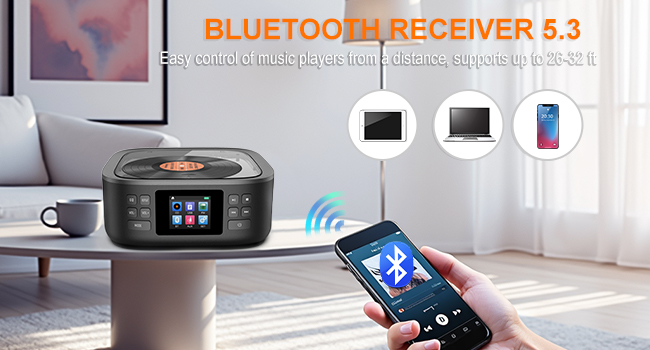
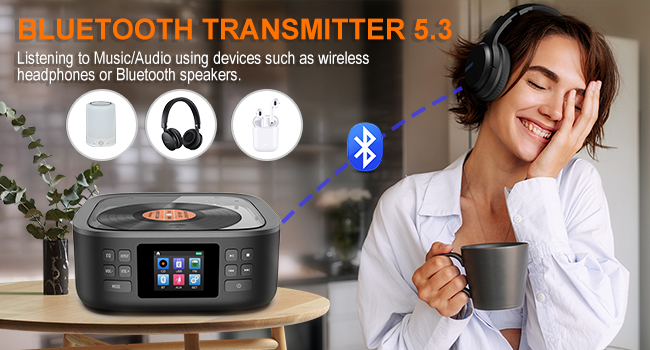
For a visual demonstration of Bluetooth pairing, watch the video below:
വീഡിയോ 3: Shows how to use the HOVOYNN HC030 as both a Bluetooth transmitter and receiver, demonstrating pairing with external devices.
എഫ്എം റേഡിയോ
- എഫ്എം മോഡ് തിരഞ്ഞെടുക്കുക: അമർത്തുക മോഡ് "FM" മോഡ് തിരഞ്ഞെടുക്കാൻ ബട്ടൺ.
- ആന്റിന വിപുലീകരിക്കുക: Fully extend the retractable antenna on the rear of the device for optimal reception.
- ഇതിനായി തിരയുക സ്റ്റേഷനുകൾ: Use the playback control buttons (e.g., Play/Pause for auto-scan, Skip for manual tuning) to search for radio stations. The device supports automatic or manual searches and can store up to 30 preset stations.

USB പ്ലേബാക്ക്
- യുഎസ്ബി ഡ്രൈവ് ചേർക്കുക: Insert a USB flash drive (capacity below 32GB, FAT32 format recommended) into the USB port on the rear of the device.
- യുഎസ്ബി മോഡ് തിരഞ്ഞെടുക്കുക: അമർത്തുക മോഡ് button to select "USB" mode. The player will automatically detect and begin playing audio fileയുഎസ്ബി ഡ്രൈവിൽ നിന്നുള്ള ങ്ങൾ.
- പ്ലേബാക്ക് നിയന്ത്രണങ്ങൾ: Use the standard playback controls (Play/Pause, Skip, Stop) to manage your music.
AUX Functionality
- AUX ഇൻപുട്ട്: Connect an external audio device (e.g., smartphone, computer) to the AUX port on the rear of the CD player using the provided 3.5mm AUX cable.
- AUX മോഡ് തിരഞ്ഞെടുക്കുക: അമർത്തുക മോഡ് button to select "AUX" mode. Audio from the connected device will now play through the CD player's speakers.
- AUX Output (Headphone Jack): To listen privately or connect to external speakers, plug headphones or an external speaker system into the 3.5mm headphone jack on the rear of the device.
മെയിൻ്റനൻസ്
To ensure the longevity and optimal performance of your HOVOYNN HC030 CD Player, follow these maintenance guidelines:
- വൃത്തിയാക്കൽ: Use a soft, dry cloth to clean the exterior of the device. For the CD lens, use a specialized CD lens cleaning kit. Do not use abrasive cleaners or solvents.
- സംഭരണം: നേരിട്ടുള്ള സൂര്യപ്രകാശം, തീവ്രമായ താപനില, ഈർപ്പം എന്നിവയിൽ നിന്ന് മാറി തണുത്തതും വരണ്ടതുമായ സ്ഥലത്ത് ഉപകരണം സൂക്ഷിക്കുക.
- കൈകാര്യം ചെയ്യൽ: Avoid dropping the device or subjecting it to strong impacts. When transporting, ensure the CD compartment is empty and the lid is closed.
ട്രബിൾഷൂട്ടിംഗ്
If you encounter issues with your HOVOYNN HC030 CD Player, refer to the following common problems and solutions:
| പ്രശ്നം | സാധ്യമായ കാരണം | പരിഹാരം |
|---|---|---|
| സിഡി ഒഴിവാക്കുകയോ പ്ലേ ചെയ്യാതിരിക്കുകയോ ചെയ്യുന്നു | Dirty or scratched CD; CD not properly inserted; CD lens dirty; mechanical noise. | Clean the CD with a soft cloth. Ensure the CD is correctly seated on the spindle. Clean the CD lens with a specialized cleaner. Try a different CD. If mechanical noise is excessive, contact support. |
| മോശം എഫ്എം റേഡിയോ സ്വീകരണം | ആന്റിന നീട്ടിയിട്ടില്ല; ദുർബലമായ സിഗ്നൽ ഏരിയ. | Fully extend the retractable FM antenna. Reposition the device to an area with better signal reception. Perform an auto-scan for stations. |
| Bluetooth device not pairing/connecting | Device not in pairing mode; incorrect device selected; distance too far. | Ensure the CD player is in the correct Bluetooth mode (receiver or transmitter) and in pairing state. Ensure the external device's Bluetooth is enabled and searching. Select "HC030" from the list. Keep devices within the effective range (up to 23-32 feet). |
| ശബ്ദമോ കുറഞ്ഞ വോളിയമോ ഇല്ല | Volume too low; incorrect mode selected; AUX cable not fully inserted. | ഉപയോഗിച്ച് വോളിയം വർദ്ധിപ്പിക്കുക VOL+. Ensure the correct playback mode (CD, BT, USB, AUX, FM) is selected. For AUX mode, ensure the cable is fully inserted into both devices. |
| Equalizer settings not saving | This device may reset EQ settings upon power cycle. | Re-select your preferred EQ mode after powering on the device. |
| AUX output not working with external speakers | Confusion between AUX IN and Headphone Jack. | The AUX port is for input only. To output audio to external speakers or headphones, use the dedicated 3.5mm Headphone Jack. |
സ്പെസിഫിക്കേഷനുകൾ
| ഫീച്ചർ | വിശദാംശങ്ങൾ |
|---|---|
| മോഡൽ നമ്പർ | HC030 |
| ഉൽപ്പന്ന അളവുകൾ | 6.5 x 6.5 x 2.8 ഇഞ്ച് |
| ഇനത്തിൻ്റെ ഭാരം | 2.31 പൗണ്ട് |
| ബാറ്ററികൾ | 1 C battery required (included), Built-in 3000 mAh rechargeable battery |
| കണക്റ്റിവിറ്റി ടെക്നോളജി | ഓക്സിലറി, ബ്ലൂടൂത്ത്, യുഎസ്ബി |
| സ്പീക്കർ തരം | Stereo (Dual Speakers) |
| എഫ്എം റേഡിയോ ഫ്രീക്വൻസി | 76-108 MHz |
| USB പിന്തുണ | U-Disk, capacity below 32GB, FAT32 format |
| സിഡി ഫോർമാറ്റുകൾ | CD, CD-R, MP3, HDCD |
വാറൻ്റിയും പിന്തുണയും
Specific warranty details are not provided in this manual. Please refer to the product packaging or contact HOVOYNN customer support for warranty information and technical assistance.