
ഇയർഫൺ കെ3
ഇയർഫൺ കെ3 കിഡ്സ് ഹെഡ്ഫോണുകൾ ഉപയോക്തൃ മാനുവൽ
Model: K3 (USB Type C Version)
1. ആമുഖം
Thank you for choosing the EarFun K3 Kids Headphones. These wired over-ear headphones are designed with children in mind, featuring an 85dBA volume limit for hearing protection, a comfortable fit, and durable construction. This manual provides essential information for setup, operation, and maintenance to ensure optimal use.
2. ബോക്സിൽ എന്താണുള്ളത്?
- EarFun K3 Kids Headphones
- ഉപയോക്തൃ മാനുവൽ

Image: EarFun K3 Kids Headphones (Pink) and included USB-C cable.
3. ഉൽപ്പന്ന സവിശേഷതകൾ
3.1 Immersive Hi-Fi Stereo Sound
Equipped with 40mm dynamic drivers, the EarFun K3 headphones deliver clear audio with deep bass and stereo sound, enhancing the listening experience for music and movies.

Image: Internal structure of the headphone earcup, highlighting the 40mm dynamic driver for stereo sound.
3.2 Comfortable and Safe Design
The headphones feature soft, cushioned ear pads and an adjustable headband for a comfortable fit during extended use. A built-in 85dBA volume limit protects children's hearing.

Image: A child comfortably wearing the EarFun K3 headphones, demonstrating the soft earcups and adjustable headband.

Image: A child wearing the headphones, with an overlay indicating the 85dBA volume limit for hearing protection.
3.3 Durable and Portable
Constructed from kid-friendly materials, these headphones are designed for durability. The foldable design allows for easy storage and portability.

Image: The headphones being twisted and folded, showcasing their durability and portable design.
3.4 USB-C Connectivity
The USB-C connector provides wide compatibility with various devices, including tablets, Chromebooks, and PCs. Note: Not compatible with USB-C charging ports.

Image: Close-up of the USB-C connector and icons representing compatible devices like mobile phones, laptops, tablets, and PCs.
4. സജ്ജീകരണവും കണക്ഷനും
To use your EarFun K3 Kids Headphones, simply connect the USB-C cable to a compatible device.
- Locate the USB-C port on your device (e.g., tablet, laptop, smartphone).
- Insert the USB-C connector of the headphone cable firmly into the device's USB-C port.
- Ensure the connection is secure for uninterrupted audio.
Video: Demonstration of connecting the EarFun K3 Kids Headphones to a device via the USB-C cable. This video shows the unboxing, features, and connection process.
5. പ്രവർത്തന നിർദ്ദേശങ്ങൾ
5.1 വോളിയം നിയന്ത്രണം
The headphones feature an integrated volume limit of 85dBA to protect young ears. Adjust the volume directly on your connected device.
5.2 Adjusting the Fit
The headband is adjustable to fit various head sizes. Gently slide the earcups up or down along the headband until a comfortable and secure fit is achieved. The earcups are also detachable for cleaning or replacement.
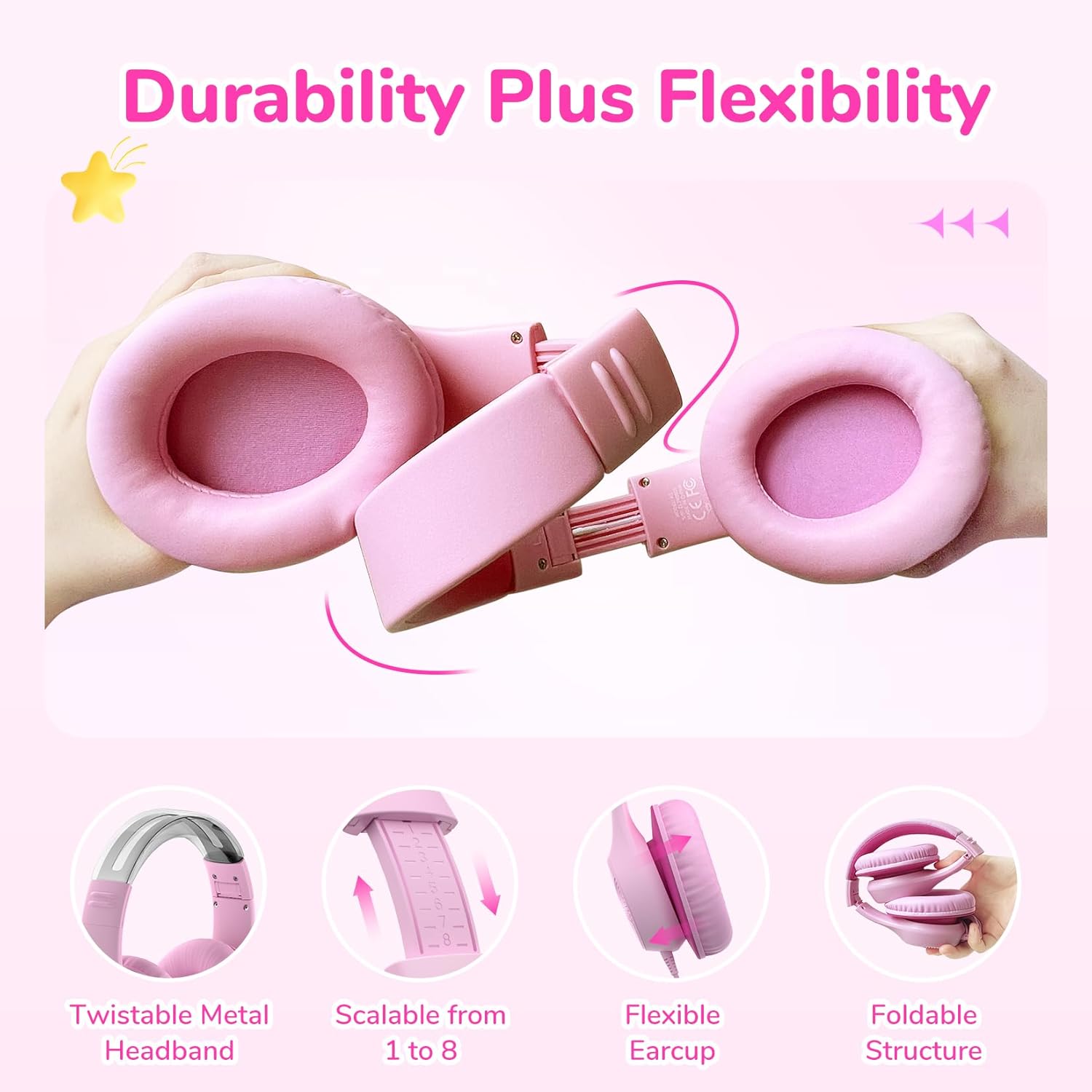
Image: Close-up showing the adjustable headband mechanism and how to detach the earcups for maintenance.
5.3 സംഭരണത്തിനുള്ള മടക്കൽ
To fold the headphones for compact storage, rotate the earcups inwards towards the headband until they lie flat. This makes them easy to carry in a bag.
6. പരിപാലനവും പരിചരണവും
- Clean the ear pads and headband with a soft, dry cloth.
- കഠിനമായ രാസവസ്തുക്കളോ ഉരച്ചിലുകളോ ഉപയോഗിക്കുന്നത് ഒഴിവാക്കുക.
- ഉപയോഗിക്കാത്തപ്പോൾ തണുത്തതും ഉണങ്ങിയതുമായ സ്ഥലത്ത് ഹെഡ്ഫോണുകൾ സൂക്ഷിക്കുക.
- അങ്ങേയറ്റത്തെ താപനിലയോ ഈർപ്പമോ തുറന്നുകാട്ടരുത്.
- The ear pads are detachable for easier cleaning or replacement.
7. പ്രശ്നപരിഹാരം
| പ്രശ്നം | സാധ്യമായ കാരണം | പരിഹാരം |
|---|---|---|
| ശബ്ദമില്ല | Cable not fully inserted; device volume too low; incorrect audio output selected on device. | Ensure USB-C cable is securely connected. Increase device volume. Check device audio settings to confirm headphones are selected as output. |
| ശബ്ദം വികലമാണ് | Volume too high on device; faulty cable or port. | Lower the volume on your device. Try connecting to a different device or using a different USB-C cable if available to rule out cable/port issues. |
| ഹെഡ്ഫോണുകൾ സുഖകരമായി യോജിക്കുന്നില്ല | ഹെഡ്ബാൻഡ് ശരിയായി ക്രമീകരിച്ചിട്ടില്ല. | സുഖകരമായ ഫിറ്റ് ലഭിക്കുന്നതുവരെ ഇയർകപ്പുകൾ മുകളിലേക്കോ താഴേക്കോ സ്ലൈഡുചെയ്തുകൊണ്ട് ഹെഡ്ബാൻഡ് ക്രമീകരിക്കുക. |
8 സ്പെസിഫിക്കേഷനുകൾ
| ഫീച്ചർ | വിശദാംശങ്ങൾ |
|---|---|
| മോഡലിൻ്റെ പേര് | EaFun K3 |
| കണക്റ്റിവിറ്റി ടെക്നോളജി | വയർഡ് |
| ഹെഡ്ഫോണുകൾ ജാക്ക് | യുഎസ്ബി-സി കേബിൾ |
| ഓഡിയോ ഡ്രൈവർ തരം | ഡൈനാമിക് ഡ്രൈവർ |
| ഓഡിയോ ഡ്രൈവർ വലിപ്പം | 40 മി.മീ |
| ഫ്രീക്വൻസി പ്രതികരണം | 20 KHz |
| സംവേദനക്ഷമത | 100 ഡി.ബി |
| പ്രതിരോധം | 32 ഓം |
| ശബ്ദ നിയന്ത്രണം | ഒന്നുമില്ല |
| വോളിയം പരിധി | 85dBA |
| പ്രായപരിധി (വിവരണം) | Kid & Teen |
| മെറ്റീരിയൽ | അക്രിലോണിട്രൈൽ ബ്യൂട്ടാഡീൻ സ്റ്റൈറൈൻ (എബിഎസ്) |
| ഇനത്തിൻ്റെ ഭാരം | 207.9 ഗ്രാം (7.3 ഔൺസ്) |
| ജല പ്രതിരോധ നില | വാട്ടർ റെസിസ്റ്റൻ്റ് അല്ല |
| പ്രത്യേക ഫീച്ചർ | Adjustable Headband, Foldable |
| അനുയോജ്യമായ ഉപകരണങ്ങൾ | Tablets, Chromebooks, PCs, Gaming Consoles (USB-C), Telephones (USB-C) |
9. വാറൻ്റിയും പിന്തുണയും
EarFun products come with an 18-month hassle-free protection. For any questions, technical support, or warranty claims, please contact EarFun customer service. You can find contact information on the official EarFun webസൈറ്റ് അല്ലെങ്കിൽ നിങ്ങളുടെ വാങ്ങൽ പ്ലാറ്റ്ഫോം വഴി.
Visit the official EarFun store for more information: EarFun Store
Ask a question about this manual
Ask about setup, troubleshooting, compatibility, parts, safety, or missing instructions. Manuals+ will review the question and use this page’s manual context to help answer it.