
1. ആമുഖം
Welcome to the user manual for your new DOOGEE N55PRO Unlocked Cell Phone. This guide provides essential information to help you set up, operate, maintain, and troubleshoot your device. Please read this manual thoroughly to ensure optimal performance and longevity of your smartphone.
2. പാക്കേജ് ഉള്ളടക്കം
Upon opening your DOOGEE N55PRO package, please verify that all the following items are included:
- DOOGEE N55PRO Smartphone
- യുഎസ്ബി ചാർജിംഗ് കേബിൾ
- പവർ അഡാപ്റ്റർ
- സിം എജക്ടർ ഉപകരണം
- ദ്രുത ആരംഭ ഗൈഡ്
- വാറൻ്റി കാർഡ്
3. ഡിവൈസ് ഓവർview
Familiarize yourself with the physical components and features of your DOOGEE N55PRO.
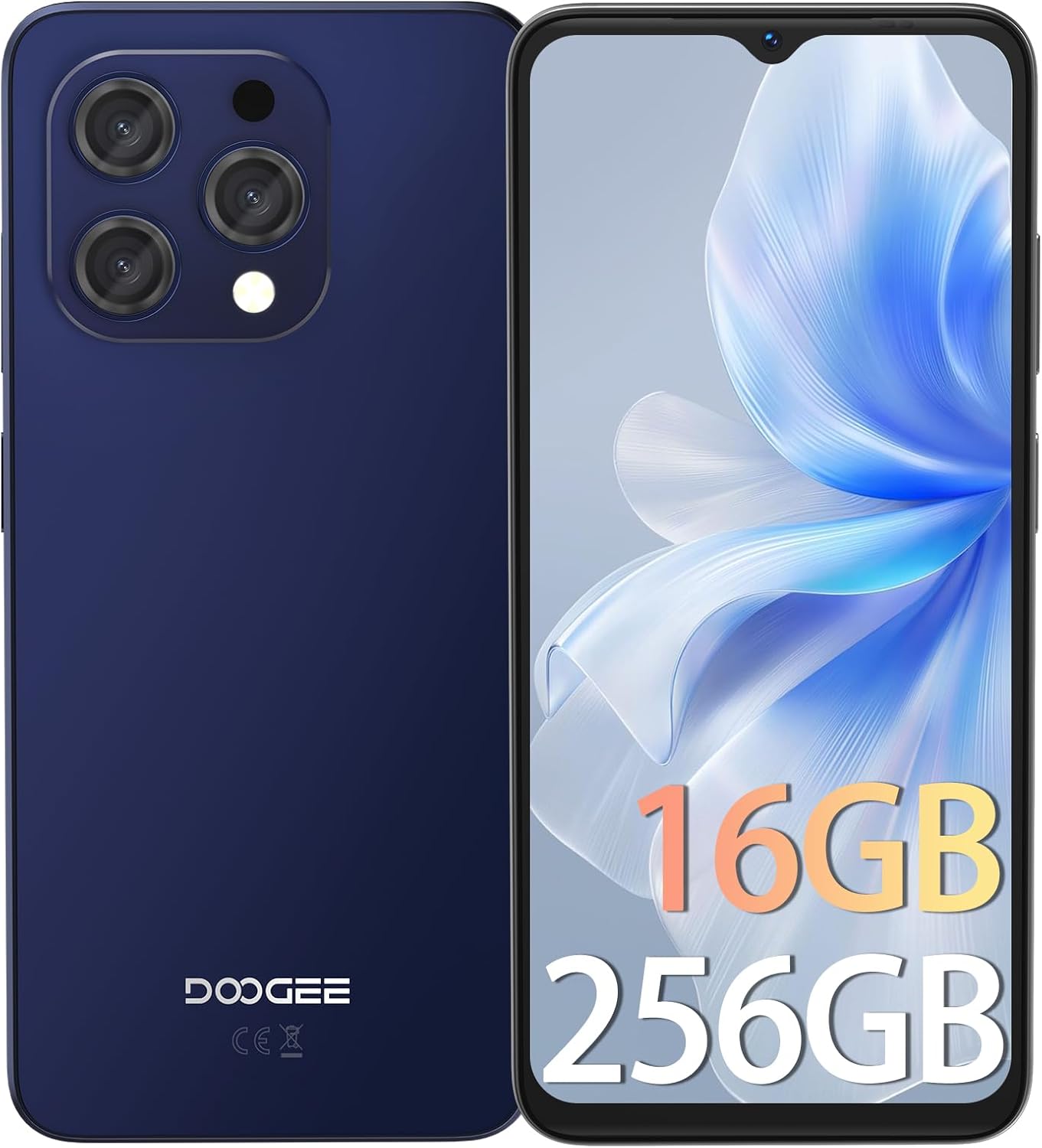
ചിത്രം 3.1: മുന്നിലും പിന്നിലും view of the DOOGEE N55PRO smartphone. The front features a large display with a waterdrop notch for the front camera, while the back shows the multi-camera module and the DOOGEE branding.
പ്രധാന സവിശേഷതകൾ:
- ഡിസ്പ്ലേ: 6.56-inch HD+ 90Hz IPS Waterdrop Screen for smooth visuals and vibrant colors.
- പ്രോസസ്സർ: Octa-Core processor for efficient performance.
- മെമ്മറിയും സംഭരണവും: 16GB RAM (with expansion technology) and 256GB ROM, expandable up to 1TB via TF card.
- ക്യാമറകൾ: Dual Camera system with a 13MP rear camera and an 8MP front camera.
- ബാറ്ററി: 5150 mAh super-large battery for extended usage.
- ഓപ്പറേറ്റിംഗ് സിസ്റ്റം: Android 14, offering the latest features and security updates.
- കണക്റ്റിവിറ്റി: 4G cellular technology, Wi-Fi, Bluetooth, and a 3.5mm headphone jack.
- സുരക്ഷ: Face Unlock ID for convenient and secure access.

ചിത്രം 3.2: Illustration highlighting the 16GB RAM (with expansion technology) and 256GB ROM, expandable to 1TB, powered by an Octa-Core processor.

ചിത്രം 3.3: Close-up of the DOOGEE N55PRO's 6.56-inch HD+ 90Hz IPS Waterdrop Screen, emphasizing its silky smooth, bright colors, high saturation, and fine image quality.

ചിത്രം 3.4: Visual representation of the DOOGEE N55PRO's 5150 mAh super-large battery, indicating long-lasting power.

ചിത്രം 3.5: Depiction of the DOOGEE N55PRO's Dual Camera system, featuring a 13MP rear camera and an 8MP front camera, with exampലെ ഫോട്ടോകൾ.

ചിത്രം 3.6: Visual representation of the Android 14 operating system interface on the DOOGEE N55PRO, showcasing various app screens.

ചിത്രം 3.7: കഴിഞ്ഞുview of key features including Face Unlock ID, Dual 4G support, device weight (186g), and the 3.5mm connection port.
4. സജ്ജീകരണം
4.1. സിം കാർഡും മൈക്രോ എസ്ഡി കാർഡും ചേർക്കൽ
- നിങ്ങളുടെ ഫോണിന്റെ വശത്ത് സിം കാർഡ് ട്രേ കണ്ടെത്തുക.
- ട്രേയുടെ അടുത്തുള്ള ചെറിയ ദ്വാരത്തിലേക്ക് സിം എജക്റ്റർ ഉപകരണം തിരുകുക, ട്രേ പുറത്തേക്ക് വരുന്നത് വരെ സൌമ്യമായി അമർത്തുക.
- ട്രേയിലെ നിയുക്ത സ്ലോട്ടുകളിൽ നിങ്ങളുടെ നാനോ-സിം കാർഡ്(കൾ) അല്ലെങ്കിൽ മൈക്രോ എസ്ഡി കാർഡ് വയ്ക്കുക. സ്വർണ്ണ കോൺടാക്റ്റുകൾ താഴേക്ക് അഭിമുഖമാണെന്ന് ഉറപ്പാക്കുക.
- ട്രേ അതിന്റെ സ്ഥാനത്ത് ക്ലിക്കായി വരുന്നത് വരെ ശ്രദ്ധാപൂർവ്വം ഫോണിലേക്ക് തിരികെ തള്ളുക.
4.2. പ്രാരംഭ പവർ ഓണും സജ്ജീകരണവും
- Press and hold the Power button (usually on the right side) until the DOOGEE logo appears.
- Follow the on-screen instructions to select your language, connect to Wi-Fi, set up your Google account, and configure security settings like Face Unlock ID.
4.3 ഉപകരണം ചാർജ് ചെയ്യുന്നു
Before first use, it is recommended to fully charge your phone. Connect the USB charging cable to the phone's charging port and the power adapter, then plug the adapter into a wall outlet. The battery indicator on the screen will show charging status.
5. പ്രവർത്തിക്കുന്നു
5.1. അടിസ്ഥാന നാവിഗേഷൻ
- ടച്ച് സ്ക്രീൻ: തിരഞ്ഞെടുക്കാൻ ടാപ്പ് ചെയ്യുക, സ്ക്രോൾ ചെയ്യാൻ സ്വൈപ്പ് ചെയ്യുക, സൂം ചെയ്യാൻ പിഞ്ച് ചെയ്യുക.
- ഹോം സ്ക്രീൻ: ആപ്പുകൾ, വിജറ്റുകൾ, അറിയിപ്പുകൾ എന്നിവ ആക്സസ് ചെയ്യുക.
- നാവിഗേഷൻ ബാർ: Use the Back, Home, and Recent Apps buttons (or gestures) at the bottom of the screen.
5.2. കോളുകൾ ചെയ്യുക, സന്ദേശങ്ങൾ അയയ്ക്കുക
- കോളുകൾ: Open the Phone app, dial a number or select a contact, then tap the call icon.
- സന്ദേശങ്ങൾ: Open the Messages app, tap 'Start chat', enter a recipient, type your message, and tap send.
5.3. ഇൻ്റർനെറ്റ് കണക്റ്റിവിറ്റി
- വൈഫൈ: Go to Settings > Network & internet > Wi-Fi. Turn Wi-Fi on, select a network, and enter the password if required.
- മൊബൈൽ ഡാറ്റ: Go to Settings > Network & internet > Mobile network. Ensure Mobile data is turned on.
5.4. ക്യാമറ ഉപയോഗം
Open the Camera app. Tap the shutter button to take a photo. Swipe left or right to switch between photo, video, and other modes. Use the front/rear camera toggle to switch between the 13MP rear camera and the 8MP front camera.
5.5. സുരക്ഷാ സവിശേഷതകൾ
Your DOOGEE N55PRO supports Face Unlock ID. To set it up, go to Settings > Security > Face Unlock and follow the on-screen instructions to register your face.
6. പരിപാലനം
6.1. ഉപകരണം വൃത്തിയാക്കൽ
നിങ്ങളുടെ ഫോണിന്റെ സ്ക്രീനും ബോഡിയും മൃദുവായതും ലിന്റ് രഹിതവുമായ ഒരു തുണി ഉപയോഗിച്ച് തുടയ്ക്കുക. കഠിനമായ രാസവസ്തുക്കളോ ഉരച്ചിലുകളോ ഉള്ള വസ്തുക്കൾ ഉപയോഗിക്കുന്നത് ഒഴിവാക്കുക, കാരണം അവ ഉപകരണത്തിന്റെ ഫിനിഷിന് കേടുവരുത്തും.
6.2. ബാറ്ററി പരിചരണം
- ഉയർന്ന താപനിലയിൽ ഫോൺ തുറന്നുവെക്കുന്നത് ഒഴിവാക്കുക.
- ഒറിജിനൽ ചാർജറോ സാക്ഷ്യപ്പെടുത്തിയ അനുയോജ്യമായ ചാർജറോ മാത്രം ഉപയോഗിക്കുക.
- Do not leave the phone charging for excessively long periods after it's fully charged.
6.3. സോഫ്റ്റ്വെയർ അപ്ഡേറ്റുകൾ
Regularly check for software updates to ensure your phone has the latest features, security patches, and performance improvements. Go to Settings > System > System update to check for and install available updates.
6.4. ഡാറ്റ ബാക്കപ്പ്
It is recommended to regularly back up your important data (photos, contacts, documents) to a cloud service (like Google Drive) or a computer to prevent data loss.
7. പ്രശ്നപരിഹാരം
This section addresses common issues you might encounter with your DOOGEE N55PRO.
| പ്രശ്നം | സാധ്യമായ പരിഹാരം |
|---|---|
| ഫോൺ ഓണാക്കുന്നില്ല | Ensure the battery is charged. Connect to a charger for at least 10 minutes, then try powering on again. If unresponsive, perform a forced restart by holding the Power button for 10-15 seconds. |
| ആപ്പുകൾ ക്രാഷ് ചെയ്യുകയോ മരവിക്കുകയോ ചെയ്യുന്നു | Clear the cache of the problematic app (Settings > Apps > [App Name] > Storage & cache > Clear cache). If the issue persists, restart the phone or reinstall the app. |
| Wi-Fi-യിലേക്ക് കണക്റ്റുചെയ്യാൻ കഴിയില്ല | Ensure Wi-Fi is enabled. Restart your router and phone. Forget the network and reconnect. Check if other devices can connect to the same Wi-Fi network. |
| മോശം കോൾ നിലവാരം അല്ലെങ്കിൽ സിഗ്നൽ ഇല്ല | നിങ്ങളുടെ സിം കാർഡ് ശരിയായി ചേർത്തിട്ടുണ്ടോയെന്ന് പരിശോധിക്കുക. മികച്ച നെറ്റ്വർക്ക് കവറേജ് ഉള്ള ഒരു പ്രദേശത്തേക്ക് മാറുക. നിങ്ങളുടെ ഫോൺ പുനരാരംഭിക്കുക. പ്രശ്നം നിലനിൽക്കുകയാണെങ്കിൽ നിങ്ങളുടെ മൊബൈൽ കാരിയറെ ബന്ധപ്പെടുക. |
| ബാറ്ററി പെട്ടെന്ന് തീരുന്നു | Reduce screen brightness, close unused apps running in the background, disable unnecessary features like GPS or Bluetooth when not in use. Check battery usage in Settings to identify power-hungry apps. |
8 സ്പെസിഫിക്കേഷനുകൾ
Detailed technical specifications for the DOOGEE N55PRO.
| ഫീച്ചർ | സ്പെസിഫിക്കേഷൻ |
|---|---|
| മോഡലിൻ്റെ പേര് | N55PRO |
| ഓപ്പറേറ്റിംഗ് സിസ്റ്റം | ആൻഡ്രോയിഡ് 14 |
| സ്ക്രീൻ വലിപ്പം | 6.56 ഇഞ്ച് |
| മെമ്മറി സ്റ്റോറേജ് കപ്പാസിറ്റി | 256 ജിബി |
| റാം | 16GB (with expansion technology) |
| സെല്ലുലാർ ടെക്നോളജി | 4G |
| കണക്റ്റിവിറ്റി ടെക്നോളജി | വൈഫൈ |
| വയർലെസ് കാരിയർ | എല്ലാ കാരിയറുകൾക്കുമായി അൺലോക്കുചെയ്തു |
| പിൻ ക്യാമറ | 13എംപി |
| മുൻ ക്യാമറ | 8എംപി |
| ബാറ്ററി ശേഷി | 5150 mAh |
| ഉൽപ്പന്ന അളവുകൾ | 6.42 x 2.95 x 0.31 ഇഞ്ച് |
| ഇനത്തിൻ്റെ ഭാരം | 6.5 ഔൺസ് (185 ഗ്രാം) |
| ഹ്യൂമൻ ഇന്റർഫേസ് ഇൻപുട്ട് | ടച്ച് സ്ക്രീൻ |
| നിറം | Yellow (as per product data, though images show blue/black) |
| ആദ്യ തീയതി ലഭ്യമാണ് | ഡിസംബർ 19, 2024 |
9. വാറൻ്റിയും പിന്തുണയും
Your DOOGEE N55PRO comes with a standard manufacturer's warranty. Please refer to the warranty card included in your package for specific terms and conditions, including warranty period and coverage details. For technical support, service, or further inquiries, please visit the official DOOGEE website or contact their customer service department. Contact information can typically be found on the DOOGEE webസൈറ്റ് അല്ലെങ്കിൽ വാറന്റി കാർഡിൽ.
10 സുരക്ഷാ വിവരങ്ങൾ
Please read all safety information before using your device to ensure safe and proper use. Improper use may cause damage to the device or personal injury.
- ഉപകരണം ഡിസ്അസംബ്ലിംഗ് ചെയ്യുകയോ പരിഷ്കരിക്കുകയോ ചെയ്യരുത്.
- ഉപകരണം തീവ്രമായ താപനിലയിലോ, നേരിട്ടുള്ള സൂര്യപ്രകാശത്തിലോ, തീയിലോ ഏൽക്കുന്നത് ഒഴിവാക്കുക.
- ജലത്തിൽ നിന്നും ഈർപ്പത്തിൽ നിന്നും ഉപകരണം അകറ്റി നിർത്തുക.
- അംഗീകൃത ചാർജറുകളും അനുബന്ധ ഉപകരണങ്ങളും മാത്രം ഉപയോഗിക്കുക.
- വാഹനമോടിക്കുമ്പോഴോ കനത്ത യന്ത്രങ്ങൾ പ്രവർത്തിപ്പിക്കുമ്പോഴോ ഉപകരണം ഉപയോഗിക്കരുത്.
- Respect local regulations regarding mobile phone usage.