
AWEI H22
AWEI Smart Watch H22 User Manual
മോഡൽ: H22
ആമുഖം
This manual provides detailed instructions for the setup, operation, and maintenance of your AWEI Smart Watch H22. Please read this manual thoroughly to ensure proper use and to maximize the features of your device. The AWEI H22 is a 1.39-inch smartwatch designed for both men and women, offering fitness tracking, call functionality, and compatibility with Android and iOS devices.
1. സജ്ജീകരണം
1.1 ബോക്സിൽ എന്താണുള്ളത്
- AWEI Smart Watch H22
- ചാർജിംഗ് കേബിൾ
- ഉപയോക്തൃ മാനുവൽ (ഈ പ്രമാണം)
1.2 ഉപകരണം ചാർജ് ചെയ്യുന്നു
Before initial use, fully charge your AWEI Smart Watch H22. Connect the charging cable to the watch's charging port and a standard USB power adapter (not included). A full charge typically takes approximately 2.5 hours. The watch is equipped with a 400mAh Lithium Polymer battery.
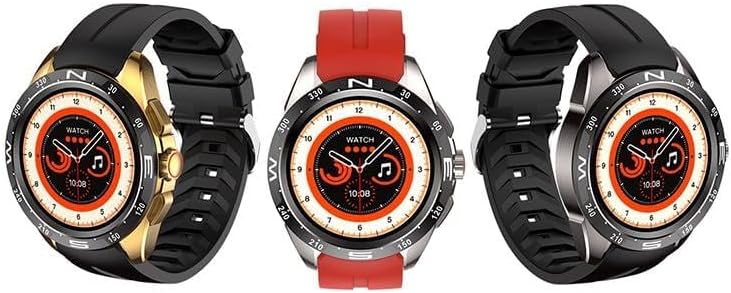
Image: The AWEI Smart Watch H22, showcasing its round display and various strap/bezel color options. This image illustrates the physical appearance of the device.
1.3 ആപ്പ് ഇൻസ്റ്റാളേഷനും ജോടിയാക്കലും
- ആപ്പ് ഡൗൺലോഡ് ചെയ്യുക: ഇതിനായി തിരയുക the official AWEI smartwatch application in your smartphone's app store (compatible with iOS 9.0 and above, and Android 6.0 and above).
- ബ്ലൂടൂത്ത് പ്രവർത്തനക്ഷമമാക്കുക: നിങ്ങളുടെ സ്മാർട്ട്ഫോണിൽ ബ്ലൂടൂത്ത് പ്രവർത്തനക്ഷമമാക്കിയിട്ടുണ്ടെന്ന് ഉറപ്പാക്കുക.
- ആപ്പ് തുറക്കുക: Launch the AWEI app and follow the on-screen instructions to create an account or log in.
- വാച്ച് ജോടിയാക്കുക: Within the app, navigate to the device pairing section. The app will search for available devices. Select "AWEI H22" from the list to initiate pairing.
- ജോടിയാക്കൽ സ്ഥിരീകരിക്കുക: A pairing request may appear on your watch screen. Confirm the pairing on both your watch and smartphone.
കുറിപ്പ്: For optimal performance, ensure your smartphone's operating system is up to date.
2. പ്രവർത്തന നിർദ്ദേശങ്ങൾ
2.1 അടിസ്ഥാന നാവിഗേഷൻ
- ടച്ച് സ്ക്രീൻ: മെനുകളിലൂടെയും സവിശേഷതകളിലൂടെയും നാവിഗേറ്റ് ചെയ്യാൻ ഇടത്തേക്ക്/വലത്തേക്ക്, മുകളിലേക്കും താഴേക്കും സ്വൈപ്പ് ചെയ്യുക. തിരഞ്ഞെടുക്കാൻ ടാപ്പ് ചെയ്യുക.
- സൈഡ് ബട്ടൺ(കൾ): Typically, a short press returns to the previous screen or watch face. A long press may power on/off or access a quick menu. Refer to the watch's on-screen prompts for specific button functions.
- മണിബന്ധം ചലിപ്പിക്കൽ: Enable the "wrist flip to light up screen" feature in the app settings to automatically activate the display when you raise your wrist.
2.2 പ്രധാന സവിശേഷതകൾ
- ഹൃദയമിടിപ്പ് നിരീക്ഷണം: Access the heart rate function on the watch to measure your current heart rate.
- രക്ത ഓക്സിജൻ നിരീക്ഷണം: Use the blood oxygen feature to check your SpO2 levels.
- മൾട്ടി-സ്പോർട്സ് മോഡുകൾ: The watch supports various sports modes including Running, Walking, Hiking, Basketball, Badminton, Boating, Climbing, Fitness, Cycling, Football, Yoga, and more. Select a mode before starting an activity to track relevant metrics like exercise time and calories burned.
- ഉത്തരം / കോളുകൾ ചെയ്യുക: Once paired via Bluetooth, you can answer incoming calls directly from your watch or dial numbers.
- സംഗീത നിയന്ത്രണം: Control music playback on your smartphone (play, pause, skip tracks) directly from the watch.
- റിമോട്ട് ഫോട്ടോഗ്രഫി: നിങ്ങളുടെ സ്മാർട്ട്ഫോൺ ക്യാമറയ്ക്കായി വാച്ച് റിമോട്ട് ഷട്ടറായി ഉപയോഗിക്കുക.
- ഇഷ്ടാനുസൃതമാക്കാവുന്ന ഡയലുകൾ: Change watch faces from a selection of cloud-based options or upload your own photos via the app.
- ഉദാസീനമായ ഓർമ്മപ്പെടുത്തൽ: Set reminders to encourage movement after periods of inactivity.
- Female Physiological Cycle Tracking: Monitor and track your physiological cycle through the app.
- അലാറം ക്ലോക്ക്: Set alarms directly on the watch or through the companion app.
3. പരിപാലനം
3.1 വൃത്തിയാക്കൽ
മൃദുവായതും ഉണങ്ങിയതുമായ തുണി ഉപയോഗിച്ച് നിങ്ങളുടെ വാച്ചും സ്ട്രാപ്പും പതിവായി വൃത്തിയാക്കുക. ആവശ്യമെങ്കിൽ, അല്പം ഡി-ക്ലിപ്പ് ഉപയോഗിക്കുക.amp മൃദുവായ സോപ്പ് ഉപയോഗിച്ച് തുണി തുടയ്ക്കുക, തുടർന്ന് ഉണക്കുക. കഠിനമായ രാസവസ്തുക്കളോ ഉരച്ചിലുകളോ ഉള്ള വസ്തുക്കൾ ഒഴിവാക്കുക.
3.2 ജല പ്രതിരോധം
The AWEI Smart Watch H22 has an IP68 waterproof rating. This means it is resistant to dust and can withstand immersion in water up to 1.5 meters for 30 minutes. It is suitable for daily use, such as washing hands, face, or during sweaty activities. However, it is not recommended for use in hot water (e.g., hot showers, saunas) or seawater, as this can compromise the waterproof seals.
3.3 ബാറ്ററി കെയർ
- ബാറ്ററി ഇടയ്ക്കിടെ പൂർണ്ണമായും ഡിസ്ചാർജ് ചെയ്യുന്നത് ഒഴിവാക്കുക.
- ബാറ്ററിയുടെ ആരോഗ്യം നിലനിർത്താൻ, സ്ഥിരമായി ഉപയോഗിക്കുന്നില്ലെങ്കിലും വാച്ച് പതിവായി ചാർജ് ചെയ്യുക.
- ദീർഘനേരം ഉപയോഗിക്കാത്തപ്പോൾ വാച്ച് തണുത്തതും വരണ്ടതുമായ സ്ഥലത്ത് സൂക്ഷിക്കുക.
4. പ്രശ്നപരിഹാരം
| പ്രശ്നം | സാധ്യമായ പരിഹാരം |
|---|---|
| വാച്ച് ഓണാക്കുന്നില്ല. | വാച്ച് പൂർണ്ണമായും ചാർജ് ചെയ്തിട്ടുണ്ടെന്ന് ഉറപ്പാക്കുക. കുറഞ്ഞത് 30 മിനിറ്റെങ്കിലും ചാർജറുമായി ബന്ധിപ്പിക്കുക. |
| സ്മാർട്ട്ഫോണുമായി ജോടിയാക്കാൻ കഴിയില്ല. |
|
| Inaccurate heart rate/blood oxygen readings. |
|
| അറിയിപ്പുകൾ ലഭിച്ചില്ല. |
|
5 സ്പെസിഫിക്കേഷനുകൾ
| ഫീച്ചർ | വിശദാംശങ്ങൾ |
|---|---|
| മോഡൽ നമ്പർ | H22 |
| സ്ക്രീൻ വലിപ്പം | 1.39 ഇഞ്ച് |
| ബാറ്ററി ശേഷി | 400 mAh (ലിഥിയം പോളിമർ) |
| ചാർജിംഗ് സമയം | ഏകദേശം 2.5 മണിക്കൂർ |
| കണക്റ്റിവിറ്റി | ബ്ലൂടൂത്ത് |
| ഓപ്പറേറ്റിംഗ് സിസ്റ്റം അനുയോജ്യത | iOS 9.0+ / Android 6.0+ |
| വാട്ടർ റെസിസ്റ്റൻസ് റേറ്റിംഗ് | IP68 |
| പ്രത്യേക സവിശേഷതകൾ | Heart rate, blood oxygen, female physiological cycle, sedentary reminder, customizable dial, wrist flip screen, time display, remote photo, music control, alarm clock, multiple sports mode detection. |
6. വാറൻ്റിയും പിന്തുണയും
Your AWEI Smart Watch H22 comes with a ഒരു വർഷത്തെ വാറൻ്റി from the date of purchase. This warranty covers manufacturing defects under normal use. It does not cover damage caused by misuse, accidents, unauthorized modifications, or failure to follow the instructions in this manual.
For technical support, warranty claims, or any questions regarding your device, please contact AWEI customer service. Refer to the contact information provided with your product packaging or visit the official AWEI webപിന്തുണാ വിശദാംശങ്ങൾക്കുള്ള സൈറ്റ്.
വാറന്റി ആവശ്യങ്ങൾക്കായി നിങ്ങളുടെ വാങ്ങിയതിന്റെ തെളിവ് സൂക്ഷിക്കുക.
Ask a question about this manual
Ask about setup, troubleshooting, compatibility, parts, safety, or missing instructions. Manuals+ will review the question and use this page’s manual context to help answer it.