
SDR987
Alcatel OmniSwitch 6465 Hardened Ethernet Switch
Model: SDR987 - User Manual
1. ആമുഖം
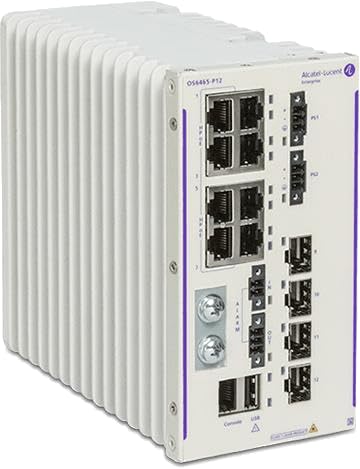
The Alcatel OmniSwitch 6465 is a series of hardened industrial Ethernet switches designed for demanding environments. These switches are engineered to provide high security, reliability, performance, and ease of management, making them ideal for a wide range of industrial applications such as intelligent transportation, railway systems, and electrical substations.
Built to operate in extended temperature ranges and offering enhanced EMI/EMC tolerance and surge protection, the OmniSwitch 6465 ensures robust and continuous network connectivity for critical infrastructure. Its DIN rail mountable design facilitates easy integration into industrial control cabinets.
പ്രധാന സവിശേഷതകൾ
- Ideal for all types of Power over Ethernet (PoE) application requirements, including outdoor wireless access points, PTZ surveillance cameras, and video displays.
- Operates across a wider temperature range and withstands greater shock, vibrations, surge, and EMI/EMC variance.
- Includes alarm relays for connection to external alarm systems, enhancing system monitoring.
- Field-upgradable and features a highly redundant network solution to maximize network uptime.
- Provides precise nanosecond time synchronization for time-sensitive applications.
- Supports out-of-the-box Zero-touch provisioning and network automation for simplified deployment.
2 സുരക്ഷാ വിവരങ്ങൾ
Please read all safety instructions carefully before installing, operating, or maintaining the Alcatel OmniSwitch 6465. Failure to follow these instructions may result in injury, damage to the product, or property damage.
- ഇലക്ട്രിക്കൽ സുരക്ഷ: ഊർജ്ജ സ്രോതസ്സ് വോള്യവുമായി പൊരുത്തപ്പെടുന്നുണ്ടെന്ന് ഉറപ്പാക്കുകtage requirements specified for the device. Disconnect power before performing any installation or maintenance.
- ഗ്രൗണ്ടിംഗ്: The device must be properly grounded to prevent electrical shock.
- പരിസ്ഥിതി: Install the switch in an environment that complies with the specified operating temperature and humidity ranges. Avoid exposure to excessive dust, moisture, or direct sunlight.
- യോഗ്യതയുള്ള ഉദ്യോഗസ്ഥർ: ഇൻസ്റ്റാളേഷനും സർവീസിംഗും യോഗ്യതയുള്ളതും അംഗീകൃതവുമായ ഉദ്യോഗസ്ഥർ മാത്രമേ നടത്താവൂ.
- വെൻ്റിലേഷൻ: Ensure adequate airflow around the device to prevent overheating. Do not block ventilation openings.
3. പാക്കേജ് ഉള്ളടക്കം
Verify that all items listed below are present in your product package. If any items are missing or damaged, please contact your vendor immediately.
- Alcatel OmniSwitch 6465 Hardened Ethernet Switch
- Power Cable (region-specific)
- DIN റെയിൽ മൗണ്ടിംഗ് കിറ്റ്
- ദ്രുത ആരംഭ ഗൈഡ്
- സുരക്ഷയും നിയന്ത്രണ വിവരങ്ങളും
4. സജ്ജീകരണവും ഇൻസ്റ്റാളേഷനും
4.1 സ്വിച്ച് മൗണ്ട് ചെയ്യുന്നു
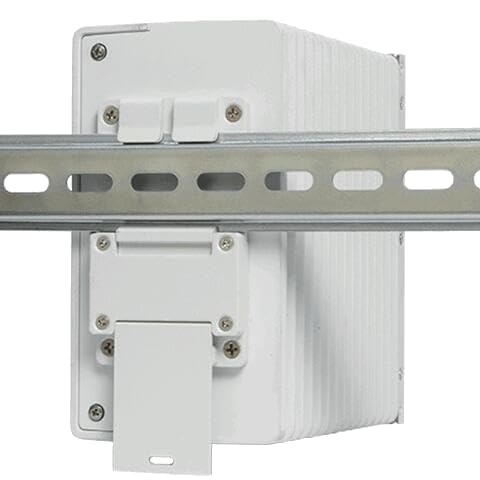
The Alcatel OmniSwitch 6465 is designed for DIN rail mounting. Follow these steps for secure installation:
- Ensure the DIN rail is securely fastened to a stable surface.
- Attach the DIN rail clip to the rear of the switch, if not already pre-installed.
- Hook the top edge of the DIN rail clip onto the top lip of the DIN rail.
- Push the bottom of the switch firmly towards the DIN rail until the clip snaps into place.
- Verify that the switch is securely mounted and does not wobble.
4.2 പവർ കണക്ഷൻ
Connect the provided power cable to the power input port on the switch and then to a suitable AC power outlet. Ensure the power source meets the specified voltage and current requirements. The switch will power on automatically once connected.
4.3 നെറ്റ്വർക്ക് കണക്ഷൻ
Connect Ethernet cables from your network devices (e.g., computers, IP cameras, wireless access points) to the Ethernet ports on the switch. Use appropriate category cables (e.g., Cat5e, Cat6) for optimal performance.
4.4 പ്രാരംഭ കോൺഫിഗറേഷൻ
For initial configuration and advanced management, connect a console cable to the console port on the switch and to a computer. Use a terminal emulation program (e.g., PuTTY, Tera Term) with the following settings:
- ബൗഡ് നിരക്ക്: 115200
- ഡാറ്റ ബിറ്റുകൾ: 8
- പാരിറ്റി: ഒന്നുമില്ല
- ബിറ്റുകൾ നിർത്തുക: 1
- ഒഴുക്ക് നിയന്ത്രണം: ഒന്നുമില്ല
Refer to the comprehensive Alcatel-Lucent Enterprise documentation for detailed command-line interface (CLI) configuration instructions.
5. ഓപ്പറേഷൻ
5.1 Basic Connectivity
Once powered on and connected, the Alcatel OmniSwitch 6465 will automatically establish network links. The switch operates as a Layer 2 Ethernet switch, forwarding data frames between connected devices based on MAC addresses.
5.2 സ്റ്റാറ്റസ് ഇൻഡിക്കേറ്ററുകൾ
The front panel of the switch features LED indicators that provide real-time status information:
- പവർ എൽഇഡി: Indicates the power status of the device. (e.g., Solid Green: Power On)
- ലിങ്ക്/ആക്ടിവിറ്റി LED-കൾ (ഓരോ പോർട്ടിലും): Indicate the link status and network activity for each Ethernet port. (e.g., Solid Green: Link Established; Blinking Green: Data Activity)
- അലാറം LED: Indicates system alarms or errors. (e.g., Red: Critical Alarm)
Consult the full product documentation for a complete list and description of all LED indicators.
6. പരിപാലനം
6.1 വൃത്തിയാക്കൽ
Periodically clean the exterior of the switch with a soft, dry cloth. Do not use liquid or aerosol cleaners. Ensure the device is powered off and disconnected from the power source before cleaning.
6.2 ഫേംവെയർ അപ്ഡേറ്റുകൾ
നിർമ്മാതാവിന്റെ website for the latest firmware updates. Keeping the firmware up-to-date ensures optimal performance, security, and access to new features. Follow the provided instructions for firmware upgrade procedures, typically involving the console port or network management interface.
7. പ്രശ്നപരിഹാരം
This section provides solutions to common issues you might encounter with the Alcatel OmniSwitch 6465.
| പ്രശ്നം | സാധ്യമായ കാരണം | പരിഹാരം |
|---|---|---|
| വൈദ്യുതിയില്ല (പവർ LED ഓഫ്) | Power cable disconnected; Power outlet fault; Device fault. | Check power cable connection; Test power outlet with another device; Contact support if problem persists. |
| No Network Link (Link LED Off) | Ethernet cable disconnected or faulty; Connected device off or faulty; Incorrect port configuration. | Verify Ethernet cable connection; Check status of connected device; Ensure port is enabled and configured correctly. |
| മന്ദഗതിയിലുള്ള നെറ്റ്വർക്ക് പ്രകടനം | Cable quality issues; Network congestion; Duplex mismatch; Firmware outdated. | Use high-quality Ethernet cables; Check network traffic; Verify duplex settings; Update firmware. |
| Alarm LED On | System error; Environmental issue (e.g., overheating); Hardware fault. | Check system logs via console/management interface; Ensure proper ventilation; Contact support. |
For more complex issues, refer to the detailed troubleshooting guide available in the full product documentation or contact technical support.
8 സാങ്കേതിക സവിശേഷതകൾ
| ഫീച്ചർ | സ്പെസിഫിക്കേഷൻ |
|---|---|
| മോഡൽ നമ്പർ | SDR987 |
| ബ്രാൻഡ് | ജനറിക് |
| ഓപ്പറേഷൻ മോഡ് | ഓഫ്-നൺ-ഓൺ |
| നിലവിലെ റേറ്റിംഗ് | 2 മില്ലിamps |
| ഓപ്പറേറ്റിംഗ് വോളിയംtage | 120 വോൾട്ട് (എസി) |
| ബന്ധപ്പെടാനുള്ള തരം | സാധാരണയായി തുറന്നിരിക്കുന്നു |
| കണക്റ്റർ തരം | പ്ലഗ് ഇൻ ചെയ്യുക |
| മൗണ്ടിംഗ് തരം | DIN റെയിൽ മ .ണ്ട് |
| അന്താരാഷ്ട്ര സംരക്ഷണ റേറ്റിംഗ് | IP00 |
| നിയന്ത്രണ രീതി | ആപ്പ് |
| കണക്റ്റിവിറ്റി പ്രോട്ടോക്കോൾ | ഇഥർനെറ്റ് |
| നിറം | വെള്ള |
| മൊത്തം അളവ് | 4000 ഗ്രാം |
| ഇനങ്ങളുടെ എണ്ണം | 1 |
| നിർമ്മാതാവ് | Innovative Informatics. |
| മാതൃരാജ്യം | ഇന്ത്യ |
| പ്രത്യേക ഫീച്ചർ | ബാക്ക്വേർഡ് കോംപാറ്റിബിൾ |
| ഇനത്തിൻ്റെ ഭാരം | 5 കി.ഗ്രാം |
| ഹാർഡ് ഡിസ്ക് ഇന്റർഫേസ് | EIO |
| കണക്റ്റിവിറ്റി ടെക്നോളജി | ബ്ലൂടൂത്ത് |
| ഡാറ്റ കൈമാറ്റ നിരക്ക് | സെക്കൻഡിൽ 50 മെഗാബൈറ്റുകൾ |
| ASIN | B0DF595VQN |
| ആദ്യ തീയതി ലഭ്യമാണ് | 24 ഓഗസ്റ്റ് 2024 |
9. വാറൻ്റിയും പിന്തുണയും
9.1 വാറൻ്റി വിവരങ്ങൾ
This product comes with a standard manufacturer's warranty. Please refer to the warranty card included in your package or visit the manufacturer's official webവാറന്റി കവറേജ്, ദൈർഘ്യം, ക്ലെയിം നടപടിക്രമങ്ങൾ എന്നിവയെക്കുറിച്ചുള്ള വിശദമായ നിബന്ധനകൾക്കും വ്യവസ്ഥകൾക്കും സൈറ്റ് സന്ദർശിക്കുക.
9.2 സാങ്കേതിക പിന്തുണ
For technical assistance, troubleshooting, or product inquiries, please contact the manufacturer's customer support. Contact details can typically be found on the manufacturer's webസൈറ്റ് അല്ലെങ്കിൽ ഉൽപ്പന്ന ഡോക്യുമെന്റേഷനിൽ.
നിർമ്മാതാവ്: Innovative Informatics.
Ask a question about this manual
Ask about setup, troubleshooting, compatibility, parts, safety, or missing instructions. Manuals+ will review the question and use this page’s manual context to help answer it.