
ആമുഖം
This manual provides detailed instructions for the ZOWEETEK S711 Voice Amplifier with Wireless Lavalier Microphone. Please read this manual thoroughly before using the product to ensure proper operation and to maximize its lifespan. This device is designed to amplify your voice clearly and effectively in various environments such as classrooms, meetings, and outdoor events.

Image: The ZOWEETEK S711 Voice Amplifier (left) and its accompanying Wireless Lavalier Microphone (right).
പാക്കേജ് ഉള്ളടക്കം
താഴെ ലിസ്റ്റ് ചെയ്തിരിക്കുന്ന എല്ലാ ഇനങ്ങളും നിങ്ങളുടെ പാക്കേജിൽ ഉൾപ്പെടുത്തിയിട്ടുണ്ടെന്ന് ദയവായി പരിശോധിക്കുക:
- 1 x ZOWEETEK S711 Voice Ampലൈഫയർ യൂണിറ്റ്
- 1 x Wireless Lavalier Microphone
- 1 x USB-A മുതൽ മൈക്രോ-USB ചാർജിംഗ് കേബിൾ വരെ
- 1 x USB-A മുതൽ USB-C ചാർജിംഗ് കേബിൾ വരെ
- 1 x Power Adapter (USB wall charger)
- 1 x Adjustable Waist Strap
- 1 x ഉപയോക്തൃ മാനുവൽ (ഈ പ്രമാണം)

Image: All components included in the ZOWEETEK S711 Voice Amplifier package, including the amplifier, microphone, cables, adapter, strap, and manual.
ഉൽപ്പന്നം കഴിഞ്ഞുview
ശബ്ദം Ampലൈഫയർ യൂണിറ്റ്

Image: Diagram of the ZOWEETEK S711 Voice Amplifier showing its various ports and controls, including Mode, Volume/Power, Play/Pause, Next, Previous, TF card slot, USB flash drive port, Mic input, Clip, and Charging Port.
- മോഡ് ബട്ടൺ (M): Switches between playback modes (e.g., TF card, USB, AUX). Long press for manual pairing.
- Volume/Power Dial: Rotates to adjust volume; press and hold to power on/off.
- പ്ലേ/താൽക്കാലികമായി നിർത്തുക ബട്ടൺ: മീഡിയ പ്ലേബാക്ക് നിയന്ത്രിക്കുന്നു.
- അടുത്തത്/മുമ്പത്തെ ബട്ടണുകൾ: മീഡിയ പ്ലേബാക്ക് സമയത്ത് ട്രാക്കുകൾ നാവിഗേറ്റ് ചെയ്യുന്നു.
- ടിഎഫ് കാർഡ് സ്ലോട്ട്: മൈക്രോ എസ്ഡി കാർഡ് പ്ലേബാക്കിനായി.
- യുഎസ്ബി ഫ്ലാഷ് ഡ്രൈവ് പോർട്ട്: യുഎസ്ബി ഡ്രൈവ് പ്ലേബാക്കിനായി.
- മൈക്ക് ഇൻപുട്ട്: 3.5mm port for wired microphone or AUX audio input.
- ചാർജിംഗ് പോർട്ട്: USB-C port for charging the ampജീവൻ.
- ക്ലിപ്പ്: അറ്റാച്ചുചെയ്യുന്നതിന് amplifier to a belt or waistband.
വയർലെസ് ലാവലിയർ മൈക്രോഫോൺ

Image: Diagram of the ZOWEETEK Wireless Lavalier Microphone, highlighting its flexible neck, ON/OFF switch, Volume controls, Wireless pairing key, Charging Port, and indicator lights.
- ഓൺ/ഓഫ് സ്വിച്ച്: മൈക്രോഫോൺ ഓൺ അല്ലെങ്കിൽ ഓഫ് ആക്കുന്നു.
- Vol+/Vol- Buttons: മൈക്രോഫോൺ വോളിയം ക്രമീകരിക്കുന്നു.
- Wireless Pairing Key: Used for manual pairing if auto-connect fails.
- ചാർജിംഗ് പോർട്ട്: Micro-USB port for charging the microphone.
- ഇൻഡിക്കേറ്റർ ലൈറ്റുകൾ: Blue for power/connection, Green for charging, Red for low battery/charging.
- ക്ലിപ്പ്: For attaching the microphone to clothing.
സജ്ജമാക്കുക
1. പ്രാരംഭ ചാർജിംഗ്
ആദ്യ ഉപയോഗത്തിന് മുമ്പ്, രണ്ട് വോയ്സ് ബാറ്ററികളും പൂർണ്ണമായും ചാർജ് ചെയ്യുക. ampലൈഫയറും വയർലെസ് മൈക്രോഫോണും.
- ശബ്ദം ബന്ധിപ്പിക്കുക amplifier to the power adapter using the USB-C cable.
- Connect the wireless microphone to the power adapter using the Micro-USB cable.
- ദി amplifier's indicator light will show charging status (refer to specifications for details). The microphone's red light indicates charging, turning off when fully charged.
2. Power On and Auto-Connect
The ZOWEETEK S711 is designed for automatic connection between the ampലൈഫയറും മൈക്രോഫോണും.
- ശബ്ദം ഓണാക്കുക amplifier by pressing and holding the Volume/Power dial.
- Turn on the wireless microphone using its ON/OFF switch.
- മൈക്രോഫോണും amplifier should automatically pair. The microphone's blue indicator light will become solid when connected.
3. Manual Pairing (If Auto-Connect Fails)
If the microphone and amplifier do not connect automatically:

Image: Visual guide for manual pairing, showing to long press the 'M' key on the amplifier and the wireless pairing key on the microphone.
- രണ്ട് ഉപകരണങ്ങളും പവർ ഓണാണെന്ന് ഉറപ്പാക്കുക.
- Long press the 'M' (Mode) button on the voice ampജീവൻ.
- Simultaneously, long press the Wireless Pairing Key on the microphone.
- The devices should pair, indicated by a solid blue light on the microphone.
4. ഉപകരണം ധരിക്കുന്നു
ശബ്ദം amplifier can be worn using the included waist strap or clipped to your clothing. The wireless microphone can be clipped to your collar or lapel.
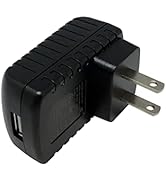
Image: A person demonstrating how to wear the ZOWEETEK S711 voice amplifier on the waist and the wireless lavalier microphone clipped to clothing.
പ്രവർത്തന നിർദ്ദേശങ്ങൾ
1. ശബ്ദം Ampലിഫിക്കേഷൻ
- രണ്ടും ഉറപ്പാക്കുക amplifier and microphone are powered on and paired.
- Speak into the microphone. Adjust the amplifier's volume using the Volume/Power dial.
- Adjust the microphone's sensitivity using the Vol+/Vol- buttons on the microphone unit.
2. Music Playback (TF Card / USB Drive)
- Insert a TF (Micro SD) card or USB flash drive into the respective port on the ampജീവൻ.
- Press the 'M' (Mode) button to switch to the desired playback mode (TF or USB).
- Use the Play/Pause, Next, and Previous buttons to control music playback.
- ദി amplifier supports repeating a single tune or looping all music.
3. AUX Audio Input
The 3.5mm Mic port can also function as an AUX audio input.
- Connect an external audio source (e.g., smartphone, MP3 player) to the Mic port using a 3.5mm audio cable (not included).
- ദി amplifier will automatically switch to AUX input mode.
4. Important Usage Tip: Avoiding Feedback
To prevent audio feedback (a high-pitched screeching sound), ensure the microphone is not placed too close to or directly in front of the voice ampജീവൻ.
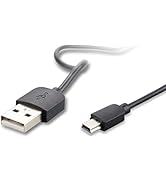
Image: Illustration showing incorrect microphone placement (too close to amplifier, causing feedback) versus correct placement (microphone worn by user, amplifier at a distance).
ചാർജിംഗും ബാറ്ററി ലൈഫും
The ZOWEETEK S711 features long-lasting rechargeable batteries for both the ampലൈഫയറും മൈക്രോഫോണും.

Image: Graphic illustrating the working and charging times for both the ZOWEETEK S711 Voice Amplifier and its Wireless Lavalier Microphone.
- ശബ്ദം Amplifier Working Time: 8-12 hours (depending on volume and usage).
- ശബ്ദം Amplifier Charging Time: 3-5 മണിക്കൂർ.
- Wireless Microphone Working Time: 4-6 മണിക്കൂർ.
- Wireless Microphone Charging Time: ഏകദേശം 2 മണിക്കൂർ.
Use the provided charging cables and power adapter for optimal charging. Do not use damaged cables or adapters.
മെയിൻ്റനൻസ്
- വൃത്തിയാക്കൽ: Wipe the device surfaces with a soft, dry cloth. Do not use abrasive cleaners or solvents.
- സംഭരണം: സംഭരിക്കുക ampലൈഫയറും മൈക്രോഫോണും നേരിട്ട് സൂര്യപ്രകാശത്തിൽ നിന്നും ഉയർന്ന താപനിലയിൽ നിന്നും മാറി തണുത്തതും വരണ്ടതുമായ സ്ഥലത്ത് വയ്ക്കുക.
- ബാറ്ററി കെയർ: ബാറ്ററി ലൈഫ് വർദ്ധിപ്പിക്കുന്നതിന്, ബാറ്ററികൾ ഇടയ്ക്കിടെ പൂർണ്ണമായും ഡിസ്ചാർജ് ചെയ്യുന്നത് ഒഴിവാക്കുക. ദീർഘനേരം ഉപയോഗിച്ചിട്ടില്ലെങ്കിൽ പോലും അവ പതിവായി ചാർജ് ചെയ്യുക.
- കൈകാര്യം ചെയ്യൽ: Handle the devices with care to prevent drops or impacts that could damage internal components.
ട്രബിൾഷൂട്ടിംഗ്
| പ്രശ്നം | സാധ്യമായ കാരണം | പരിഹാരം |
|---|---|---|
| നിന്ന് ശബ്ദമില്ല ampജീവപര്യന്തം |
|
|
| Feedback (high-pitched noise) |
|
|
| മൈക്രോഫോൺ ചാർജ് ചെയ്യുന്നില്ല |
|
|
| സംഗീത പ്ലേബാക്ക് പ്രവർത്തിക്കുന്നില്ല |
|
|
സ്പെസിഫിക്കേഷനുകൾ
| ഫീച്ചർ | വിശദാംശങ്ങൾ |
|---|---|
| മോഡൽ നമ്പർ | എസ് 711 |
| ബ്രാൻഡ് | സോവീടെക് |
| പവർ ഉറവിടം | ബാറ്ററി പവർ (ലിഥിയം അയോൺ) |
| ഔട്ട്പുട്ട് പവർ | 10W |
| കണക്റ്റിവിറ്റി ടെക്നോളജി | Wireless (2.4G), AUX (3.5mm) |
| ഓഡിയോ ഇൻപുട്ട് | 3.5mm AUX ഓഡിയോ ഇൻപുട്ട് |
| Ampലിഫയർ ബാറ്ററി ലൈഫ് | 8-12 മണിക്കൂർ |
| മൈക്രോഫോൺ ബാറ്ററി ലൈഫ് | 4-6 മണിക്കൂർ |
| Ampജീവിത ഭാരം | 172 ഗ്രാം (6.1 ഔൺസ്) |
| നിറം | കറുപ്പ് |
| മൗണ്ടിംഗ് തരം | Tabletop, Waist Mount |
| അനുയോജ്യമായ ഉപകരണങ്ങൾ | Headphone (for wired mic input) |
വാറൻ്റിയും പിന്തുണയും
ZOWEETEK products are manufactured with quality and reliability in mind. For specific warranty information, please refer to the warranty card included in your product packaging or contact ZOWEETEK customer support directly.
If you encounter any issues or have questions regarding your ZOWEETEK S711 Voice Amplifier, please reach out to our customer support team for assistance. Contact details can typically be found on the official ZOWEETEK webസൈറ്റ് അല്ലെങ്കിൽ ഉൽപ്പന്ന പാക്കേജിംഗിൽ.