
1. ഉൽപ്പന്നം കഴിഞ്ഞുview
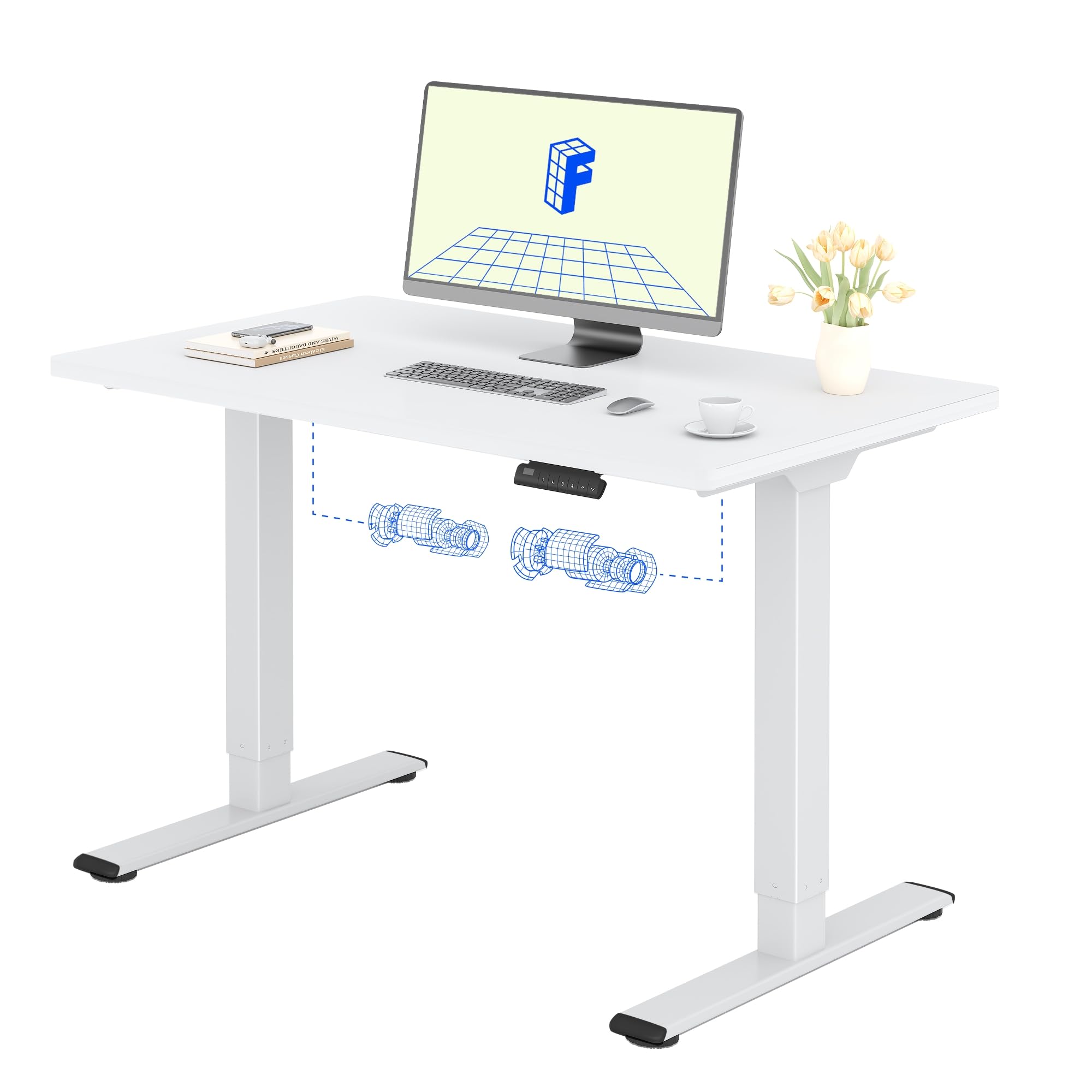
The FLEXISPOT Electric Standing Desk QB2 SET is designed to provide a stable and efficient workspace with adjustable height capabilities. This desk features a robust dual-motor system and an intelligent control panel for ease of use.
പ്രധാന സവിശേഷതകൾ:
- ശക്തമായ ഡ്യുവൽ മോട്ടോറുകൾ: Ensures greater stability and efficiency, with a maximum speed of up to 25 mm/s.
- സ്ഥിരമായ പിന്തുണ: Static load capacity of 120 kg and dynamic load capacity of 100 kg, providing secure support for various office equipment.
- സ്മാർട്ട് കൺട്രോൾ പാനൽ: Features four memory functions for easy height adjustment and an anti-collision system for safety.
- ക്രമീകരിക്കാവുന്ന ഉയരം: The desk height can be adjusted from 70 cm to 119 cm to suit different user requirements and work preferences.
- One-Piece Tabletop: A seamless 120x60cm tabletop for a clean and modern aesthetic.

2 സുരക്ഷാ വിവരങ്ങൾ
അസംബ്ലി ചെയ്യുന്നതിനുമുമ്പ് എല്ലാ സുരക്ഷാ നിർദ്ദേശങ്ങളും വായിച്ച് മനസ്സിലാക്കുക, ഉൽപ്പന്നത്തിന് പരിക്കോ കേടുപാടുകളോ ഉണ്ടാകാതിരിക്കാൻ ഉപയോഗിക്കുക.
- Do not exceed the maximum allowed weight of 70 kg (moving) or 100 കി.ഗ്രാം (സ്റ്റാറ്റിക്). Overloading can cause instability and damage.
- Pay close attention to stability when adjusting the height. Ensure the desk is level and all items are securely placed.
- Be cautious of obstacles in the vicinity that could cause a collision during height adjustment. The desk is equipped with an anti-collision system, but manual vigilance is always recommended.
- അപകടങ്ങൾ തടയുന്നതിന് ജോലി സമയത്ത് കുട്ടികളെയും വളർത്തുമൃഗങ്ങളെയും മേശയിൽ നിന്ന് അകറ്റി നിർത്തുക.
- Ensure all cables are properly managed and secured to avoid entanglement or damage during movement.

3. സജ്ജീകരണവും അസംബ്ലിയും
The FLEXISPOT Electric Standing Desk is designed for straightforward assembly. An instruction manual is included with your purchase. It is recommended that രണ്ടു പേർ assemble the desk to ensure safety and ease.
അസംബ്ലി നുറുങ്ങുകൾ:
- മാനുവൽ വായിക്കുക: ശ്രദ്ധാപൂർവ്വം വീണ്ടുംview the included assembly instructions before starting.
- ഉപകരണങ്ങൾ: All necessary tools are typically included. A small electric screwdriver can speed up the process, but is not essential. You may need a pencil and a wood drill bit for minor pilot holes.
- അൺപാക്ക് ചെയ്യുന്നു: The desk is shipped in two separate packages for maximum protection: one for the desktop and one for the frame. Ensure both packages have arrived before beginning assembly.
- സമയം: Assembly typically takes around 1 hour for one person, taking their time.


4. പ്രവർത്തന നിർദ്ദേശങ്ങൾ
The FLEXISPOT Electric Standing Desk offers intuitive controls for adjusting its height and saving preferred positions.
നിയന്ത്രണ പാനൽ പ്രവർത്തനങ്ങൾ:
- അപ്പ്/ഡൗൺ ബട്ടണുകൾ: Use the up (▲) and down (▼) arrows to manually adjust the desk height.
- മെമ്മറി പ്രീസെറ്റുകൾ (1, 2, 3, 4): The control panel allows you to save up to four preferred height settings. To save a height: adjust the desk to your desired height, then press and hold one of the memory buttons (1-4) until you hear a beep or see the display flash, indicating the height is saved.
- LED ഡിസ്പ്ലേ: Shows the current height of the desk in centimeters.
- ആന്റി-കൊളിഷൻ സിസ്റ്റം: This safety feature automatically stops and slightly reverses the desk's movement if it encounters an obstacle during height adjustment.
ഉയരം ക്രമീകരിക്കൽ ശ്രേണി:
The desk can be adjusted from a minimum height of 70 സെ.മീ to a maximum height of 119 സെ.മീ.


5. പരിപാലനം
Proper maintenance ensures the longevity and optimal performance of your FLEXISPOT Electric Standing Desk.
വൃത്തിയാക്കൽ:
- The desk surface and frame are easy to clean. Use a വരണ്ട അല്ലെങ്കിൽ ഡിamp തുണി to wipe away dust and spills.
- കഠിനമായ രാസവസ്തുക്കളോ അബ്രാസീവ് ക്ലീനറുകളോ ഉപയോഗിക്കുന്നത് ഒഴിവാക്കുക, കാരണം ഇവ ഫിനിഷിന് കേടുവരുത്തും.
പൊതു പരിചരണം:
- Regularly check all screws and fasteners to ensure they are tight. Retighten if necessary.
- Keep the area around the desk clear to allow for smooth height adjustments and to prevent the anti-collision system from being triggered unnecessarily.
- Do not place excessively heavy objects on the desk, especially when moving, to avoid straining the motors.
6. പ്രശ്നപരിഹാരം
If you encounter any issues with your FLEXISPOT Electric Standing Desk, refer to the following common troubleshooting steps.
പൊതുവായ പ്രശ്നങ്ങളും പരിഹാരങ്ങളും:
- Desk Not Moving / No Power:
- Check if the power cable is securely plugged into both the desk and the wall outlet.
- മറ്റൊരു ഉപകരണം പ്ലഗ് ഇൻ ചെയ്ത് വാൾ ഔട്ട്ലെറ്റ് പ്രവർത്തനക്ഷമമാണെന്ന് ഉറപ്പാക്കുക.
- Desk Wobbles at High Height:
- എല്ലാ അസംബ്ലി സ്ക്രൂകളും മുറുക്കിയിട്ടുണ്ടെന്ന് ഉറപ്പാക്കുക.
- Verify that the desk is on a level surface. Adjust the leveling feet if necessary.
- Distribute weight evenly on the desktop.
- ഡിസ്പ്ലേയിൽ പിശക് കോഡ്:
- Refer to the detailed troubleshooting section in the included physical manual for specific error codes and their solutions.
- Often, a simple reset can resolve minor errors. To perform a reset, unplug the desk for 10-15 seconds, then plug it back in.
- ആന്റി-കൊളിഷൻ സിസ്റ്റം ഇടയ്ക്കിടെ ട്രിഗർ ചെയ്യുന്നു:
- Ensure there are no obstructions under or above the desk during movement.
- Check if any cables are interfering with the desk's movement.
If these steps do not resolve the issue, please contact FLEXISPOT customer support for further assistance.
7. ഉൽപ്പന്ന സവിശേഷതകൾ
| ഫീച്ചർ | വിശദാംശങ്ങൾ |
|---|---|
| ബ്രാൻഡ് | ഫ്ലെക്സിസ്പോട്ട് |
| മോഡൽ നമ്പർ | QB2 SET |
| GTIN/UPC | 840460406635 |
| ഡെസ്ക് ഡിസൈൻ | സ്റ്റാൻഡിംഗ് ഡെസ്ക് |
| ആകൃതി | ദീർഘചതുരം |
| ഉൽപ്പന്ന അളവുകൾ (D x W x H) | 60P x 120l x 73H cm (60D x 120W x 73H cm) |
| ടാബ്ലെറ്റ് വലുപ്പം | 120 x 60 സെ.മീ |
| ടേബിൾടോപ്പ് കനം | 1.5 സെ.മീ |
| നിറം | White Frame + White Top |
| ശൈലി | ആധുനികം |
| അടിസ്ഥാന മെറ്റീരിയൽ | അലോയ് സ്റ്റീൽ |
| മികച്ച മെറ്റീരിയൽ തരം | മരം |
| ഫിനിഷ് തരം | Laser, Powder Coated |
| പ്രത്യേക സവിശേഷതകൾ | Ergonomic, Height Adjustable, Memory Presets, Anti-collision |
| ഇനത്തിൻ്റെ ഭാരം | 30 കിലോഗ്രാം |
| കുറഞ്ഞ ഉയരം | 70 സെ.മീ |
| പരമാവധി ഉയരം | 119 സെ.മീ |
| ലിഫ്റ്റിംഗ് മെക്കാനിസം | ഇലക്ട്രിക് (ഡ്യുവൽ മോട്ടോർ) |
| Recommended Load Capacity | 100 കിലോഗ്രാം |
| ശുപാർശ ചെയ്യുന്ന അസംബ്ലി വ്യക്തികൾ | 2 |
| അസംബ്ലി നിർദ്ദേശങ്ങൾ | ഉൾപ്പെടുത്തിയിട്ടുണ്ട് |
| ഉൾപ്പെടുത്തിയ ഘടകങ്ങൾ | Height adjustment mechanism, keyboard drawer (if applicable) |
| മുറിയുടെ തരം | ഓഫീസ് |
| ശുപാർശ ചെയ്യുന്ന ഉപയോഗങ്ങൾ | Work, Home, Office, Gaming |

8. വാറൻ്റി വിവരങ്ങൾ
FLEXISPOT provides a limited warranty for the Electric Standing Desk QB2 SET.
- 5 വർഷത്തെ വാറൻ്റി: Covers the frame, motors, and other mechanical components.
- 2 വർഷത്തെ വാറൻ്റി: Covers the controller, switch, and electronic components.
For detailed warranty terms and conditions, please refer to the warranty card included with your product or visit the official FLEXISPOT webസൈറ്റ്.
9. ഉപഭോക്തൃ പിന്തുണ
Should you require assistance with your FLEXISPOT Electric Standing Desk, please utilize the following resources:
- ഓൺലൈൻ സ്റ്റോർ: Visit the official FLEXISPOT store on Amazon for product information and FAQs: FLEXISPOT Amazon Store
- ഉപഭോക്തൃ സേവനവുമായി ബന്ധപ്പെടുക: For technical support, warranty claims, or any other inquiries, please contact FLEXISPOT customer service directly. Contact details can typically be found on the official FLEXISPOT webസൈറ്റ് അല്ലെങ്കിൽ നിങ്ങളുടെ ഉൽപ്പന്ന ഡോക്യുമെന്റേഷനിൽ.
- റിട്ടേണുകൾ: If you are not satisfied with your purchase, you may be eligible for a return within 30 days. Please refer to the return policy of your retailer or contact customer service for details.