
Flysky FGR12B
Flysky FGR12B Receiver User Manual
Single Antenna 2.4GHz 12CH for AFHDS 3 Transmitters
1. ഉൽപ്പന്നം കഴിഞ്ഞുview
The Flysky FGR12B is a compact and lightweight 12-channel receiver designed for use with AFHDS 3 compatible transmitters, including models like the PL18, NB4, and NB4 Lite. It operates on the 2.4GHz frequency band and utilizes Flysky's advanced third-generation Automatic Frequency Hopping Digital System (AFHDS 3) protocol, ensuring reliable and stable communication for RC cars, boats, and other models. This receiver provides multiple data output options including PWM, PPM, and i-bus in, offering versatility for various control setups.
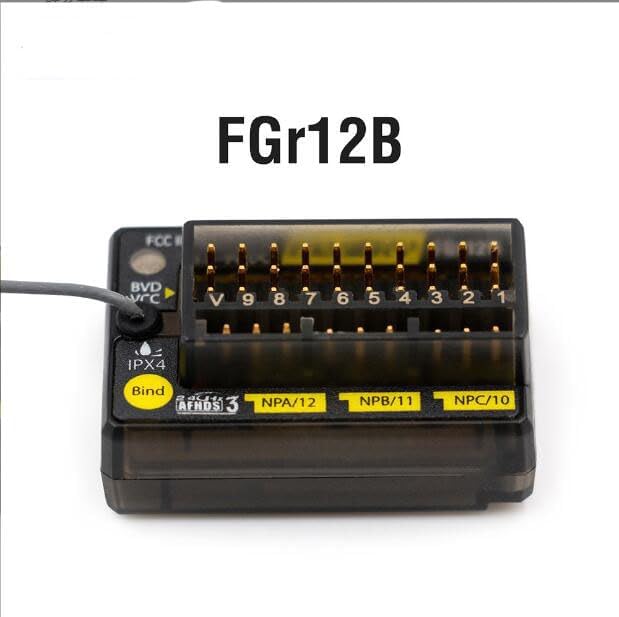
ചിത്രം 1: മുൻഭാഗം view of the Flysky FGR12B Receiver, highlighting its compact design and labeling.
2 സുരക്ഷാ വിവരങ്ങൾ
This product is designed for safe operation when used as intended. Please observe the following safety guidelines:
- Ensure proper power input (3.5-9V) to prevent damage to the receiver.
- Avoid exposing the receiver to extreme temperatures outside the range of -10℃ to +60℃.
- Keep the receiver away from excessive humidity (above 95%) to prevent malfunction.
- Always connect components correctly according to the wiring diagrams to avoid short circuits or damage.
- Perform range checks before operating your model to ensure stable signal reception.
3. ഉൽപ്പന്ന സവിശേഷതകൾ
- Adaptive Transmitter Compatibility: Fully compatible with all AFHDS 3 supporting transmitters (e.g., PL18, NB4, NB4 Lite).
- 12 PWM Channels: Provides 12 Pulse Width Modulation channels for extensive control capabilities.
- ഒതുക്കമുള്ളതും ഭാരം കുറഞ്ഞതുമായ ഡിസൈൻ: Optimized for space and weight-sensitive applications.
- AFHDS 3 Protocol: Utilizes Flysky's third-generation automatic frequency hopping digital system for robust and interference-resistant communication.
- Versatile Data Output: Supports PWM, PPM, and i-bus in data output for flexible integration with various flight controllers and servos.
- Single Antenna: Efficient single antenna design for reliable signal reception.
- Online Update Support: Firmware can be updated online for future enhancements and bug fixes.
4 സ്പെസിഫിക്കേഷനുകൾ
| പരാമീറ്റർ | മൂല്യം |
|---|---|
| ഉൽപ്പന്ന മോഡൽ | FGr12B |
| അഡാപ്റ്റീവ് ട്രാൻസ്മിറ്റർ | All AFHDS 3 compatible (PL18, NB4, NB4 Lite, etc.) |
| മോഡൽ തരം | Car/Boat, etc. |
| PWM ചാനലുകൾ | 12 |
| RF ഫ്രീക്വൻസി | 2.4GHz |
| 2.4G പ്രോട്ടോക്കോൾ | AFHDS 3 |
| ആൻ്റിന തരം | സിംഗിൾ ആന്റിന |
| ഇൻപുട്ട് പവർ | 3.5-9V |
| ഡാറ്റ ഔട്ട്പുട്ട് | PWM, PPM, i-bus in |
| താപനില പരിധി | -10℃ മുതൽ +60℃ വരെ |
| ഈർപ്പം പരിധി | 20%-95% |
| ഓൺലൈൻ അപ്ഡേറ്റ് | അതെ |
| അളവുകൾ (L*W*H) | 37 x 25 x 17.5 മിമി (1.81 x 0.5 x 0.9 ഇഞ്ച്) |
| ഭാരം | 11.2 ഗ്രാം (0.4 ഔൺസ്) |
| സർട്ടിഫിക്കേഷനുകൾ | CE, FCC ഐഡി: N4ZFGR12B |
5. ബോക്സിൽ എന്താണുള്ളത്?
പാക്കേജ് തുറക്കുമ്പോൾ, നിങ്ങൾ ഇനിപ്പറയുന്ന ഇനങ്ങൾ കണ്ടെത്തണം:
- 1x Flysky FGR12B Receiver
- 1x Binding Cable
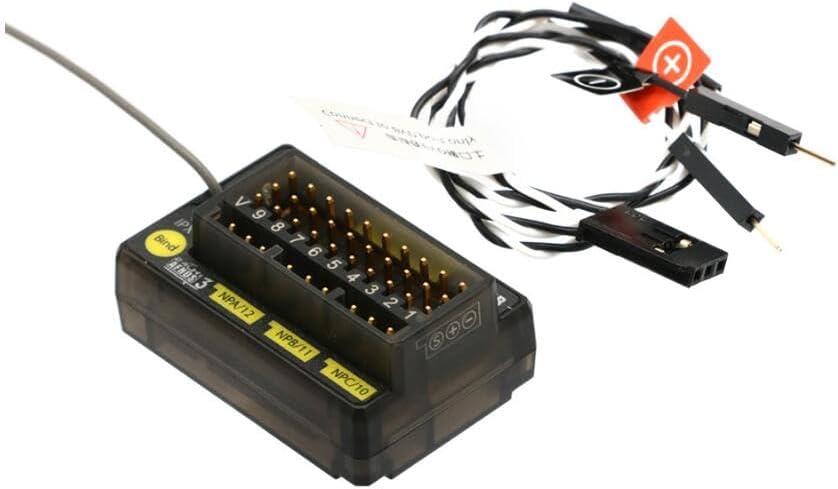
Figure 2: Contents of the Flysky FGR12B package, showing the receiver and connecting wires.
6. സജ്ജീകരണ ഗൈഡ്
6.1. റിസീവർ ബൈൻഡിംഗ്
To establish communication between your Flysky FGR12B receiver and your AFHDS 3 compatible transmitter, you must perform a binding procedure:
- Ensure your transmitter is powered off.
- Connect the binding cable (included) to the 'Bind' port on the FGR12B receiver.
- Apply power to the receiver (3.5-9V). The receiver's LED should start flashing rapidly, indicating it is in binding mode.
- Turn on your transmitter and navigate to the binding menu (refer to your transmitter's manual for specific instructions).
- Initiate the binding process on your transmitter. The receiver's LED should turn solid, indicating a successful bind.
- Power off both the receiver and the transmitter.
- റിസീവറിൽ നിന്ന് ബൈൻഡിംഗ് കേബിൾ നീക്കം ചെയ്യുക.
- Power on the transmitter first, then the receiver. Verify that the receiver's LED is solid, confirming a successful connection.

ചിത്രം 3: ക്ലോസപ്പ് view of the FGR12B receiver, showing the 'Bind' port and channel labels.
6.2. Connecting Servos and ESCs
Connect your servos, Electronic Speed Controllers (ESCs), and other components to the corresponding PWM channels on the receiver. Refer to your model's specific wiring diagram for correct connections.
- Channels are typically labeled 1-12.
- Ensure correct polarity when connecting (Signal, Positive, Negative).
- The 'VCC' or 'BVD' port can be used for voltage detection if supported by your transmitter.
7. പ്രവർത്തന നിർദ്ദേശങ്ങൾ
Once the receiver is successfully bound and all components are connected, you can begin operating your RC model:
- Always power on your transmitter first.
- Then, power on your RC model (which powers the receiver).
- Verify that the receiver's LED is solid, indicating a stable connection.
- Perform a quick control check to ensure all channels respond correctly to transmitter inputs (e.g., steering, throttle, auxiliary functions).
- After operation, power off your RC model first, then your transmitter.
8. പരിപാലനം
To ensure the longevity and optimal performance of your FGR12B receiver, follow these maintenance guidelines:
- വൃത്തിയായി സൂക്ഷിക്കു: Regularly clean the receiver to prevent dust and debris buildup, which can affect performance. Use a soft, dry brush or compressed air.
- മൂലകങ്ങളിൽ നിന്ന് സംരക്ഷിക്കുക: Avoid exposing the receiver to water, excessive moisture, or direct sunlight for prolonged periods.
- സുരക്ഷിത മൗണ്ടിംഗ്: Ensure the receiver is securely mounted within your model to prevent vibrations from damaging internal components.
- ആൻ്റിന പ്ലേസ്മെൻ്റ്: Position the single antenna away from carbon fiber or metal parts that can shield the signal. Ensure it is not kinked or damaged.
- കണക്ഷനുകൾ പരിശോധിക്കുക: Periodically check all wire connections for looseness or corrosion.
9. പ്രശ്നപരിഹാരം
If you encounter issues with your FGR12B receiver, consider the following troubleshooting steps:
- Receiver Not Binding:
- Ensure the binding cable is correctly inserted into the 'Bind' port.
- Verify that the receiver is receiving adequate power (3.5-9V).
- Confirm your transmitter is in binding mode and is AFHDS 3 compatible.
- Try moving the transmitter closer to the receiver during the binding process.
- നിയന്ത്രണ പ്രതികരണമില്ല:
- Check if the receiver is successfully bound (solid LED). If not, re-bind.
- Verify all servo and ESC connections are correct and secure.
- Ensure your transmitter's battery is charged.
- Check for any physical damage to the receiver or its antenna.
- ഇടയ്ക്കിടെയുള്ള സിഗ്നൽ നഷ്ടം:
- Check antenna placement; ensure it's not obstructed or damaged.
- Avoid operating in areas with high RF interference (e.g., near Wi-Fi routers, power lines).
- Ensure the receiver's power supply is stable and not fluctuating.
10. വാറൻ്റിയും പിന്തുണയും
For warranty information and technical support, please refer to the official Flysky webസൈറ്റിൽ ബന്ധപ്പെടുക അല്ലെങ്കിൽ നിങ്ങളുടെ അംഗീകൃത ഡീലറെ ബന്ധപ്പെടുക. ഏതെങ്കിലും വാറന്റി ക്ലെയിമുകൾക്കായി നിങ്ങളുടെ വാങ്ങലിന്റെ തെളിവ് സൂക്ഷിക്കുക.
ഓൺലൈൻ അപ്ഡേറ്റുകൾ: The FGR12B receiver supports online firmware updates. Visit the official Flysky website for the latest firmware versions and update instructions to ensure optimal performance and access to new features.
കൂടുതൽ സഹായത്തിന്, നിങ്ങൾക്ക് സന്ദർശിക്കാവുന്നതാണ് Flysky Official Webസൈറ്റ്.
Ask a question about this manual
Ask about setup, troubleshooting, compatibility, parts, safety, or missing instructions. Manuals+ will review the question and use this page’s manual context to help answer it.