
1. ആമുഖം
This manual provides detailed instructions for the installation, operation, and maintenance of your AUHIFVAX 8MP Outdoor WiFi PTZ Camera. This camera features a dual-lens system, AI auto-tracking, two-way audio, and is designed for reliable outdoor video surveillance. Please read this manual thoroughly before using the product to ensure proper function and safety.
2. ബോക്സിൽ എന്താണുള്ളത്?
പാക്കേജിൽ എല്ലാ ഘടകങ്ങളും ഉണ്ടെന്ന് ഉറപ്പാക്കുക:
- 1x PTZ ക്യാമറ
- 1x ഉപയോക്തൃ മാനുവൽ
- 1x Power Supply (shorter than 1 meter)
- 1x Screws Bag for mounting

Image: Contents of the package, including the camera, power supply with EU/US plugs, and mounting screws.
3. ഉൽപ്പന്ന സവിശേഷതകൾ
- 8MP Dual Lens System: The camera features two lenses, each contributing to the total 8MP resolution (4MP per lens). This allows for a wider field of view or simultaneous monitoring of two distinct areas.
- AI Humanoid Detection & Auto Tracking: When an intruder is detected, the camera sends an alarm message to your mobile device. It automatically tracks the movement of detected individuals within the surveillance area.
- Smart Three Light Modes: Equipped with built-in White LED and IR LED. The camera can automatically illuminate moving objects. It offers three night vision modes, including a color vision option.
- Clear Two-Way Audio: Features a built-in microphone and speaker, enabling real-time two-way communication and audio recording.
- 270° Pan & 90° Tilt Rotation: Remotely control the camera's horizontal (270°) and vertical (90°) movement via your mobile phone to monitor various angles.
- വെതർപ്രൂഫ് ഡിസൈൻ: Constructed for outdoor use, this IP video surveillance camera is designed to withstand various weather conditions, ensuring durability and longevity.
- സംഭരണ ഓപ്ഷനുകൾ: Supports Micro SD card storage up to 128GB (optional) and cloud storage services.

ചിത്രം: കഴിഞ്ഞുview of camera features including 4MP/8MP UHD, 2-way audio, IP66 waterproof rating, PTZ control, SD card storage, cloud storage, human detection & tracking, and iCsee app compatibility.

Image: Illustration of the camera's pan (270°) and tilt (90°) capabilities, showing remote control via a mobile device.

Image: Depiction of the camera's auto-tracking feature, showing it adjusting its rotation to follow moving subjects and sending a motion detection alert to a phone.

Image: Visual representation of the dual-lens and dual-screen functionality, allowing one camera to monitor two positions simultaneously.
4. സജ്ജീകരണം
4.1 ഫിസിക്കൽ ഇൻസ്റ്റലേഷൻ
- ഒരു ലൊക്കേഷൻ തിരഞ്ഞെടുക്കുക: Select a suitable outdoor location that provides the desired surveillance coverage and has access to a power outlet. Ensure the mounting surface is sturdy.
- ക്യാമറ ഘടിപ്പിക്കുക: Use the provided screws and mounting bracket to securely attach the camera to a wall, ceiling, or other appropriate surface.
4.2 പവർ കണക്ഷൻ
Connect the provided power adapter to the camera's power input and then plug it into a standard electrical outlet. The camera will power on and initiate its startup sequence.
4.3 ആപ്പ് ഡൗൺലോഡും അക്കൗണ്ട് സൃഷ്ടിക്കലും
- ഡൗൺലോഡ് ചെയ്യുക iCsee app from your mobile device's app store (Android or iOS).
- ആപ്പ് തുറന്ന് സ്ക്രീനിലെ നിർദ്ദേശങ്ങൾ പാലിച്ച് പുതിയൊരു ഉപയോക്തൃ അക്കൗണ്ട് സൃഷ്ടിക്കുക അല്ലെങ്കിൽ നിങ്ങൾക്ക് ഇതിനകം ഒരു അക്കൗണ്ട് ഉണ്ടെങ്കിൽ ലോഗിൻ ചെയ്യുക.
4.4 നെറ്റ്വർക്ക് കണക്ഷൻ
The camera supports AP Mode, Wi-Fi, and Wired connections.
- ഉപകരണം ചേർക്കുക: In the iCsee app, tap the "+" icon to add a new device.
- Select Connection Type: Follow the app's prompts to choose your preferred connection method (e.g., "Add Wi-Fi Camera").
- നെറ്റ്വർക്ക് കോൺഫിഗർ ചെയ്യുക: Enter your Wi-Fi network details (SSID and password) if connecting wirelessly. For wired connections, connect an Ethernet cable to the camera and your router.
- സജ്ജീകരണം പൂർത്തിയാക്കുക: Follow the remaining steps in the app to finalize the camera's network configuration and add it to your account.
4.5 SD കാർഡ് ഇൻസ്റ്റാളേഷൻ (ഓപ്ഷണൽ)
If you plan to use local storage, install a Micro SD card (up to 128GB, not always included) into the designated slot on the camera. Ensure the camera is powered off before inserting or removing the SD card.
5. പ്രവർത്തന നിർദ്ദേശങ്ങൾ
5.1 തത്സമയം View
Open the iCsee app and select your camera from the device list to access the live video feed. You can switch between the dual lenses if supported by the app interface.
5.2 പാൻ/ടിൽറ്റ് നിയന്ത്രണം
തത്സമയം view screen, use the directional controls within the app to remotely adjust the camera's pan (horizontal) and tilt (vertical) angles.
5.3 ടു-വേ ഓഡിയോ
ക്യാമറയുടെ സ്പീക്കറിലൂടെ സംസാരിക്കാൻ ആപ്പിലെ മൈക്രോഫോൺ ഐക്കണിൽ ടാപ്പ് ചെയ്യുക. ക്യാമറയുടെ പരിതസ്ഥിതിയിൽ നിന്ന് ഓഡിയോ കേൾക്കാൻ സ്പീക്കർ ഐക്കണിൽ ടാപ്പ് ചെയ്യുക.
5.4 നൈറ്റ് വിഷൻ മോഡുകൾ
The camera offers three night vision modes, typically selectable within the app settings:
- ഇൻഫ്രാറെഡ് മോഡ്: IR LED-കൾ ഉപയോഗിച്ചുള്ള സ്റ്റാൻഡേർഡ് കറുപ്പും വെളുപ്പും രാത്രി ദർശനം.
- കളർ നൈറ്റ് വിഷൻ: Utilizes white LEDs to provide full-color video in low-light conditions.
- സ്മാർട്ട് മോഡ്: Automatically switches between IR and color night vision based on detected motion or light levels.
5.5 Motion Detection and AI Tracking
Enable motion detection and AI humanoid tracking in the app settings. You will receive push notifications on your phone when motion or a human shape is detected. The camera will automatically follow detected human movement.
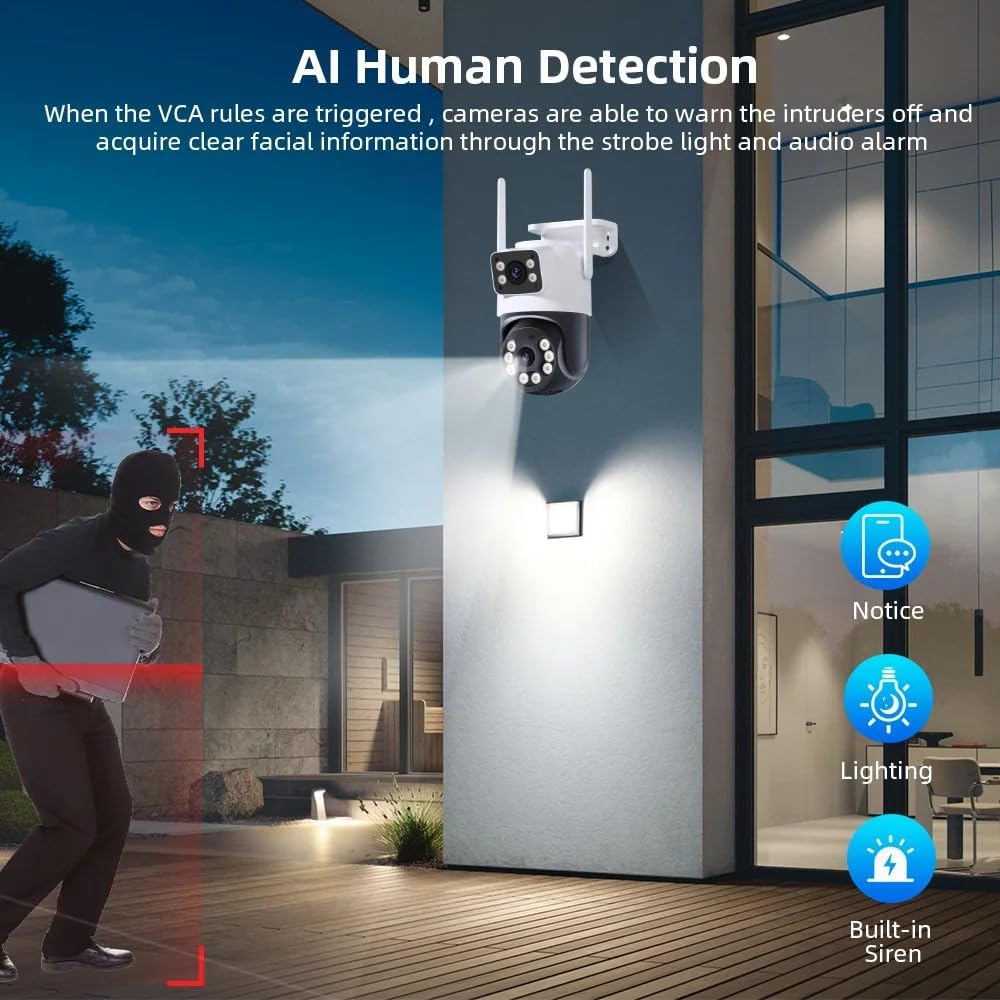
Image: The camera's AI Human Detection feature in action, showing how it triggers a strobe light and audio alarm to deter intruders and sends a notification to the user.
5.6 റെക്കോർഡിംഗും പ്ലേബാക്കും
Recordings are stored on the Micro SD card (if installed) or in the cloud (subscription may be required). Access recorded footage through the "Playback" section of the iCsee app. You can select specific times to review സംഭവങ്ങൾ.
5.7 റിമോട്ട് ആക്സസ്
Once connected to the internet, your camera can be accessed remotely from anywhere using the iCsee app on your mobile device.
6. പരിപാലനം
- വൃത്തിയാക്കൽ: ക്യാമറ ലെൻസും ഹൗസിംഗും ഇടയ്ക്കിടെ സോഫ്റ്റ്, ഡി-ക്യാമറ ഉപയോഗിച്ച് വൃത്തിയാക്കുക.amp തുണി. കഠിനമായ രാസവസ്തുക്കളോ ഉരച്ചിലുകളോ ഉപയോഗിക്കരുത്.
- ഫേംവെയർ അപ്ഡേറ്റുകൾ: Check the iCsee app regularly for available firmware updates. Keeping the firmware updated ensures optimal performance and security.
- SD കാർഡ് മാനേജുമെന്റ്: If using an SD card, periodically check its status in the app. Format the card if necessary to maintain recording efficiency.
7. പ്രശ്നപരിഹാരം
- ക്യാമറ വൈഫൈയിലേക്ക് കണക്റ്റ് ചെയ്യുന്നില്ല:
- നിങ്ങളുടെ വൈഫൈ പാസ്വേഡ് ശരിയാണെന്ന് ഉറപ്പാക്കുക.
- പ്രാരംഭ സജ്ജീകരണ സമയത്ത് ക്യാമറ നിങ്ങളുടെ വൈഫൈ റൂട്ടറിന് അടുത്തായി വയ്ക്കുക.
- Check if your router is operating on a 2.4GHz network (most cameras do not support 5GHz).
- ക്യാമറയും റൂട്ടറും പുനരാരംഭിക്കുക.
- ചിത്രം ഇല്ല/മോശം ചിത്രം നിലവാരം:
- പവർ കണക്ഷൻ പരിശോധിക്കുക.
- ക്യാമറ ലെൻസ് വൃത്തിയാക്കുക.
- Ensure sufficient lighting for optimal image quality, especially at night.
- മോഷൻ ഡിറ്റക്ഷൻ പ്രവർത്തിക്കുന്നില്ല:
- Verify motion detection settings are enabled in the iCsee app.
- സെൻസിറ്റിവിറ്റി ക്രമീകരണങ്ങൾ ക്രമീകരിക്കുക.
- ക്യാമറകൾക്ക് തടസ്സങ്ങളൊന്നുമില്ലെന്ന് ഉറപ്പാക്കുക. view.
- ടു-വേ ഓഡിയോ പ്രശ്നങ്ങൾ:
- Check volume settings on your phone and in the app.
- Ensure your phone's microphone is not muted.
- നെറ്റ്വർക്ക് കണക്ഷൻ സ്ഥിരത പരിശോധിക്കുക.
8 സ്പെസിഫിക്കേഷനുകൾ
| ബ്രാൻഡ് | AUHIFVAX |
| മോഡൽ നമ്പർ | A31 |
| ഹൈ ഡെഫനിഷൻ | 8.0 Megapixels (4MP + 4MP Dual Lens) |
| കണക്റ്റിവിറ്റി | IP/Network Wireless (AP Mode / Wifi / Wired Connection) |
| ചലന ശ്രേണി (പാൻ) | 0°-360° |
| ചലന ശ്രേണി (ടിൽറ്റ്) | -10°-180° |
| ഓഡിയോ ഔട്ട്പുട്ട് | ടു വേ ഓഡിയോ |
| വീഡിയോ കംപ്രഷൻ ഫോർമാറ്റ് | H.265 |
| IR ദൂരം | 10-20 മി |
| വൈദ്യുതി വിതരണം | DC 12V2A |
| വൈദ്യുതി ഉപഭോഗം | പരമാവധി 8W |
| പിന്തുണയ്ക്കുന്ന മൊബൈൽ സിസ്റ്റങ്ങൾ | ആൻഡ്രോയിഡ്, ഐഒഎസ് |
| പ്രത്യേക സവിശേഷതകൾ | Waterproof / Weatherproof, AI Smart Function, Human Detection, Night Vision |
| ലെൻസ് (എംഎം) | 3.6 മി.മീ, 4 മി.മീ |
| ക്ലൗഡ് സംഭരണം | 30 Days Free (then paid subscription) |
| കാർഡ് സ്ലോട്ട് | Max support 128GB Micro SD card |
| അനുയോജ്യമായ ഉപകരണങ്ങൾ | ONVIF/NVR |
9. വാറൻ്റിയും പിന്തുണയും
For warranty information, technical support, or service inquiries, please refer to the contact information provided with your purchase documentation or visit the official AUHIFVAX webവാറന്റി ക്ലെയിമുകൾക്കുള്ള വാങ്ങലിന്റെ തെളിവായി നിങ്ങളുടെ വാങ്ങൽ രസീത് സൂക്ഷിക്കുക.