1. ആമുഖം
വാങ്ങിയതിന് നന്ദി.asing the STN-28 Colorful Cat Ear Luminous Bluetooth Headset. This headset combines wireless audio technology with a unique luminous cat ear design, offering a comfortable and immersive listening experience. This manual provides essential information on how to set up, operate, and maintain your new headset.
2 സുരക്ഷാ വിവരങ്ങൾ
- ഹെഡ്സെറ്റ് തീവ്രമായ താപനില, ഈർപ്പം, അല്ലെങ്കിൽ നശിപ്പിക്കുന്ന വസ്തുക്കൾ എന്നിവയ്ക്ക് വിധേയമാക്കരുത്.
- ഹെഡ്സെറ്റ് താഴെയിടുകയോ ശക്തമായ ആഘാതങ്ങൾക്ക് വിധേയമാക്കുകയോ ചെയ്യുന്നത് ഒഴിവാക്കുക.
- ഹെഡ്സെറ്റ് സ്വയം ഡിസ്അസംബ്ലിംഗ് ചെയ്യുകയോ നന്നാക്കാൻ ശ്രമിക്കുകയോ ചെയ്യരുത്. ഇത് വാറന്റി അസാധുവാക്കും.
- Clean the headset with a soft, dry cloth. Do not use harsh chemicals or abrasive materials.
- ഉയർന്ന ശബ്ദത്തിൽ ദീർഘനേരം കേൾക്കുന്നത് കേൾവിക്ക് കേടുപാടുകൾ വരുത്തിയേക്കാം. സുരക്ഷിതമായ തലത്തിലേക്ക് ശബ്ദം ക്രമീകരിക്കുക.
3. പാക്കേജ് ഉള്ളടക്കം
- STN-28 Wireless Headset Body
- യുഎസ്ബി ചാർജിംഗ് കേബിൾ
- ഉപയോക്തൃ മാനുവൽ (ഈ പ്രമാണം)
4. ഉൽപ്പന്നം കഴിഞ്ഞുview നിയന്ത്രണങ്ങളും
Familiarize yourself with the headset's components and control buttons.
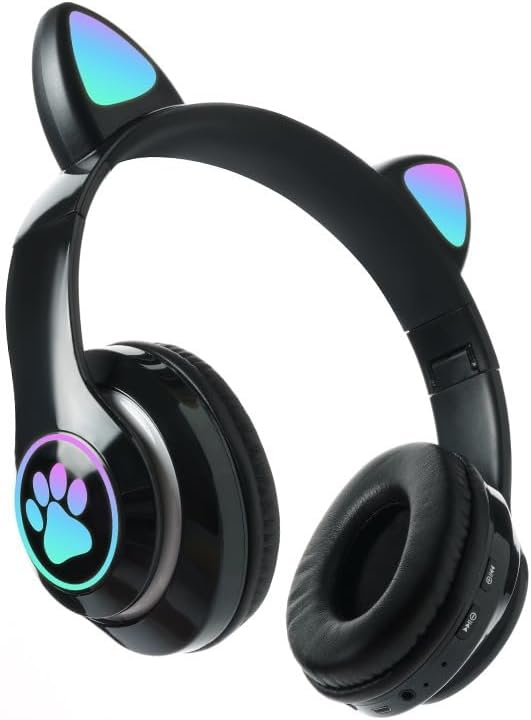
ചിത്രം: മുൻഭാഗം view of the STN-28 headset in black, showcasing the luminous cat ears and paw print design on the earcups.

Image: Two STN-28 headsets, one in purple and one in pink, displayed on a wooden stand, highlighting their colorful design and cat ear feature.
Control Buttons (Typical Layout - Refer to your specific model for exact placement):
- പവർ ബട്ടൺ: On/Off, Play/Pause, Answer/End Call.
- വോളിയം കൂട്ടുക (+): Increase volume, Next track (long press).
- വോളിയം ഡൗൺ (-): Decrease volume, Previous track (long press).
- മോഡ് ബട്ടൺ (M): Switch between Bluetooth and TF Card mode.
- യുഎസ്ബി ചാർജിംഗ് പോർട്ട്: ഹെഡ്സെറ്റ് ചാർജ് ചെയ്യുന്നതിനായി.
- ടിഎഫ് കാർഡ് സ്ലോട്ട്: Insert external TF card for music playback.
- LED ഇൻഡിക്കേറ്റർ ലൈറ്റ്: Shows power, connection, and charging status.
5. സജ്ജീകരണം
5.1 ഹെഡ്സെറ്റ് ചാർജ് ചെയ്യുന്നു
- Connect the USB charging cable to the headset's USB charging port.
- കേബിളിന്റെ മറ്റേ അറ്റം ഒരു USB പവർ സ്രോതസ്സുമായി ബന്ധിപ്പിക്കുക (ഉദാ: കമ്പ്യൂട്ടർ USB പോർട്ട്, USB വാൾ അഡാപ്റ്റർ).
- The LED indicator light will show a red light during charging.
- A full charge takes approximately 2 hours. The red light will turn off when fully charged.
Note: Ensure the headset is fully charged before first use for optimal battery life.
5.2 പവർ ഓൺ/ഓഫ്
- പവർ ഓണാക്കാൻ: Press and hold the Power button for a few seconds until the LED indicator lights flash red and blue.
- പവർ ഓഫ് ചെയ്യാൻ: Press and hold the Power button for a few seconds until the LED indicator light turns off.
5.3 ബ്ലൂടൂത്ത് ജോടിയാക്കൽ
- ഹെഡ്സെറ്റ് പൂർണ്ണമായും ചാർജ് ചെയ്തിട്ടുണ്ടെന്നും പവർ ഓഫ് ചെയ്തിട്ടുണ്ടെന്നും ഉറപ്പാക്കുക.
- Press and hold the Power button until the LED indicator lights flash red and blue alternately. This indicates the headset is in pairing mode.
- നിങ്ങളുടെ ഉപകരണത്തിൽ (സ്മാർട്ട്ഫോൺ, ടാബ്ലെറ്റ്, ലാപ്ടോപ്പ്), ബ്ലൂടൂത്ത് പ്രവർത്തനക്ഷമമാക്കി ലഭ്യമായ ഉപകരണങ്ങൾക്കായി തിരയുക.
- Select "STN-28" or "LX-B39C" from the list of found devices.
- Once successfully paired, the LED indicator light on the headset will flash blue slowly.
Note: The headset supports Bluetooth 5.0+EDR for stable and efficient connection.
6. പ്രവർത്തന നിർദ്ദേശങ്ങൾ
6.1 സംഗീത പ്ലേബാക്ക് (ബ്ലൂടൂത്ത് മോഡ്)
- പ്ലേ/താൽക്കാലികമായി നിർത്തുക: പവർ ബട്ടൺ ചെറുതായി അമർത്തുക.
- വോളിയം കൂട്ടുക: "+" ബട്ടൺ ചുരുക്കി അമർത്തുക.
- വോളിയം താഴേക്ക്: "-" ബട്ടൺ ചുരുക്കി അമർത്തുക.
- അടുത്ത ട്രാക്ക്: "+" ബട്ടൺ ദീർഘനേരം അമർത്തുക.
- മുമ്പത്തെ ട്രാക്ക്: "-" ബട്ടൺ ദീർഘനേരം അമർത്തുക.
6.2 ഫോൺ കോളുകൾ
- മറുപടി കോൾ: Short press the Power button when an incoming call rings.
- കോൾ അവസാനിപ്പിക്കുക: ഒരു കോൾ സമയത്ത് പവർ ബട്ടൺ ഹ്രസ്വമായി അമർത്തുക.
- കോൾ നിരസിക്കുക: Long press the Power button when an incoming call rings.
6.3 TF കാർഡ് പ്ലേബാക്ക്
- MP3 ഓഡിയോ ഉള്ള ഒരു TF (മൈക്രോഎസ്ഡി) കാർഡ് ചേർക്കുക fileടിഎഫ് കാർഡ് സ്ലോട്ടിലേക്ക്.
- The headset will automatically switch to TF card playback mode, or you may need to short press the "M" (Mode) button to switch.
- Use the Play/Pause, Volume Up/Down, and Next/Previous Track buttons as described in section 6.1.
6.4 Luminous Cat Ear Feature
The cat ears and paw print on the earcups feature luminous accents. This feature is typically activated automatically when the headset is powered on. There is no specific control mentioned for this feature, implying it's always on when the headset is active.
7. പരിപാലനവും പരിചരണവും
- വൃത്തിയാക്കൽ: Wipe the headset regularly with a soft, dry, lint-free cloth. Do not use liquid cleaners or sprays.
- സംഭരണം: When not in use, store the headset in a cool, dry place away from direct sunlight and extreme temperatures.
- ബാറ്ററി കെയർ: ബാറ്ററി ലൈഫ് വർദ്ധിപ്പിക്കാൻ, ബാറ്ററി ഇടയ്ക്കിടെ പൂർണ്ണമായും ഡിസ്ചാർജ് ചെയ്യുന്നത് ഒഴിവാക്കുക. ദീർഘനേരം ഉപയോഗിച്ചിട്ടില്ലെങ്കിൽ പോലും ഹെഡ്സെറ്റ് പതിവായി ചാർജ് ചെയ്യുക.
- ജല പ്രതിരോധം: The headset is listed as "Waterproof". While it offers protection against water, avoid submerging it in water or exposing it to heavy rain for prolonged periods to prevent damage.
8. പ്രശ്നപരിഹാരം
| പ്രശ്നം | സാധ്യമായ കാരണം | പരിഹാരം |
|---|---|---|
| ഹെഡ്സെറ്റ് ഓണാക്കുന്നില്ല. | കുറഞ്ഞ ബാറ്ററി. | Charge the headset fully (approx. 2 hours). |
| ഉപകരണവുമായി ജോടിയാക്കാൻ കഴിയില്ല. | ഹെഡ്സെറ്റ് ജോടിയാക്കൽ മോഡിലല്ല; ഉപകരണത്തിൽ ബ്ലൂടൂത്ത് ഓഫാണ്; ഉപകരണം വളരെ അകലെയാണ്. | Ensure headset is flashing red/blue; enable Bluetooth on device; keep devices within 10 meters. Try forgetting the device on your phone and re-pairing. |
| ശബ്ദമില്ല അല്ലെങ്കിൽ കുറഞ്ഞ ശബ്ദമില്ല. | Volume too low on headset or device; headset not connected. | Increase volume on both headset and connected device. Ensure headset is properly paired. |
| TF കാർഡ് പ്ലേ ചെയ്യുന്നില്ല. | കാർഡ് ശരിയായി ചേർത്തിട്ടില്ല; പിന്തുണയ്ക്കുന്നില്ല. file format; headset not in TF card mode. | Reinsert TF card; ensure files are MP3; press 'M' button to switch to TF card mode. |
9 സ്പെസിഫിക്കേഷനുകൾ
| മോഡൽ | STN-28 / LX-B39C |
| ധരിക്കുന്ന രീതി | Head-mounted folding |
| ബ്ലൂടൂത്ത് പതിപ്പ് | ബ്ലൂടൂത്ത് 5.0+EDR |
| Supported Bluetooth Modes | A2DP 1.2, AVRCP 1.0, HSP, HSF 1.5 |
| ബാറ്ററി ശേഷി | 400mAh Polymer A-grade Lithium Battery |
| Speaker Size / Impedance | 40 മിമി / 32Ω |
| പ്രക്ഷേപണ ശ്രേണി | ≤10 meters (33 feet) |
| ചാർജിംഗ് സമയം | ഏകദേശം 2 മണിക്കൂർ |
| സംഗീത പ്ലേബാക്ക് സമയം | ≤6 മണിക്കൂർ |
| സംസാര സമയം | ≤6 മണിക്കൂർ |
| സ്റ്റാൻഡ്ബൈ സമയം | 200 മണിക്കൂർ |
| ഫ്രീക്വൻസി റേഞ്ച് | 20 ഹെർട്സ് - 20,000 ഹെർട്സ് |
| ജല പ്രതിരോധ നില | വാട്ടർപ്രൂഫ് |
| നിയന്ത്രണ തരം | Media Control, Touch (via buttons) |
| പ്രത്യേക സവിശേഷതകൾ | Luminous Cat Ears, TF Card Playback |
10. വാറൻ്റിയും പിന്തുണയും
This product comes with a standard manufacturer's warranty. For specific warranty terms, conditions, and duration, please refer to the warranty card included with your purchase or contact the retailer where you purchased the product.
For technical support or inquiries, please contact your retailer or the manufacturer directly. Keep your purchase receipt as proof of purchase for warranty claims.


