
1. ആമുഖം
വാങ്ങിയതിന് നന്ദി.asing the LONPOO Mini Hi-Fi Ampജീവപര്യന്തം AMP-615B. This 2-channel stereo ampഉയർന്ന നിലവാരമുള്ള ഓഡിയോ നൽകുന്നതിനാണ് ലൈഫയർ രൂപകൽപ്പന ചെയ്തിരിക്കുന്നത് amplification for your passive speakers, offering versatile connectivity options including Bluetooth 5.3, Optical, Coaxial, USB, and AUX inputs. This manual provides detailed instructions for setup, operation, and maintenance to ensure optimal performance and longevity of your device.
2. സുരക്ഷാ നിർദ്ദേശങ്ങൾ
- ഊർജ്ജ സ്രോതസ്സ്: ഉറപ്പാക്കുക amplifier is connected to a power supply within the specified voltage range (AC 100-240V ~ 50/60Hz).
- വെൻ്റിലേഷൻ: വെന്റിലേഷൻ തുറസ്സുകൾ തടയരുത്. അമിതമായി ചൂടാകുന്നത് തടയാൻ യൂണിറ്റിന് ചുറ്റും മതിയായ വായുസഞ്ചാരം ഉറപ്പാക്കുക.
- ഈർപ്പം: സൂക്ഷിക്കുക ampവെള്ളം, ഈർപ്പം, ഉയർന്ന ഈർപ്പം എന്നിവയുള്ള ചുറ്റുപാടുകളിൽ നിന്ന് ലിഫയർ അകലെ വയ്ക്കുക. നനഞ്ഞ കൈകളാൽ പ്രവർത്തിക്കരുത്.
- ചൂട്: റേഡിയേറ്ററുകൾ, ഹീറ്റ് രജിസ്റ്ററുകൾ, സ്റ്റൗകൾ അല്ലെങ്കിൽ മറ്റ് ചൂട് ഉൽപ്പാദിപ്പിക്കുന്ന ഉപകരണങ്ങൾ പോലുള്ള താപ സ്രോതസ്സുകൾക്ക് സമീപം യൂണിറ്റ് സ്ഥാപിക്കുന്നത് ഒഴിവാക്കുക.
- വൃത്തിയാക്കൽ: Disconnect the power cord before cleaning. Use a dry, soft cloth. Do not use liquid cleaners or aerosol cleaners.
- സേവനം: ഈ ഉൽപ്പന്നം സ്വയം സേവിക്കാൻ ശ്രമിക്കരുത്. യോഗ്യതയുള്ള സേവന ഉദ്യോഗസ്ഥർക്ക് എല്ലാ സേവനങ്ങളും റഫർ ചെയ്യുക.
- പ്ലേസ്മെൻ്റ്: യൂണിറ്റ് വീഴുന്നത് തടയാൻ സ്ഥിരതയുള്ളതും പരന്നതുമായ ഒരു പ്രതലത്തിൽ വയ്ക്കുക.
3. പാക്കേജ് ഉള്ളടക്കം
പെട്ടി ശ്രദ്ധാപൂർവ്വം അൺപാക്ക് ചെയ്യുക, താഴെ ലിസ്റ്റ് ചെയ്തിരിക്കുന്ന എല്ലാ ഇനങ്ങളും ഉണ്ടെന്നും നല്ല നിലയിലാണെന്നും ഉറപ്പാക്കുക. ഏതെങ്കിലും ഇനം നഷ്ടപ്പെട്ടിട്ടുണ്ടെങ്കിലോ കേടായിട്ടുണ്ടെങ്കിലോ, ദയവായി നിങ്ങളുടെ റീട്ടെയിലറെ ബന്ധപ്പെടുക.

The package includes the LONPOO Mini Hi-Fi Amplifier, a remote control for convenient operation, an AC power cord, an optical cable for digital audio, and a quick start guide.
- 1x LONPOO Mini Hi-Fi Ampജീവപര്യന്തം (AMP-615B)
- 1x റിമോട്ട് കൺട്രോൾ
- 1x എസി പവർ കോർഡ്
- 1x ഒപ്റ്റിക്കൽ കേബിൾ
- 1x User Manual (Quick Start Guide)
4. ഉൽപ്പന്നം കഴിഞ്ഞുview
4.1 ഫ്രണ്ട് പാനൽ

The front panel features Treble and Bass controls, a multi-function knob for volume and input selection, AUX IN, USB input, IR receiver, and an indicator light.
- ട്രെബിൾ നിയന്ത്രണം: Adjusts high-frequency audio levels.
- BASS നിയന്ത്രണം: Adjusts low-frequency audio levels.
- Multi-Function Knob (VOLUME +/- / MODE / POWER ON/OFF):
- Rotate: Adjusts volume.
- Short Press: Cycles through input modes (Bluetooth, AUX, USB, Coaxial, Optical).
- Long Press: Powers the unit On/Off.
- ഓക്സ് ഇൻ (3.5 മിമി): Audio input for devices with a 3.5mm audio jack.
- യുഎസ്ബി ഇൻപുട്ട്: ഓഡിയോ പ്ലേ ചെയ്യുന്നതിന് files from a USB flash drive (supports MP3, WAV formats).
- IR (Infrared) Receiver: റിമോട്ട് കൺട്രോളിൽ നിന്ന് സിഗ്നലുകൾ സ്വീകരിക്കുന്നു.
- ഇൻഡിക്കേറ്റർ ലൈറ്റ്: Displays the current status/input mode:
- Red: Standby (Power Off)
- Blue: Bluetooth Input
- Green: AUX Input
- Yellow: Coaxial Input
- Light Blue: Optical Input
4.2 പിൻ പാനൽ
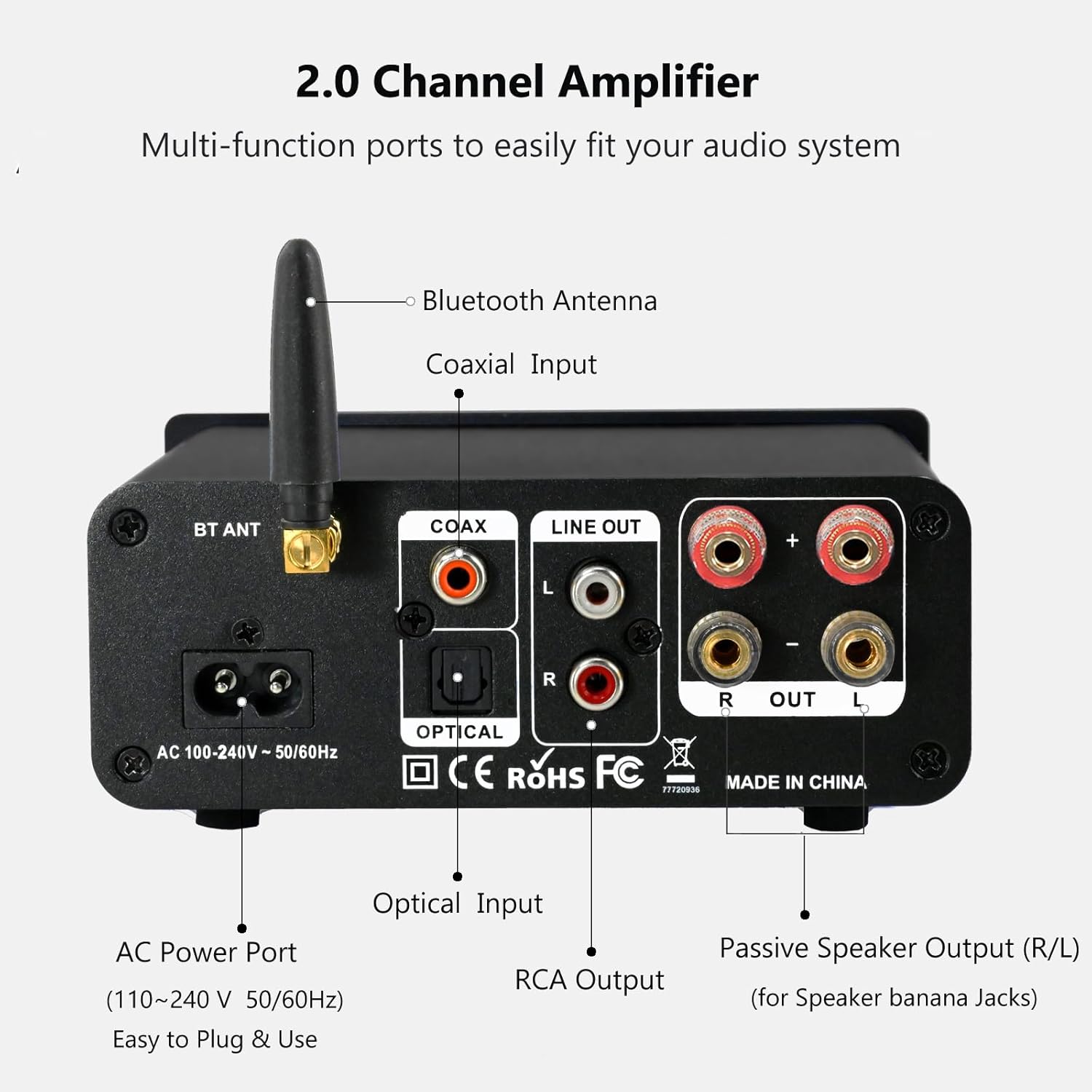
The rear panel provides connections for the Bluetooth antenna, Coaxial and Optical inputs, RCA Line Out, passive speaker outputs, and the AC power port.
- BT ANT (Bluetooth Antenna): Connect the included Bluetooth antenna for optimal wireless range and stability.
- COAX (Coaxial Input): Digital audio input for devices with a coaxial output.
- OPTICAL (Optical Input): Digital audio input for devices with an optical (Toslink) output.
- LINE OUT (RCA L/R): Analog audio output for connecting to powered speakers or a subwoofer.
- PASSIVE SPEAKER OUTPUT (R/L): Connect passive speakers using banana plugs or bare speaker wire.
- AC POWER PORT: Connect the supplied AC power cord (100-240V ~ 50/60Hz).
5. സജ്ജീകരണം
5.1 സ്പീക്കറുകൾ ബന്ധിപ്പിക്കുന്നു

The LONPOO Mini Hi-Fi Amplifier seamlessly integrates with your home audio setup, providing clear sound to passive bookshelf speakers.
- നിഷ്ക്രിയ സ്പീക്കറുകൾ: Connect your passive bookshelf speakers to the PASSIVE SPEAKER OUTPUT (R/L) terminals on the rear panel. Ensure correct polarity (+ to + and - to -) for each speaker. You can use banana plugs or strip the speaker wire ends and insert them into the terminals.
- Powered Speakers/Subwoofer: If you wish to connect powered speakers or a subwoofer, use an RCA cable to connect them to the LINE OUT (RCA L/R) പിൻ പാനലിലെ പോർട്ടുകൾ.
5.2 ഓഡിയോ ഉറവിടങ്ങൾ ബന്ധിപ്പിക്കുന്നു
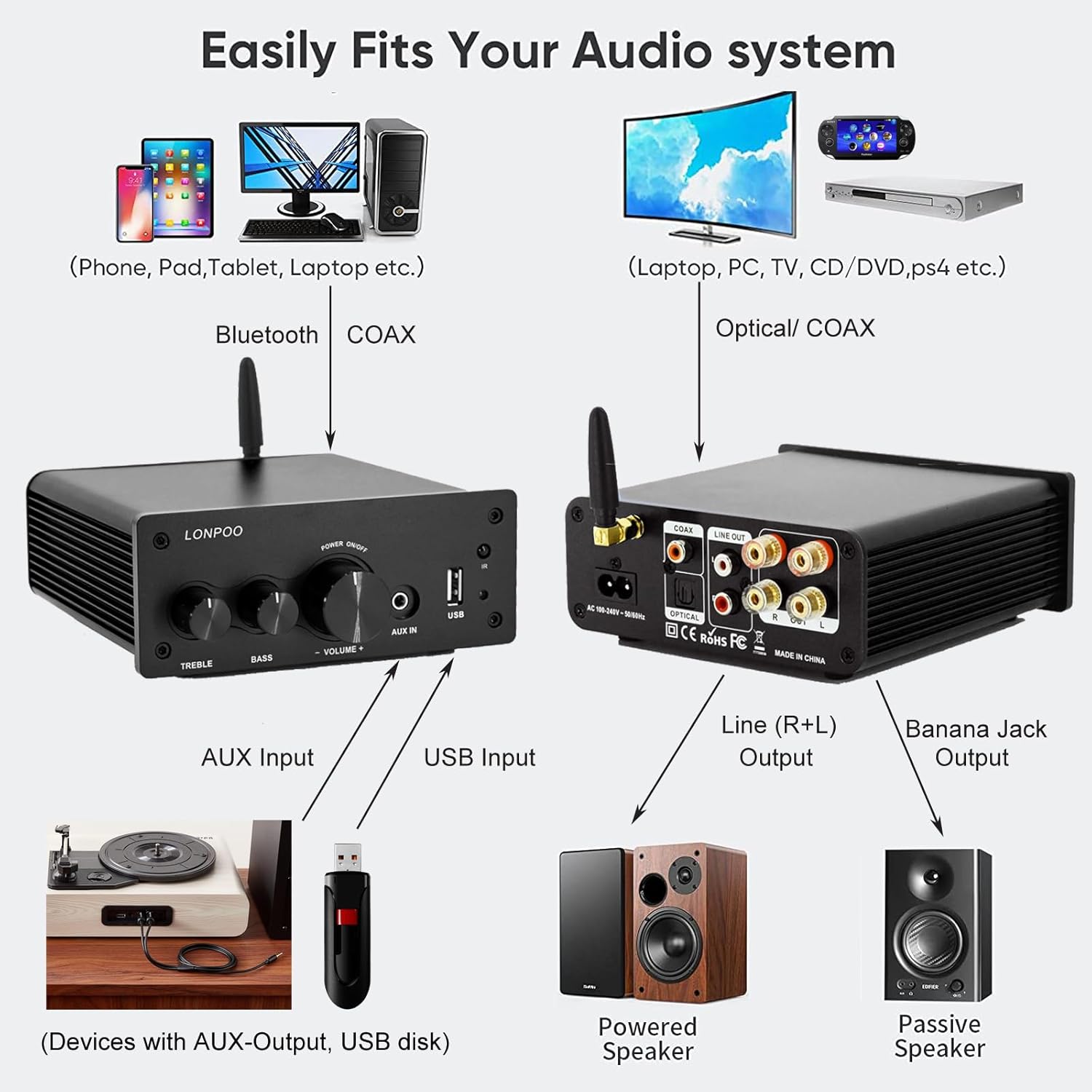
This diagram illustrates how the amplifier connects to a wide range of audio sources and output devices, including phones, PCs, TVs, CD players, powered speakers, and passive speakers.
- ബ്ലൂടൂത്ത്: Ensure the Bluetooth antenna is connected to the ബിടി എഎൻടി തുറമുഖം.
- AUX ഇൻപുട്ട്: Connect your smartphone, tablet, or other audio device using a 3.5mm audio cable to the ഓക്സ് ഇൻ മുൻ പാനലിലെ പോർട്ട്.
- യുഎസ്ബി ഇൻപുട്ട്: MP3 അല്ലെങ്കിൽ WAV ഓഡിയോ അടങ്ങിയ ഒരു USB ഫ്ലാഷ് ഡ്രൈവ് ഇടുക. fileഎസ് യുഎസ്ബി ഇൻപുട്ട് മുൻ പാനലിലെ പോർട്ട്.
- ഒപ്റ്റിക്കൽ ഇൻപുട്ട്: Connect your TV, CD player, or game console with an optical output to the ഒപ്റ്റിക്കൽ port on the rear panel using the provided optical cable.
- ഏകോപന ഇൻപുട്ട്: Connect your TV, DVD player, or other audio source with a coaxial output to the COAX പിൻ പാനലിലെ പോർട്ട്.
5.3 പവർ കണക്ഷൻ
വിതരണം ചെയ്ത എസി പവർ കോർഡ് ഇതിലേക്ക് ബന്ധിപ്പിക്കുക എസി പവർ പോർട്ട് യുടെ പിൻ പാനലിൽ amplifier, then plug the other end into a wall outlet.
6. പ്രവർത്തന നിർദ്ദേശങ്ങൾ
6.1 പവർ ഓൺ/ഓഫ്
പവർ ചെയ്യാൻ ampലൈഫയർ, നീണ്ട അമർത്തുക ദി മൾട്ടി-ഫംഗ്ഷൻ നോബ് on the front panel. The indicator light will illuminate. To power off, നീണ്ട അമർത്തുക the knob again.
6.2 ഇൻപുട്ട് തിരഞ്ഞെടുക്കൽ
To select an audio input source, ചെറിയ അമർത്തുക ദി മൾട്ടി-ഫംഗ്ഷൻ നോബ്. Each short press will cycle through the available inputs: Bluetooth, AUX, USB, Coaxial, and Optical. The ഇൻഡിക്കേറ്റർ ലൈറ്റ് will change color to reflect the active input mode (refer to Section 4.1 for color codes).
6.3 വോളിയം ക്രമീകരണം
തിരിക്കുക മൾട്ടി-ഫംഗ്ഷൻ നോബ് clockwise to increase the volume and counter-clockwise to decrease it.
6.4 ടോൺ നിയന്ത്രണം
ഉപയോഗിക്കുക ട്രെബിൾ ഒപ്പം ബാസ്സ് knobs on the front panel to adjust the high and low frequencies of the audio output according to your preference.
6.5 ബ്ലൂടൂത്ത് ജോടിയാക്കൽ

Connect your smartphone or other Bluetooth-enabled devices wirelessly to the amplifier for convenient audio streaming.
- Ensure the Bluetooth antenna is securely connected.
- പവർ ഓൺ amplifier and select the Bluetooth input mode (the indicator light will turn blue).
- നിങ്ങളുടെ ബ്ലൂടൂത്ത് പ്രാപ്തമാക്കിയ ഉപകരണത്തിൽ (ഉദാ: സ്മാർട്ട്ഫോൺ, ടാബ്ലെറ്റ്), ലഭ്യമായ ബ്ലൂടൂത്ത് ഉപകരണങ്ങൾക്കായി തിരയുക.
- Select "LONPOO AMP-615" from the list to pair.
- ജോടിയാക്കിയാൽ, ദി amplifier will play a confirmation sound, and you can stream audio wirelessly.
6.6 യുഎസ്ബി പ്ലേബാക്ക്

ദി amplifier supports direct audio input via 3.5mm AUX and USB, allowing for plug-and-play functionality with various devices.
ഇതിലേക്ക് ഒരു USB ഫ്ലാഷ് ഡ്രൈവ് ചേർക്കുക യുഎസ്ബി ഇൻപുട്ട് port. The amplifier will automatically detect and begin playing supported audio files (MP3, WAV). Use the remote control for playback functions like play/pause, next/previous track.
6.7 വിദൂര നിയന്ത്രണം
ഉൾപ്പെടുത്തിയിരിക്കുന്ന റിമോട്ട് കൺട്രോൾ സൗകര്യപ്രദമായ പ്രവർത്തനം അനുവദിക്കുന്നു amplifier from a distance. Functions include:
- പവർ ഓൺ/ഓഫ്
- വോളിയം കൂട്ടുക/താഴ്ത്തുക
- നിശബ്ദമാക്കുക
- Input Source Selection (BT, AUX, USB, COAX, OPT)
- USB Playback Controls (Play/Pause, Next/Previous Track)
7. പ്രശ്നപരിഹാരം
If you encounter any issues with your LONPOO Mini Hi-Fi Amplifier, please refer to the following troubleshooting guide:
| പ്രശ്നം | സാധ്യമായ കാരണം | പരിഹാരം |
|---|---|---|
| ശബ്ദ ഔട്ട്പുട്ട് ഇല്ല |
|
|
| Poor sound quality (distortion, low volume) |
|
|
| ബ്ലൂടൂത്ത് കണക്ഷൻ പ്രശ്നങ്ങൾ |
|
|
| Optical/Coaxial audio dropouts or no sound |
|
|
| മൂളൽ അല്ലെങ്കിൽ മൂളൽ ശബ്ദം |
|
|
8 സ്പെസിഫിക്കേഷനുകൾ
| മോഡൽ നമ്പർ | AMP-615 |
| ഔട്ട്പുട്ട് പവർ | 100W + 100W (200W total) |
| ചാനലുകൾ | 2.0 സ്റ്റീരിയോ |
| ബ്ലൂടൂത്ത് പതിപ്പ് | 5.3 |
| ഇൻപുട്ടുകൾ | Bluetooth, Optical, Coaxial, USB, 3.5mm AUX |
| ഔട്ട്പുട്ടുകൾ | RCA Line Out (L/R), Passive Speaker Output (Banana Jack compatible) |
| വൈദ്യുതി വിതരണം | AC 100-240V ~ 50 / 60Hz |
| അളവുകൾ (W x H x D) | 132 മിമി x 55 മിമി x 140 മിമി (ഏകദേശം 5.19 x 2.16 x 5.51 ഇഞ്ച്) |
| ഭാരം | 1.09 കി.ഗ്രാം (ഏകദേശം. 2.4 പൗണ്ട്) |
| ഉൾപ്പെടുത്തിയ ഘടകങ്ങൾ | ഹൈ-ഫൈ Amplifier, AC Cable, Remote Control, Optical Cable |
9. പരിപാലനം
- വൃത്തിയാക്കൽ: വൃത്തിയാക്കുന്നതിന് മുമ്പ് വൈദ്യുതി ബന്ധം വിച്ഛേദിക്കുക. പുറംഭാഗം തുടയ്ക്കാൻ മൃദുവായതും ഉണങ്ങിയതുമായ തുണി ഉപയോഗിക്കുക. ampലിഫയർ. അബ്രാസീവ് ക്ലീനറുകളോ ലായകങ്ങളോ ഉപയോഗിക്കരുത്.
- സംഭരണം: സംഭരിച്ചാൽ ampലൈഫയർ ദീർഘനേരം വച്ചതിനുശേഷം, വൈദ്യുതി വിതരണത്തിൽ നിന്ന് വിച്ഛേദിച്ച് തണുത്തതും വരണ്ടതുമായ സ്ഥലത്ത് സൂക്ഷിക്കുക.
- കേബിൾ മാനേജുമെന്റ്: കേടുപാടുകൾ സംഭവിക്കാതിരിക്കാൻ എല്ലാ കേബിളുകളും വൃത്തിയായി ക്രമീകരിച്ചിട്ടുണ്ടെന്നും പിരിമുറുക്കത്തിലല്ലെന്നും ഉറപ്പാക്കുക.
10. വാറൻ്റിയും പിന്തുണയും
This product comes with a standard manufacturer's warranty. For specific warranty details, please refer to the documentation provided with your purchase or contact your retailer. For technical support, troubleshooting assistance, or inquiries regarding spare parts, please contact LONPOO customer service or your authorized dealer. Information regarding spare parts availability is currently unavailable.