
AOSHIDA XQ-50 Pro 3
xDuoo XQ-50 Pro3 DAC Headphone Ampലൈഫ്ഫയർ യൂസർ മാന്വൽ
Model: XQ-50 Pro 3 | Brand: AOSHIDA
1. ആമുഖം
The xDuoo XQ-50 Pro3 is a versatile Bluetooth audio converter and DAC headphone amplifier designed to enhance your audio experience. It allows you to upgrade existing DACs or amplifiers with 24-bit lossless Bluetooth streaming, making it suitable for both vintage and modern audio setups. Featuring advanced chips like the Qualcomm QCC5125 for high-definition Bluetooth, CS8406 for digital conversion, and CS43131 for digital-to-analog conversion, the XQ-50 Pro3 delivers superior sound quality with multiple output options.
2. പാക്കേജ് ഉള്ളടക്കം
താഴെ ലിസ്റ്റ് ചെയ്തിരിക്കുന്ന എല്ലാ ഇനങ്ങളും നിങ്ങളുടെ പാക്കേജിൽ ഉൾപ്പെടുത്തിയിട്ടുണ്ടെന്ന് ദയവായി പരിശോധിക്കുക:
- 1 x ടൈപ്പ്-സി കേബിൾ
- 1 x ബ്ലൂടൂത്ത് ആന്റിന
- 1 x ഉപയോക്തൃ മാനുവൽ
- 1 x 6.35mm to 3.5mm converter
3. ഉൽപ്പന്നം കഴിഞ്ഞുview
ഫ്രണ്ട് പാനൽ

The front panel features a 1.3-inch color display, a 3.5mm headphone output jack, and a multi-function knob for volume control and menu navigation. A power/input selection button is also present.
പിൻ പാനൽ

The rear panel provides various input and output options, including RCA analog output, coaxial digital output, optical digital output, a USB-C input for PC DAC functionality, and a DC 5V power input. The Bluetooth antenna connector is also located here.
പ്രധാന സവിശേഷതകൾ
- വയർലെസ് കണക്റ്റിവിറ്റി: Upgrade your existing DAC or amplifier with 24-bit lossless Bluetooth streaming.
- High-Definition Bluetooth Streaming: Features Qualcomm's QCC5125 chip, supporting SBC, AAC, aptX, aptX_LL, aptX_HD, and LDAC formats.
- മികച്ച സിഗ്നൽ നിലവാരം: CS8406 digital conversion chip ensures high-quality optical or coaxial outputs.
- CS43131 DAC Chip: Independent DAC chip for exceptional sound with high signal-to-noise ratio (SNR) and low distortion.
- എളുപ്പമുള്ള നാവിഗേഷൻ: 1.3-inch color screen displays Bluetooth status, encoding format, and sampലിംഗ് നിരക്ക്.
- Rich Output Interfaces: Headphone output with 360mW power, RCA, Coaxial, and Optical outputs.
4. സജ്ജീകരണ ഗൈഡ്
4.1 പവർ കണക്ഷൻ
- Connect the provided Type-C cable to the DC 5V input port on the rear panel of the XQ-50 Pro3.
- Connect the other end of the Type-C cable to a compatible 5V/1A USB power adapter (not included) or a USB port on a computer.
4.2 ബ്ലൂടൂത്ത് ആന്റിന ഇൻസ്റ്റാളേഷൻ
- Gently screw the Bluetooth antenna into the designated connector on the rear panel of the XQ-50 Pro3.
- Ensure the antenna is securely fastened for optimal Bluetooth signal reception.
4.3 ഓഡിയോ കണക്ഷനുകൾ
Choose one of the following connection methods based on your audio system:
- To an Amplifier/Active Speakers (RCA): Connect RCA cables from the XQ-50 Pro3's RCA OUT ports to the analog input of your ampലൈഫയർ അല്ലെങ്കിൽ സജീവ സ്പീക്കറുകൾ.
- To a DAC (Optical/Coaxial): Connect an optical or coaxial cable from the XQ-50 Pro3's OPTICAL OUT or COAXIAL OUT port to the corresponding digital input on your external DAC.
- ഹെഡ്ഫോണുകളിലേക്ക്: Plug your headphones into the 3.5mm headphone jack on the front panel. Use the included 6.35mm to 3.5mm converter if your headphones have a 6.35mm plug.
- PC USB DAC Mode: Connect a USB-C cable from the XQ-50 Pro3's USB input to your computer. The device will function as an external sound card.
5. പ്രവർത്തന നിർദ്ദേശങ്ങൾ
5.1 പവർ ഓൺ/ഓഫ്
Press and hold the power button on the front panel to turn the device on or off.
5.2 ഇൻപുട്ട് തിരഞ്ഞെടുക്കൽ
Short press the power button to cycle through available input modes (Bluetooth, USB).
5.3 ബ്ലൂടൂത്ത് ജോടിയാക്കൽ
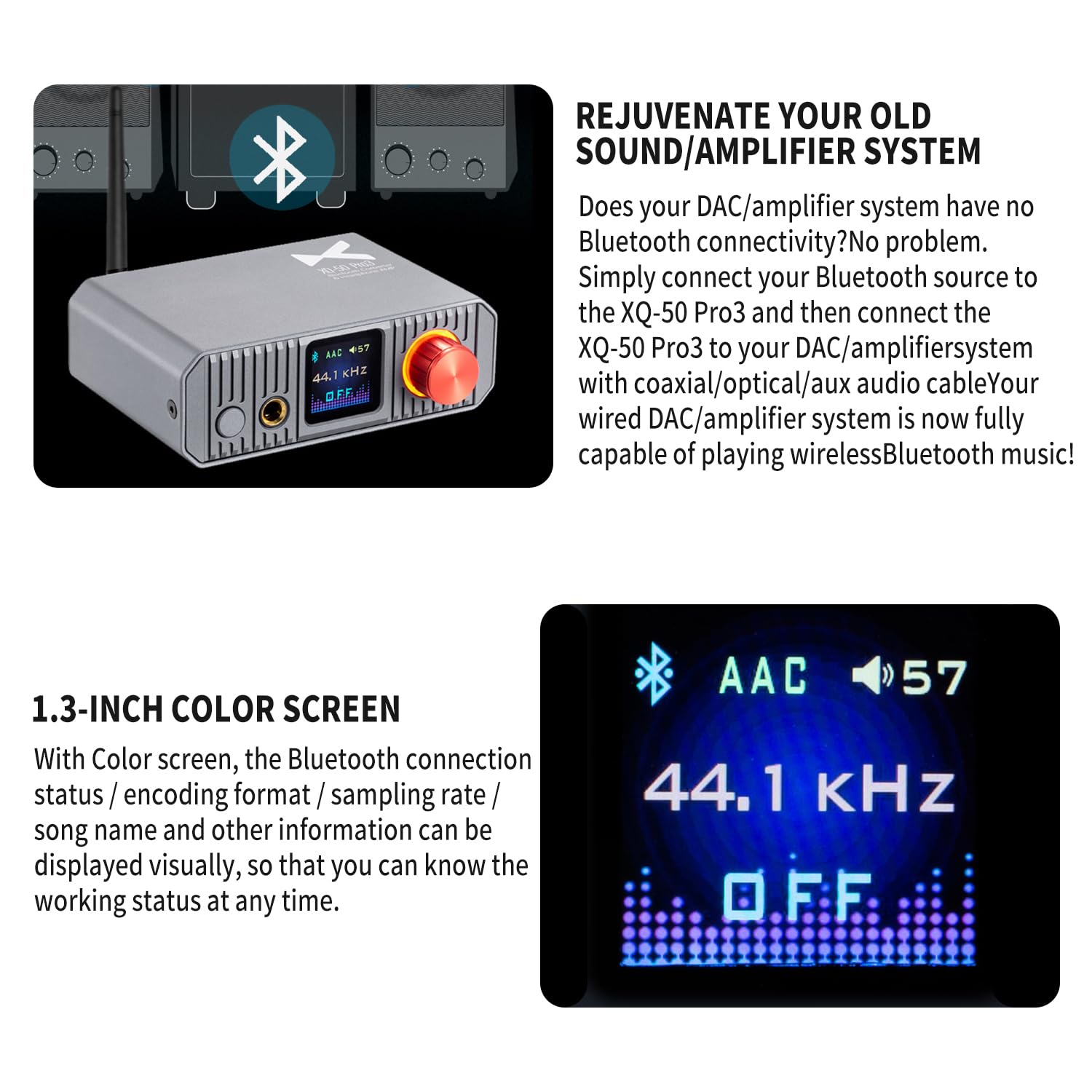
When the XQ-50 Pro3 is in Bluetooth mode, the 1.3-inch color screen will display the Bluetooth connection status. If not connected, it will automatically enter pairing mode. On your source device (phone, tablet, computer), search for "xDuoo XQ-50 Pro3" in the Bluetooth settings and select it to pair. The screen will confirm the connection and display the active codec (e.g., AAC, LDAC) and sampലിംഗ് നിരക്ക്.
5.4 വോളിയം നിയന്ത്രണം
Rotate the multi-function knob on the front panel clockwise to increase volume and counter-clockwise to decrease volume. This controls the headphone output and the analog RCA output level.
5.5 EQ Adjustment

The XQ-50 Pro3 supports EQ adjustment. Refer to the on-screen menu (accessed via the multi-function knob) to select and customize various EQ modes to tailor the sound to your preference.
6 സ്പെസിഫിക്കേഷനുകൾ
| പരാമീറ്റർ | മൂല്യം |
|---|---|
| വൈദ്യുതി വിതരണം | DC 5V/1A |
| ബ്ലൂടൂത്ത് പതിപ്പ് | 5.1 |
| പിന്തുണയ്ക്കുന്ന ഓഡിയോ ഫോർമാറ്റുകൾ | SBC, AAC, aptX, aptX_LL, aptX_HD, LDAC |
| ആശയവിനിമയ ശ്രേണി | ഏകദേശം 10 മീറ്റർ (33 അടി) |
| ഹെഡ്ഫോൺ ഔട്ട്പുട്ട് പവർ | 360mW (32 ohms @ 1kHz) |
| Headphone THD+N | 0.008% |
| Headphone SNR | 115dB |
| Headphone Crosstalk | 85dB |
| Optical Output THD+N | 0.00087% |
| Coaxial Output THD+N | 0.00087% |
| AUX Output THD+N | 0.002% |
| Optical Output Level | 0.5V P-P |
| Coaxial Output Level | 0.5V P-P |
| AUX Output Level | 2V |
| അളവുകൾ (L x W x H) | 10.0 x 12.0 x 4.2 സെ.മീ (3.94 x 4.72 x 1.65 ഇഞ്ച്) |
| ഭാരം | 0.34 കി.ഗ്രാം (0.75 പൗണ്ട്) |
| DAC ചിപ്പ് | CS43131 |
| ഡിജിറ്റൽ കൺവേർഷൻ ചിപ്പ് | CS8406 |
| ബ്ലൂടൂത്ത് ചിപ്പ് | ക്വാൽകോം QCC5125 |
7. പരിപാലനം
- വൃത്തിയാക്കൽ: ഉപകരണത്തിന്റെ പുറംഭാഗം വൃത്തിയാക്കാൻ മൃദുവായതും ഉണങ്ങിയതുമായ തുണി ഉപയോഗിക്കുക. ലിക്വിഡ് ക്ലീനറുകളോ ലായകങ്ങളോ ഉപയോഗിക്കുന്നത് ഒഴിവാക്കുക.
- സംഭരണം: നേരിട്ടുള്ള സൂര്യപ്രകാശത്തിൽ നിന്നും കടുത്ത താപനിലയിൽ നിന്നും മാറി തണുത്തതും വരണ്ടതുമായ സ്ഥലത്ത് ഉപകരണം സൂക്ഷിക്കുക.
- കൈകാര്യം ചെയ്യൽ: ശക്തമായ ആഘാതങ്ങൾക്ക് ഉപകരണം ഇടുകയോ ഇടുകയോ ചെയ്യുന്നത് ഒഴിവാക്കുക.
- വെൻ്റിലേഷൻ: Ensure proper ventilation around the device to prevent overheating. Do not block ventilation openings.
8. പ്രശ്നപരിഹാരം
| പ്രശ്നം | സാധ്യമായ കാരണം | പരിഹാരം |
|---|---|---|
| ശക്തിയില്ല | Power cable not connected; Power adapter faulty; Device off. | Ensure Type-C cable is securely connected. Try a different 5V/1A power adapter. Press and hold the power button to turn on. |
| ശബ്ദ ഔട്ട്പുട്ട് ഇല്ല | Incorrect input selected; Volume too low; Cables loose; Source device not playing. | Verify correct input mode. Increase volume. Check all audio cables. Ensure source device is playing audio. |
| ബ്ലൂടൂത്ത് ജോടിയാക്കൽ പരാജയം | Device not in pairing mode; Antenna loose; Source device too far; Interference. | Ensure XQ-50 Pro3 is in Bluetooth mode and displaying 'pairing'. Check antenna connection. Move source device closer. Reduce interference from other wireless devices. |
| ശബ്ദ വക്രീകരണം അല്ലെങ്കിൽ സ്ഥിരത | Poor cable connection; Source audio quality; High volume clipping. | Check all cable connections. Try a different audio source. Reduce volume on both XQ-50 Pro3 and source device. |
| ഡിസ്പ്ലേ പ്രവർത്തിക്കുന്നില്ല | Device off; Software glitch. | Ensure device is powered on. Try restarting the device by unplugging and re-plugging the power cable. |
9. വാറൻ്റിയും പിന്തുണയും
This product is covered by a standard manufacturer's warranty. For specific warranty terms and conditions, please refer to the warranty card included in your package or contact the retailer where the product was purchased. For technical support or further assistance, please reach out to the manufacturer or authorized service center.
കൂടുതൽ വിവരങ്ങൾക്ക്, നിങ്ങൾക്ക് സന്ദർശിക്കാവുന്നതാണ് AOSHIDA Store on Amazon.
Ask a question about this manual
Ask about setup, troubleshooting, compatibility, parts, safety, or missing instructions. Manuals+ will review the question and use this page’s manual context to help answer it.