
1. ആമുഖം
Thank you for choosing the Erazers XP2 Over The Ear Wireless Earbuds. These earbuds are designed to provide a superior audio experience with advanced features for convenience and versatility. This manual will guide you through the setup, operation, and maintenance of your new earbuds.
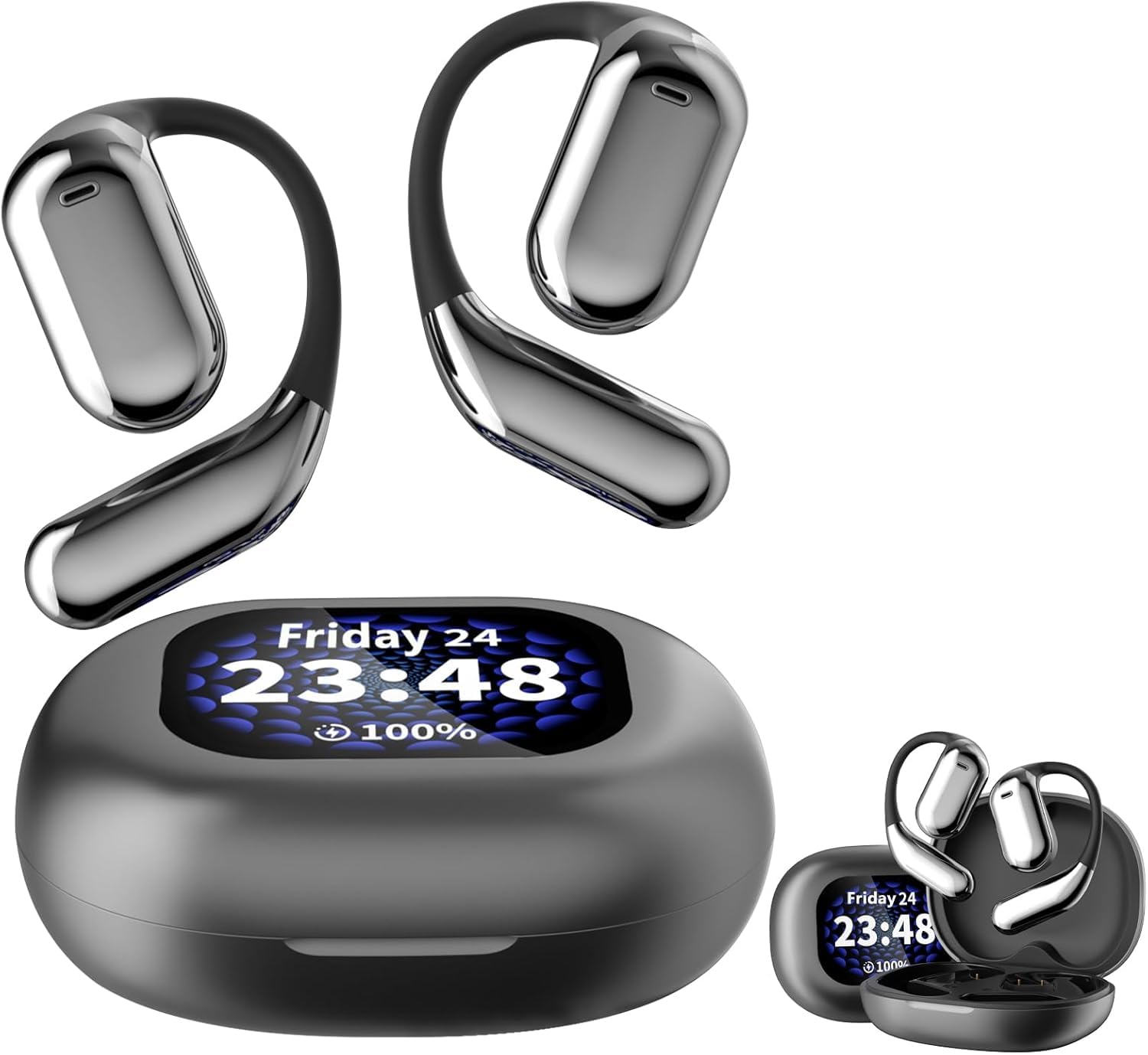
Figure 1: Erazers XP2 Earbuds and Charging Case
2. പാക്കേജ് ഉള്ളടക്കം
നിങ്ങളുടെ പാക്കേജിൽ എല്ലാ ഇനങ്ങളും ഉണ്ടെന്ന് ഉറപ്പാക്കുക:
- Erazers XP2 Over The Ear Wireless Earbuds (Left and Right)
- Intelligent Touch Screen Charging Case
- USB-C ചാർജിംഗ് കേബിൾ
- ഉപയോക്തൃ മാനുവൽ
3. ഉൽപ്പന്നം കഴിഞ്ഞുview
The Erazers XP2 earbuds feature an over-the-ear design for secure and comfortable fit, ideal for various activities including running, exercising, cycling, and gaming. The accompanying charging case is equipped with an intelligent touch screen for enhanced control.
3.1 ഇയർബഡുകൾ
- ഇയർപീസ് ആകൃതി: Over-ear for secure fit.
- നിയന്ത്രണ രീതി: Touch-sensitive controls for media and calls.
- ജല പ്രതിരോധം: IPX5 rated for sweatproof protection.
- ഓഡിയോ ഡ്രൈവർ: Dynamic Driver for superior sound quality.
3.2 ചാർജിംഗ് കേസ്
- ഡിസ്പ്ലേ: Intelligent full-color touch screen for easy navigation.
- ബാറ്ററി സൂചകം: LED display shows battery life of both earbuds and case.
- ചാർജിംഗ് ഇൻ്റർഫേസ്: USB-C for fast charging.
- അധിക സവിശേഷതകൾ: Flashlight, alarm clock, find my earphone function.
ചിത്രം 2: ചാർജിംഗ് കെയ്സിലെ ഇയർബഡുകൾ
4. സജ്ജീകരണം
4.1 പ്രാരംഭ ചാർജിംഗ്
ആദ്യ ഉപയോഗത്തിന് മുമ്പ്, ചാർജിംഗ് കെയ്സും ഇയർബഡുകളും പൂർണ്ണമായും ചാർജ് ചെയ്യുക.
- രണ്ട് ഇയർബഡുകളും ചാർജിംഗ് കേസിൽ വയ്ക്കുക.
- USB-C ചാർജിംഗ് കേബിൾ കേസിലെ ചാർജിംഗ് പോർട്ടിലേക്കും ഒരു പവർ സ്രോതസ്സിലേക്കും ബന്ധിപ്പിക്കുക.
- The LED display on the case will show the charging status. A full charge takes approximately 1 hour for the earbuds and 1.5 hours for the case.

Figure 3: Charging Time Overview
4.2 നിങ്ങളുടെ ഉപകരണവുമായി ജോടിയാക്കൽ
The earbuds will automatically enter pairing mode when removed from the case.
- ചാർജിംഗ് കേസ് തുറന്ന് രണ്ട് ഇയർബഡുകളും നീക്കം ചെയ്യുക.
- On your Bluetooth-enabled device (e.g., smartphone, tablet), go to Bluetooth settings.
- ഇതിനായി തിരയുക "Erazers XP2" in the list of available devices and select it to connect.
- കണക്റ്റ് ചെയ്തുകഴിഞ്ഞാൽ, ഇയർബഡുകൾ ജോടിയാക്കൽ വിജയകരമാണെന്ന് സൂചിപ്പിക്കും.
5. പ്രവർത്തന നിർദ്ദേശങ്ങൾ
5.1 Touch Screen Controls (Charging Case)
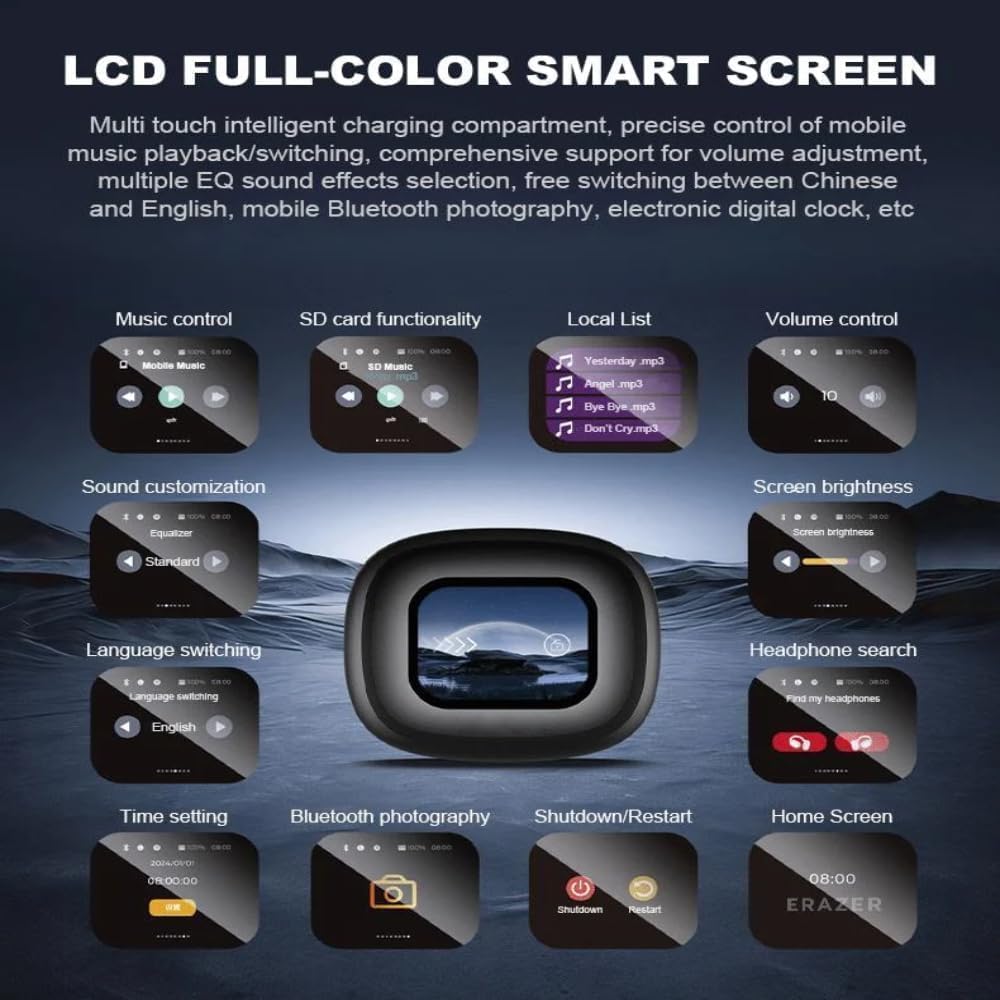
The intelligent touch screen on the charging case provides intuitive control over various functions:
- സംഗീത നിയന്ത്രണം: Play/pause, skip tracks, adjust volume.
- SD Card Functionality: Access and play music directly from a TF card inserted into the case.
- വോളിയം നിയന്ത്രണം: Adjust audio output directly from the case.
- ശബ്ദ ഇഷ്ടാനുസൃതമാക്കൽ: Select from multiple equalizer presets (Normal, Pop, Rock, Jazz, Classical, Folk, Custom) and spatial sound settings (movie mode, game mode).
- സ്ക്രീൻ തെളിച്ചം: Adjust the display brightness for comfort and battery saving.
- ഭാഷ മാറൽ: Change the display language (English, Mandarin, German, Spanish, Portuguese, French).
- Headphone Search: Use the "Find my earphone" feature to locate misplaced earbuds by emitting a sound.
- സമയ ക്രമീകരണം: Set the current time and use the alarm clock function.
- ബ്ലൂടൂത്ത് ഫോട്ടോഗ്രാഫി: നിങ്ങളുടെ ഫോണിന്റെ ക്യാമറ വിദൂരമായി നിയന്ത്രിക്കുക.
- ഷട്ട്ഡൗൺ/പുനരാരംഭിക്കുക: Power off or restart the device.

Figure 4: Charging Case Touch Screen Functions
5.2 ഇയർബഡ് ടച്ച് നിയന്ത്രണങ്ങൾ
The earbuds themselves feature touch-sensitive areas for direct control:
- പ്ലേ/താൽക്കാലികമായി നിർത്തുക: Click Left or Right earbud once.
- മുൻ ഗാനം: Hold Left earbud for 1 second.
- അടുത്ത ഗാനം: Hold Right earbud for 1 second.
- ഉത്തരം/ഹാംഗ് അപ്പ് കോൾ: Click Left or Right earbud once.
- കോൾ നിരസിക്കുക: Hold Left or Right earbud for 2 seconds.
- വോളിയം +: Double-click Left earbud to increase volume by 1 level.
- വ്യാപ്തം -: Double-click Right earbud to decrease volume by 1 level.
- സിരി സജീവമാക്കുക: Three clicks on the Left earbud.
- Switch Games/Movies Musical Pattern: Three clicks on the Right earbud.
- Switch to Transparent/Default ENC/Normal Mode: Four clicks on Left or Right earbud.

Figure 5: Earbud Touch Control Functions
5.3 ശബ്ദ കസ്റ്റമൈസേഷൻ
The Erazers XP2 offers various sound modes to optimize your listening experience:
- ഈക്വലൈസർ പ്രീസെറ്റുകൾ: Choose from Normal, Pop, Rock, Jazz, Classical, Folk, or create a Custom setting.
- സ്പേഷ്യൽ ശബ്ദം: Dedicated modes for movies and games enhance audio immersion.
- ശബ്ദ നിയന്ത്രണം: Adaptive Noise Cancellation (ANC) and Transparent/Normal modes are available.

Figure 6: Music Preferences and Sound Adjustment

Figure 7: Game Mode and Movie Mode Sound Enhancements
6. ചാർജിംഗ്
The charging case provides extended battery life for your earbuds. The case itself can be charged via USB-C.
- Earbud Endurance: Approximately 10 hours of single use.
- Overall Endurance (with case): 40 മണിക്കൂർ വരെ.
- കെയ്സ് ബാറ്ററി കപ്പാസിറ്റി: 500എംഎഎച്ച്.

ചിത്രം 8: ബാറ്ററി ലൈഫും ചാർജിംഗ് കേസ് ശേഷിയും
7. പരിപാലനം
7.1 വൃത്തിയാക്കൽ
പതിവായി വൃത്തിയാക്കുന്നത് മികച്ച പ്രകടനവും ശുചിത്വവും ഉറപ്പാക്കുന്നു:
- ഇയർബഡുകളും ചാർജിംഗ് കെയ്സും മൃദുവായതും ഉണങ്ങിയതും ലിന്റ് രഹിതവുമായ തുണി ഉപയോഗിച്ച് തുടയ്ക്കുക.
- അബ്രാസീവ് ക്ലീനറുകൾ, ആൽക്കഹോൾ, കെമിക്കൽ ലായകങ്ങൾ എന്നിവ ഉപയോഗിക്കരുത്.
- കേസിൽ ഇയർബഡുകൾ വയ്ക്കുന്നതിന് മുമ്പ് ചാർജിംഗ് കോൺടാക്റ്റുകൾ വൃത്തിയുള്ളതും വരണ്ടതുമാണെന്ന് ഉറപ്പാക്കുക.
7.2 സംഭരണം
ഇയർബഡുകൾ ഉപയോഗിക്കാത്തപ്പോൾ അവയുടെ ചാർജ്ജിംഗ് കെയ്സിൽ സൂക്ഷിക്കുക, അവയെ സംരക്ഷിക്കുകയും ചാർജ്ജ് ചെയ്തിരിക്കുകയും ചെയ്യുക.
7.3 ജല പ്രതിരോധം (IPX5)
The earbuds are IPX5 water resistant, meaning they can withstand splashes and sweat. They are not designed for submersion in water. Avoid exposing them to high-pressure water or prolonged immersion.
8. പ്രശ്നപരിഹാരം
If you encounter issues with your Erazers XP2 earbuds, try the following solutions:
| പ്രശ്നം | പരിഹാരം |
|---|---|
| ഇയർബഡുകൾ ജോടിയാക്കുന്നില്ല | Ensure earbuds are charged. Turn off and on Bluetooth on your device. Try resetting the earbuds (refer to case touch screen options). |
| ശബ്ദമോ കുറഞ്ഞ വോളിയമോ ഇല്ല | Check device volume and earbud volume controls. Ensure earbuds are properly seated in your ears. Clean any debris from earbud speakers. |
| ചാർജിംഗ് കേസ് ചാർജുചെയ്യുന്നില്ല | Ensure USB-C cable is securely connected to both the case and power source. Try a different cable or power adapter. |
| ടച്ച് നിയന്ത്രണങ്ങൾ പ്രതികരിക്കുന്നില്ല | Ensure earbuds are clean and dry. Restart the earbuds by placing them in the case and closing/opening the lid. |
| "Find my earphone" feature not working | Ensure the earbuds are within Bluetooth range of the charging case. |
9 സ്പെസിഫിക്കേഷനുകൾ
| ഫീച്ചർ | വിശദാംശങ്ങൾ |
|---|---|
| മോഡലിൻ്റെ പേര് | Erazers Over The Ear Earbuds Xp2 |
| ബ്രാൻഡ് | ജനറിക് |
| കണക്റ്റിവിറ്റി ടെക്നോളജി | വയർലെസ്സ് (ബ്ലൂടൂത്ത് 5.4) |
| ബ്ലൂടൂത്ത് ശ്രേണി | 10 meters (Barrier free) |
| ശബ്ദ നിയന്ത്രണം | അഡാപ്റ്റീവ് നോയ്സ് റദ്ദാക്കൽ |
| Earbud Battery Life (Single Use) | ഏകദേശം 10 മണിക്കൂർ |
| മൊത്തം ബാറ്ററി ലൈഫ് (കേസിനൊപ്പം) | ഏകദേശം 40 മണിക്കൂർ |
| ചാർജിംഗ് കെയ്സ് ബാറ്ററി കപ്പാസിറ്റി | 500mAh |
| ചാർജിംഗ് സമയം | Approx. 1 hour (earbuds), 1.5 hours (case) |
| ചാർജിംഗ് ഇൻ്റർഫേസ് | USB-C |
| ജല പ്രതിരോധ നില | IPX5 (വാട്ടർ റെസിസ്റ്റൻ്റ്) |
| ഫ്രീക്വൻസി റേഞ്ച് | 20 ഹെർട്സ് - 20,000 ഹെർട്സ് |
| പ്രതിരോധം | 80 ഓം |
| മെറ്റീരിയൽ | Plastic, Protein Leather, Silicone, Glass |
| മാതൃരാജ്യം | ചൈന |

ചിത്രം 9: വിശദമായ ഉൽപ്പന്ന പാരാമീറ്ററുകൾ
10. ഔദ്യോഗിക ഉൽപ്പന്ന വീഡിയോ
Video 1: Erazers Xp2 Over The Ear Earbuds - An official overview of the product's features and design.
11. വാറൻ്റിയും പിന്തുണയും
For warranty information and customer support, please refer to the contact details provided on the product packaging or the official Generic brand webസൈറ്റ്. ഏതെങ്കിലും വാറന്റി ക്ലെയിമുകൾക്കായി നിങ്ങളുടെ വാങ്ങൽ രസീത് സൂക്ഷിക്കുക.