
1. ഉൽപ്പന്നം കഴിഞ്ഞുview
The AWEI H27 Smart Watch is designed to provide comprehensive health monitoring, fitness tracking, and communication features. It features a 1.43-inch AMOLED HD screen, supports Bluetooth calls, and offers a variety of sports modes. The device is IP68 waterproof, making it suitable for daily use and various activities.
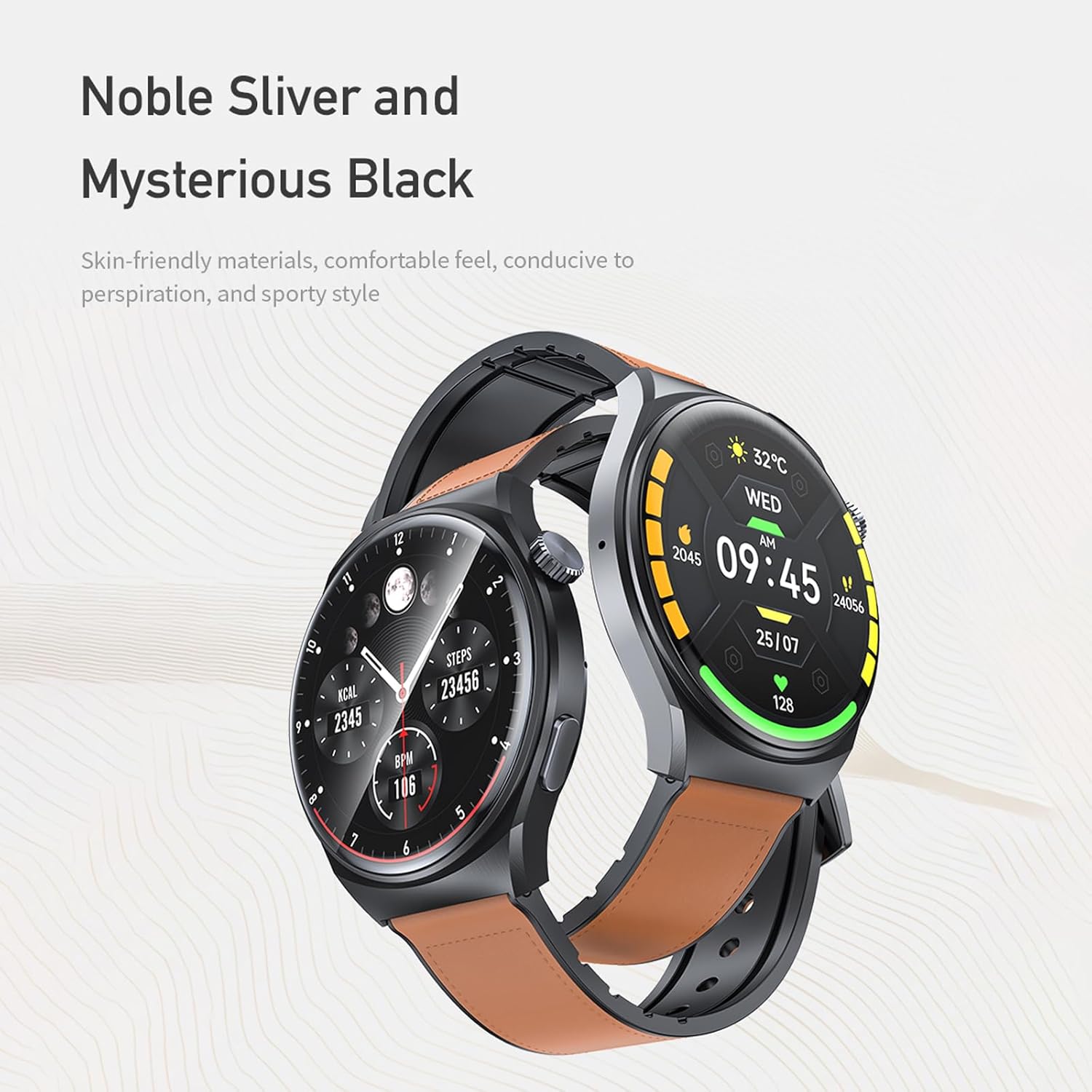
Image 1.1: AWEI H27 Smart Watch with two strap options, showcasing അതിന്റെ ഡിസൈൻ.

ചിത്രം 1.2: ക്ലോസ്-അപ്പ് view of the AWEI H27 Smart Watch screen, highlighting its 46mm round watch face, 72% screen-to-body ratio, 466x466 resolution, and 500nit luminance.
2. പാക്കേജ് ഉള്ളടക്കം
അൺബോക്സ് ചെയ്യുമ്പോൾ പാക്കേജ് ഉള്ളടക്കങ്ങൾ പരിശോധിക്കുക. ഏതെങ്കിലും ഇനങ്ങൾ നഷ്ടപ്പെട്ടാലോ കേടായാലോ, ഉപഭോക്തൃ പിന്തുണയുമായി ബന്ധപ്പെടുക.
- AWEI H27 Smart Watch
- മാഗ്നെറ്റിക് ചാർജിംഗ് കേബിൾ
- ഉപയോക്തൃ മാനുവൽ
3. സജ്ജീകരണം
3.1 ഉപകരണം ചാർജ് ചെയ്യുന്നു
- വാച്ചിന്റെ പിൻഭാഗത്തുള്ള ചാർജിംഗ് കോൺടാക്റ്റുകളുമായി മാഗ്നറ്റിക് ചാർജിംഗ് കേബിൾ ബന്ധിപ്പിക്കുക.
- കേബിളിന്റെ USB അറ്റം ഒരു സ്റ്റാൻഡേർഡ് USB പവർ അഡാപ്റ്ററിലേക്ക് (ഉൾപ്പെടുത്തിയിട്ടില്ല) അല്ലെങ്കിൽ ഒരു കമ്പ്യൂട്ടറിന്റെ USB പോർട്ടിലേക്ക് പ്ലഗ് ചെയ്യുക.
- Ensure the watch screen indicates charging. A full charge typically takes approximately 4 hours.
A full charge provides up to 7-10 days of daily use and up to 30 days of standby time. Actual battery life may vary based on usage frequency and settings.

Image 3.1: The AWEI H27 Smart Watch connected to its magnetic charging cable, displaying a charging icon on the screen.
3.2 പവർ ഓൺ/ഓഫ്
- പവർ ഓൺ: സ്ക്രീൻ പ്രകാശിക്കുന്നത് വരെ സൈഡ് ബട്ടൺ അമർത്തിപ്പിടിക്കുക.
- പവർ ഓഫ്: സൈഡ് ബട്ടൺ അമർത്തിപ്പിടിക്കുക, തുടർന്ന് സ്ക്രീനിൽ 'പവർ ഓഫ്' ഓപ്ഷൻ തിരഞ്ഞെടുക്കുക.
3.3 ആപ്പ് ഇൻസ്റ്റാളേഷനും ജോടിയാക്കലും
- ആപ്പ് ഡൗൺലോഡ് ചെയ്യുക: Scan the QR code provided in the physical manual or search for the official AWEI Smart Watch app in your smartphone's app store (compatible with Android and iOS).
- അക്കൗണ്ട് സൃഷ്ടിക്കുക: ഒരു അക്കൗണ്ട് സൃഷ്ടിക്കുന്നതിനോ ലോഗിൻ ചെയ്യുന്നതിനോ ആപ്പ് തുറന്ന് ഓൺ-സ്ക്രീൻ നിർദ്ദേശങ്ങൾ പാലിക്കുക.
- ഉപകരണം ജോടിയാക്കുക: Enable Bluetooth on your smartphone. In the app, navigate to 'Add Device' or 'Pair Device' and select 'AWEI H27' from the list of available devices. Confirm the pairing request on both your phone and the watch.
- സജ്ജീകരണം പൂർത്തിയാക്കുക: Follow any additional prompts in the app to complete the initial setup, including personal profile information and notification permissions.
4. ഓപ്പറേഷൻ
4.1 അടിസ്ഥാന നാവിഗേഷൻ
- ടച്ച് സ്ക്രീൻ: മെനുകളിലൂടെയും സ്ക്രീനുകളിലൂടെയും നാവിഗേറ്റ് ചെയ്യാൻ ഇടത്തോട്ടോ വലത്തോട്ടോ മുകളിലേക്കോ താഴേക്കോ സ്വൈപ്പ് ചെയ്യുക. ഇനങ്ങൾ തിരഞ്ഞെടുക്കാൻ ടാപ്പ് ചെയ്യുക.
- സൈഡ് ബട്ടൺ: Press to return to the previous screen or the watch face. Press and hold for power options or to access specific functions (customizable via app).
4.2 കോളുകൾ നടത്തുകയും ഉത്തരം നൽകുകയും ചെയ്യുന്നു
Once paired with your smartphone via Bluetooth, the AWEI H27 allows you to make and answer calls directly from your wrist.
- കോളുകൾക്ക് ഉത്തരം നൽകുന്നു: When an incoming call is received, tap the green answer icon on the watch screen.
- കോളുകൾ ചെയ്യുന്നു: Access the dialer or contact list on the watch (enabled via app settings) to initiate a call.
4.3 സ്പോർട്സ് മോഡുകൾ
The watch supports a variety of sports modes to track your physical activity. These include:
- ഓടുന്നു
- നടത്തം
- കാൽനടയാത്ര
- ബാസ്കറ്റ്ബോൾ
- ബാഡ്മിൻ്റൺ
- ബോട്ടിംഗ്
- കയറുന്നു
- ഫിറ്റ്നസ്
- സൈക്ലിംഗ്
- ഫുട്ബോൾ
- യോഗ
- കൂടാതെ കൂടുതൽ.
Select the desired sport mode before starting your activity to accurately track exercise duration, calories burned, and other relevant metrics.

Image 4.1: The AWEI H27 Smart Watch screen showing a selection of icons representing over 100 sports modes.
4.4 വാച്ച് ഫെയ്സുകൾ
Customize the appearance of your watch by changing watch faces. The AWEI H27 supports multiple cloud-based watch faces and allows you to upload personal photos.
- വാച്ച് മുഖങ്ങൾ മാറ്റുന്നു: Swipe on the watch face or use the companion app to browse and select different designs.
- ഇഷ്ടാനുസൃത വാച്ച് മുഖങ്ങൾ: Use the app to upload images from your phone to create personalized watch faces.

Image 4.2: A collage of various customizable watch faces available for the AWEI H27 Smart Watch, demonstrating personalization options.
4.5 ആരോഗ്യ നിരീക്ഷണം
The watch provides all-day health monitoring features, which may include heart rate tracking, sleep monitoring, and other health-related data. Refer to the companion app for detailed insights and historical data.
4.6 മറ്റ് പ്രവർത്തനങ്ങൾ
The AWEI H27 Smart Watch includes additional features for convenience:
- സംഗീത നിയന്ത്രണം
- റിമോട്ട് ഫോട്ടോഗ്രാഫി
- അലാറം ക്ലോക്ക്
- Female Physiological Cycle Tracking
- ഉദാസീനമായ ഓർമ്മപ്പെടുത്തലുകൾ
- Wrist-flip Display Activation
5. പരിപാലനം
5.1 ജല പ്രതിരോധം (IP68)
The AWEI H27 Smart Watch has an IP68 waterproof rating. This means it is resistant to dust and can withstand immersion in water up to 1.5 meters for 30 minutes. It is suitable for daily activities such as hand washing, face washing, and sweating during exercise.
പ്രധാനപ്പെട്ടത്: The IP68 rating does not mean the watch is suitable for swimming, diving, or exposure to hot water, steam, or high-pressure water jets. Water resistance may decrease over time with normal wear and tear. Avoid using the watch in saunas, hot tubs, or during activities involving high-speed water. If the watch gets wet, dry it thoroughly before charging or using buttons.
5.2 വൃത്തിയാക്കൽ
- Wipe the watch and strap regularly with a soft, dry, lint-free cloth.
- ആവശ്യമെങ്കിൽ, ഡിampen the cloth slightly with water. Do not use soap, cleaning agents, abrasive materials, or compressed air.
- ചാർജ് ചെയ്യുന്നതിനുമുമ്പ് ചാർജിംഗ് കോൺടാക്റ്റുകൾ വൃത്തിയുള്ളതും വരണ്ടതുമാണെന്ന് ഉറപ്പാക്കുക.
5.3 സംഭരണം
ദീർഘനേരം ഉപയോഗിക്കാത്തപ്പോൾ, നേരിട്ടുള്ള സൂര്യപ്രകാശത്തിൽ നിന്നും കടുത്ത താപനിലയിൽ നിന്നും മാറി തണുത്തതും വരണ്ടതുമായ സ്ഥലത്ത് വാച്ച് സൂക്ഷിക്കുക.
6. പ്രശ്നപരിഹാരം
6.1 ഉപകരണം ഓണാക്കുന്നില്ല
- വാച്ച് പൂർണ്ണമായും ചാർജ് ചെയ്തിട്ടുണ്ടെന്ന് ഉറപ്പാക്കുക. കുറഞ്ഞത് 30 മിനിറ്റെങ്കിലും ചാർജറുമായി ബന്ധിപ്പിക്കുക.
- നിർബന്ധിതമായി റീബൂട്ട് ചെയ്യാൻ ശ്രമിക്കുന്നതിന് സൈഡ് ബട്ടൺ 10-15 സെക്കൻഡ് അമർത്തിപ്പിടിക്കുക.
6.2 കണക്റ്റിവിറ്റി പ്രശ്നങ്ങൾ (ബ്ലൂടൂത്ത്)
- നിങ്ങളുടെ സ്മാർട്ട്ഫോണിൽ ബ്ലൂടൂത്ത് പ്രവർത്തനക്ഷമമാക്കിയിട്ടുണ്ടെന്ന് ഉറപ്പാക്കുക.
- Make sure the watch is within the Bluetooth range of your phone (typically 10 meters).
- നിങ്ങളുടെ വാച്ചും സ്മാർട്ട്ഫോണും പുനരാരംഭിക്കുക.
- If the issue persists, unpair the device from your phone's Bluetooth settings and re-pair it through the app.
6.3 Inaccurate Data (Heart Rate, Steps)
- വാച്ച് നിങ്ങളുടെ കൈത്തണ്ടയിൽ നന്നായി ധരിക്കുന്നുണ്ടെന്ന് ഉറപ്പാക്കുക, അധികം ഇറുകിയതോ അധികം അയഞ്ഞതോ അല്ല.
- Clean the sensors on the back of the watch to remove any dirt or debris.
- Ensure your personal information (height, weight, age) is accurately entered in the companion app.
6.4 കുറഞ്ഞ ബാറ്ററി ലൈഫ്
- Frequent use of features like Bluetooth calling, continuous heart rate monitoring, and high screen brightness can reduce battery life.
- സ്ക്രീൻ തെളിച്ചവും സ്ക്രീൻ ഓൺ സമയവും കുറയ്ക്കുക.
- Limit the number of notifications received on the watch.
- Disable continuous health monitoring features if not needed constantly.
7 സ്പെസിഫിക്കേഷനുകൾ
| ബ്രാൻഡ് | അവേയ് |
| മോഡൽ | H27 |
| സ്ക്രീൻ വലിപ്പം | 1.43 ഇഞ്ച് |
| ഡിസ്പ്ലേ തരം | അമോലെഡ് |
| ബാറ്ററി ശേഷി | 300 മില്ലിamp മണിക്കൂറുകൾ |
| ചാർജിംഗ് സമയം | ഏകദേശം 4 മണിക്കൂർ |
| കണക്റ്റിവിറ്റി | ബ്ലൂടൂത്ത് |
| ജല പ്രതിരോധം | IP68 |
| അനുയോജ്യമായ ഉപകരണങ്ങൾ | Smartphone (Android and iOS) |
| ഹ്യൂമൻ ഇന്റർഫേസ് ഇൻപുട്ട് | ബട്ടണുകൾ, ടച്ച്സ്ക്രീൻ |
| പ്രത്യേക സവിശേഷതകൾ | Multi-sport mode, One-touch Bluetooth calling |
8. വാറൻ്റിയും പിന്തുണയും
The AWEI H27 Smart Watch comes with a one-year warranty from the date of purchase. This warranty covers manufacturing defects under normal use.
For warranty claims, technical support, or any questions regarding your device, please contact the seller or manufacturer's customer service. Refer to your purchase documentation for specific contact details.