
മോൺസ്റ്റർ ക്ലാരിറ്റി 102 പ്ലസ്
മോൺസ്റ്റർ ക്ലാരിറ്റി 102 പ്ലസ് വയർലെസ് ഇയർബഡ്സ് യൂസർ മാനുവൽ
Model: Clarity 102 Plus | Brand: Monster
1. ആമുഖം
Thank you for choosing the Monster Clarity 102 Plus Wireless Earbuds. These earbuds are designed to provide a superior audio experience with advanced features for daily use, workouts, and professional calls. This manual will guide you through the setup, operation, and maintenance of your new earbuds to ensure optimal performance and longevity.
പ്രധാന സവിശേഷതകൾ:
- Pure Monster Sound with HiFi Stereo for immersive audio.
- 4-Mic AI Clear Calls for crystal-clear communication.
- ചാർജിംഗ് കെയ്സ് ഉപയോഗിച്ച് ആകെ 30 മണിക്കൂർ വരെ പ്ലേടൈം.
- IPX6 Water Resistant design for protection against splashes.
- Ergonomic design with multiple eartip sizes for a comfortable and secure fit.
- Advanced Bluetooth 5.4 for stable and low-latency connectivity.
2. ബോക്സിൽ എന്താണുള്ളത്?
എല്ലാ ഇനങ്ങളും ഉണ്ടെന്ന് ഉറപ്പാക്കാൻ നിങ്ങളുടെ പാക്കേജിന്റെ ഉള്ളടക്കങ്ങൾ പരിശോധിക്കുക:
- 1 x Monster Clarity 102 AirLinks Wireless Earbuds
- 1 x യുഎസ്ബി-സി ചാർജിംഗ് കേബിൾ
- 1 x ഉപയോക്തൃ മാനുവൽ (ഈ പ്രമാണം)
- 3 x Replacement Ear Caps (various sizes)
3. ഉൽപ്പന്നം കഴിഞ്ഞുview

Image: The Monster Clarity 102 Plus Wireless Earbuds shown with their compact charging case.
The Monster Clarity 102 Plus earbuds feature a sleek, in-ear design with a stem for enhanced microphone placement. The accompanying charging case is designed for portability and provides extended battery life.
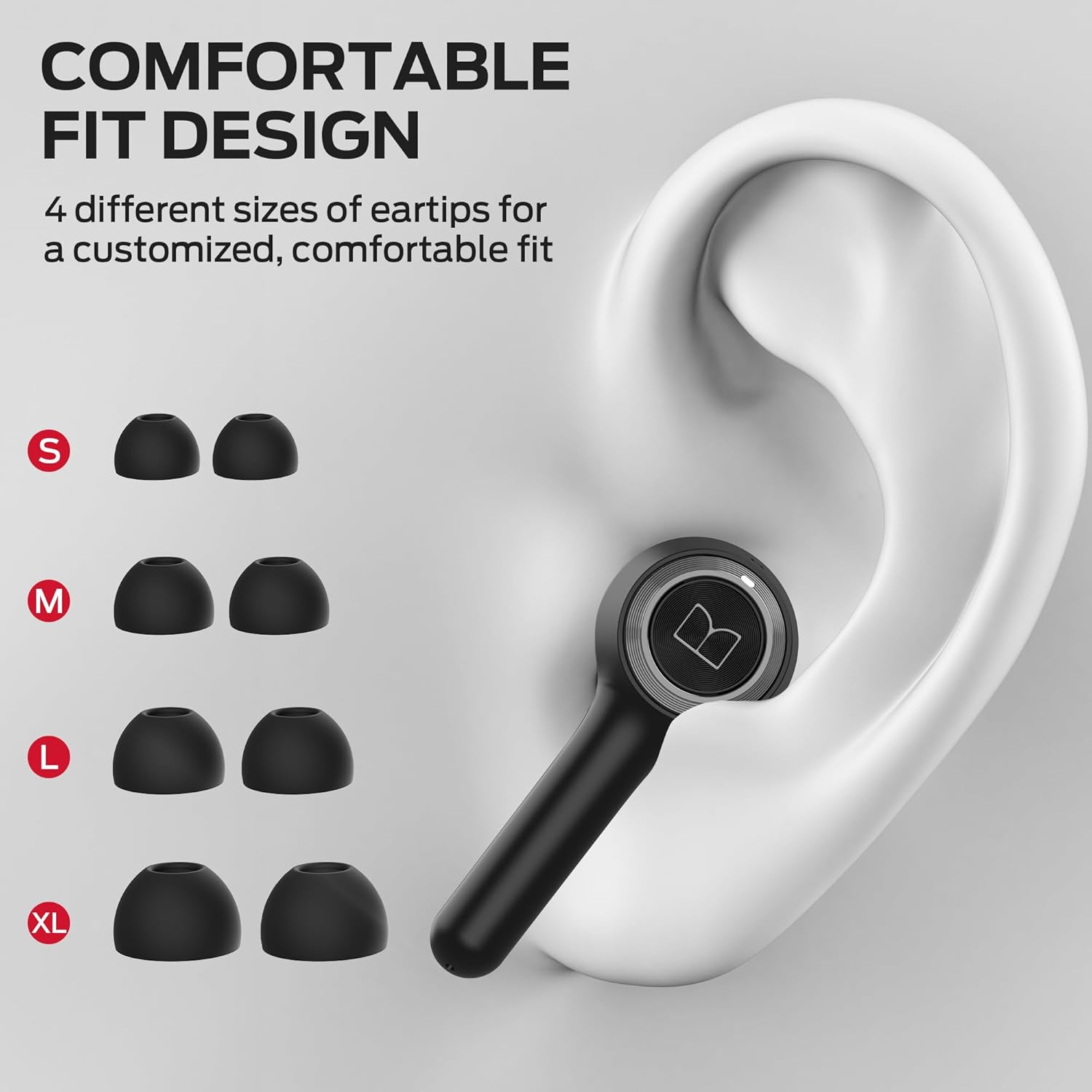
Image: Illustration of the four different eartip sizes (S, M, L, XL) provided for a customized and comfortable fit.
The earbuds come with four sizes of soft rubber ear caps (S, M, L, XL) to ensure a secure and comfortable fit for various ear shapes. The M size is pre-installed.
4. സജ്ജീകരണം
4.1 ഇയർബഡുകളും കേസും ചാർജ് ചെയ്യുന്നു
Before first use, fully charge the earbuds and the charging case. The charging case has a battery capacity of 500 Milliamp മണിക്കൂറുകൾ.
- ഇയർബഡുകൾ ചാർജിംഗ് കേസിൽ വയ്ക്കുക. അവ ശരിയായി ഘടിപ്പിച്ചിട്ടുണ്ടെന്ന് ഉറപ്പാക്കുക; കാന്തിക കോൺടാക്റ്റുകൾ അവയെ സ്ഥാനത്ത് ഉറപ്പിക്കും.
- USB-C ചാർജിംഗ് കേബിൾ കേസിലെ ചാർജിംഗ് പോർട്ടിലേക്കും മറ്റേ അറ്റം ഒരു USB പവർ സ്രോതസ്സിലേക്കും (ഉദാ: വാൾ അഡാപ്റ്റർ, കമ്പ്യൂട്ടർ USB പോർട്ട്) ബന്ധിപ്പിക്കുക.
- The LED indicators on the charging case will show the charging status. A full charge for the case and earbuds typically takes approximately 3 hours.

Image: The earbuds inside the charging case, illustrating the ultra-long battery life of 6 hours on a single charge and 30 hours total with the case.
4.2 നിങ്ങളുടെ ഉപകരണവുമായി ജോടിയാക്കൽ
The Monster Clarity 102 Plus earbuds utilize Bluetooth 5.4 technology for stable and efficient connections.
- ഒരു-ഘട്ട ജോടിയാക്കൽ: After the initial pairing, simply remove both wireless earbuds from the charging case, and they will automatically connect to your last paired device.
- ആദ്യ തവണ ജോടിയാക്കൽ:
- ഇയർബഡുകൾ ചാർജ്ജ് ചെയ്തിട്ടുണ്ടെന്ന് ഉറപ്പാക്കുക.
- ചാർജിംഗ് കേസ് തുറക്കുക. ഇയർബഡുകൾ സ്വയമേവ ജോടിയാക്കൽ മോഡിലേക്ക് പ്രവേശിക്കും.
- നിങ്ങളുടെ ഉപകരണത്തിൽ (സ്മാർട്ട്ഫോൺ, ടാബ്ലെറ്റ്, കമ്പ്യൂട്ടർ), ബ്ലൂടൂത്ത് ക്രമീകരണങ്ങളിലേക്ക് പോയി ബ്ലൂടൂത്ത് ഓണാക്കുക.
- ഇതിനായി തിരയുക available devices and select "Monster Clarity 102 Plus" from the list.
- കണക്റ്റ് ചെയ്തുകഴിഞ്ഞാൽ, നിങ്ങൾക്ക് ഒരു കേൾക്കാവുന്ന സ്ഥിരീകരണം കേൾക്കാൻ കഴിയും, ഇയർബഡുകളുടെ ഇൻഡിക്കേറ്റർ ലൈറ്റുകൾ മാറുകയും ചെയ്യും.
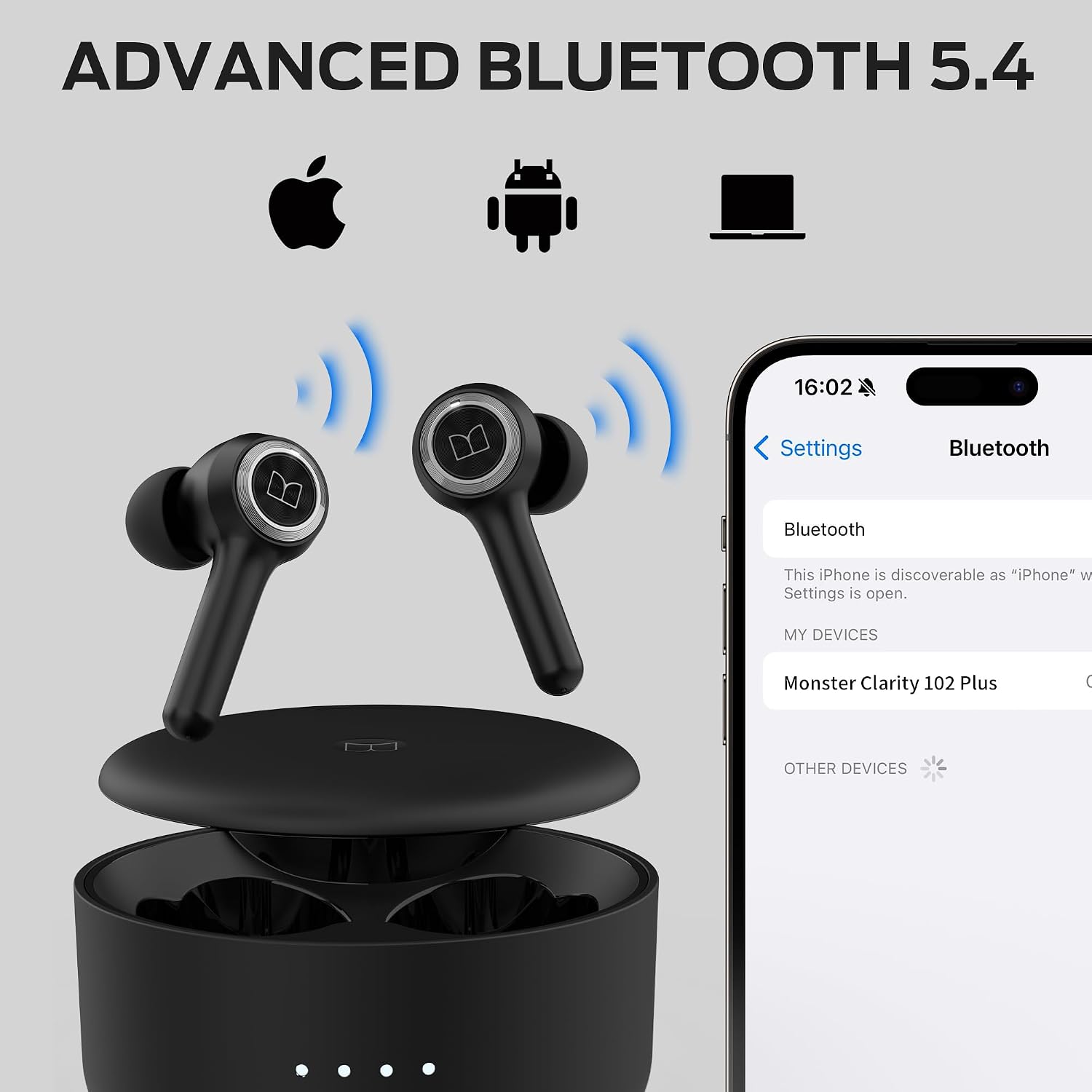
Image: The earbuds and charging case with a smartphone screen showing the Bluetooth pairing process for the Monster Clarity 102 Plus.
4.3 ഇയർബഡുകൾ ധരിക്കൽ
മികച്ച ശബ്ദ നിലവാരത്തിനും സുഖസൗകര്യത്തിനും, ശരിയായ ഇയർടിപ്പ് വലുപ്പം തിരഞ്ഞെടുത്ത് ശരിയായ ഫിറ്റ് ഉറപ്പാക്കുക.
- Select the eartips that provide a snug seal in your ear canal. Experiment with different sizes (S, M, L, XL) for the best fit.
- Gently insert each earbud into your ear.
- Twist the earbuds slightly forward or backward until they feel secure and comfortable. A good seal is crucial for bass response and noise isolation.
5. പ്രവർത്തന നിർദ്ദേശങ്ങൾ
5.1 ബട്ടൺ നിയന്ത്രണങ്ങൾ
The Monster Clarity 102 Plus earbuds feature intuitive press-button controls on each earbud. The following table outlines the functions:

Image: A visual guide to the simple button controls on the Monster Clarity 102 Plus earbuds, detailing actions for playback, calls, and voice assistant.
| ആക്ഷൻ | നിയന്ത്രണം |
|---|---|
| പ്ലേ/താൽക്കാലികമായി നിർത്തുക | Press 1x (Either Earbud) |
| അടുത്ത ഗാനം | 2s അമർത്തുക (വലത് ഇയർബഡ്) |
| മുൻ ഗാനം | 2s അമർത്തുക (ഇടത് ഇയർബഡ്) |
| വോളിയം കൂട്ടുക | Press 2x (Right Earbud) |
| വോളിയം ഡൗൺ | Press 2x (Left Earbud) |
| ഉത്തരം / കോൾ അവസാനിപ്പിക്കുക | Press 1x (Either Earbud) |
| കോൾ നിരസിക്കുക | Press 2s (Either Earbud) |
| വോയ്സ് അസിസ്റ്റൻ്റ് | Press 2s (Either Earbud) |
5.2 കോളുകൾ ചെയ്യലും സ്വീകരിക്കലും
The earbuds are equipped with 4 built-in microphones (2 per earbud) and an AI algorithm to ensure crystal-clear calls by picking up your voice effectively.

Image: A man demonstrating the use of Monster Clarity 102 Plus earbuds for a phone call, highlighting the incredible call quality.
- ഒരു കോളിന് മറുപടി നൽകുന്നു: ഇയർബഡുകളുടെ ബട്ടണുകളിൽ ഏതെങ്കിലുമൊന്ന് ഒരിക്കൽ അമർത്തുക.
- ഒരു കോൾ അവസാനിപ്പിക്കുന്നു: Press either earbud button once during a call.
- ഒരു കോൾ നിരസിക്കുന്നു: ഇയർബഡുകളിലെ ഏതെങ്കിലും ഒരു ബട്ടൺ 2 സെക്കൻഡ് അമർത്തിപ്പിടിക്കുക.
5.3 ഓഡിയോ പ്ലേബാക്ക്
Experience Pure Monster Sound with a unique digital audio processor that enhances mid to high frequencies and provides deep bass.

Image: A close-up of a Monster Clarity 102 Plus earbud with visual representations of sound waves and an equalizer, illustrating the 'Pure Monster Sound' feature.
- സംഗീതം പ്ലേ ചെയ്യുന്നു: Once connected, open your music application on your device and begin playback.
- Pausing Music: Press either earbud button once. Press again to resume.
- വോളിയം ക്രമീകരിക്കുന്നു: Use the dedicated volume controls as described in the Button Controls section (Press 2x Right for Volume Up, Press 2x Left for Volume Down).
6. പരിപാലനം
ശരിയായ അറ്റകുറ്റപ്പണി നിങ്ങളുടെ ഇയർബഡുകളുടെ ദീർഘായുസ്സും മികച്ച പ്രകടനവും ഉറപ്പാക്കുന്നു.
- വൃത്തിയാക്കൽ: Regularly clean the earbuds, especially the eartips and charging contacts, with a soft, dry, lint-free cloth. Remove eartips and clean them separately with mild soap and water if necessary, ensuring they are completely dry before reattaching.
- ജല പ്രതിരോധം: The earbuds are IPX6 Water Resistant, meaning they are protected against powerful water jets. This makes them suitable for workouts and light rain. However, they are not designed for submersion in water. Do not expose them to saltwater, chlorinated water, or other liquids. Ensure the charging port is dry before charging.

Image: The Monster Clarity 102 Plus earbuds shown with water droplets, signifying their IPX6 water-resistant rating, suitable for rain, sweat, and splashes.
- സംഭരണം: ഉപയോഗത്തിലില്ലാത്തപ്പോൾ, പൊടി, കേടുപാടുകൾ എന്നിവയിൽ നിന്ന് സംരക്ഷിക്കുന്നതിനും ചാർജ്ജ് ചെയ്ത് നിലനിർത്തുന്നതിനും ഇയർബഡുകൾ അവയുടെ ചാർജിംഗ് കേസിൽ സൂക്ഷിക്കുക.
- താപനില: Avoid exposing the earbuds and charging case to extreme temperatures (hot or cold) or direct sunlight for extended periods.
7. പ്രശ്നപരിഹാരം
If you encounter issues with your Monster Clarity 102 Plus earbuds, try the following troubleshooting steps:
- ഇയർബഡുകൾ ജോടിയാക്കുന്നില്ല/കണക്റ്റ് ചെയ്യുന്നില്ല:
- രണ്ട് ഇയർബഡുകളും ചാർജ്ജ് ചെയ്തിട്ടുണ്ടെന്ന് ഉറപ്പാക്കുക.
- നിങ്ങളുടെ ഉപകരണത്തിൽ Bluetooth ഓഫാക്കുക, തുടർന്ന് അത് വീണ്ടും ഓണാക്കുക.
- Forget/delete "Monster Clarity 102 Plus" from your device's Bluetooth list.
- Place both earbuds back into the charging case, close the lid, wait a few seconds, then open the lid to re-enter pairing mode.
- Attempt to re-pair the earbuds with your device.
- ഒന്നോ രണ്ടോ ഇയർബഡുകളിൽ നിന്ന് ശബ്ദമില്ല:
- നിങ്ങളുടെ ഉപകരണത്തിലെയും ഇയർബഡുകളിലെയും വോളിയം ലെവൽ പരിശോധിക്കുക.
- ഇയർബഡുകൾ നിങ്ങളുടെ ഉപകരണവുമായി ശരിയായി ബന്ധിപ്പിച്ചിട്ടുണ്ടെന്ന് ഉറപ്പാക്കുക.
- വ്യത്യസ്തമായ ഒരു ആപ്ലിക്കേഷനിൽ നിന്നോ ഉറവിടത്തിൽ നിന്നോ ഓഡിയോ പ്ലേ ചെയ്യാൻ ശ്രമിക്കുക.
- Re-pair the earbuds as described above.
- ചാർജിംഗ് പ്രശ്നങ്ങൾ:
- USB-C കേബിൾ കേസിലേക്കും പവർ സ്രോതസ്സിലേക്കും സുരക്ഷിതമായി ബന്ധിപ്പിച്ചിട്ടുണ്ടെന്ന് ഉറപ്പാക്കുക.
- മറ്റൊരു USB-C കേബിളും കൂടാതെ/അല്ലെങ്കിൽ പവർ അഡാപ്റ്ററും പരീക്ഷിച്ചുനോക്കൂ.
- ഇയർബഡുകളിലെയും കേസിന്റെ ഉള്ളിലെയും ചാർജിംഗ് കോൺടാക്റ്റുകൾ ഉണങ്ങിയ കോട്ടൺ സ്വാബ് ഉപയോഗിച്ച് വൃത്തിയാക്കുക.
- കുറിപ്പ്: This product does not currently support a dedicated mobile application for advanced controls or equalizer adjustments. All controls are managed via the physical buttons on the earbuds.
8 സ്പെസിഫിക്കേഷനുകൾ
Detailed technical specifications for the Monster Clarity 102 Plus Wireless Earbuds:
| ഫീച്ചർ | സ്പെസിഫിക്കേഷൻ |
|---|---|
| മോഡലിൻ്റെ പേര് | ക്ലാരിറ്റി 102 പ്ലസ് |
| ബ്രാൻഡ് | രാക്ഷസൻ |
| കണക്റ്റിവിറ്റി ടെക്നോളജി | വയർലെസ് |
| വയർലെസ് കമ്മ്യൂണിക്കേഷൻ ടെക്നോളജി | ബ്ലൂടൂത്ത് |
| ബ്ലൂടൂത്ത് പതിപ്പ് | 5.4 |
| ബ്ലൂടൂത്ത് ശ്രേണി | 10 മീറ്റർ |
| ഇയർബഡ് പ്ലേടൈം (സിംഗിൾ ചാർജ്) | 6 മണിക്കൂർ വരെ |
| ആകെ പ്ലേടൈം (ചാർജിംഗ് കേസിനൊപ്പം) | 30 മണിക്കൂർ വരെ |
| ചാർജിംഗ് സമയം | ഏകദേശം 3 മണിക്കൂർ |
| കാരിയർ കെയ്സ് ബാറ്ററി കപ്പാസിറ്റി | 500 മില്ലിamp മണിക്കൂറുകൾ |
| ജല പ്രതിരോധ നില | IPX6 വാട്ടർ റെസിസ്റ്റൻ്റ് |
| ഇനത്തിൻ്റെ ഭാരം | 5.3 ഔൺസ് (ആകെ പാക്കേജ്) |
| നിയന്ത്രണ തരം | ബട്ടൺ നിയന്ത്രണം |
| നിർമ്മാതാവ് | രാക്ഷസൻ |
9. വാറൻ്റിയും പിന്തുണയും
Monster products are manufactured to the highest quality standards. For information regarding warranty coverage, please refer to the warranty card included in your product packaging or visit the official Monster webസൈറ്റ്. വാറന്റി ക്ലെയിമുകൾക്കായി നിങ്ങളുടെ വാങ്ങലിന്റെ തെളിവ് സൂക്ഷിക്കുക.
For technical support, troubleshooting assistance beyond this manual, or general inquiries, please visit the official Monster support page or contact their customer service directly. Contact information can typically be found on the Monster webസൈറ്റ് അല്ലെങ്കിൽ നിങ്ങളുടെ ഉൽപ്പന്ന പാക്കേജിംഗിൽ.
Ask a question about this manual
Ask about setup, troubleshooting, compatibility, parts, safety, or missing instructions. Manuals+ will review the question and use this page’s manual context to help answer it.