
EarFun EarFun K2
EarFun K2 കിഡ്സ് ബ്ലൂടൂത്ത് ഹെഡ്ഫോണുകളുടെ ഉപയോക്തൃ മാനുവൽ
Model: EarFun K2 | Brand: EarFun
ആമുഖം
Welcome to the user manual for your new EarFun K2 Kids Bluetooth Headphones. These headphones are designed with children in mind, featuring safe volume limiting, comfortable materials, and a durable, foldable design. This manual provides essential information on setup, operation, maintenance, and troubleshooting to ensure a safe and enjoyable listening experience for your child.
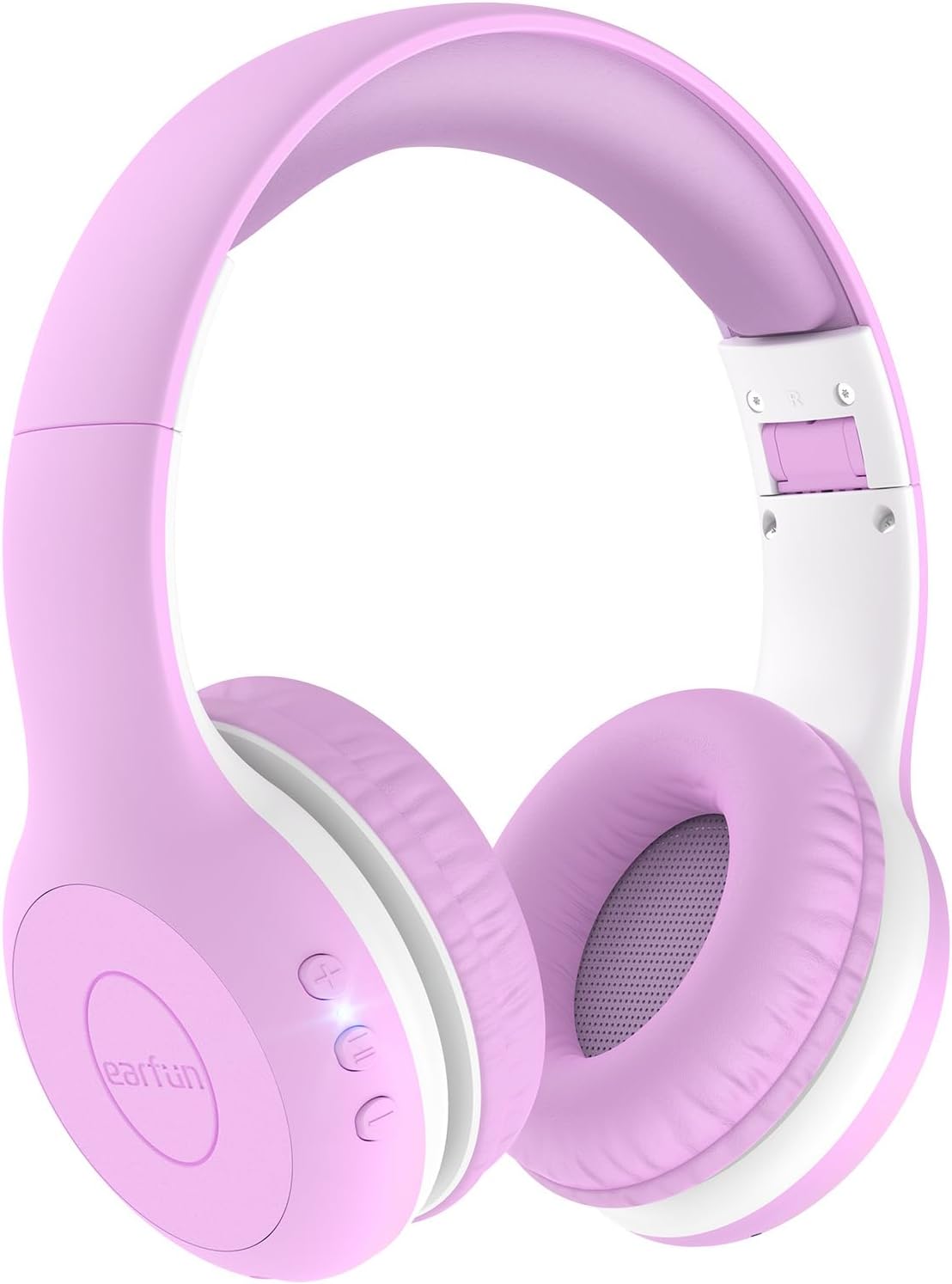
Image: EarFun K2 Kids Bluetooth Headphones in Violet color, showcasing the over-ear design and control buttons on the earcup.
ബോക്സിൽ എന്താണുള്ളത്
എല്ലാ ഇനങ്ങളും ഉണ്ടെന്ന് ഉറപ്പാക്കാൻ പാക്കേജ് ഉള്ളടക്കങ്ങൾ പരിശോധിക്കുക:
- EarFun K2 Kids Bluetooth Headphone
- ഉപയോക്തൃ മാനുവൽ
- ചാർജിംഗ് കേബിൾ (USB-C)
- 3.5 എംഎം ഓഡിയോ കേബിൾ
ഉൽപ്പന്ന സവിശേഷതകൾ
- Kids-Friendly and Comfy Material: Made from CPC-certified, RoHS2.0, and FCC compliant materials, featuring soft memory foam for a safe and cozy fit.
- Safe Volume Limiting: Adjustable volume limits at 74dB (Normal Mode), 85dB (Study Mode), and 94dB (Travel Mode) to protect children's hearing, meeting WHO recommended levels.
- Bluetooth 5.4 & Hands-Free Call: Ensures stable wireless connection and includes a built-in microphone for clear hands-free communication.
- Balanced Stereo Sound: Equipped with 40mm drivers for clear, crisp vocals and full dynamic bass, promoting good listening habits.
- വിപുലീകരിച്ച കളിസമയം: Up to 40 hours of battery life on a single charge. A 2.5-hour charge via USB-C provides full battery.
- Reliable & Foldable Design: Constructed from wear-resistant material with an ergonomic headband that can be twisted and bent without breaking. The lightweight and foldable design enhances portability.

Image: Safety certifications for EarFun K2 headphones, highlighting compliance with CPC, RoHS, and FCC standards, along with the safe volume limits.

ചിത്രം: വിശദമായത് view of the EarFun K2's thoughtful design, including 8-degree floating-axis, 8-level adjustable headband, and soft, comfy earcups.

Image: The EarFun K2 headphones folded for portability, shown next to a smartphone on a seesaw to illustrate their light weight (175g).
സജ്ജമാക്കുക
1. ഹെഡ്ഫോണുകൾ ചാർജ് ചെയ്യുന്നു
Before first use, fully charge your EarFun K2 headphones.
- നൽകിയിരിക്കുന്ന USB-C ചാർജിംഗ് കേബിൾ ഹെഡ്ഫോണുകളിലെ ചാർജിംഗ് പോർട്ടുമായി ബന്ധിപ്പിക്കുക.
- കേബിളിന്റെ മറ്റേ അറ്റം ഒരു USB പവർ അഡാപ്റ്ററുമായി (ഉൾപ്പെടുത്തിയിട്ടില്ല) അല്ലെങ്കിൽ ഒരു കമ്പ്യൂട്ടറിന്റെ USB പോർട്ടുമായി ബന്ധിപ്പിക്കുക.
- The LED indicator will show charging status (refer to LED indicator section for details). A full charge takes approximately 2.5 hours and provides up to 40 hours of playtime.

Image: Visual representation of the EarFun K2's long battery life (40 hours) and fast USB-C charging capabilities.
2. ബ്ലൂടൂത്ത് ജോടിയാക്കൽ
To connect your EarFun K2 headphones to a Bluetooth-enabled device:
- ഹെഡ്ഫോണുകൾ ചാർജ് ചെയ്തിട്ടുണ്ടെന്നും പവർ ഓഫ് ചെയ്തിട്ടുണ്ടെന്നും ഉറപ്പാക്കുക.
- ജോടിയാക്കൽ മോഡ് സൂചിപ്പിക്കുന്ന LED ഇൻഡിക്കേറ്റർ നീലയും ചുവപ്പും നിറങ്ങളിൽ മിന്നുന്നതുവരെ ഹെഡ്ഫോണുകളിലെ പവർ ബട്ടൺ അമർത്തിപ്പിടിക്കുക.
- നിങ്ങളുടെ ഉപകരണത്തിൽ (സ്മാർട്ട്ഫോൺ, ടാബ്ലെറ്റ്, ലാപ്ടോപ്പ്), ബ്ലൂടൂത്ത് പ്രവർത്തനക്ഷമമാക്കി ലഭ്യമായ ഉപകരണങ്ങൾക്കായി തിരയുക.
- Select "EarFun K2" from the list of found devices.
- കണക്റ്റ് ചെയ്തുകഴിഞ്ഞാൽ, മോഡലിനെ ആശ്രയിച്ച് LED ഇൻഡിക്കേറ്റർ കടും നീലയായി മാറുകയോ ഓഫാകുകയോ ചെയ്യും.
പവർ ഓൺ ചെയ്യുമ്പോൾ ഹെഡ്ഫോണുകൾ അവസാനം ജോടിയാക്കിയ ഉപകരണത്തിലേക്ക് വീണ്ടും കണക്റ്റുചെയ്യാൻ ശ്രമിക്കും.

Image: Illustration of the EarFun K2 headphones' Bluetooth 5.4 connectivity, emphasizing stable and low-power connection.
3. വയർഡ് കണക്ഷൻ (ഓപ്ഷണൽ)
For devices without Bluetooth or when the battery is low, you can use the included 3.5mm audio cable.
- 3.5mm ഓഡിയോ കേബിളിന്റെ ഒരറ്റം ഹെഡ്ഫോണുകളിലെ ഓഡിയോ ജാക്കിലേക്ക് പ്ലഗ് ചെയ്യുക.
- Plug the other end into the 3.5mm audio output of your device (e.g., PC, tablet, laptop, Kindle Fire, cell phone).
- The headphones will function in wired mode, even if the battery is depleted.

Image: The 3.5mm audio cable and its compatibility with various devices like PCs, tablets, laptops, and cell phones, allowing for wired use.
പ്രവർത്തന നിർദ്ദേശങ്ങൾ
നിയന്ത്രിക്കുന്നുview
The EarFun K2 headphones feature intuitive controls located on the earcup.
- പവർ ബട്ടൺ: Press and hold to power on/off. Press briefly to play/pause music or answer/end calls.
- വോളിയം കൂട്ടുക (+): വോളിയം കൂട്ടുക.
- വോളിയം ഡൗൺ (-): വോളിയം കുറയ്ക്കുക.
- Volume Limiting Switch: (If applicable, refer to specific model for location) Allows selection between 74dB, 85dB, and 94dB modes.
Safe Volume Limiting
The EarFun K2 headphones are equipped with a volume limiting feature to protect your child's hearing. You can select from three different maximum volume levels:
- 74dB (Normal Mode): Suitable for quiet environments and general listening.
- 85dB (പഠന മോഡ്): Ideal for educational content or slightly noisier settings.
- 94dB (യാത്രാ മോഡ്): For use in louder environments like cars or airplanes, providing necessary volume without exceeding safe limits.
To switch between modes, locate the volume limiting switch on the headphones and adjust it to the desired setting.

Image: A child wearing the EarFun K2 headphones, with graphics explaining the three safe volume limiting modes: Normal (74dB), Study (85dB), and Travel (94dB).
മെയിൻ്റനൻസ്
Proper care will extend the life of your EarFun K2 headphones.
- വൃത്തിയാക്കൽ: ഹെഡ്ഫോണുകൾ തുടയ്ക്കാൻ മൃദുവായതും ഉണങ്ങിയതുമായ തുണി ഉപയോഗിക്കുക. അബ്രാസീവ് ക്ലീനറുകളോ ലായകങ്ങളോ ഉപയോഗിക്കരുത്.
- സംഭരണം: When not in use, store the headphones in a cool, dry place. The foldable design makes them compact for storage and travel.
- ഈർപ്പം ഒഴിവാക്കുക: ഹെഡ്ഫോണുകൾ വെള്ളത്തെ പ്രതിരോധിക്കുന്നില്ല. വെള്ളം, മഴ, അമിതമായ ഈർപ്പം എന്നിവയിൽ സമ്പർക്കം പുലർത്തുന്നത് ഒഴിവാക്കുക.
- ശ്രദ്ധയോടെ കൈകാര്യം ചെയ്യുക: While durable, avoid dropping the headphones or subjecting them to strong impacts.
ട്രബിൾഷൂട്ടിംഗ്
If you encounter issues with your EarFun K2 headphones, try the following solutions:
| പ്രശ്നം | സാധ്യമായ പരിഹാരം |
|---|---|
| ഹെഡ്ഫോണുകൾ പവർ ഓൺ ചെയ്യുന്നില്ല. | ഹെഡ്ഫോണുകൾ പൂർണ്ണമായും ചാർജ് ചെയ്തിട്ടുണ്ടെന്ന് ഉറപ്പാക്കുക. ഒരു പവർ സ്രോതസ്സിലേക്ക് കണക്റ്റ് ചെയ്ത് ചാർജിംഗ് ഇൻഡിക്കേറ്റർ പരിശോധിക്കുക. |
| ഉപകരണവുമായി ജോടിയാക്കാൻ കഴിയില്ല. |
|
| ശബ്ദമില്ല അല്ലെങ്കിൽ കുറഞ്ഞ ശബ്ദമില്ല. |
|
| Sound is distorted or cuts out. |
|
സ്പെസിഫിക്കേഷനുകൾ
| ഫീച്ചർ | വിശദാംശങ്ങൾ |
|---|---|
| മോഡലിൻ്റെ പേര് | ഇയർഫൺ കെ2 |
| കണക്റ്റിവിറ്റി ടെക്നോളജി | വയർലെസ്സ് (ബ്ലൂടൂത്ത്), വയർഡ് (3.5mm ജാക്ക്) |
| വയർലെസ് കമ്മ്യൂണിക്കേഷൻ ടെക്നോളജി | ബ്ലൂടൂത്ത് 5.4 |
| പ്രായപരിധി (വിവരണം) | Kids & Teens |
| മെറ്റീരിയൽ | പ്ലാസ്റ്റിക്, മെമ്മറി ഫോം |
| അനുയോജ്യമായ ഉപകരണങ്ങൾ | സ്മാർട്ട്ഫോണുകൾ, ടാബ്ലെറ്റുകൾ, ലാപ്ടോപ്പുകൾ, ഡെസ്ക്ടോപ്പുകൾ, സ്മാർട്ട് സ്പീക്കറുകൾ, ടെലിവിഷനുകൾ |
| ഇനത്തിൻ്റെ ഭാരം | 175 ഗ്രാം (6.2 ഔൺസ്) |
| ജല പ്രതിരോധ നില | വാട്ടർ റെസിസ്റ്റൻ്റ് അല്ല |
| ഫ്രീക്വൻസി റേഞ്ച് | 20Hz - 20,000Hz |
| നിയന്ത്രണ രീതി | Remote (Buttons on earcup) |
| ഓഡിയോ ഡ്രൈവർ തരം | ഡൈനാമിക് ഡ്രൈവർ (40mm) |
| ഇയർപീസ് ആകൃതി | ചെവിക്ക് മുകളിൽ |
| നിർമ്മാതാവ് | ഇയർഫൺ |
| നിറം | വയലറ്റ് |
| ബാറ്ററി ലൈഫ് | 40 മണിക്കൂർ വരെ |
| ചാർജിംഗ് സമയം | ഏകദേശം 2.5 മണിക്കൂർ (USB-C) |
| Volume Limit Modes | 74dB, 85dB, 94dB |
വാറൻ്റിയും പിന്തുണയും
EarFun provides an 18-month hassle-free protection for the K2 Kids Bluetooth Headphones. For any product inquiries, technical support, or warranty claims, please contact EarFun customer service.
You can find more information and contact details on the official EarFun webസൈറ്റ് അല്ലെങ്കിൽ നിങ്ങളുടെ വാങ്ങൽ പ്ലാറ്റ്ഫോം വഴി.
കുറിപ്പ്: Keep your purchase receipt or order number handy when contacting support for faster service.
Ask a question about this manual
Ask about setup, troubleshooting, compatibility, parts, safety, or missing instructions. Manuals+ will review the question and use this page’s manual context to help answer it.