
ആമുഖം
This manual provides comprehensive instructions for the setup, operation, maintenance, and troubleshooting of your DOOGEE T30Max 4K 12.4 Inch Android 14 Gaming Tablet. Please read this manual carefully before using your device to ensure optimal performance and longevity.
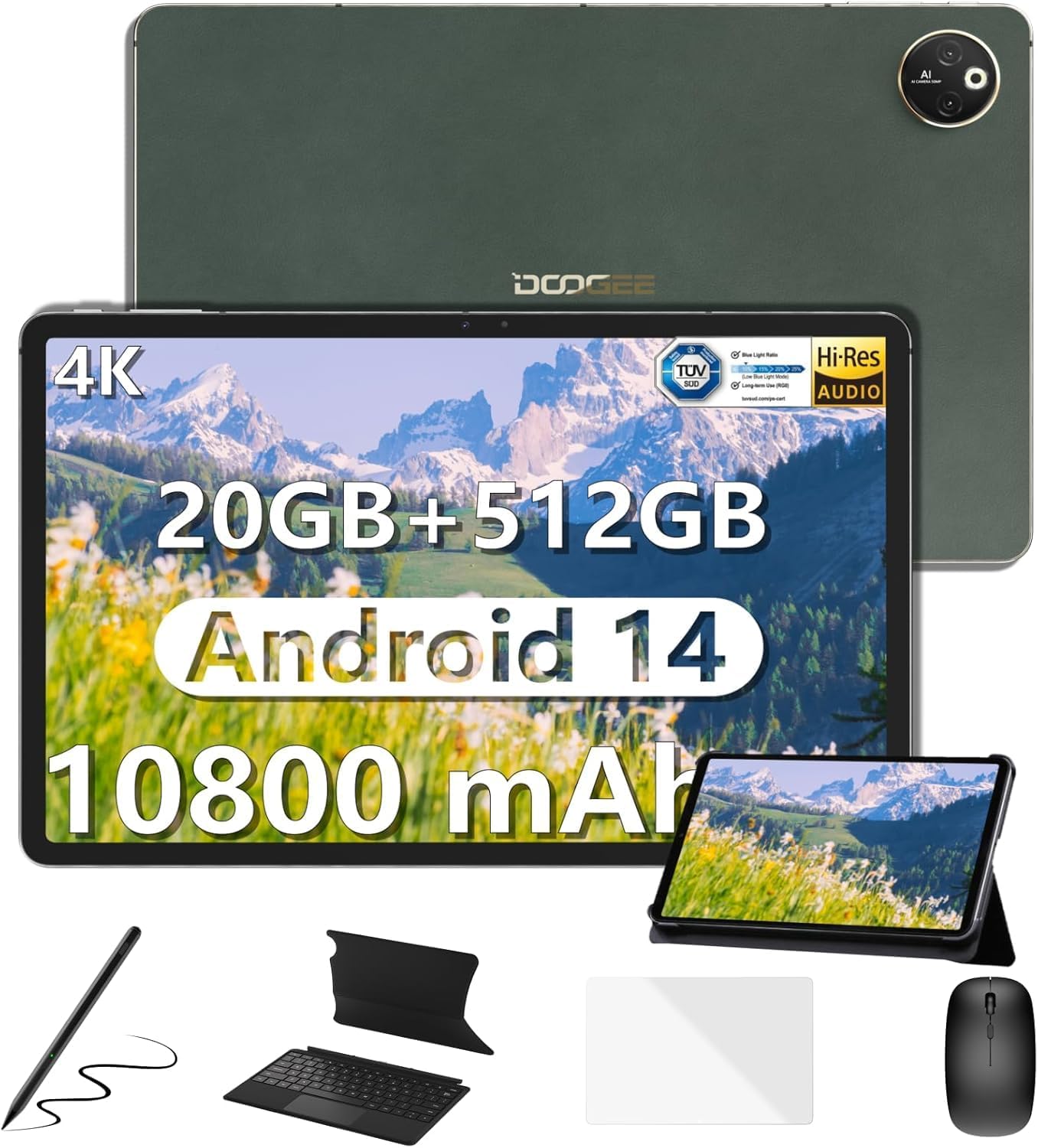
Image: The DOOGEE T30Max tablet displayed with its included accessories: keyboard, mouse, stylus pen, and case.
ബോക്സിൽ എന്താണുള്ളത്
നിങ്ങളുടെ പാക്കേജിൽ എല്ലാ ഇനങ്ങളും ഉണ്ടെന്ന് ഉറപ്പാക്കുക:
- ടാബ്ലെറ്റ് x1
- Charger and Data line x1
- Card removal needle x1
- ഉപയോക്തൃ മാനുവൽ x1
- Keyboard, Mouse, Stylus Pen and Case x1
സജ്ജമാക്കുക
1. പ്രാരംഭ ചാർജിംഗ്
Before first use, fully charge your DOOGEE T30Max tablet. Connect the provided charger and data line to the tablet's charging port and a power outlet. The tablet supports 33W fast charging.

Image: The DOOGEE T30Max tablet connected to a charger, illustrating its 10800mAh battery and fast charging capability.
2. പവർ ഓൺ/ഓഫ്
- പവർ ഓണാക്കാൻ: Press and hold the Power button until the DOOGEE logo appears.
- പവർ ഓഫ് ചെയ്യാൻ: പവർ ബട്ടൺ അമർത്തിപ്പിടിക്കുക, തുടർന്ന് സ്ക്രീനിലെ ഓപ്ഷനുകളിൽ നിന്ന് "പവർ ഓഫ്" തിരഞ്ഞെടുക്കുക.
3. സിം കാർഡും മൈക്രോ എസ്ഡിയും ഇൻസ്റ്റാൾ ചെയ്യൽ
The tablet supports dual 4G Nano-SIM cards and Micro SD expansion up to 2TB.
- ടാബ്ലെറ്റിന്റെ വശത്ത് സിം കാർഡ് ട്രേ കണ്ടെത്തുക.
- Insert the provided card removal needle into the small hole next to the tray to eject it.
- Place your Nano-SIM card(s) and/or Micro SD card into the designated slots on the tray. Ensure correct orientation.
- Gently push the tray back into the tablet until it is flush with the device body.

Image: A close-up of the DOOGEE T30Max tablet showing the SIM card tray and indicating support for dual 4G and Wi-Fi connectivity.
4. ആക്സസറികൾ ബന്ധിപ്പിക്കുന്നു
Your T30Max comes with a Bluetooth keyboard, mouse, and a capacitive touch pen.
- ബ്ലൂടൂത്ത് കീബോർഡ്/മൗസ്: Turn on the keyboard/mouse and enable Bluetooth on your tablet via Settings > Connected devices > Bluetooth. Select the device from the list to pair.
- സ്റ്റൈലസ് പേന: The capacitive touch pen is ready for use upon removal from its packaging. No pairing is required for basic touch functions.
പ്രവർത്തന നിർദ്ദേശങ്ങൾ
1. ഡിസ്പ്ലേ സവിശേഷതകൾ
The DOOGEE T30Max features a 12.4-inch IPS screen with a 2560x1600 resolution and DCI-P3 color gamut support for vivid visuals. It also has TÜV certification for low blue light, reducing eye strain.

Image: The tablet's 12.4-inch 4K display, highlighting its anti-blue light feature, 16:10 aspect ratio, 2560x1600 resolution, and 87.5% screen-to-body ratio.
2. ഓഡിയോയും മൾട്ടിമീഡിയയും
Experience high-resolution audio with the tablet's four smart speakers. The T30Max supports Widevine L1, allowing for streaming of 1080P and higher definition media from various video platforms.

Image: The tablet displaying a high-definition video, emphasizing its Widevine DRM L1 support and Hi-Res certified quad speakers.
3. ആൻഡ്രോയിഡ് 14 ഓപ്പറേറ്റിംഗ് സിസ്റ്റം
The tablet runs on the latest Android 14, offering enhanced privacy controls, multi-screen login, split-screen functionality, and floating windows for improved multitasking.

Image: Screenshots of the Android 14 interface on the tablet, showcasing privacy controls, Google Play Store access, and various app icons.
4. പ്രകടനവും സംഭരണവും
Powered by the Helio G99 Octa-Core processor, the T30Max provides smooth performance. It comes with 8GB base RAM (expandable to 20GB) and 512GB ROM, with Micro SD expansion up to 2TB.

Image: An illustration of the Helio G99 Octa-Core processor, highlighting its 2.2GHz ARM Cortex-A76, Mali-G57 MC2 GPU, and 6nm process technology.

Image: The tablet displaying multiple open applications, illustrating its expandable RAM, 512GB storage, and Micro SD expansion capabilities.
5. ക്യാമറ പ്രവർത്തനങ്ങൾ
The tablet is equipped with a 50MP main camera and a 20MP front camera for capturing photos and video calls.

Image: The tablet's camera interface and examples of photos taken with its 50MP main camera and 20MP front camera.
6. കണക്റ്റിവിറ്റിയും നാവിഗേഷനും
The T30Max supports dual 4G, dual-band 2.4G/5G WiFi, and Bluetooth 5.0 for seamless connectivity. For navigation, it integrates Beidou, Galileo, Glonass, GPS, and AGRS for accurate positioning.
മെയിൻ്റനൻസ്
1. ബാറ്ററി പരിചരണം
10800mAh ബാറ്ററി ദീർഘനേരം ഉപയോഗിക്കാനുള്ള അവസരം നൽകുന്നു. ബാറ്ററി ആയുസ്സ് വർദ്ധിപ്പിക്കുന്നതിന്:
- Use the original charger for optimal charging speed and safety.
- തീവ്രമായ താപനില ഒഴിവാക്കുക.
- For long-term storage, charge the tablet to about 50% and power it off.
- The tablet supports OTG reverse charging, allowing it to charge other devices in emergencies.
2. വൃത്തിയാക്കൽ
നിങ്ങളുടെ ടാബ്ലെറ്റ് വൃത്തിയാക്കാൻ:
- വൃത്തിയാക്കുന്നതിന് മുമ്പ് ഉപകരണം പവർ ഓഫ് ചെയ്യുക.
- മൃദുവായ തുണിയില്ലാത്ത തുണി ഉപയോഗിക്കുക.
- കഠിനമായ അടയാളങ്ങൾക്ക്, ചെറുതായി dampഇലക്ട്രോണിക് ഉപകരണങ്ങൾക്കായി രൂപകൽപ്പന ചെയ്ത ഒരു സ്ക്രീൻ ക്ലീനർ അല്ലെങ്കിൽ വെള്ളം ഉപയോഗിച്ചുള്ള തുണി. കഠിനമായ രാസവസ്തുക്കൾ ഒഴിവാക്കുക.
ട്രബിൾഷൂട്ടിംഗ്
| ഇഷ്യൂ | സാധ്യമായ കാരണം / പരിഹാരം |
|---|---|
| ടാബ്ലെറ്റ് ഓണാക്കുന്നില്ല. | Ensure the battery is charged. Connect the charger and wait a few minutes before attempting to power on again. If unresponsive, press and hold the power button for 10-15 seconds for a forced restart. |
| Poor Wi-Fi connection. | Check if Wi-Fi is enabled. Ensure you are within range of the Wi-Fi router. Restart the router and the tablet. Forget the network and reconnect. |
| ആപ്ലിക്കേഷനുകൾ മന്ദഗതിയിലാണ് അല്ലെങ്കിൽ ക്രാഷ് ചെയ്യുന്നു. | Close unnecessary background applications. Clear app cache (Settings > Apps > [App Name] > Storage > Clear cache). Restart the tablet. Ensure sufficient storage space is available. |
| Screen not displaying 4K resolution. | Ensure the content being viewed is 4K. Check display settings for resolution. For optimal viewing, disable "Battery Saver" and "Adaptive Brightness" in settings. A stable internet connection is crucial for streaming high-resolution content. |
| Accessories (keyboard, mouse) not connecting. | Ensure Bluetooth is enabled on the tablet and the accessory. Make sure the accessory is charged and in pairing mode. Unpair and re-pair the device. |
സ്പെസിഫിക്കേഷനുകൾ
| ഫീച്ചർ | വിശദാംശങ്ങൾ |
|---|---|
| ബ്രാൻഡ് | ഡോഗി |
| മോഡലിൻ്റെ പേര് | T30MAX-V-02 |
| ഓപ്പറേറ്റിംഗ് സിസ്റ്റം | ആൻഡ്രോയിഡ് 14 |
| സ്ക്രീൻ വലിപ്പം | 12.4 ഇഞ്ച് |
| പരമാവധി സ്ക്രീൻ റെസല്യൂഷൻ | 2560 x 1600 പിക്സലുകൾ |
| പ്രോസസ്സർ | Helio G99 Octa-Core |
| റാം | 8GB LPDDR4X (expandable to 20GB) |
| ഫ്ലാഷ് മെമ്മറി വലുപ്പം (റോം) | 512 ജിബി |
| വികസിപ്പിക്കാവുന്ന സംഭരണം | Up to 2TB Micro SD |
| ബാറ്ററി ശേഷി | 10800 mAh |
| ഫാസ്റ്റ് ചാർജിംഗ് | 33W |
| പ്രധാന ക്യാമറ | 50എംപി |
| മുൻ ക്യാമറ | 20എംപി |
| വയർലെസ് തരം | 802.11n, 802.11b, 802.11a, 802.11g, 802.11ac (Dual-band 2.4G/5G WiFi) |
| സെല്ലുലാർ കണക്റ്റിവിറ്റി | Dual 4G (Nano-SIM) |
| ബ്ലൂടൂത്ത് | ബ്ലൂടൂത്ത് 5.0 |
| നാവിഗേഷൻ | Beidou, Galileo, Glonass, GPS, AGRS |
| ഇനത്തിൻ്റെ ഭാരം | 687 ഗ്രാം (ഏകദേശം 1.5 പൗണ്ട്) |
| ഉൽപ്പന്ന അളവുകൾ | 11.22 x 7.3 x 0.31 ഇഞ്ച് (28.5 x 18.5 x 0.79 സെ.മീ) |
വാറൻ്റിയും പിന്തുണയും
DOOGEE values your experience. Your T30Max tablet comes with:
- 30 ദിവസത്തെ മണി ബാക്ക് ഗ്യാരണ്ടിയും സൗജന്യ റിട്ടേണും: For initial satisfaction.
- 2-വർഷ പരിമിത വാറൻ്റി: നിർമ്മാണ വൈകല്യങ്ങൾ കവർ ചെയ്യുന്നു.
- 24/7 One-on-One Online Support: For any issues or questions.
If you encounter any issues or have questions while using the product, please do not hesitate to contact DOOGEE customer service. They promise to respond within 24 hours and assist in resolving any issues.
For further assistance, you may visit the official DOOGEE store or support channels.