
ആമുഖം
Thank you for choosing the Beetel G30 Corded Landline Phone. This manual provides detailed instructions for setting up, operating, and maintaining your new telephone. Please read this manual thoroughly before use to ensure proper functionality and to take full advantagഅതിന്റെ സവിശേഷതകളുടെ ഇ.
പ്രധാന സവിശേഷതകൾ:
- TEC Certified: Ensures compliance with technical standards.
- 2-Way Speaker Phone: Adjustable volume for hands-free communication.
- LCD Display: Clear screen for caller ID, date, and time with 3-level contrast adjustment.
- DTMF/FSK Compatible: Supports various caller ID transmission methods.
- Adjustable Handset/Ringer Volume: Customize audio levels.
- Music on Hold: Keeps callers engaged during hold.
- Desk/Wall Mountable: Flexible installation options.
- Ringer LED: Visual alert for incoming calls.
ബോക്സിൽ എന്താണുള്ളത്:
- Beetel G30 Landline Phone Unit
- ഹാൻഡ്സെറ്റ്
- കോയിൽഡ് ഹാൻഡ്സെറ്റ് കോർഡ്
- ലൈൻ കോർഡ്
- ഉപയോക്തൃ മാനുവൽ
സജ്ജീകരണ നിർദ്ദേശങ്ങൾ
Follow these steps to set up your Beetel G30 landline phone.
1. ഹാൻഡ്സെറ്റ് ബന്ധിപ്പിക്കുന്നു
Connect one end of the coiled handset cord to the handset and the other end to the port labeled ഹാൻഡ്സെറ്റ് on the side of the phone base unit.
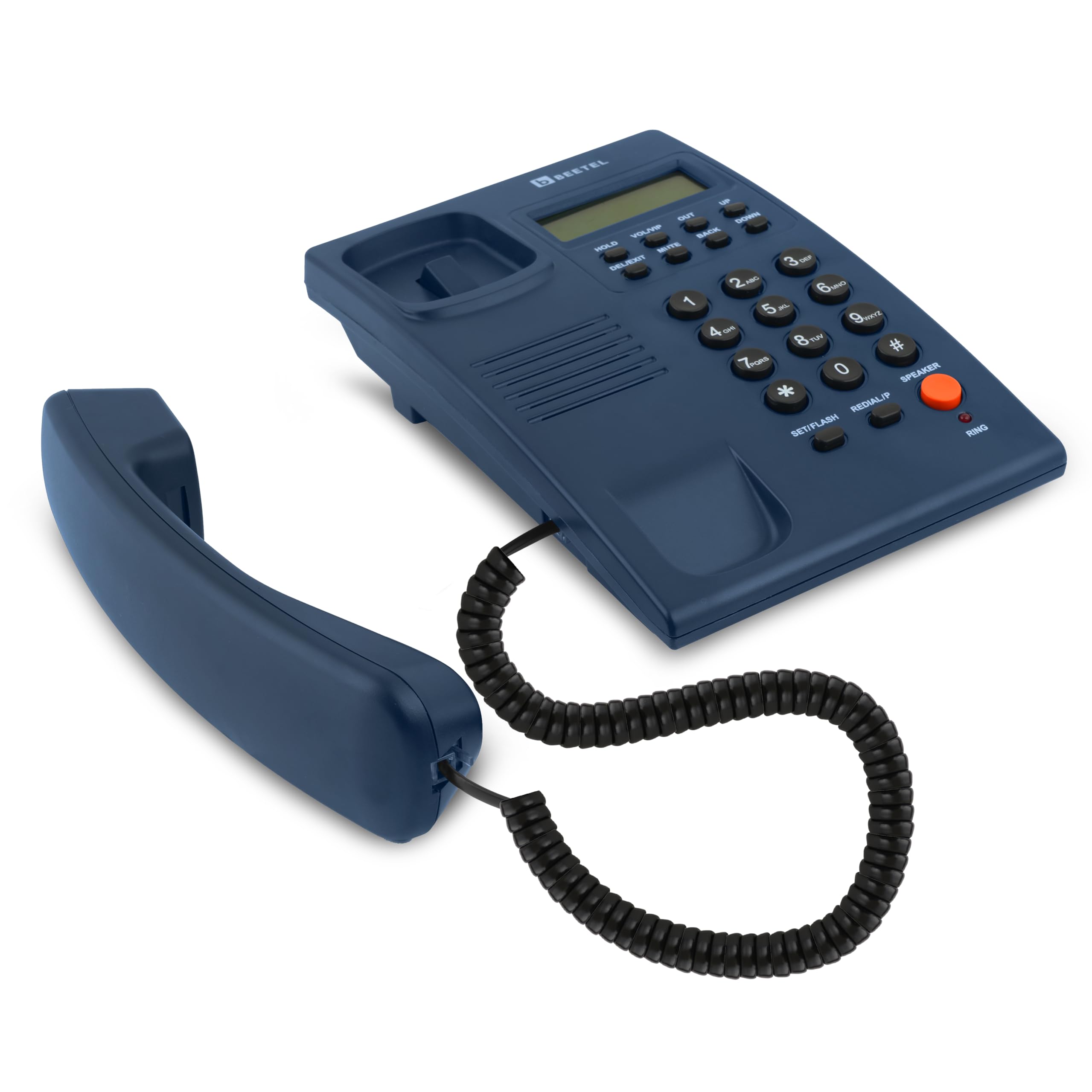
Image: The Beetel G30 phone with its handset properly connected via the coiled cord.
2. Connecting the Line Cord
Connect one end of the line cord to the port labeled ലൈൻ on the back of the phone base unit. Connect the other end to your telephone wall jack.

ചിത്രം: പിൻഭാഗം view of the Beetel G30 phone, illustrating where the line cord connects to the unit.
3. Powering On (Battery Installation for LCD)
While the phone is corded, the LCD display requires batteries for full functionality, including caller ID and display contrast. Open the battery compartment on the underside of the phone and insert the required batteries (typically AAA, refer to the compartment for exact type and quantity). Ensure correct polarity.

Image: The underside of the Beetel G30 phone, highlighting the battery compartment for LCD power.
4. Desk or Wall Mounting
The G30 can be placed on a desk or mounted on a wall. For wall mounting, use the integrated keyhole slots on the back of the unit and appropriate screws (not included).

Image: The Beetel G30 phone displaying its wall mount slots for flexible installation.
പ്രവർത്തന നിർദ്ദേശങ്ങൾ
ഒരു കോൾ ചെയ്യുന്നു
- ഹാൻഡ്സെറ്റ് ഉയർത്തുക അല്ലെങ്കിൽ അമർത്തുക സ്പീക്കർ സ്പീക്കർഫോൺ സജീവമാക്കുന്നതിനുള്ള ബട്ടൺ.
- ഒരു ഡയൽ ടോൺ കേൾക്കുക.
- കീപാഡ് ഉപയോഗിച്ച് ആവശ്യമുള്ള ഫോൺ നമ്പർ ഡയൽ ചെയ്യുക.
- കോൾ അവസാനിപ്പിക്കാൻ, ഹാൻഡ്സെറ്റ് മാറ്റിസ്ഥാപിക്കുക അല്ലെങ്കിൽ അമർത്തുക സ്പീക്കർ വീണ്ടും ബട്ടൺ.
ഒരു കോൾ സ്വീകരിക്കുന്നു
- When the phone rings and the Ringer LED flashes, lift the handset or press the സ്പീക്കർ ഉത്തരം നൽകാനുള്ള ബട്ടൺ.
- The LCD display will show caller ID information (if available from your service provider and enabled).

Image: The Beetel G30 phone with its Ringer LED indicating an incoming call.
സ്പീക്കർഫോൺ പ്രവർത്തനം
To use the 2-way speakerphone, press the സ്പീക്കർ button during a call. You can adjust the speaker volume using the VOL/VIP ബട്ടണുകൾ.

Image: The Beetel G30 phone, showing the speakerphone button and volume controls.
Caller ID (DTMF/FSK Compatible)
The phone supports both DTMF and FSK caller ID formats. Incoming call numbers will be displayed on the LCD screen. The phone stores up to 40 incoming call records (with 10 digits).

Image: The Beetel G30 phone's LCD screen displaying caller ID information.
എൽസിഡി കോൺട്രാസ്റ്റ് ക്രമീകരിക്കുന്നു
The LCD display has 3 levels of contrast. Use the dedicated contrast adjustment buttons (refer to the phone's physical buttons, usually near the display) to set your preferred visibility.

Image: The Beetel G30 phone's LCD display, indicating its adjustable contrast feature.
മ്യൂസിക് ഹോൾഡിൽ
ഒരു കോൾ സമയത്ത്, അമർത്തുക പിടിക്കുക button to place the caller on hold. Music will play for the caller. Press പിടിക്കുക സംഭാഷണം പുനരാരംഭിക്കാൻ വീണ്ടും.
ശല്യപ്പെടുത്തരുത് പ്രവർത്തനം
The phone features a Do Not Disturb function. Consult the specific button or menu option on your device to activate/deactivate this feature, which typically silences incoming calls for a set period.

Image: The Beetel G30 phone, illustrating the Do Not Disturb function.
മെയിൻ്റനൻസ്
To ensure the longevity and optimal performance of your Beetel G30 phone, follow these maintenance guidelines:
- വൃത്തിയാക്കൽ: ഫോണിന്റെ പ്രതലം മൃദുവായ, ഡി-ടച്ച് ഉപയോഗിച്ച് തുടയ്ക്കുക.amp തുണി. കഠിനമായ രാസവസ്തുക്കളോ ഉരച്ചിലുകളുള്ള ക്ലീനറുകളോ ഉപയോഗിക്കരുത്.
- ദ്രാവകങ്ങൾ ഒഴിവാക്കുക: Keep the phone away from water and other liquids. If liquid spills on the phone, immediately disconnect it from the wall jack and allow it to dry completely before reconnecting.
- താപനില: മിതമായ താപനിലയുള്ള അന്തരീക്ഷത്തിൽ ഫോൺ സൂക്ഷിക്കുകയും പ്രവർത്തിപ്പിക്കുകയും ചെയ്യുക. കടുത്ത ചൂടോ തണുപ്പോ ഒഴിവാക്കുക.
- ബാറ്ററി മാറ്റിസ്ഥാപിക്കൽ: If the LCD display becomes dim or functions intermittently, replace the batteries in the compartment on the underside of the phone.
ട്രബിൾഷൂട്ടിംഗ്
If you encounter issues with your Beetel G30 phone, refer to the following common problems and solutions:
| പ്രശ്നം | സാധ്യമായ കാരണം | പരിഹാരം |
|---|---|---|
| ഡയൽ ടോൺ ഇല്ല | Line cord is disconnected or faulty. | Ensure the line cord is securely connected to both the phone and the wall jack. Test with another phone if possible. |
| LCD ഡിസ്പ്ലേ ശൂന്യമാണ് അല്ലെങ്കിൽ മങ്ങിയതാണ് | ബാറ്ററികൾ കുറവാണ് അല്ലെങ്കിൽ തെറ്റായി ഇൻസ്റ്റാൾ ചെയ്തിരിക്കുന്നു. | Replace the batteries in the battery compartment on the underside of the phone. Ensure correct polarity. |
| No caller ID displayed | Caller ID service not activated by your provider or phone settings are incorrect. | Contact your telephone service provider to ensure Caller ID service is active. Check phone settings for Caller ID display options. |
| Cannot hear caller or caller cannot hear you (speakerphone) | Speaker volume is too low or mute function is active. | Adjust the speaker volume using the VOL/VIP buttons. Ensure the നിശബ്ദമാക്കുക button is not active. |
| ഫോൺ റിംഗ് ചെയ്യുന്നില്ല | Ringer volume is set to minimum or Do Not Disturb is active. | Adjust the ringer volume. Deactivate the Do Not Disturb function if it is enabled. |
സ്പെസിഫിക്കേഷനുകൾ
- മോഡൽ നമ്പർ: G30
- ഉൽപ്പന്ന അളവുകൾ: 13 x 20.5 x 8 സെ.മീ
- ഇനത്തിൻ്റെ ഭാരം: 415 ഗ്രാം
- ടെലിഫോൺ തരം: കോർഡഡ്
- ഊർജ്ജ സ്രോതസ്സ്: Corded Electric (LCD requires batteries)
- ഡിസ്പ്ലേ: LCD with 3-level contrast
- കോളർ ഐഡി: DTMF/FSK Compatible
- സ്പീക്കർഫോൺ: 2-Way with adjustable volume
- മൗണ്ടിംഗ്: ഡെസ്ക്/ചുവരിൽ ഘടിപ്പിക്കാവുന്നത്
- സർട്ടിഫിക്കേഷൻ: TEC Certified
- നിർമ്മാതാവ്: ബീറ്റൽ ടെലിടെക് ലിമിറ്റഡ്
- മാതൃരാജ്യം: ഇന്ത്യ
വാറൻ്റിയും പിന്തുണയും
വാറൻ്റി വിവരങ്ങൾ
The Beetel G30 Corded Landline Phone comes with a standard manufacturer's warranty. For specific warranty terms and conditions, please refer to the warranty card included with your product or visit the official Beetel webസൈറ്റ്. എക്സ്റ്റൻഡഡ് വാറന്റി പ്ലാനുകളും വാങ്ങാൻ ലഭ്യമായേക്കാം.
ഉപഭോക്തൃ പിന്തുണ
For technical assistance, troubleshooting, or service inquiries, please contact Beetel customer support. Contact details can typically be found on the manufacturer's webസൈറ്റ് അല്ലെങ്കിൽ ഉൽപ്പന്ന പാക്കേജിംഗിൽ.
നിങ്ങൾക്ക് സന്ദർശിക്കാനും കഴിയും Beetel Store on Amazon കൂടുതൽ ഉൽപ്പന്ന വിവരങ്ങൾക്കും ഉറവിടങ്ങൾക്കും.
ഉൽപ്പന്നം കഴിഞ്ഞുview വീഡിയോ
വീഡിയോ: ഒരു സംക്ഷിപ്ത വിവരണംview demonstrating the features and setup of the Beetel G30 Corded Landline Phone, including its LCD display, speakerphone, and desk/wall mountable design.