
ആമുഖം
This manual provides comprehensive instructions for the setup, operation, and maintenance of your T3 Wireless Charging Keyboard and Mouse Set. This high-quality unit offers a seamless wireless experience for various computing needs, featuring an ergonomic design and backlighting system.
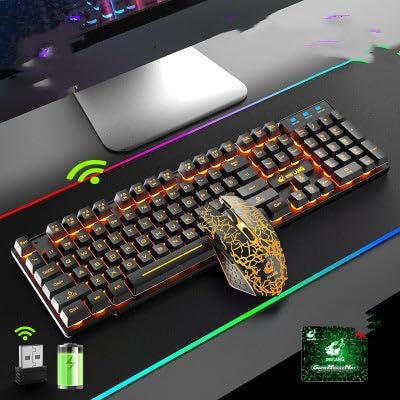
This image displays the T3 Wireless Charging Keyboard and Mouse Set. The keyboard features orange backlighting on its keys, and the mouse has a distinctive black and orange pattern. Below the keyboard, icons indicate wireless connectivity via a USB receiver and a rechargeable battery.
സജ്ജമാക്കുക
1. അൺബോക്സിംഗും ഘടകങ്ങളും
പാക്കേജിംഗിൽ നിന്ന് എല്ലാ ഘടകങ്ങളും ശ്രദ്ധാപൂർവ്വം നീക്കം ചെയ്യുക. ഇനിപ്പറയുന്ന ഇനങ്ങൾ നിങ്ങളുടെ പക്കലുണ്ടെന്ന് ഉറപ്പാക്കുക:
- T3 വയർലെസ് കീബോർഡ്
- T3 വയർലെസ് മൗസ്
- യുഎസ്ബി വയർലെസ് റിസീവർ
- USB Charging Cable (for keyboard and mouse)
- ഉപയോക്തൃ മാനുവൽ (ഈ പ്രമാണം)
2. പ്രാരംഭ ചാർജിംഗ്
Before first use, it is recommended to fully charge both the keyboard and the mouse.
- Locate the charging port on the keyboard and mouse.
- Connect the provided USB charging cable to the charging port on each device.
- Plug the other end of the USB cable into a powered USB port (e.g., computer, USB wall adapter).
- ചാർജ് ചെയ്യുമ്പോൾ ചാർജിംഗ് ഇൻഡിക്കേറ്റർ ലൈറ്റ് പ്രകാശിക്കുകയും പൂർണ്ണമായി ചാർജ് ചെയ്യുമ്പോൾ സാധാരണയായി ഓഫാകുകയോ നിറം മാറുകയോ ചെയ്യും.
പൂർണ്ണമായി ചാർജ് ചെയ്യാൻ ഏകദേശം 2-3 മണിക്കൂർ അനുവദിക്കുക.
3. വയർലെസ് റിസീവർ ബന്ധിപ്പിക്കുന്നു
The T3 set uses a single USB receiver for both the keyboard and mouse.
- Turn on the keyboard and mouse using their respective power switches (usually located on the underside of the devices).
- നിങ്ങളുടെ കമ്പ്യൂട്ടറിൽ ലഭ്യമായ ഒരു USB പോർട്ടിലേക്ക് USB വയർലെസ് റിസീവർ ചേർക്കുക.
- Your operating system should automatically detect and install the necessary drivers. This is a plug-and-play device, requiring no manual driver installation.
- ഡ്രൈവറുകൾ ഇൻസ്റ്റാൾ ചെയ്തുകഴിഞ്ഞാൽ, കീബോർഡും മൗസും ഉപയോഗത്തിന് തയ്യാറാകും.
പ്രവർത്തന നിർദ്ദേശങ്ങൾ
കീബോർഡ് പ്രവർത്തനങ്ങൾ
- ബാക്ക്ലൈറ്റിംഗ്: The keyboard features a backlighting system. Use the dedicated backlight key (often indicated by a sun or light bulb icon) to cycle through different lighting modes or to turn the backlighting on/off.
- മൾട്ടിമീഡിയ ഫംഗ്ഷൻ കീകൾ: The keyboard includes multimedia function keys (F1-F12, often combined with the 'Fn' key). These keys allow quick access to functions like volume control, media playback, and web browsing. Refer to the keycap legends for specific functions.
- എർഗണോമിക് ഡിസൈൻ: The keyboard is designed for ergonomic comfort during extended use.
മൗസ് പ്രവർത്തനങ്ങൾ
- ഒപ്റ്റിക്കൽ റെസല്യൂഷൻ: The mouse operates with an optical resolution of 1600dpi, providing precise tracking.
- ബട്ടണുകൾ: Standard left-click, right-click, and scroll wheel functions are available. Additional side buttons may be present for forward/back navigation or other customizable functions depending on your operating system settings.
- വൈദ്യുതി ലാഭിക്കൽ: The mouse may enter a sleep mode after a period of inactivity to conserve battery. Move the mouse or click a button to wake it up.
മെയിൻ്റനൻസ്
വൃത്തിയാക്കൽ
- വൃത്തിയാക്കുന്നതിനു മുമ്പ് കീബോർഡും മൗസും ഓഫ് ചെയ്യുക.
- മൃദുവായ, ലിൻ്റ് രഹിത തുണി ഉപയോഗിക്കുകampവെള്ളം അല്ലെങ്കിൽ നേരിയതും, ഉരച്ചിലുകളില്ലാത്തതുമായ ക്ലീനിംഗ് ലായനി ഉപയോഗിച്ച് നനയ്ക്കുക.
- ഉപകരണങ്ങളിൽ നേരിട്ട് ദ്രാവകങ്ങൾ തളിക്കുന്നത് ഒഴിവാക്കുക.
- For keyboard keys, use compressed air to remove dust and debris from between the keys.
ബാറ്ററി കെയർ
- Recharge the devices when the battery indicator is low or when performance degrades.
- Avoid fully depleting the battery frequently, as this can reduce its lifespan.
- If storing the devices for an extended period, charge them to about 50% before storage and recharge every few months.
- ഉപകരണങ്ങളെ അങ്ങേയറ്റത്തെ ഊഷ്മാവിൽ തുറന്നുകാട്ടരുത്.
ട്രബിൾഷൂട്ടിംഗ്
| പ്രശ്നം | സാധ്യമായ കാരണം | പരിഹാരം |
|---|---|---|
| കീബോർഡ്/മൗസ് പ്രതികരിക്കുന്നില്ല | Low battery; Receiver not connected; Device turned off; Interference. | Charge devices; Ensure USB receiver is firmly plugged in; Turn on devices; Move receiver closer or away from other wireless devices. |
| കാലതാമസം അല്ലെങ്കിൽ ഇടവിട്ടുള്ള കണക്ഷൻ | റിസീവറിൽ നിന്നുള്ള ദൂരം; തടസ്സം; ബാറ്ററി കുറവാണ്. | Reduce distance to receiver; Remove sources of interference (e.g., other wireless devices, large metal objects); Recharge devices. |
| ബാക്ക്ലൈറ്റ് പ്രവർത്തിക്കുന്നില്ല | ബാക്ക്ലൈറ്റ് ഓഫാക്കി; ബാറ്ററി കുറവാണ്. | Press the backlight key to cycle modes; Recharge keyboard. |
| മൗസ് കഴ്സർ ക്രമരഹിതം | Dirty optical sensor; Uneven surface. | Clean the optical sensor on the mouse's underside; Use on a clean, flat, opaque surface. |
സ്പെസിഫിക്കേഷനുകൾ
- മോഡൽ: T3
- കണക്റ്റിവിറ്റി: വയർലെസ് (USB റിസീവർ)
- Mouse Optical Resolution: 1600dpi
- പ്രത്യേക സവിശേഷതകൾ: Wireless charging, Ergonomic design, Backlit keyboard, Multimedia function keys
- അനുയോജ്യമായ ഉപകരണങ്ങൾ: Laptop, Office PC, Gaming PC, Home PC
- ഇനത്തിൻ്റെ ഭാരം: ഏകദേശം 1.7 പൗണ്ട് (സെറ്റിന്)
- നിറം: Black Orange (as per this variant)
വാറൻ്റിയും പിന്തുണയും
This product comes with a standard manufacturer's warranty. For specific warranty terms, conditions, and duration, please refer to the documentation provided at the time of purchase or contact your retailer.
For technical support or inquiries, please contact the product manufacturer or your point of purchase. Keep your purchase receipt as proof of purchase for warranty claims.