
1. ആമുഖം
Thank you for choosing the LiebeWH ZT-300AB Wireless Digital Multimeter. This device is a high-precision, 6000-count True RMS multimeter designed for a wide range of electrical measurements. It features wireless connectivity, allowing real-time data recording, analysis, and processing via a mobile application. This manual provides essential information for the safe and effective use of your multimeter.
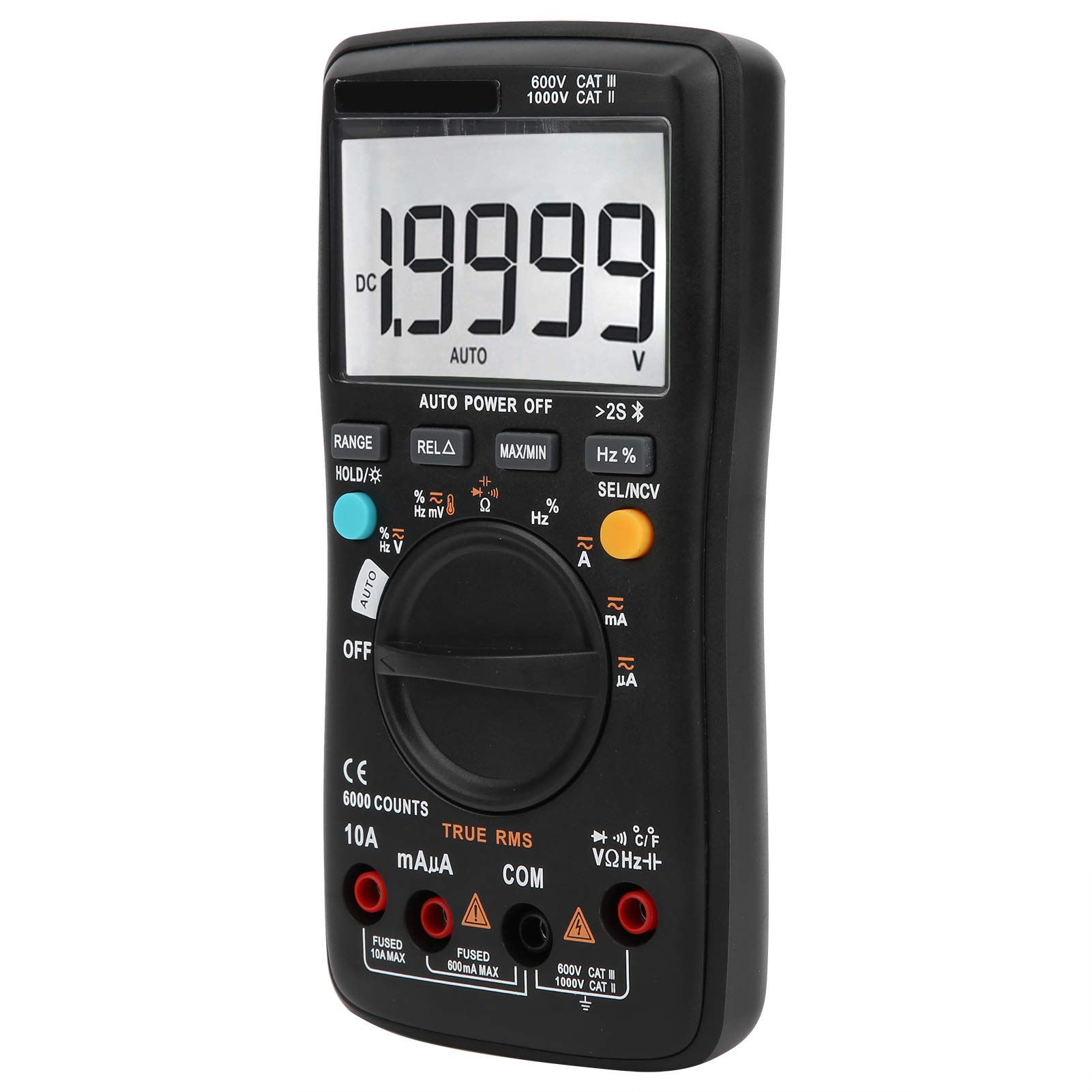
ചിത്രം 1.1: മുൻഭാഗം view of the LiebeWH ZT-300AB Wireless Digital Multimeter, showing the large LCD display and function dial.
2 സുരക്ഷാ വിവരങ്ങൾ
മീറ്ററിന്റെ സുരക്ഷിതമായ പ്രവർത്തനവും സേവനവും ഉറപ്പാക്കാൻ, ഈ നിർദ്ദേശങ്ങൾ പാലിക്കുക. ഈ മുന്നറിയിപ്പുകൾ പാലിക്കുന്നതിൽ പരാജയപ്പെടുന്നത് ഗുരുതരമായ പരിക്കോ മരണമോ ഉണ്ടാക്കാം.
- ഫംഗ്ഷനുകൾ മാറ്റുന്നതിനുമുമ്പ് എല്ലായ്പ്പോഴും സർക്യൂട്ടിൽ നിന്ന് ടെസ്റ്റ് ലീഡുകൾ വിച്ഛേദിക്കുക.
- റേറ്റുചെയ്ത വോള്യത്തേക്കാൾ കൂടുതൽ പ്രയോഗിക്കരുത്tage, മീറ്ററിൽ അടയാളപ്പെടുത്തിയിരിക്കുന്നതുപോലെ, ടെർമിനലുകൾക്കിടയിൽ അല്ലെങ്കിൽ ഏതെങ്കിലും ടെർമിനലിനും ഭൂമിക്കും ഇടയിൽ.
- വോള്യവുമായി പ്രവർത്തിക്കുമ്പോൾ ജാഗ്രത പാലിക്കുകtag30V AC RMS, 42V പീക്ക്, അല്ലെങ്കിൽ 60V DC എന്നിവയ്ക്ക് മുകളിലാണ്. അത്തരം വോള്യംtagഒരു ഷോക്ക് അപകടമാണ്.
- നിങ്ങളുടെ അളവുകൾക്ക് എല്ലായ്പ്പോഴും ശരിയായ ടെർമിനലുകൾ, ഫംഗ്ഷൻ, ശ്രേണി എന്നിവ ഉപയോഗിക്കുക.
- മീറ്റർ കേടായതായി തോന്നുകയോ കേസ് തുറന്നിരിക്കുകയോ ചെയ്താൽ അത് ഉപയോഗിക്കരുത്.
- തെറ്റായ റീഡിംഗുകൾ ഒഴിവാക്കാൻ കുറഞ്ഞ ബാറ്ററി സൂചകം പ്രത്യക്ഷപ്പെട്ടാലുടൻ ബാറ്ററി മാറ്റിസ്ഥാപിക്കുക.
- സ്ഫോടനാത്മകമായ വാതകം, നീരാവി അല്ലെങ്കിൽ പൊടി നിറഞ്ഞ പരിതസ്ഥിതികളിൽ മീറ്റർ പ്രവർത്തിപ്പിക്കരുത്.
- Ensure test leads are in good condition, with no damaged insulation.
3. സജ്ജീകരണം
3.1 പാക്കേജ് ഉള്ളടക്കം
നിങ്ങളുടെ പാക്കേജിൽ ഇനിപ്പറയുന്ന ഇനങ്ങൾ അടങ്ങിയിട്ടുണ്ടെന്ന് പരിശോധിക്കുക:
- LiebeWH ZT-300AB Digital Multimeter
- ടെസ്റ്റ് ലീഡുകൾ (ചുവപ്പും കറുപ്പും)
- താപനില അന്വേഷണം
- ഉപയോക്തൃ മാനുവൽ

Image 3.1: The multimeter shown with its included test leads and temperature probe.
3.2 ബാറ്ററി ഇൻസ്റ്റാളേഷൻ
The multimeter requires batteries for operation. To install or replace batteries:
- മൾട്ടിമീറ്റർ ഓഫാക്കിയിട്ടുണ്ടെന്ന് ഉറപ്പുവരുത്തി എല്ലാ ടെസ്റ്റ് ലീഡുകളും വിച്ഛേദിക്കുക.
- യൂണിറ്റിന്റെ പിൻഭാഗത്ത് ബാറ്ററി കമ്പാർട്ട്മെന്റ് കവർ കണ്ടെത്തുക.
- ബാറ്ററി കമ്പാർട്ട്മെന്റ് തുറക്കാൻ ഒരു സ്ക്രൂഡ്രൈവർ ഉപയോഗിക്കുക.
- Insert the new batteries, observing the correct polarity (+ and -).
- ബാറ്ററി കമ്പാർട്ട്മെന്റ് കവർ മാറ്റി സ്ക്രൂ ഉപയോഗിച്ച് സുരക്ഷിതമാക്കുക.
3.3 ടെസ്റ്റ് ലീഡുകൾ ബന്ധിപ്പിക്കുന്നു
Connect the test leads to the appropriate input jacks on the multimeter:
- ബന്ധിപ്പിക്കുക കറുപ്പ് ടെസ്റ്റ് ലീഡിലേക്ക് നയിക്കുന്നു COM (സാധാരണ) ജാക്ക്.
- ബന്ധിപ്പിക്കുക ചുവപ്പ് ടെസ്റ്റ് ലീഡിലേക്ക് നയിക്കുന്നു VΩHz വോള്യത്തിനുള്ള ജാക്ക്tage, പ്രതിരോധം, ആവൃത്തി, കപ്പാസിറ്റൻസ്, ഡയോഡ്, തുടർച്ച അളവുകൾ.
- കറന്റ് അളവുകൾക്ക് (mA/µA), ബന്ധിപ്പിക്കുക ചുവപ്പ് ടെസ്റ്റ് ലീഡിലേക്ക് നയിക്കുന്നു mAµA ജാക്ക്.
- ഉയർന്ന കറന്റ് അളവുകൾക്ക് (10A വരെ), ബന്ധിപ്പിക്കുക ചുവപ്പ് ടെസ്റ്റ് ലീഡിലേക്ക് നയിക്കുന്നു 10എ ജാക്ക്.
3.4 Wireless Function and Mobile App
The ZT-300AB can connect to your smartphone via its wireless function for real-time data monitoring and analysis.
- Download the dedicated mobile application from your device's app store. (App name not specified, refer to product packaging or manufacturer's webസൈറ്റ്).
- Enable wireless on your smartphone and the multimeter.
- Open the app and follow the on-screen instructions to pair your multimeter.
- The app allows real-time data display, recording, and curve graphing. It can connect to and monitor up to four wireless multimeters simultaneously.

Image 3.2: The multimeter displaying a reading, with a smartphone screen showing the companion application for data monitoring.
4. പ്രവർത്തന നിർദ്ദേശങ്ങൾ
4.1 പവർ ഓൺ/ഓഫ്
Turn the rotary dial from the OFF position to any measurement function to power on the multimeter. To power off, turn the dial back to the OFF position. The multimeter also features an automatic power-off function to conserve battery life.
4.2 ഫംഗ്ഷൻ തിരഞ്ഞെടുക്കൽ
ആവശ്യമുള്ള മെഷർമെന്റ് ഫംഗ്ഷൻ തിരഞ്ഞെടുക്കാൻ സെൻട്രൽ ഡയൽ തിരിക്കുക (ഉദാ. AC വോള്യത്തിന് V~tage, V- ഫോർ DC വോള്യങ്ങൾtage, Ω for Resistance, A~ for AC Current, A- for DC Current, Temp for Temperature, etc.).
4.3 ബട്ടൺ പ്രവർത്തനങ്ങൾ
- റേഞ്ച്: Switches between automatic and manual ranging. In manual range, press repeatedly to cycle through available ranges.
- HOLD/☀: Press once to hold the current reading on the display. Press again to release. Long press to activate/deactivate the backlight.
- REL△: Relative measurement mode. Displays the difference between the current reading and a stored reference value.
- പരമാവധി/മിനിറ്റ്: Records and displays the maximum and minimum values measured during a session.
- Hz%: For frequency and duty cycle measurements.
- SEL/NCV: Selects between different sub-functions within a dial position (e.g., AC/DC, Diode/Continuity). Long press to activate Non-Contact Voltage (NCV) കണ്ടെത്തൽ.
4.4 അളവുകൾ നിർവ്വഹിക്കൽ
Always ensure the test leads are connected to the correct jacks and the function dial is set to the appropriate measurement type before connecting to a circuit.
- വാല്യംtagഇ മെഷർമെന്റ് (എസി/ഡിസി): Select V~ for AC or V- for DC. Connect test leads in parallel with the circuit or component.
- കറന്റ് അളവ് (എസി/ഡിസി): Select A~ for AC or A- for DC. Connect test leads in series with the circuit. Ensure the correct current jack (mAµA or 10A) is used.
- പ്രതിരോധ അളവ് (Ω): Select Ω. Connect test leads across the component when it is de-energized.
- കപ്പാസിറ്റൻസ് അളക്കൽ: Select the capacitance function. Connect test leads across the capacitor when it is de-energized.
- ഡയോഡ് ടെസ്റ്റ്: Select the diode function. Connect test leads across the diode.
- തുടർച്ച പരിശോധന: Select the continuity function. Connect test leads across the circuit. A beep indicates continuity.
- ഫ്രീക്വൻസി (Hz) / ഡ്യൂട്ടി സൈക്കിൾ (%): Select the Hz% function. Connect test leads to the signal source.
- താപനില അളക്കൽ: Connect the temperature probe to the appropriate jacks (usually VΩHz and COM). Select the temperature function.
- നോൺ-കോൺടാക്റ്റ് വോളിയംtagഇ (എൻസിവി): Long press the SEL/NCV button. Bring the top of the multimeter near an AC voltage source. The meter will indicate the presence of voltagനേരിട്ട് ബന്ധപ്പെടാതെ ഇ.
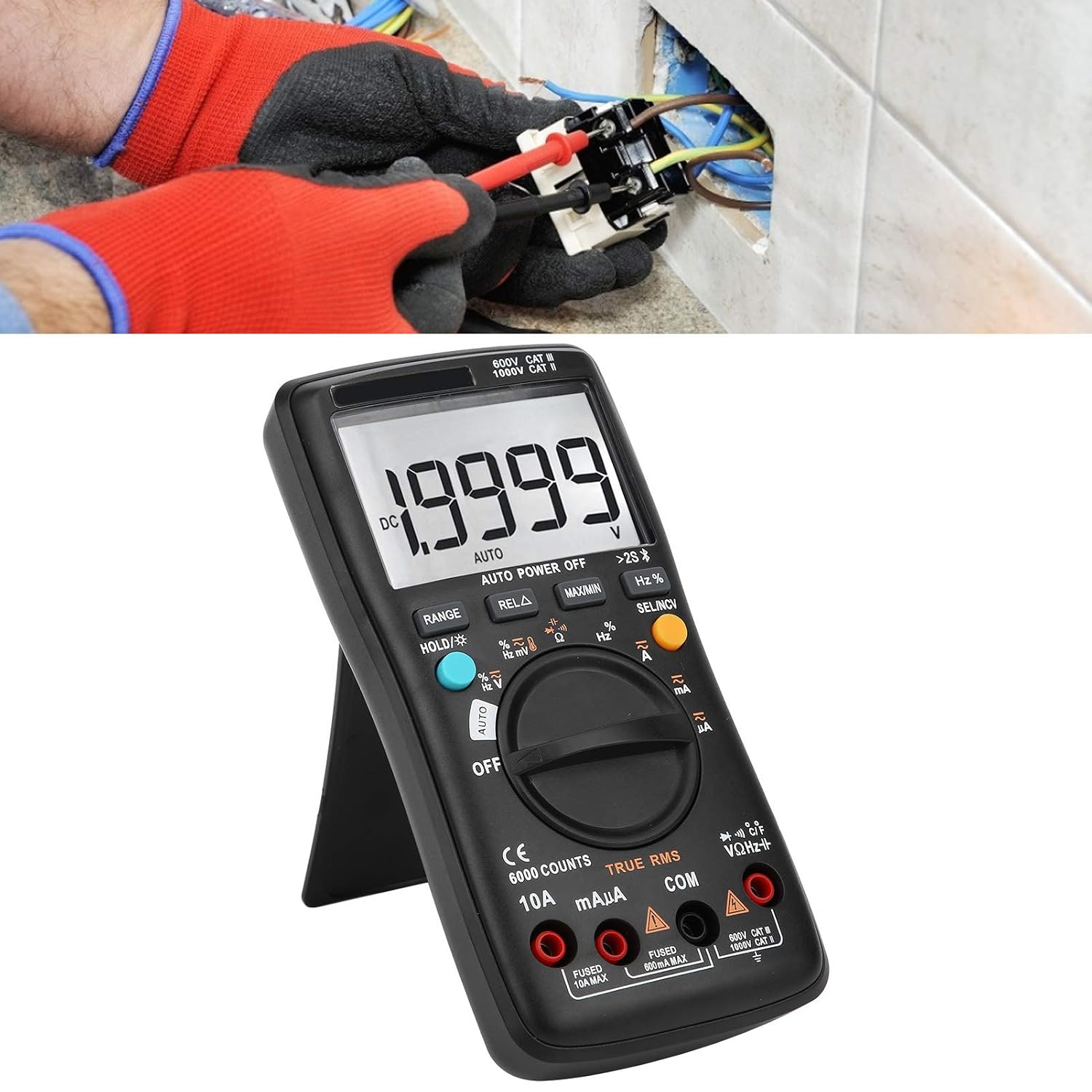
Image 4.1: The multimeter in use, positioned on its integrated kickstand for convenient viewing during measurements.
5. പരിപാലനം
5.1 വൃത്തിയാക്കൽ
പരസ്യം ഉപയോഗിച്ച് കേസ് തുടയ്ക്കുകamp തുണിയും നേരിയ ഡിറ്റർജന്റും. ഉരച്ചിലുകളോ ലായകങ്ങളോ ഉപയോഗിക്കരുത്. ടെർമിനലുകൾ അഴുക്കും ഈർപ്പവും ഇല്ലാതെ സൂക്ഷിക്കുക.
5.2 ബാറ്ററി മാറ്റിസ്ഥാപിക്കൽ
ബാറ്ററി മാറ്റിസ്ഥാപിക്കുന്നതിനുള്ള നിർദ്ദേശങ്ങൾക്ക് സെക്ഷൻ 3.2 കാണുക. ഡിസ്പ്ലേയിൽ കുറഞ്ഞ ബാറ്ററി സൂചകം ദൃശ്യമാകുമ്പോൾ ബാറ്ററികൾ ഉടൻ മാറ്റിസ്ഥാപിക്കുക.
5.3 ഫ്യൂസ് മാറ്റിസ്ഥാപിക്കൽ
If the current measurement functions stop working, the fuse may need replacement. Fuses are located inside the multimeter. Fuse specifications are typically printed near the current input jacks (e.g., FUSED 10A MAX, FUSED 600mA MAX). To replace a fuse:
- മൾട്ടിമീറ്റർ ഓഫാക്കിയിട്ടുണ്ടെന്ന് ഉറപ്പുവരുത്തി എല്ലാ ടെസ്റ്റ് ലീഡുകളും വിച്ഛേദിക്കുക.
- Open the back case of the multimeter (this may require removing screws).
- Carefully locate and remove the blown fuse.
- Replace it with a fuse of the exact same type and rating. Using an incorrect fuse can damage the meter or pose a safety hazard.
- Reassemble the multimeter, ensuring all screws are securely fastened.
6. പ്രശ്നപരിഹാരം
- ഡിസ്പ്ലേ ഇല്ല അല്ലെങ്കിൽ മങ്ങിയ ഡിസ്പ്ലേ: ബാറ്ററി ഇൻസ്റ്റാളേഷനും ചാർജ് ലെവലും പരിശോധിക്കുക. ആവശ്യമെങ്കിൽ ബാറ്ററികൾ മാറ്റിസ്ഥാപിക്കുക.
- തെറ്റായ വായനകൾ: Ensure test leads are properly connected to the correct jacks. Verify the function dial is set to the appropriate measurement type and range. Check for damaged test leads.
- കറന്റ് അളക്കൽ പ്രവർത്തിക്കുന്നില്ല: Check the fuse (refer to Section 5.3). Ensure the red test lead is connected to the correct current input jack (mAµA or 10A).
- വയർലെസ് കണക്ഷൻ പ്രശ്നങ്ങൾ: Ensure wireless is enabled on both the multimeter and your smartphone. Restart both devices and try pairing again. Check the mobile app for troubleshooting tips.
- മീറ്റർ പ്രതികരിക്കുന്നില്ല: Turn the meter off and then on again. If the issue persists, remove batteries for a few minutes and then reinsert them.
7 സ്പെസിഫിക്കേഷനുകൾ
| ഫീച്ചർ | സ്പെസിഫിക്കേഷൻ |
|---|---|
| പ്രദർശിപ്പിക്കുക | 6000 എണ്ണം |
| റേഞ്ചിംഗ് | സ്വയമേവ/മാനുവൽ |
| Sampലിംഗ് നിരക്ക് | 3 സെക്കൻഡ്/സമയം |
| യഥാർത്ഥ RMS | പിന്തുണച്ചു |
| ഡാറ്റ ഹോൾഡ് | പിന്തുണച്ചു |
| ബാക്ക്ലൈറ്റ് | പിന്തുണച്ചു |
| കുറഞ്ഞ ബാറ്ററി സൂചന | പിന്തുണച്ചു |
| ഓട്ടോ പവർ ഓഫ് | പിന്തുണച്ചു |
| ഡിസി വോളിയംtagഇ (വി) | 6V, 60V, 600V, 1000V |
| ഡിസി വോളിയംtagഇ (എംവി) | 60 മി |
| അളവുകൾ | 20 x 12 x 5 സെ.മീ (7.9 x 4.7 x 2 ഇഞ്ച്) |
| ഭാരം | 374 ഗ്രാം (0.82 പൗണ്ട്) |
| നിർമ്മാതാവ് | LiebeWH |
| ഉൽപ്പന്ന മോഡൽ നമ്പർ | LiebeWHso0iq29gfn |

Image 7.1: Dimensions of the LiebeWH ZT-300AB Multimeter, showing its compact size.
8. വാറൻ്റിയും പിന്തുണയും
For warranty information and technical support, please refer to the documentation included with your purchase or contact the manufacturer directly. Contact details can typically be found on the product packaging or the official LiebeWH webസൈറ്റ്.