
1. ആമുഖം
The ATTACK SHARK X87 is a 75% layout gasket-mount mechanical keyboard designed for versatility and performance. It features a compact design, hot-swappable switches, triple connectivity modes (Bluetooth 5.0, 2.4GHz wireless, and USB-C wired), and customizable RGB backlighting. This manual provides instructions for setup, operation, and maintenance of your keyboard.
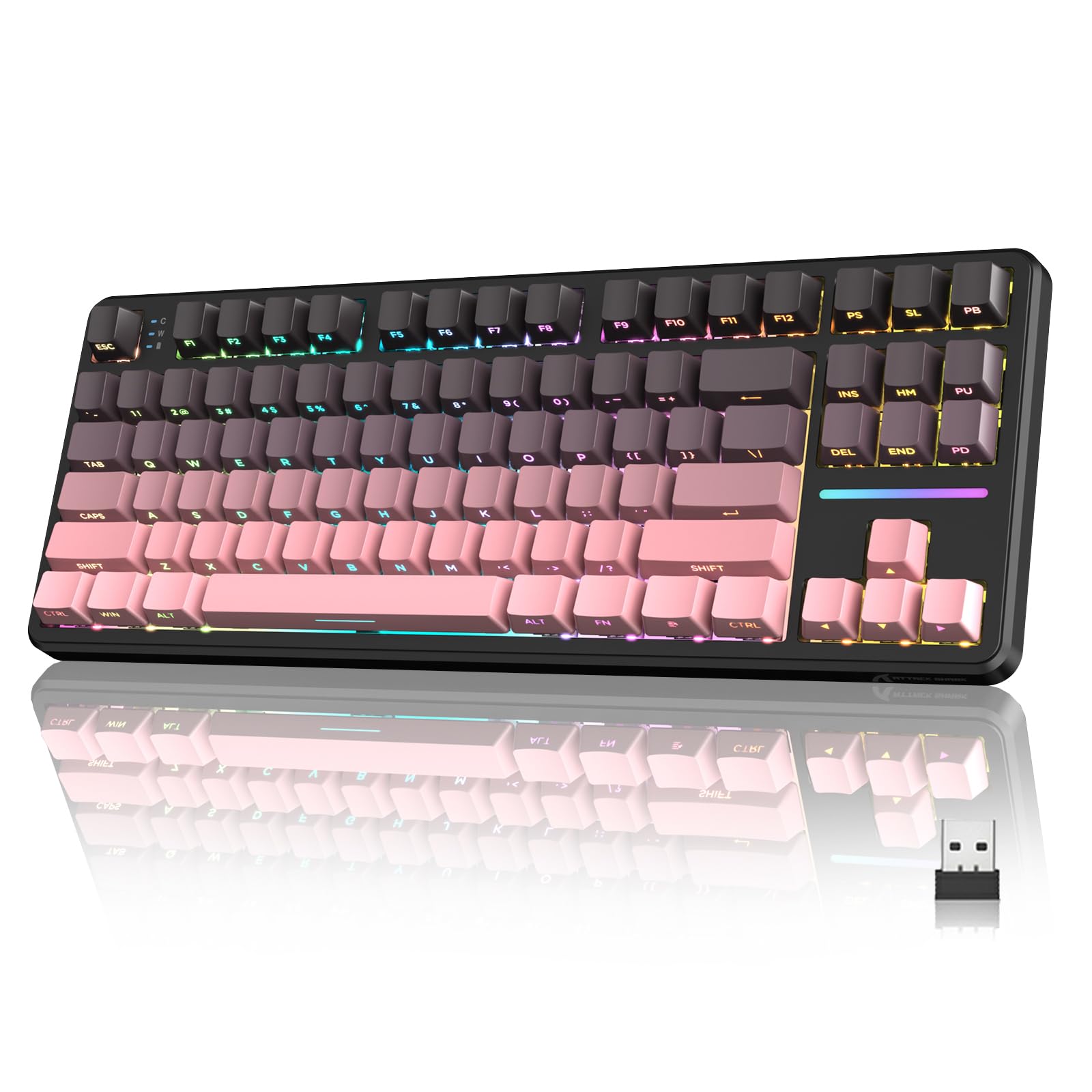
Figure 1: ATTACK SHARK X87 Wireless Mechanical Keyboard Overview
2. പാക്കേജ് ഉള്ളടക്കം
നിങ്ങളുടെ പാക്കേജിൽ എല്ലാ ഇനങ്ങളും ഉണ്ടെന്ന് ദയവായി പരിശോധിക്കുക:
- ATTACK SHARK X87 Wireless Mechanical Keyboard
- യുഎസ്ബി-സി കേബിൾ
- കീക്യാപ് പുള്ളർ
- 2x സ്പെയർ സ്വിച്ചുകൾ
- ഉപയോക്തൃ മാനുവൽ (ഈ പ്രമാണം)
3. സജ്ജീകരണവും കണക്ഷനും
The X87 keyboard supports three connection methods: Bluetooth 5.0, 2.4GHz wireless, and USB-C wired. It is compatible with Windows, Mac, and PC systems.
3.1 പ്രാരംഭ ചാർജിംഗ്
Before first use, connect the keyboard to a USB power source using the provided USB-C cable to ensure it is fully charged. The battery indicator will show charging status.
3.2 കണക്ഷൻ മോഡുകൾ
A switch located on the back of the keyboard allows selection between connection modes (BT/USB/2.4G) and operating systems (Mac/Win).
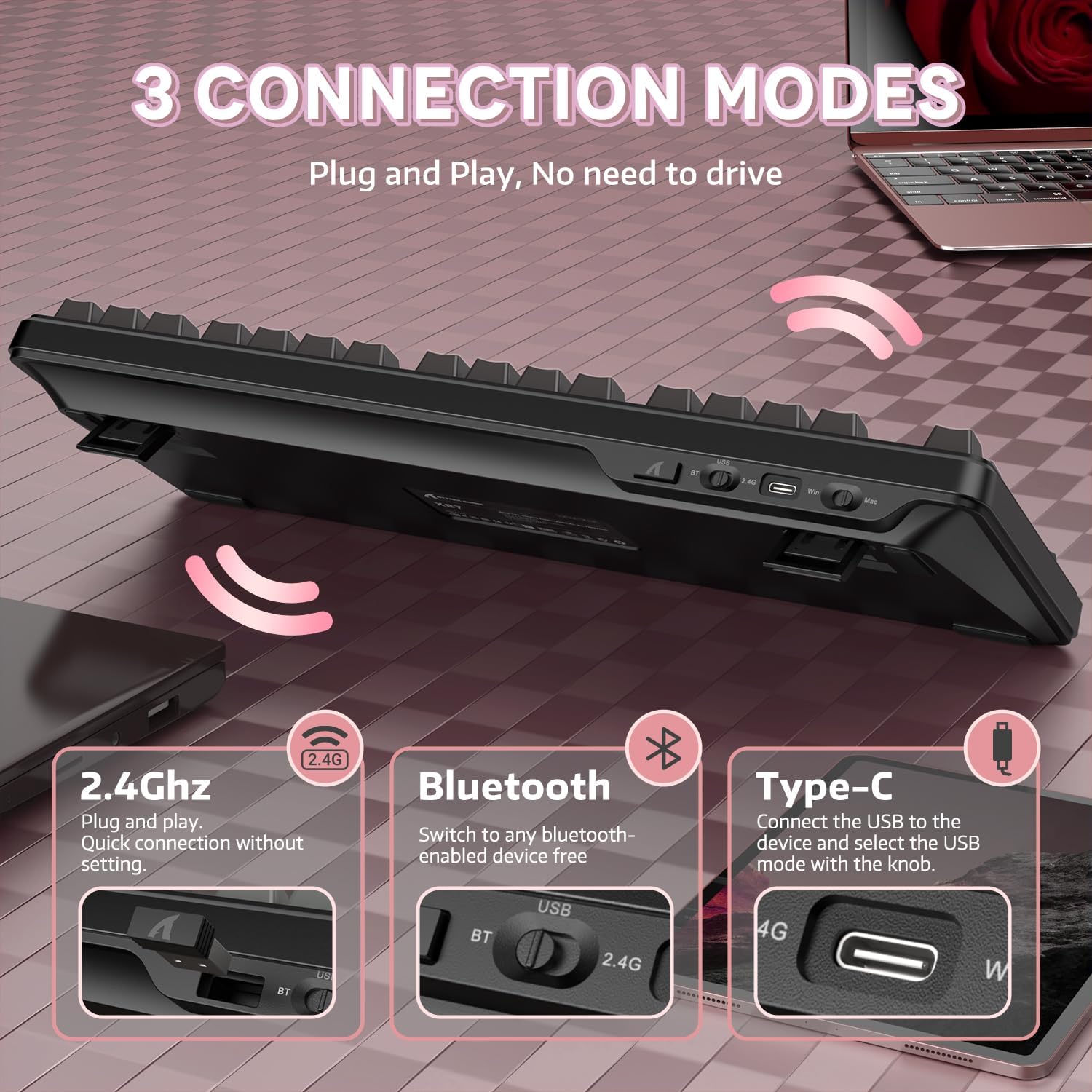
Figure 2: Keyboard with 2.4GHz, Bluetooth, and USB-C connection options highlighted.
- 2.4GHz വയർലെസ് മോഡ്:
1. Set the switch on the back of the keyboard to '2.4G'.
2. Insert the 2.4GHz USB receiver into an available USB port on your computer.
3. The keyboard will automatically connect. - ബ്ലൂടൂത്ത് 5.0 മോഡ്:
1. Set the switch on the back of the keyboard to 'BT'.
2. On your device (computer, laptop, smartphone, tablet), enable Bluetooth and search for new devices.
3. Select 'ATTACK SHARK X87' from the list of available devices to pair.
4. The keyboard can connect to up to five devices simultaneously. Use FN + key combinations to switch between paired devices. - USB-C വയേർഡ് മോഡ്:
1. Set the switch on the back of the keyboard to 'USB'.
2. Connect the keyboard to your computer using the provided USB-C cable.
3. The keyboard will function immediately without additional drivers.
4. പ്രവർത്തന നിർദ്ദേശങ്ങൾ
The ATTACK SHARK X87 keyboard features standard key layouts and additional functions accessible via the Function (FN) key.
4.1 ഫംഗ്ഷൻ കീ കോമ്പിനേഷനുകൾ
The FN key, combined with other keys, activates various multimedia and system controls. Refer to the keyboard's keycap legends or the official software for a complete list of combinations.
- എഫ്എൻ + എഫ്1-എഫ്12: മൾട്ടിമീഡിയ നിയന്ത്രണങ്ങൾ (ഉദാ: വോളിയം, പ്ലേ/പോസ്, ട്രാക്ക് ഒഴിവാക്കൽ).
- FN + ബാക്ക്സ്പെയ്സ്: Check battery level (see Section 6).
- FN + Key Combinations: Adjust RGB lighting effects (see Section 5).
5. RGB ബാക്ക്ലൈറ്റിംഗ്
The keyboard features 15+ RGB lighting effects with over 16.8 million colors and 10 unique music rhythm lighting effects. Adjustments can be made directly on the keyboard or through the customization software.

Figure 3: RGB Backlighting Controls and Effects
- FN + മുകളിലേക്കും താഴേക്കും ഉള്ള അമ്പടയാളം: ബാക്ക്ലൈറ്റിന്റെ തെളിച്ചം ക്രമീകരിക്കുക.
- FN + ഇടത്തേക്കോ വലത്തേക്കോ ഉള്ള അമ്പടയാളം: ബാക്ക്ലൈറ്റ് വേഗത ക്രമീകരിക്കുക.
- FN + നൽകുക: ലൈറ്റ് മോഡ് മാറ്റുക.
- FN + ESC: ഫാക്ടറി ക്രമീകരണങ്ങളിലേക്ക് പുനഃസ്ഥാപിക്കുക.
- എഫ്എൻ + എക്സ്: Light switch (turn RGB on/off).
6. ഇഷ്ടാനുസൃതമാക്കലും സോഫ്റ്റ്വെയറും
The ATTACK SHARK X87 keyboard is programmable via dedicated drivers, allowing for macro recording, key remapping, and custom backlighting. This enhances both gaming and work efficiency.

Figure 4: Customized Driver Software for Key Functions and Backlighting
For driver downloads and detailed instructions on customization, please visit the official ATTACK SHARK webസൈറ്റ് അല്ലെങ്കിൽ ഉപഭോക്തൃ പിന്തുണയുമായി ബന്ധപ്പെടുക.
7. ബാറ്ററി മാനേജ്മെന്റ്
The keyboard is equipped with a 4000mAh battery, providing extended usage in wireless modes. It features smart power-saving functions.

Figure 5: Battery Level Indication on the ATTACK SHARK X87 Keyboard
നിലവിലെ ബാറ്ററി നില പരിശോധിക്കാൻ, അമർത്തുക FN + ബാക്ക്സ്പേസ്. The indicator lights will illuminate to show the approximate charge remaining.
8. Hot-Swappable Switches and Gasket Structure
The X87 keyboard features a hot-swappable PCB, allowing users to easily change switches without soldering. It supports both 3-pin and 5-pin mechanical switches. The keyboard comes with pre-lubed Strawberry switches for a smooth typing experience.

Figure 6: Hot-Swappable Switch Support (3-pin and 5-pin)
The keyboard also incorporates a gasket structure with five layers of sound-absorbing material, including PORON, to reduce noise and vibration, optimizing switch sound for a better typing experience.
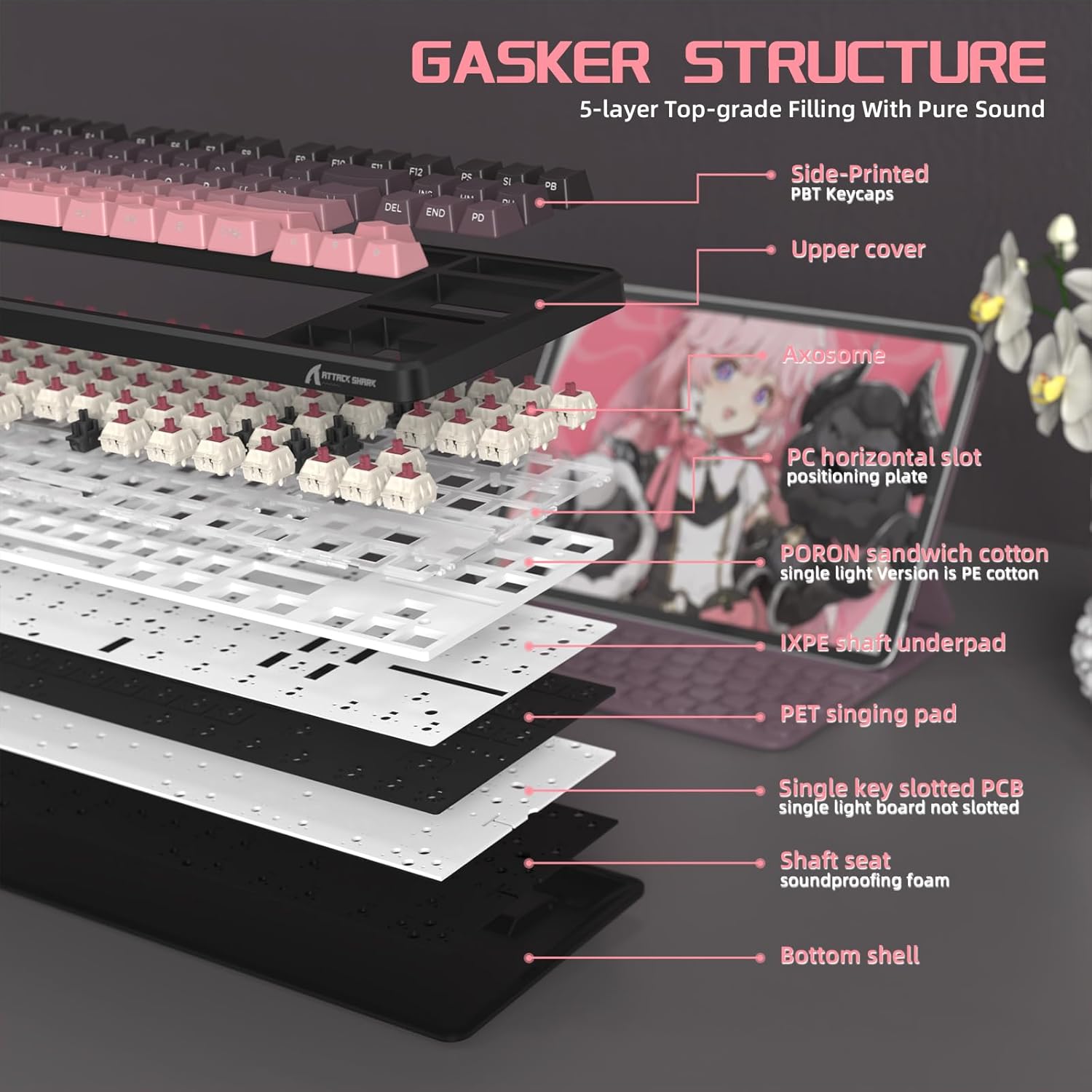
ചിത്രം 7: പൊട്ടിത്തെറിച്ചു view of the keyboard's gasket structure and sound-absorbing layers.
8.1 പിബിടി കീക്യാപ്പുകൾ
The keyboard is equipped with side-printed PBT keycaps with an OEM profile. PBT material is known for its durability and resistance to wear, friction, and solvents, ensuring a long-lasting aesthetic and feel.
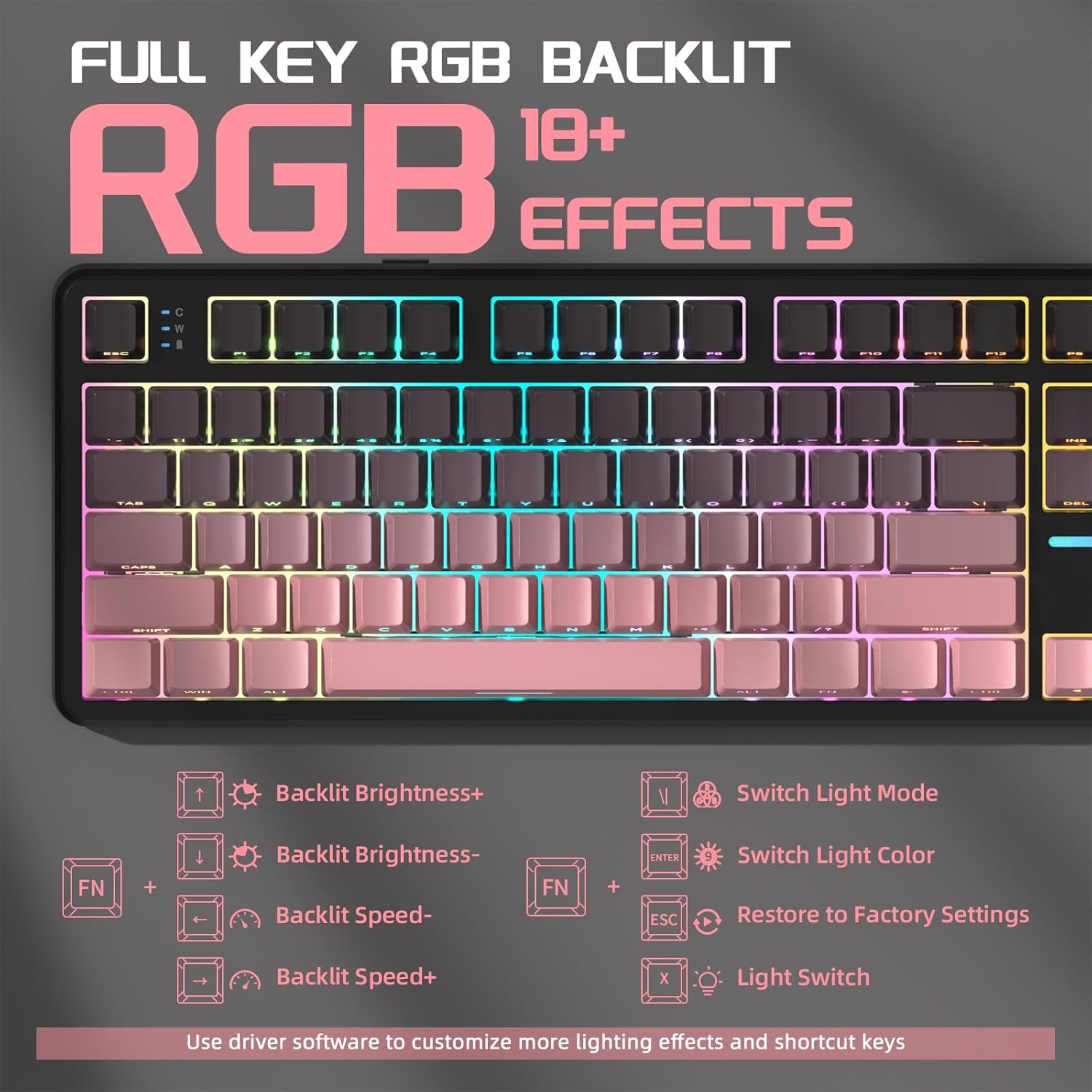
Figure 8: Close-up of the side-printed PBT keycaps.
9. ഔദ്യോഗിക ഉൽപ്പന്ന വീഡിയോകൾ
9.1 ATTACK SHARK X87 Wireless Mechanical Gaming Keyboard
വീഡിയോ 1: ഒരു ഓവർview of the ATTACK SHARK X87 Wireless Mechanical Gaming Keyboard, showcasing അതിന്റെ രൂപകൽപ്പനയും സവിശേഷതകളും.
9.2 ATTACK SHARK X87 Side-Printed PBT Keycaps Mechanical Keyboard
Video 2: A closer look at the side-printed PBT keycaps and the mechanical switches of the ATTACK SHARK X87 keyboard.
9.3 ATTACK SHARK X87 Wireless Mechanical Keyboard
Video 3: Demonstrates the wireless capabilities and overall functionality of the ATTACK SHARK X87 Mechanical Keyboard.
10 സ്പെസിഫിക്കേഷനുകൾ
| ബ്രാൻഡ് | അറ്റാക്ക് സ്രാവ് |
| മോഡൽ നമ്പർ | X87 |
| കണക്റ്റിവിറ്റി ടെക്നോളജി | 2.4GHz, BT5.0, USB-C |
| കീബോർഡ് വിവരണം | മെക്കാനിക്കൽ |
| അനുയോജ്യമായ ഉപകരണങ്ങൾ | ഗെയിമിംഗ് കൺസോൾ, ലാപ്ടോപ്പ്, പിസി, സ്മാർട്ട്ഫോൺ, ടാബ്ലെറ്റ് |
| പ്രത്യേക സവിശേഷതകൾ | ബാക്ക്ലിറ്റ്, എർഗണോമിക്, ഹോട്ട്-സ്വാപ്പ് ചെയ്യാവുന്ന, പ്രോഗ്രാം ചെയ്യാവുന്ന കീകൾ, റീചാർജ് ചെയ്യാവുന്നത് |
| കീബോർഡ് ബാക്ക്ലൈറ്റിംഗ് | RGB |
| മെറ്റീരിയൽ | പ്ലാസ്റ്റിക് |
| ഇനത്തിൻ്റെ ഭാരം | 2.42 പൗണ്ട് |
| പാക്കേജ് അളവുകൾ | 15.71 x 7.52 x 2.09 ഇഞ്ച് |
11. പ്രശ്നപരിഹാരം
- കീബോർഡ് പ്രതികരിക്കുന്നില്ല: Ensure the keyboard is charged. Check the connection mode switch (2.4G/BT/USB) is set correctly. For wireless modes, ensure the receiver is properly inserted or Bluetooth is paired. Try a different USB port or cable for wired mode.
- RGB ലൈറ്റിംഗ് പ്രവർത്തിക്കുന്നില്ല: Ensure RGB is enabled (FN + X). Adjust brightness (FN + Arrow Up). If issues persist, try restoring factory settings (FN + ESC).
- രജിസ്റ്റർ ചെയ്യാത്ത കീകൾ: For hot-swappable switches, ensure switches are fully seated. If a specific key is not working, try replacing the switch with one of the spare switches provided.
- കണക്റ്റിവിറ്റി പ്രശ്നങ്ങൾ: Ensure the keyboard is within range for wireless connections. Avoid interference from other wireless devices. For Bluetooth, try re-pairing the device.
12. വാറൻ്റിയും പിന്തുണയും
For warranty information, technical support, or any questions regarding your ATTACK SHARK X87 keyboard, please contact ATTACK SHARK customer service through their official webഉൽപ്പന്നം വാങ്ങിയ സ്ഥലത്തോ റീട്ടെയിലറിലോ. പിന്തുണയുമായി ബന്ധപ്പെടുമ്പോൾ നിങ്ങളുടെ ഉൽപ്പന്ന മോഡലും വാങ്ങൽ തീയതിയും ലഭ്യമാക്കുക.