
1. പാക്കേജ് ഉള്ളടക്കം
താഴെ ലിസ്റ്റ് ചെയ്തിരിക്കുന്ന എല്ലാ ഇനങ്ങളും നിങ്ങളുടെ പാക്കേജിൽ ഉൾപ്പെടുത്തിയിട്ടുണ്ടെന്ന് ഉറപ്പാക്കുക. ഏതെങ്കിലും ഇനങ്ങൾ നഷ്ടപ്പെട്ടിട്ടുണ്ടെങ്കിലോ കേടായിട്ടുണ്ടെങ്കിലോ, ദയവായി ഉപഭോക്തൃ പിന്തുണയുമായി ബന്ധപ്പെടുക.
- 8 Channel 4K PoE NVR with 1TB Hard Drive (x1)
- 2.7K/5.0 Megapixel PoE Camera (x4)
- 60 Feet Network Cable (x4)
- 48V Power Supply for NVR (x1)
- റിമോട്ട് (x1)
- HDMI കേബിൾ (x1)
- USB മൗസ് (x1)
- സ്ക്രൂകൾ (x4)
- മാനുവൽ (x1)
- 24 Hour Video Surveillance Protection Sticker (x1)

Figure 1: Included components in the OOSSXX PoE Security Camera System package.
2. സിസ്റ്റം ഓവർview
The OOSSXX PoE Outdoor Security Camera System provides comprehensive surveillance with high-resolution cameras and a Network Video Recorder (NVR) with an integrated monitor. The system supports up to 8 cameras for expandable coverage.

Figure 2: The 10.2-inch integrated monitor NVR for convenient viewing.

Figure 3: System diagram illustrating the 8-channel NVR with 4 cameras and expansion capability.
3. സജ്ജീകരണ ഗൈഡ്
3.1 Physical Camera Installation
Follow these steps to physically install your PoE bullet cameras:
- Determine Bracket Screw Hole Sizes: Use the camera's mounting bracket as a template to mark the desired screw hole positions on the wall or ceiling.
- Drill Hole Positions: Drill pilot holes at the marked positions using an appropriate drill bit for your mounting surface.
- വാൾ ആങ്കറുകൾ തിരുകുക: For masonry or drywall, insert the provided wall anchors into the drilled holes.
- ക്യാമറ ഘടിപ്പിക്കുക: Align the camera bracket with the holes and secure it using the provided screws. Adjust the camera angle as needed.
Video 1: Step-by-step guide for installing the 5MP Wired PoE Bullet Camera.
3.2 സിസ്റ്റം കണക്ഷൻ
Connect the cameras to the NVR and ensure network connectivity:
- Connect PoE Cameras to NVR: Use the provided 60-foot network cables to connect each PoE camera to the PoE LAN ports on the back of the NVR.
- NVR പവറുമായി ബന്ധിപ്പിക്കുക: Plug the 48V power supply into the NVR's power port and then into a power outlet.
- Connect NVR to Router (for online access): Use the 1-meter LAN cable to connect the NVR's WAN port to your internet router.
- Connect Monitor (if not integrated): If your NVR does not have an integrated monitor, connect an external monitor via HDMI or VGA.
3.3 Mobile App Setup (HonestView)
To access your security system remotely, install and configure the 'HonestView' mobile application:
- ആപ്പ് ഡൗൺലോഡ് ചെയ്യുക: Download the free 'HonestView' app from your smartphone's App Store (iOS or Android).
- ആപ്പ് തുറന്ന് ഉപകരണം ചേർക്കുക: Launch the app, tap the '+' icon, and select 'Scan to add' or 'Add smart device'.
- Scan NVR QR Code: Scan the QR code located on the NVR device or displayed on the NVR's monitor.
- Complete Network Setup: Wait for the app to complete the network configuration.
- നിങ്ങളുടെ ഉപകരണത്തിന് പേര് നൽകുക: Once connected, name your device (e.g., 'Home Security') and tap 'Finished'.
- തത്സമയം ആരംഭിക്കുക View: Tap the 'Play' button to begin viewing live camera feeds. You can tap the screen to enter full-screen mode.
Video 2: Demonstration of connecting the PoE camera to the NVR and setting up the 'HonestView' app.
4. പ്രവർത്തന നിർദ്ദേശങ്ങൾ
4.1 തത്സമയം View ഒപ്പം പ്ലേബാക്ക്
വിജയകരമായ സജ്ജീകരണത്തിന് ശേഷം, നിങ്ങൾക്ക് കഴിയും view live feeds and review രേഖപ്പെടുത്തി footage:
- തത്സമയം View: Access the 'HonestView' app or connect a monitor to the NVR to see real-time video from all connected cameras.
- പ്ലേബാക്ക്: Use the app's 'Playback' function or the NVR interface to review recorded video. The 1TB hard drive stores footage for later access.
4.2 മോഷൻ ഡിറ്റക്ഷനും അലേർട്ടുകളും
The system features advanced AI Human Detection to minimize false alarms:
- AI ഹ്യൂമൻ ഡിറ്റക്ഷൻ: Utilizes advanced recognition algorithms to detect human activity, reducing false alerts from animals, leaves, or other non-human movements. This feature can be manually enabled or disabled.
- അലേർട്ടുകൾ: Receive real-time notifications via the 'HonestView' app, email, or a buzzer on the NVR when abnormal actions are detected.
- ഇഷ്ടാനുസൃതമാക്കാവുന്ന കണ്ടെത്തൽ ഏരിയ: Configure specific zones within the camera's view to trigger alerts, focusing on critical areas and further reducing unnecessary notifications.

Figure 4: AI Human/Vehicle Detection capabilities and alert options.
4.3 നൈറ്റ് വിഷൻ മോഡുകൾ
The cameras provide clear visibility in various lighting conditions:
- ഇൻഫ്രാറെഡ് നൈറ്റ് വിഷൻ: Three infrared array LEDs enable high-quality night vision up to 65 feet, automatically switching from day to night mode.
- പൂർണ്ണ വർണ്ണ മോഡ്: In certain conditions, the camera can provide full-color night vision for enhanced detail.
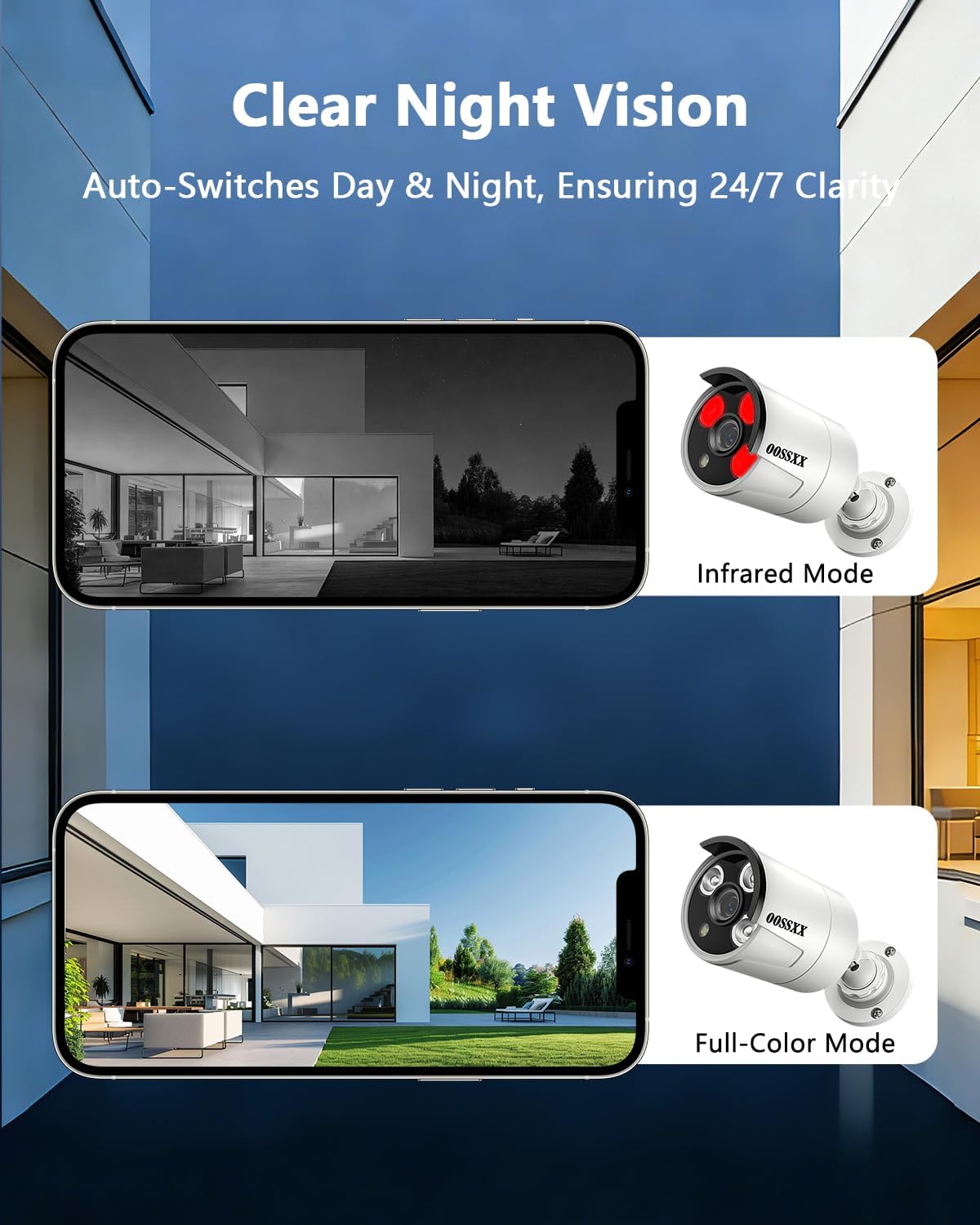
Figure 5: Clear night vision with automatic day/night switching.
4.4 ഓഡിയോ മോണിറ്ററിംഗ്
Each camera includes a built-in microphone for one-way audio monitoring:
- വൺ-വേ ഓഡിയോ: Listen to audio from the camera's location through the 'HonestView' app. Note that this is a one-way audio feature, allowing you to hear but not speak through the camera.
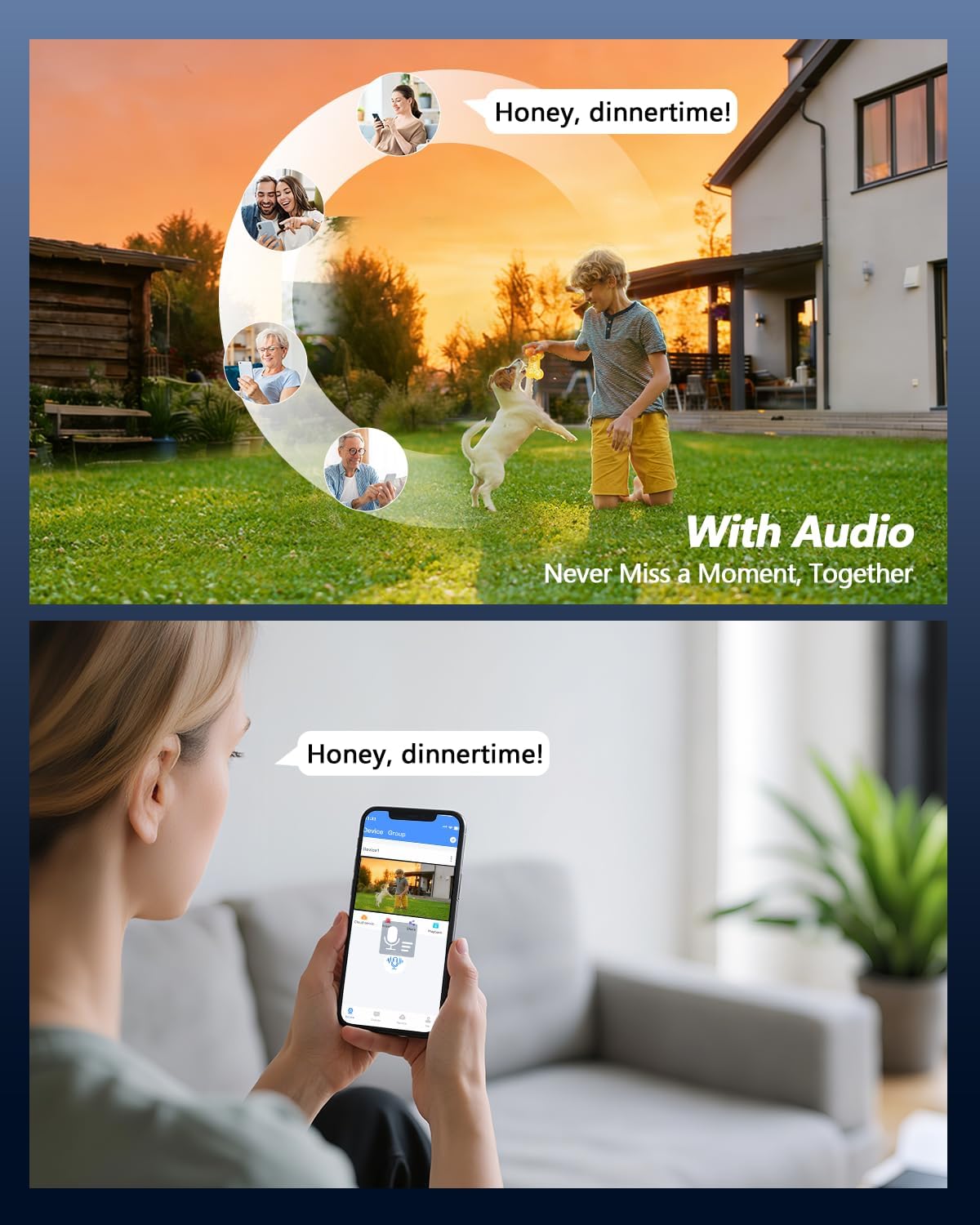
Figure 6: Audio monitoring feature for listening to your surroundings.
5. പരിപാലനം
പതിവ് അറ്റകുറ്റപ്പണികൾ നിങ്ങളുടെ സുരക്ഷാ സംവിധാനത്തിന്റെ ഒപ്റ്റിമൽ പ്രകടനവും ദീർഘായുസ്സും ഉറപ്പാക്കുന്നു:
- വൃത്തിയാക്കൽ: ക്യാമറ ലെൻസുകൾ ഇടയ്ക്കിടെ മൃദുവായ, ഡി-ടച്ച് ഉപയോഗിച്ച് വൃത്തിയാക്കുക.amp cloth to remove dust and smudges that may affect image clarity. Ensure the camera is powered off before cleaning.
- ഫേംവെയർ അപ്ഡേറ്റുകൾ: Check the OOSSXX official website or the 'HonestView' app for available firmware updates. Keeping your system updated ensures the latest features and security patches.
- ഹാർഡ് ഡ്രൈവ് മാനേജ്മെന്റ്: The 1TB hard drive will automatically overwrite older footage when full. If you require longer storage, consider backing up important footage or upgrading the hard drive (supports up to 2TB).
- കേബിൾ പരിശോധന: Regularly inspect all network and power cables for any signs of wear, damage, or loose connections.
6. പ്രശ്നപരിഹാരം
If you encounter issues with your OOSSXX security camera system, refer to the following common troubleshooting steps:
- വീഡിയോ ഫീഡ് ഇല്ല:
- NVR-ന്റെ PoE പോർട്ടുകളുമായി ക്യാമറകൾ ശരിയായി ബന്ധിപ്പിച്ചിട്ടുണ്ടെന്ന് ഉറപ്പാക്കുക.
- Verify the NVR is powered on and connected to a monitor (if applicable).
- Check network cables for damage or loose connections.
- റിമോട്ട് ആക്സസ് ഇല്ല:
- Confirm the NVR is connected to your internet router via the LAN cable.
- നിങ്ങളുടെ റൂട്ടറിന്റെ ഇന്റർനെറ്റ് കണക്ഷൻ പരിശോധിക്കുക.
- Ensure the 'HonestView' app is updated to the latest version.
- Verify that the NVR's QR code was scanned correctly during app setup.
- തെറ്റായ ചലന മുന്നറിയിപ്പുകൾ:
- Adjust the sensitivity settings for motion detection in the NVR or app.
- Utilize the customizable detection area feature to exclude areas prone to false triggers (e.g., moving trees, busy roads).
- Ensure AI Human Detection is enabled if you wish to filter out non-human movements.
- മോശം ചിത്രത്തിന്റെ ഗുണനിലവാരം:
- ക്യാമറ ലെൻസ് വൃത്തിയാക്കി അതിൽ നിന്ന് അഴുക്കോ പാടുകളോ നീക്കം ചെയ്യുക.
- ക്യാമറ സുരക്ഷിതമായി ഘടിപ്പിച്ചിട്ടുണ്ടെന്നും വൈബ്രേറ്റ് ചെയ്യുന്നില്ലെന്നും ഉറപ്പാക്കുക.
- ക്യാമറയുടെ ഫീൽഡിൽ തടസ്സങ്ങൾ ഉണ്ടോയെന്ന് പരിശോധിക്കുക view.
7 സ്പെസിഫിക്കേഷനുകൾ
Detailed technical specifications for the OOSSXX PoE Outdoor Security Camera System:
| ഫീച്ചർ | സ്പെസിഫിക്കേഷൻ |
|---|---|
| ബ്രാൻഡ് | OOSSXX |
| മോഡലിൻ്റെ പേര് | IP Cameras System |
| മോഡൽ നമ്പർ | HD 2.7K 5.0MP with Audio |
| കണക്റ്റിവിറ്റി ടെക്നോളജി | IEEE 802.11at/af, POE, Wired |
| പ്രത്യേക സവിശേഷതകൾ | 2.7K / 5Megapixel Super HD, IP67 Waterproof, One-Way Audio, Plug and play PoE System |
| ഇൻഡോർ/ഔട്ട്ഡോർ ഉപയോഗം | ഇൻഡോർ, ഔട്ട്ഡോർ |
| അനുയോജ്യമായ ഉപകരണങ്ങൾ | Smartphones, Personal Computers, Tablets, TV |
| കൺട്രോളർ തരം | APP, Remote |
| മൌണ്ട് തരം | മതിൽ മൗണ്ട് |
| നിറം | Plug and Play PoE System |
| ഫോം ഫാക്ടർ | ബുള്ളറ്റ് |
| ഇൻസ്റ്റലേഷൻ തരം | സ്ക്രൂ ഇൻ |
| എൻക്ലോഷർ മെറ്റീരിയൽ | അലുമിനിയം |
| ജല പ്രതിരോധ നില | വാട്ടർപ്രൂഫ് (IP67) |
| അലേർട്ട് തരം | ഓഡിയോയും ചലനവും |
| പ്രകാശ സ്രോതസ്സ് | ഇൻഫ്രാറെഡ് |
| ഫലപ്രദമായ സ്റ്റിൽ റെസല്യൂഷൻ | 5 എം.പി |
| ഫോട്ടോ സെൻസർ റെസല്യൂഷൻ | 5 എം.പി |
| വീഡിയോ ക്യാപ്ചർ റെസല്യൂഷൻ | 2.7K 5MP, 2592×1944 |
| ഫ്രെയിം റേറ്റ് | 15fps |
| ചാനലുകളുടെ എണ്ണം | 8 |
| വീഡിയോ എൻകോഡിംഗ് | H.265 |
| നൈറ്റ് വിഷൻ റേഞ്ച് | 65 അടി |
| ഐആർ എൽഇഡികളുടെ എണ്ണം | 3 |
| ഫ്ലാഷ് മെമ്മറി ഇൻസ്റ്റാൾ ചെയ്ത വലുപ്പം | 1 ടി.ബി |
| ഫ്ലാഷ് മെമ്മറി പിന്തുണയ്ക്കുന്ന പരമാവധി വലുപ്പം | 2 ടി.ബി |
| പവർ ഉറവിടം | കോർഡഡ് ഇലക്ട്രിക് |
| വാല്യംtage | 110 വോൾട്ട് (എസി) |
| വാട്ട്tage | 30 വാട്ട്സ് |
| Viewing ആംഗിൾ | 75 ഡിഗ്രി |
| സൂം തരം | ഡിജിറ്റൽ സൂം |
| ഇനത്തിൻ്റെ അളവുകൾ | 11 x 10 x 7 ഇഞ്ച് |
| ഇനത്തിൻ്റെ ഭാരം | 10 പൗണ്ട് |
8. വാറൻ്റിയും പിന്തുണയും
8.1 വാറൻ്റി വിവരങ്ങൾ
This OOSSXX product comes with a US Location Manufacturer Warranty for 1 Year from the date of purchase. Please retain your proof of purchase for warranty claims.
8.2 ഉപഭോക്തൃ പിന്തുണ
For technical assistance, troubleshooting, or warranty inquiries, please contact OOSSXX customer support. Refer to the contact information provided in your product packaging or visit the official OOSSXX webസൈറ്റ്.