
1. ആമുഖം
This manual provides essential information for the safe and efficient installation, operation, and maintenance of your Bromic Affinity Smart Heat Dimmer Controller, Model BH3130062. This 2-channel controller is designed to manage Bromic Platinum and Tungsten electric heaters, offering precise heat output adjustments and smart connectivity via Wi-Fi and Bluetooth.
Please read this manual thoroughly before installation and use, and retain it for future reference. Proper installation and adherence to these instructions are crucial for optimal performance and safety.
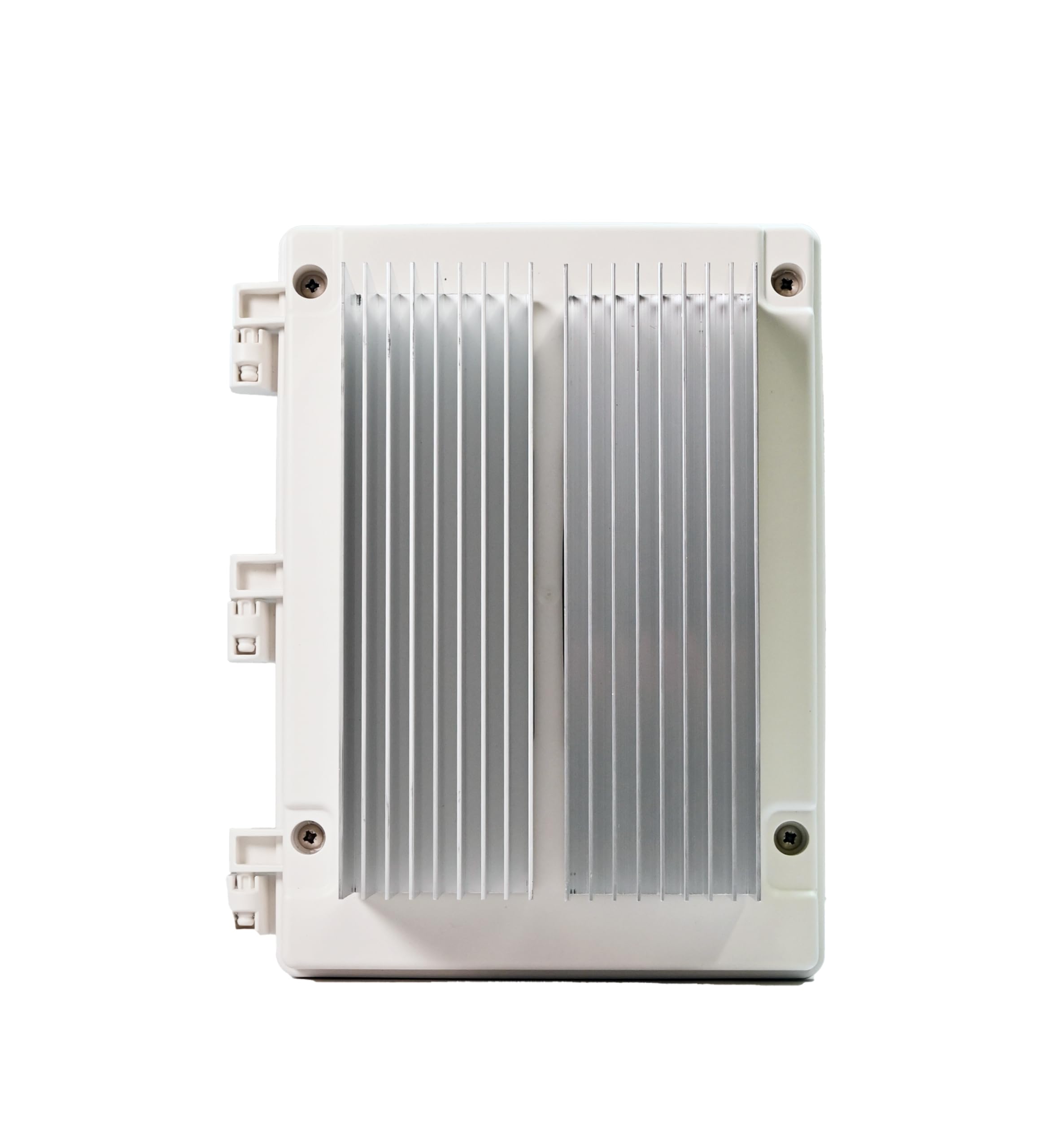
ചിത്രം 1: മുൻഭാഗം view of the Bromic Affinity Smart Heat Dimmer Controller.
2 സുരക്ഷാ വിവരങ്ങൾ
മുന്നറിയിപ്പ്: ഈ സുരക്ഷാ നിർദ്ദേശങ്ങൾ പാലിക്കുന്നതിൽ പരാജയപ്പെടുന്നത് തീ, വൈദ്യുത ആഘാതം അല്ലെങ്കിൽ മറ്റ് പരിക്കുകൾ അല്ലെങ്കിൽ നാശനഷ്ടങ്ങൾക്ക് കാരണമാകാം.
- Installation must be performed by a qualified and licensed electrician in accordance with all local and national electrical codes.
- Disconnect power at the circuit breaker before installing or servicing the controller.
- Do not operate the controller if it appears damaged.
- Ensure the power supply matches the specifications of the controller (208-277V).
- This device is designed for outdoor use with an IP54 rating, but avoid direct water spray or submersion.
- Keep children and pets away from the installation area during setup and operation.
- Do not attempt to modify or repair the controller yourself. Contact qualified service personnel.
3. ഉൽപ്പന്ന സവിശേഷതകൾ
The Bromic Affinity Smart Heat Dimmer Controller offers advanced functionality for managing your electric heating system:
- ഉയർന്ന പവർ കപ്പാസിറ്റി: Supports up to 12,000 watts (6kW per channel) at 208–277 volts two-phase.
- Electric Heater Compatibility: Designed for seamless integration with Bromic Platinum and Tungsten Series electric heaters.
- സ്മാർട്ട് കണക്റ്റിവിറ്റി: Integrated Wi-Fi (2.4GHz) and Bluetooth for remote control via the Bromic Heating App.
- ആപ്പ് നിയന്ത്രണം: Manage heaters, adjust settings, create zones, set timers, and enable multi-site control from your smartphone.
- വോയ്സ് ഇൻ്റഗ്രേഷൻ: Compatible with Amazon Alexa and Google Home for convenient voice control.
- Precise Dimming: Fine-tune heat output with adjustments down to 1% increments.
- മോടിയുള്ള ഡിസൈൻ: IP54 weather-resistant rating for outdoor use, operating in temperatures from -4°F to 86°F.
- Optional Expansion: Supports an optional Expansion Board for Ethernet connectivity and 0–10V compatibility for smart home integration.
4. ഇൻസ്റ്റലേഷനും സജ്ജീകരണവും
പ്രധാനപ്പെട്ടത്: Installation must be performed by a qualified and licensed electrician.
4.1 കൺട്രോളർ മൌണ്ട് ചെയ്യുന്നു
- Choose a suitable outdoor location that is protected from direct heavy rain and sunlight, yet accessible for wiring and maintenance.
- Ensure the mounting surface is stable and can support the weight of the controller.
- Mount the controller securely using appropriate fasteners. Refer to the included mounting template for hole placement.

ചിത്രം 2: ഉദാample of the controller mounted on an exterior wall with conduit connections.
4.2 ഇലക്ട്രിക്കൽ വയറിംഗ്
- Ensure all power is disconnected at the main circuit breaker before beginning any wiring.
- Connect the incoming power supply (208-277V, two-phase) to the designated terminals within the controller.
- Connect the Bromic electric heaters to the output channels of the controller. This 2-channel model supports two independent heater circuits.
- Follow the wiring diagram provided in the full installation guide (not included in this manual) for precise connections.
- Ensure all connections are tight and secure, and that proper grounding is established.
- Close and seal the enclosure securely after wiring to maintain its IP54 rating.
4.3 App and Network Setup
- ഡൗൺലോഡ് ചെയ്യുക ബ്രോമിക് ഹീറ്റിംഗ് ആപ്പ് നിങ്ങളുടെ ഉപകരണത്തിന്റെ ആപ്പ് സ്റ്റോറിൽ നിന്ന് (iOS അല്ലെങ്കിൽ Android).
- ഒരു അക്കൗണ്ട് സൃഷ്ടിക്കുക അല്ലെങ്കിൽ ലോഗിൻ ചെയ്യുക.
- Follow the in-app instructions to add your new Affinity Smart Heat Dimmer Controller. This typically involves connecting to the controller's temporary Bluetooth network or Wi-Fi hotspot, then configuring it to join your home/business 2.4GHz Wi-Fi network.
- Once connected, you can name your controller and assign heaters to specific zones.
5. പ്രവർത്തന നിർദ്ദേശങ്ങൾ
The Bromic Affinity Controller is primarily operated through the Bromic Heating App.
5.1 Basic On/Off and Dimming
- Open the Bromic Heating App on your smartphone or tablet.
- Select the desired controller or zone.
- ടാപ്പ് ചെയ്യുക ഓൺ/ഓഫ് button to power the connected heaters.
- Use the slider or percentage input to adjust the heat output from 1% to 100%.
5.2 വിപുലമായ ആപ്പ് സവിശേഷതകൾ
- സോൺ സൃഷ്ടി: Group multiple heaters or channels into custom zones for simultaneous control.
- ടൈമറുകൾ: Schedule specific on/off times and heat levels for different zones or individual heaters.
- Multi-Site Control: Manage multiple Bromic Affinity controllers located at different properties from a single app.
- ശബ്ദ നിയന്ത്രണം: Integrate with Amazon Alexa or Google Home by linking your Bromic Heating account in their respective apps. Use commands like "Alexa, turn on patio heater" or "Hey Google, set lounge heat to 75%."
6. പരിപാലനം
The Bromic Affinity Smart Heat Dimmer Controller requires minimal maintenance to ensure long-term performance.
- വൃത്തിയാക്കൽ: ഇടയ്ക്കിടെ കൺട്രോളറിന്റെ പുറംഭാഗം മൃദുവായ, d തുണി ഉപയോഗിച്ച് തുടയ്ക്കുക.amp തുണി. അബ്രാസീവ് ക്ലീനറുകളോ ലായകങ്ങളോ ഉപയോഗിക്കരുത്. വൃത്തിയാക്കുന്നതിന് മുമ്പ് പവർ ഓഫ് ചെയ്തിട്ടുണ്ടെന്ന് ഉറപ്പാക്കുക.
- പരിശോധന: Annually inspect the wiring connections and the enclosure for any signs of wear, damage, or loose connections. If any issues are found, contact a qualified electrician for inspection and repair.
- ഫേംവെയർ അപ്ഡേറ്റുകൾ: The Bromic Heating App will notify you of any available firmware updates for your controller. It is recommended to install these updates to ensure optimal performance and access to new features.
7. പ്രശ്നപരിഹാരം
| പ്രശ്നം | സാധ്യമായ കാരണം | പരിഹാരം |
|---|---|---|
| കൺട്രോളർ ഓണാക്കുന്നില്ല. | വൈദ്യുതി ഇല്ല; സർക്യൂട്ട് ബ്രേക്കർ തകരാറിലായി; വയറിങ്ങിൽ തകരാറുണ്ട്. | Check circuit breaker. Verify power connections. Contact electrician if problem persists. |
| Heaters not responding. | Heaters not connected; controller not powered; app issue; heater fault. | Ensure heaters are properly wired. Check controller power. Restart app. Consult heater manual. |
| വൈഫൈ/ബ്ലൂടൂത്ത് കണക്റ്റ് ചെയ്യാൻ കഴിയുന്നില്ല. | Incorrect Wi-Fi password; out of range; 2.4GHz network not used; interference. | Verify Wi-Fi password. Move closer to controller/router. Ensure 2.4GHz network is selected. Reduce interference. |
| ഡിമ്മിംഗ് ശരിയായി പ്രവർത്തിക്കുന്നില്ല. | Heater incompatibility; wiring issue; controller fault. | Ensure heaters are compatible Bromic models. Check wiring. Contact support. |
If you encounter issues not listed here or if the suggested solutions do not resolve the problem, please contact Bromic Heating customer support.
8 സ്പെസിഫിക്കേഷനുകൾ
| മോഡൽ നമ്പർ | BH3130062 |
| ബ്രാൻഡ് | Bromic Heating |
| ചാനലുകൾ | 2 |
| പവർ കപ്പാസിറ്റി | 12,000W (6kW per channel) |
| വാല്യംtage | 208-277V (Two-Phase) |
| കണക്റ്റിവിറ്റി | Wi-Fi (2.4GHz), ബ്ലൂടൂത്ത് |
| എൻക്ലോഷർ റേറ്റിംഗ് | IP54 (കാലാവസ്ഥാ പ്രതിരോധം) |
| പ്രവർത്തന താപനില | -4°F മുതൽ 86°F വരെ (-20°C മുതൽ 30°C വരെ) |
| ഉൽപ്പന്ന അളവുകൾ (L x W x H) | 11.4" x 8" x 6.4" |
| ഇനത്തിൻ്റെ ഭാരം | 5.3 പൗണ്ട് |
| നിറം | Metal (Gray Finish) |
9. വാറൻ്റിയും പിന്തുണയും
9.1 വാറൻ്റി വിവരങ്ങൾ
This Bromic Affinity Smart Heat Dimmer Controller (Model BH3130062) comes with a 1 വർഷത്തെ നിർമ്മാതാവിന്റെ വാറന്റി വാങ്ങിയ തീയതി മുതൽ. സാധാരണ ഉപയോഗത്തിലുള്ള മെറ്റീരിയലുകളിലെയും പ്രവർത്തനങ്ങളിലെയും തകരാറുകൾ ഈ വാറന്റി ഉൾക്കൊള്ളുന്നു. അനുചിതമായ ഇൻസ്റ്റാളേഷൻ, ദുരുപയോഗം, ദുരുപയോഗം, അപകടം അല്ലെങ്കിൽ അനധികൃത അറ്റകുറ്റപ്പണികൾ എന്നിവയിൽ നിന്നുള്ള നാശനഷ്ടങ്ങൾക്ക് ഇത് പരിരക്ഷ നൽകുന്നില്ല.
വാറൻ്റി ക്ലെയിമുകൾക്കായി നിങ്ങളുടെ വാങ്ങിയതിൻ്റെ തെളിവ് സൂക്ഷിക്കുക.
9.2 ഉപഭോക്തൃ പിന്തുണ
For technical assistance, troubleshooting, or warranty inquiries, please contact Bromic Heating customer support. Refer to the Bromic Heating webഏറ്റവും പുതിയ ബന്ധപ്പെടാനുള്ള വിവരങ്ങൾക്കായി സൈറ്റ്.
ഓൺലൈൻ ഉറവിടങ്ങൾ: Visit the official Bromic Heating website for FAQs, additional documentation, and support resources.