
1. ഉൽപ്പന്നം കഴിഞ്ഞുview
The Morel Biggie is a high-fidelity portable Bluetooth speaker designed to deliver exceptional sound quality in a compact form factor. Featuring precision-handcrafted drivers and advanced DSP technology, it provides a balanced and immersive listening experience. Its robust design and long battery life make it suitable for various indoor environments.

Figure 1.1: The Morel Biggie speaker, showcasing its compact and modern design within a home environment.
Key features include a 2-way bass reflex system with a 4-inch woofer and 25mm soft dome tweeter, ensuring accurate and deep sound reproduction. The customized Digital Signal Processing (DSP) optimizes audio quality, preventing distortion and maintaining natural sound. The Biggie also supports True Wireless Stereo (TWS) pairing for a wider soundstage and offers up to 20 hours of playtime.
2. പാക്കേജ് ഉള്ളടക്കം
പാക്കേജിൽ എല്ലാ ഇനങ്ങളും ഉണ്ടെന്ന് ഉറപ്പാക്കുക:
- Morel Biggie Portable Bluetooth Speaker
- ചാർജിംഗ് കേബിൾ (USB-C)
- ഉപയോക്തൃ മാനുവൽ (ഈ പ്രമാണം)
3. സജ്ജീകരണ ഗൈഡ്
3.1 പ്രാരംഭ ചാർജിംഗ്
Before first use, fully charge your Morel Biggie speaker. Connect the provided charging cable to the speaker's charging port and plug the other end into a compatible USB power adapter (not included). The charging indicator light will show the charging status and turn off when fully charged. A full charge provides up to 20 hours of playback.
3.2 പവർ ഓൺ/ഓഫ്
- പവർ ഓണാക്കാൻ: പവർ ബട്ടൺ അമർത്തിപ്പിടിക്കുക (⏻) located on the side panel until you hear an audible chime and the indicator light illuminates.
- പവർ ഓഫ് ചെയ്യാൻ: പവർ ബട്ടൺ അമർത്തിപ്പിടിക്കുക (⏻) until you hear an audible chime and the indicator light turns off.

Figure 3.1: Side panel controls of the Morel Biggie speaker.
3.3 ബ്ലൂടൂത്ത് ജോടിയാക്കൽ
The Morel Biggie uses Bluetooth 5.3 for stable and efficient wireless connectivity.
- നിങ്ങളുടെ ബ്ലൂടൂത്ത് ഉപകരണത്തിന്റെ 50 മീറ്റർ (164 അടി) അകലത്തിൽ സ്പീക്കർ ഓണാക്കിയിട്ടുണ്ടെന്ന് ഉറപ്പാക്കുക.
- The speaker will automatically enter pairing mode when powered on for the first time or if no device is connected. The Bluetooth indicator light will flash.
- നിങ്ങളുടെ ഉപകരണത്തിൽ (സ്മാർട്ട്ഫോൺ, ടാബ്ലെറ്റ്, ലാപ്ടോപ്പ്), ബ്ലൂടൂത്ത് ക്രമീകരണങ്ങളിലേക്ക് പോയി ലഭ്യമായ ഉപകരണങ്ങൾക്കായി തിരയുക.
- Select "Morel Biggie" from the list.
- Once connected, the Bluetooth indicator light on the speaker will become solid, and you will hear a confirmation sound.
If you wish to pair with a new device, disconnect the current connection from your device's Bluetooth settings, or press and hold the Bluetooth button on the speaker to enter pairing mode again.
3.4 ട്രൂ വയർലെസ് സ്റ്റീരിയോ (TWS) ജോടിയാക്കൽ
For an enhanced stereo soundstage, you can pair two Morel Biggie speakers together wirelessly. This feature will be fully supported with an upcoming app release in 2024.
- Ensure both Biggie speakers are powered on and not connected to any other Bluetooth devices.
- On one speaker (this will be your primary speaker), press and hold the TWS pairing button (often indicated by an interlocking circles icon).
- On the second speaker, briefly press the TWS pairing button.
- The speakers will attempt to connect to each other. Once successfully paired, you will hear a confirmation sound, and their indicator lights will change to reflect the TWS connection.
- Now, connect your Bluetooth device to the primary speaker. Audio will play in stereo across both units.

Figure 3.2: Two Morel Biggie speakers ready for True Wireless Stereo (TWS) pairing.
4. പ്രവർത്തന നിർദ്ദേശങ്ങൾ
4.1 അടിസ്ഥാന നിയന്ത്രണങ്ങൾ
The Morel Biggie features intuitive touch controls on its side panel:
- പവർ ബട്ടൺ (⏻): പവർ ഓൺ/ഓഫ് ചെയ്യാൻ അമർത്തിപ്പിടിക്കുക.
- ബ്ലൂടൂത്ത് ബട്ടൺ (⏚ ⏚ कालिक समालिकसमालिक ⏚ ⏚ ⏚ ⏚ ⏚ ⏚ ⏚ ⏚ ⏚ ⏚ ⏚ ⏚ ⏚ �): ബ്ലൂടൂത്ത് ജോടിയാക്കൽ മോഡിൽ പ്രവേശിക്കാൻ അമർത്തിപ്പിടിക്കുക.
- വോളിയം കൂട്ടുക (+): വോളിയം കൂട്ടാൻ അമർത്തുക.
- വോളിയം ഡൗൺ (-): വോളിയം കുറയ്ക്കാൻ അമർത്തുക.
- Play/Pause/Call Answer (Multi-function button, often indicated by a play/pause symbol or phone icon): Briefly press to play/pause music or answer/end calls. Double-press for next track (if supported).
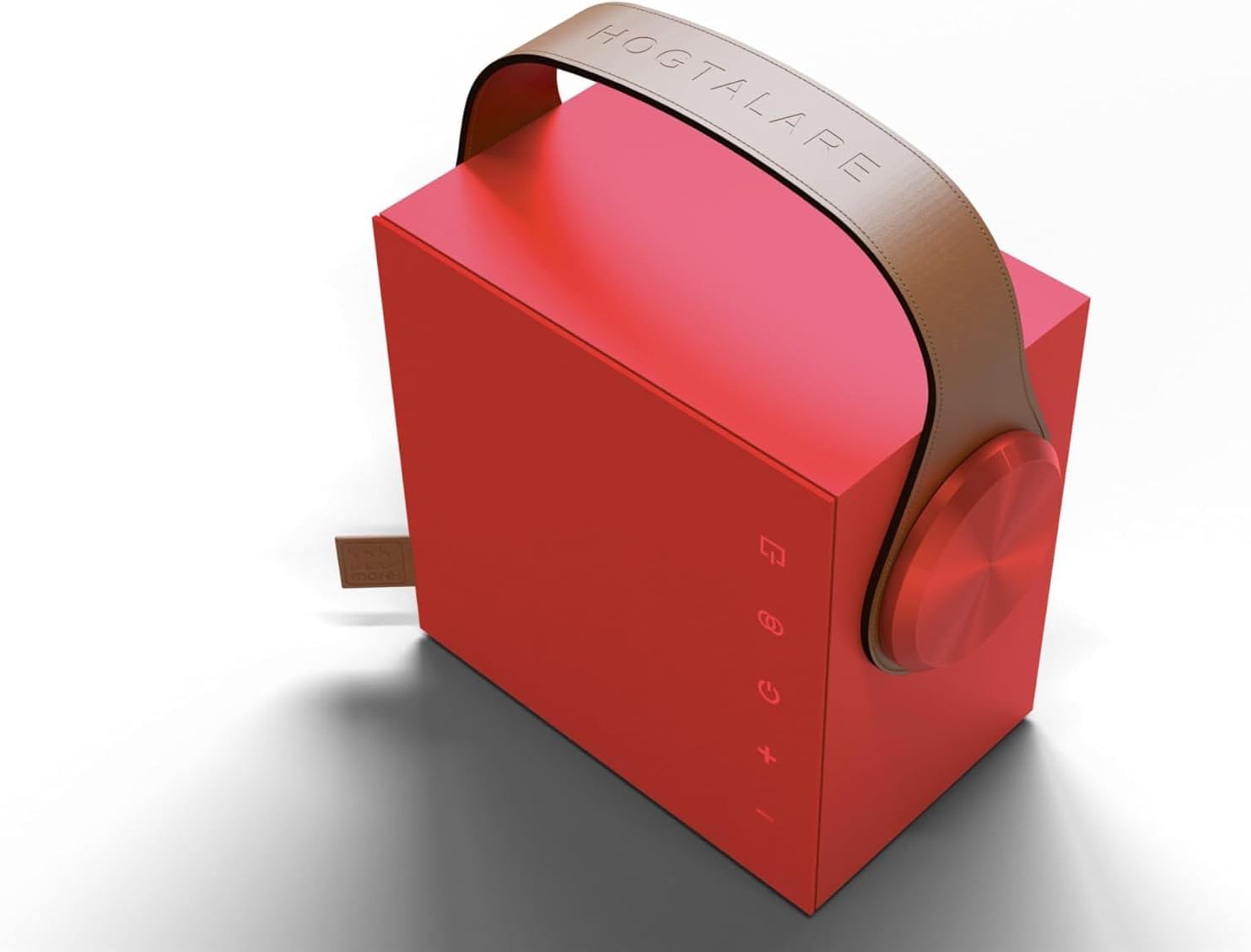
ചിത്രം 4.1: വിശദമായി view of the Morel Biggie's touch control panel.
4.2 ഓഡിയോ പ്ലേബാക്ക്
Once connected via Bluetooth, audio from your paired device will automatically play through the Morel Biggie. Use the volume controls on the speaker or your device to adjust the sound level. The speaker's advanced DSP and dynamic EQ ensure optimal sound balance at all volume levels.
5. പരിപാലനവും പരിചരണവും
Proper care will ensure the longevity and performance of your Morel Biggie speaker.
- വൃത്തിയാക്കൽ: Use a soft, dry, lint-free cloth to clean the speaker's exterior. Do not use abrasive cleaners, alcohol, benzene, or other chemicals, as these may damage the surface.
- ബാറ്ററി കെയർ: To maximize battery life, avoid fully discharging the speaker frequently. Recharge the battery regularly, even if not in use for extended periods. Store in a cool, dry place.
- പരിസ്ഥിതി വ്യവസ്ഥകൾ: The Morel Biggie is designed for indoor use. While it can be used in sheltered outdoor areas, it is വാട്ടർപ്രൂഫ് അല്ല and should be protected from rain, splashes, and extreme temperatures. Avoid direct sunlight exposure for prolonged periods.
- സംഭരണം: When storing the speaker for a long time, ensure it is fully charged and power it off.
6. പ്രശ്നപരിഹാരം
If you encounter issues with your Morel Biggie speaker, please refer to the following common problems and solutions:
| പ്രശ്നം | സാധ്യമായ കാരണം | പരിഹാരം |
|---|---|---|
| സ്പീക്കർ പവർ ഓൺ ചെയ്യുന്നില്ല. | Low battery; power button not held long enough. | Charge the speaker fully. Press and hold the power button for at least 3 seconds. |
| ബ്ലൂടൂത്ത് വഴി ജോടിയാക്കാൻ കഴിയില്ല. | Speaker not in pairing mode; device Bluetooth off; too far from speaker; interference. | Ensure speaker is in pairing mode (flashing light). Turn Bluetooth on your device. Move device closer to speaker. Turn off other Bluetooth devices nearby. |
| ശബ്ദമില്ല അല്ലെങ്കിൽ കുറഞ്ഞ ശബ്ദമില്ല. | Volume too low on speaker or device; speaker not connected; incorrect audio source. | Increase volume on both speaker and device. Verify Bluetooth connection. Ensure audio is playing from the correct source on your device. |
| ശബ്ദ വികൃതത. | ശബ്ദം വളരെ കൂടുതലാണ്; ഓഡിയോ ഉറവിട നിലവാരം മോശമാണ്. | ശബ്ദം കുറയ്ക്കുക. മറ്റൊരു ഓഡിയോ ഉറവിടം പരീക്ഷിക്കുക അല്ലെങ്കിൽ file. Allow for break-in period (up to 15 hours) for optimal sound. |
| TWS ജോടിയാക്കൽ പരാജയപ്പെടുന്നു. | Speakers already connected to another device; incorrect pairing sequence. | Ensure both speakers are disconnected from other devices. Follow the TWS pairing steps precisely. |
If the problem persists after trying these solutions, please contact Morel customer support for further assistance.
7 സ്പെസിഫിക്കേഷനുകൾ
| ഫീച്ചർ | വിശദാംശങ്ങൾ |
|---|---|
| മോഡലിൻ്റെ പേര് | Biggie |
| ഇനം മോഡൽ നമ്പർ | RM |
| ബ്രാൻഡ് | മോറെൽ |
| സ്പീക്കർ തരം | പോർട്ടബിൾ ബ്ലൂടൂത്ത് സ്പീക്കർ |
| കണക്റ്റിവിറ്റി ടെക്നോളജി | Bluetooth 5.3 BLE, Wireless |
| വയർലെസ് ശ്രേണി | 50 മീറ്റർ വരെ (164 അടി) |
| ഓഡിയോ put ട്ട്പുട്ട് മോഡ് | സ്റ്റീരിയോ (TWS ജോടിയാക്കൽ ഉള്ളത്) |
| സറൗണ്ട് സൗണ്ട് ചാനൽ കോൺഫിഗറേഷൻ | 2.0 |
| ഡ്രൈവർമാർ | 4-inch Woofer, 25mm Soft Dome Tweeter |
| പവർ ഉറവിടം | ബാറ്ററി പവർ |
| ബാറ്ററി ലൈഫ് | Up to 20 hours (varies with volume and content) |
| നിയന്ത്രണ രീതി | സ്പർശിക്കുക |
| ഉൽപ്പന്ന അളവുകൾ (D x W x H) | 7.5" x 5" x 7.5" (18cm x 18cm) |
| ഇനത്തിൻ്റെ ഭാരം | 7.7 പൗണ്ട് |
| നിറം | Ruby Red (other colors available: Cosmic Black, Olive Green, Midnight Blue, Aqua Frost, Oak Wood, Golden Glow, Minimal White, Denim Sky) |
| വാട്ടർപ്രൂഫ് | ഇല്ല |
| ശുപാർശ ചെയ്യുന്ന ഉപയോഗങ്ങൾ | Indoor/Outdoor (with caution for elements) |
| അനുയോജ്യമായ ഉപകരണങ്ങൾ | ലാപ്ടോപ്പ്, സ്മാർട്ട്ഫോൺ, ടാബ്ലെറ്റ്, ടെലിവിഷൻ |
8. വാറൻ്റിയും പിന്തുണയും
8.1 ലിമിറ്റഡ് വാറൻ്റി
The Morel Biggie Portable Bluetooth Speaker comes with a limited warranty. Please refer to the warranty card included in your product packaging for specific terms and conditions, including coverage duration and limitations. Keep your proof of purchase for warranty claims.
8.2 ഉപഭോക്തൃ പിന്തുണ
For technical assistance, troubleshooting beyond this manual, or warranty inquiries, please contact Morel customer support. Visit the official Morel webബന്ധപ്പെടാനുള്ള വിവരങ്ങൾക്കും അധിക ഉറവിടങ്ങൾക്കുമായി സൈറ്റ്.
Visit the Morel Store on Amazon കൂടുതൽ ഉൽപ്പന്ന വിവരങ്ങൾക്കും പിന്തുണയ്ക്കും.