
HOSTACK Twin LED Bed Frame with Storage Headboard and Charging Station
HOSTACK Twin LED Bed Frame User Manual
Model: Twin LED Bed Frame with Storage Headboard and Charging Station
Brand: HOSTACK
ആമുഖം
This manual provides detailed instructions for the assembly, operation, and maintenance of your HOSTACK Twin LED Bed Frame. Please read this manual thoroughly before assembly and use to ensure safe and proper functionality of your new bed frame.

Figure 1: HOSTACK Twin LED Bed Frame Overview
ഉൾപ്പെടുത്തിയ ഘടകങ്ങൾ
അസംബ്ലി ആരംഭിക്കുന്നതിന് മുമ്പ് താഴെ ലിസ്റ്റ് ചെയ്തിരിക്കുന്ന എല്ലാ ഘടകങ്ങളും നിലവിലുണ്ടെന്ന് ഉറപ്പാക്കുക. ഏതെങ്കിലും ഭാഗങ്ങൾ നഷ്ടപ്പെട്ടാലോ കേടുപാടുകൾ സംഭവിച്ചാലോ, ദയവായി ഉപഭോക്തൃ പിന്തുണയുമായി ബന്ധപ്പെടുക.
- Headboard with integrated storage and charging station
- Bed frame rails (left and right)
- Wood slats for mattress support
- Two (2) under-bed storage drawers with wheels
- അസംബ്ലി ഹാർഡ്വെയർ (സ്ക്രൂകൾ, ബോൾട്ടുകൾ, നട്ടുകൾ, അല്ലെൻ റെഞ്ച്)
- LED light strip and remote control
- Power adapter for charging station and LED lights
- ഇൻസ്ട്രക്ഷൻ മാനുവൽ
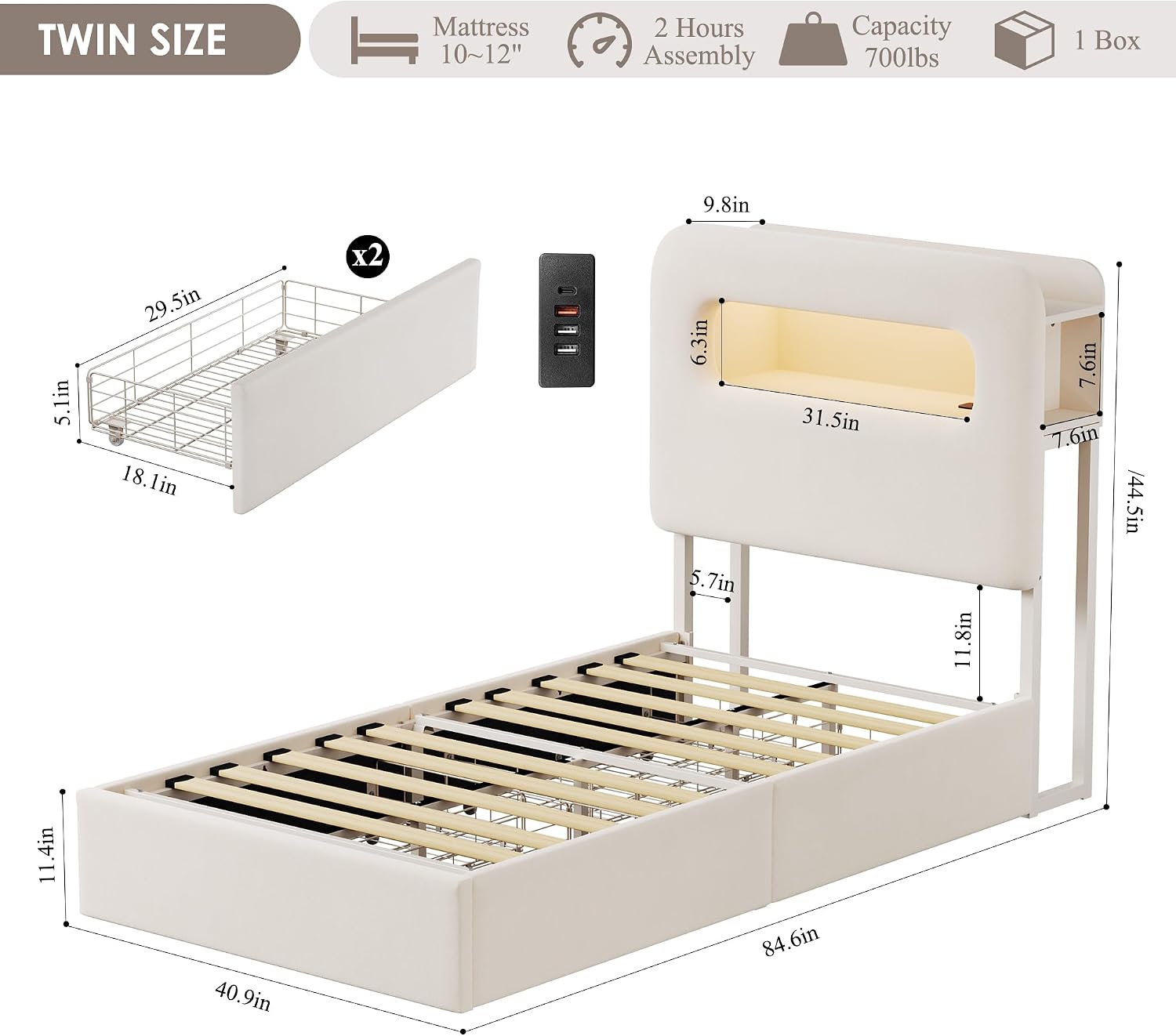
ചിത്രം 2: ഉൽപ്പന്ന അളവുകളും പ്രധാന സവിശേഷതകളും
സജ്ജീകരണവും അസംബ്ലിയും
Assembly of the HOSTACK Twin LED Bed Frame typically takes approximately 40 minutes with two people. Follow the detailed instruction guide included in the package for step-by-step assembly.
അസംബ്ലിക്ക് മുമ്പുള്ള ചെക്ക്ലിസ്റ്റ്:
- അസംബ്ലിക്ക് മതിയായ ഇടമുണ്ടെന്ന് ഉറപ്പാക്കുക.
- എല്ലാ ഘടകങ്ങളും ഹാർഡ്വെയറും നിരത്തുക.
- കുട്ടികളെയും വളർത്തുമൃഗങ്ങളെയും അസംബ്ലി ഏരിയയിൽ നിന്ന് അകറ്റി നിർത്തുക.
അസംബ്ലി ഘട്ടങ്ങൾ (ജനറൽ ഓവർview):
- സൈഡ് റെയിലുകൾ ഹെഡ്ബോർഡിലും ഫുട്ബോർഡിലും ഘടിപ്പിക്കുക.
- Install the central support beam and legs.
- Place the wood slats onto the frame, ensuring they are securely fastened. The slats feature a noise-free muter bar for quiet operation.
- Assemble the two under-bed drawers and insert them into the desired positions.
- Install the LED light strip into the headboard compartment and connect the charging station.

Figure 3: Flexible Drawer Placement Options

Figure 4: Under-Bed Storage Drawer Features
പ്രവർത്തന നിർദ്ദേശങ്ങൾ
LED ലൈറ്റിംഗ് സിസ്റ്റം:
The integrated LED lights in the headboard can be controlled via the included remote control or a dedicated mobile application. You can customize the light color, brightness, and various modes to create your desired ambiance.
- പവർ ഓൺ/ഓഫ്: Use the power button on the remote or app.
- വർണ്ണ തിരഞ്ഞെടുപ്പ്: Choose from over 60,000 colors using the color wheel on the app or preset buttons on the remote.
- സമയ മോഡ്: Set timers for the lights to turn on or off.
- സംഗീത മോഡ്: Lights can synchronize with music (via app).
- മൈക്ക് മോഡ്: Lights can react to ambient sounds (via app).

Figure 5: LED Light Features and Control Options
ചാർജിംഗ് സ്റ്റേഷൻ:
The headboard features a built-in charging station with USB ports (5V/2A) and a Type-C port (5V/2A) for convenient charging of your electronic devices. Connect the bed frame's power cord to a standard wall outlet.
- Ensure the bed frame is properly plugged into a functioning power outlet.
- Connect your devices to the available USB or Type-C ports.
- The charging station is designed for low-power electronic devices.

Figure 6: Headboard Charging Station
സ്റ്റോറേജ് ഡ്രോയറുകൾ:
The two under-bed drawers provide ample storage space. They are equipped with easy-gliding wheels for smooth operation and a buckle design to secure them in place under the bed.
- To open, gently pull the drawer outwards.
- To close, push the drawer fully inwards until the buckle engages, securing it.
- Drawers can be positioned on either side of the bed or both on one side, as per your room layout.
Video 1: Demonstration of LED lights, charging station, and drawer functionality.
പരിപാലനവും പരിചരണവും
വൃത്തിയാക്കൽ:
- For general cleaning, wipe the bed frame surfaces with a damp തുണി.
- Avoid using harsh chemicals or abrasive cleaners, as they may damage the velvet upholstery or metal finish.
- For spills on the velvet, blot immediately with a clean, dry cloth.
ഘടനാപരമായ സമഗ്രത:
- Periodically check all bolts and screws to ensure they remain tight. Tighten if necessary to maintain stability and prevent noise.
- Do not exceed the maximum weight loading capacity of 700 lbs.
- Ensure the mattress size is compatible (8-12 inches recommended).
ട്രബിൾഷൂട്ടിംഗ്
| പ്രശ്നം | സാധ്യമായ കാരണം | പരിഹാരം |
|---|---|---|
| എൽഇഡി ലൈറ്റുകൾ പ്രവർത്തിക്കുന്നില്ല. | Power adapter unplugged; remote battery low; loose connection. | Ensure power adapter is securely plugged in. Check remote battery and replace if needed. Verify all LED strip connections are firm. |
| ചാർജിംഗ് സ്റ്റേഷൻ വൈദ്യുതി നൽകുന്നില്ല. | Bed frame not plugged in; device cable faulty; device requires more power than supplied. | Confirm bed frame is plugged into a live outlet. Try a different charging cable. Ensure your device is compatible with 5V/2A charging. |
| കിടക്കയുടെ ഫ്രെയിം ഞെരുങ്ങുന്നു അല്ലെങ്കിൽ അസ്ഥിരമാണ്. | Loose bolts or screws; uneven floor. | Inspect and tighten all assembly hardware. Ensure the bed is on a level surface; use adjustable legs if available to stabilize. |
| ഡ്രോയറുകൾ സുഗമമായി സ്ലൈഡ് ചെയ്യുന്നില്ല. | Obstruction in the path; wheels dirty or damaged. | Check for any items blocking the drawer path. Clean drawer wheels. Ensure drawers are correctly aligned. |
സ്പെസിഫിക്കേഷനുകൾ
| ഫീച്ചർ | വിശദാംശങ്ങൾ |
|---|---|
| വലിപ്പം | ഇരട്ട |
| ഉൽപ്പന്ന അളവുകൾ (L x W x H) | 84.6" x 40.9" x 44.5" |
| നിറം | ക്രീം |
| ഫിനിഷ് തരം | വെൽവെറ്റ് അപ്ഹോൾസ്റ്റേർഡ് |
| പ്രത്യേക സവിശേഷതകൾ | Storage Headboard, 2 Drawers, Charging Station (USB & Type-C), LED Lights |
| പരമാവധി ലോഡിംഗ് കപ്പാസിറ്റി | 700 പൗണ്ട് |
| അനുയോജ്യമായ മെത്ത വലുപ്പം | 8 - 12 ഇഞ്ച് |
| Drawer Interior Space | 29.5"L x 18.1"W x 5.1"H |
| അസംബ്ലി ആവശ്യമാണ് | അതെ |
| നിർമ്മാതാവ് | HOSTACK |
വാറൻ്റിയും പിന്തുണയും
For any questions, concerns, or support needs regarding your HOSTACK Twin LED Bed Frame, please contact the seller directly via the "Contact Seller" option on Amazon. The HOSTACK support team offers 24/7 service and is ready to assist you.
ഏതെങ്കിലും വാറന്റി ക്ലെയിമുകൾക്കായി നിങ്ങളുടെ വാങ്ങൽ രസീത് സൂക്ഷിക്കുക.
Ask a question about this manual
Ask about setup, troubleshooting, compatibility, parts, safety, or missing instructions. Manuals+ will review the question and use this page’s manual context to help answer it.