
1. ആമുഖം
This manual provides essential information for the proper use and maintenance of your EBTOOLS 8-Inch 2-in-1 Pocket PC Computer. Please read this guide thoroughly before operating the device to ensure optimal performance and longevity. This compact and versatile device features an 8-inch touchscreen, a 360-degree rotating design, and runs on Windows 11 Pro.

Image: The EBTOOLS 8-Inch 2-in-1 Pocket PC shown in its tablet configuration, with a scenic road displayed on the screen.
2. പാക്കേജ് ഉള്ളടക്കം
താഴെ ലിസ്റ്റ് ചെയ്തിരിക്കുന്ന എല്ലാ ഇനങ്ങളും നിങ്ങളുടെ ഉൽപ്പന്ന പാക്കേജിൽ ഉൾപ്പെടുത്തിയിട്ടുണ്ടെന്ന് ഉറപ്പാക്കുക:
- 1 x EBTOOLS 8-Inch 2-in-1 Laptop
- 1 x പവർ സപ്ലൈ കോർഡ്
- 1 x പവർ അഡാപ്റ്റർ (യുഎസ് പ്ലഗ്)
- 2 x User Manuals (this document is one of them)

Image: The EBTOOLS 8-Inch 2-in-1 Pocket PC, its power supply cord, and the US plug adapter, laid out as they would appear in the package.
3. ഉൽപ്പന്നം കഴിഞ്ഞുview
The EBTOOLS 8-Inch 2-in-1 Pocket PC is designed for portability and versatility. It features a compact form factor and a 360-degree rotating display, allowing it to function as both a laptop and a tablet.
പ്രധാന സവിശേഷതകൾ:
- പ്രോസസ്സർ: N100 CPU, capable of up to 3.4GHz frequency.
- മെമ്മറി: 12 ജിബി എൽപിഡിഡിആർ5 റാം.
- സംഭരണം: 512GB M.2 SSD, expandable up to 2TB.
- ഡിസ്പ്ലേ: 8-inch touchscreen with 360-degree rotation.
- കണക്റ്റിവിറ്റി: WiFi6 (2.4G/5G band) and Bluetooth 5.2.
- ക്യാമറ: 2MP 30 Frame HD built-in front camera for video calls.
- കീബോർഡ്: Edge-less full-size QWERTY keyboard with integrated touchpad.
- ബാറ്ററി: Built-in 5000mAh polymer lithium battery, providing 4-6 hours of use.
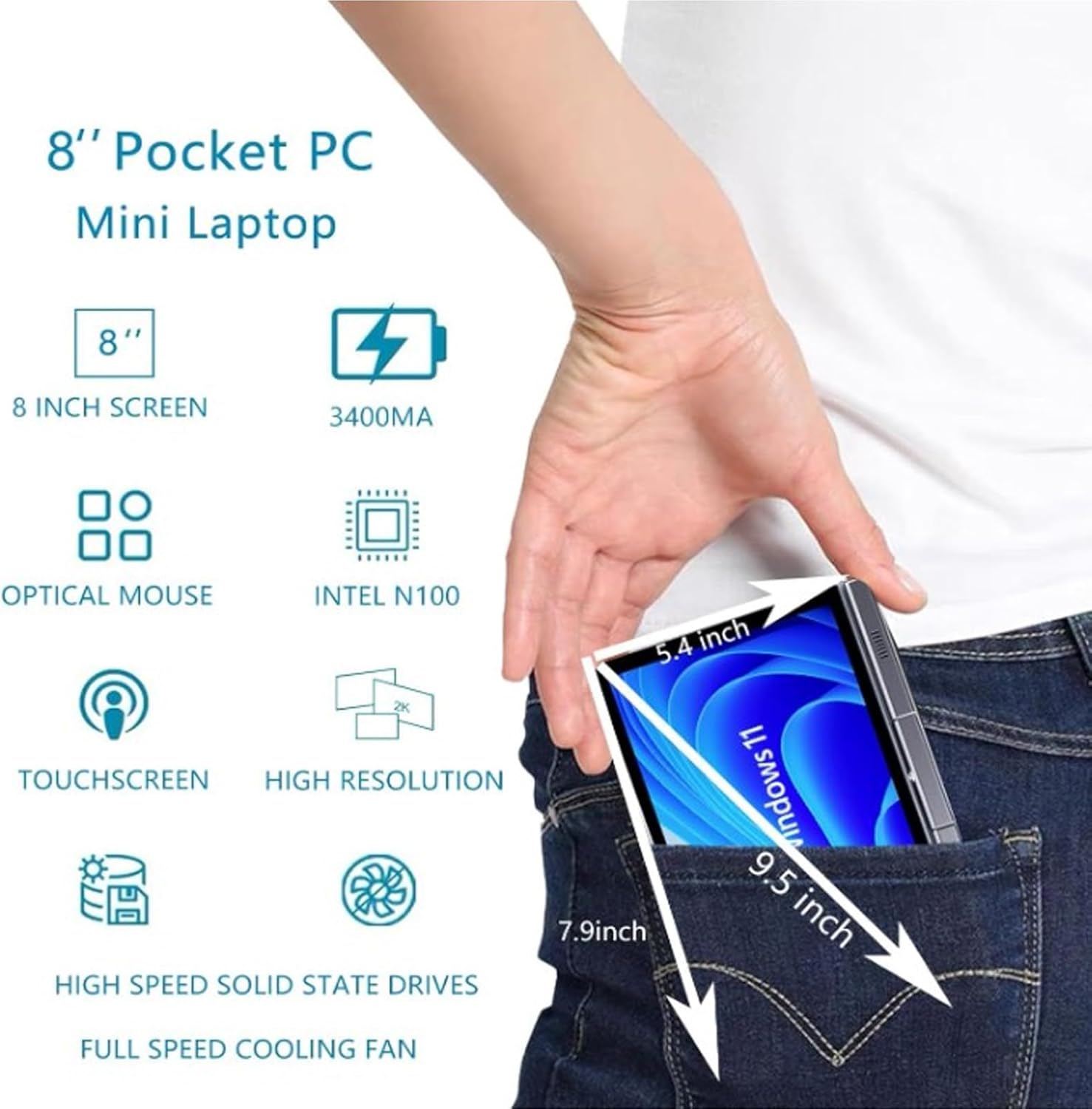
Image: A visual representation of the 8-inch Pocket PC's compact dimensions, demonstrating its portability by showing it fitting into a standard pocket.

Image: A labeled diagram highlighting the various ports (USB 3.0, Type-C, Audio, RJ45) and keyboard components (Front Camera, Speaker, Power Light, Power Button, Left/Right/Middle Mouse Buttons) of the EBTOOLS 8-Inch 2-in-1 Pocket PC.
4. സജ്ജീകരണം
4.1 പ്രാരംഭ പവർ ഓണും ചാർജിംഗും
- ഉപകരണം ചാർജ് ചെയ്യുക: Before first use, connect the power adapter to the Type-C port on the device and plug it into a power outlet. Allow the device to charge fully. The power light indicator will show charging status.
- പവർ ഓൺ: Press and hold the Power Button located on the keyboard deck until the screen illuminates.
- പ്രാരംഭ സജ്ജീകരണം: Follow the on-screen instructions to complete the Windows 11 Pro setup process, including language selection, network connection, and user account creation.
The device is designed for immediate use upon completion of the initial Windows setup.
5. പ്രവർത്തന നിർദ്ദേശങ്ങൾ
5.1 കീബോർഡും ടച്ച്പാഡും
- The device features an edge-less full-size QWERTY keyboard for typing.
- The integrated touchpad supports standard mouse functions, including moving the pointer, scrolling, and left/right clicks. The left, right, and middle mouse buttons are clearly indicated on the diagram.
5.2 ടച്ച്സ്ക്രീൻ പ്രവർത്തനം
- The 8-inch display is a multi-touch screen. Use gestures such as tap, swipe, pinch-to-zoom, and rotate for navigation and interaction with applications.
5.3 360-Degree Rotation
- The display can be rotated 360 degrees to switch between laptop mode (traditional clamshell) and tablet mode (screen folded back against the base).
- When in tablet mode, the keyboard is automatically disabled to prevent accidental input.
5.4 പെരിഫറലുകൾ ബന്ധിപ്പിക്കുന്നു
- USB 3.0: Connect external devices such as USB drives, mice, or keyboards to the USB 3.0 port.
- തരം-സി: ചാർജ് ചെയ്യുന്നതിനും ഡാറ്റ കൈമാറ്റത്തിനും ഉപയോഗിക്കുന്നു.
- High Definition Multimedia Interface (HDMI): Connect an external monitor or projector using an HDMI cable for extended display.
- 3.5mm Standard Headphone Jack: ഹെഡ്ഫോണുകളോ ബാഹ്യ സ്പീക്കറുകളോ ബന്ധിപ്പിക്കുക.
- RJ45 നെറ്റ്വർക്ക് പോർട്ട്: വയർഡ് ഇന്റർനെറ്റ് കണക്ഷനായി ഒരു ഇതർനെറ്റ് കേബിൾ ബന്ധിപ്പിക്കുക.
5.5 വയർലെസ് കണക്റ്റിവിറ്റി
- വൈഫൈ6: Access wireless networks (2.4G and 5G bands) for internet connectivity. Enable Wi-Fi through Windows settings.
- ബ്ലൂടൂത്ത് 5.2: Pair with Bluetooth-enabled devices such as headphones, speakers, or other peripherals. Enable Bluetooth through Windows settings.
6. പരിപാലനം
6.1 വൃത്തിയാക്കൽ
- Use a soft, lint-free cloth to clean the screen and exterior surfaces. For stubborn marks, slightly dampതുണിയിൽ വെള്ളം അല്ലെങ്കിൽ സ്ക്രീൻ ക്ലീനിംഗ് ലായനി ഉപയോഗിച്ച് നനയ്ക്കുക.
- ഉപകരണത്തിൽ നേരിട്ട് കഠിനമായ രാസവസ്തുക്കൾ, അബ്രാസീവ് ക്ലീനറുകൾ, അല്ലെങ്കിൽ എയറോസോൾ സ്പ്രേകൾ എന്നിവ ഉപയോഗിക്കുന്നത് ഒഴിവാക്കുക.
- വൃത്തിയാക്കുന്നതിന് മുമ്പ് ഉപകരണം ഓഫാണെന്നും അൺപ്ലഗ് ചെയ്തിട്ടുണ്ടെന്നും ഉറപ്പാക്കുക.
6.2 സംഭരണം
- നേരിട്ടുള്ള സൂര്യപ്രകാശത്തിൽ നിന്നും കടുത്ത താപനിലയിൽ നിന്നും മാറി തണുത്തതും വരണ്ടതുമായ സ്ഥലത്ത് ഉപകരണം സൂക്ഷിക്കുക.
- If storing for an extended period, ensure the battery is charged to approximately 50% to preserve battery health.
7. പ്രശ്നപരിഹാരം
This section addresses common issues you might encounter with your EBTOOLS 8-Inch 2-in-1 Pocket PC.
7.1 ഉപകരണം ഓണാകുന്നില്ല
- ഉപകരണം പൂർണ്ണമായും ചാർജ് ചെയ്തിട്ടുണ്ടെന്ന് ഉറപ്പാക്കുക. പവർ അഡാപ്റ്റർ കണക്റ്റ് ചെയ്ത് വീണ്ടും പവർ ഓൺ ചെയ്യാൻ ശ്രമിക്കുന്നതിന് മുമ്പ് കുറച്ച് മിനിറ്റ് കാത്തിരിക്കുക.
- Verify the power adapter and cable are securely connected and the power outlet is functional.
- ഹാർഡ് റീസെറ്റ് നടത്താൻ പവർ ബട്ടൺ 10-15 സെക്കൻഡ് അമർത്തിപ്പിടിക്കാൻ ശ്രമിക്കുക.
7.2 Wi-Fi or Bluetooth Connectivity Issues
- Check if Wi-Fi or Bluetooth is enabled in Windows settings.
- Restart the device and your wireless router/Bluetooth device.
- Ensure you are within range of the Wi-Fi network or Bluetooth device.
- Update wireless drivers if available.
7.3 ടച്ച്സ്ക്രീൻ പ്രതികരിക്കുന്നില്ല
- ഉപകരണം പുനരാരംഭിക്കുക.
- സ്ക്രീൻ വൃത്തിയുള്ളതും അവശിഷ്ടങ്ങൾ ഇല്ലാത്തതുമാണെന്ന് ഉറപ്പാക്കുക.
- Check for any system updates that might include touchscreen driver fixes.
7.4 കുറഞ്ഞ ബാറ്ററി ലൈഫ്
- Adjust power settings in Windows to optimize battery usage.
- പശ്ചാത്തലത്തിൽ പ്രവർത്തിക്കുന്ന അനാവശ്യ ആപ്ലിക്കേഷനുകൾ അടയ്ക്കുക.
- സ്ക്രീൻ തെളിച്ചം കുറയ്ക്കുക.
- Ensure the device is not running resource-intensive tasks continuously.
8 സ്പെസിഫിക്കേഷനുകൾ
| ഫീച്ചർ | സ്പെസിഫിക്കേഷൻ |
|---|---|
| ഓപ്പറേറ്റിംഗ് സിസ്റ്റം | വിൻഡോസ് 11 പ്രോ |
| ഡിസ്പ്ലേ വലിപ്പം | 8 ഇഞ്ച് |
| പ്രോസസ്സർ | N100 CPU (up to 3.4GHz) |
| റാം | 12GB LPDDR5 |
| സംഭരണം | 512GB M.2 SSD (supports up to 2TB) |
| മുൻ ക്യാമറ | 2MP 30 Frame HD Built-In Camera |
| ബ്ലൂടൂത്ത് | BT 5.2 |
| Wireless Fidelity Type | 2.4G / 5G Band (WiFi6) |
| ഇൻ്റർഫേസുകൾ | 1 x USB3.0, 1 x 3.5mm Standard Headphone Jack, 1 x High Definition Multimedia Interface Port, 1 x Type-C, 1 x RJ45 Network Port |
| ബാറ്ററി തരം | ബിൽറ്റ്-ഇൻ 5000mAh പോളിമർ ലിഥിയം ബാറ്ററി |
| ബാറ്ററി ലൈഫ് | 4-6 hours (typical use) |
| ഇനത്തിൻ്റെ ഭാരം | 2.68 പൗണ്ട് (ഏകദേശം 1.22 കിലോഗ്രാം) |
| പാക്കേജ് അളവുകൾ | 9.45 x 7.09 x 2.36 ഇഞ്ച് |
9. വാറൻ്റിയും പിന്തുണയും
9.1 ഉൽപ്പന്ന വാറന്റി
Specific warranty details for your EBTOOLS 8-Inch 2-in-1 Pocket PC are typically provided with your purchase documentation or on the manufacturer's official website. Please refer to these resources for information regarding warranty coverage, duration, and terms.
9.2 ഉപഭോക്തൃ പിന്തുണ
For technical assistance, troubleshooting beyond this manual, or warranty claims, please contact EBTOOLS customer support. Contact information can usually be found on the product packaging, the manufacturer's webസൈറ്റ്, അല്ലെങ്കിൽ നിങ്ങളുടെ റീട്ടെയിലർ വഴി.
When contacting support, please have your product model number (EBTOOLS9pxf4058ch-12) and purchase information readily available.