ഉൽപ്പന്നം കഴിഞ്ഞുview
The Pro 4 TWS Wireless Headphones are designed to provide a high-quality audio experience with the convenience of wireless technology. These earbuds feature Bluetooth 5.0 for stable connectivity, an IPX7 waterproof rating for durability, and a built-in microphone for clear calls. The ergonomic design ensures a comfortable and secure fit for extended use.

Image: The black protective storage case included with the Pro 4 TWS Wireless Headphones. This compact case helps protect your earbuds when not in use.

Image: The Pro 4 TWS Wireless Earbuds resting inside their open charging case. The earbuds are white with black tips, and the case is also white.
എന്താണ് ഉൾപ്പെടുത്തിയിരിക്കുന്നത്
- Pro 4 TWS Wireless Earbuds (Left and Right)
- ചാർജിംഗ് കേസ്
- Protective Case (Black, as shown in product images)
- ഉപയോക്തൃ മാനുവൽ (ഈ പ്രമാണം)
- Charging Cable (not explicitly mentioned but standard for earbuds)
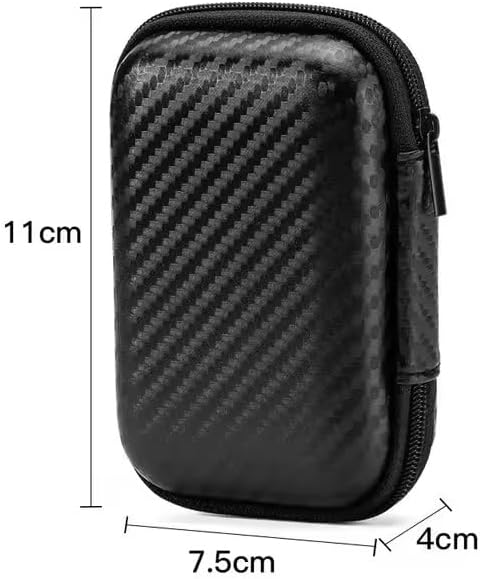
Image: A visual representation of the protective storage case with its dimensions: approximately 11cm in height, 7.5cm in width, and 4cm in depth. This illustrates the compact size of the included accessory.
സജ്ജീകരണ ഗൈഡ്
1. പ്രാരംഭ ചാർജിംഗ്
Before first use, ensure both the earbuds and the charging case are fully charged. Place the earbuds into the charging case and connect the charging case to a power source using the provided charging cable. The indicator light on the case will show charging status.
2. ഒരു ഉപകരണവുമായി ജോടിയാക്കൽ
- ചാർജിംഗ് കേസ് തുറക്കുക. ഇയർബഡുകൾ സ്വയമേവ ജോടിയാക്കൽ മോഡിലേക്ക് പ്രവേശിക്കും.
- നിങ്ങളുടെ ഉപകരണത്തിൽ (സ്മാർട്ട്ഫോൺ, ടാബ്ലെറ്റ്, ലാപ്ടോപ്പ്), ബ്ലൂടൂത്ത് ക്രമീകരണങ്ങളിലേക്ക് പോകുക.
- ഇതിനായി തിരയുക available devices and select "Pro 4 TWS" (or similar name) from the list.
- കണക്റ്റുചെയ്തുകഴിഞ്ഞാൽ, ഒരു വോയ്സ് പ്രോംപ്റ്റ് വിജയകരമായ ജോടിയാക്കൽ സ്ഥിരീകരിക്കും.
Note: If pairing fails, ensure the earbuds are charged and within range of your device. You may need to "forget" previous pairings on your device and try again.

Image: The Pro 4 TWS earbuds shown with a smartphone, illustrating the touch control feature for connection. A blue light effect indicates active connection or touch interaction.
പ്രവർത്തന നിർദ്ദേശങ്ങൾ
ടച്ച് നിയന്ത്രണങ്ങൾ
The Pro 4 TWS headphones feature intuitive touch controls on each earbud. Specific functions may vary slightly, but common controls include:
- ഒറ്റ ടാപ്പ്: സംഗീതം പ്ലേ ചെയ്യുക/താൽക്കാലികമായി നിർത്തുക, കോൾ സ്വീകരിക്കുക/അവസാനിപ്പിക്കുക.
- രണ്ടുതവണ ടാപ്പ് ചെയ്യുക (ഇടത് ഇയർബഡ്): മുമ്പത്തെ ട്രാക്ക്.
- രണ്ടുതവണ ടാപ്പ് ചെയ്യുക (വലത് ഇയർബഡ്): അടുത്ത ട്രാക്ക്.
- ട്രിപ്പിൾ ടാപ്പ്: Activate voice assistant (Siri, Google Assistant).
- ലോംഗ് പ്രസ്സ്: കോൾ നിരസിക്കുക.
ഇയർബഡുകൾ ധരിക്കുന്നു
Gently insert each earbud into your ear canal. Rotate slightly until you achieve a comfortable and secure fit. The ergonomic design is intended to keep them stable during various activities.

Image: A woman wearing the Pro 4 TWS earbuds, highlighting their ergonomic design and comfortable fit within the ear. The image emphasizes that the earbuds are designed to stay securely in place.
പരിപാലനവും പരിചരണവും
- വൃത്തിയാക്കൽ: ഇയർബഡുകളും ചാർജിംഗ് കെയ്സും വൃത്തിയാക്കാൻ മൃദുവായതും ഉണങ്ങിയതും ലിന്റ് രഹിതവുമായ തുണി ഉപയോഗിക്കുക. കഠിനമായ രാസവസ്തുക്കളോ ഉരച്ചിലുകളുള്ള വസ്തുക്കളോ ഉപയോഗിക്കരുത്.
- ജല പ്രതിരോധം: The earbuds have an IPX7 waterproof rating, meaning they are resistant to sweat and rain. Do not submerge them in water or expose them to strong jets of water. Ensure they are dry before placing them back in the charging case.
- സംഭരണം: When not in use, store the earbuds in their charging case, preferably within the included protective case, to prevent damage and keep them clean.
- ബാറ്ററി കെയർ: ബാറ്ററി ലൈഫ് വർദ്ധിപ്പിക്കാൻ, ഇയർബഡുകൾ പൂർണ്ണമായും ഡിസ്ചാർജ് ചെയ്യുന്നതും കേസ് ഇടയ്ക്കിടെ ചാർജ് ചെയ്യുന്നതും ഒഴിവാക്കുക. തുടർച്ചയായ ഉപയോഗത്തിലല്ലെങ്കിൽ പോലും അവ പതിവായി ചാർജ് ചെയ്യുക.
ട്രബിൾഷൂട്ടിംഗ്
| പ്രശ്നം | സാധ്യമായ പരിഹാരം |
|---|---|
| ഇയർബഡുകൾ ജോടിയാക്കുന്നില്ല |
|
| ഒരു ഇയർബഡിൽ നിന്ന് ശബ്ദമില്ല |
|
| മോശം ശബ്ദ നിലവാരം |
|
| ചാർജിംഗ് പ്രശ്നങ്ങൾ |
|
സ്പെസിഫിക്കേഷനുകൾ
| ഫീച്ചർ | വിശദാംശങ്ങൾ |
|---|---|
| മോഡൽ നമ്പർ | BT4 |
| കണക്റ്റിവിറ്റി ടെക്നോളജി | വയർലെസ്, ബ്ലൂടൂത്ത് |
| ബ്ലൂടൂത്ത് പതിപ്പ് | 5.0 |
| വയർലെസ് ശ്രേണി | 33 അടി വരെ (ഏകദേശം 10 മീറ്റർ) |
| ജല പ്രതിരോധം | IPX7 (Resistant to sweat and rain) |
| മൈക്രോഫോൺ | Built-in, High-Quality |
| നിയന്ത്രണ രീതി | Remote (Touch Controls) |
| ചെവി പ്ലേസ്മെൻ്റ് | ചെവിയിൽ |
| മെറ്റീരിയൽ | സിലിക്കൺ, പ്ലാസ്റ്റിക് |
| ഉൾപ്പെടുത്തിയ ഘടകങ്ങൾ | സംരക്ഷണ കേസ് |
| അനുയോജ്യമായ ഉപകരണങ്ങൾ | Smartphones, Tablets, Laptops, Desktops, Smart Speakers, Cars (with Bluetooth capabilities) |

Image: A diagram highlighting the upgraded Bluetooth 5.0 chip, emphasizing features like HD Voice, Quick Connect, and Stable Reception, which contribute to high-fidelity sound quality and anti-interference.

ചിത്രം: പൊട്ടിത്തെറിച്ച ഒരു view of the earbud's internal components, specifically showcasing the high-quality dynamic unit and balanced adjustment technology designed to deliver rich sound effects.
വാറൻ്റിയും പിന്തുണയും
For warranty information and customer support, please refer to the documentation provided at the time of purchase or contact the seller directly. The product is manufactured by "wireless earphone".
കൂടുതൽ സഹായത്തിന്, നിങ്ങൾക്ക് ആമസോണിലെ ഉൽപ്പന്ന പേജും സന്ദർശിക്കാവുന്നതാണ്: Pro 4 TWS Wireless Headphones on Amazon.


