
1. ആമുഖം
വാങ്ങിയതിന് നന്ദി.asing the Greadio Portable CD Player Boombox, Model CD-X9B. This device offers multiple audio playback options including CD, Bluetooth, USB, AUX, and FM radio. This manual provides detailed instructions for setup, operation, maintenance, and troubleshooting to ensure optimal performance and longevity of your device. Please read this manual thoroughly before use and retain it for future reference.

Figure 1: Greadio CD-X9B Portable CD Player Boombox
2. ഉൽപ്പന്നം കഴിഞ്ഞുview
2.1 പാക്കേജ് ഉള്ളടക്കം
- CD Player Boombox (Model CD-X9B) x 1
- എസി പവർ കോർഡ് x 1
- AUX കേബിൾ x 1
- ഉപയോക്തൃ മാനുവൽ x 1

ചിത്രം 2: ഉൾപ്പെടുത്തിയ ആക്സസറികൾ
2.2 Controls and Components
Familiarize yourself with the various buttons and ports on your boombox:

Figure 3: Front, Top, and Rear View നിയന്ത്രണങ്ങളുടെ
- Power ON/OFF / Function Selector: Turns the unit on/off and switches between modes (CD, Bluetooth, USB, AUX, FM).
- Mode/Program Button: Selects playback mode (e.g., repeat, random) or programs CD tracks.
- Previous Song / Fast Rewind Button: Skips to the previous track or fast rewinds during playback.
- വ്യാപ്തം -: വോളിയം നില കുറയ്ക്കുന്നു.
- ഇയർഫോൺ ജാക്ക്: ഹെഡ്ഫോണുകൾക്ക് 3.5mm ഔട്ട്പുട്ട്.
- USB ജാക്ക്: യുഎസ്ബി ഡ്രൈവ് പ്ലേബാക്കിനായി.
- ജാക്സിലെ ഓക്സ്: ബാഹ്യ ഓഡിയോ ഉപകരണങ്ങൾക്കായി 3.5mm ഇൻപുട്ട്.
- പ്ലേ / താൽക്കാലികമായി / സ്കാൻ ചെയ്യുക: Plays or pauses playback; initiates FM radio scan.
- Stop/Sleep: Stops playback; sets the sleep timer.
- Next Song / Fast Forward Button: Skips to the next track or fast forwards during playback.
- വോളിയം +: വോളിയം നില വർദ്ധിപ്പിക്കുന്നു.
- സ്പീക്കർ: Integrated stereo speakers.
- LCD ഡിസ്പ്ലേ: Shows current mode, track number, time, and FM frequency.
- CD Disc Door: സിഡികൾ ചേർക്കാനോ നീക്കം ചെയ്യാനോ തുറക്കുന്നു.
- കൈകാര്യം ചെയ്യുക: For portable carrying.
- എഫ്എം ആന്റിന: Telescopic antenna for FM radio reception.
- എസി ഔട്ട്ലെറ്റ്: എസി പവർ കോർഡ് ബന്ധിപ്പിക്കുന്നതിന്.
- ബാറ്ററി കമ്പാർട്ട്മെൻ്റ്: Holds 6 C-size batteries (not included).
3. സജ്ജീകരണം
3.1 പവർ സപ്ലൈ
The Greadio CD-X9B boombox can be powered by either AC power or batteries.
- എസി പവർ: Connect the provided AC power cord to the AC outlet on the back of the unit and then plug it into a standard wall outlet.
- ബാറ്ററി പവർ: For portable use, open the battery compartment on the bottom of the unit and insert 6 C-size batteries (not included), ensuring correct polarity.

Figure 4: Dual Power Supply Options
3.2 പ്രാരംഭ പവർ ഓൺ
അമർത്തുക പവർ ഓൺ/ഓഫ് യൂണിറ്റ് ഓണാക്കാനുള്ള ബട്ടൺ അമർത്തുക. LCD ഡിസ്പ്ലേ പ്രകാശിക്കും.
4. പ്രവർത്തന നിർദ്ദേശങ്ങൾ
4.1 സിഡി പ്ലേബാക്ക്
The boombox supports CD, CD-R, and CD-RW formats.
- അമർത്തുക Power ON/OFF / Function Selector button repeatedly until 'CD' appears on the LCD display.
- തുറക്കുക CD Disc Door by gently lifting it.
- Place a CD onto the spindle with the label side facing up. Close the CD Disc Door.
- യൂണിറ്റ് ഡിസ്ക് വായിക്കും, കൂടാതെ മൊത്തം ട്രാക്കുകളുടെ എണ്ണം ഡിസ്പ്ലേയിൽ ദൃശ്യമാകും.
- അമർത്തുക പ്ലേ/താൽക്കാലികമായി നിർത്തുക പ്ലേബാക്ക് ആരംഭിക്കുന്നതിനുള്ള ബട്ടൺ.
- ഉപയോഗിക്കുക Previous Song / Fast Rewind ഒപ്പം അടുത്ത ഗാനം / ഫാസ്റ്റ് ഫോർവേഡ് buttons to navigate tracks. Hold these buttons to fast rewind or fast forward.
- അമർത്തുക Mode/Program button to cycle through playback modes: Normal, Single Cycle (repeat current track), Full Cycle (repeat all tracks), and Random Play.
- അമർത്തുക Stop/Sleep പ്ലേബാക്ക് നിർത്താനുള്ള ബട്ടൺ.
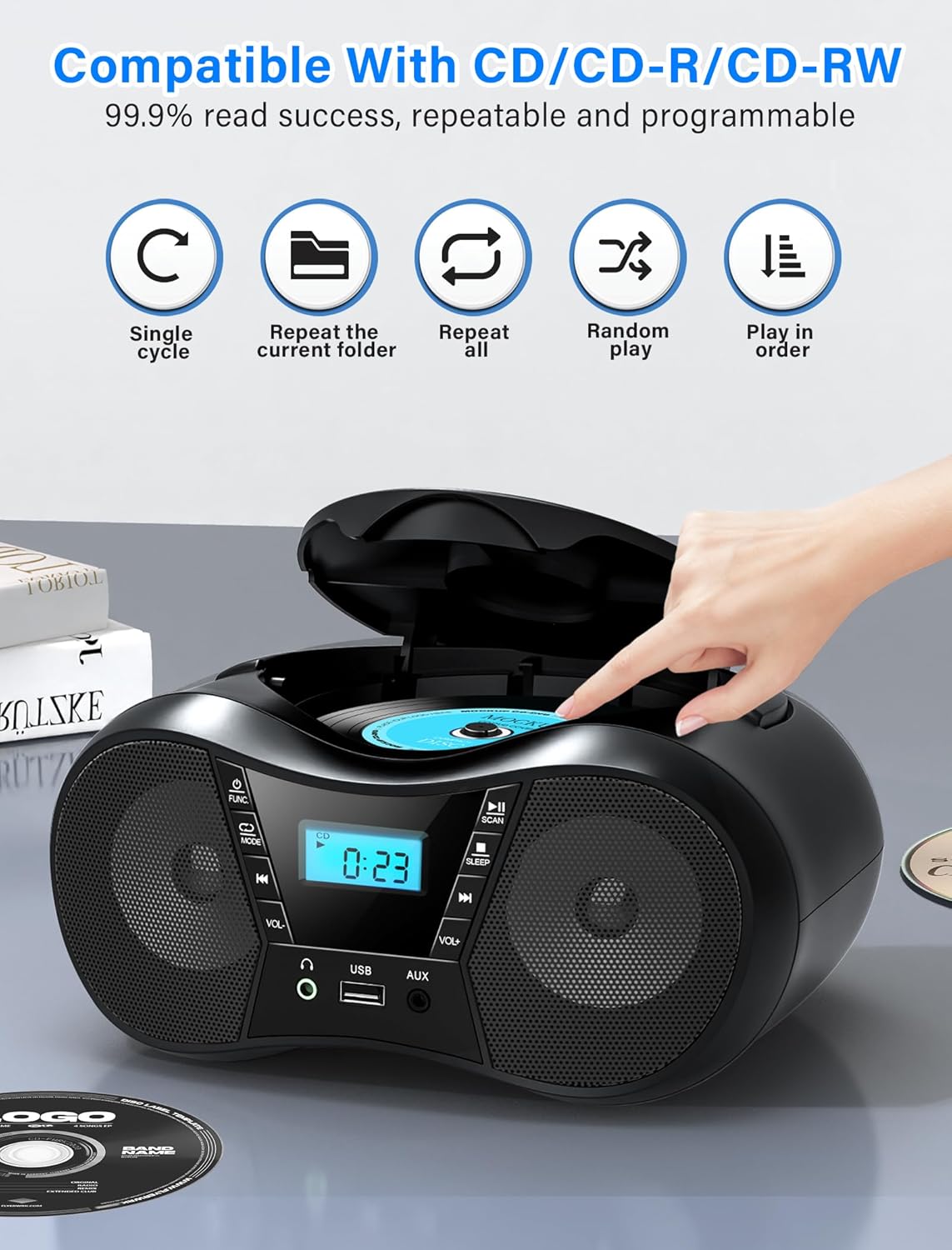
Figure 5: CD Playback Features
4.2 ബ്ലൂടൂത്ത് പ്രവർത്തനം
Connect your Bluetooth-enabled device to the boombox.
- അമർത്തുക Power ON/OFF / Function Selector button repeatedly until 'BT' appears on the LCD display. The unit will enter pairing mode, indicated by a flashing 'BT'.
- Enable Bluetooth on your external device (smartphone, tablet, computer) and search for available devices.
- Select 'CD-X9B' from the list of devices. Once connected, 'BT' will stop flashing and remain solid.
- You can now play audio from your connected device through the boombox.
- ബ്ലൂടൂത്ത് ശ്രേണി 26 അടി (8 മീറ്റർ) വരെയാണ്.
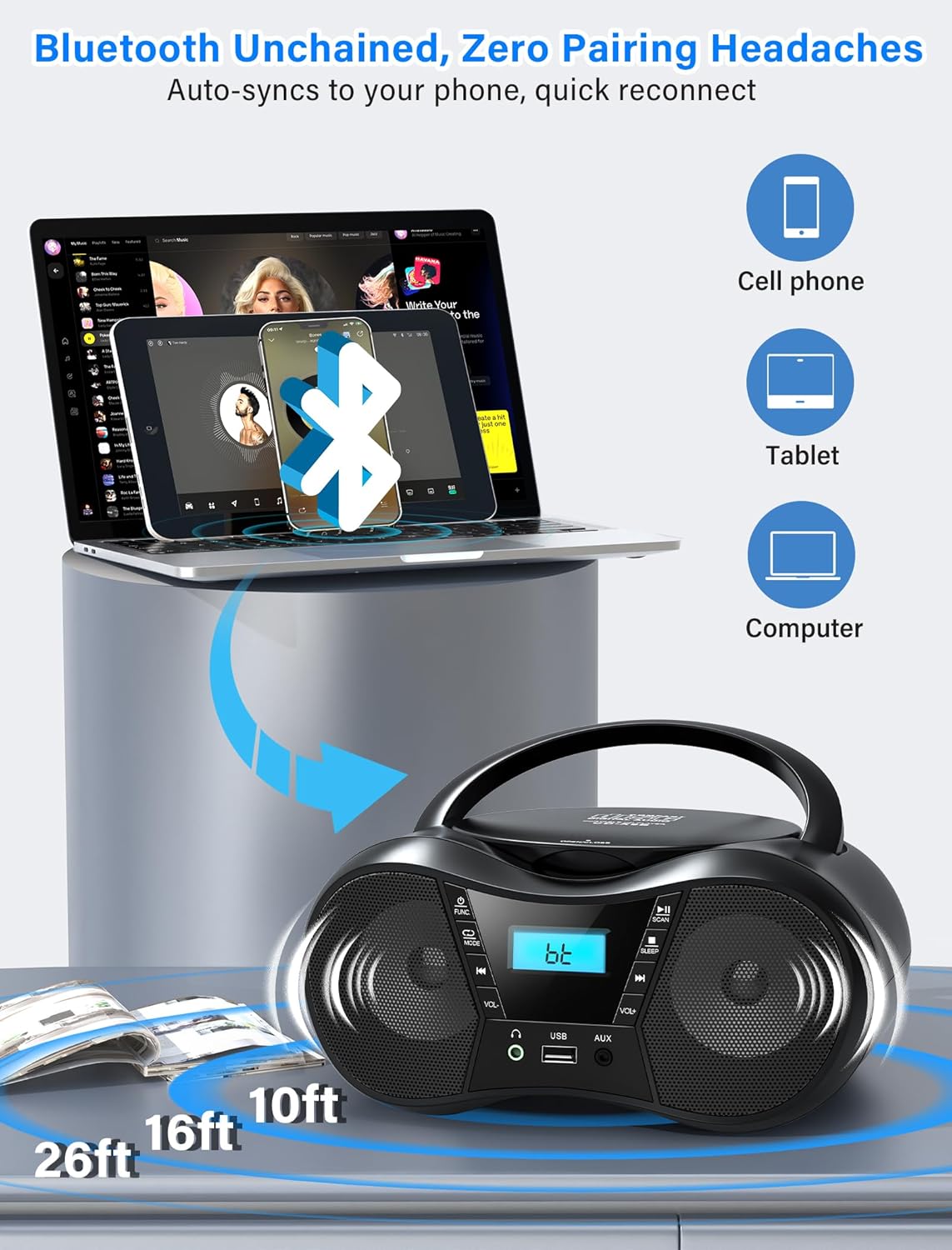
ചിത്രം 6: ബ്ലൂടൂത്ത് കണക്റ്റിവിറ്റി
4.3 എഫ്എം റേഡിയോ
Listen to FM radio stations.
- അമർത്തുക Power ON/OFF / Function Selector button repeatedly until 'FM' appears on the LCD display.
- നീട്ടുക എഫ്എം ആൻ്റിന fully and adjust its position for optimal reception.
- അമർത്തുക പ്ലേ/താൽക്കാലികമായി നിർത്തുക/സ്കാൻ ചെയ്യുക ലഭ്യമായ എഫ്എം സ്റ്റേഷനുകൾ സ്വയമേവ സ്കാൻ ചെയ്യാനും സംരക്ഷിക്കാനും ബട്ടൺ.
- ഉപയോഗിക്കുക Previous Song / Fast Rewind ഒപ്പം അടുത്ത ഗാനം / ഫാസ്റ്റ് ഫോർവേഡ് buttons to manually tune or select saved stations.
- The FM frequency range is 87.5 to 108 MHz.
4.4 യുഎസ്ബി പ്ലേബാക്ക്
ഓഡിയോ പ്ലേ ചെയ്യുക fileഒരു USB ഡ്രൈവിൽ നിന്നുള്ള എസ്.
- ഒരു USB ഡ്രൈവ് ഇതിലേക്ക് ചേർക്കുക യുഎസ്ബി ജാക്ക്.
- അമർത്തുക Power ON/OFF / Function Selector button repeatedly until 'USB' appears on the LCD display.
- The unit will automatically begin playing MP3 audio fileയുഎസ്ബി ഡ്രൈവിൽ നിന്നുള്ള ങ്ങൾ.
- ഉപയോഗിക്കുക Previous Song / Fast Rewind ഒപ്പം അടുത്ത ഗാനം / ഫാസ്റ്റ് ഫോർവേഡ് ട്രാക്കുകൾ നാവിഗേറ്റ് ചെയ്യുന്നതിനുള്ള ബട്ടണുകൾ.
4.5 AUX ഇൻപുട്ട്
Connect external audio devices using the AUX cable.
- Connect one end of the provided AUX cable to the AUX IN ജാക്ക് on the boombox.
- മറ്റേ അറ്റം നിങ്ങളുടെ ബാഹ്യ ഉപകരണത്തിന്റെ (ഉദാ: MP3 പ്ലെയർ, കമ്പ്യൂട്ടർ) ഹെഡ്ഫോൺ ജാക്കുമായോ ഓഡിയോ ഔട്ട്പുട്ടുമായോ ബന്ധിപ്പിക്കുക.
- അമർത്തുക Power ON/OFF / Function Selector button repeatedly until 'AUX' appears on the LCD display.
- Play audio from your external device. The boombox will output the sound.

Figure 7: USB, AUX, and FM Modes
4.6 വോളിയം നിയന്ത്രണം
ഉപയോഗിച്ച് വോളിയം ക്രമീകരിക്കുക വോളിയം + ഒപ്പം വ്യാപ്തം - ബട്ടണുകൾ.
4.7 ഹെഡ്ഫോൺ ഉപയോഗം
For private listening, plug 3.5mm headphones into the ഇയർഫോൺ ജാക്ക്.
4.8 സ്ലീപ്പ് ടൈമർ
ഒരു നിശ്ചിത കാലയളവിനുശേഷം യൂണിറ്റ് യാന്ത്രികമായി ഓഫാക്കാൻ സ്ലീപ്പ് ടൈമർ അനുവദിക്കുന്നു.
- While the unit is on, press the Stop/Sleep button repeatedly to cycle through sleep timer options (90, 80, 70, 60, 50, 40, 30, 20, 10 minutes, or OFF).
- The selected time will appear on the display. The unit will automatically power off after the set duration.

ചിത്രം 8: സ്ലീപ്പ് ടൈമർ ഫംഗ്ഷൻ
5. പരിപാലനം
5.1 വൃത്തിയാക്കൽ
- മൃദുവായതും ഉണങ്ങിയതുമായ തുണി ഉപയോഗിച്ച് യൂണിറ്റിന്റെ പുറംഭാഗം തുടയ്ക്കുക. അബ്രാസീവ് ക്ലീനറുകളോ ലായകങ്ങളോ ഉപയോഗിക്കരുത്.
- സിഡി ലെൻസിന്, ഒരു പ്രത്യേക സിഡി ലെൻസ് ക്ലീനർ ഡിസ്ക് ഉപയോഗിക്കുക.
5.2 സിഡി കെയർ
- Handle CDs by their edges to avoid fingerprints on the playing surface.
- Store CDs in their cases when not in use to prevent scratches.
- Clean dirty CDs with a soft, lint-free cloth, wiping from the center outwards.
5.3 ബാറ്ററി മാറ്റിസ്ഥാപിക്കൽ
When using battery power, replace all 6 C-size batteries when the unit's performance degrades or the display dims. Ensure correct polarity when inserting new batteries.

ചിത്രം 9: വിശദമായി Views of CD Compartment, Controls, and Battery Compartment
6. പ്രശ്നപരിഹാരം
| പ്രശ്നം | സാധ്യമായ കാരണം | പരിഹാരം |
|---|---|---|
| യൂണിറ്റ് പവർ ഓണാക്കുന്നില്ല. | No AC power or depleted batteries. | Ensure AC cord is securely plugged in or replace batteries. |
| സിഡി പ്ലേ ചെയ്യുകയോ ഒഴിവാക്കുകയോ ചെയ്യുന്നില്ല. | സിഡി വൃത്തികെട്ടതോ, പോറലുകളുള്ളതോ, അല്ലെങ്കിൽ തെറ്റായി ചേർത്തതോ ആണ്. | Clean the CD, check for damage, or reinsert correctly. |
| മോശം എഫ്എം റേഡിയോ സ്വീകരണം. | ആന്റിന നീട്ടിയിട്ടില്ല അല്ലെങ്കിൽ ഇടപെടുന്നില്ല. | Fully extend and adjust the FM antenna. Reposition the unit near a window and away from electronic devices. |
| ബ്ലൂടൂത്ത് ഉപകരണം ജോടിയാക്കാൻ കഴിയില്ല. | Boombox not in pairing mode or device out of range. | Ensure boombox is in 'BT' mode and flashing. Move device closer to the boombox (within 26 feet). |
| No sound from USB. | USB drive not inserted correctly or unsupported file ഫോർമാറ്റ്. | Ensure USB drive is fully inserted. Verify audio files MP3 ഫോർമാറ്റിലാണ്. |
| No sound from AUX. | AUX cable not connected or external device volume too low. | Check AUX cable connection. Increase volume on both the boombox and the external device. |
7 സ്പെസിഫിക്കേഷനുകൾ
- മോഡൽ: CD-X9B
- ബ്രാൻഡ്: ഗ്രേഡിയോ
- ഉൽപ്പന്ന അളവുകൾ (L x W x H): 9.01 x 8.23 x 4.29 ഇഞ്ച് (22.89 x 20.90 x 10.89 സെ.മീ)
- ഇനത്തിൻ്റെ ഭാരം: 2.1 പൗണ്ട് (0.95 കി.ഗ്രാം)
- കണക്റ്റിവിറ്റി ടെക്നോളജി: ഓക്സിലറി, ബ്ലൂടൂത്ത് 5.1, യുഎസ്ബി
- നിറം: കറുപ്പ്
- സ്പീക്കർ തരം: ബിൽറ്റ്-ഇൻ സ്റ്റീരിയോ സ്പീക്കറുകൾ
- സിഡി അനുയോജ്യത: CD, CD-R, CD-RW
- FM ഫ്രീക്വൻസി റേഞ്ച്: 87.5 - 108 മെഗാഹെട്സ്
- വൈദ്യുതി വിതരണം: AC 120V~60Hz or 6 x C-size batteries (not included)
- ബ്ലൂടൂത്ത് ശ്രേണി: 26 അടി വരെ (8 മീറ്റർ)
8. വാറൻ്റിയും പിന്തുണയും
Greadio is committed to providing quality products and customer service.
- Hesitation Period: 15 ദിവസം
- Maintenance Period: 12 മാസം
- സേവന പിന്തുണ: ജീവിതകാലം
For any questions or support needs, please contact Greadio customer service. Our service offices are based in Seattle and Berlin to provide comprehensive customer experience.