
1. ആമുഖം
This manual provides detailed instructions for the VILCORN Z03 Wireless Gaming Controller. This versatile gamepad is designed for multi-platform compatibility, offering an enhanced gaming experience across various devices including PC, iOS, Android, Nintendo Switch, Steam Deck, PlayStation 3, and PlayStation 4. Please read this manual carefully before use to ensure proper operation and to maximize your gaming performance.
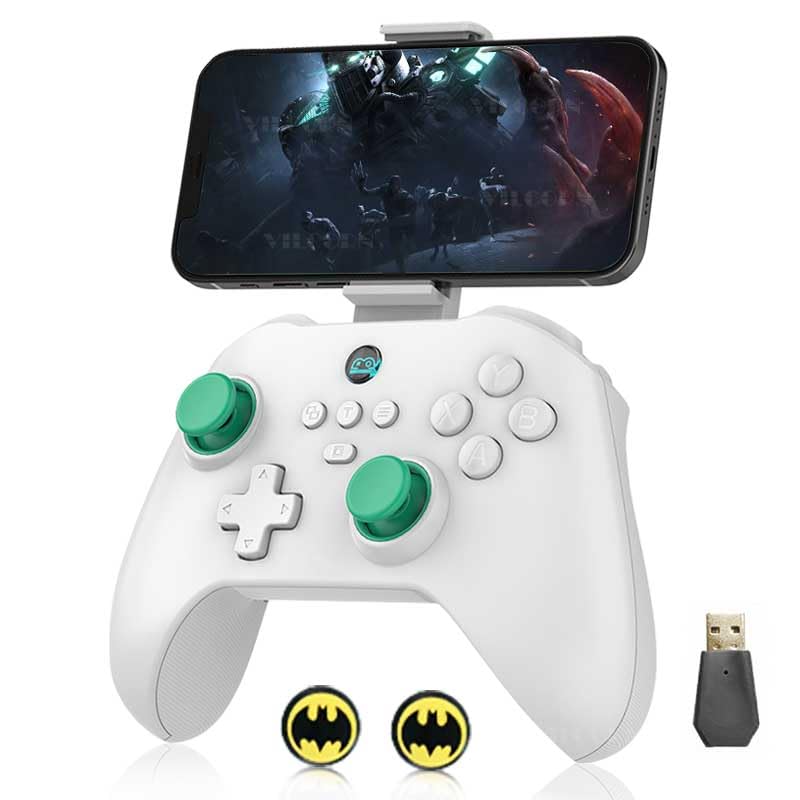
Image: The VILCORN Z03 Wireless Gaming Controller in white, with a smartphone attached to its integrated holder, demonstrating its use for mobile gaming. A USB dongle and two small circular accessories are also visible.
2. ഉൽപ്പന്ന സവിശേഷതകൾ
- മൾട്ടി-പ്ലാറ്റ്ഫോം അനുയോജ്യത: Supports direct connection to iPhone/iPad/Macbook, Android Phone/Tablet, PC, Switch/Switch Lite/Switch OLED, PS3/PS4, and Steam Deck.
- 2-In-1 Hall Linear Trigger & Micro Triggers: Equipped with two types of changeable triggers for precise control. Micro triggers offer instant response for shooting games, while Hall linear triggers provide smooth, drift-free control ideal for racing games.
- ABXY Key Value Interchange Setting: Allows users to remap ABXY button positions to match preferred layouts, such as the Nintendo Switch gamepad key order. Supports direct-attached Shootingplus and GamepadSpace handle mapping.
- Enhanced Game Atmosphere: Features dual haptic feedback motors with 4-level vibration intensity adjustment and sensitive 6-axis gyroscopic sensors for immersive gameplay. Vibration and 6-axis gyro are supported on PC, PS3, PS4, and NS-Switch.
- നീണ്ട ബാറ്ററി ലൈഫ്: Built-in 500 mAh rechargeable battery provides over 10 hours of gameplay on a full charge.
- മൊബൈൽ ഫോൺ ഹോൾഡർ: Features a stretchable expansion slot capable of gripping devices with a width of 53mm to 96mm.
- Macro Programming Keys: Includes two extension macro programming keys (M1 and M2) for one-click custom actions.
Detailed Feature Overview:
Hall Joystick with POM Ring
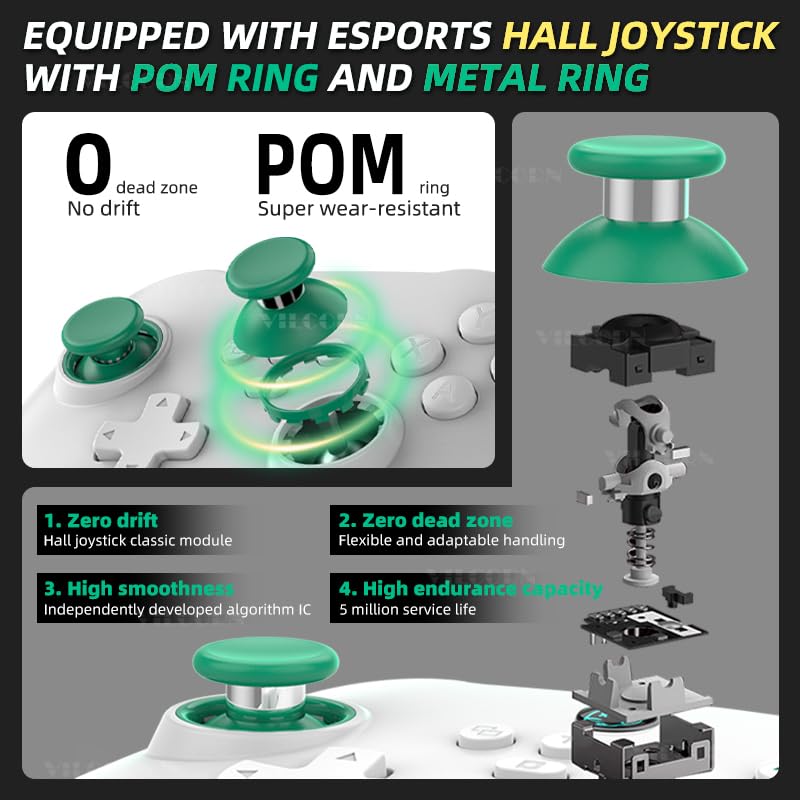
Image: This diagram details the Hall joystick, emphasizing its zero drift, zero dead zone, high smoothness, and durable POM ring for super wear-resistance, ensuring precise and long-lasting performance.
High Precision Six-Axis Somatosensory & HD Dual Vibration Motor
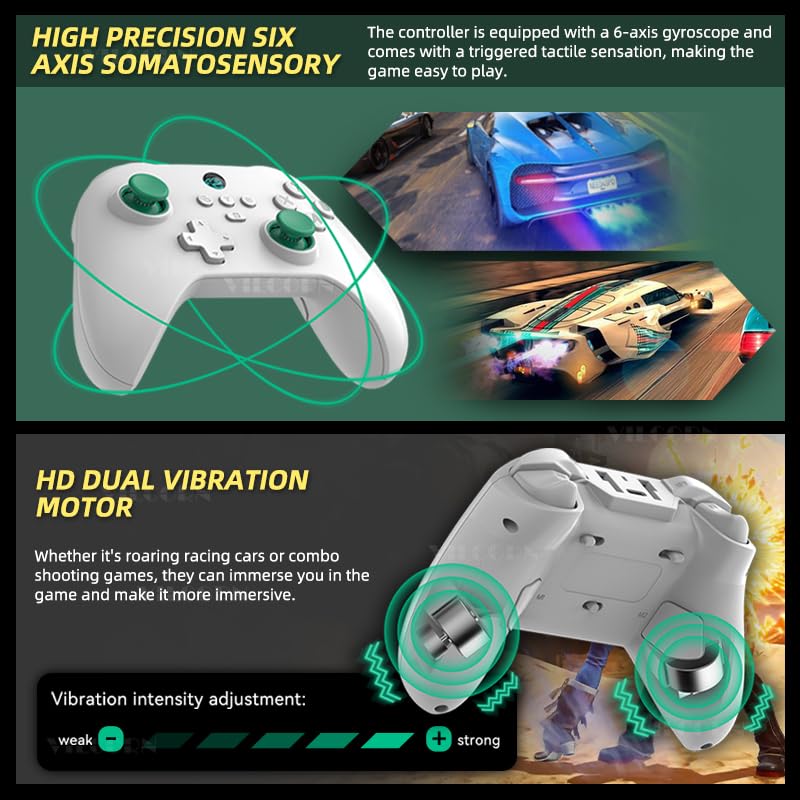
Image: This visual highlights the controller's 6-axis gyroscope for precise motion control and its HD dual vibration motors, which provide tactile feedback. An intensity slider indicates adjustable vibration levels from weak to strong.
Double Cut Trigger Key: Micro Trigger + Hall Trigger Switching
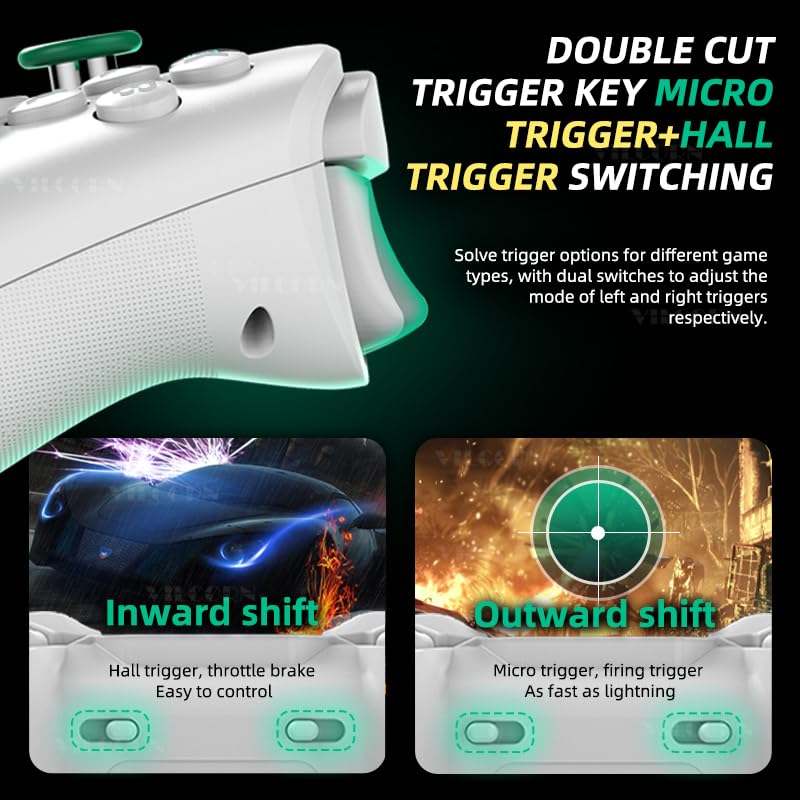
Image: This diagram demonstrates the dual trigger system, allowing users to switch between Hall triggers for smooth, linear control (like throttle brakes in racing games) and Micro triggers for instant, rapid response (like firing in shooting games).
Third Gear Adaptation Mode: One-Click Switch Joystick Linear Algorithm

Image: This graphic illustrates the three preset joystick modes: Racing mode for precise vehicle control, Normal mode for general gameplay, and FPS (Gunfight) mode for optimized aiming and shooting, allowing one-click switching between linear algorithms.
Mobile Phone Holder Expansion Slot
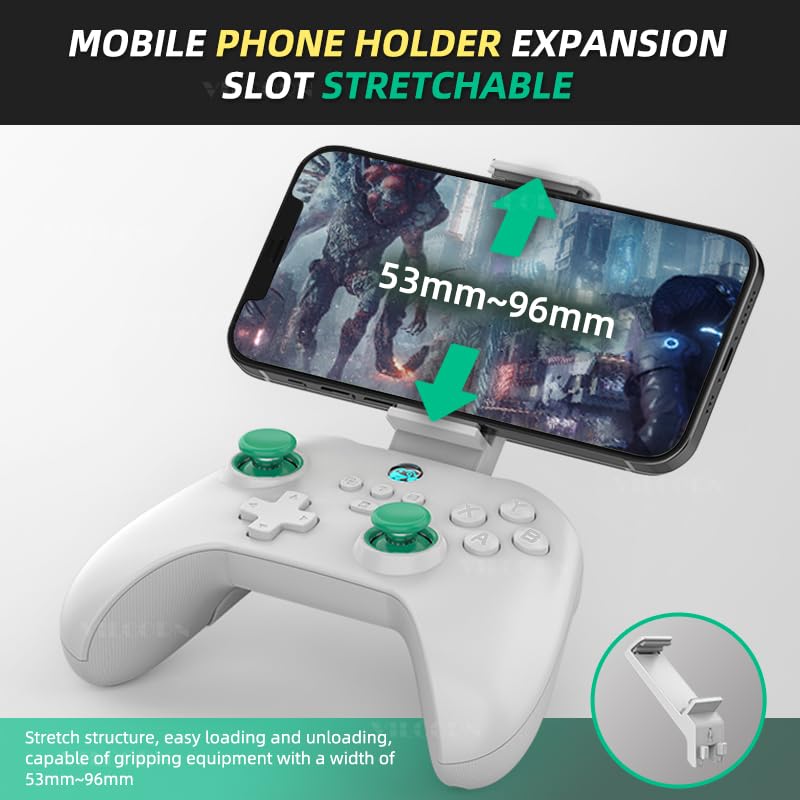
Image: This image demonstrates the controller's stretchable mobile phone holder, designed for easy loading and unloading, capable of securely gripping devices with widths ranging from 53mm to 96mm.
2 Extension Macro Programming Keys (M1 and M2)
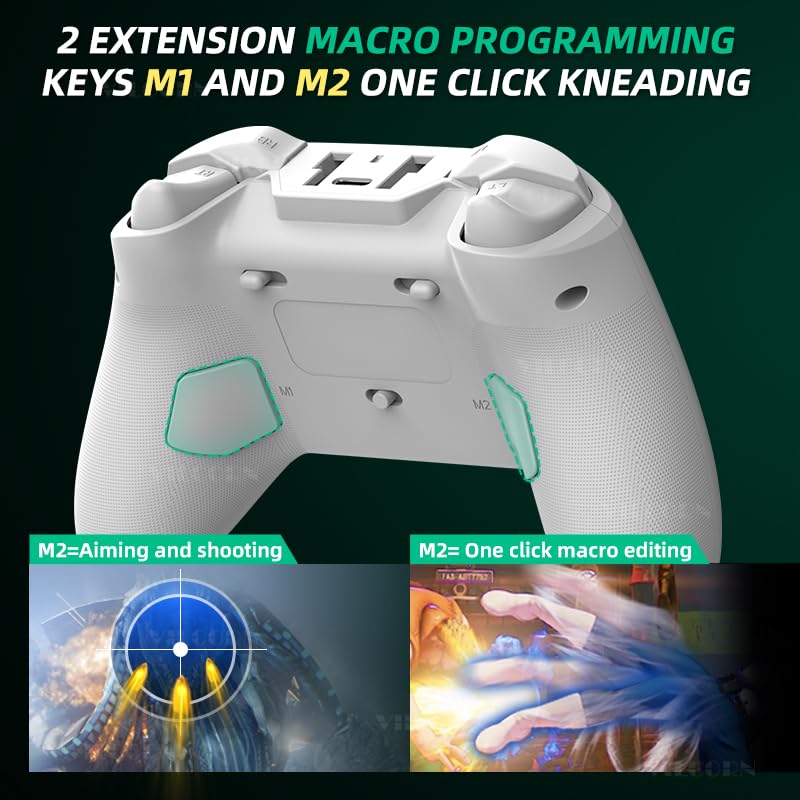
Image: This image points out the M1 and M2 extension macro programming keys located on the back of the controller, illustrating their utility for assigning complex actions, such as combined aiming and shooting or custom one-click macro editing.
3. സജ്ജീകരണവും കണക്ഷനും
The VILCORN Z03 controller offers multiple connection methods to ensure compatibility with your devices. Please follow the instructions below for your specific platform.
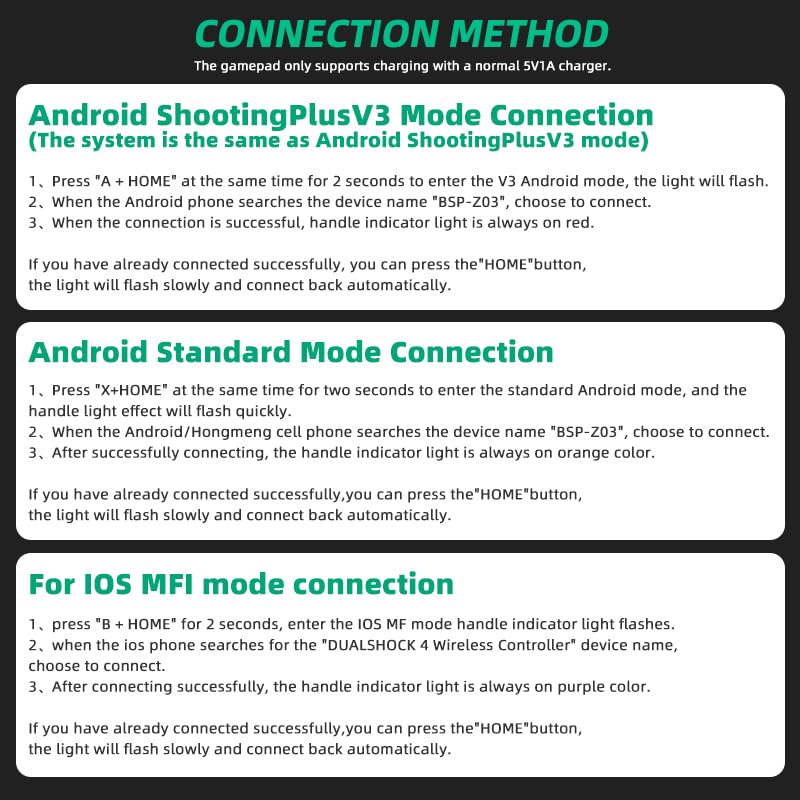
Image: This diagram outlines the steps for connecting the controller via Android ShootingPlus V3 Mode, Android Standard Mode, and iOS MFI Mode, including button combinations and indicator light behaviors.
3.1 Android ShootingPlus V3 Mode Connection
This mode is suitable for Android devices using the ShootingPlus V3 system.
- അമർത്തുക A + വീട് buttons simultaneously for 2 seconds to enter V3 Android mode. The indicator light will flash.
- On your Android phone/tablet, search for the device name "BSP-Z03" and select it to connect.
- Once the connection is successful, the handle indicator light will remain solid red.
- If you have previously connected successfully, you can simply press the വീട് button, and the light will flash slowly before automatically reconnecting.
3.2 Android Standard Mode Connection
This mode is for standard Android connections.
- അമർത്തുക X + വീട് buttons simultaneously for 2 seconds to enter standard Android mode. The handle effect light will flash quickly.
- When your Android/Hongmeng cell phone searches for the device name "BSP-Z03", choose to connect.
- After successfully connecting, the handle indicator light will remain solid orange.
- If you have previously connected successfully, you can simply press the വീട് button, and the light will flash slowly before automatically reconnecting.
3.3 iOS MFI Mode Connection
This mode is for iOS devices supporting MFI (Made For iPhone/iPad) controllers.
- അമർത്തുക B + വീട് buttons for 2 seconds. The iOS MFI mode handle indicator light will flash.
- When your iOS phone searches for the "DUALSHOCK 4 Wireless Controller" device name, choose to connect.
- After successfully connecting, the handle indicator light will remain solid purple.
- If you have previously connected successfully, you can simply press the വീട് button, and the light will flash slowly before automatically reconnecting.
Note: The gamepad only supports charging with a normal 5V1A charger.
4. പ്രവർത്തന നിർദ്ദേശങ്ങൾ
4.1 Trigger Switching (Micro Trigger / Hall Linear Trigger)
The controller features a unique dual-trigger system. Use the physical switches located near the triggers to select the desired mode:
- Micro Trigger Mode: Provides instant, short-travel actuation, ideal for rapid firing in FPS games.
- Hall Linear Trigger Mode: Offers smooth, precise, and progressive input, perfect for throttle control in racing games or other applications requiring fine input.
4.2 Joystick Linear Algorithm Modes
The controller has three preset joystick modes to optimize performance for different game genres. These modes adjust the joystick's linear algorithm for sensitivity and response.
- റേസിംഗ് മോഡ്: Optimized for precise control in racing simulations.
- സാധാരണ മോഡ്: Standard response suitable for most game types.
- FPS (ഗൺഫൈറ്റ്) മോഡ്: ഫസ്റ്റ്-പേഴ്സൺ ഷൂട്ടർ ഗെയിമുകൾക്കായി മെച്ചപ്പെടുത്തിയ സംവേദനക്ഷമതയും കൃത്യതയും.
Note: The three gear modes are factory preset and debugged for optimal performance.
4.3 Macro Programming (M1/M2 Keys)
The M1 and M2 keys on the back of the controller can be programmed for custom actions, allowing for complex commands with a single press. Refer to the specific software or in-game settings for detailed macro programming instructions.
- M1 Key: Typically used for left-side actions or custom macros.
- M2 Key: Typically used for right-side actions, such as aiming and shooting combinations, or one-click macro editing.
4.4 Vibration Intensity Adjustment
The dual haptic feedback motors provide immersive vibration. On supported platforms (PC, PS3, PS4, NS-Switch), you can adjust the vibration intensity to your preference. Consult your device's system settings or specific game options for vibration control.
4.5 ABXY Key Value Interchange Setting
The controller supports remapping of the ABXY buttons. If you prefer the button layout of a Nintendo Switch gamepad, you can change the ABXY order through the controller's settings or compatible mapping applications like Shootingplus and GamepadSpace.
5. പരിപാലനം
To ensure the longevity and optimal performance of your VILCORN Z03 Wireless Gaming Controller, follow these maintenance guidelines:
- വൃത്തിയാക്കൽ: കൺട്രോളർ വൃത്തിയാക്കാൻ മൃദുവായതും ഉണങ്ങിയതുമായ തുണി ഉപയോഗിക്കുക. കഠിനമായ അഴുക്കിന്, ചെറുതായി dampതുണിയിൽ വെള്ളം അല്ലെങ്കിൽ നേരിയ ക്ലീനിംഗ് ലായനി ഉപയോഗിക്കുക. കഠിനമായ രാസവസ്തുക്കളോ ഉരച്ചിലുകളോ ഉള്ള വസ്തുക്കൾ ഒഴിവാക്കുക.
- സംഭരണം: Store the controller in a cool, dry place away from direct sunlight, extreme temperatures, and humidity.
- ബാറ്ററി കെയർ: ബാറ്ററി ഉയർന്ന താപനിലയിൽ തുറന്നുവിടുകയോ അത് വേർപെടുത്താൻ ശ്രമിക്കുകയോ ചെയ്യരുത്. ബാറ്ററിയുടെ ആരോഗ്യം നിലനിർത്താൻ, ഉപയോഗത്തിലില്ലെങ്കിൽ പോലും, കൺട്രോളർ പതിവായി ചാർജ് ചെയ്യുക.
- തുള്ളികൾ ഒഴിവാക്കുക: ആന്തരിക ഘടകങ്ങളെ തകരാറിലാക്കുന്ന ഭൗതിക ആഘാതങ്ങളിൽ നിന്നും വീഴ്ചകളിൽ നിന്നും കൺട്രോളറെ സംരക്ഷിക്കുക.
6. പ്രശ്നപരിഹാരം
If you encounter issues with your VILCORN Z03 Wireless Gaming Controller, please refer to the following common troubleshooting steps:
- കൺട്രോളർ കണക്റ്റുചെയ്യുന്നില്ല:
- കൺട്രോളർ പൂർണ്ണമായും ചാർജ്ജ് ചെയ്തിട്ടുണ്ടെന്ന് ഉറപ്പാക്കുക.
- Verify you are using the correct button combination for your device's connection mode (Android ShootingPlus V3, Android Standard, iOS MFI).
- Make sure Bluetooth is enabled on your device and that it is discoverable.
- Try forgetting the device in your device's Bluetooth settings and re-pairing.
- കൺട്രോളറും നിങ്ങളുടെ ഉപകരണവും പുനരാരംഭിക്കുക.
- ഇൻപുട്ട് ലാഗ് അല്ലെങ്കിൽ വിച്ഛേദനങ്ങൾ:
- Ensure there are no strong wireless interferences nearby (e.g., Wi-Fi routers, other Bluetooth devices).
- Move closer to your device to reduce distance-related issues.
- Check for any firmware updates for the controller (if available from the manufacturer's webസൈറ്റ്).
- ബട്ടണുകൾ അല്ലെങ്കിൽ ജോയ്സ്റ്റിക്കുകൾ പ്രതികരിക്കുന്നില്ല:
- കൺട്രോളർ ശരിയായി ബന്ധിപ്പിച്ചിട്ടുണ്ടെന്ന് ഉറപ്പാക്കുക.
- Test the controller on another device or game to isolate the issue.
- Perform a factory reset if possible (refer to manufacturer's website for specific instructions if not in manual).
- വൈബ്രേഷൻ പ്രവർത്തിക്കുന്നില്ല:
- Confirm that the platform you are using (PC, PS3, PS4, NS-Switch) supports vibration.
- Check in-game settings and system settings to ensure vibration is enabled and intensity is not set to zero.
If these steps do not resolve your issue, please contact VILCORN customer support for further assistance.
7 സ്പെസിഫിക്കേഷനുകൾ
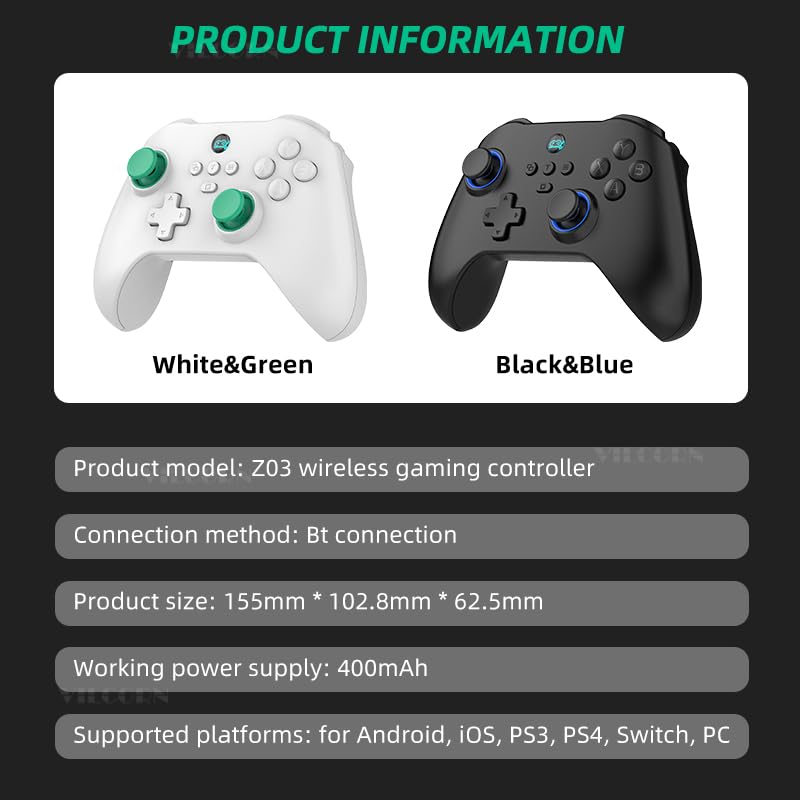
Image: This image provides key product information including model, connection method, dimensions, power supply, and supported platforms.
| ഫീച്ചർ | സ്പെസിഫിക്കേഷൻ |
|---|---|
| ഉൽപ്പന്ന മോഡൽ | Z03 വയർലെസ് ഗെയിമിംഗ് കൺട്രോളർ |
| കണക്ഷൻ രീതി | 2.4G USB, Bluetooth (BT connection), Wired |
| ഉൽപ്പന്ന വലുപ്പം (L*W*H) | 155 മിമി * 102.8 മിമി * 62.5 മിമി |
| വർക്കിംഗ് പവർ സപ്ലൈ | 500mAh (Internal Rechargeable Battery) |
| പിന്തുണയ്ക്കുന്ന പ്ലാറ്റ്ഫോമുകൾ | Android, iOS, PS3, PS4, Switch, PC, Steam Deck |
| നിർമ്മാതാവ് | Shenzhen Jiajue Technology Co., Ltd |
| റിലീസ് തീയതി | സെപ്റ്റംബർ 20, 2024 |
8. വാറൻ്റിയും പിന്തുണയും
VILCORN products are manufactured with high standards of quality and craftsmanship. For information regarding warranty coverage, technical support, or service inquiries, please refer to the warranty card included with your product or visit the official VILCORN webസൈറ്റ്.
ഏതെങ്കിലും വാറന്റി ക്ലെയിമുകൾക്കായി നിങ്ങളുടെ വാങ്ങിയതിന്റെ തെളിവ് സൂക്ഷിക്കുക.