
Greadio 8c0c898f-cb5d-4c0d-ae7c-39b2ea300e4d
Greadio Shortwave Radio User Manual
Model: 8c0c898f-cb5d-4c0d-ae7c-39b2ea300e4d

മുന്നിലും വശത്തും view of the Greadio Shortwave Radio, highlighting its compact design and integrated 4000mAh battery.
ഉൽപ്പന്നം കഴിഞ്ഞുview
The Greadio Shortwave Radio is a versatile and portable device designed for various listening and emergency needs. It combines traditional radio functionalities with modern features like Bluetooth connectivity and multiple charging options, making it an ideal companion for outdoor activities and emergency preparedness.
പ്രധാന സവിശേഷതകൾ:
- മൾട്ടി-ബാൻഡ് സ്വീകരണം: AM, FM, Shortwave (SW), and Weather Band (WB) for comprehensive coverage.
- ബ്ലൂടൂത്ത് 5.4: അനുയോജ്യമായ ഉപകരണങ്ങളിൽ നിന്നുള്ള തടസ്സമില്ലാത്ത വയർലെസ് ഓഡിയോ സ്ട്രീമിംഗ്.
- ഒന്നിലധികം ഊർജ്ജ സ്രോതസ്സുകൾ: Rechargeable 4000mAh battery, Type-C charging, solar panel, and hand crank for reliable power in any situation.
- അടിയന്തര പ്രവർത്തനങ്ങൾ: Built-in SOS alarm and bright LED flashlight.
- മീഡിയ പ്ലേബാക്ക്: Supports USB flash drives and TF/SD cards (up to 256GB) for MP3/WAV audio playback.
- സുഖസൗകര്യങ്ങൾ: Sleep timer and 8 types of white noise for relaxation.
- പോർട്ടബിലിറ്റി: Compact design with an integrated compass and wrist strap.

This image highlights the radio's compact size and lists its key features, including SOS, Bluetooth 5.4, TF/SD Card support, flashlight, sleep timer, white noise, earphone jack, USB driver, AM/FM/SW/WB radio, and 4000mAh rechargeable battery.

The Greadio radio is a versatile tool suitable for various outdoor activities, offering multiple functionalities in a compact form.
നിയന്ത്രണങ്ങളും ഘടകങ്ങളും
Familiarize yourself with the various buttons, switches, and ports on your Greadio Shortwave Radio for optimal use.
ഈ വീഡിയോ വിശദമായ ഒരു വിവരണം നൽകുന്നുview of the Greadio radio's function buttons and overall appearance, including front, side, top, and back views.
ഫ്രണ്ട് പാനൽ:
- LCD ഡിസ്പ്ലേ: Shows frequency, mode, battery level, and other indicators.
- സ്പീക്കർ: 5W speaker for clear audio output.
- വൈദ്യുതി സ്വിച്ച്: Used to turn the radio on/off.
- ട്യൂണിംഗ് നോബ്: Adjusts frequency and navigates menus.
Side Panel (Left):
- ഫംഗ്ഷൻ സ്വിച്ച്: Selects between RADIO, BT (Bluetooth), TF (TF Card), and USB modes.
- ഹാൻഡ് ക്രാങ്ക്: Used for manual power generation.
മികച്ച പാനൽ:
- LED ഫ്ലാഷ്ലൈറ്റ്: പ്രകാശം നൽകുന്നു.
- കോമ്പസ്: Integrated compass for navigation, also functions as volume knob.
- ആൻ്റിന: Extendable antenna for improved radio reception.
- വൈറ്റ് നോയിസ് ബട്ടൺ: Activates white noise mode.
- ബാൻഡ് ബട്ടൺ: Cycles through radio bands (FM/AM/SW/WB).
- മോഡ് ബട്ടൺ: Used for sleep timer and lock mode.
- SOS Alert Switch: അടിയന്തര അലാറം സജീവമാക്കുന്നു.
- Previous Song Button (⏴): Skips to previous track/station.
- Pause/Play Button (⏵ ⏵ മിനിമം): ഓഡിയോ പ്ലേ ചെയ്യുകയോ താൽക്കാലികമായി നിർത്തുകയോ ചെയ്യുന്നു.
- Next Song Button (⏵ ⏵ മിനിമം): Skips to next track/station.
ബാക്ക് പാനൽ:
- സോളാർ പാനൽ: സോളാർ ചാർജിംഗിനായി.
- Earphone Jack (3.5mm): സ്വകാര്യ ശ്രവണത്തിനായി.
- ടൈപ്പ്-സി ചാർജിംഗ് പോർട്ട്: റേഡിയോ ചാർജ് ചെയ്യാൻ.
- TF/SD Card Slot: For playing audio from memory cards.
- USB പോർട്ട്: For playing audio from USB drives and for USB output charging.

വിശദമായി view of the radio's multi-function ports, including the 3.5mm earphone jack, USB Type-C charging port, TF/SD card slot, and USB port.
സജ്ജമാക്കുക
പ്രാരംഭ ചാർജിംഗ്
Before first use, it is recommended to fully charge the radio. The device offers three charging methods:
- ടൈപ്പ്-സി ചാർജിംഗ്: Connect the provided Type-C charging cable to the radio's Type-C port and a compatible USB power adapter (not included). The charging indicator will turn red.
- സോളാർ ചാർജിംഗ്: Place the solar panel directly towards sunlight. The charging indicator lights will turn red when charging.
- ഹാൻഡ് ക്രാങ്ക് ചാർജിംഗ്: Turn the hand crank clockwise or anti-clockwise. The red charging indicator will light up. For initial use, crank for approximately three minutes to activate the battery.
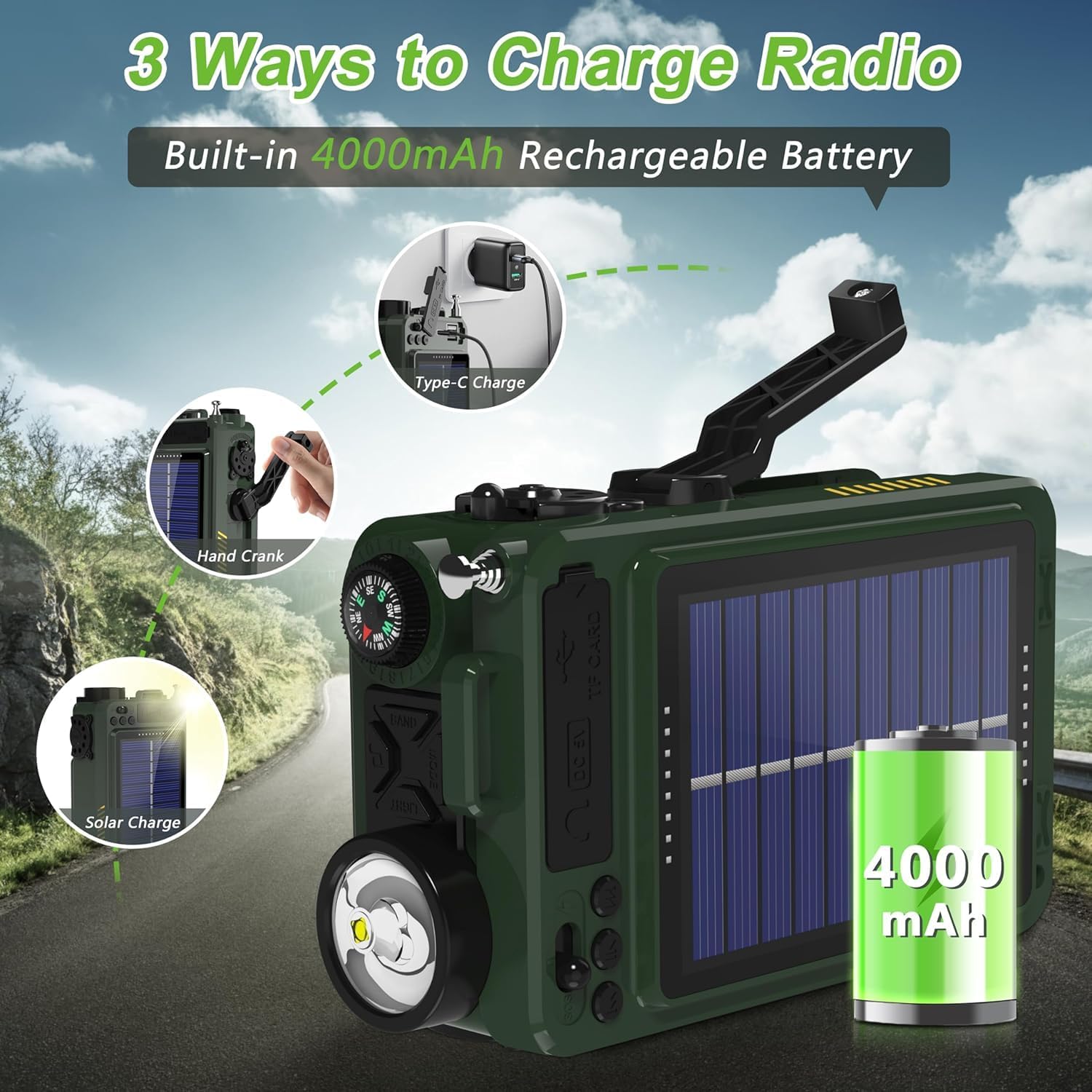
Illustration of the three charging methods for the radio: Type-C, hand crank, and solar panel.

Visual guide demonstrating the three power options: Type-C charging, hand cranking, and solar panel charging.
പവർ ഓൺ/ഓഫ്
To turn the radio on or off, long press the power button (⏻) രണ്ട് സെക്കൻഡ് നേരത്തേക്ക്.
This video demonstrates how to power on and off the Greadio portable radio, along with other basic functions like band switching, sleep timer, and lock mode.
പ്രവർത്തന നിർദ്ദേശങ്ങൾ
ബാൻഡ് സ്വിച്ചിംഗ്
Press the "BAND" button to cycle through the available bands: FM, AM, SW (Shortwave), and WB (Weather Band).
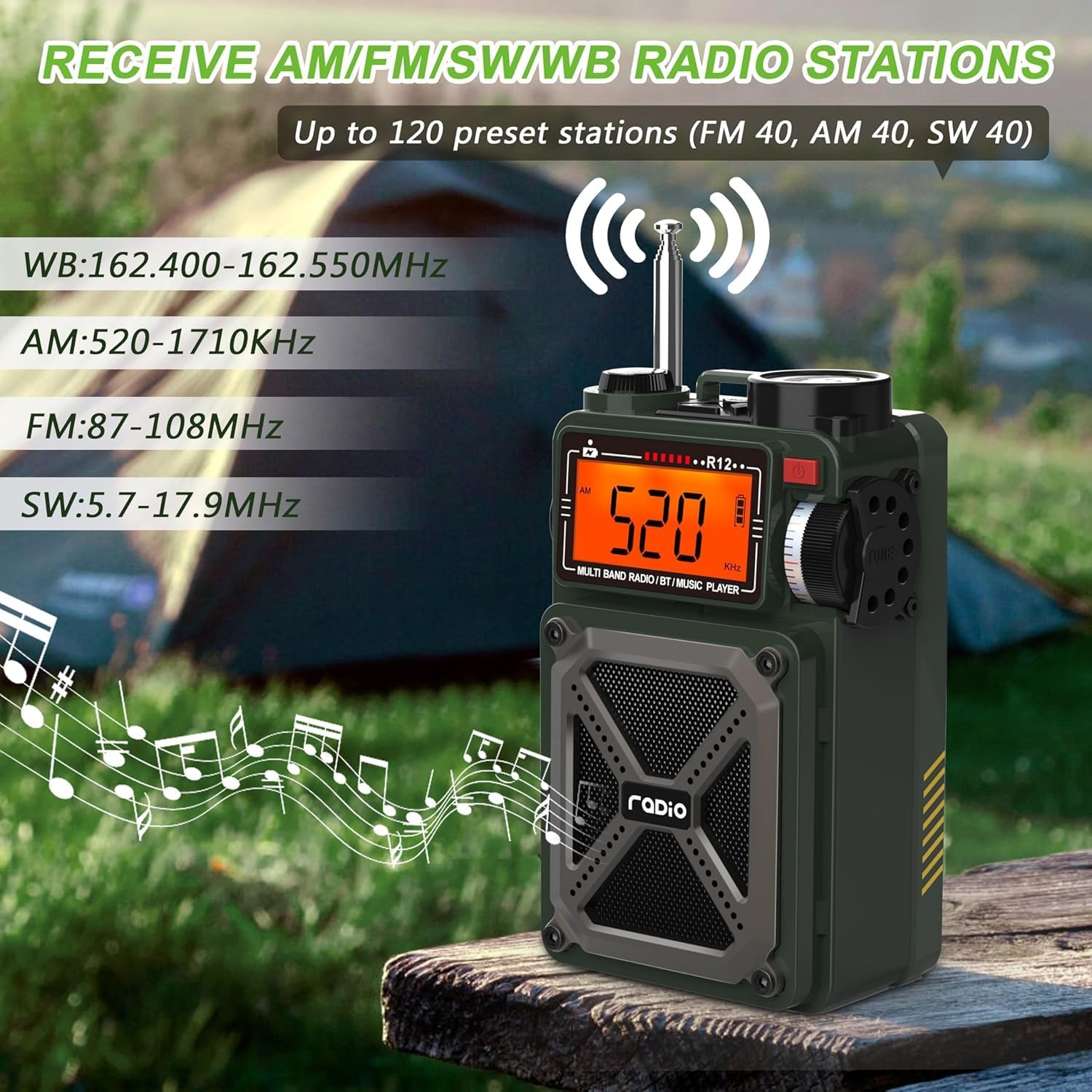
The radio's display showing different frequency bands (WB, AM, FM, SW) and its ability to receive up to 120 preset stations.

This image illustrates the radio's multi-band reception capabilities, including AM, FM, SW, and WB, with frequency ranges for each.
ട്യൂണിംഗും പ്രീസെറ്റുകളും
- യാന്ത്രിക തിരയൽ: ദീർഘനേരം അമർത്തുക ⏴⏵ button to automatically search for stations. The search will stop when a signal is received.
- Automatic Preset: ദീർഘനേരം അമർത്തുക ⏴⏵ button to automatically search and store stations as presets.
- Manual Preset: Select your desired station using the tuning knob. Then, press the ⏵ ⏵ മിനിമം button to select the storage location, and press ⏵ ⏵ മിനിമം സ്ഥിരീകരിക്കാൻ വീണ്ടും.
- Accessing Presets: ഷോർട്ട് അമർത്തുക ♫ button to call out the preset stations. Switch between presets using the ⏴⏵ ബട്ടൺ.
ബ്ലൂടൂത്ത് മോഡ്
Adjust the "Function Switch" to "BT" to enter Bluetooth mode. Turn on Bluetooth on your device (e.g., smartphone) and connect to the device named "R12".

The radio displaying "bt" for Bluetooth mode, with a smartphone showing the Bluetooth connection process to "R12".

This image illustrates the Bluetooth 5.4 connectivity of the radio, showing a seamless connection to a smartphone and other devices within a 32ft range.
TF/SD Card & USB Playback
Enter the M-PLAY mode. Insert a Micro SD (TF) card or a USB flash drive into the respective slots. Short press the ⏵ ⏵ മിനിമം button to play/pause the song, or use the ⏴⏵ buttons to switch to the previous or next song.

This image shows users enjoying music by plugging a USB drive into the radio, highlighting its support for MP3 and WAV formats up to 256GB.

A user reading while the radio plays music from a TF/SD card, emphasizing its support for MP3 and WAV formats up to 256GB.
White Noise & Sleep Timer
The radio features 8 types of white noise to help with relaxation and sleep. Long press the ♫ button to enter white noise mode. Press ⏴⏵ to choose from 1 to 8 natural sounds.
The sleep timer allows the radio to automatically shut off after 10-90 minutes. Short press the "MODE" button to set the sleep time.

The radio's display showing the sleep timer function and highlighting the 8 types of white noise available for a comfortable sleep environment.

A person sleeping peacefully with the radio emitting white noise, illustrating the feature designed to create a comfortable sleep environment.

A person resting in bed with the radio nearby, demonstrating the sleep timer function that allows automatic shut-off after a set period.
അടിയന്തര പ്രവർത്തനങ്ങൾ
- SOS അലാറം: Push the switch to the lightning symbol position (SOS) to activate the alert.
- LED ഫ്ലാഷ്ലൈറ്റ്: Press the "Light" button to turn on the flashlight.

A collage showing the radio's LED flashlight, SOS alarm, integrated compass, and USB output for charging other devices.

A person in distress with the radio's SOS alarm activated, indicating its use in emergency situations.

The radio's 1W flashlight illuminating a dark area, demonstrating its utility in low-light conditions.
Volume Adjustment & Compass
Adjust the volume by rotating the compass in the upper left corner of the radio. The integrated compass can be used for navigation.

A person using the radio's integrated compass for direction, with a note indicating that rotating the compass adjusts the volume.
USB Output Function (Power Bank)
The radio can charge external devices. Push the switch to the lightning symbol position. Plug your charging cable into the USB/Type-C output port and connect your phone or other device.

The radio's 4000mAh battery charging a smartphone, demonstrating its power bank capability.
മെയിൻ്റനൻസ്
- വൃത്തിയാക്കൽ: റേഡിയോയുടെ പുറംഭാഗം വൃത്തിയാക്കാൻ മൃദുവായതും ഉണങ്ങിയതുമായ തുണി ഉപയോഗിക്കുക. കഠിനമായ രാസവസ്തുക്കളോ അബ്രസിവ് ക്ലീനറുകളോ ഉപയോഗിക്കുന്നത് ഒഴിവാക്കുക.
- സംഭരണം: നേരിട്ടുള്ള സൂര്യപ്രകാശത്തിൽ നിന്നും കടുത്ത താപനിലയിൽ നിന്നും അകലെ തണുത്തതും വരണ്ടതുമായ സ്ഥലത്ത് റേഡിയോ സൂക്ഷിക്കുക.
- ബാറ്ററി കെയർ: ബാറ്ററി ലൈഫ് വർദ്ധിപ്പിക്കാൻ, ബാറ്ററി ഇടയ്ക്കിടെ പൂർണ്ണമായും ഡിസ്ചാർജ് ചെയ്യുന്നത് ഒഴിവാക്കുക. ദീർഘനേരം സൂക്ഷിക്കുകയാണെങ്കിൽ, കുറച്ച് മാസങ്ങൾ കൂടുമ്പോൾ ബാറ്ററി ഏകദേശം 50% വരെ ചാർജ് ചെയ്യുക.
- ജല പ്രതിരോധം: This device is not waterproof. Avoid exposure to rain, splashes, or submersion in water.
ട്രബിൾഷൂട്ടിംഗ്
| പ്രശ്നം | സാധ്യമായ കാരണം | പരിഹാരം |
|---|---|---|
| റേഡിയോ ഓൺ ചെയ്യുന്നില്ല. | കുറഞ്ഞതോ തീർന്നതോ ആയ ബാറ്ററി. | Charge the radio using Type-C, solar, or hand crank. Ensure initial hand cranking for 3 minutes if completely depleted. |
| മോശം റേഡിയോ സ്വീകരണം. | ദുർബലമായ സിഗ്നൽ, ആന്റിന നീട്ടിയില്ല, ഇടപെടൽ. | Fully extend the antenna. Try moving to an open area away from electronic devices or large metal objects. |
| ബ്ലൂടൂത്ത് കണക്ഷൻ പ്രശ്നങ്ങൾ. | Radio not in Bluetooth mode, device too far, interference. | Ensure the function switch is set to "BT". Keep your device within 26 feet (8 meters). Restart both devices. |
| USB/TF കാർഡ് പ്ലേ ചെയ്യുന്നില്ല. | തെറ്റായ മോഡ്, പിന്തുണയ്ക്കുന്നില്ല file format, card/drive issue. | Ensure the radio is in M-PLAY mode. Verify audio files are MP3 or WAV format. Check if the card/drive is properly inserted or corrupted. |
| Volume knob is too sensitive. | ഡിസൈൻ സവിശേഷത. | Adjust the volume slowly and carefully, especially at lower levels. |
സ്പെസിഫിക്കേഷനുകൾ
- ഉൽപ്പന്ന അളവുകൾ: 3.19 x 2.05 x 5.2 ഇഞ്ച്
- ഇനത്തിൻ്റെ ഭാരം: 12.5 ഔൺസ്
- മോഡൽ നമ്പർ: 8c0c898f-cb5d-4c0d-ae7c-39b2ea300e4d
- ബാറ്ററികൾ: 2 ലിഥിയം അയോൺ ബാറ്ററികൾ ആവശ്യമാണ് (ഉൾപ്പെടുത്തിയിരിക്കുന്നു)
- ഊർജ്ജ സ്രോതസ്സ്: Type-C Charging, Solar Powered, Hand Crank
- കണക്റ്റിവിറ്റി ടെക്നോളജി: ബ്ലൂടൂത്ത് 5.4
- ട്യൂണർ സാങ്കേതികവിദ്യ: എഎം/എഫ്എം/എസ്ഡബ്ല്യു/വെസ്റ്റ് ബെൽറ്റ്
- പിന്തുണയ്ക്കുന്ന റേഡിയോ ബാൻഡുകൾ: 1-Band; AM/FM/SW/WB
- പ്രത്യേക സവിശേഷതകൾ: Rechargeable, Compass, SOS Alarm, Portable, USB, SD Card Port, Flashlight
- നിറം: പച്ച
- നിർമ്മാതാവ്: ഗ്രേഡിയോ
- ആദ്യം ലഭ്യമായത്: സെപ്റ്റംബർ 23, 2024
വാറൻ്റി & പിന്തുണ
Greadio provides a twelve-month manufacturer's warranty for this shortwave radio. For any technical assistance, troubleshooting, or warranty claims, please contact Greadio customer service. Refer to the contact information provided in your product packaging or visit the official Greadio webപിന്തുണയ്ക്കുള്ള സൈറ്റ്.
നിർമ്മാതാവ്: ഗ്രേഡിയോ
ഉൾപ്പെടുത്തിയ ഘടകങ്ങൾ: Portable Shortwave Radio, Owner's Manual, Type-C Charging Cord, Exquisite Storage Bag, Wrist Strap.
Ask a question about this manual
Ask about setup, troubleshooting, compatibility, parts, safety, or missing instructions. Manuals+ will review the question and use this page’s manual context to help answer it.