1. ആമുഖം
The Generic G63 Smart Light Sound Machine is a versatile device designed to enhance your daily routine and improve sleep quality. It integrates multiple functions including a smart LED light with seven color selections, a natural sleep aid sound machine, an alarm clock with sunrise simulation, and a convenient 10W wireless charging pad for compatible devices. This manual provides detailed instructions for setup, operation, and maintenance of your new device.

Image: The Generic G63 Smart Light Sound Machine, showcasing its design with integrated clock, wireless charging pad, and vibrant LED lighting.
2 സുരക്ഷാ വിവരങ്ങൾ
- ഉപകരണം വെള്ളത്തിലോ അമിതമായ ഈർപ്പത്തിലോ തുറന്നുകാട്ടരുത്.
- ശക്തമായ ആഘാതങ്ങൾക്ക് ഉപകരണം ഇടുകയോ ഇടുകയോ ചെയ്യുന്നത് ഒഴിവാക്കുക.
- Use only the provided or recommended power adapter (5V/2A) to prevent damage.
- താപ സ്രോതസ്സുകളിൽ നിന്നും നേരിട്ടുള്ള സൂര്യപ്രകാശത്തിൽ നിന്നും ഉപകരണം അകറ്റി നിർത്തുക.
- ഉപകരണം സ്വയം വേർപെടുത്താനോ നന്നാക്കാനോ ശ്രമിക്കരുത്. യോഗ്യതയുള്ള സേവന ഉദ്യോഗസ്ഥരെ ബന്ധപ്പെടുക.
- Ensure proper ventilation around the device, especially during wireless charging.
3. പാക്കേജ് ഉള്ളടക്കം
പാക്കേജിൽ ഇനിപ്പറയുന്ന ഇനങ്ങൾ ഉണ്ടോ എന്ന് പരിശോധിക്കുക:
- Generic G63 Smart Light Sound Machine
- USB-C ചാർജിംഗ് കേബിൾ
- റിമോട്ട് കൺട്രോൾ
- ഉപയോക്തൃ മാനുവൽ (ഈ പ്രമാണം)
4. ഉൽപ്പന്ന സവിശേഷതകൾ
- Multi-functional Lamp: Combines smart lighting, sound machine, and alarm clock.
- വയർലെസ് ചാർജിംഗ്: Integrated 10W wireless charging pad for compatible smartphones and devices.
- ഡൈനാമിക് ലൈറ്റിംഗ്: Seven selectable LED light colors with dimmable options and sunrise simulation.
- ശബ്ദ യന്ത്രം: Features natural sleep aid sounds and can function as a Bluetooth speaker (V5.2, 3W).
- അലാറം ക്ലോക്ക്: Digital display with alarm function.
- Voice-Activated Adjustment: Lights can change to the rhythm of music or be adjusted via voice commands.
- 360° Surround Sound Structure: Designed for immersive audio experience.
- പോർട്ടബിൾ ഡിസൈൻ: Built-in 3.7V/300MAH battery for 2-3 hours of use.
5. സജ്ജീകരണം
5.1 പ്രാരംഭ ചാർജിംഗ്
Before first use, fully charge the Smart Light Sound Machine. Connect the provided USB-C charging cable to the device's charging port and the other end to a 5V/2A power adapter (not included) or a compatible USB power source. The charging indicator will show the charging status. A full charge takes approximately 2.5 hours.
5.2 പ്ലേസ്മെൻ്റ്
Place the device on a stable, flat surface, such as a bedside table or desk. Ensure there is adequate space around the device for ventilation, especially for the wireless charging function.
6. പ്രവർത്തന നിർദ്ദേശങ്ങൾ

Image: Key Function Introduction, showing the control buttons on the device's base for volume, call management, and light effects.
6.1 പവർ ഓൺ/ഓഫ്
Press and hold the power button (usually indicated by a power symbol) for a few seconds to turn the device on or off. The digital display will illuminate when the device is powered on.
6.2 സമയ ക്രമീകരണം
To set the time, refer to the specific instructions in your remote control's manual or the device's on-screen prompts. Typically, there is a dedicated button for time setting, followed by using volume/navigation buttons to adjust hours and minutes. Confirm your selection to save the time.
6.3 ലൈറ്റ് കൺട്രോൾ
Press the "Mode/Switch Light Effect" button (often labeled 'M' or a light bulb icon) to cycle through the seven available light colors and effects. Hold the button to dim or brighten the light. The sunrise simulation feature can be activated through the alarm settings.

Image: The Smart Light Sound Machine providing ambient light in a bedroom setting, demonstrating its use as a sleep aid.
6.4 Sound Control and Bluetooth Pairing
ബ്ലൂടൂത്ത് ജോടിയാക്കൽ: Turn on the device. Activate Bluetooth on your smartphone or audio device and search for "G63" or "Smart Light Sound Machine" in the list of available devices. Select it to pair. A confirmation sound will indicate successful pairing.
വോളിയം ക്രമീകരണം: Use the "Volume Down/Previous Song" buttons (often labeled with '-' and '+' or arrow icons) on the device or remote control to adjust the volume. Short press for volume, long press to skip tracks.
പ്ലേ ചെയ്യുന്ന ശബ്ദങ്ങൾ: Once paired via Bluetooth, you can play music or select from the device's built-in natural sleep aid sounds. Use the mode button to switch between Bluetooth audio and internal sound modes.

Image: The Smart Light Sound Machine emitting colorful lights and musical notes, illustrating its audio capabilities.
6.5 അലാറം ക്ലോക്ക് പ്രവർത്തനം
To set an alarm, locate the alarm button (often an alarm clock icon) on the device or remote. Press it to enter alarm setting mode. Use the navigation buttons to set the desired alarm time and select the alarm sound or sunrise simulation option. Confirm to save the alarm. To snooze or turn off the alarm, refer to the specific button functions on the device.
6.6 വയർലെസ് ചാർജിംഗ്
Place your Qi-compatible smartphone or device on the designated wireless charging pad located on the base of the Smart Light Sound Machine. Ensure the device is centered on the pad for optimal charging. The charging indicator on your phone will confirm that charging has begun. This device supports up to 10W wireless charging.

Image: The Smart Light Sound Machine with a smartphone on its wireless charging pad. Note: While the image indicates 5W, the product specifications state 10W wireless charging capability.
6.7 Voice-Activated Adjustment
The device supports intelligent voice-activated adjustments. When enabled, the lights can change in rhythm with music or be adjusted by voice commands. Refer to the device's specific voice command prompts or the remote control for activation and usage details.
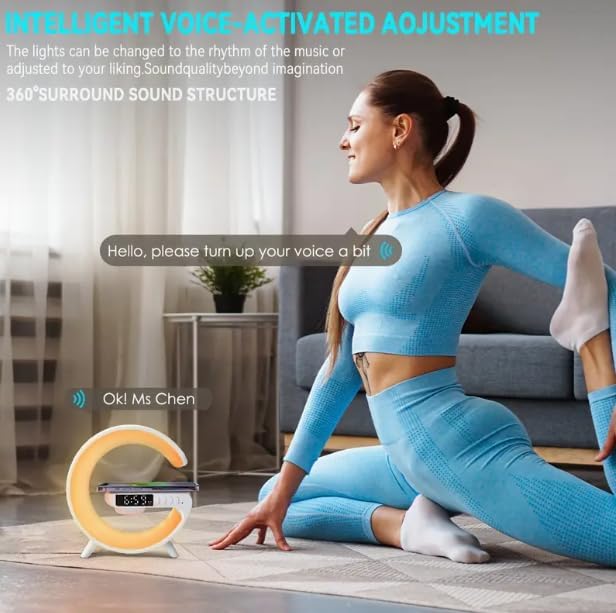
Image: Illustration of the voice-activated adjustment feature, where the device responds to spoken commands.
7. പരിപാലനം
- വൃത്തിയാക്കൽ: Use a soft, dry cloth to clean the surface of the device. Do not use abrasive cleaners or solvents.
- സംഭരണം: ദീർഘനേരം ഉപയോഗിക്കാത്തപ്പോൾ, നേരിട്ട് സൂര്യപ്രകാശം ഏൽക്കാത്ത ഒരു തണുത്തതും വരണ്ടതുമായ സ്ഥലത്ത് ഉപകരണം സൂക്ഷിക്കുക.
- ബാറ്ററി കെയർ: ബാറ്ററി ലൈഫ് വർദ്ധിപ്പിക്കാൻ, ഉപകരണം ഇടയ്ക്കിടെ പൂർണ്ണമായും ഡിസ്ചാർജ് ചെയ്യുന്നത് ഒഴിവാക്കുക. തുടർച്ചയായ ഉപയോഗത്തിലല്ലെങ്കിൽ പോലും പതിവായി ചാർജ് ചെയ്യുക.
8. പ്രശ്നപരിഹാരം
| പ്രശ്നം | സാധ്യമായ കാരണം | പരിഹാരം |
|---|---|---|
| ഉപകരണം ഓണാക്കില്ല. | ബാറ്ററി ചാർജ് കുറവാണ്; പവർ കേബിൾ ശരിയായി ബന്ധിപ്പിച്ചിട്ടില്ല. | Charge the device fully. Ensure the USB-C cable is securely connected to both the device and a working power source. |
| സ്പീക്കറിൽ നിന്ന് ശബ്ദമില്ല. | Volume too low; Not paired via Bluetooth; Incorrect mode selected. | Increase volume. Re-pair Bluetooth device. Ensure the device is in Bluetooth audio mode if playing from an external source. |
| വയർലെസ് ചാർജിംഗ് പ്രവർത്തിക്കുന്നില്ല. | Phone not Qi-compatible; Phone not centered; Foreign objects on pad; Device not powered on. | Ensure your phone supports Qi wireless charging. Re-position phone on the center of the pad. Remove any metal objects or thick cases. Ensure the Smart Light Sound Machine is powered on. |
| Cannot set or change time/alarm. | Incorrect button sequence; Firmware issue. | Refer to the specific instructions for time/alarm setting in the manual or remote control guide. Try resetting the device if issues persist. |
| Lights not changing or dimming. | Incorrect button usage; Device malfunction. | Ensure you are using the correct button ("Mode/Switch Light Effect") and pressing/holding it as instructed. |
9 സ്പെസിഫിക്കേഷനുകൾ
| മോഡൽ | G63 |
| അളവുകൾ (L x W x H) | 5.7"D x 5.7"W x 2.17"H (approx. 150x54x157mm) |
| ഇനത്തിൻ്റെ ഭാരം | 7.3 ഔൺസ് |
| ബ്ലൂടൂത്ത് പതിപ്പ് | V5.2 |
| സ്പീക്കർ പവർ | 3W |
| ബാറ്ററി | 3.7V/300MAH |
| സമയം ഉപയോഗിക്കുക | 2-3 മണിക്കൂർ |
| ചാർജിംഗ് സമയം | 2.5 മണിക്കൂർ |
| ചാർജിംഗ് പോർട്ട് | ടൈപ്പ് സി |
| ഇൻപുട്ട് ചാർജ് ചെയ്യുന്നു | 5V/2A |
| വയർലെസ് ചാർജിംഗ് putട്ട്പുട്ട് | 10W |
| പ്രകാശ സ്രോതസ്സ് തരം | LED (7 colors) |
| മെറ്റീരിയൽ | പ്ലാസ്റ്റിക് |
| ഉൾപ്പെടുത്തിയ ഘടകങ്ങൾ | റിമോട്ട് കൺട്രോൾ |

Image: Product Size diagram, illustrating the physical dimensions of the Smart Light Sound Machine.
10. വാറൻ്റിയും പിന്തുണയും
ഈ ഉൽപ്പന്നത്തിന് ഒരു സ്റ്റാൻഡേർഡ് നിർമ്മാതാവിന്റെ വാറണ്ടിയുണ്ട്. നിർദ്ദിഷ്ട നിബന്ധനകൾക്കും വ്യവസ്ഥകൾക്കും നിങ്ങളുടെ പാക്കേജിൽ ഉൾപ്പെടുത്തിയിരിക്കുന്ന വാറണ്ടി കാർഡ് പരിശോധിക്കുക. സാങ്കേതിക പിന്തുണ, ട്രബിൾഷൂട്ടിംഗ് സഹായം അല്ലെങ്കിൽ വാറന്റി ക്ലെയിമുകൾ എന്നിവയ്ക്കായി, നിങ്ങളുടെ വാങ്ങലിനൊപ്പം നൽകിയിരിക്കുന്ന കോൺടാക്റ്റ് വിവരങ്ങൾ ഉപയോഗിച്ച് റീട്ടെയിലറെയോ നിർമ്മാതാവിനെയോ നേരിട്ട് ബന്ധപ്പെടുക.
For further assistance, please visit the Generic brand's official support webസൈറ്റ് അല്ലെങ്കിൽ അവരുടെ ഉപഭോക്തൃ സേവനവുമായി ബന്ധപ്പെടുക.


