
1. ഉൽപ്പന്നം കഴിഞ്ഞുview
The Awei Y525 is a portable Bluetooth 5.3 speaker designed for wireless audio playback. It features True Wireless Stereo (TWS) functionality for pairing two speakers, Hifi sound, and integrated RGB lighting effects. The speaker supports multiple input methods including Bluetooth, USB, and TF card, making it suitable for various outdoor and indoor listening environments.
2. പാക്കേജ് ഉള്ളടക്കം
പാക്കേജിൽ ഇനിപ്പറയുന്ന ഇനങ്ങൾ ഉണ്ടോ എന്ന് പരിശോധിക്കുക:
- Awei Y525 Bluetooth Speaker
- ചാർജിംഗ് കേബിൾ (USB-C)
- ഉപയോക്തൃ മാനുവൽ
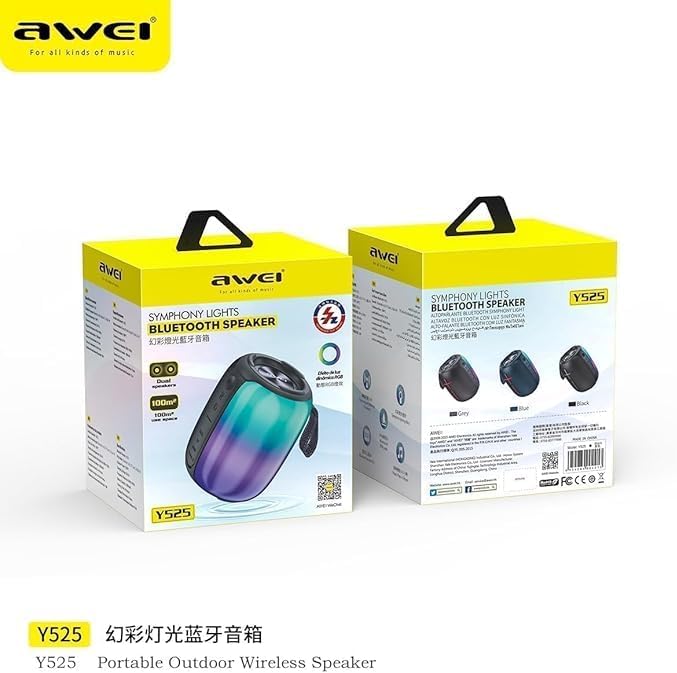
Image: Awei Y525 speaker packaging. The image displays two Awei Y525 speakers in their retail boxes, highlighting the product's branding and model number.
3. നിയന്ത്രണങ്ങളും സൂചകങ്ങളും
Familiarize yourself with the speaker's controls and indicators:
- പവർ ബട്ടൺ: പവർ ഓൺ/ഓഫ് ചെയ്യാൻ അമർത്തിപ്പിടിക്കുക. പ്ലേ/താൽക്കാലികമായി നിർത്താൻ ഹ്രസ്വമായി അമർത്തുക.
- വോളിയം കൂട്ടുക (+): ശബ്ദം കൂട്ടാൻ ഷോർട്ട് പ്രസ് ചെയ്യുക. അടുത്ത ട്രാക്കിനായി ദീർഘനേരം അമർത്തുക.
- വോളിയം ഡൗൺ (-): ശബ്ദം കുറയ്ക്കാൻ ഷോർട്ട് പ്രസ് ചെയ്യുക. മുമ്പത്തെ ട്രാക്കിനായി ദീർഘനേരം അമർത്തുക.
- മോഡ് ബട്ടൺ (M): Short press to switch between Bluetooth, USB, TF card, and AUX modes.
- RGB ലൈറ്റ് ബട്ടൺ: Short press to cycle through light modes or turn off lights.
- ചാർജിംഗ് പോർട്ട്: ചാർജ് ചെയ്യാനുള്ള USB-C പോർട്ട്.
- LED സൂചകം: Shows charging status and Bluetooth connection status.

Image: Awei Y525 speaker controls. This image displays several Awei Y525 speakers in various colors, providing a clear view of the control buttons and input ports on the side of the device.
4. സ്പീക്കറിൽ നിന്ന് നിരക്ക് ഈടാക്കുന്നു
ആദ്യ ഉപയോഗത്തിന് മുമ്പ്, സ്പീക്കർ പൂർണ്ണമായും ചാർജ് ചെയ്യുക.
- നൽകിയിരിക്കുന്ന USB-C ചാർജിംഗ് കേബിൾ സ്പീക്കറിന്റെ ചാർജിംഗ് പോർട്ടുമായി ബന്ധിപ്പിക്കുക.
- കേബിളിന്റെ മറ്റേ അറ്റം ഒരു USB പവർ അഡാപ്റ്ററുമായി (ഉൾപ്പെടുത്തിയിട്ടില്ല) അല്ലെങ്കിൽ ഒരു കമ്പ്യൂട്ടറിന്റെ USB പോർട്ടുമായി ബന്ധിപ്പിക്കുക.
- ചാർജ് ചെയ്യുമ്പോൾ LED ഇൻഡിക്കേറ്റർ പ്രകാശിക്കുകയും പൂർണ്ണമായി ചാർജ് ചെയ്യുമ്പോൾ ഓഫാകുകയും ചെയ്യും.
5. സജ്ജീകരണവും ജോടിയാക്കലും
5.1 ബ്ലൂടൂത്ത് ജോടിയാക്കൽ
- സ്പീക്കർ ചാർജ് ചെയ്തിട്ടുണ്ടെന്നും പവർ ഓണാക്കിയിട്ടുണ്ടെന്നും ഉറപ്പാക്കുക.
- സ്പീക്കർ സ്വയമേവ ബ്ലൂടൂത്ത് ജോടിയാക്കൽ മോഡിലേക്ക് പ്രവേശിക്കും, ഇത് ഒരു മിന്നുന്ന LED ലൈറ്റ് വഴി സൂചിപ്പിക്കപ്പെടും.
- നിങ്ങളുടെ ഉപകരണത്തിൽ (സ്മാർട്ട്ഫോൺ, ടാബ്ലെറ്റ് മുതലായവ), ബ്ലൂടൂത്ത് പ്രവർത്തനക്ഷമമാക്കി ലഭ്യമായ ഉപകരണങ്ങൾക്കായി തിരയുക.
- Select "Awei Y525" from the list of devices.
- ജോടിയാക്കിക്കഴിഞ്ഞാൽ, LED ഇൻഡിക്കേറ്റർ മിന്നുന്നത് നിർത്തുകയും ദൃഢമായി തുടരുകയും ചെയ്യും, കൂടാതെ നിങ്ങൾ ഒരു സ്ഥിരീകരണ ടോൺ കേൾക്കുകയും ചെയ്യും.
5.2 True Wireless Stereo (TWS) Interconnection
To achieve a stereo sound experience, you can pair two Awei Y525 speakers together.
- Ensure both Awei Y525 speakers are powered on and not connected to any other Bluetooth device.
- On one of the speakers (this will be the primary speaker), double-press the Power button or a dedicated TWS button (if available, refer to specific model instructions if different).
- The speakers will search for each other and automatically pair. You will hear a confirmation tone when TWS pairing is successful.
- TWS ജോടിയാക്കിക്കഴിഞ്ഞാൽ, വിഭാഗം 5.1-ൽ വിവരിച്ചിരിക്കുന്നതുപോലെ ബ്ലൂടൂത്ത് വഴി നിങ്ങളുടെ ഉപകരണം പ്രാഥമിക സ്പീക്കറുമായി ബന്ധിപ്പിക്കുക.

Image: TWS Interconnection. This image illustrates two Awei Y525 speakers positioned to demonstrate their True Wireless Stereo (TWS) interconnection capability for enhanced sound.
6. സ്പീക്കർ പ്രവർത്തിപ്പിക്കൽ
6.1 അടിസ്ഥാന ഓഡിയോ പ്ലേബാക്ക്
- പ്ലേ/താൽക്കാലികമായി നിർത്തുക: പവർ ബട്ടൺ ചെറുതായി അമർത്തുക.
- വോളിയം നിയന്ത്രണം: വോളിയം കൂട്ടാൻ '+' കീ അമർത്തുക, വോളിയം കുറയ്ക്കാൻ '-' കീ അമർത്തുക.
- അടുത്തത് / മുമ്പത്തെ ട്രാക്ക്: Long press '+' for the next track, long press '-' for the previous track.
6.2 RGB ലൈറ്റ് മോഡുകൾ
The speaker features dynamic RGB lighting effects.
- Short press the RGB Light button to cycle through different light modes.
- Continue pressing to turn off the lights.
6.3 ഹാൻഡ്സ്-ഫ്രീ കോളിംഗ്
ബ്ലൂടൂത്ത് വഴി കണക്റ്റ് ചെയ്യുമ്പോൾ, ഹാൻഡ്സ് ഫ്രീ കോളുകൾക്കായി സ്പീക്കർ ഉപയോഗിക്കാം.
- മറുപടി കോൾ: പവർ ബട്ടൺ ചെറുതായി അമർത്തുക.
- കോൾ അവസാനിപ്പിക്കുക: ഒരു കോൾ സമയത്ത് പവർ ബട്ടൺ ഹ്രസ്വമായി അമർത്തുക.
- കോൾ നിരസിക്കുക: പവർ ബട്ടൺ ദീർഘനേരം അമർത്തുക.
6.4 Other Playback Modes (USB, TF Card, AUX)
Insert a USB drive or TF card into the respective port, or connect an audio device via an AUX cable. The speaker will automatically switch to the corresponding mode or you can manually switch using the Mode button.
7. പരിപാലനവും പരിചരണവും
- Keep the speaker away from water and excessive moisture. The product is not waterproof.
- സ്പീക്കർ തീവ്രമായ താപനിലയിൽ കാണിക്കുന്നത് ഒഴിവാക്കുക.
- മൃദുവായതും ഉണങ്ങിയതുമായ തുണി ഉപയോഗിച്ച് സ്പീക്കർ വൃത്തിയാക്കുക. അബ്രസീവ് ക്ലീനറുകളോ ലായകങ്ങളോ ഉപയോഗിക്കരുത്.
- ദീർഘനേരം ഉപയോഗിക്കാത്തപ്പോൾ സ്പീക്കർ തണുത്തതും വരണ്ടതുമായ സ്ഥലത്ത് സൂക്ഷിക്കുക.
8. പ്രശ്നപരിഹാരം
| പ്രശ്നം | പരിഹാരം |
|---|---|
| സ്പീക്കർ പവർ ഓൺ ചെയ്യുന്നില്ല. | സ്പീക്കർ പൂർണ്ണമായും ചാർജ് ചെയ്തിട്ടുണ്ടെന്ന് ഉറപ്പാക്കുക. പവർ ബട്ടൺ കുറച്ച് സെക്കൻഡ് അമർത്തിപ്പിടിക്കുക. |
| ബ്ലൂടൂത്ത് വഴി ജോടിയാക്കാൻ കഴിയില്ല. | Make sure the speaker is in pairing mode (flashing LED). Disable and re-enable Bluetooth on your device. Ensure no other devices are connected to the speaker. |
| ശബ്ദമില്ല അല്ലെങ്കിൽ കുറഞ്ഞ ശബ്ദമില്ല. | സ്പീക്കറിലും കണക്റ്റുചെയ്ത ഉപകരണത്തിലും വോളിയം ലെവലുകൾ പരിശോധിക്കുക. ശരിയായ ഇൻപുട്ട് മോഡ് തിരഞ്ഞെടുത്തിട്ടുണ്ടെന്ന് ഉറപ്പാക്കുക. |
| TWS ജോടിയാക്കൽ പരാജയപ്പെടുന്നു. | Ensure both speakers are charged and not connected to any other Bluetooth device. Try resetting both speakers and repeating the TWS pairing steps. |
| RGB ലൈറ്റുകൾ പ്രവർത്തിക്കുന്നില്ല. | Press the RGB Light button to cycle through modes or turn them on. |
9 സ്പെസിഫിക്കേഷനുകൾ
| ഫീച്ചർ | വിശദാംശങ്ങൾ |
|---|---|
| മോഡലിൻ്റെ പേര് | Y525 |
| ബ്ലൂടൂത്ത് പതിപ്പ് | 5.3 |
| വയർലെസ് കമ്മ്യൂണിക്കേഷൻ ടെക്നോളജി | ബ്ലൂടൂത്ത് |
| സ്പീക്കർ തരം | ഔട്ട്ഡോർ, പോർട്ടബിൾ |
| ഓഡിയോ put ട്ട്പുട്ട് മോഡ് | സ്റ്റീരിയോ (TWS ഉള്ളത്) |
| പവർ ഉറവിടം | ബാറ്ററി പവർ |
| നിയന്ത്രണ രീതി | സ്പർശിക്കുക |
| ഇനത്തിൻ്റെ ഭാരം | 500 ഗ്രാം |
| സ്പീക്കർ വലിപ്പം | 17 സെൻ്റീമീറ്റർ |
| പ്രത്യേക സവിശേഷതകൾ | Anti-shocking, Lightweight, Volume Control, RGB Light Effects, TWS Function |
| അനുയോജ്യമായ ഉപകരണങ്ങൾ | ലാപ്ടോപ്പ്, സ്മാർട്ട്ഫോൺ, ടാബ്ലെറ്റ്, ടെലിവിഷൻ |
| വാട്ടർപ്രൂഫ് ആണ് | ഇല്ല |
10 സുരക്ഷാ വിവരങ്ങൾ
- സ്പീക്കർ ഡിസ്അസംബ്ലിംഗ് ചെയ്യുകയോ റിപ്പയർ ചെയ്യുകയോ പരിഷ്കരിക്കുകയോ ചെയ്യരുത്.
- കുട്ടികൾക്ക് ലഭ്യമാകാതെ സൂക്ഷിക്കുക.
- പ്രാദേശിക ചട്ടങ്ങൾക്കനുസൃതമായി ഉൽപ്പന്നം ഉത്തരവാദിത്തത്തോടെ വിനിയോഗിക്കുക.
- കേൾവിക്ക് കേടുപാടുകൾ സംഭവിക്കുന്നത് തടയാൻ ദീർഘനേരം ഉയർന്ന ശബ്ദത്തിൽ കേൾക്കുന്നത് ഒഴിവാക്കുക.
11. വാറൻ്റിയും പിന്തുണയും
Specific warranty information and customer support details are typically provided with your purchase documentation or on the manufacturer's official website. Please refer to those resources for assistance.