
1. ആമുഖം
വാങ്ങിയതിന് നന്ദി.asing the Philco Portable CD Player Boombox. This versatile audio system combines modern and classic audio playback options, including CD, cassette, FM radio, and Bluetooth connectivity. This manual provides essential information for safe and efficient use of your device.
2. പ്രധാന സുരക്ഷാ നിർദ്ദേശങ്ങൾ
- ഉപകരണം പ്രവർത്തിപ്പിക്കുന്നതിന് മുമ്പ് എല്ലാ നിർദ്ദേശങ്ങളും വായിക്കുക.
- ഭാവി റഫറൻസിനായി ഈ മാനുവൽ സൂക്ഷിക്കുക.
- തീയോ വൈദ്യുതാഘാതമോ തടയാൻ യൂണിറ്റ് മഴയിലോ ഈർപ്പത്തിലോ തുറന്നുകാട്ടരുത്.
- ശരിയായ വായുസഞ്ചാരം ഉറപ്പാക്കുക; ഏതെങ്കിലും വായുസഞ്ചാര ദ്വാരങ്ങൾ തടയരുത്.
- നിർമ്മാതാവ് വ്യക്തമാക്കിയ അറ്റാച്ച്മെൻ്റുകൾ/ആക്സസറികൾ മാത്രം ഉപയോഗിക്കുക.
- മിന്നൽ കൊടുങ്കാറ്റുകളുടെ സമയത്തോ ദീർഘകാലത്തേക്ക് ഉപയോഗിക്കാത്ത സമയത്തോ യൂണിറ്റ് അൺപ്ലഗ് ചെയ്യുക.
- എല്ലാ സേവനങ്ങളും യോഗ്യതയുള്ള സേവന ഉദ്യോഗസ്ഥർക്ക് റഫർ ചെയ്യുക.
- സി തുറക്കരുത്.asing; ഉള്ളിൽ ഉപയോക്തൃ-സേവനയോഗ്യമായ ഭാഗങ്ങളൊന്നുമില്ല.
- റേഡിയേറ്ററുകൾ, ഹീറ്റ് രജിസ്റ്ററുകൾ, സ്റ്റൗകൾ അല്ലെങ്കിൽ മറ്റ് ഉപകരണങ്ങൾ (ഉൾപ്പെടെ) പോലുള്ള താപ സ്രോതസ്സുകൾക്ക് സമീപം യൂണിറ്റ് സ്ഥാപിക്കുന്നത് ഒഴിവാക്കുക. ampലൈഫയറുകൾ) ചൂട് ഉത്പാദിപ്പിക്കുന്നത്.
3. ഉൽപ്പന്ന ഘടകങ്ങളും നിയന്ത്രണങ്ങളും
Familiarize yourself with the various parts and controls of your Philco Portable CD Player Boombox.
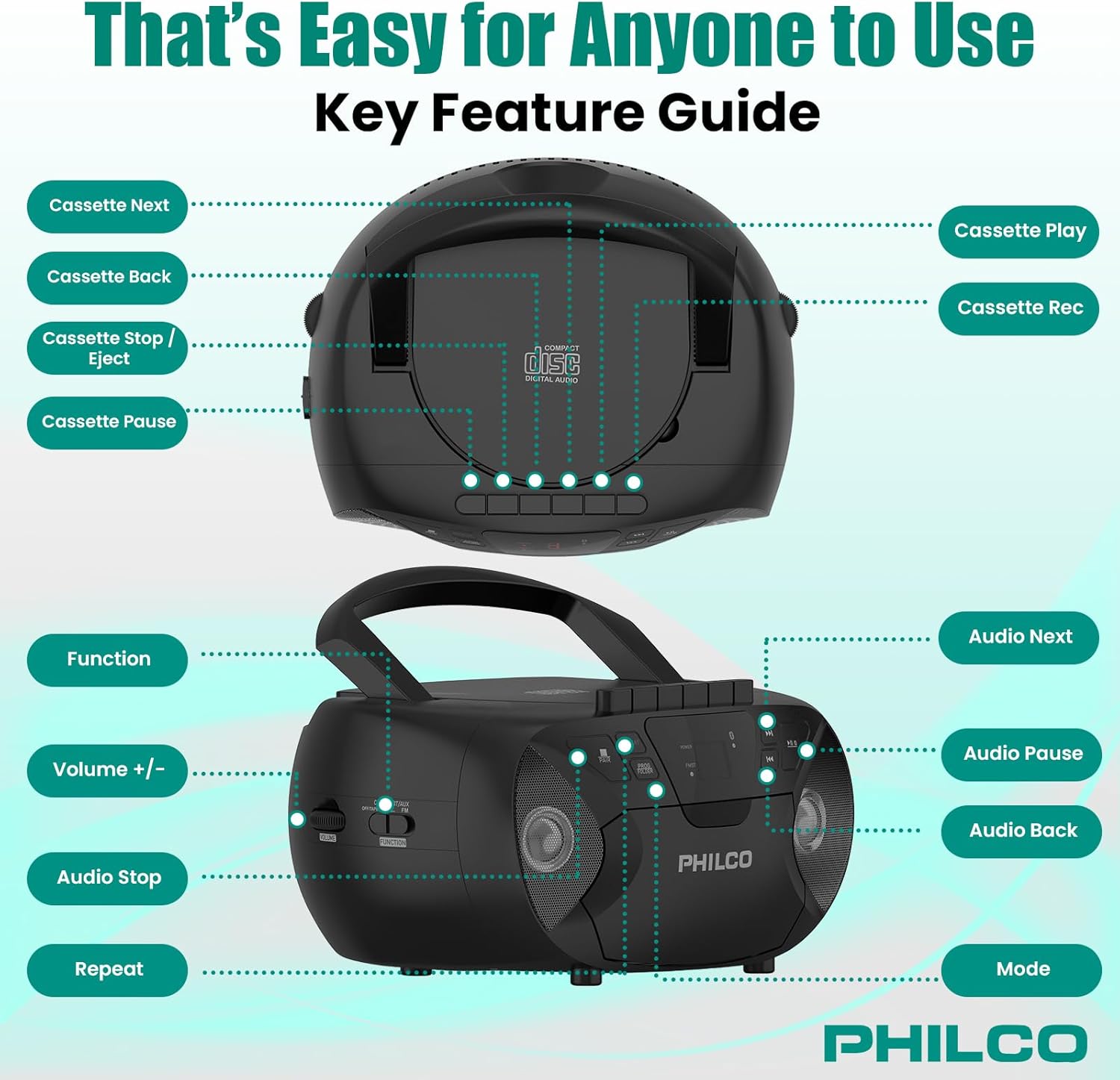
ചിത്രം 3.1: മുകളിലും വശത്തും view of the Philco Boombox with key controls labeled. This image shows the layout of buttons for cassette functions (Next, Back, Stop/Eject, Pause, Play, Record) and audio controls (Next, Pause, Back, Mode, Volume, Function, Stop, Repeat).
ഫ്രണ്ട് പാനൽ നിയന്ത്രണങ്ങൾ:
- പവർ ബട്ടൺ: യൂണിറ്റ് ഓണാക്കുകയോ ഓഫാക്കുകയോ ചെയ്യുന്നു.
- മോഡ് ബട്ടൺ: Switches between CD, Cassette, FM Radio, Bluetooth, and AUX modes.
- PLAY/PAUSE Button (CD/Bluetooth): പ്ലേബാക്ക് ആരംഭിക്കുകയോ താൽക്കാലികമായി നിർത്തുകയോ ചെയ്യുന്നു.
- STOP Button (CD/Bluetooth): പ്ലേബാക്ക് നിർത്തുന്നു.
- ഒഴിവാക്കുക/തിരയൽ ബട്ടണുകൾ (<< / >>): ട്രാക്കുകൾ ഒഴിവാക്കുകയോ വേഗത്തിൽ മുന്നോട്ട്/റിവൈൻഡ് ചെയ്യുകയോ ചെയ്യുന്നു.
- ശബ്ദ നിയന്ത്രണം: ഓഡിയോ ഔട്ട്പുട്ട് ലെവൽ ക്രമീകരിക്കുന്നു.
- FM TUNER Dial: Selects FM radio stations.
Cassette Deck Controls:
- പ്ലേ ബട്ടൺ: കാസറ്റ് പ്ലേബാക്ക് ആരംഭിക്കുന്നു.
- റെക്കോർഡ് ബട്ടൺ: Initiates cassette recording (from CD, FM, or AUX).
- REWIND/FAST FORWARD Buttons: Rewinds or fast forwards the tape.
- STOP/EJECT ബട്ടൺ: Stops tape playback/recording and opens the cassette door.
- താൽക്കാലികമായി നിർത്തുക ബട്ടൺ: Temporarily pauses cassette playback/recording.
Rear/Side Panel Connections:
- എസി പവർ ഇൻപുട്ട്: എസി പവർ കോർഡ് ബന്ധിപ്പിക്കുന്നു.
- ബാറ്ററി കമ്പാർട്ട്മെൻ്റ്: Holds 6 x 'C' size batteries (not included) for portable use.
- AUX IN Jack (3.5mm): ബാഹ്യ ഓഡിയോ ഉപകരണങ്ങളെ ബന്ധിപ്പിക്കുന്നു.
- HEADPHONE Jack (3.5mm): ഹെഡ്ഫോണുകൾ ഉപയോഗിച്ച് സ്വകാര്യ ശ്രവണത്തിനായി.
- എഫ്എം ആന്റിന: മെച്ചപ്പെട്ട എഫ്എം സ്വീകരണത്തിനായി വികസിപ്പിക്കാവുന്ന ആന്റിന.
4. സജ്ജീകരണം
4.1 യൂണിറ്റിന് പവർ നൽകുന്നു
നിങ്ങളുടെ ഫിൽകോ ബൂംബോക്സിന് എസി പവർ അല്ലെങ്കിൽ ബാറ്ററികൾ ഉപയോഗിച്ച് പവർ നൽകാം.

ചിത്രം 4.1: Illustration of AC power connection and battery installation for the Philco Boombox.
എസി പവർ:
- യൂണിറ്റ് ഓഫാണെന്ന് ഉറപ്പാക്കുക.
- Connect the supplied AC power cord to the AC power input jack on the back of the unit.
- Plug the other end of the AC power cord into a standard wall outlet (AC 120V ~ 60Hz).
ബാറ്ററി പവർ:
- യൂണിറ്റ് ഓഫാക്കിയിട്ടുണ്ടെന്നും എസി പവറിൽ നിന്ന് വിച്ഛേദിച്ചിട്ടുണ്ടെന്നും ഉറപ്പാക്കുക.
- Open the battery compartment cover located on the bottom or rear of the unit.
- Insert 6 x 'C' size batteries (not included), observing the correct polarity (+/-) as indicated inside the compartment.
- ബാറ്ററി കമ്പാർട്ട്മെൻ്റ് കവർ സുരക്ഷിതമായി അടയ്ക്കുക.
കുറിപ്പ്: When using AC power, batteries are automatically disconnected. Remove batteries if the unit will not be used for an extended period to prevent leakage.
4.2 പ്രാരംഭ പവർ ഓൺ
അമർത്തുക പവർ button to turn on the unit. The unit will typically default to the last used mode or CD mode.
5. ഓപ്പറേഷൻ
5.1 സിഡി പ്ലെയർ പ്രവർത്തനം
ചിത്രം 5.1: Demonstrating the top-loading CD compartment for disc insertion.
- അമർത്തുക മോഡ് "CD" മോഡ് തിരഞ്ഞെടുക്കുന്നതുവരെ ബട്ടൺ അമർത്തുക.
- സിഡി കമ്പാർട്ടുമെന്റിന്റെ വാതിൽ പതുക്കെ ഉയർത്തി തുറക്കുക.
- Place a CD (CD-R, CD-RW, MP3, WMA compatible) onto the spindle with the label side facing up.
- Close the CD compartment door securely.
- അമർത്തുക പ്ലേ/താൽക്കാലികമായി നിർത്തുക പ്ലേബാക്ക് ആരംഭിക്കുന്നതിനുള്ള ബട്ടൺ.
- ഉപയോഗിക്കുക ഒഴിവാക്കുക/തിരയുക ട്രാക്കുകൾക്കിടയിൽ നാവിഗേറ്റ് ചെയ്യാൻ ബട്ടണുകൾ (<< / >>).
- അമർത്തുക നിർത്തുക പ്ലേബാക്ക് അവസാനിപ്പിക്കാൻ ബട്ടൺ.
- അമർത്തുക ആവർത്തിക്കുക നിലവിലെ ട്രാക്ക് അല്ലെങ്കിൽ എല്ലാ ട്രാക്കുകളും ആവർത്തിക്കാൻ ബട്ടൺ.
5.2 Cassette Player/Recorder Operation

ചിത്രം 5.2: View of the cassette deck with a tape loaded, ready for playback or recording.
ഒരു കാസറ്റ് പ്ലേ ചെയ്യുന്നു:
- അമർത്തുക മോഡ് button until "TAPE" or "CASSETTE" mode is selected.
- അമർത്തുക നിർത്തുക/പുറത്തള്ളുക കാസറ്റ് വാതിൽ തുറക്കാനുള്ള ബട്ടൺ.
- Insert a cassette tape with the open edge facing upwards and the side to be played facing you.
- കാസറ്റ് വാതിൽ അടയ്ക്കുക.
- അമർത്തുക കളിക്കുക പ്ലേബാക്ക് ആരംഭിക്കുന്നതിനുള്ള ബട്ടൺ.
- ഉപയോഗിക്കുക REWIND/FAST FORWARD ടേപ്പ് നാവിഗേറ്റ് ചെയ്യാനുള്ള ബട്ടണുകൾ.
- അമർത്തുക നിർത്തുക/പുറത്തള്ളുക പ്ലേബാക്ക് നിർത്തി ടേപ്പ് പുറത്തെടുക്കാൻ ബട്ടൺ അമർത്തുക.
കാസറ്റിലേക്ക് റെക്കോർഡുചെയ്യുന്നു:
- കാസറ്റ് ഡെക്കിൽ ഒരു ശൂന്യമായ കാസറ്റ് ടേപ്പ് തിരുകുക.
- Select the desired source (CD, FM Radio, or AUX) using the മോഡ് ബട്ടൺ.
- Start playback on the source (e.g., play a CD track, tune to an FM station).
- അമർത്തുക രേഖപ്പെടുത്തുക കാസറ്റ് ഡെക്കിലെ ബട്ടൺ. ദി കളിക്കുക ബട്ടണും ഇടപഴകും.
- റെക്കോർഡിംഗ് താൽക്കാലികമായി നിർത്താൻ, അമർത്തുക താൽക്കാലികമായി നിർത്തുക button. Press it again to resume.
- റെക്കോർഡിംഗ് നിർത്താൻ, അമർത്തുക നിർത്തുക/പുറത്തള്ളുക ബട്ടൺ.
5.3 എഫ്എം റേഡിയോ പ്രവർത്തനം
- അമർത്തുക മോഡ് "FM" മോഡ് തിരഞ്ഞെടുക്കുന്നത് വരെ ബട്ടൺ.
- Extend the FM telescopic antenna for optimal reception.
- തിരിക്കുക എഫ്എം ട്യൂണർ നിങ്ങൾക്ക് ആവശ്യമുള്ള റേഡിയോ സ്റ്റേഷൻ തിരഞ്ഞെടുക്കാൻ ഡയൽ ചെയ്യുക.
- ക്രമീകരിക്കുക വോളിയം നിങ്ങൾക്ക് ഇഷ്ടപ്പെട്ട ശ്രവണ നിലവാരത്തിലേക്ക് നിയന്ത്രണം.
5.4 ബ്ലൂടൂത്ത് ഓഡിയോ സ്ട്രീമിംഗ്

ചിത്രം 5.3: The Philco Boombox wirelessly connected to a smartphone via Bluetooth for audio streaming.
- അമർത്തുക മോഡ് button until "BT" or "BLUETOOTH" mode is selected. The unit will enter pairing mode, indicated by a flashing Bluetooth indicator.
- നിങ്ങളുടെ Bluetooth പ്രാപ്തമാക്കിയ ഉപകരണത്തിൽ (ഉദാ: സ്മാർട്ട്ഫോൺ, ടാബ്ലെറ്റ്), Bluetooth പ്രാപ്തമാക്കി ലഭ്യമായ ഉപകരണങ്ങൾക്കായി തിരയുക.
- Select "PHILCO BOOMBOX" (or similar name) from the list of devices to pair.
- ജോടിയാക്കിക്കഴിഞ്ഞാൽ, ബ്ലൂടൂത്ത് ഇൻഡിക്കേറ്റർ മിന്നുന്നത് നിർത്തുകയും ദൃഢമായി തുടരുകയും ചെയ്യും.
- Start playing audio on your connected device. The sound will be streamed to the boombox.
- ബൂംബോക്സിലും നിങ്ങളുടെ കണക്റ്റുചെയ്ത ഉപകരണത്തിലും വോളിയം ക്രമീകരിക്കുക.
പ്രധാന കുറിപ്പ്: This boombox is designed to സ്വീകരിക്കുക audio via Bluetooth from other devices. It cannot സംപ്രേക്ഷണം audio to Bluetooth headphones, earbuds, or speakers.
5.5 AUX ഇൻപുട്ട് പ്രവർത്തനം

ചിത്രം 5.4: The AUX input jack on the Philco Boombox, used for connecting external audio sources.
- 3.5mm ഓഡിയോ കേബിളിന്റെ ഒരു അറ്റം (ഉൾപ്പെടുത്തിയിട്ടില്ല) ബൂംബോക്സിലെ AUX IN ജാക്കുമായി ബന്ധിപ്പിക്കുക.
- ഓഡിയോ കേബിളിന്റെ മറ്റേ അറ്റം ഹെഡ്ഫോൺ ജാക്കിലേക്കോ നിങ്ങളുടെ ബാഹ്യ ഉപകരണത്തിന്റെ (ഉദാ: MP3 പ്ലെയർ, സ്മാർട്ട്ഫോൺ) ഓഡിയോ ഔട്ട്പുട്ടിലേക്കോ ബന്ധിപ്പിക്കുക.
- അമർത്തുക മോഡ് "AUX" മോഡ് തിരഞ്ഞെടുക്കുന്നതുവരെ ബട്ടൺ അമർത്തുക.
- നിങ്ങളുടെ ബാഹ്യ ഉപകരണത്തിൽ ഓഡിയോ പ്ലേ ചെയ്യാൻ ആരംഭിക്കുക.
- Adjust the volume on both the boombox and your external device.
5.6 ഹെഡ്ഫോൺ ഉപയോഗം
For private listening, plug any standard 3.5mm headphones into the ഹെഡ്ഫോൺ jack. The internal speakers will automatically mute.
6. പരിപാലനം
6.1 യൂണിറ്റ് വൃത്തിയാക്കൽ
- ഒരു സോഫ്റ്റ്, ഡി ഉപയോഗിച്ച് യൂണിറ്റിൻ്റെ പുറംഭാഗം തുടയ്ക്കുകamp തുണി. ഉരച്ചിലുകളുള്ള ക്ലീനറുകളോ ലായകങ്ങളോ ഉപയോഗിക്കരുത്.
- For the CD lens, use a specialized CD lens cleaning kit.
- കാസറ്റ് ഡെക്കിന്, ഇടയ്ക്കിടെ ടേപ്പ് ഹെഡുകൾ വൃത്തിയാക്കുകയും റോളറുകൾ ഒരു കോട്ടൺ സ്വാബ് ഉപയോഗിച്ച് ചെറുതായി പിഞ്ച് ചെയ്യുകയും ചെയ്യുക d.ampഐസോപ്രോപൈൽ ആൽക്കഹോൾ ഉപയോഗിച്ചാണ് നിർവഹിച്ചത്.
6.2 ബാറ്ററി കെയർ
- Remove batteries if the unit will not be used for an extended period to prevent battery leakage and corrosion.
- പഴയതും പുതിയതുമായ ബാറ്ററികളോ വ്യത്യസ്ത തരം ബാറ്ററികളോ മിക്സ് ചെയ്യരുത്.
- ഉപയോഗിച്ച ബാറ്ററികൾ പ്രാദേശിക നിയന്ത്രണങ്ങൾ അനുസരിച്ച് ഉത്തരവാദിത്തത്തോടെ നീക്കം ചെയ്യുക.
7. പ്രശ്നപരിഹാരം
| പ്രശ്നം | സാധ്യമായ കാരണം | പരിഹാരം |
|---|---|---|
| ശക്തിയില്ല | എസി കോർഡ് ബന്ധിപ്പിച്ചിട്ടില്ല; ബാറ്ററികൾ തീർന്നു അല്ലെങ്കിൽ തെറ്റായി ചേർത്തിരിക്കുന്നു. | എസി കോർഡ് കണക്ഷൻ പരിശോധിക്കുക; ബാറ്ററികൾ മാറ്റിസ്ഥാപിക്കുക അല്ലെങ്കിൽ ശരിയായ പോളാരിറ്റി ഉറപ്പാക്കുക. |
| No sound from CD/Cassette/Radio/Bluetooth/AUX | Volume too low; Incorrect mode selected; Headphones connected; CD/Cassette inserted incorrectly or damaged; Bluetooth not paired. | Increase volume; Select correct mode; Disconnect headphones; Check/replace media; Re-pair Bluetooth device. |
| സിഡി ഒഴിവാക്കലുകൾ | CD dirty or scratched; Unit on an unstable surface. | Clean or replace CD; Place unit on a stable, flat surface. |
| മോശം എഫ്എം സ്വീകരണം | ആന്റിന നീട്ടിയിട്ടില്ല; ദുർബലമായ സിഗ്നൽ. | Fully extend and adjust the FM antenna; Try moving the unit to a different location. |
| ബ്ലൂടൂത്ത് ഉപകരണം ജോടിയാക്കില്ല | Boombox not in pairing mode; Device too far; Bluetooth already connected to another device. | Ensure boombox is in BT pairing mode; Move device closer; Disconnect from other devices and try again. |
| Cassette tape not playing/recording correctly | Tape damaged; Tape heads dirty; Buttons stuck (as per review). | Try a different tape; Clean tape heads; If buttons are stuck, gently try to free them or contact support if persistent. |
8 സ്പെസിഫിക്കേഷനുകൾ
- ബ്രാൻഡ്: ഫിൽകോ
- മോഡൽ: B0DHYKCWYN
- കണക്റ്റിവിറ്റി ടെക്നോളജി: ബ്ലൂടൂത്ത്
- നിറം: കറുപ്പ്
- സ്പീക്കർ തരം: സ്റ്റീരിയോ
- ഇനത്തിന്റെ അളവുകൾ (L x W x H): 10.08 x 5.71 x 10.75 ഇഞ്ച്
- ഊർജ്ജ സ്രോതസ്സ്: AC 120V ~ 60Hz or 6 x 'C' Batteries (not included)
- അനുയോജ്യമായ ഉപകരണങ്ങൾ: MP3 Player (via AUX)
- പിന്തുണയ്ക്കുന്ന ഓഡിയോ ഫോർമാറ്റുകൾ: CD, CD-R, CD-RW, MP3, WMA (from CD)
- സ്പീക്കർമാരുടെ എണ്ണം: 2
- ഓഡിയോ putട്ട്പുട്ട് മോഡ്: സ്റ്റീരിയോ
- ബ്ലൂടൂത്ത് പിന്തുണ: Yes (receive only)
- അന്തർനിർമ്മിത മീഡിയ: CD, Cassette, FM Radio
9. വാറൻ്റിയും പിന്തുണയും
9.1 വാറൻ്റി വിവരങ്ങൾ
For specific warranty details, please refer to the warranty card included with your product or visit the official Philco webസൈറ്റ്. വാറന്റി നിബന്ധനകളും വ്യവസ്ഥകളും പ്രദേശത്തിനും റീട്ടെയിലർക്കും അനുസരിച്ച് വ്യത്യാസപ്പെടാം.
9.2 ഉപഭോക്തൃ പിന്തുണ
If you encounter any issues or have questions not covered in this manual, please visit the official Philco website for support resources, FAQs, and contact information. You can typically find support links on the product page where you purchased the item or by searching for "Philco customer support" online.