
1. ഉൽപ്പന്നം കഴിഞ്ഞുview
The DOOGEE V Pad 5G is a high-performance Android tablet designed for versatile use, from entertainment to productivity. It features a large 12-inch 2.4K IPS display, powerful MediaTek Dimensity 7050 5G Octa-Core processor, and an 8800mAh battery, ensuring a smooth and immersive user experience.
1.1 പാക്കേജ് ഉള്ളടക്കം
Upon unboxing your DOOGEE V Pad 5G tablet, please verify that all the following items are included:
- 1* DOOGEE V Pad Tablet
- 1* ടൈപ്പ്-സി കേബിൾ
- 1* 18W Charger
- 1* SIM Card Removal Needle
- 1* പാക്കിംഗ് ബോക്സ്
- 1* ഉപയോക്തൃ മാനുവൽ

The package includes the DOOGEE V Pad Tablet, a Type-C Cable, an 18W Charger, a SIM Card Removal Needle, the Packing Box, and this User Manual.
1.2 ഉപകരണ ലേayട്ട്
നിങ്ങളുടെ ടാബ്ലെറ്റിന്റെ ഭൗതിക ഘടകങ്ങളുമായി പരിചയപ്പെടുക:
- മുൻ ക്യാമറ: Located at the top center when held horizontally.
- ഡിസ്പ്ലേ: The 12-inch 2.4K IPS screen.
- പവർ ബട്ടൺ: Typically on the side, used to turn the device on/off or wake/sleep the screen.
- വോളിയം ബട്ടണുകൾ: ഓഡിയോ ലെവലുകൾ ക്രമീകരിക്കുന്നതിനായി പവർ ബട്ടണിനോട് ചേർന്ന്.
- യുഎസ്ബി ടൈപ്പ്-സി പോർട്ട്: At the bottom edge, for charging and data transfer.
- സ്പീക്കർ ഗ്രിൽസ്: Quad speakers located on the sides for immersive audio.
- സിം/ടിഎഫ് കാർഡ് സ്ലോട്ട്: On the side, for inserting SIM cards and expandable storage.
- പിൻ ക്യാമറ മൊഡ്യൂൾ: Located on the back, featuring the main camera.
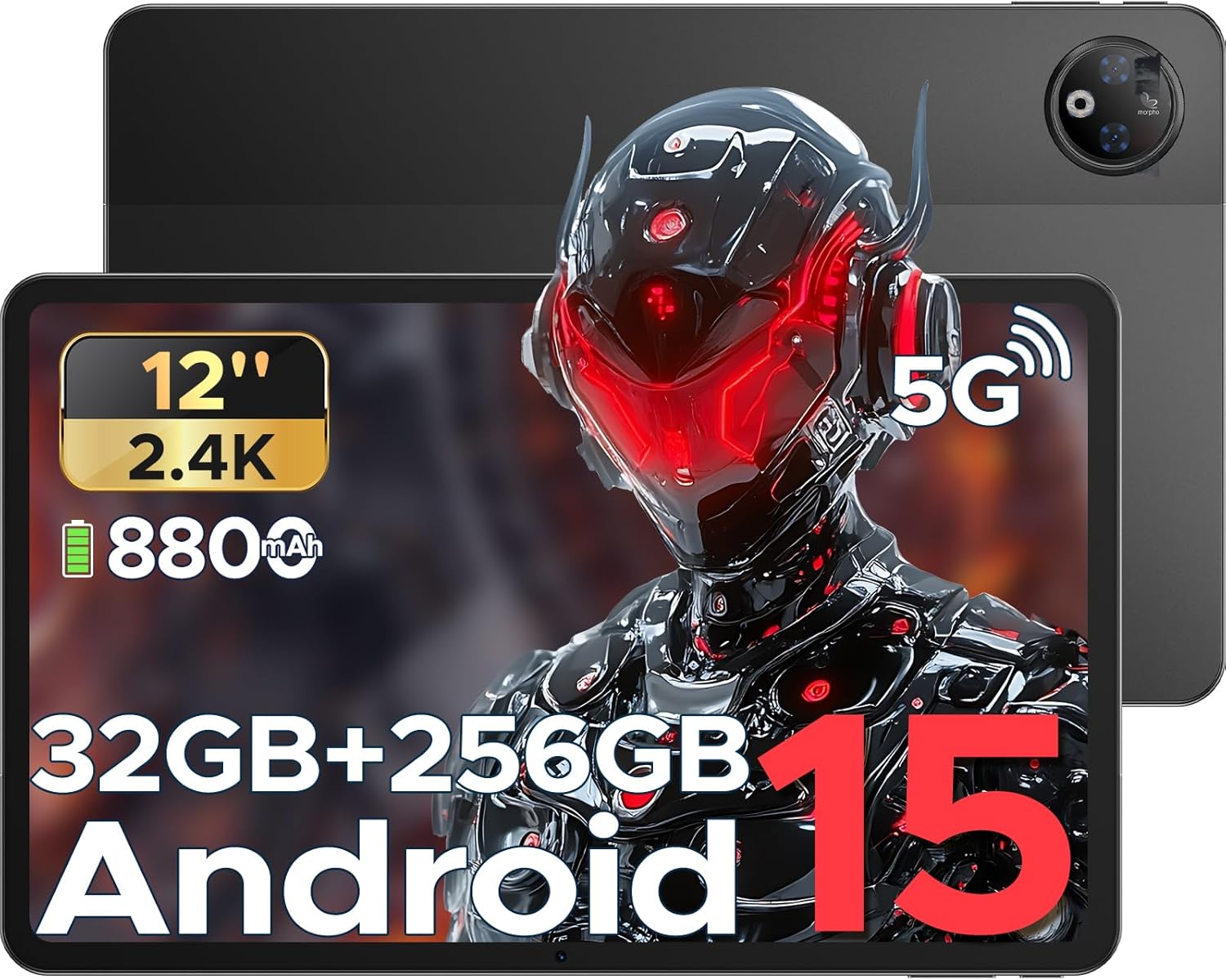
This image provides a general view of the DOOGEE V Pad 5G tablet, showing its front display and rear camera module.
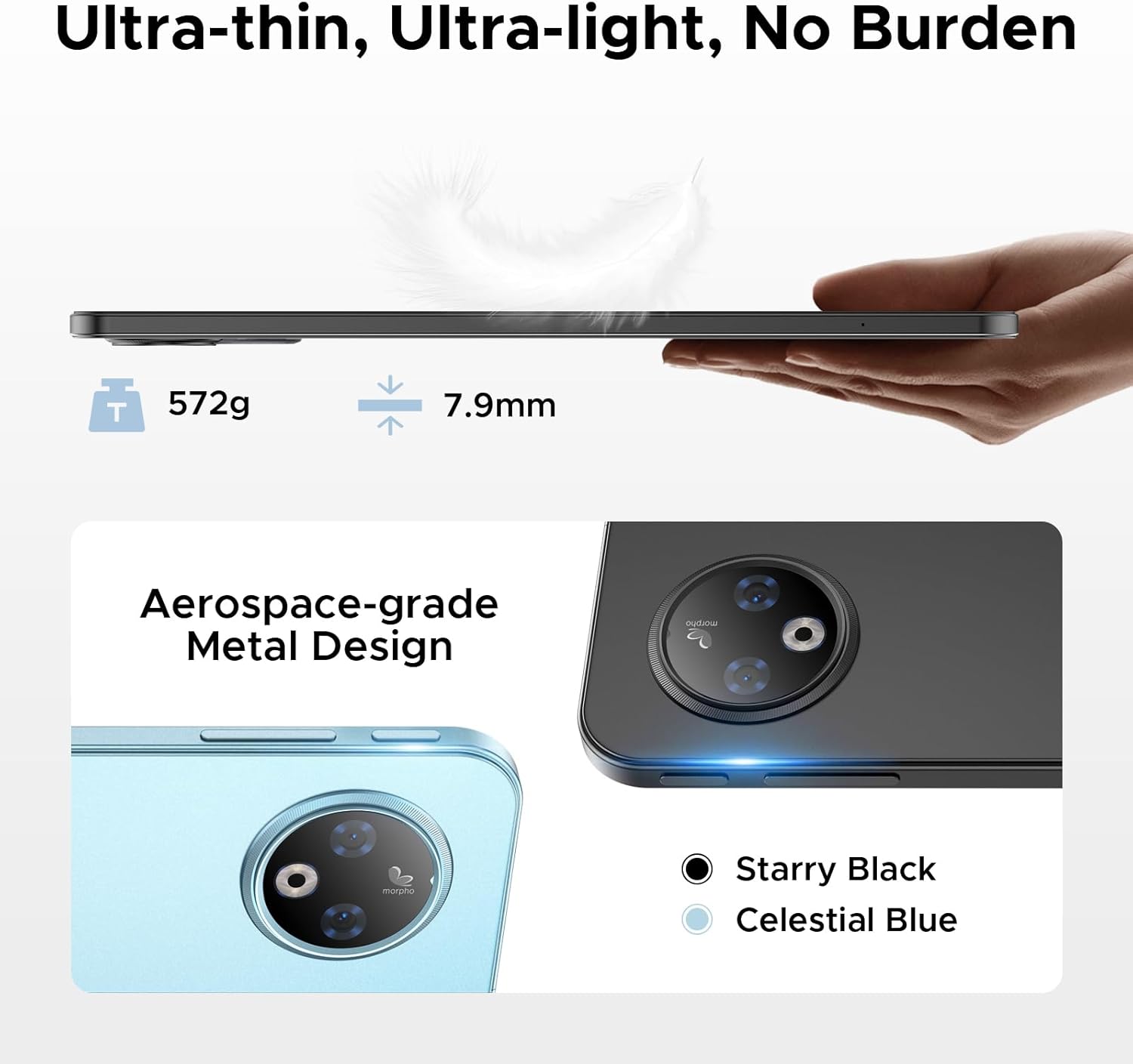
ഭാഗം view of the tablet illustrates its 7.9mm ultra-thin design and the placement of physical buttons and ports.
2. ആരംഭിക്കുന്നു
2.1 ടാബ്ലെറ്റ് ചാർജ് ചെയ്യുന്നു
Before first use, fully charge your tablet. Connect the provided Type-C cable to the tablet's charging port and the 18W charger to a power outlet. The tablet supports 18W fast charging and can also function as an emergency power bank for other devices via reverse charging.
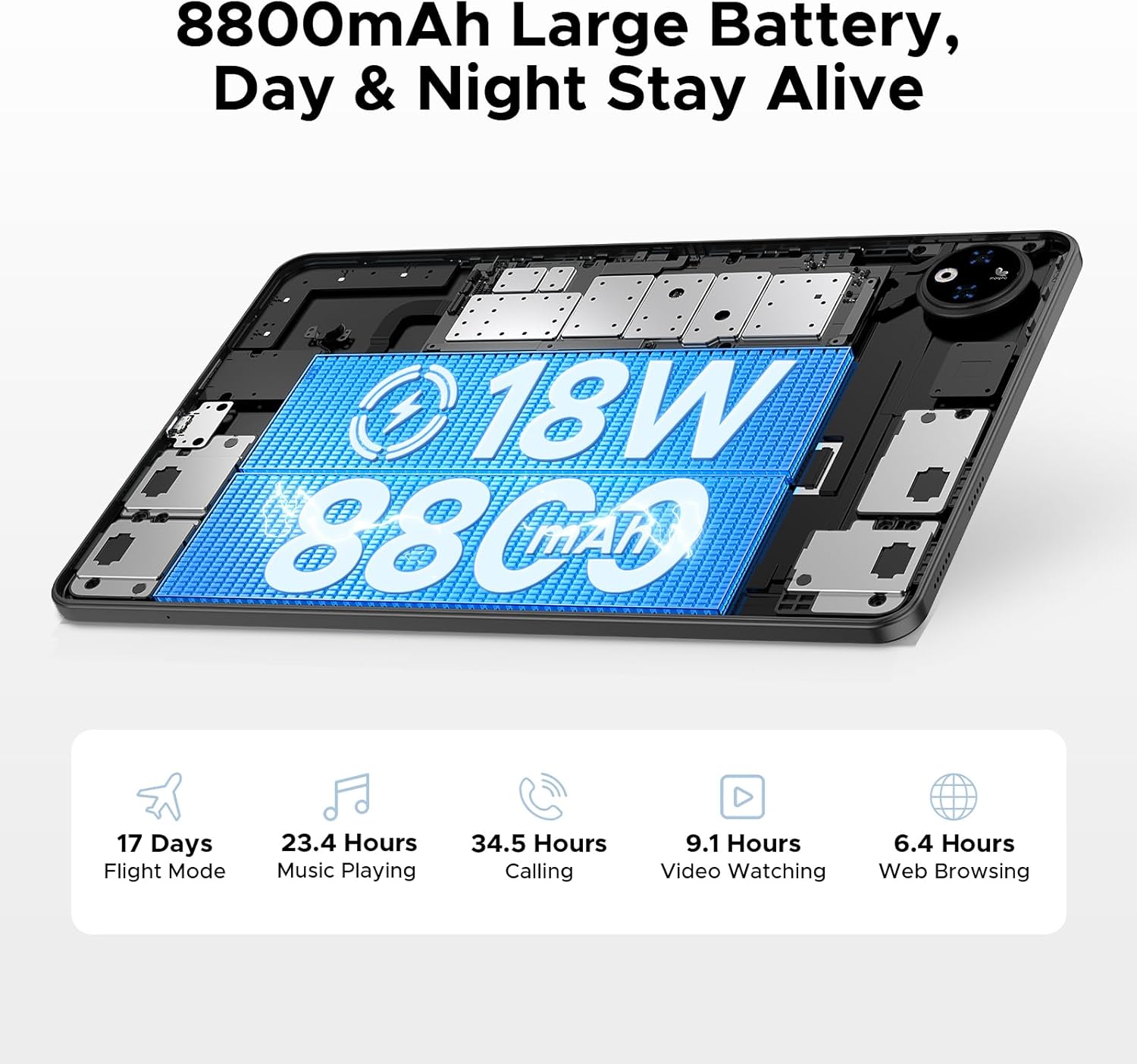
This image illustrates the tablet's large 8800mAh battery and its 18W fast charging feature, ensuring extended usage.
This video demonstrates the DOOGEE V Pad's powerful battery and its ability to support reverse charging, acting as an emergency power bank.
2.2 പവർ ഓൺ/ഓഫ്
- പവർ ഓണാക്കാൻ: Press and hold the Power button until the DOOGEE logo appears on the screen.
- പവർ ഓഫ് ചെയ്യാൻ: പവർ ഓപ്ഷൻ മെനു ദൃശ്യമാകുന്നതുവരെ പവർ ബട്ടൺ അമർത്തിപ്പിടിക്കുക. 'പവർ ഓഫ്' തിരഞ്ഞെടുത്ത് സ്ഥിരീകരിക്കുക.
- പുനരാരംഭിക്കാൻ: പവർ ഓപ്ഷൻ മെനുവിൽ നിന്ന്, 'റീസ്റ്റാർട്ട്' തിരഞ്ഞെടുത്ത് സ്ഥിരീകരിക്കുക.
2.3 പ്രാരംഭ സജ്ജീകരണം
The first time you power on your tablet, you will be guided through an initial setup process. Follow the on-screen prompts to:
- നിങ്ങളുടെ ഭാഷ തിരഞ്ഞെടുക്കുക.
- ഒരു Wi-Fi നെറ്റ്വർക്കിലേക്ക് കണക്റ്റുചെയ്യുക.
- നിങ്ങളുടെ Google അക്കൗണ്ട് ഉപയോഗിച്ച് സൈൻ ഇൻ ചെയ്യുക അല്ലെങ്കിൽ പുതിയൊരെണ്ണം സൃഷ്ടിക്കുക.
- സ്ക്രീൻ ലോക്ക് (പിൻ, പാറ്റേൺ, പാസ്വേഡ് അല്ലെങ്കിൽ ഫെയ്സ് അൺലോക്ക്) സജ്ജീകരിക്കുക.
- Review നിബന്ധനകളും വ്യവസ്ഥകളും അംഗീകരിക്കുക.

The Android 15 logo signifies the tablet's operating system, which offers a smarter, smoother, and safer user experience.
2.4 സിം/ടിഎഫ് കാർഡ് ചേർക്കൽ
To insert a SIM card for cellular data or a TF (microSD) card for expanded storage:
- Locate the SIM/TF card tray on the side of the tablet.
- Use the provided SIM card removal needle to gently eject the tray.
- Place the Nano-SIM card(s) and/or TF card into the designated slots on the tray, ensuring correct orientation.
- ടാബ്ലെറ്റിലേക്ക് ട്രേ ശ്രദ്ധാപൂർവ്വം വീണ്ടും തിരുകുക, അത് ശരിയായ സ്ഥാനത്ത് ക്ലിക്കായി ഉറപ്പിക്കുന്നതുവരെ.

This diagram illustrates the tablet's dual SIM 5G NR connectivity, allowing for ultra-fast internet access and communication.
3. നിങ്ങളുടെ ടാബ്ലെറ്റ് പ്രവർത്തിപ്പിക്കൽ
3.1 നാവിഗേഷനും ആംഗ്യങ്ങളും
The DOOGEE V Pad 5G utilizes intuitive touch gestures for navigation:
- ടാപ്പ് ചെയ്യുക: ഒരു ഇനം തിരഞ്ഞെടുക്കാനോ ഒരു ആപ്പ് തുറക്കാനോ.
- സ്വൈപ്പ്: പേജുകളിലൂടെയോ മെനുകളിലൂടെയോ സ്ക്രോൾ ചെയ്യാൻ.
- പിഞ്ച്-ടു-സൂം: ചിത്രങ്ങൾ സൂം ഇൻ ചെയ്യാനോ ഔട്ട് ചെയ്യാനോ, web പേജുകൾ.
- ലോംഗ് പ്രസ്സ്: സന്ദർഭോചിത മെനുകൾ ആക്സസ് ചെയ്യുന്നതിനോ ആപ്പ് ഐക്കണുകൾ നീക്കുന്നതിനോ.
- Split-Screen Multitasking: Utilize the smart split-screen feature to run two applications simultaneously, enhancing productivity.

This image shows the tablet's smart split-screen multitasking feature, allowing two applications to be viewഒരേസമയം ed.
3.2 Wi-Fi-ലേക്ക് ബന്ധിപ്പിക്കുന്നു
To connect your tablet to a Wi-Fi network:
- പോകുക ക്രമീകരണങ്ങൾ > നെറ്റ്വർക്കും ഇൻ്റർനെറ്റും > വൈഫൈ.
- Wi-Fi ഓണാക്കുക.
- ലിസ്റ്റിൽ നിന്ന് നിങ്ങൾക്ക് ആവശ്യമുള്ള നെറ്റ്വർക്ക് തിരഞ്ഞെടുക്കുക.
- ആവശ്യപ്പെടുകയാണെങ്കിൽ പാസ്വേഡ് നൽകി ടാപ്പ് ചെയ്യുക ബന്ധിപ്പിക്കുക.
The tablet supports Wi-Fi 6 for faster and more stable wireless connections.

This image highlights the benefits of WiFi 6 high-speed transmission on the tablet, ensuring faster and more stable wireless connectivity.
3.3 ക്യാമറകൾ ഉപയോഗിക്കുന്നത്
The DOOGEE V Pad 5G is equipped with a 13MP rear camera and an 8MP front camera for capturing photos and videos. Open the Camera app to access various modes, including Portrait Mode, Beauty Mode, and Skew Correction for documents.

This image showcases the tablet's 13MP main camera and 8MP front camera capabilities, including various shooting modes for capturing lively moments.
3.4 സ്റ്റോറേജ് മാനേജ്മെൻ്റ്
Your tablet comes with 256GB of internal storage (ROM) and 32GB of RAM (8GB physical + 24GB extended virtual RAM). If you require more space, the tablet supports up to 2TB of expandable memory via a TF card (sold separately).

This image highlights the tablet's generous 256GB internal storage and 32GB RAM (8GB physical + 24GB virtual), along with the option to expand storage up to 2TB using a TF card.
3.5 Gemini AI Features
The DOOGEE V Pad 5G integrates Gemini AI, offering a range of intelligent functionalities to enhance your productivity and creativity:
- ഉള്ളടക്ക സൃഷ്ടി: Assist in generating ideas and drafting content.
- Information Retrieval & Summarization: Quickly find and summarize information from various sources.
- ഇമേജ് വിശകലനം: Understand and interpret visual content.
- Code Development: Provide assistance in programming tasks.
- ഭാഷാ പഠനം: Support language acquisition and practice.
- സ്മാർട്ട് അസിസ്റ്റന്റ്: Act as a personal assistant for daily tasks and queries.

This image illustrates the various functions of the built-in Gemini AI, including content creation, information retrieval, image analysis, code development, language learning, and smart assistant capabilities.

This image demonstrates Gemini Live, enabling real-time AI conversations for various tasks, offering helpful tips and information.

This image illustrates Gemini Deep Research's ability to process vast amounts of data and provide instant, summarized insights.
3.6 മറ്റ് സവിശേഷതകൾ
The tablet includes several other useful features:
- ഫേസ് അൺലോക്ക്: മുഖം തിരിച്ചറിയൽ ഉപയോഗിച്ച് നിങ്ങളുടെ ടാബ്ലെറ്റ് സുരക്ഷിതമായി അൺലോക്ക് ചെയ്യുക.
- Precise Navigation System: Supports GPS, Beidou, GLONASS, and Galileo for accurate location tracking and navigation.
- എഫ്എം റേഡിയോ പ്രവർത്തനം: Enjoy local radio broadcasts (requires headphones to be plugged in).
- Built-in PC-Level WPS Office: Pre-integrated WPS Office suite (Word, Excel, PPT) for productivity on the go.

This image highlights additional features such as facial recognition unlock, dual card slots, and Bluetooth 5.2 connectivity.

This image illustrates the tablet's precise navigation system, supporting GPS, Beidou, GLONASS, and Galileo for accurate location tracking.

This image shows the pre-integrated WPS Office suite (Word, Excel, PPT), allowing for PC-level productivity on the tablet.

This image explains the FM Radio function, noting that headphones must be plugged in to activate it.
4. പരിപാലനവും പരിചരണവും
Proper maintenance ensures the longevity and optimal performance of your DOOGEE V Pad 5G tablet.
4.1 ബാറ്ററി ആയുസ്സ്
The tablet features an 8800mAh semi-solid state battery designed for extended life, with up to 800 charge and discharge cycles and an estimated 3-year lifetime. To maximize battery health:
- Avoid extreme temperatures. The tablet is designed to withstand cold conditions down to -10°C for up to 6 hours of video playback, but prolonged exposure to extreme heat or cold can degrade battery performance.
- നൽകിയിരിക്കുന്ന ചാർജറും കേബിളും മാത്രം ഉപയോഗിക്കുക.
- ബാറ്ററി ഇടയ്ക്കിടെ പൂർണ്ണമായും കളയുന്നത് ഒഴിവാക്കുക.

This image details the tablet's advanced semi-solid state battery technology, which enhances low-temperature performance, offers 800 charge and discharge cycles, and has a 3-year lifetime.

This image demonstrates the tablet's durability in extreme cold, capable of operating at -10°C for 6 hours of video playback.
4.2 നേത്ര സംരക്ഷണം
The 12-inch 2.4K IPS display features eye-caring modes to reduce blue light and protect your eyes during prolonged use. You can switch between Warm Mode, Standard Mode, and Cool Mode in the display settings to find your preferred viewആശ്വാസം.

This image highlights the tablet's eye-caring mode, which reduces blue light emissions and offers Warm, Standard, and Cool display settings for user comfort.
5. പ്രശ്നപരിഹാരം
This section addresses common issues you might encounter with your DOOGEE V Pad 5G tablet.
5.1 പൊതുവായ പ്രശ്നങ്ങളും പരിഹാരങ്ങളും
| ഇഷ്യൂ | സാധ്യമായ പരിഹാരം |
|---|---|
| ടാബ്ലെറ്റ് ഓണാക്കുന്നില്ല | ബാറ്ററി ചാർജ്ജ് ചെയ്തിട്ടുണ്ടെന്ന് ഉറപ്പാക്കുക. റീസ്റ്റാർട്ട് ചെയ്യാൻ പവർ ബട്ടൺ കുറഞ്ഞത് 10-15 സെക്കൻഡ് അമർത്തിപ്പിടിക്കുക. |
| Wi-Fi കണക്ഷൻ പ്രശ്നങ്ങൾ | Restart your Wi-Fi router. Forget the network on your tablet and reconnect. Ensure Wi-Fi is enabled. |
| മന്ദഗതിയിലുള്ള പ്രകടനം | Close unused apps. Clear cache of frequently used apps. Restart the tablet. Check for system updates. |
| ആപ്പുകൾ ക്രാഷാകുന്നു അല്ലെങ്കിൽ മരവിക്കുന്നു | Clear the app's cache and data (Settings > Apps > [App Name] > Storage). Reinstall the app. Ensure the app is updated. |
| ടച്ച്സ്ക്രീൻ പ്രതികരിക്കുന്നില്ല | Restart the tablet. If the issue persists, consider a factory reset (data will be lost). |
5.2 ഫാക്ടറി റീസെറ്റ്
If your tablet experiences persistent software issues, a factory reset may resolve them. മുന്നറിയിപ്പ്: A factory reset will erase all data from your tablet, including apps, photos, and settings. Back up important data before proceeding.
- പോകുക ക്രമീകരണങ്ങൾ > സിസ്റ്റം > റീസെറ്റ് ഓപ്ഷനുകൾ.
- ടാപ്പ് ചെയ്യുക എല്ലാ ഡാറ്റയും മായ്ക്കുക (ഫാക്ടറി റീസെറ്റ്).
- നിങ്ങളുടെ തീരുമാനം സ്ഥിരീകരിച്ച് ആവശ്യപ്പെടുകയാണെങ്കിൽ നിങ്ങളുടെ പിൻ/പാറ്റേൺ/പാസ്വേഡ് നൽകുക.
- ടാപ്പ് ചെയ്യുക എല്ലാ ഡാറ്റയും മായ്ക്കുക to begin the reset process.
6 സ്പെസിഫിക്കേഷനുകൾ
Detailed technical specifications for the DOOGEE V Pad 5G tablet:
| ഫീച്ചർ | സ്പെസിഫിക്കേഷൻ |
|---|---|
| മോഡൽ | V Pad |
| പ്രോസസ്സർ | MediaTek Dimensity 7050 5G Octa-Core (2.6GHz, 6nm) |
| പ്രദർശിപ്പിക്കുക | 12-inch 2.4K IPS (1200*2000 pixels), 90Hz Refresh Rate |
| റാം | 32GB (8GB physical + 24GB extended) |
| ആന്തരിക സംഭരണം | 256 ജിബി റോം |
| വികസിപ്പിക്കാവുന്ന സംഭരണം | Up to 2TB via TF card (sold separately) |
| ബാറ്ററി | 8800mAh, 18W Fast Charging, Reverse Charging Support |
| പിൻ ക്യാമറ | 13എംപി |
| മുൻ ക്യാമറ | 8എംപി |
| ഓപ്പറേറ്റിംഗ് സിസ്റ്റം | ആൻഡ്രോയിഡ് 15 |
| കണക്റ്റിവിറ്റി | 5G, Wi-Fi 6 (2.4/5GHz), Bluetooth 5.2 |
| നാവിഗേഷൻ | GPS, Beidou, GLONASS, Galileo, AGPS |
| അളവുകൾ (LxWxH) | 11 x 6.8 x 0.3 ഇഞ്ച് |
| ഇനത്തിൻ്റെ ഭാരം | 14.7 ഔൺസ് |
7. വാറൻ്റിയും പിന്തുണയും
DOOGEE products are manufactured to the highest quality standards. For specific warranty details and terms, please refer to the warranty card included in your product package or visit the official DOOGEE webസൈറ്റ്.
For technical support, troubleshooting assistance, or service inquiries, please contact DOOGEE customer support through their official channels. You can find more information and support resources by visiting the DOOGEE Store on Amazon.