
ആമുഖം
This manual provides comprehensive instructions for the safe and effective use of your jeeber Babyphone U2 Smart Baby Monitor. Please read this manual thoroughly before operating the device and retain it for future reference.
സുരക്ഷാ വിവരങ്ങൾ
- Keep the device and its cables out of reach of children (at least 1 meter away from the crib).
- Ensure the power adapter and cable are not damaged.
- ഉപകരണം നേരിട്ട് സൂര്യപ്രകാശത്തിലോ താപ സ്രോതസ്സുകൾക്ക് സമീപമോ സ്ഥാപിക്കരുത്.
- നൽകിയിരിക്കുന്ന പവർ അഡാപ്റ്റർ മാത്രം ഉപയോഗിക്കുക.
- ഈ ഉപകരണം ഇൻഡോർ ഉപയോഗത്തിന് മാത്രമുള്ളതാണ്.
- ഉപകരണത്തിന് എന്തെങ്കിലും തകരാറുകൾ ഉണ്ടോ എന്ന് പതിവായി പരിശോധിക്കുക.
പാക്കേജ് ഉള്ളടക്കം
നിങ്ങളുടെ പാക്കേജിൽ എല്ലാ ഇനങ്ങളും ഉണ്ടെന്ന് ഉറപ്പാക്കുക:
- 1 x jeeber Baby Monitor Camera
- 1 x വാൾ മൗണ്ട്
- 1 x Screw Bag
- 1 x DE Power Supply
- 1 x 2m Charging Cable
- 1 x Pin (for reset)
- 1 x ഉപയോക്തൃ മാനുവൽ

Image: The jeeber Babyphone U2 camera unit and a smartphone displaying its monitoring interface.
സജ്ജമാക്കുക
1. ഫിസിക്കൽ ഇൻസ്റ്റലേഷൻ
The jeeber Babyphone U2 can be placed on a flat surface or mounted on a wall.
- ടാബ്ലെറ്റ് പ്ലേസ്മെൻ്റ്: Place the camera on a stable, flat surface, ensuring it has a clear view of the baby's crib. Keep it at a safe distance from the crib.
- മതിൽ മൗണ്ടിംഗ്:
- Choose a suitable location on the wall that provides an optimal viewing ആംഗിൾ.
- Use the provided wall mount and screws to securely attach the mount to the wall.
- Attach the camera to the wall mount.
- Ensure the camera is stable and the power cable can reach a power outlet safely.
2. പവർ കണക്ഷൻ
Connect the provided 2m charging cable to the camera and the DE power supply. Plug the power supply into a wall outlet. The camera will power on automatically.
3. ആപ്പ് ഇൻസ്റ്റാളേഷനും ജോടിയാക്കലും
To use the smart features, download the dedicated jeeber app on your smartphone or tablet.
- ഇതിനായി തിരയുക "jeeber" in your device's app store (App Store for iOS, Google Play Store for Android).
- ആപ്പ് ഡൗൺലോഡ് ചെയ്ത് ഇൻസ്റ്റാൾ ചെയ്യുക.
- Open the app and create an account. Follow the on-screen instructions for registration and verification.
- Add your jeeber Babyphone U2 camera to the app by following the in-app pairing guide. This typically involves scanning a QR code on the camera or connecting to a temporary Wi-Fi hotspot created by the camera.
- Ensure your device is connected to a 2.4GHz Wi-Fi network during the pairing process.
പ്രവർത്തന നിർദ്ദേശങ്ങൾ
1. Live Monitoring
Once paired, you can access the live video feed from your baby monitor through the jeeber app on your smartphone, smartwatch, or tablet. The 2.5K image quality provides clear visuals of your baby.

Image: Visual comparison of the 2.5K UHD camera quality of the jeeber Babyphone U2 versus standard 1080P/2K cameras.
2. AI Smart Features
- കരച്ചിൽ കണ്ടെത്തൽ: The monitor automatically detects when your baby cries and can play a soothing lullaby to calm them.
- Face Covering & Tummy Sleep Detection: Advanced AI detects potential risks such as face covering or tummy sleeping, sending immediate alerts to your device for quick intervention.
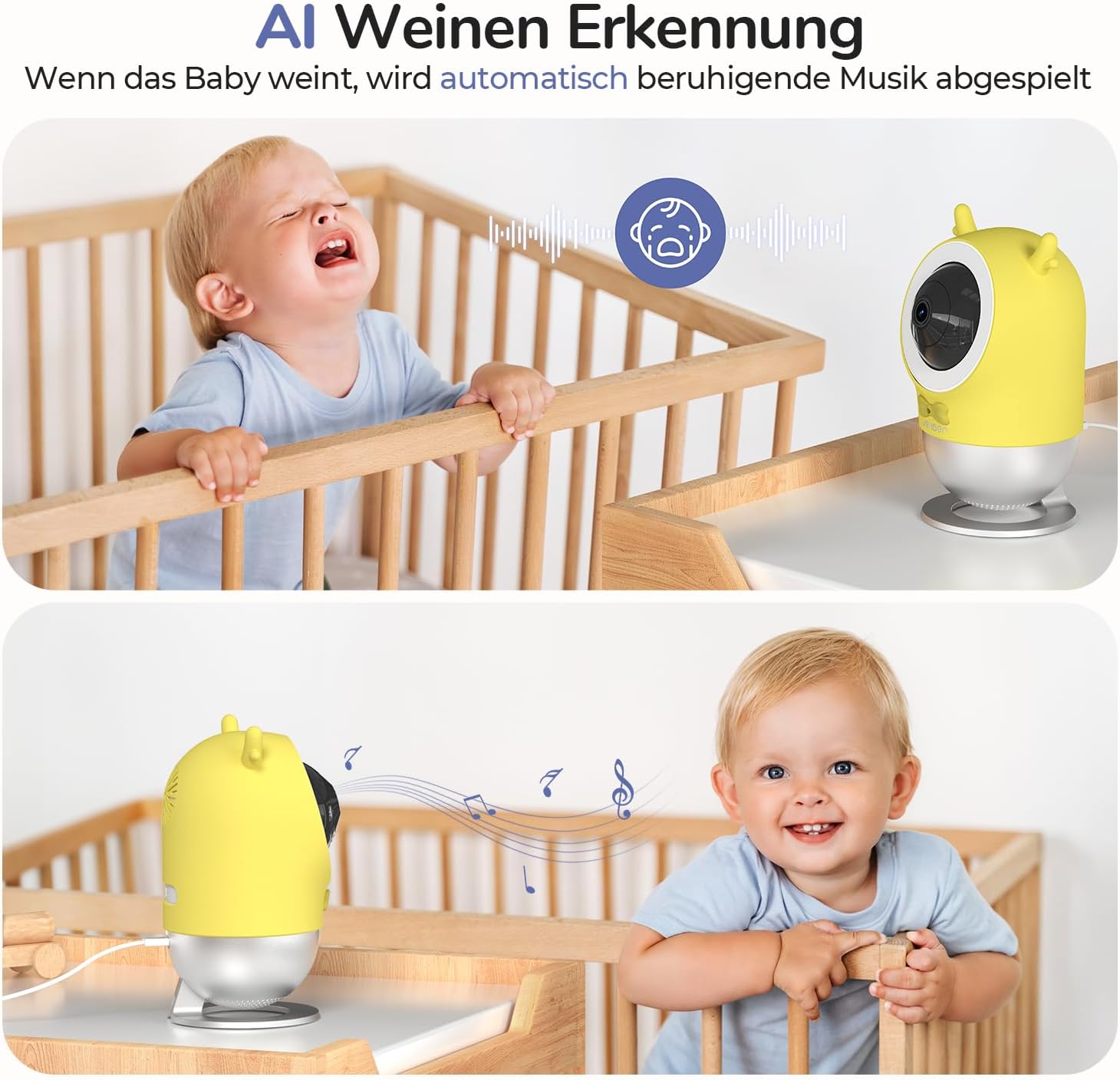
Image: Illustration of the AI cry detection feature, showing the camera playing music when a baby cries.

Image: Screenshot of the app showing a "Face Covering ALERT!" notification and a sleep analysis report.
3. Sleep Monitoring and Analysis
The monitor's exclusive respiratory sensor algorithm analyzes your baby's deep and light sleep cycles. This data, combined with customizable soothing music and a gentle night light, helps ensure restful sleep for your baby and you.
4. ടു-വേ ഓഡിയോ
Utilize the two-way audio function through the app to speak to your baby or listen to their sounds in real-time.
5. Night Light & Lullabies
The integrated night light provides a soft, non-intrusive 940nm light that does not disturb your baby's sleep. You can also play a selection of soothing lullabies directly from the app.
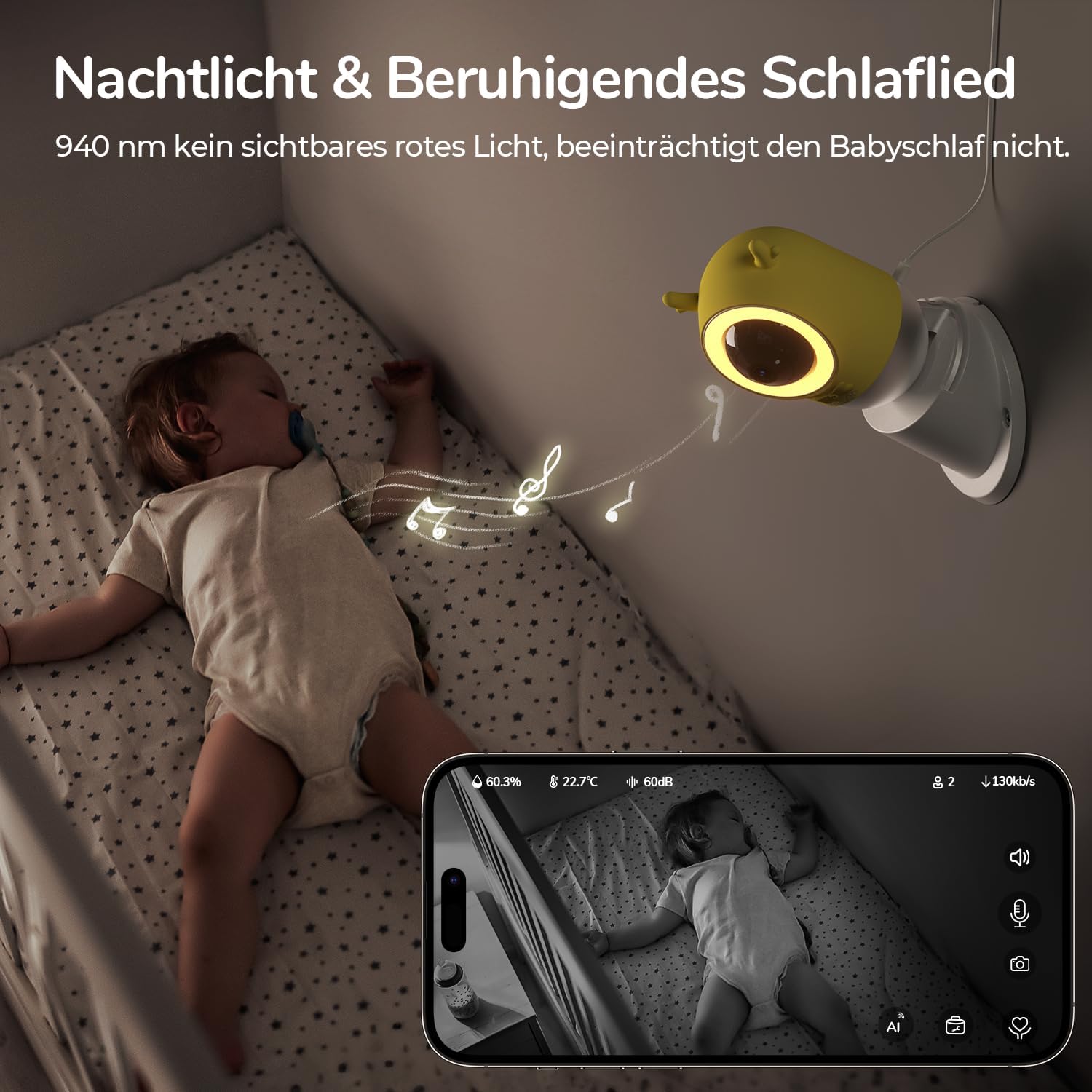
Image: A baby sleeping in a crib with the jeeber Babyphone U2 camera mounted nearby, emitting a soft night light and playing music.
6. Movement Tracking & Safety Zone
The camera can track your baby's movements and allows you to set a virtual safety zone. You will receive instant notifications if your baby crosses this predefined boundary.

Image: A child reaching for an object on a counter, with an overlay showing a defined safety zone and a "GEFAHRENZONE ALARM!" notification.
7. താപനിലയും ഈർപ്പവും നിരീക്ഷിക്കൽ
Monitor the temperature and humidity levels in your baby's environment directly through the app to ensure optimal comfort.

Image: A baby smiling, with an app interface overlay showing real-time humidity, temperature, and sound level readings.
മെയിൻ്റനൻസ്
- വൃത്തിയാക്കൽ: Wipe the camera with a soft, dry cloth. Do not use liquid cleaners or aerosols.
- സംഭരണം: ദീർഘനേരം ഉപയോഗത്തിലില്ലെങ്കിൽ, ഉപകരണം അൺപ്ലഗ് ചെയ്ത് തണുത്തതും വരണ്ടതുമായ സ്ഥലത്ത് സൂക്ഷിക്കുക.
- സോഫ്റ്റ്വെയർ അപ്ഡേറ്റുകൾ: Regularly check the app for available firmware updates for the camera to ensure optimal performance and security.
ട്രബിൾഷൂട്ടിംഗ്
- ശക്തിയില്ല:
Ensure the power cable is securely connected to the camera and the power outlet. Try a different outlet.
- Cannot Connect to Wi-Fi / Frequent Disconnections:
Ensure your Wi-Fi network is 2.4GHz. Check the Wi-Fi signal strength at the camera's location. Move the camera closer to the router if necessary. Restart your router and the camera. If issues persist, reset the camera using the provided pin and attempt pairing again.
- App Account Verification Issues:
Check your spam/junk folder for the verification code. Ensure you have entered the correct email address. Try again after some time or contact support if the issue persists.
- മോശം ചിത്രത്തിന്റെ ഗുണനിലവാരം:
Ensure the camera lens is clean. Check your internet connection speed. Higher resolution streaming requires a stable and fast internet connection.
- ടു-വേ ഓഡിയോ പ്രവർത്തിക്കുന്നില്ല:
Check microphone and speaker permissions for the app on your smartphone. Ensure the volume on your smartphone and within the app is turned up.
സ്പെസിഫിക്കേഷനുകൾ
| ഫീച്ചർ | വിശദാംശങ്ങൾ |
|---|---|
| ബ്രാൻഡ് | jeeber |
| മോഡലിൻ്റെ പേര് | U2 |
| നിറം | വെള്ള |
| മെറ്റീരിയൽ | പ്ലാസ്റ്റിക് |
| ക്യാമറ റെസല്യൂഷൻ | 2.5K / 4MP |
| ഉൾപ്പെടുത്തിയ ഘടകങ്ങൾ | 1 baby monitor camera, 1 wall mount, 1 screw bag, 1 DE power supply, 1 2m charging cable, 1 pin, 1 user manual |
| ASIN | B0DJ2F4VHN |
വാറൻ്റിയും പിന്തുണയും
jeeber offers a 90-day free return and exchange policy, along with a 3-year warranty for every baby monitor. For technical support or warranty claims, please refer to the contact information provided in the product packaging or on the official jeeber webസൈറ്റ്.
The product is RoHS certified, ensuring its materials are soft and safe for use around babies.