
ആമുഖം
Thank you for choosing the AWEI T36 Bluetooth Earbuds. This manual provides detailed instructions on how to set up, operate, and maintain your new earbuds. Please read this manual carefully before use to ensure optimal performance and longevity of your device.
പാക്കേജ് ഉള്ളടക്കം
- AWEI T36 Wireless Earbuds (Left and Right)
- ചാർജിംഗ് കേസ്
- USB-C ചാർജിംഗ് കേബിൾ
- ഇയർടിപ്പുകൾ (വിവിധ വലുപ്പങ്ങൾ)
- ഉപയോക്തൃ മാനുവൽ
ഉൽപ്പന്നം കഴിഞ്ഞുview
Familiarize yourself with the components of your AWEI T36 earbuds and charging case.
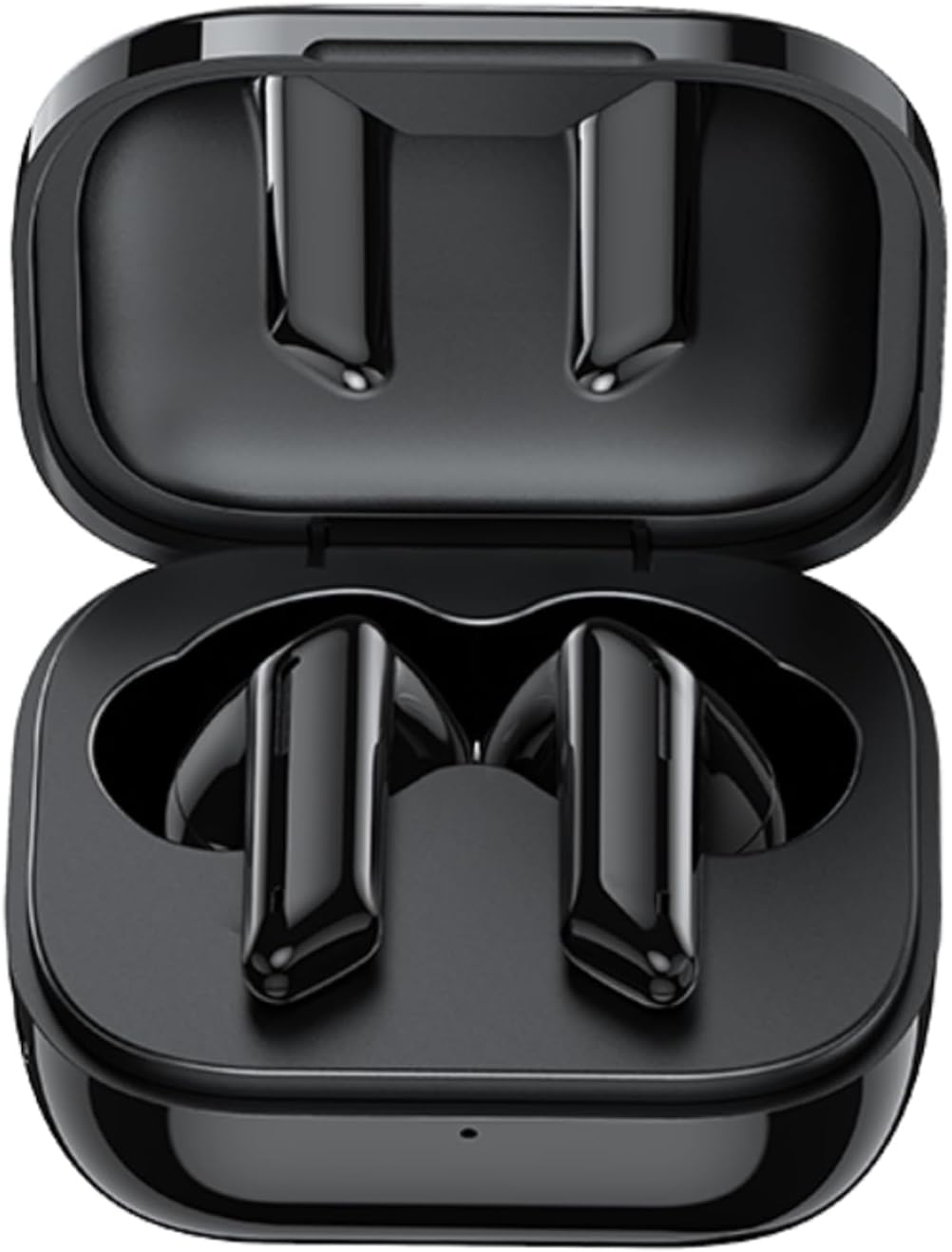
Image: AWEI T36 earbuds securely placed inside their open charging case, showcasing the sleek black design of both the earbuds and the case interior.
ഇയർബഡ് ഘടകങ്ങൾ
- ടച്ച് കൺട്രോൾ ഏരിയ: സംഗീത പ്ലേബാക്ക്, കോളുകൾ, വോയ്സ് അസിസ്റ്റന്റ് എന്നിവ കൈകാര്യം ചെയ്യുന്നതിന്.
- മൈക്രോഫോൺ: For clear call performance.
- ചാർജിംഗ് കോൺടാക്റ്റുകൾ: Located at the bottom of each earbud.
- LED സൂചകം: ജോടിയാക്കൽ നിലയും ബാറ്ററി നിലയും കാണിക്കുന്നു.
ചാർജിംഗ് കേസ് ഘടകങ്ങൾ
- ഇയർബഡ് ചാർജിംഗ് സ്ലോട്ടുകൾ: ഇയർബഡുകൾ സുരക്ഷിതമായി പിടിച്ച് ചാർജ് ചെയ്യുക.
- USB-C ചാർജിംഗ് പോർട്ട്: കേസെടുത്തതിന്.
- LED സൂചകം: Displays charging status of the case.
സജ്ജമാക്കുക
1. ഇയർബഡുകളും കേസും ചാർജ് ചെയ്യുന്നു
ആദ്യ ഉപയോഗത്തിന് മുമ്പ്, ഇയർബഡുകളും ചാർജിംഗ് കേസും പൂർണ്ണമായും ചാർജ് ചെയ്യുക.
- Place the earbuds into the charging case, ensuring they are correctly seated. The earbuds' LED indicators will light up to show they are charging.
- USB-C ചാർജിംഗ് കേബിൾ കേസിലെ ചാർജിംഗ് പോർട്ടിലേക്കും മറ്റേ അറ്റം ഒരു USB പവർ അഡാപ്റ്ററിലേക്കോ (ഉൾപ്പെടുത്തിയിട്ടില്ല) അല്ലെങ്കിൽ കമ്പ്യൂട്ടറിന്റെ USB പോർട്ടിലേക്കോ ബന്ധിപ്പിക്കുക.
- The charging case LED indicator will show charging progress. A full charge takes approximately 1.5 hours for the case.

Image: AWEI T36 earbuds and their charging case resting on a circular charging pad, illustrating the product's battery life and charging capabilities. The image indicates a 320mAh charging case, 4-5 hours playtime, and 1.5 hours charging time.
Note: The product specifications indicate 7 hours of continuous use per charge for earbuds and 35 hours of playback with the charging case.
2. നിങ്ങളുടെ ഉപകരണവുമായി ജോടിയാക്കുന്നു
The earbuds support Bluetooth 5.3 for a stable and fast connection.
- ആദ്യമായി ജോടിയാക്കൽ:
- ചാർജിംഗ് കേസ് തുറക്കുക. ഇയർബഡുകൾ സ്വയമേവ ഓണാകുകയും ജോടിയാക്കൽ മോഡിലേക്ക് പ്രവേശിക്കുകയും ചെയ്യും.
- നിങ്ങളുടെ ഉപകരണത്തിൽ (സ്മാർട്ട്ഫോൺ, ടാബ്ലെറ്റ്, ലാപ്ടോപ്പ്), ബ്ലൂടൂത്ത് പ്രവർത്തനക്ഷമമാക്കുക.
- ഇതിനായി തിരയുക "AWEI T36" in the list of available Bluetooth devices and select it to connect.
- Once connected, you will hear a confirmation tone, and the earbud LED indicators will turn off or flash slowly.
- തുടർന്നുള്ള ജോടിയാക്കൽ:
- Once paired, the earbuds will automatically connect to the last paired device when taken out of the charging case, provided Bluetooth is enabled on the device.

Image: A smartphone displaying a game, with the AWEI T36 earbuds and their charging case in the foreground, illustrating the Bluetooth connection. The image highlights "Bluetooth 5.1 Faster & More Stable" (Note: Product specifications state Bluetooth 5.3 for this model, which offers improved performance.)

Image: Two AWEI T36 earbuds, one in its open charging case and one outside, demonstrating that both earbuds can function independently as "hosts" or "main engines" for flexible use.
പ്രവർത്തന നിർദ്ദേശങ്ങൾ
The AWEI T36 earbuds feature smart touch controls for easy operation.
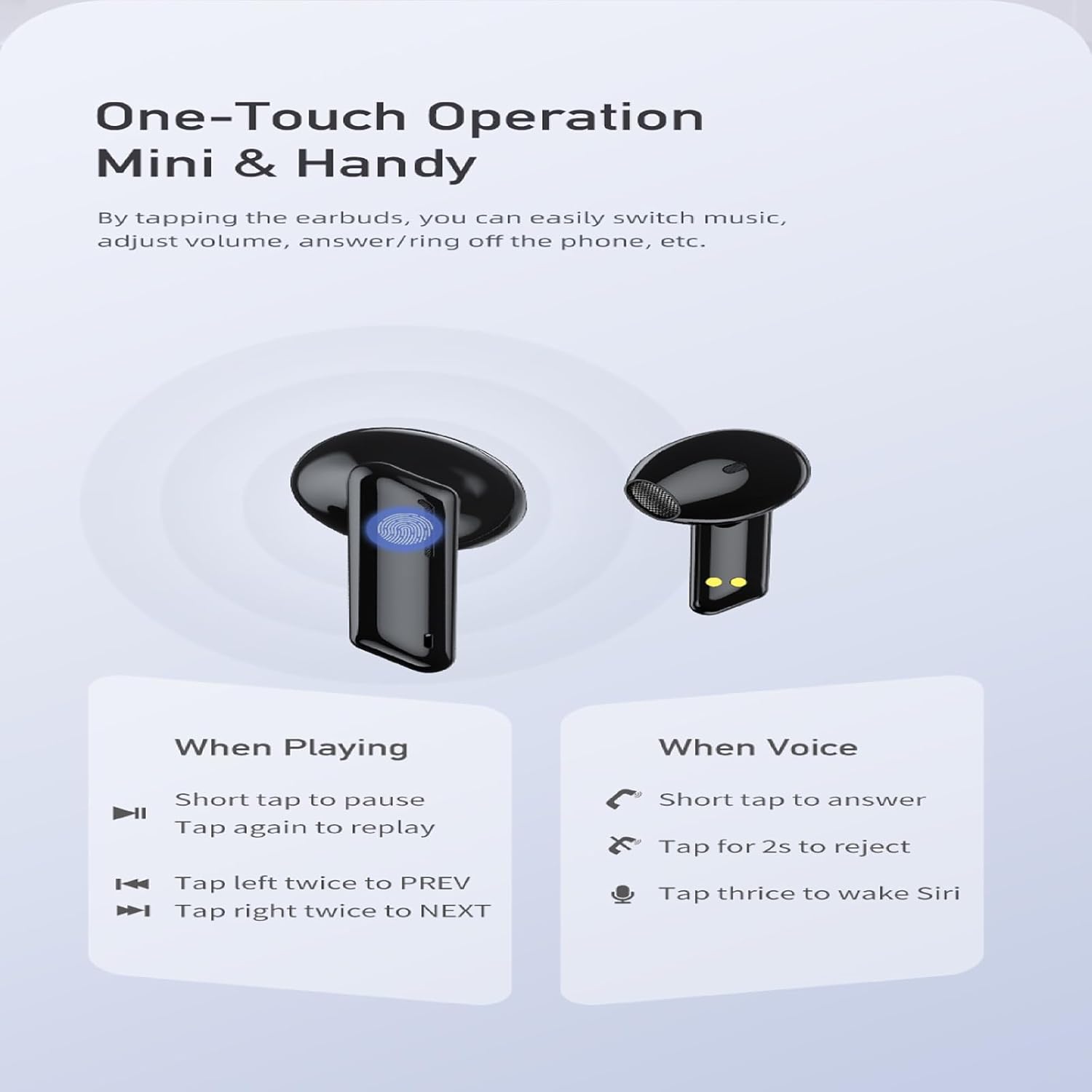
Image: A visual guide to the one-touch operation of the AWEI T36 earbuds, detailing touch commands for music playback (pause/play, previous/next song) and call management (answer/reject, activate voice assistant).
സംഗീത പ്ലേബാക്ക്
- പ്ലേ/താൽക്കാലികമായി നിർത്തുക: Short tap on either earbud.
- അടുത്ത ഗാനം: വലതുവശത്തെ ഇയർബഡിൽ രണ്ടുതവണ ടാപ്പ് ചെയ്യുക.
- മുൻ ഗാനം: ഇടതുവശത്തെ ഇയർബഡിൽ രണ്ടുതവണ ടാപ്പ് ചെയ്യുക.
- വോളിയം നിയന്ത്രണം: (Specific gesture not detailed in image, typically long press or multiple taps. Refer to device settings if not working as expected.)
കോൾ മാനേജുമെന്റ്
- മറുപടി കോൾ: Short tap on either earbud.
- കോൾ നിരസിക്കുക: ഏതെങ്കിലും ഇയർബഡിൽ 2 സെക്കൻഡ് ടാപ്പ് ചെയ്ത് പിടിക്കുക.
- കോൾ അവസാനിപ്പിക്കുക: Short tap on either earbud during a call.
വോയ്സ് അസിസ്റ്റൻ്റ്
- വോയ്സ് അസിസ്റ്റന്റ് (സിരി/ഗൂഗിൾ അസിസ്റ്റന്റ്) സജീവമാക്കുക: ഇയർബഡുകളിലൊന്നിൽ മൂന്ന് തവണ ടാപ്പ് ചെയ്യുക.
പവർ ഓൺ/ഓഫ്
- പവർ ഓൺ: ചാർജിംഗ് കെയ്സിൽ നിന്ന് ഇയർബഡുകൾ നീക്കം ചെയ്യുമ്പോൾ അവ സ്വയമേവ ഓണാകും.
- പവർ ഓഫ്: ചാർജിംഗ് കെയ്സിലേക്ക് തിരികെ വയ്ക്കുമ്പോഴും ലിഡ് അടയ്ക്കുമ്പോഴും ഇയർബഡുകൾ സ്വയമേവ ഓഫാകും.
മെയിൻ്റനൻസ്
വൃത്തിയാക്കൽ
- ഇയർബഡുകളും ചാർജിംഗ് കെയ്സും മൃദുവായതും ഉണങ്ങിയതും ലിന്റ് രഹിതവുമായ തുണി ഉപയോഗിച്ച് പതിവായി വൃത്തിയാക്കുക.
- ഒരു കോട്ടൺ സ്വാബ് ഉപയോഗിച്ച് ചെറുതായി നനയ്ക്കുക dampened with isopropyl alcohol to clean the charging contacts on both the earbuds and inside the case.
- അബ്രാസീവ് ക്ലീനറുകൾ ഉപയോഗിക്കരുത് അല്ലെങ്കിൽ ഇയർബഡുകളോ കേസോ വെള്ളത്തിൽ മുക്കരുത്.
സംഭരണം
- ഇയർബഡുകൾ ഉപയോഗിക്കാത്തപ്പോൾ അവയുടെ ചാർജ്ജിംഗ് കെയ്സിൽ സൂക്ഷിക്കുക, അവയെ സംരക്ഷിക്കുകയും ചാർജ്ജ് ചെയ്തിരിക്കുകയും ചെയ്യുക.
- ഉപകരണം തീവ്രമായ താപനിലയിലോ (ചൂടോ തണുപ്പോ) അല്ലെങ്കിൽ ഉയർന്ന ഈർപ്പമുള്ള അന്തരീക്ഷത്തിലോ സൂക്ഷിക്കുന്നത് ഒഴിവാക്കുക.
ബാറ്ററി കെയർ
- ബാറ്ററി ലൈഫ് നിലനിർത്താൻ, ഇയർബഡുകളും കെയ്സും പതിവായി ചാർജ് ചെയ്യുക, പതിവായി ഉപയോഗിക്കുന്നില്ലെങ്കിലും.
- റീചാർജ് ചെയ്യുന്നതിനുമുമ്പ് ബാറ്ററി പൂർണ്ണമായും ഡിസ്ചാർജ് ചെയ്യുന്നത് ഒഴിവാക്കുക.

Image: AWEI T36 earbuds and their charging case with water droplets on them, emphasizing their IPX4 waterproof rating, which protects against sweat and light rain during exercise.
ട്രബിൾഷൂട്ടിംഗ്
If you encounter any issues with your AWEI T36 earbuds, please refer to the following common solutions:
- ഉപകരണവുമായി ഇയർബഡുകൾ ജോടിയാക്കുന്നില്ല:
- ഇയർബഡുകൾ പൂർണ്ണമായും ചാർജ് ചെയ്തിട്ടുണ്ടെന്ന് ഉറപ്പാക്കുക.
- നിങ്ങളുടെ ഉപകരണത്തിൽ ബ്ലൂടൂത്ത് പ്രവർത്തനക്ഷമമാക്കിയിട്ടുണ്ടെന്നും ഇയർബഡുകൾ പരിധിക്കുള്ളിലാണെന്നും (10 മീറ്റർ വരെ) ഉറപ്പാക്കുക.
- Forget "AWEI T36" from your device's Bluetooth list and try pairing again.
- രണ്ട് ഇയർബഡുകളും ചാർജിംഗ് കെയ്സിലേക്ക് തിരികെ വയ്ക്കുക, ലിഡ് അടയ്ക്കുക, കുറച്ച് നിമിഷങ്ങൾ കാത്തിരിക്കുക, തുടർന്ന് അവ റീസെറ്റ് ചെയ്യാൻ ലിഡ് തുറക്കുക.
- ഒരു ഇയർബഡ് മാത്രമേ പ്രവർത്തിക്കുന്നുള്ളൂ:
- രണ്ട് ഇയർബഡുകളും ചാർജ്ജ് ചെയ്തിട്ടുണ്ടെന്ന് ഉറപ്പാക്കുക.
- Place both earbuds back into the charging case, close the lid, then open it again. This often re-syncs them.
- രണ്ട് ഇയർബഡുകളിലെയും കേസിനുള്ളിലെയും ചാർജിംഗ് കോൺടാക്റ്റുകൾ വൃത്തിയാക്കുക.
- ഇയർബഡുകൾ ചാർജ് ചെയ്യുന്നില്ല:
- ചാർജിംഗ് കേബിൾ കേസിലേക്കും പവർ സ്രോതസ്സിലേക്കും സുരക്ഷിതമായി ബന്ധിപ്പിച്ചിട്ടുണ്ടോയെന്ന് പരിശോധിക്കുക.
- ഇയർബഡുകളിലെയും കേസിനുള്ളിലെയും ചാർജിംഗ് കോൺടാക്റ്റുകൾ വൃത്തിയുള്ളതും അവശിഷ്ടങ്ങളില്ലാത്തതുമാണെന്ന് ഉറപ്പാക്കുക.
- മറ്റൊരു USB-C കേബിളോ പവർ അഡാപ്റ്ററോ പരീക്ഷിച്ചുനോക്കൂ.
- കുറഞ്ഞ ശബ്ദം അല്ലെങ്കിൽ മോശം ശബ്ദ നിലവാരം:
- നിങ്ങളുടെ ഉപകരണത്തിലും ഇയർബഡുകളിലും വോളിയം ക്രമീകരിക്കുക.
- Ensure the eartips are properly seated in your ears to create a good seal. Try different sized eartips.
- Clean any earwax or debris from the earbud speaker mesh.
സ്പെസിഫിക്കേഷനുകൾ
| ഫീച്ചർ | വിവരണം |
|---|---|
| മോഡലിൻ്റെ പേര് | T36 |
| ബ്രാൻഡ് | AWEI |
| കണക്റ്റിവിറ്റി ടെക്നോളജി | വയർലെസ്സ് (ബ്ലൂടൂത്ത് 5.3) |
| ബ്ലൂടൂത്ത് ശ്രേണി | 10 മീറ്റർ വരെ (33 അടി) |
| ഇയർബഡ് ബാറ്ററി ലൈഫ് | 7 മണിക്കൂർ വരെ (ഒറ്റ ചാർജ്) |
| ആകെ പ്ലേടൈം (കേസിനൊപ്പം) | 35 മണിക്കൂർ വരെ |
| ചാർജിംഗ് സമയം (കേസ്) | ഏകദേശം 1.5 മണിക്കൂർ |
| ജല പ്രതിരോധം | IPX4 (വിയർപ്പിനും തെറിക്കലിനും പ്രതിരോധം) |
| നിയന്ത്രണ തരം | ടച്ച് നിയന്ത്രണം |
| ഇയർപീസ് ആകൃതി | ഇൻ-ഇയർ |
| മെറ്റീരിയൽ | Silicone (Eartips) |
| ഉൾപ്പെടുത്തിയ ഘടകങ്ങൾ | Earbuds, Charging Case, USB-C Cable, Eartips, User Manual |
വാറൻ്റിയും പിന്തുണയും
AWEI products are manufactured to the highest quality standards. For information regarding warranty coverage, technical support, or customer service, please refer to the warranty card included in your package or visit the official AWEI webസൈറ്റ്.
For further assistance, please contact AWEI customer support with your product model number (T36) and purchase details.