ഉൽപ്പന്നം കഴിഞ്ഞുview
സൗകര്യത്തിനും പോർട്ടബിലിറ്റിക്കും വേണ്ടി രൂപകൽപ്പന ചെയ്ത ഒരു വൈവിധ്യമാർന്ന ഉപകരണമാണ് ജനറിക് വൈറ്റ് എഫ്എം റേഡിയോ അലാറം ക്ലോക്ക്. ഇത് ഒരു ഡിജിറ്റൽ അലാറം ക്ലോക്കിനെ ഒരു എഫ്എം റേഡിയോ, ബ്ലൂടൂത്ത് സ്പീക്കർ, മെമ്മറി കാർഡ് പ്ലെയർ എന്നിവയുമായി സംയോജിപ്പിക്കുന്നു. ഇതിന്റെ ഒതുക്കമുള്ള രൂപകൽപ്പനയും മിറർ ഡിസ്പ്ലേയും ബെഡ്സൈഡ് അലാറം മുതൽ യാത്രയ്ക്കായി പോർട്ടബിൾ മ്യൂസിക് പ്ലെയർ വരെയുള്ള വിവിധ ഉപയോഗങ്ങൾക്ക് അനുയോജ്യമാക്കുന്നു.

ചിത്രം: മുകളിൽ നിന്ന് താഴേക്ക് view വൈറ്റ് എഫ്എം റേഡിയോ അലാറം ക്ലോക്കിന്റെ, ഡിജിറ്റൽ ഡിസ്പ്ലേ, സ്പീക്കർ ഗ്രിൽ, കൺട്രോൾ ബട്ടണുകൾ എന്നിവ കാണിക്കുന്നു.
സജ്ജമാക്കുക
1 ഉപകരണം ചാർജ് ചെയ്യുന്നു
ആദ്യ ഉപയോഗത്തിന് മുമ്പ്, അലാറം ക്ലോക്ക് പൂർണ്ണമായും ചാർജ് ചെയ്യുക. നൽകിയിരിക്കുന്ന മൈക്രോ യുഎസ്ബി ചാർജിംഗ് കേബിൾ ഉപകരണത്തിലെ ചാർജിംഗ് പോർട്ടിലേക്കും മറ്റേ അറ്റം ഒരു സ്റ്റാൻഡേർഡ് യുഎസ്ബി പവർ അഡാപ്റ്ററിലേക്കോ (ഉൾപ്പെടുത്തിയിട്ടില്ല) അല്ലെങ്കിൽ കമ്പ്യൂട്ടർ യുഎസ്ബി പോർട്ടിലേക്കോ ബന്ധിപ്പിക്കുക. ചാർജിംഗ് ഇൻഡിക്കേറ്റർ ചാർജിംഗ് സ്റ്റാറ്റസ് കാണിക്കും.
2. പ്രാരംഭ പവർ ഓൺ
ഉപകരണം ഓണാക്കാൻ പവർ ബട്ടൺ (സാധാരണയായി പവർ ഐക്കൺ കൊണ്ട് അടയാളപ്പെടുത്തിയിരിക്കും) അമർത്തിപ്പിടിക്കുക. LED ഡിജിറ്റൽ ഡിസ്പ്ലേ പ്രകാശിക്കും.
3. സമയം ക്രമീകരിക്കുന്നു
- സമയ ക്രമീകരണ മോഡിൽ പ്രവേശിക്കാൻ "SET" ബട്ടൺ ഒരിക്കൽ അമർത്തുക. മണിക്കൂർ അക്കങ്ങൾ മിന്നിമറയും.
- "മുമ്പത്തേത്" ഉപയോഗിക്കുക (⏮ ⏮ по видео 🇮🇳) ഉം "അടുത്തത്" ഉം (⏭कालिक समाल�) മണിക്കൂർ ക്രമീകരിക്കാനുള്ള ബട്ടണുകൾ.
- മണിക്കൂർ സ്ഥിരീകരിക്കാൻ "SET" വീണ്ടും അമർത്തി മിനിറ്റ് ക്രമീകരണത്തിലേക്ക് നീങ്ങുക. മിനിറ്റ് അക്കങ്ങൾ മിന്നിമറയും.
- "മുമ്പത്തേത്" ഉപയോഗിക്കുക (⏮ ⏮ по видео 🇮🇳) ഉം "അടുത്തത്" ഉം (⏭कालिक समाल�) മിനിറ്റ് ക്രമീകരിക്കാനുള്ള ബട്ടണുകൾ.
- മിനിറ്റ് സ്ഥിരീകരിക്കുന്നതിനും സമയ ക്രമീകരണ മോഡിൽ നിന്ന് പുറത്തുകടക്കുന്നതിനും "SET" മൂന്നാം തവണയും അമർത്തുക.

ചിത്രം: പിൻഭാഗം view അലാറം ക്ലോക്കിന്റെ, മൈക്രോ യുഎസ്ബി ചാർജിംഗ് പോർട്ടും TF (മെമ്മറി കാർഡ്) സ്ലോട്ടും ഹൈലൈറ്റ് ചെയ്യുന്നു.
പ്രവർത്തന നിർദ്ദേശങ്ങൾ
1. ഡ്യുവൽ അലാറം ക്ലോക്ക് ഫംഗ്ഷൻ
രണ്ട് സ്വതന്ത്ര അലാറങ്ങൾ സജ്ജീകരിക്കുന്നതിനെ ഉപകരണം പിന്തുണയ്ക്കുന്നു.
- ഡിസ്പ്ലേയിൽ അലാറം ഐക്കൺ (ബെൽ ചിഹ്നം) ദൃശ്യമാകുന്നതുവരെ "M" (മോഡ്) ബട്ടൺ ആവർത്തിച്ച് അമർത്തുക, ഇത് അലാറം സജ്ജീകരണ മോഡിനെ സൂചിപ്പിക്കുന്നു.
- അലാറം 1 അല്ലെങ്കിൽ അലാറം 2 തിരഞ്ഞെടുക്കാൻ "SET" അമർത്തുക. അനുബന്ധ അലാറം സമയം മിന്നിമറയും.
- "മുമ്പത്തേത്" ഉപയോഗിക്കുക (⏮ ⏮ по видео 🇮🇳) ഉം "അടുത്തത്" ഉം (⏭कालिक समाल�) അലാറം സമയം ക്രമീകരിക്കാനുള്ള ബട്ടണുകൾ.
- മണിക്കൂർ സ്ഥിരീകരിക്കാനും മിനിറ്റ് ക്രമീകരിക്കാനും "SET" അമർത്തുക.
- മിനിറ്റ് സ്ഥിരീകരിക്കാൻ "SET" വീണ്ടും അമർത്തുക.
- ഒരു അലാറം പ്രവർത്തനക്ഷമമാക്കാനോ പ്രവർത്തനരഹിതമാക്കാനോ, അലാറം സമയം പ്രദർശിപ്പിക്കുമ്പോൾ "SET" ബട്ടൺ അമർത്തുക. അലാറം സജീവമാണോ എന്ന് ഒരു സൂചകം കാണിക്കും.
2. എഫ്എം റേഡിയോ മോഡ്
അന്തർനിർമ്മിത എഫ്എം റേഡിയോ ഉപയോഗിച്ച് നിങ്ങളുടെ പ്രിയപ്പെട്ട റേഡിയോ സ്റ്റേഷനുകൾ ആസ്വദിക്കൂ.
- ഡിസ്പ്ലേയിൽ "FM" ദൃശ്യമാകുന്നതുവരെ "M" (മോഡ്) ബട്ടൺ ആവർത്തിച്ച് അമർത്തുക.
- "പ്ലേ/പോസ്" അമർത്തിപ്പിടിക്കുക (⏸ ⏸ മിനിമലിസ്റ്റ്) ലഭ്യമായ എഫ്എം സ്റ്റേഷനുകൾ സ്വയമേവ സ്കാൻ ചെയ്യാനും സംരക്ഷിക്കാനും ബട്ടൺ.
- "മുമ്പത്തേത്" ഉപയോഗിക്കുക (⏮ ⏮ по видео 🇮🇳) ഉം "അടുത്തത്" ഉം (⏭कालिक समाल�) സംരക്ഷിച്ച സ്റ്റേഷനുകൾക്കിടയിൽ നാവിഗേറ്റ് ചെയ്യാനുള്ള ബട്ടണുകൾ.
3. ബ്ലൂടൂത്ത് സ്പീക്കർ മോഡ്
വയർലെസ് ആയി ഓഡിയോ പ്ലേ ചെയ്യാൻ നിങ്ങളുടെ സ്മാർട്ട്ഫോണോ മറ്റ് ബ്ലൂടൂത്ത് പ്രവർത്തനക്ഷമമാക്കിയ ഉപകരണങ്ങളോ ബന്ധിപ്പിക്കുക.
- ഡിസ്പ്ലേയിൽ "BT" ദൃശ്യമാകുന്നതുവരെ "M" (മോഡ്) ബട്ടൺ ആവർത്തിച്ച് അമർത്തുക, ഇത് ബ്ലൂടൂത്ത് ജോടിയാക്കൽ മോഡിനെ സൂചിപ്പിക്കുന്നു.
- നിങ്ങളുടെ ഉപകരണത്തിൽ (ഉദാ. സ്മാർട്ട്ഫോൺ), ബ്ലൂടൂത്ത് പ്രവർത്തനക്ഷമമാക്കി ലഭ്യമായ ഉപകരണങ്ങൾക്കായി തിരയുക.
- ജോടിയാക്കാൻ കണ്ടെത്തിയ ഉപകരണങ്ങളുടെ പട്ടികയിൽ നിന്ന് "Genericgfcybhmqrv" (അല്ലെങ്കിൽ സമാനമായ പേര്) തിരഞ്ഞെടുക്കുക.
- ജോടിയാക്കിക്കഴിഞ്ഞാൽ, അലാറം ക്ലോക്ക് സ്പീക്കർ വഴി നിങ്ങളുടെ ഉപകരണത്തിൽ നിന്ന് ഓഡിയോ പ്ലേ ചെയ്യാൻ കഴിയും.

ചിത്രം: ഒരു മേശപ്പുറത്ത് സ്ഥാപിച്ചിരിക്കുന്ന അലാറം ക്ലോക്ക്, അതിന്റെ പ്രതിഫലിക്കുന്ന മിറർ ഡിസ്പ്ലേയും ഇന്റഗ്രേറ്റഡ് സ്പീക്കറും പ്രദർശിപ്പിച്ചിരിക്കുന്നു, പശ്ചാത്തലത്തിൽ പുസ്തകങ്ങളും.
4. മെമ്മറി കാർഡ് പ്ലേബാക്ക്
ഓഡിയോ പ്ലേ ചെയ്യുക fileഒരു മൈക്രോ എസ്ഡി (ടിഎഫ്) കാർഡിൽ നിന്ന് നേരിട്ട്.
- ഉപകരണത്തിന്റെ വശത്തുള്ള TF കാർഡ് സ്ലോട്ടിലേക്ക് ഒരു മൈക്രോ SD (TF) കാർഡ് (32GB വരെ, ഉൾപ്പെടുത്തിയിട്ടില്ല) ഇടുക. കാർഡ് സ്ഥലത്ത് ക്ലിക്ക് ചെയ്യുന്നത് വരെ ശരിയായി ചേർത്തിട്ടുണ്ടെന്ന് ഉറപ്പാക്കുക.
- ഉപകരണം യാന്ത്രികമായി മെമ്മറി കാർഡ് പ്ലേബാക്ക് മോഡിലേക്ക് മാറും. അല്ലെങ്കിൽ, ഡിസ്പ്ലേയിൽ TF കാർഡ് മോഡ് സൂചിപ്പിക്കുന്നത് വരെ "M" (മോഡ്) ബട്ടൺ അമർത്തുക.
- "മുമ്പത്തേത്" ഉപയോഗിക്കുക (⏮ ⏮ по видео 🇮🇳) ഉം "അടുത്തത്" ഉം (⏭कालिक समाल�) ഓഡിയോ ട്രാക്കുകൾക്കിടയിൽ നാവിഗേറ്റ് ചെയ്യാനുള്ള ബട്ടണുകൾ.
- "പ്ലേ/പോസ്" അമർത്തുക (⏸ ⏸ മിനിമലിസ്റ്റ്) പ്ലേബാക്ക് താൽക്കാലികമായി നിർത്താനോ പുനരാരംഭിക്കാനോ ഉള്ള ബട്ടൺ.
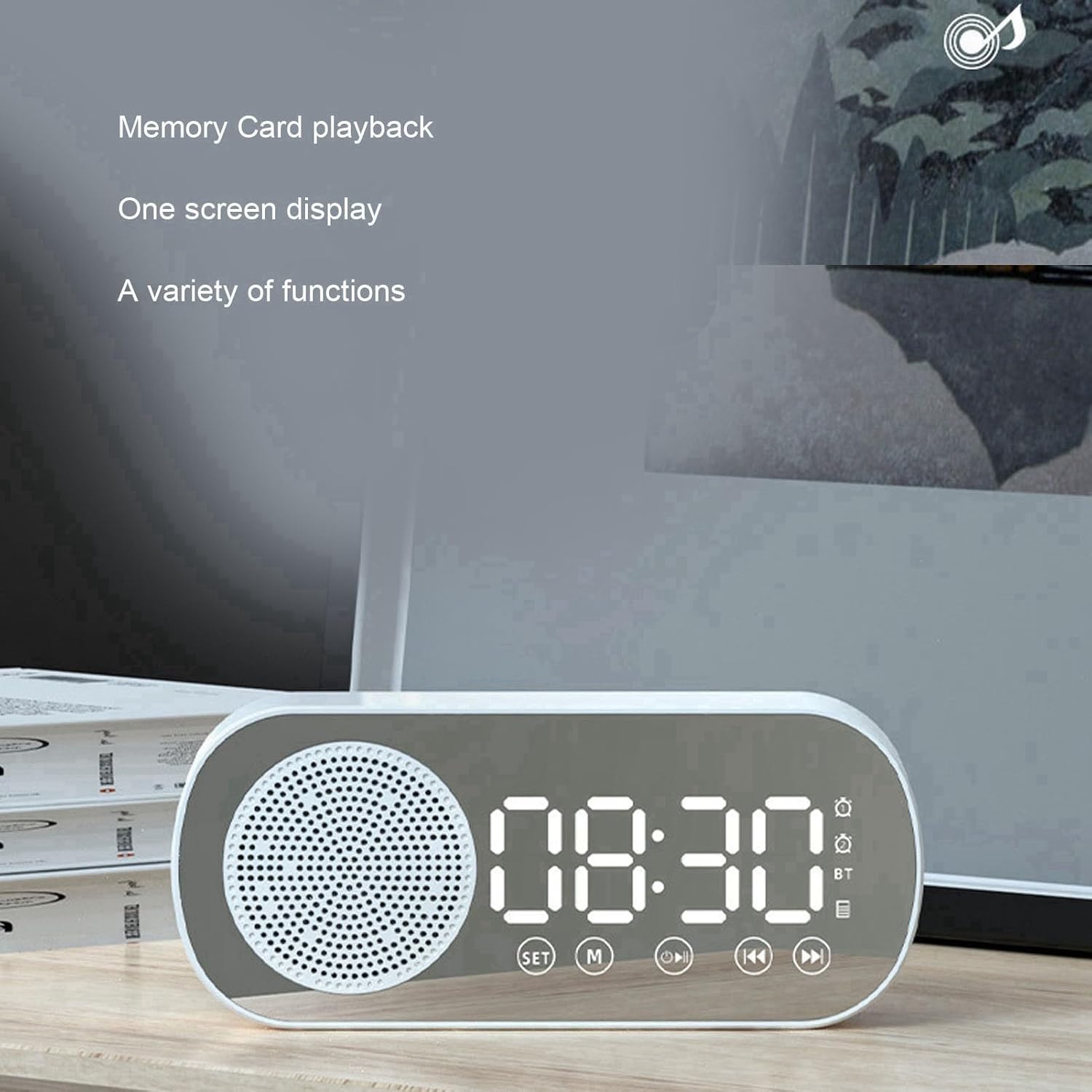
ചിത്രം: ഡിജിറ്റൽ സമയ ഡിസ്പ്ലേ കാണിക്കുന്ന അലാറം ക്ലോക്ക്, "മെമ്മറി കാർഡ് പ്ലേബാക്ക്" എന്നും "വൺ സ്ക്രീൻ ഡിസ്പ്ലേ" എന്നും സൂചിപ്പിക്കുന്ന വാചകം, അതിന്റെ വൈവിധ്യമാർന്ന പ്രവർത്തനങ്ങൾ എടുത്തുകാണിക്കുന്നു.
5. മിറർ ഫംഗ്ഷൻ
LED ഡിസ്പ്ലേ ഉപരിതലം ഒരു കണ്ണാടിയായും പ്രവർത്തിക്കുന്നു, പെട്ടെന്നുള്ള പരിശോധനകൾക്കോ ടച്ച്-അപ്പുകൾക്കോ ഇത് ഉപയോഗപ്രദമാണ്.

ചിത്രം: ഒതുക്കമുള്ള അലാറം ക്ലോക്ക് പിടിച്ചിരിക്കുന്ന ഒരു കൈ, ഡിജിറ്റൽ ഡിസ്പ്ലേ ദൃശ്യമാകുന്ന തരത്തിൽ, പോർട്ടബിൾ മിററായി അതിന്റെ ഉപയോഗം പ്രകടമാക്കുന്നു.

ചിത്രം: ഡ്യുവൽ അലാറം, ഹൈഫൈ ശബ്ദ നിലവാരം, എഫ്എം റേഡിയോ, ടിഎഫ് കാർഡ് പ്ലേബാക്ക്, എച്ച്ഡി മിറർ പ്രവർത്തനം എന്നിവയുൾപ്പെടെ അലാറം ക്ലോക്കിന്റെ പ്രധാന സവിശേഷതകളുടെ ഒരു ദൃശ്യ പ്രാതിനിധ്യം.
മെയിൻ്റനൻസ്
- വൃത്തിയാക്കൽ: അലാറം ക്ലോക്കിന്റെ പ്രതലം തുടയ്ക്കാൻ മൃദുവായതും ഉണങ്ങിയതുമായ തുണി ഉപയോഗിക്കുക. അബ്രാസീവ് ക്ലീനറുകളോ ലായകങ്ങളോ ഉപയോഗിക്കരുത്, കാരണം അവ ഫിനിഷിനോ ഡിസ്പ്ലേയ്ക്കോ കേടുവരുത്തും.
- ബാറ്ററി കെയർ: ബാറ്ററി ലൈഫ് വർദ്ധിപ്പിക്കാൻ, ബാറ്ററി ഇടയ്ക്കിടെ പൂർണ്ണമായും ഡിസ്ചാർജ് ചെയ്യുന്നത് ഒഴിവാക്കുക. ബാറ്ററി ലോ ഇൻഡിക്കേറ്റർ ദൃശ്യമാകുമ്പോൾ ഉപകരണം റീചാർജ് ചെയ്യുക. ദീർഘനേരം സൂക്ഷിക്കുകയാണെങ്കിൽ, ഓരോ 3-6 മാസത്തിലും ബാറ്ററി ചാർജ് ചെയ്യുക.
- സംഭരണം: നേരിട്ടുള്ള സൂര്യപ്രകാശത്തിൽ നിന്നും കടുത്ത താപനിലയിൽ നിന്നും മാറി തണുത്തതും വരണ്ടതുമായ സ്ഥലത്ത് ഉപകരണം സൂക്ഷിക്കുക.
ട്രബിൾഷൂട്ടിംഗ്
| പ്രശ്നം | സാധ്യമായ കാരണം | പരിഹാരം |
|---|---|---|
| ഉപകരണം പവർ ഓണാക്കുന്നില്ല. | ബാറ്ററി കുറവാണ്; ഉപകരണം ചാർജ് ചെയ്തിട്ടില്ല. | ചാർജിംഗ് കേബിൾ ബന്ധിപ്പിച്ച് കുറഞ്ഞത് 2 മണിക്കൂറെങ്കിലും ഉപകരണം ചാർജ് ചെയ്യുക. |
| ബ്ലൂടൂത്ത് ജോടിയാക്കൽ പരാജയപ്പെട്ടു. | ഉപകരണം ജോടിയാക്കൽ മോഡിൽ അല്ല; ഉറവിട ഉപകരണത്തിൽ ബ്ലൂടൂത്ത് പ്രവർത്തനരഹിതമാക്കിയിരിക്കുന്നു; ഉറവിട ഉപകരണത്തിൽ നിന്ന് വളരെ അകലെയാണ്. | അലാറം ക്ലോക്ക് ബ്ലൂടൂത്ത് മോഡിലാണെന്ന് ഉറപ്പാക്കുക ("BT" പ്രദർശിപ്പിച്ചിരിക്കുന്നു). നിങ്ങളുടെ ഉറവിട ഉപകരണത്തിൽ ബ്ലൂടൂത്ത് പ്രവർത്തനക്ഷമമാക്കുക. ഉപകരണങ്ങൾ അടുത്തേക്ക് നീക്കുക (10 മീറ്ററിനുള്ളിൽ). |
| എഫ്എം റേഡിയോയ്ക്ക് മോശം റിസപ്ഷൻ അല്ലെങ്കിൽ സ്റ്റാറ്റിക് ആണ്. | ദുർബലമായ സിഗ്നൽ; തടസ്സം. | സിഗ്നൽ സ്വീകരണം മെച്ചപ്പെടുത്തുന്നതിന് ഉപകരണം പുനഃസ്ഥാപിക്കുക. തടസ്സമുണ്ടാക്കുന്ന മറ്റ് ഇലക്ട്രോണിക് ഉപകരണങ്ങൾക്ക് സമീപം വയ്ക്കുന്നത് ഒഴിവാക്കുക. |
| മെമ്മറി കാർഡ് തിരിച്ചറിഞ്ഞില്ല. | കാർഡ് തെറ്റായി ചേർത്തു; ഫോർമാറ്റ് പിന്തുണയ്ക്കുന്നില്ല; കാർഡ് കേടായി. | TF കാർഡ് ശരിയായി വീണ്ടും ചേർക്കുക. കാർഡ് FAT32 ലേക്ക് ഫോർമാറ്റ് ചെയ്തിട്ടുണ്ടെന്ന് ഉറപ്പാക്കുക. മറ്റൊരു TF കാർഡ് പരീക്ഷിക്കുക. |
| അലാറം മുഴങ്ങുന്നില്ല. | അലാറം പ്രവർത്തനക്ഷമമാക്കിയിട്ടില്ല; ശബ്ദം വളരെ കുറവാണ്. | അലാറം സജ്ജീകരിച്ചിട്ടുണ്ടെന്നും പ്രവർത്തനക്ഷമമാക്കിയിട്ടുണ്ടെന്നും ഉറപ്പാക്കുക (അലാറം ഐക്കൺ ദൃശ്യമാണ്). ശബ്ദം വർദ്ധിപ്പിക്കുക. |
സ്പെസിഫിക്കേഷനുകൾ
| ഫീച്ചർ | വിശദാംശങ്ങൾ |
|---|---|
| ഉൽപ്പന്ന അളവുകൾ | ഏകദേശം 116 x 51 x 33 മിമി / 4.6 x 2 x 1.3 ഇഞ്ച് |
| നിറം | വെള്ള |
| ബാറ്ററി തരം | ബിൽറ്റ്-ഇൻ ലിഥിയം ബാറ്ററി |
| ബാറ്ററി ശേഷി | 1600mAh |
| ബ്ലൂടൂത്ത് പതിപ്പ് | 5.0 |
| പിന്തുണയ്ക്കുന്ന പ്ലേ മോഡുകൾ | ബ്ലൂടൂത്ത്, മെമ്മറി കാർഡ് (TF കാർഡ്) |
| മെമ്മറി കാർഡ് പിന്തുണ | പരമാവധി 32GB (TF കാർഡ്, ഉൾപ്പെടുത്തിയിട്ടില്ല) |
| എഫ്എം റേഡിയോ ഫ്രീക്വൻസി | 87.5 മെഗാഹെട്സ് - 108 മെഗാഹെട്സ് |
| പവർ ഇൻപുട്ട് | 5V=1A |
| സ്പീക്കർ | 4Ω 3W |
| വളച്ചൊടിക്കൽ | <10% |
| ഔട്ട്പുട്ട് പവർ | 3WTHD+10% |
| ഓഡിയോ സിഗ്നൽ-നോയ്സ് അനുപാതം | ≥70dB |
| ഇനത്തിൻ്റെ ഭാരം | 5.8 ഔൺസ് |
| ഫ്രെയിം മെറ്റീരിയൽ | പ്ലാസ്റ്റിക് |
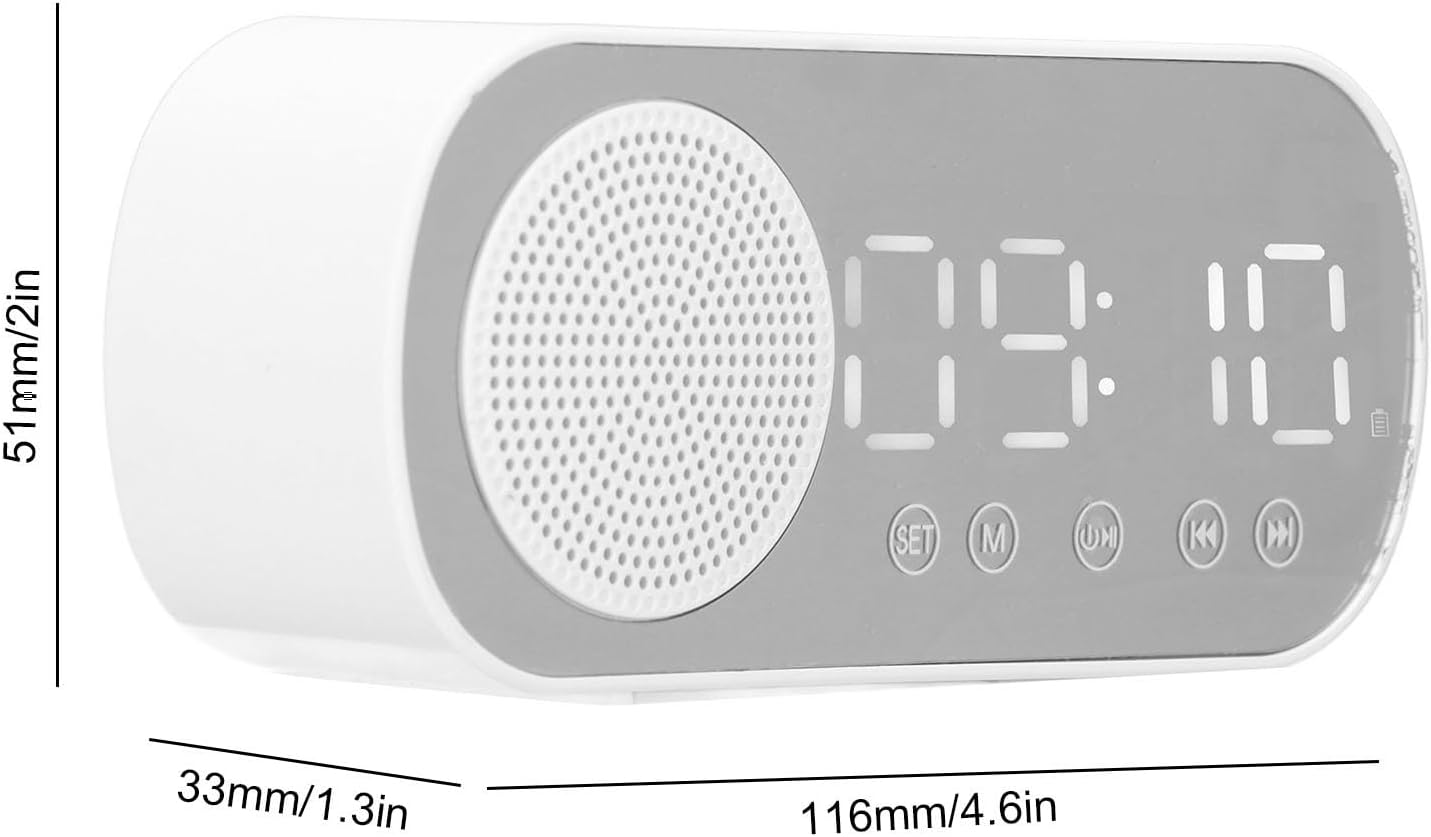
ചിത്രം: അലാറം ക്ലോക്കിന്റെ അളവുകൾ ചിത്രീകരിക്കുന്ന സാങ്കേതിക ഡയഗ്രം: 116mm (4.6in) നീളം, 51mm (2in) ഉയരം, 33mm (1.3in) ആഴം.
വാറൻ്റിയും പിന്തുണയും
വാറന്റി വിവരങ്ങൾക്കും സാങ്കേതിക പിന്തുണയ്ക്കും, നിങ്ങളുടെ വാങ്ങലിനൊപ്പം ഉൾപ്പെടുത്തിയിരിക്കുന്ന ഡോക്യുമെന്റേഷൻ പരിശോധിക്കുകയോ നിർമ്മാതാവിനെ നേരിട്ട് ബന്ധപ്പെടുകയോ ചെയ്യുക. വാറന്റി ക്ലെയിമുകൾക്കായി നിങ്ങളുടെ വാങ്ങിയതിന്റെ തെളിവ് സൂക്ഷിക്കുക.
നിർമ്മാതാവ്: ജനറിക്
മോഡൽ നമ്പർ: Genericgfcybhmqrv