
Monster Open Touch Pro100
Monster Open Touch Pro 100 User Manual
Model: Open Touch Pro100 | Brand: Monster
1. ആമുഖം
Welcome to the user manual for your Monster Open Touch Pro 100 Open Ear Headphones. These innovative earbuds combine advanced audio technology with a unique open-ear design, a full-color touch screen charging case, and versatile playback options, including an independent MP3 mode. This manual provides detailed instructions on setup, operation, maintenance, and troubleshooting to ensure you get the most out of your device.
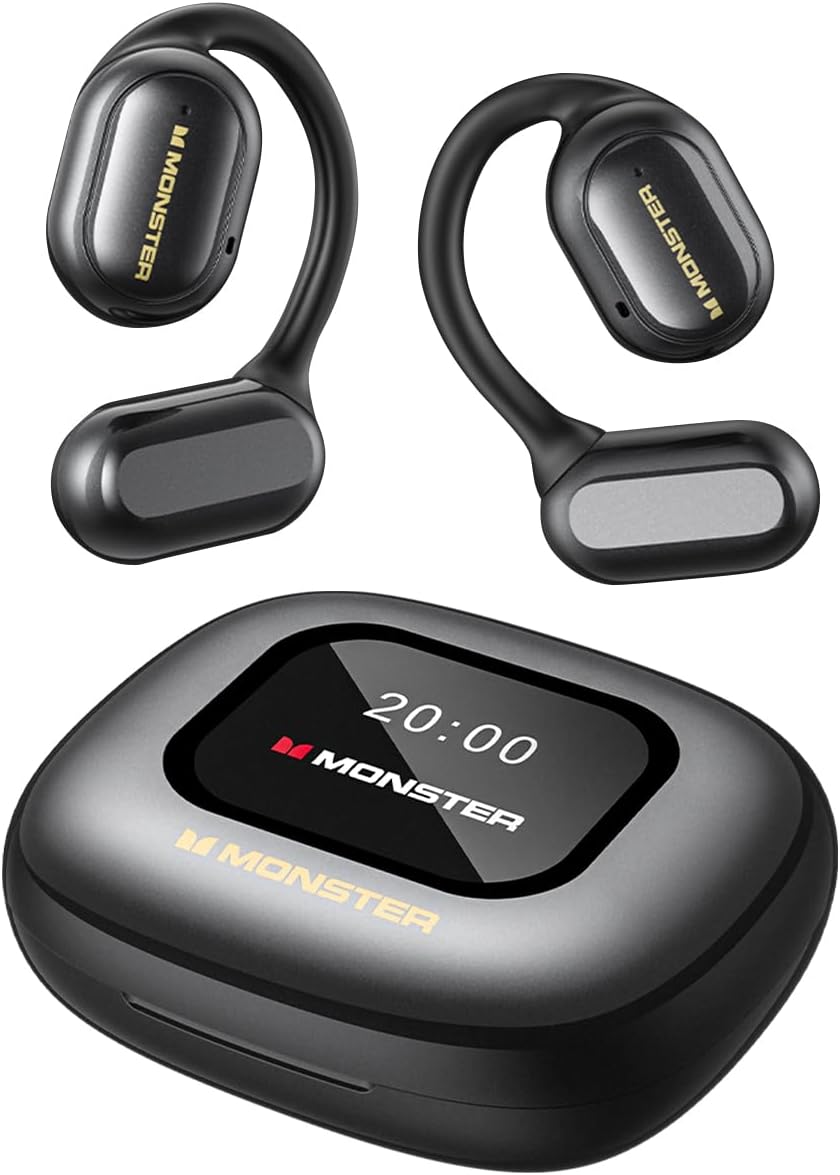
Figure 1: Monster Open Touch Pro 100 Earbuds and Charging Case
2. ബോക്സിൽ എന്താണുള്ളത്?
എല്ലാ ഇനങ്ങളും ഉണ്ടെന്ന് ഉറപ്പാക്കാൻ പാക്കേജ് ഉള്ളടക്കങ്ങൾ പരിശോധിക്കുക:
- Monster Open Touch Pro 100 Earbuds (Left and Right)
- Charging Case with Full-Color Touch Screen
- യുഎസ്ബി ചാർജിംഗ് കേബിൾ
- സംരക്ഷണ കേസ്
- ഉപയോക്തൃ മാനുവൽ
3. ഉൽപ്പന്ന സവിശേഷതകൾ
3.1. Pure Monster Sound & ENC Noise Cancellation
Experience clear and detailed audio with the high-quality 16.2mm large drivers. The ENC (Environmental Noise Cancellation) adaptive noise separation technology ensures crystal-clear conversations by intelligently adjusting to environmental changes, providing a more comfortable listening experience.

Figure 2: 16.2mm Large Driver for Clear Sound Quality

Figure 3: ENC Noise Cancellation for Crystal Clear Calls
3.2. LED Full-Color Smart Screen & Independent MP3 Mode
The multi-touch smart charging case features an LED full-color screen, allowing precise control over music playback, track switching, and volume adjustment. It also offers multiple EQ modes for a personalized listening experience. With a built-in TF card slot (TF Card NOT included), the earbuds can function independently as an MP3 player without needing a phone or network, providing convenience and freedom to enjoy music anywhere.

Figure 4: LED Full-Color Touch Screen Functions

Figure 5: TF Card Input for Independent MP3 Playback
3.3. Open-Ear Design & Comfort
The innovative open-ear design allows you to enjoy music while staying aware of your surroundings, enhancing safety alongside providing a comfortable listening experience. The ergonomic curved ear-hook design, crafted from skin-friendly silicone, ensures secure wear during activities without feeling intrusive, keeping you fresh and burden-free all day.

Figure 6: Open-Ear Design for Comfortable Wear
3.4. Bluetooth 5.4 Technology
Featuring the latest Bluetooth 5.4 technology, these wireless earbuds ensure low power consumption and low latency, while delivering faster connection speeds, longer range, and greater stability. Enjoy seamless wireless audio with minimal interruptions and reliable, high-quality sound.
3.5. All-Day Battery Life
Enjoy up to 8 hours of playback on a single charge, and extend to 30 hours with the charging case. Whether on a long trip or a busy workday, these Bluetooth earbuds ensure all-day music without worrying about power. The compact charging case provides additional battery life and is easy to carry, keeping your earbuds charged and ready.

ചിത്രം 7: എക്സ്റ്റൻഡഡ് ബാറ്ററി ലൈഫ്
3.6. IPX5 Waterproof Performance
Whether sweating during workouts or caught in light rain, the IPX5 waterproof rating effectively protects the earbuds from moisture, enhancing their durability. This allows for confident use in various conditions, ensuring uninterrupted music enjoyment at the gym, outdoors, or during daily activities. കുറിപ്പ്: ചാർജിംഗ് കേസ് വാട്ടർപ്രൂഫ് അല്ല.

Figure 8: IPX5 Waterproof Performance for Earbuds
4. സജ്ജീകരണം
4.1. ഇയർബഡുകളും കേസും ചാർജ് ചെയ്യുന്നു
Before first use, fully charge the earbuds and the charging case. Place the earbuds into the charging case. Connect the USB charging cable to the charging port on the case and plug the other end into a USB power adapter (not included). The screen on the charging case will indicate the charging status. A full charge typically takes approximately 1.5-2 hours.
4.2. പ്രാരംഭ പവർ ഓൺ
The earbuds will automatically power on when removed from the charging case. To manually power on, press and hold the touch control area on both earbuds for 3 seconds until you hear a power-on prompt.
5. പ്രവർത്തന നിർദ്ദേശങ്ങൾ
5.1. ബ്ലൂടൂത്ത് ജോടിയാക്കൽ
- ഇയർബഡുകൾ ചാർജ് ചെയ്തിട്ടുണ്ടെന്നും പവർ ഓണാണെന്നും ഉറപ്പാക്കുക.
- Open the charging case. The earbuds will enter pairing mode automatically, indicated by a flashing light on the earbuds.
- നിങ്ങളുടെ ഉപകരണത്തിൽ (സ്മാർട്ട്ഫോൺ, ടാബ്ലെറ്റ്, ലാപ്ടോപ്പ്), ബ്ലൂടൂത്ത് പ്രവർത്തനക്ഷമമാക്കി ലഭ്യമായ ഉപകരണങ്ങൾക്കായി തിരയുക.
- Select "Monster Open Touch Pro 100" from the list of devices.
- Once connected, you will hear a confirmation prompt, and the earbud lights will stop flashing.
5.2. ടച്ച് നിയന്ത്രണങ്ങൾ
വിവിധ പ്രവർത്തനങ്ങൾക്കായി ഇയർബഡുകൾ അവബോധജന്യമായ ടച്ച് നിയന്ത്രണങ്ങൾ അവതരിപ്പിക്കുന്നു:
- പ്ലേ/താൽക്കാലികമായി നിർത്തുക: Single tap on either L/R earbud.
- അടുത്ത ഗാനം: വലതുവശത്തെ ഇയർബഡിൽ രണ്ടുതവണ ടാപ്പ് ചെയ്യുക.
- മുൻ ഗാനം: ഇടതുവശത്തെ ഇയർബഡിൽ മൂന്ന് തവണ ടാപ്പ് ചെയ്യുക.
- മറുപടി കോൾ: Double tap on either L/R earbud.
- ഹാംഗ് അപ്പ് കോൾ: ഏതെങ്കിലും L/R ഇയർബഡിൽ 3 സെക്കൻഡ് പിടിക്കുക.
- വോയ്സ് അസിസ്റ്റന്റ്: ഏതെങ്കിലും L/R ഇയർബഡിൽ 2 സെക്കൻഡ് പിടിക്കുക.

ചിത്രം 9: ഇയർബഡ് ടച്ച് നിയന്ത്രണങ്ങൾ
5.3. Using the Touch Screen Case
The full-color touch screen on the charging case provides additional control and information:
- സംഗീത പ്ലേബാക്ക് നിയന്ത്രണം: Navigate through your music library, adjust volume, and switch tracks directly from the screen.
- EQ മോഡുകൾ: Select from multiple equalizer presets (e.g., Rock, Pop, Normal, Jazz, Classic) to customize your audio experience.
- ടിഎഫ് കാർഡ് മോഡ്: Insert a TF card (MicroSD card) into the dedicated slot to play music directly from the card without needing a connected device. The screen allows you to browse and control playback.
- ഭാഷാ സ്വിച്ച്: Change the display language of the case screen.
- എന്റെ ഇയർഫോൺ കണ്ടെത്തുക: Utilize this feature to locate misplaced earbuds.
- റിമോട്ട് ഷട്ടർ: Use the case screen as a remote shutter button for your smartphone camera.

Figure 10: EQ Mode Selection

Figure 11: Language Switch on Case Screen
5.4. ഉപകരണ അനുയോജ്യത
The Monster Open Touch Pro 100 earbuds are widely compatible with various devices, including smartphones (Android, iOS), tablets, laptops, desktops, and smart speakers, thanks to their advanced Bluetooth 5.4 connectivity.

ചിത്രം 12: വിശാലമായ ഉപകരണ അനുയോജ്യത
6. പരിപാലനം
6.1. വൃത്തിയാക്കൽ
- ഇയർബഡുകളും ചാർജിംഗ് കെയ്സും മൃദുവായതും ഉണങ്ങിയതും ലിന്റ് രഹിതവുമായ തുണി ഉപയോഗിച്ച് പതിവായി വൃത്തിയാക്കുക.
- അബ്രാസീവ് ക്ലീനറുകൾ, ആൽക്കഹോൾ, കെമിക്കൽ ലായകങ്ങൾ എന്നിവ ഉപയോഗിക്കരുത്.
- Gently clean the charging contacts on both the earbuds and the case to ensure proper connection.
6.2. സംഭരണം
- ഉപയോഗത്തിലില്ലാത്തപ്പോൾ, ഇയർബഡുകൾ സംരക്ഷിക്കുന്നതിനും ചാർജ്ജ് ചെയ്ത നിലയിൽ നിലനിർത്തുന്നതിനും അവ ചാർജിംഗ് കേസിൽ സൂക്ഷിക്കുക.
- തീവ്രമായ താപനിലയിൽ നിന്നും നേരിട്ടുള്ള സൂര്യപ്രകാശത്തിൽ നിന്നും അകന്ന്, തണുത്തതും വരണ്ടതുമായ സ്ഥലത്ത് ഉപകരണം സൂക്ഷിക്കുക.
7. പ്രശ്നപരിഹാരം
| പ്രശ്നം | സാധ്യമായ കാരണം | പരിഹാരം |
|---|---|---|
| ഇയർബഡുകൾ ജോടിയാക്കുന്നില്ല | Low battery; Out of range; Not in pairing mode; Previous connection issue. | Charge earbuds and case. Ensure earbuds are close to the device. Put earbuds back in case, close, then reopen to re-enter pairing mode. Forget device on your phone's Bluetooth settings and re-pair. |
| ശബ്ദമോ കുറഞ്ഞ വോളിയമോ ഇല്ല | Volume too low; Earbuds not properly seated; Device volume low. | Adjust volume on both earbuds and connected device. Ensure earbuds are correctly placed in ears. Check audio output settings on your device. |
| ചാർജിംഗ് കേസ് സ്ക്രീൻ പ്രതികരിക്കുന്നില്ല | സോഫ്റ്റ്വെയർ തകരാർ; ബാറ്ററി കുറവാണ്. | Connect the charging case to power. If unresponsive, try holding the power button (if available) or allowing it to fully discharge and then recharge. |
| TF card music not playing | TF card not inserted correctly; Incompatible file format; TF card not recognized. | Ensure TF card is fully inserted. Check if music files are in a supported format (e.g., MP3, WAV). Try reformatting the TF card (backup data first) or using a different TF card. |
8 സ്പെസിഫിക്കേഷനുകൾ
| ഫീച്ചർ | വിശദാംശങ്ങൾ |
|---|---|
| മോഡലിൻ്റെ പേര് | Open Touch Pro100 |
| ബ്രാൻഡ് | രാക്ഷസൻ |
| ചെവി പ്ലേസ്മെൻ്റ് | തുറന്ന ചെവി |
| കണക്റ്റിവിറ്റി ടെക്നോളജി | വയർലെസ്സ് (ബ്ലൂടൂത്ത് 5.4) |
| ഡ്രൈവർ വലിപ്പം | 16.2 മി.മീ |
| നോയ്സ് റദ്ദാക്കൽ | ENC Clear Talk |
| നിയന്ത്രണ തരം | Touch Control (Earbuds), Touch Screen (Case) |
| ബാറ്ററി ലൈഫ് (ഇയർബഡുകൾ) | ഓരോ ചാർജിനും 8 മണിക്കൂർ വരെ |
| ആകെ പ്ലേബാക്ക് സമയം | ചാർജിംഗ് കേസ് ഉപയോഗിച്ച് 30 മണിക്കൂർ വരെ ഉപയോഗിക്കാം |
| വാട്ടർ റെസിസ്റ്റൻസ് റേറ്റിംഗ് | IPX5 (ഇയർബഡുകൾ മാത്രം) |
| TF കാർഡ് പിന്തുണ | Yes (for independent MP3 mode, TF card not included) |
| മെറ്റീരിയൽ | Silicone (ear-hooks) |
| ഇനത്തിൻ്റെ ഭാരം | 6.4 ഔൺസ് |
| അനുയോജ്യമായ ഉപകരണങ്ങൾ | സ്മാർട്ട്ഫോണുകൾ, ടാബ്ലെറ്റുകൾ, ലാപ്ടോപ്പുകൾ, ഡെസ്ക്ടോപ്പുകൾ, സ്മാർട്ട് സ്പീക്കറുകൾ |
9. വാറൻ്റിയും പിന്തുണയും
വാറന്റി വിവരങ്ങൾക്കും ഉപഭോക്തൃ പിന്തുണയ്ക്കും, ദയവായി നിങ്ങളുടെ ഉൽപ്പന്ന പാക്കേജിംഗിൽ ഉൾപ്പെടുത്തിയിരിക്കുന്ന വാറന്റി കാർഡ് പരിശോധിക്കുകയോ ഔദ്യോഗിക മോൺസ്റ്റർ സന്ദർശിക്കുകയോ ചെയ്യുക. webസൈറ്റ്. സഹായത്തിനായി നിങ്ങളുടെ വാങ്ങൽ പ്ലാറ്റ്ഫോം വഴി വിൽപ്പനക്കാരനെ നേരിട്ട് ബന്ധപ്പെടാനും കഴിയും.
ഉൽപ്പന്നം കഴിഞ്ഞുview വീഡിയോ
ഈ വീഡിയോ ഒരു സമഗ്രമായ ഓവർ നൽകുന്നുview of the Monster Open Touch Pro 100 Earbuds, highlighting their key features, design, and functionality. It demonstrates the touchscreen controls, open-ear design, and various usage scenarios.
Ask a question about this manual
Ask about setup, troubleshooting, compatibility, parts, safety, or missing instructions. Manuals+ will review the question and use this page’s manual context to help answer it.