
1 പ്രധാനപ്പെട്ട സുരക്ഷാ വിവരങ്ങൾ
Before using the ZIPRO One S Exercise Bike, please read and understand all instructions in this manual. Keep this manual for future reference. Failure to follow these instructions may result in injury or damage to the product.
- ഏതെങ്കിലും വ്യായാമ പരിപാടി ആരംഭിക്കുന്നതിന് മുമ്പ് നിങ്ങളുടെ ഡോക്ടറെ സമീപിക്കുക.
- ഓരോ ഉപയോഗത്തിനും മുമ്പ് എല്ലാ ഭാഗങ്ങളും ശരിയായി കൂട്ടിച്ചേർക്കുകയും മുറുക്കുകയും ചെയ്തിട്ടുണ്ടെന്ന് ഉറപ്പാക്കുക.
- വ്യായാമ ബൈക്ക് പരന്നതും സ്ഥിരതയുള്ളതുമായ ഒരു പ്രതലത്തിൽ വയ്ക്കുക.
- ഉപയോഗ സമയത്ത് ഉപകരണങ്ങളിൽ നിന്ന് കുട്ടികളെയും വളർത്തുമൃഗങ്ങളെയും അകറ്റി നിർത്തുക.
- പരമാവധി ഉപയോക്തൃ ഭാരം കവിയരുത് 110 കി.ഗ്രാം (242 പൗണ്ട്).
- വ്യായാമത്തിന് അനുയോജ്യമായ വസ്ത്രങ്ങളും പാദരക്ഷകളും ധരിക്കുക.
- നിങ്ങൾക്ക് ക്ഷീണം, തലകറക്കം, അല്ലെങ്കിൽ വേദന അനുഭവപ്പെടുകയാണെങ്കിൽ ഉടൻ വ്യായാമം നിർത്തുക.
2. ഉൽപ്പന്നം കഴിഞ്ഞുview
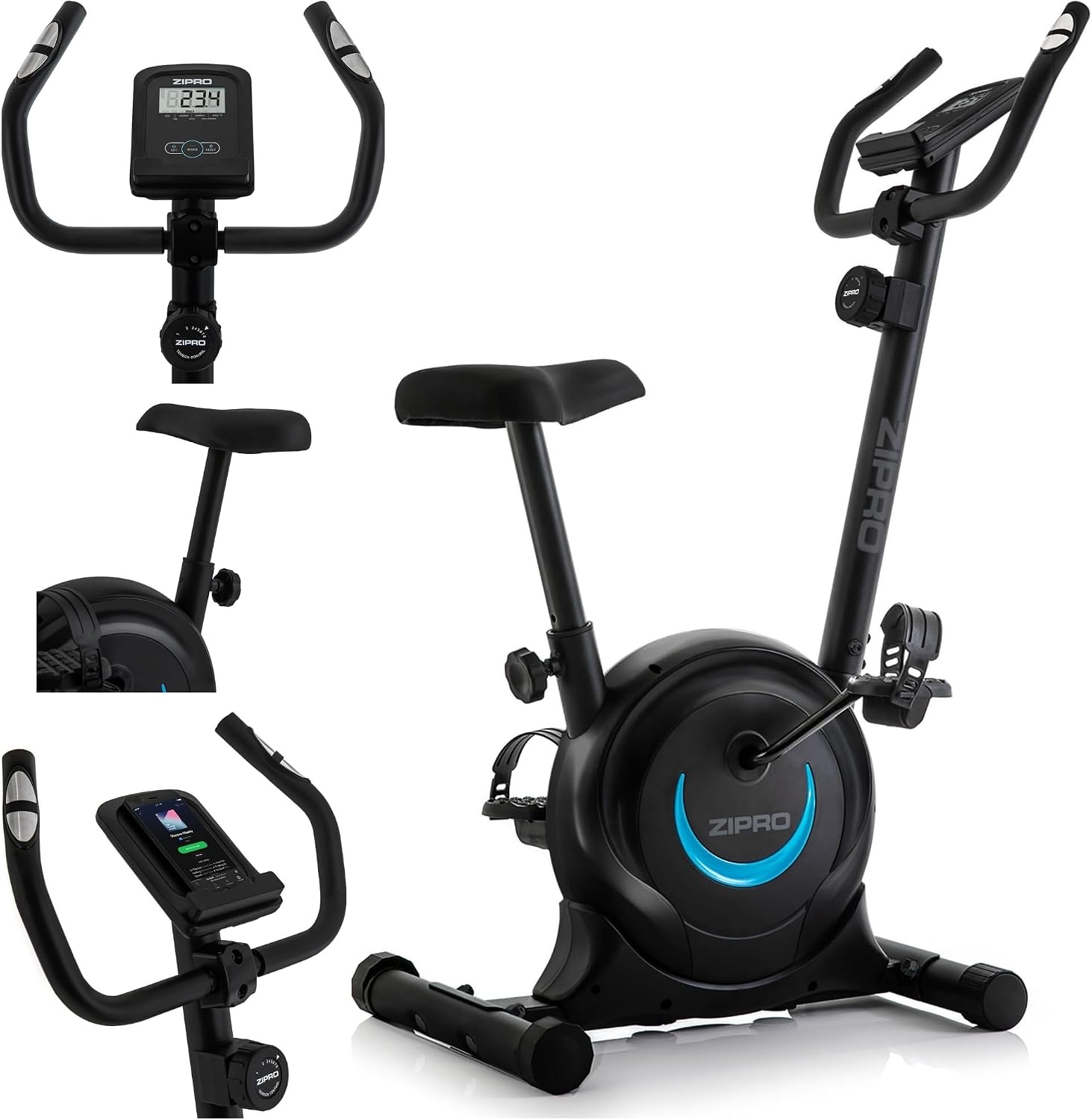
The ZIPRO One S is a compact and portable exercise bike designed for home cardio training. It features a silent magnetic resistance system, an LCD display for tracking workout data, and an adjustable saddle for ergonomic comfort.

Image: The ZIPRO One S Exercise Bike shown in a living room setting, highlighting its compact dimensions of 897mm (length) x 435mm (width) x 1100mm (height).
പ്രധാന സവിശേഷതകൾ:
- 8-ലെവൽ കാന്തിക പ്രതിരോധം: Manually adjustable for varied workout intensity.
- LCD ഡിസ്പ്ലേ: Tracks time, distance, calories burned, and pulse.
- Adjustable Saddle: Height adjustable from 65-80 cm (from floor) and 55-75 cm (from pedals) for optimal user comfort.
- സ്മാർട്ട്ഫോൺ ഹോൾഡർ: Integrated into the console for convenience during workouts.
- കോംപാക്റ്റ് ഡിസൈൻ: Ideal for small spaces, with integrated transport wheels for easy relocation.
- നിശബ്ദ പ്രവർത്തനം: Magnetic resistance mechanism ensures quiet workouts.
- ദൃഢമായ നിർമ്മാണം: Made from metal, plastic, and polyethylene with alloy steel handlebars.
3. സജ്ജീകരണവും അസംബ്ലിയും
The ZIPRO One S Exercise Bike is designed for straightforward assembly, typically taking 30-40 minutes. All necessary tools are included.
അസംബ്ലി ഘട്ടങ്ങൾ:
- Assemble the Front and Rear Supports: Attach the stabilizer bars to the main frame using the provided bolts and washers. Ensure they are securely fastened.
- Assemble the Handlebar Telescope: Insert the handlebar post into the main frame. Adjust to the desired height and secure with the adjustment knob.
- Assemble the Handlebar: Attach the handlebar assembly to the handlebar post. Connect any necessary sensor cables for the display.
- Assemble the Saddle: Mount the saddle onto the seat post. Insert the seat post into the main frame and adjust its height and position, then secure it.
- Assemble the Pedals: Attach the right pedal (marked 'R') to the right crank arm and the left pedal (marked 'L') to the left crank arm. Note that the left pedal has a reverse thread. Tighten firmly.
ചിത്രം: പൊട്ടിത്തെറിച്ച ഒരു view showing various components of the ZIPRO One S Exercise Bike, including the display, saddle, and phone holder, illustrating parts for assembly.
സാഡിൽ ക്രമീകരണം:
The saddle height can be adjusted to ensure an ergonomic and comfortable riding position. Loosen the adjustment knob below the saddle, move the saddle to the desired height, and then firmly tighten the knob.
- Saddle height from floor: 65 സെ.മീ മുതൽ 80 സെ.മീ
- Saddle height from pedals: 55 സെ.മീ മുതൽ 75 സെ.മീ

Image: A user demonstrating the saddle height adjustment on the ZIPRO One S Exercise Bike, with arrows indicating the adjustable range.
4. പ്രവർത്തന നിർദ്ദേശങ്ങൾ
പ്രതിരോധ ക്രമീകരണം:
The ZIPRO One S features 8 levels of magnetic resistance. To adjust the resistance, turn the tension control knob located below the handlebars. Turn clockwise for higher resistance and counter-clockwise for lower resistance.

ചിത്രം: ഒരു ക്ലോസ്-അപ്പ് view of the manual tension control knob on the ZIPRO One S Exercise Bike, showing the 8 resistance levels.
എൽസിഡി ഡിസ്പ്ലേ ഉപയോഗിക്കുന്നു:
The integrated LCD display provides real-time feedback on your workout. It typically requires 2x AAA batteries (not included).

ചിത്രം: വിശദമായ ഒരു ചിത്രം view of the LCD display and handlebars, showing the display interface and pulse sensors.
- മോഡ് ബട്ടൺ: Press to cycle through different display functions: Time, Distance, Calories, Pulse, Speed.
- SCAN Function: When 'SCAN' is active, the display will automatically cycle through all functions every few seconds, allowing hands-free monitoring.
- റീസെറ്റ് ബട്ടൺ: Press and hold to clear all workout data.
- SET ബട്ടൺ: Used to set target values for time, distance, or calories. An alarm will sound when the target is reached.
- പൾസ് സെൻസറുകൾ: Grip the sensors on the handlebars to measure your heart rate. Your pulse will be displayed on the LCD screen.

Image: A diagram illustrating the various functions of the LCD display, including heart rate monitoring, battery requirement, and tracked metrics like time, distance, calories, and speed.
Using the Smartphone Holder:
A dedicated holder is integrated into the console, allowing you to place your smartphone or tablet for entertainment or tracking during your workout.

Image: A close-up of the integrated smartphone holder on the exercise bike's console, with a phone placed in it.
5. പരിപാലനം
Regular maintenance ensures the longevity and safe operation of your ZIPRO One S Exercise Bike.
- വൃത്തിയാക്കൽ: പരസ്യം ഉപയോഗിച്ച് ബൈക്ക് തുടയ്ക്കുകamp ഓരോ ഉപയോഗത്തിനു ശേഷവും വിയർപ്പും പൊടിയും നീക്കം ചെയ്യാൻ തുണി ഉപയോഗിക്കുക. അബ്രാസീവ് ക്ലീനറുകൾ ഉപയോഗിക്കരുത്.
- കണക്ഷനുകൾ പരിശോധിക്കുക: Periodically check all bolts, nuts, and moving parts to ensure they are securely tightened. Tighten if necessary.
- ലൂബ്രിക്കേഷൻ: The magnetic resistance system is generally maintenance-free. If you notice any squeaking from moving parts (e.g., pedals), apply a small amount of silicone-based lubricant.
- സംഭരണം: Store the bike in a dry, cool place away from direct sunlight and moisture. Use the integrated transport wheels to move the bike easily.

Image: A woman demonstrating the ease of moving the ZIPRO One S Exercise Bike using its integrated transport wheels, highlighting its space-saving feature.
6. പ്രശ്നപരിഹാരം
If you encounter any issues with your ZIPRO One S Exercise Bike, refer to the following common solutions:
| പ്രശ്നം | സാധ്യമായ കാരണം | പരിഹാരം |
|---|---|---|
| LCD ഡിസ്പ്ലേ പ്രവർത്തിക്കുന്നില്ല | ഡെഡ് ബാറ്ററികൾ, അയഞ്ഞ കണക്ഷൻ | Replace AAA batteries. Check cable connections to the display. |
| No resistance or inconsistent resistance | Resistance cable disconnected or damaged, internal mechanism issue | Check if the resistance cable is properly connected. Ensure the tension knob is functioning. If the problem persists, contact customer support. |
| ഞരക്കുകയോ പൊടിക്കുകയോ ചെയ്യുന്ന ശബ്ദം | Loose parts, lack of lubrication, internal friction | Check and tighten all bolts and nuts. Apply silicone lubricant to moving parts if accessible. |
| ഉപയോഗ സമയത്ത് അസ്ഥിരമാണ് | Uneven floor, loose stabilizer feet | Ensure the bike is on a flat surface. Adjust the leveling feet on the stabilizer bars to eliminate wobbling. |
If these solutions do not resolve the issue, please contact ZIPRO customer support.
7 സ്പെസിഫിക്കേഷനുകൾ
| സ്പെസിഫിക്കേഷൻ | വിശദാംശങ്ങൾ |
|---|---|
| ബ്രാൻഡ് | ZIPRO |
| മോഡലിൻ്റെ പേര് | ഒന്ന് എസ് |
| മോഡൽ നമ്പർ | 5304084 |
| നിറം | കറുപ്പ്-നീല |
| പ്രതിരോധ സംവിധാനം | കാന്തിക |
| പ്രതിരോധ നിലകളുടെ എണ്ണം | 8 |
| ഡ്രൈവ് സിസ്റ്റം | ബെൽറ്റ് |
| പവർ ഉറവിടം | Pedal powered (non-electric) |
| മെറ്റീരിയൽ | Metal, Plastic, Polyethylene (Handle: Alloy Steel) |
| ഇനത്തിൻ്റെ ഭാരം | 16.5 കിലോഗ്രാം (16500 ഗ്രാം) |
| ശുപാർശ ചെയ്യുന്ന പരമാവധി ഭാരം | 110 കിലോഗ്രാം (110000 ഗ്രാം) |
| ഉൽപ്പന്ന അളവുകൾ (L x W x H) | 89.7 സെ.മീ x 43.5 സെ.മീ x 110 സെ.മീ |
| Saddle Height (Min/Max from floor) | 650 mm / 800 mm |
| ശുപാർശ ചെയ്യുന്ന ഉപയോഗം | ഇൻഡോർ |

ചിത്രം: ഒരു സൈഡ് പ്രോfile of the ZIPRO One S Exercise Bike, clearly indicating its height (110 cm) and length (89 cm).
8. വാറൻ്റിയും പിന്തുണയും
വാറൻ്റി വിവരങ്ങൾ:
The ZIPRO One S Exercise Bike comes with a 2 വർഷത്തെ നിർമ്മാതാവിൻ്റെ വാറൻ്റി. സാധാരണ ഉപയോഗത്തിലുള്ള മെറ്റീരിയലുകളിലെയും നിർമ്മാണത്തിലെയും വൈകല്യങ്ങൾ ഈ വാറന്റി ഉൾക്കൊള്ളുന്നു. വാറന്റി ക്ലെയിമുകൾക്കായി നിങ്ങളുടെ വാങ്ങലിന്റെ തെളിവ് സൂക്ഷിക്കുക.
ഉപഭോക്തൃ പിന്തുണ:
For any questions, technical assistance, or warranty claims, please contact ZIPRO customer support through their official website or the retailer where the product was purchased. Please have your model number (One S) and proof of purchase ready when contacting support.
ഓൺലൈൻ പിന്തുണ: Visit the official ZIPRO webപതിവുചോദ്യങ്ങൾ, ഉൽപ്പന്ന രജിസ്ട്രേഷൻ, കോൺടാക്റ്റ് ഫോമുകൾ എന്നിവയ്ക്കുള്ള സൈറ്റ്.
ഇമെയിൽ പിന്തുണ: Refer to your purchase documentation for specific email contact information.