
BUGANI BUGANI B09
BUGANI True Wireless Earbuds User Manual
Model: BUGANI B09
1. ആമുഖം
Thank you for choosing BUGANI True Wireless Earbuds. This manual provides detailed instructions on how to set up, operate, and maintain your earbuds to ensure optimal performance and longevity. Please read this manual thoroughly before using the product.
2. പാക്കേജ് ഉള്ളടക്കം
എല്ലാ ഇനങ്ങളും ഉണ്ടെന്ന് ഉറപ്പാക്കാൻ പാക്കേജ് ഉള്ളടക്കങ്ങൾ പരിശോധിക്കുക:
- 1 x BUGANI B09 Wireless Earbuds
- 1 x ചാർജിംഗ് കേസ്
- 3 x Different Sizes of Eartips (S, M, L)
- 3 x Different Sizes of Silicone Earwings (S, M, L)
- 1 x യുഎസ്ബി-സി ചാർജിംഗ് കേബിൾ
- 1 x ഉപയോക്തൃ മാനുവൽ
3. ഉൽപ്പന്നം കഴിഞ്ഞുview
The BUGANI B09 True Wireless Earbuds are designed for comfort and high-quality audio, featuring deep bass and ENC noise cancellation for clear calls. The compact charging case provides extended playtime.
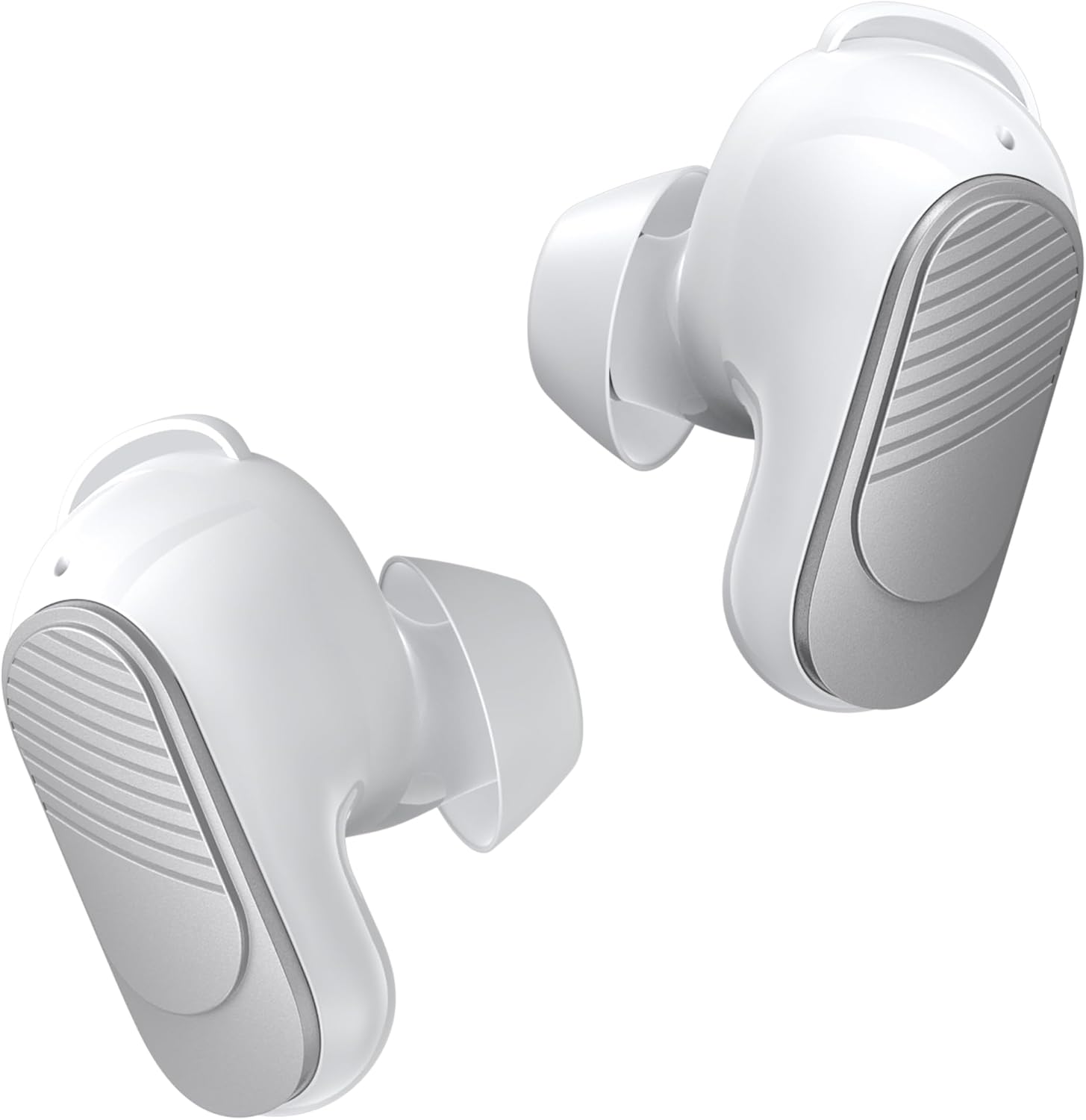
Figure 3.1: BUGANI True Wireless Earbuds (White)

Figure 3.2: Earbuds placed in their charging case with the lid open.
4. ഇയർബഡുകൾ ധരിക്കുന്നു
For optimal sound quality and comfort, it is important to choose the correct ear tips and earwings and wear the earbuds properly.
- Select the Right Fit: Experiment with the three different sizes of eartips (S, M, L) and silicone earwings (S, M, L) included in the package. A snug fit ensures better sound isolation and bass response.
- ഇയർബഡുകൾ ഇടുക: Gently insert the earbuds into your ear canal. Rotate them slightly until they feel secure and comfortable. The earwings should fit into the concha of your ear to provide stability.

Figure 4.1: Proper placement of the earbuds for a secure and comfortable fit.

Figure 4.2: Included eartips and earwings for customizable comfort.
5. ഇയർബഡുകളും കേസും ചാർജ് ചെയ്യുന്നു
Ensure your earbuds and charging case are fully charged before first use.
- ഇയർബഡുകൾ ചാർജ് ചെയ്യുന്നു: Place the earbuds into the charging case. The earbuds will automatically begin charging.
- കേസ് ചാർജ് ചെയ്യുന്നത്: Connect the USB-C charging cable to the charging port on the case and to a power source. The indicator lights on the case will show the charging status.
- ബാറ്ററി ലൈഫ്: A single charge provides up to 6 hours of playtime. The charging case provides an additional 3 charges, extending total playtime to approximately 24 hours. A full charge for the case takes about 1.5 hours.

Figure 5.1: Earbuds in charging case, illustrating the 24-hour total playtime.

Figure 5.2: Visual representation of battery life: 6 hours per single charge, 24 hours with charging case, 1.5 hours for full case charge.
6. ബ്ലൂടൂത്ത് ജോടിയാക്കൽ
സ്ഥിരവും കാര്യക്ഷമവുമായ കണക്ഷനായി ഇയർബഡുകൾ ബ്ലൂടൂത്ത് 5.3 ഉപയോഗിക്കുന്നു.
- ഒരു-ഘട്ട ജോടിയാക്കൽ: Open the charging case, and the earbuds will automatically enter pairing mode.
- ഉപകരണത്തിലേക്ക് കണക്റ്റുചെയ്യുക: On your device (smartphone, tablet, laptop), enable Bluetooth and search for "BUGANI B09" in the list of available devices. Select it to connect.
- യാന്ത്രിക പുനഃസംയോജനം: Once paired, the earbuds will automatically reconnect to the last paired device when taken out of the charging case.

Figure 6.1: Illustrates the one-step pairing process and wide compatibility with various Bluetooth-enabled devices.
7. പ്രവർത്തന നിർദ്ദേശങ്ങൾ (ടച്ച് നിയന്ത്രണങ്ങൾ)
The BUGANI B09 earbuds feature intuitive touch controls on each earbud. Refer to the diagram below for specific functions:

Figure 7.1: Detailed diagram of touch control functions for the BUGANI B09 earbuds.
സംഗീത പ്ലേബാക്ക്:
- പ്ലേ/താൽക്കാലികമായി നിർത്തുക: Single touch on either L/R earbud.
- മുൻ ഗാനം: Double touch on the Left earbud.
- അടുത്ത ഗാനം: Double touch on the Right earbud.
- വോളിയം കൂട്ടുക: Triple touch on the Left earbud.
- വോളിയം താഴേക്ക്: Triple touch on the Right earbud.
കോൾ മാനേജ്മെൻ്റ്:
- മറുപടി കോൾ: Single touch on either L/R earbud.
- ഹാംഗ് അപ്പ് കോൾ: Single touch on either L/R earbud during a call.
- കോൾ നിരസിക്കുക: Double touch on either L/R earbud.
മറ്റ് പ്രവർത്തനങ്ങൾ:
- പവർ ഓൺ: L/R ഇയർബഡ് 3 സെക്കൻഡ് ദീർഘനേരം അമർത്തുക.
- പവർ ഓഫ്: L/R ഇയർബഡ് 5 സെക്കൻഡ് ദീർഘനേരം അമർത്തുക.
- വോയ്സ് അസിസ്റ്റന്റ്: L/R ഇയർബഡ് 2 സെക്കൻഡ് ദീർഘനേരം അമർത്തുക.
- പുന et സജ്ജമാക്കുക: Five quick touches on either L/R earbud.
8. Sound Quality and Call Performance
The BUGANI B09 earbuds are engineered to deliver an immersive audio experience and crystal-clear calls.
- ആഴത്തിലുള്ള ശബ്ദം: Equipped with oversized 10mm dynamic drivers, these earbuds produce powerful sound with enhanced bass and clear mids, providing a rich listening experience for music, movies, and games.
- ENC Noise Cancelling Calls: Featuring a BUGANI intelligent noise reduction algorithm and built-in dual microphones, the earbuds accurately pick up your voice while effectively blocking out background noise, ensuring clear communication during calls and video chats.

Figure 8.1: Diagram illustrating the internal components responsible for distortion-free sound.

Figure 8.2: Demonstrates the crystal-clear call quality provided by the dual-mic noise cancellation.
9. ജല പ്രതിരോധം (IPX6)
The BUGANI B09 earbuds are rated IPX6 water-resistant, protecting them from sweat, splashes, and light rain. This makes them suitable for workouts and outdoor activities.
പ്രധാനപ്പെട്ടത്: ഇയർബഡുകൾ വെള്ളത്തിൽ മുക്കരുത്.

Figure 9.1: Earbuds are designed to withstand sweat and splashes during physical activity.

Figure 9.2: Visual representation of the earbuds' water resistance.
10. പരിപാലനവും പരിചരണവും
ശരിയായ പരിചരണം നിങ്ങളുടെ ഇയർബഡുകളുടെ ആയുസ്സ് വർദ്ധിപ്പിക്കും.
- വൃത്തിയാക്കൽ: ഇയർബഡുകളും ചാർജിംഗ് കെയ്സും മൃദുവായതും ഉണങ്ങിയതും ലിന്റ് രഹിതവുമായ തുണി ഉപയോഗിച്ച് പതിവായി വൃത്തിയാക്കുക. അബ്രാസീവ് ക്ലീനറുകളോ ലായകങ്ങളോ ഉപയോഗിക്കരുത്.
- ചെവി ടിപ്പുകൾ: Remove and clean the ear tips periodically with mild soap and water. Ensure they are completely dry before reattaching.
- സംഭരണം: ഉപയോഗത്തിലില്ലാത്തപ്പോൾ, പൊടിയിൽ നിന്നും കേടുപാടുകളിൽ നിന്നും സംരക്ഷിക്കാൻ ഇയർബഡുകൾ അവയുടെ ചാർജിംഗ് കേസിൽ സൂക്ഷിക്കുക.
- താപനില: ഇയർബഡുകൾ കടുത്ത താപനിലയിലോ (ചൂടോ തണുപ്പോ) ഉയർന്ന ആർദ്രതയിലോ തുറന്നുകാട്ടുന്നത് ഒഴിവാക്കുക.
11. പ്രശ്നപരിഹാരം
നിങ്ങളുടെ ഇയർബഡുകളിൽ പ്രശ്നങ്ങൾ നേരിടുകയാണെങ്കിൽ, ഇനിപ്പറയുന്ന പരിഹാരങ്ങൾ പരീക്ഷിക്കുക:
| പ്രശ്നം | പരിഹാരം |
|---|---|
| ഇയർബഡുകൾ ജോടിയാക്കുന്നില്ല |
|
| ഒരു ഇയർബഡിൽ നിന്ന് ശബ്ദമില്ല |
|
| ചാർജിംഗ് കേസ് ചാർജുചെയ്യുന്നില്ല |
|
| മോശം കോൾ നിലവാരം |
|
12 സ്പെസിഫിക്കേഷനുകൾ
| ഫീച്ചർ | വിശദാംശങ്ങൾ |
|---|---|
| മോഡലിൻ്റെ പേര് | BUGANI B09 |
| കണക്റ്റിവിറ്റി ടെക്നോളജി | വയർലെസ് (ബ്ലൂടൂത്ത്) |
| ബ്ലൂടൂത്ത് പതിപ്പ് | 5.3 |
| ചെവി പ്ലേസ്മെൻ്റ് | ചെവിയിൽ |
| നിയന്ത്രണ തരം | ടച്ച് നിയന്ത്രണം |
| ബാറ്ററി ലൈഫ് (ഇയർബഡുകൾ) | 6 മണിക്കൂർ വരെ |
| ആകെ പ്ലേടൈം (കേസിനൊപ്പം) | 24 മണിക്കൂർ വരെ |
| ഓഡിയോ ഡ്രൈവർ തരം | ഡൈനാമിക് ഡ്രൈവർ (10mm) |
| നോയ്സ് റദ്ദാക്കൽ | കോളുകൾക്കുള്ള ENC (പരിസ്ഥിതി ശബ്ദ റദ്ദാക്കൽ) |
| ജല പ്രതിരോധ നില | IPX6 |
| ഫ്രീക്വൻസി റേഞ്ച് | 20 ഹെർട്സ് - 20,000 ഹെർട്സ് |
| മെറ്റീരിയൽ | പ്ലാസ്റ്റിക് |
| ഇനത്തിൻ്റെ ഭാരം | 3.84 ഔൺസ് |
| നിർമ്മാതാവ് | ബുഗാനി |
13. വാറൻ്റിയും പിന്തുണയും
BUGANI products are designed and manufactured to the highest quality standards. For warranty information and technical support, please refer to the warranty card included in your package or visit the official BUGANI webസൈറ്റ്. വാങ്ങിയതിന്റെ തെളിവായി നിങ്ങളുടെ വാങ്ങൽ രസീത് സൂക്ഷിക്കുക.
For further assistance, please contact BUGANI customer service.
Ask a question about this manual
Ask about setup, troubleshooting, compatibility, parts, safety, or missing instructions. Manuals+ will review the question and use this page’s manual context to help answer it.