
1. ആമുഖം
Welcome to the user manual for your new SVITOO P10 Android 16 Tablet. This guide provides detailed instructions on how to set up, operate, and maintain your device, ensuring you get the most out of its advanced features. Please read this manual carefully before using your tablet.
2. ഉൽപ്പന്നം കഴിഞ്ഞുview
The SVITOO P10 is a high-performance Android 16 tablet designed for both entertainment and productivity. It features a vibrant 10.1-inch IPS display, a powerful 8-core processor, and extensive storage options.
പ്രധാന സവിശേഷതകൾ:
- ഓപ്പറേറ്റിംഗ് സിസ്റ്റം: Latest Android 16 with enhanced customization, privacy protection, and user assistance.
- പ്രോസസ്സർ: UNISOC T615 8-core CPU (1.8GHz) for fast and smooth multitasking.
- മെമ്മറിയും സംഭരണവും: Up to 20GB RAM (4GB + 16GB expansion) and 128GB internal storage, expandable up to 1TB via microSD card.
- ഡിസ്പ്ലേ: 10.1-inch IPS in-cell display with 1280x800 resolution, 6mm narrow bezels, and a 16:10 aspect ratio for vivid visuals and wide viewകോണുകൾ.
- സ്ട്രീമിംഗ്: Widevine L1 support for 1080P HD streaming on platforms like YouTube, Netflix, Amazon Prime Video, Disney+, and Hulu.
- നാവിഗേഷൻ: Built-in GPS positioning system, ideal for maps and in-car navigation.
- ക്യാമറകൾ: 8MP main camera with autofocus and AI sub-camera, 2MP front camera for video calls and online classes.
- കണക്റ്റിവിറ്റി: 2.4G/5G Wi-Fi (IEEE 802.11b/g/n/ac) and Bluetooth 5.0 for stable and high-speed connections.
- ബാറ്ററി: Large-capacity 6600mAh battery for extended usage.
- അധിക സവിശേഷതകൾ: Multi-screen connection, split-screen, floating window, wireless projection, face recognition unlock, and parental control functions.
ഉൽപ്പന്ന ചിത്രങ്ങൾ:
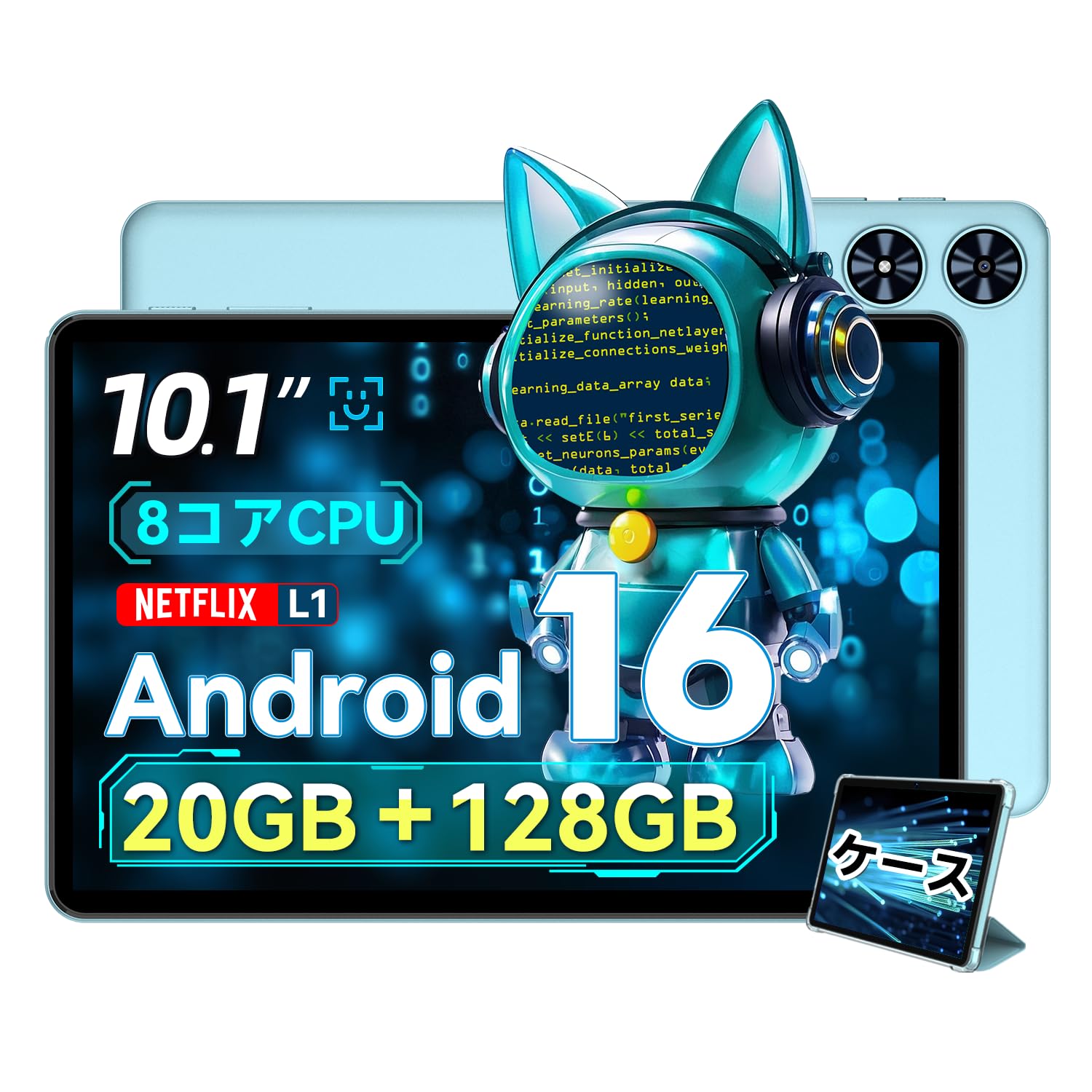
ചിത്രം 2.1: മുൻഭാഗം view of the SVITOO P10 tablet, showcasing യുടെ 10.1 ഇഞ്ച് ഡിസ്പ്ലേ.

Figure 2.2: The SVITOO P10 tablet with on-screen graphics highlighting its 10.1-inch display, Android 16 OS, Bluetooth 5.0, 128GB storage, 20GB RAM expansion, 2.4G/5G Wi-Fi, 6600mAh battery, and Widevine L1 support.
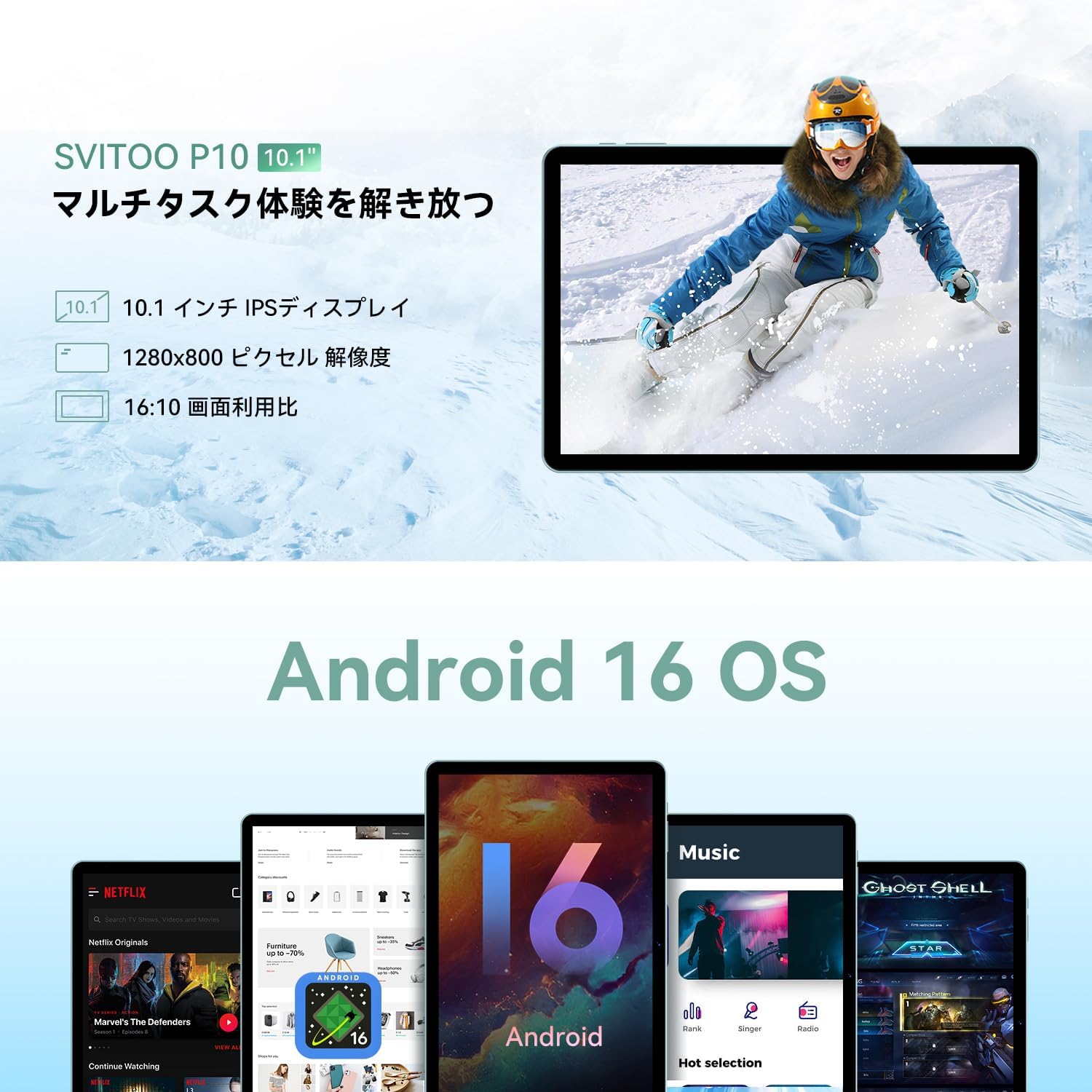
Figure 2.3: The SVITOO P10 tablet displaying a vibrant image, emphasizing its 10.1-inch IPS display, 1280x800 pixel resolution, and 16:10 aspect ratio.

Figure 2.4: Internal components of the SVITOO P10, illustrating the 20GB RAM (4GB + 16GB expandable), 128GB ROM, 1TB microSD card support, and the efficient 8-core CPU (UNISOC T7250 shown in diagram, actual is T615).
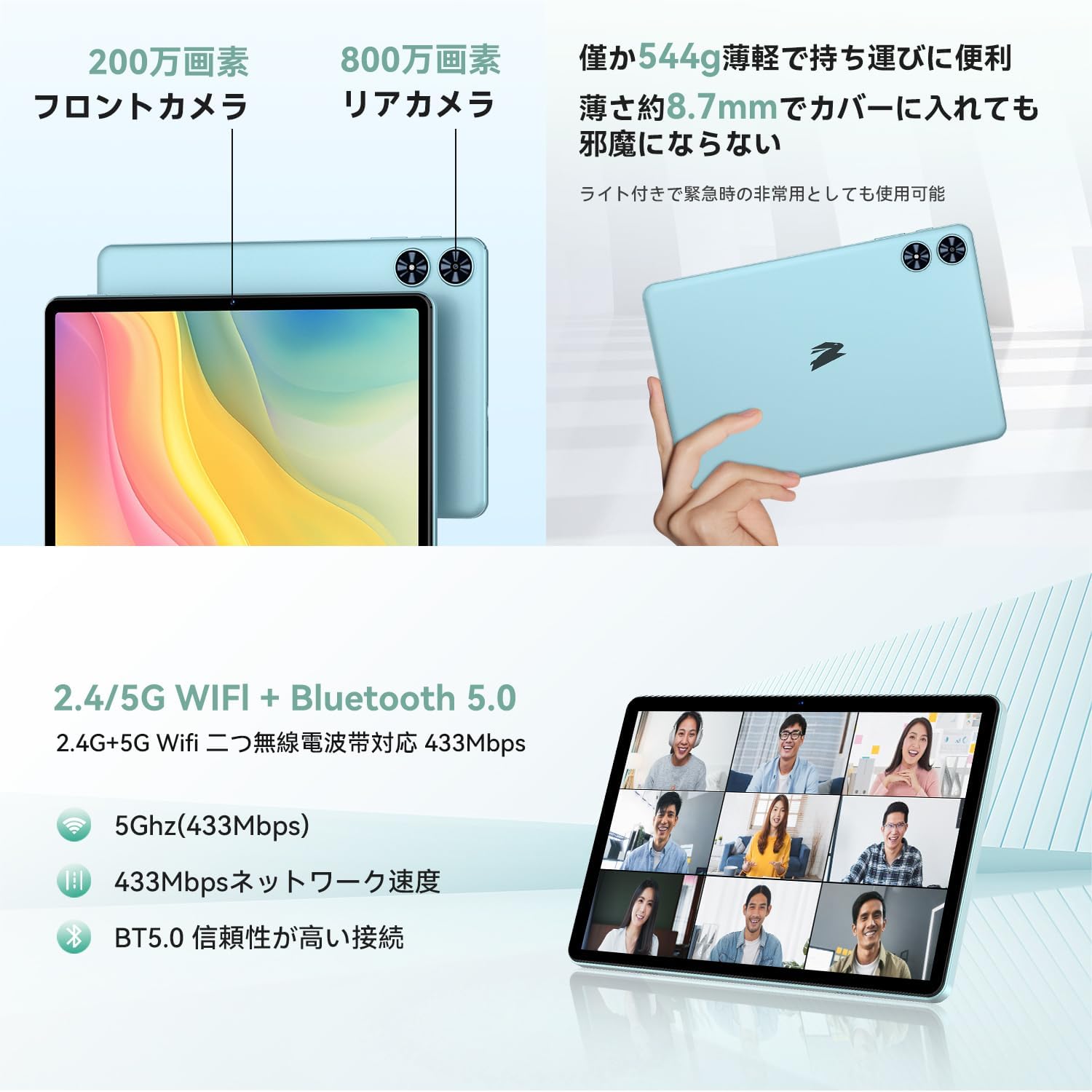
ചിത്രം 2.5: പിന്നിലും മുന്നിലും views of the SVITOO P10 tablet, highlighting the 2MP front camera, 8MP rear camera, 2.4G/5G WiFi, and Bluetooth 5.0. An example of a video conference is shown on the screen.

Figure 2.6: Demonstrates the SVITOO P10's software capabilities, including convenient multi-window, wireless projection, face recognition unlock, and eye protection screen modes (reading mode, blue light reduction).
ഉൽപ്പന്ന വീഡിയോകൾ:
Video 2.1: This video demonstrates how the Android 16 OS on the SVITOO P10 tablet enhances both entertainment and work tasks, showcasing its smooth performance and user-friendly interface.
3. സജ്ജീകരണം
3.1. അൺബോക്സിംഗും പ്രാരംഭ പരിശോധനയും
Upon receiving your SVITOO P10 tablet, carefully open the package and ensure all components are present:
- SVITOO P10 Tablet
- USB-C ചാർജിംഗ് കേബിൾ
- പവർ അഡാപ്റ്റർ
- USB-C മുതൽ 3.5mm ഓഡിയോ അഡാപ്റ്റർ വരെ
- ഉപയോക്തൃ മാനുവൽ
- SIM Ejector Pin (for microSD card slot)
Inspect the tablet for any physical damage. The screen comes with a pre-applied protective film.
3.2. പവർ ഓൺ/ഓഫ്
- പവർ ഓണാക്കാൻ: Press and hold the Power button (located on the side) until the SVITOO logo appears on the screen.
- പവർ ഓഫ് ചെയ്യാൻ: Press and hold the Power button, then select 'Power off' from the options that appear.
- പുനരാരംഭിക്കാൻ: പവർ ബട്ടൺ അമർത്തിപ്പിടിക്കുക, തുടർന്ന് ഓപ്ഷനുകളിൽ നിന്ന് 'പുനരാരംഭിക്കുക' തിരഞ്ഞെടുക്കുക.
3.3. പ്രാരംഭ സജ്ജീകരണ വിസാർഡ്
നിങ്ങളുടെ ടാബ്ലെറ്റ് ആദ്യമായി ഓൺ ചെയ്യുമ്പോൾ, ഒരു പ്രാരംഭ സജ്ജീകരണ പ്രക്രിയയിലൂടെ നിങ്ങൾക്ക് വഴികാട്ടപ്പെടും:
- നിങ്ങൾ ഇഷ്ടപ്പെടുന്ന ഭാഷ തിരഞ്ഞെടുക്കുക.
- ഒരു Wi-Fi നെറ്റ്വർക്കിലേക്ക് കണക്റ്റുചെയ്യുക.
- നിങ്ങളുടെ Google അക്കൗണ്ട് ഉപയോഗിച്ച് സൈൻ ഇൻ ചെയ്യുക അല്ലെങ്കിൽ പുതിയൊരെണ്ണം സൃഷ്ടിക്കുക.
- സജ്ജീകരണം പൂർത്തിയാക്കാൻ ഓൺ-സ്ക്രീൻ നിർദ്ദേശങ്ങൾ പാലിക്കുക.
3.4. ഒരു മൈക്രോ എസ്ഡി കാർഡ് ചേർക്കൽ
To expand your tablet's storage:
- ടാബ്ലെറ്റിന്റെ വശത്ത് സിം/മൈക്രോ എസ്ഡി കാർഡ് ട്രേ കണ്ടെത്തുക.
- Insert the provided SIM ejector pin into the small hole next to the tray to open it.
- Place your microSD card (up to 1TB, sold separately) into the designated slot on the tray.
- ട്രേ അതിന്റെ സ്ഥാനത്ത് ക്ലിക്കു ചെയ്യുന്നത് വരെ ടാബ്ലെറ്റിലേക്ക് പതുക്കെ തിരികെ തള്ളുക.
4. പ്രവർത്തന നിർദ്ദേശങ്ങൾ
4.1. അടിസ്ഥാന നാവിഗേഷൻ
The SVITOO P10 uses standard Android touch gestures:
- ടാപ്പ് ചെയ്യുക: ഒരു ഇനം തിരഞ്ഞെടുക്കുകയോ ഒരു ആപ്പ് തുറക്കുകയോ ചെയ്യുക.
- സ്വൈപ്പ്: സ്ക്രീനുകളിലൂടെയോ ലിസ്റ്റുകളിലൂടെയോ സ്ക്രോൾ ചെയ്യുക.
- പിഞ്ച്: ഫോട്ടോകളിൽ സൂം ഇൻ ചെയ്യുകയോ സൂം ഔട്ട് ചെയ്യുകയോ ചെയ്യുക, web പേജുകൾ.
- ലോംഗ് പ്രസ്സ്: സന്ദർഭോചിത മെനുകൾ ആക്സസ് ചെയ്യുക അല്ലെങ്കിൽ ഐക്കണുകൾ നീക്കുക.
4.2. ഡിസ്പ്ലേ ക്രമീകരണങ്ങൾ
നിങ്ങളുടെ ക്രമീകരിക്കുക viewഅനുഭവം:
- തെളിച്ചം: Swipe down from the top of the screen to access Quick Settings, then adjust the brightness slider.
- ഡാർക്ക് മോഡ്: പോകുക Settings > Display > Dark theme to enable or disable dark mode for a more comfortable viewing experience in low light.
- വായനാ രീതി: Activate reading mode (often found in Quick Settings or Display settings) to reduce eye strain during prolonged reading.
4.3. കണക്റ്റിവിറ്റി
- വൈഫൈ: പോകുക ക്രമീകരണങ്ങൾ > നെറ്റ്വർക്കും ഇന്റർനെറ്റും > വൈ-ഫൈ to connect to available networks. The tablet supports 2.4G and 5G bands.
- ബ്ലൂടൂത്ത്: പോകുക ക്രമീകരണങ്ങൾ > കണക്റ്റുചെയ്ത ഉപകരണങ്ങൾ > ബ്ലൂടൂത്ത് to pair with Bluetooth 5.0 devices like headphones, speakers, or keyboards.
- ജിപിഎസ്: The built-in GPS allows for accurate location tracking and navigation using map applications.
4.4 മൾട്ടിമീഡിയ
- വീഡിയോ സ്ട്രീമിംഗ്: With Widevine L1 support, enjoy high-definition content from popular streaming services.
- ഓഡിയോ: The tablet features quad speakers for immersive sound. A 3.5mm headphone jack is also available via the included adapter.
4.5. ക്യാമറ ഉപയോഗം
The SVITOO P10 is equipped with an 8MP rear camera and a 2MP front camera.
- തുറക്കുക ക്യാമറ ഹോം സ്ക്രീനിൽ നിന്നോ ആപ്പ് ഡ്രോയറിൽ നിന്നോ ആപ്പ്.
- ക്യാമറ ഐക്കൺ ഉപയോഗിച്ച് മുൻ ക്യാമറയും പിൻ ക്യാമറയും തമ്മിൽ മാറുക.
- Tap the shutter button to take a photo or record a video.
4.6. Productivity Features
- സ്പ്ലിറ്റ് സ്ക്രീൻ: Use the split-screen function to run two apps side-by-side for enhanced multitasking.
- വയർലെസ് പ്രൊജക്ഷൻ: Easily connect your tablet to a larger TV or display wirelessly for a broader visual experience.
4.7. Security and Parental Controls
- മുഖം തിരിച്ചറിയൽ: മുഖം തിരിച്ചറിയൽ സജ്ജമാക്കുക Settings > Security & privacy > Face unlock to quickly and conveniently unlock your device.
- രക്ഷാകർതൃ നിയന്ത്രണങ്ങൾ: Utilize the parental control features to manage screen time, app access, and prevent unauthorized purchases when children use the tablet.
5. പരിപാലനം
5.1. ബാറ്ററി ചാർജിംഗ്
Charge your SVITOO P10 tablet using the provided USB-C cable and power adapter. The durable Type-C port ensures reliable charging. Avoid using damaged cables or chargers.
5.2. സ്റ്റോറേജ് മാനേജ്മെൻ്റ്
Regularly manage your tablet's storage to maintain optimal performance. Delete unnecessary files and apps, or offload large media files to your microSD card (up to 1TB) or cloud storage.
5.3. ഉപകരണം വൃത്തിയാക്കൽ
Use a soft, lint-free cloth to clean the screen and body of your tablet. Avoid using harsh chemicals or abrasive materials that could damage the device.
6. പ്രശ്നപരിഹാരം
If you encounter issues with your SVITOO P10 tablet, refer to the following common solutions:
6.1. ഉപകരണം ഓണാക്കുന്നില്ല
- Ensure the battery is charged. Connect the tablet to the charger for at least 30 minutes.
- റീസ്റ്റാർട്ട് ചെയ്യാൻ പവർ ബട്ടൺ 10-15 സെക്കൻഡ് അമർത്തിപ്പിടിക്കുക.
6.2. വൈ-ഫൈ കണക്ഷൻ പ്രശ്നങ്ങൾ
- Check if Wi-Fi is enabled in ക്രമീകരണങ്ങൾ > നെറ്റ്വർക്കും ഇന്റർനെറ്റും > വൈ-ഫൈ.
- നിങ്ങളുടെ വൈഫൈ റൂട്ടർ പുനരാരംഭിക്കുക.
- നെറ്റ്വർക്ക് മറന്ന് പാസ്വേഡ് വീണ്ടും നൽകി വീണ്ടും കണക്റ്റുചെയ്യുക.
6.3. Apps Crashing or Slow Performance
- പശ്ചാത്തല ആപ്പുകൾ അടയ്ക്കുക.
- Clear the cache of problematic apps (ക്രമീകരണങ്ങൾ > ആപ്പുകൾ > [ആപ്പ് നാമം] > സംഭരണവും കാഷെയും > കാഷെ മായ്ക്കുക).
- Ensure your tablet's software is up to date (ക്രമീകരണങ്ങൾ > സിസ്റ്റം > സിസ്റ്റം അപ്ഡേറ്റ്).
- പ്രശ്നങ്ങൾ നിലനിൽക്കുകയാണെങ്കിൽ, ഫാക്ടറി റീസെറ്റ് പരിഗണിക്കുക (ക്രമീകരണങ്ങൾ > സിസ്റ്റം > റീസെറ്റ് ഓപ്ഷനുകൾ > എല്ലാ ഡാറ്റയും മായ്ക്കുക (ഫാക്ടറി റീസെറ്റ്)). Warning: This will delete all data on your tablet. Back up important information first.
7 സ്പെസിഫിക്കേഷനുകൾ
| ഫീച്ചർ | സ്പെസിഫിക്കേഷൻ |
|---|---|
| ബ്രാൻഡ് | SVITOO |
| മോഡലിൻ്റെ പേര് | P10 |
| ഓപ്പറേറ്റിംഗ് സിസ്റ്റം | Android 16 (GMS certified) |
| സിപിയു ബ്രാൻഡ് | യൂണിസോക്ക് |
| സിപിയു വേഗത | 1.8 GHz |
| ഗ്രാഫിക്സ് ആക്സിലറേറ്റർ | മാലി-ജി57 |
| ഡിസ്പ്ലേ വലിപ്പം | 10.1 ഇഞ്ച് |
| ഡിസ്പ്ലേ റെസല്യൂഷൻ | 1280x800 പിക്സലുകൾ |
| മെമ്മറി സ്റ്റോറേജ് കപ്പാസിറ്റി | 128 ജിബി |
| വികസിപ്പിക്കാവുന്ന സംഭരണം | മൈക്രോ എസ്ഡി കാർഡ് വഴി 1TB വരെ |
| മുൻ ക്യാമറ | 2എംപി |
| പിൻ ക്യാമറ | 8എംപി |
| വയർലെസ് തരം | 802.11a/g/n/ac (2.4G/5G Wi-Fi) |
| കണക്റ്റിവിറ്റി തരം | ബ്ലൂടൂത്ത് 5.0, ജിപിഎസ് |
| ബാറ്ററി ശേഷി | 6600mAh |
| ചാർജിംഗ് പോർട്ട് | USB-C |
| ഓഡിയോ പോർട്ട് | 3.5mm Headphone Jack (via adapter) |
| ഇനത്തിൻ്റെ ഭാരം | 1.05 കിലോഗ്രാം |
| പാക്കേജ് അളവുകൾ | 32.4 x 20.3 x 2.9 സെ.മീ |
8. വാറൻ്റിയും പിന്തുണയും
8.1. നിർമ്മാതാവിന്റെ വാറന്റി
The SVITOO P10 tablet comes with a 1 വർഷത്തെ നിർമ്മാതാവിന്റെ വാറന്റി. സാധാരണ ഉപയോഗത്തിലുള്ള മെറ്റീരിയലുകളിലെയും ജോലികളിലെയും വൈകല്യങ്ങൾ ഈ വാറന്റി ഉൾക്കൊള്ളുന്നു.
Returns or exchanges are accepted for defects found before use (after unboxing) or for initial defects discovered after use.
8.2. ഉപഭോക്തൃ പിന്തുണ
For any inquiries, technical support, or warranty claims, please contact SVITOO customer service through your Amazon account:
- നിങ്ങളുടെ ആമസോൺ അക്കൗണ്ടിലേക്ക് ലോഗിൻ ചെയ്യുക.
- 'ഓർഡർ ചരിത്രം' എന്നതിലേക്ക് പോകുക.
- Locate your SVITOO P10 tablet order.
- Click 'Contact Seller' to reach our support team.