
1. ആമുഖം
വാങ്ങിയതിന് നന്ദി.asing the CYBORIS Foldable Phone Stand with Speaker, Model T203. This device combines a versatile phone and tablet stand with a wireless Bluetooth speaker, offering enhanced audio and hands-free convenience. This manual provides detailed instructions for setup, operation, and maintenance to ensure optimal performance and longevity of your device.
2. ഉൽപ്പന്നം കഴിഞ്ഞുview
The CYBORIS T203 features a compact, foldable design with an integrated Bluetooth speaker. It includes an adjustable stand for various viewing angles and heights, and control buttons for power, light, playback, and mode selection.
2.1 പാക്കേജ് ഉള്ളടക്കം
- 1 x CYBORIS Foldable Phone Stand with Speaker (Model T203)
- 1 x USB ചാർജിംഗ് കേബിൾ
- 1 x ഉപയോക്തൃ മാനുവൽ
2.2 ഉപകരണ ഘടകങ്ങൾ
Familiarize yourself with the main parts and controls of your device:

Image: The CYBORIS Foldable Phone Stand with Speaker, illustrating its compact folded form and its ready-to-use unfolded configuration with a phone in place. This image highlights the device's dual functionality and portability.
- Adjustable Phone/Tablet Holder: Securely holds devices from 4 to 13 inches.
- സ്പീക്കർ ഗ്രിൽ: ഓഡിയോ ഔട്ട്പുട്ട്.
- നിയന്ത്രണ ബട്ടണുകൾ:
- പവർ/ലൈറ്റ് ബട്ടൺ: Power on/off, cycle LED light modes.
- മുമ്പത്തെ ട്രാക്ക്/വോളിയം ഡൗൺ ബട്ടൺ: വോളിയം കുറയ്ക്കാൻ ഷോർട്ട് പ്രസ്സ് ചെയ്യുക, മുമ്പത്തെ ട്രാക്കിനായി ദീർഘനേരം അമർത്തുക.
- പ്ലേ/താൽക്കാലികമായി നിർത്തുക/കോൾ ബട്ടൺ: സംഗീതം പ്ലേ ചെയ്യുക/താൽക്കാലികമായി നിർത്തുക, കോളുകൾക്ക് മറുപടി നൽകുക/അവസാനിപ്പിക്കുക.
- അടുത്ത ട്രാക്ക്/വോളിയം അപ്പ് ബട്ടൺ: വോളിയം കൂട്ടാൻ ഷോർട്ട് പ്രസ്സ് ചെയ്യുക, അടുത്ത ട്രാക്കിനായി ദീർഘനേരം പ്രസ്സ് ചെയ്യുക.
- മോഡ് ബട്ടൺ (M): ബ്ലൂടൂത്ത്, ടിഎഫ് കാർഡ് മോഡുകൾക്കിടയിൽ മാറുക.
- LED ലൈറ്റ് ബാർ: ആംബിയന്റ് ലൈറ്റിംഗ് നൽകുന്നു.
- ടിഎഫ് കാർഡ് സ്ലോട്ട്: ഒരു TF (മൈക്രോ എസ്ഡി) കാർഡിൽ നിന്ന് നേരിട്ട് സംഗീതം പ്ലേ ചെയ്യുന്നതിന്.
- ടൈപ്പ്-സി ചാർജിംഗ് പോർട്ട്: ഉപകരണം ചാർജ് ചെയ്യുന്നതിനായി.
- Anti-slip Pads: Located on the base and device holder for stability and protection.
3. സജ്ജീകരണം
3.1 Unfolding the Stand
To prepare the stand for use:
- Gently unfold the main arm of the stand from its compact position.
- Adjust the angle of the phone/tablet holder to your desired viewമുൻഗണന.
- Extend the telescopic arm to achieve the desired height.

Image: The phone stand adjusted to different angles, demonstrating its flexibility for various viewing positions. The image shows a phone placed vertically on the stand.
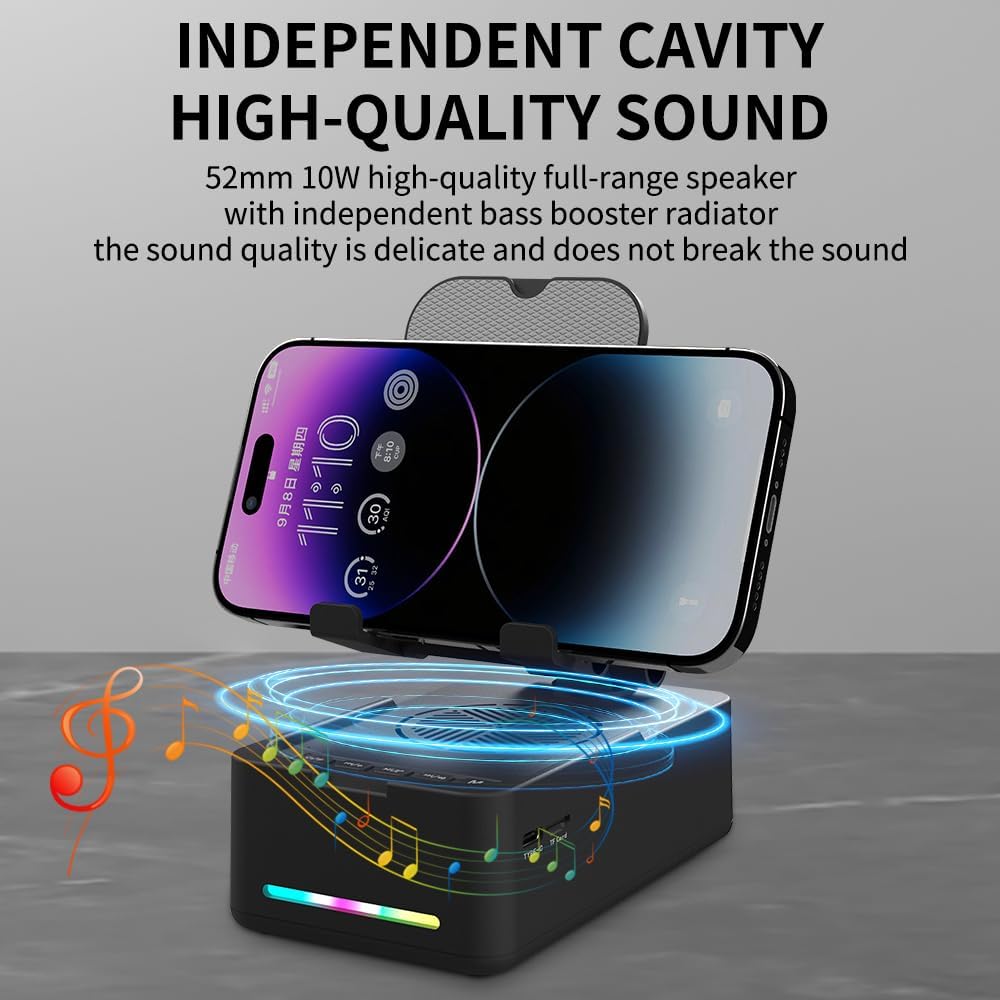
Image: The phone stand with its telescopic arm extended to a higher position, illustrating the adjustable height feature. A phone is shown on the stand at an elevated level.
The sturdy hook and anti-slip pads ensure your device remains secure and protected from scratches.
3.2 പവർ ഓൺ/ഓഫ്
- പവർ ഓണാക്കാൻ: Press and hold the Power/Light button (⏻ / ✱) for approximately 3 seconds until you hear an audible prompt and the LED light bar illuminates.
- പവർ ഓഫ് ചെയ്യാൻ: Press and hold the Power/Light button (⏻ / ✱) for approximately 3 seconds until you hear an audible prompt and the LED light bar turns off.
4. പ്രവർത്തന നിർദ്ദേശങ്ങൾ
4.1 ബ്ലൂടൂത്ത് ജോടിയാക്കൽ
ബ്ലൂടൂത്ത് വഴി നിങ്ങളുടെ ഉപകരണം ബന്ധിപ്പിക്കുന്നതിന്:
- Ensure the speaker is powered on. The LED light bar will indicate it is in pairing mode (often a flashing blue light).
- നിങ്ങളുടെ സ്മാർട്ട്ഫോണിലോ, ടാബ്ലെറ്റിലോ, അല്ലെങ്കിൽ മറ്റ് ബ്ലൂടൂത്ത് പ്രവർത്തനക്ഷമമാക്കിയ ഉപകരണത്തിലോ, ബ്ലൂടൂത്ത് ക്രമീകരണങ്ങളിലേക്ക് നാവിഗേറ്റ് ചെയ്യുക.
- ഇതിനായി തിരയുക available devices and select "CYBORIS T203" (or similar name) from the list.
- Once connected, you will hear a confirmation sound, and the LED light bar will typically show a solid blue light.
- The device will automatically attempt to reconnect to the last paired device when powered on.
4.2 മീഡിയ പ്ലേബാക്ക്
Control your audio playback using the buttons on the speaker:
- പ്ലേ/താൽക്കാലികമായി നിർത്തുക: Short press the Play/Pause/Call button (▶ / ⏸ / 📞) നിലവിലെ ട്രാക്ക് പ്ലേ ചെയ്യാനോ താൽക്കാലികമായി നിർത്താനോ.
- വോളിയം കൂട്ടുക: Short press the Next Track/Volume Up button (⏭ / 🔊+).
- വോളിയം താഴേക്ക്: Short press the Previous Track/Volume Down button (⏮ / 🔊-).
- അടുത്ത ട്രാക്ക്: Long press the Next Track/Volume Up button (⏭ / 🔊+).
- മുമ്പത്തെ ട്രാക്ക്: Long press the Previous Track/Volume Down button (⏮ / 🔊-).
Note: Some instructions may incorrectly state the long press functions for track control. Please follow the above corrected instructions for proper operation.
4.3 കോൾ പ്രവർത്തനങ്ങൾ
ബിൽറ്റ്-ഇൻ മൈക്രോഫോൺ ഹാൻഡ്സ്-ഫ്രീ കോളിംഗ് അനുവദിക്കുന്നു:
- മറുപടി കോൾ: Short press the Play/Pause/Call button (▶ / ⏸ / 📞) when an incoming call is received.
- കോൾ അവസാനിപ്പിക്കുക: Short press the Play/Pause/Call button (▶ / ⏸ / 📞) during a call to hang up.
- കോൾ നിരസിക്കുക: Long press the Play/Pause/Call button (▶ / ⏸ / 📞) when an incoming call is received.
4.4 LED ലൈറ്റ് മോഡുകൾ
To cycle through the LED light modes:
- Short press the Power/Light button (⏻ / ✱) to change the LED light pattern or turn it off.
4.5 TF കാർഡ് പ്ലേബാക്ക്
To play music directly from a TF (MicroSD) card:
- MP3 ഓഡിയോ ഉള്ള ഒരു TF കാർഡ് ചേർക്കുക fileടിഎഫ് കാർഡ് സ്ലോട്ടിലേക്ക്.
- മോഡ് ബട്ടൺ അമർത്തുക (M) to switch to TF card mode. The speaker will automatically begin playing music from the card.
- Use the media playback buttons (Play/Pause, Next/Previous Track, Volume Up/Down) to control the audio.

ചിത്രം: ഒരു ക്ലോസ്-അപ്പ് view of the side of the speaker base, clearly showing the TF card slot and the Type-C charging port, indicating multiple music playback options.
5. ചാർജിംഗ്
To charge your CYBORIS T203 speaker:
- Connect the provided USB charging cable to the Type-C charging port on the speaker.
- USB കേബിളിന്റെ മറ്റേ അറ്റം അനുയോജ്യമായ ഒരു USB പവർ സ്രോതസ്സുമായി ബന്ധിപ്പിക്കുക (ഉദാ: വാൾ അഡാപ്റ്റർ, കമ്പ്യൂട്ടർ USB പോർട്ട്).
- LED ഇൻഡിക്കേറ്റർ ചാർജിംഗ് സ്റ്റാറ്റസ് കാണിക്കും (ഉദാ: ചാർജ് ചെയ്യുമ്പോൾ ചുവപ്പ്, പൂർണ്ണമായി ചാർജ് ചെയ്യുമ്പോൾ ഓഫ് അല്ലെങ്കിൽ നീല).
- സാധാരണയായി ഒരു പൂർണ്ണ ചാർജ് ഏകദേശം 2-3 മണിക്കൂർ എടുക്കും.
Note: The device has a battery capacity of 1800mAh and requires a DC 5V/1A input for charging.

Image: The phone stand with a phone displaying battery life estimates: up to 6 hours at maximum volume and 30 hours at 50% volume, highlighting its long-lasting battery.
6. പരിപാലനം
- ഉപകരണം വരണ്ടതും ഈർപ്പത്തിൽ നിന്ന് അകറ്റി നിർത്തുന്നതും സൂക്ഷിക്കുക.
- ഉപകരണത്തെ അങ്ങേയറ്റത്തെ താപനിലയിൽ തുറന്നുകാട്ടരുത്.
- മൃദുവായതും ഉണങ്ങിയതുമായ തുണി ഉപയോഗിച്ച് ഉപകരണം വൃത്തിയാക്കുക. കഠിനമായ രാസവസ്തുക്കളോ ഉരച്ചിലുകളുള്ള ക്ലീനറുകളോ ഉപയോഗിക്കുന്നത് ഒഴിവാക്കുക.
- ഉപയോഗത്തിലില്ലാത്തപ്പോൾ തണുത്തതും ഉണങ്ങിയതുമായ സ്ഥലത്ത് ഉപകരണം സൂക്ഷിക്കുക.
7. പ്രശ്നപരിഹാരം
| പ്രശ്നം | സാധ്യമായ കാരണം | പരിഹാരം |
|---|---|---|
| ഉപകരണം പവർ ഓണാക്കുന്നില്ല. | കുറഞ്ഞ ബാറ്ററി. | നൽകിയിരിക്കുന്ന USB കേബിൾ ഉപയോഗിച്ച് ഉപകരണം ചാർജ് ചെയ്യുക. |
| ബ്ലൂടൂത്ത് വഴി ജോടിയാക്കാൻ കഴിയില്ല. | Bluetooth not enabled on source device; device too far; speaker not in pairing mode. | Ensure Bluetooth is on and the speaker is in pairing mode. Move devices closer. Restart both devices. |
| ശബ്ദമില്ല അല്ലെങ്കിൽ കുറഞ്ഞ ശബ്ദമില്ല. | സ്പീക്കറിലോ ഉറവിട ഉപകരണത്തിലോ ശബ്ദം വളരെ കുറവാണ്; ഉപകരണം കണക്റ്റുചെയ്തിട്ടില്ല. | Increase volume on both the speaker and your connected device. Verify Bluetooth connection. |
| Track control buttons (Next/Previous) not working as expected. | ബട്ടൺ അമർത്തുന്നതിന്റെ ദൈർഘ്യം തെറ്റാണ്. | For Next/Previous track, നീണ്ട അമർത്തുക the respective buttons. Short press is for volume control. |
| TF കാർഡ് സംഗീതം പ്ലേ ചെയ്യുന്നില്ല. | Incorrect mode selected; TF card not inserted correctly or corrupted. | Press the 'M' button to switch to TF card mode. Reinsert the TF card. Ensure files MP3 ഫോർമാറ്റിലാണ്. |
8 സ്പെസിഫിക്കേഷനുകൾ
- മോഡലിൻ്റെ പേര്: T203
- ബ്രാൻഡ്: CYBORIS
- അനുയോജ്യമായ ഉപകരണങ്ങൾ: Smartphones, Tablets (4 to 13 inches)
- ഫോം ഘടകം: ബ്രാക്കറ്റ്
- മൗണ്ടിംഗ് തരം: ടേബിൾടോപ്പ്
- ബാറ്ററി: 1800mAh
- ഇൻപുട്ട്: DC 5V/1A
- ഇനത്തിൻ്റെ അളവുകൾ: 5.51 x 3.15 x 2.44 ഇഞ്ച്
- ഇനത്തിൻ്റെ ഭാരം: 0.44 കിലോഗ്രാം
- എൻക്ലോഷർ മെറ്റീരിയൽ: പ്ലാസ്റ്റിക്, റബ്ബർ
- അന്തർനിർമ്മിത മീഡിയ: Speaker, USB cable, Manual book
9. വാറൻ്റിയും പിന്തുണയും
The CYBORIS Foldable Phone Stand with Speaker (Model T203) comes with a 1 വർഷത്തെ വാറൻ്റി വാങ്ങിയ തീയതി മുതൽ. സാധാരണ ഉപയോഗത്തിലുള്ള നിർമ്മാണ വൈകല്യങ്ങളും തകരാറുകളും ഈ വാറന്റി ഉൾക്കൊള്ളുന്നു.
For warranty claims, technical support, or any questions regarding your product, please contact CYBORIS customer service through the retailer where you purchased the product or visit the official CYBORIS webബന്ധപ്പെടാനുള്ള വിവരങ്ങൾക്കുള്ള സൈറ്റ്.
വാറന്റി സാധൂകരണത്തിനായി നിങ്ങളുടെ വാങ്ങിയതിന്റെ തെളിവ് സൂക്ഷിക്കുക.