
1. ആമുഖം
വാങ്ങിയതിന് നന്ദി.asing the Audizio Genua DAB Radio. This manual provides essential information for the safe and efficient operation of your device. Please read it thoroughly before use and retain it for future reference. The Audizio Genua is a versatile DAB+/FM stereo radio featuring Bluetooth connectivity, USB playback, and an alarm function, designed for both home and portable use.
2 സുരക്ഷാ വിവരങ്ങൾ
- ഊർജ്ജ സ്രോതസ്സ്: നൽകിയിരിക്കുന്ന പവർ അഡാപ്റ്റർ മാത്രം ഉപയോഗിക്കുക. വോളിയം ഉറപ്പാക്കുകtagഇ നിങ്ങളുടെ പ്രദേശത്തിന്റെ ആവശ്യകതകളുമായി പൊരുത്തപ്പെടുന്നു.
- ജലവും ഈർപ്പവും: Do not expose the unit to rain, moisture, or dripping/splashing liquids. Do not place objects filled with liquids, such as vases, on the apparatus.
- വെൻ്റിലേഷൻ: ആവശ്യത്തിന് വായുസഞ്ചാരം ഉറപ്പാക്കുക. വായുസഞ്ചാര ദ്വാരങ്ങൾ തടയരുത്.
- ചൂട്: റേഡിയേറ്ററുകൾ, ഹീറ്റ് രജിസ്റ്ററുകൾ, സ്റ്റൗകൾ അല്ലെങ്കിൽ മറ്റ് ഉപകരണങ്ങൾ (ഉൾപ്പെടെ) പോലുള്ള താപ സ്രോതസ്സുകളിൽ നിന്ന് യൂണിറ്റ് അകറ്റി നിർത്തുക. ampലൈഫയറുകൾ) ചൂട് ഉത്പാദിപ്പിക്കുന്നത്.
- വൃത്തിയാക്കൽ: ഉണങ്ങിയ തുണി ഉപയോഗിച്ച് മാത്രം വൃത്തിയാക്കുക.
- സേവനം: ഈ ഉൽപ്പന്നം സ്വയം സേവിക്കാൻ ശ്രമിക്കരുത്. യോഗ്യതയുള്ള സേവന ഉദ്യോഗസ്ഥർക്ക് എല്ലാ സേവനങ്ങളും റഫർ ചെയ്യുക.
- ആൻ്റിന: Do not bend or force the antenna.
3. പാക്കേജ് ഉള്ളടക്കം
Please check that all items are present and in good condition upon unpacking:
- Audizio Genua DAB Radio
- റിമോട്ട് കൺട്രോൾ
- പവർ അഡാപ്റ്റർ
- Quick Start Guide (language not guaranteed)
4. ഉൽപ്പന്നം കഴിഞ്ഞുview
4.1 ഫ്രണ്ട് പാനൽ നിയന്ത്രണങ്ങളും ഡിസ്പ്ലേയും

ചിത്രം 4.1: മുൻഭാഗം view of the Audizio Genua DAB Radio.
The front panel features a clear color TFT display, two speaker grilles, and an array of control buttons and a central rotary knob. The display shows station information, track details, time, and menu options. Buttons include Menu, Preset, Scan, Dimmer, Alarm, and playback controls (Play/Pause, Skip). The central knob is used for volume adjustment, tuning, and selection.
4.2 പിൻ പാനൽ കണക്ഷനുകൾ
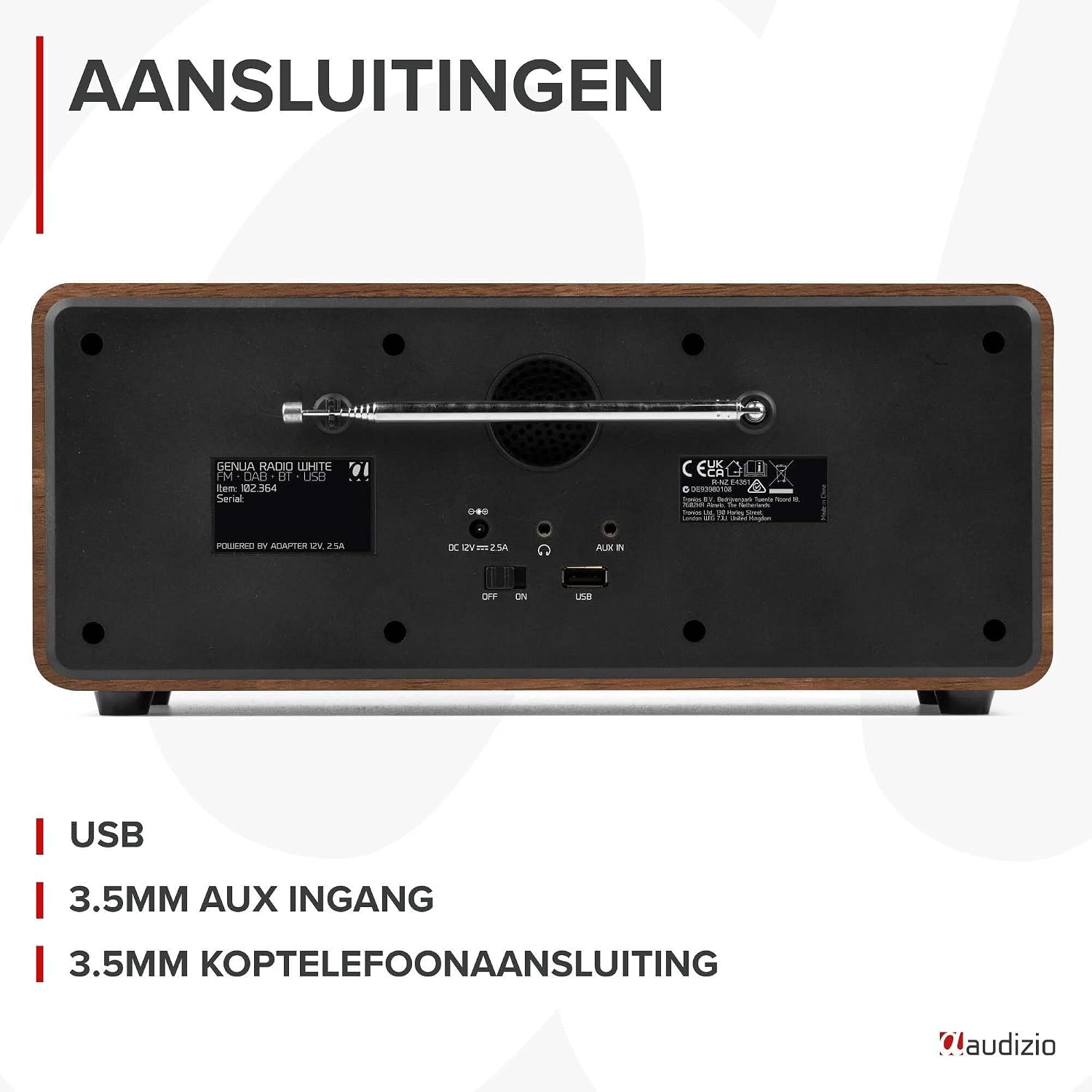
ചിത്രം 4.2: പിൻഭാഗം view of the Audizio Genua DAB Radio with connections.
The rear panel includes the telescopic antenna for radio reception, a USB port for media playback, a 3.5mm AUX input for external audio devices, a 3.5mm headphone output, a DC 12V power input, and a main power ON/OFF switch.
4.3 വിദൂര നിയന്ത്രണം

Figure 4.3: Remote control for the Audizio Genua DAB Radio.
The included remote control provides full functionality, allowing you to power on/off, adjust volume, change modes, navigate menus, set alarms, and control playback from a distance.
5. സജ്ജീകരണം
5.1 പവർ കണക്ഷൻ
- Connect the power adapter to the DC 12V input on the rear of the radio.
- പവർ അഡാപ്റ്റർ അനുയോജ്യമായ ഒരു മതിൽ ഔട്ട്ലെറ്റിലേക്ക് പ്ലഗ് ചെയ്യുക.
- Flip the main power switch on the rear panel to the 'ON' position.
5.2 ആന്റിന ക്രമീകരണം
Extend the telescopic antenna fully for optimal DAB+ and FM radio reception. Adjust its position for the best signal quality.
5.3 Initial Setup and Auto Scan
- Upon first power-on, the radio may prompt you to perform an auto-scan for DAB+ stations. Select 'Yes' or press the 'Scan' button.
- The radio will scan for available DAB+ stations and store them. This process may take a few minutes.
- സ്കാൻ പൂർത്തിയായിക്കഴിഞ്ഞാൽ, റേഡിയോ ലഭ്യമായ ആദ്യത്തെ സ്റ്റേഷനിലേക്ക് ട്യൂൺ ചെയ്യും.
6. പ്രവർത്തന നിർദ്ദേശങ്ങൾ
6.1 മോഡ് തിരഞ്ഞെടുക്കൽ
Press the 'Mode' button on the remote control or the 'Menu' button on the unit to cycle through available modes: DAB+, FM, Bluetooth, USB, and AUX In.
6.2 DAB+ Radio Operation
- Select DAB+ mode.
- If no stations are found or you wish to rescan, press the 'Scan' button to perform a full scan.
- Use the 'Tune/Select' knob or the navigation buttons on the remote to browse through the list of available stations.
- Press the 'OK' button (on remote) or push the 'Tune/Select' knob to select a station.
- പ്രീസെറ്റുകൾ സംഭരിക്കുന്നു: To store a favorite station, press and hold the 'Preset' button until the preset menu appears. Use the knob/navigation to select a preset number (1-30) and press 'OK' to confirm.
- പ്രീസെറ്റുകൾ തിരിച്ചുവിളിക്കുന്നു: Briefly press the 'Preset' button, then use the knob/navigation to select the desired preset and press 'OK'.
6.3 എഫ്എം റേഡിയോ പ്രവർത്തനം
- എഫ്എം മോഡ് തിരഞ്ഞെടുക്കുക.
- ഓട്ടോ സ്കാൻ: Press the 'Scan' button to automatically scan for and store available FM stations.
- സ്വമേധയാലുള്ള ട്യൂണിംഗ്: Use the 'Tune/Select' knob to manually tune to a specific frequency.
- പ്രീസെറ്റുകൾ സംഭരിക്കുന്നു: Similar to DAB+ mode, press and hold 'Preset', select a number, and confirm.
- പ്രീസെറ്റുകൾ തിരിച്ചുവിളിക്കുന്നു: Briefly press 'Preset', select the desired preset, and confirm.
6.4 ബ്ലൂടൂത്ത് കണക്റ്റിവിറ്റി
- Select Bluetooth mode. The display will show "Pairing" or "Waiting for connection".
- നിങ്ങളുടെ സ്മാർട്ട്ഫോണിലോ മറ്റ് ബ്ലൂടൂത്ത് പ്രവർത്തനക്ഷമമാക്കിയ ഉപകരണത്തിലോ, ബ്ലൂടൂത്ത് പ്രവർത്തനക്ഷമമാക്കി ലഭ്യമായ ഉപകരണങ്ങൾക്കായി തിരയുക.
- Select "Audizio Genua" from the list of devices.
- Once paired, the radio will confirm the connection, and you can start playing audio from your device.
6.5 യുഎസ്ബി പ്ലേബാക്ക്
- MP3 അടങ്ങിയ യുഎസ്ബി ഫ്ലാഷ് ഡ്രൈവ് ചേർക്കുക fileപിൻ പാനലിലെ USB പോർട്ടിലേക്ക് s.
- Select USB mode. The radio will automatically detect the USB drive and begin playing the first compatible audio file.
- Use the playback control buttons (Play/Pause, Skip Forward/Backward) on the unit or remote to manage your music.
6.6 AUX ഇൻപുട്ട്
- Connect an external audio device (e.g., MP3 player, smartphone) to the 3.5mm AUX IN port on the rear panel using an audio cable (not included).
- AUX മോഡ് തിരഞ്ഞെടുക്കുക.
- നിങ്ങളുടെ ബാഹ്യ ഉപകരണത്തിൽ നിന്ന് പ്ലേബാക്കും ശബ്ദവും നിയന്ത്രിക്കുക.
6.7 Alarm and Sleep Timer
- അലാറം ക്രമീകരണം: Press the 'Alarm' button on the unit or remote. Follow the on-screen prompts to set Alarm 1 and Alarm 2, including time, source (DAB/FM/Buzzer), and volume.
- സ്നൂസ് പ്രവർത്തനം: When the alarm sounds, press any button (except Power) to activate snooze. The alarm will sound again after a set interval.
- സ്ലീപ്പ് ടൈമർ: Press the 'Sleep' button on the remote to set a sleep timer (e.g., 15, 30, 60 minutes). The radio will automatically turn off after the selected time.
6.8 ഡിസ്പ്ലേ ഡിമ്മർ
Press the 'Dimmer' button on the unit or remote to adjust the brightness of the display. This is useful for different lighting conditions or for use in a bedroom.
7. പരിപാലനം
- വൃത്തിയാക്കൽ: റേഡിയോയുടെ പുറംഭാഗം വൃത്തിയാക്കാൻ മൃദുവായതും ഉണങ്ങിയതുമായ തുണി ഉപയോഗിക്കുക. അബ്രാസീവ് ക്ലീനറുകൾ, മെഴുക് അല്ലെങ്കിൽ ലായകങ്ങൾ ഉപയോഗിക്കരുത്.
- ആൻ്റിന: കേടുപാടുകൾ സംഭവിക്കാതിരിക്കാൻ ടെലിസ്കോപ്പിക് ആന്റിന ശ്രദ്ധയോടെ കൈകാര്യം ചെയ്യുക.
- സംഭരണം: റേഡിയോ ദീർഘനേരം സൂക്ഷിക്കുകയാണെങ്കിൽ, വൈദ്യുതി വിതരണത്തിൽ നിന്ന് അത് വിച്ഛേദിക്കുക.
8. പ്രശ്നപരിഹാരം
| പ്രശ്നം | സാധ്യമായ കാരണം | പരിഹാരം |
|---|---|---|
| ശക്തിയില്ല | Power adapter not connected; Main power switch off | Ensure power adapter is securely connected and plugged in; Turn main power switch to 'ON' |
| മോശം റേഡിയോ റിസപ്ഷൻ (DAB+/FM) | Antenna not extended; Weak signal area; Interference | Fully extend and adjust the telescopic antenna; Try repositioning the radio; Move away from other electronic devices |
| ബ്ലൂടൂത്ത് ജോടിയാക്കുന്നില്ല | Radio not in Bluetooth mode; Device not discoverable; Already paired with another device | Select Bluetooth mode on the radio; Ensure Bluetooth is enabled on your device and it's in pairing mode; Disconnect from other Bluetooth devices |
| USB പ്ലേബാക്ക് പ്രവർത്തിക്കുന്നില്ല | USB drive not inserted correctly; Incompatible file format; USB drive corrupted | Ensure USB drive is fully inserted; Check if files are in MP3 format; Try a different USB drive |
| ശബ്ദമില്ല | ശബ്ദം വളരെ കുറവാണ്; മ്യൂട്ട് സജീവമാക്കി; തെറ്റായ ഉറവിടം തിരഞ്ഞെടുത്തു. | Increase volume; Check if mute is active; Ensure correct input source (DAB/FM/BT/USB/AUX) is selected |
9 സ്പെസിഫിക്കേഷനുകൾ

Figure 9.1: Audizio Genua DAB Radio dimensions.
- ബ്രാൻഡ്: ഓഡിസിയോ
- മോഡൽ നമ്പർ: ജെനുവ
- നിറം: വെള്ള
- പ്രത്യേക സവിശേഷത: Bluetooth Connectivity, DAB+ Radio
- കണക്റ്റിവിറ്റി ടെക്നോളജി: Aux, Bluetooth, USB
- ഉൽപ്പന്ന അളവുകൾ (L x W x H): 13.5 x 31 x 13.3 സെ.മീ
- ട്യൂണർ സാങ്കേതികവിദ്യ: DAB+
- ശൈലി: ആധുനികം
- ഊർജ്ജ സ്രോതസ്സ്: കോർഡഡ് ഇലക്ട്രിക്
- പിന്തുണയ്ക്കുന്ന റേഡിയോ ബാൻഡുകൾ: FM, DAB+
- അനുയോജ്യമായ ഉപകരണങ്ങൾ: Smartphone, Tablet, Laptop, MP3 Player, Headphones, Speaker
- വാല്യംtage: 220 വോൾട്ട്
- പരമാവധി സ്പീക്കർ ഔട്ട്പുട്ട് പവർ: 50 വാട്ട്സ്
- ബാറ്ററികളുടെ എണ്ണം: 1 Non-standard battery (Type of battery required)
- സ്ക്രീൻ തരം: ടി.എഫ്.ടി
- ഇനത്തിൻ്റെ ഭാരം: 2.25 കിലോഗ്രാം
10. വാറൻ്റിയും പിന്തുണയും
This product is covered by a standard manufacturer's warranty. For detailed warranty terms and conditions, please refer to the documentation provided at the time of purchase or contact your retailer. For technical support or service inquiries, please contact the Audizio customer support team through their official webസൈറ്റ് അല്ലെങ്കിൽ നിങ്ങളുടെ വാങ്ങൽ സ്ഥലം.