
1. ഓവർview
The Denon DCD-3000NE is a high-performance CD/SACD player engineered to deliver exceptional sound quality for audiophiles. It features advanced digital processing and robust construction to ensure precise and detailed audio reproduction from various disc and file ഫോർമാറ്റുകൾ.

ചിത്രം 1.1: മുൻഭാഗം view of the Denon DCD-3000NE CD/SACD Player in silver.
പ്രധാന സവിശേഷതകൾ:
- Hi-Fi CD/SACD Playback: Supports SACD/CD and DSD playback with a 384kHz/32-bit quad DAC for high-resolution audio.
- Ultra AL32 Processing: Denon's proprietary processing technology for smooth, high-resolution output and enhanced audio fidelity.
- Versatile Media Support: Plays SACD/CD, DVD-R/RW, DVD+R/RW (up to 192kHz/24-bit), CD-R/RW (at 48kHz), and digital formats including MP3, WMA, AAC, WAV, FLAC, Apple Lossless, and AIFF.
- High-Precision SVH Disc Drive: Minimizes vibrations and ensures accurate disc loading and precise spinning for superior reading accuracy.
- Pure Direct Mode: Bypasses digital signal processing and disables digital outputs and display for an unaltered, high-quality analog sound.
- കരുത്തുറ്റ നിർമ്മാണം: Features separate analog and digital power supplies to isolate noise, Direct Mechanical Ground Construction to channel away vibrations, and premium components for pristine sound.
2. ബോക്സിൽ എന്താണുള്ളത്?
Verify that all items are present in the packaging before proceeding with setup.
- Denon DCD-3000NE CD/SACD Player
- പവർ കോർഡ്
- ദ്രുത ആരംഭ ഗൈഡ്
- Remote Control (with 2 AAA Batteries)
- സ്റ്റീരിയോ RCA കേബിൾ
3. സജ്ജീകരണം
3.1 പ്ലേസ്മെൻ്റ്
Place the DCD-3000NE on a stable, level surface away from direct sunlight, heat sources, and excessive vibration. Ensure adequate ventilation around the unit.
3.2 കണക്ഷനുകൾ
Connect the DCD-3000NE to your amplifier or receiver using the appropriate audio cables. The player offers analog RCA, optical, and coaxial digital outputs.
- അനലോഗ് കണക്ഷൻ: Use the supplied stereo RCA cable to connect the DCD-3000NE's ANALOG OUT jacks to the corresponding analog input jacks on your ampജീവൻ.
- Digital Connection (Optional): For digital audio transmission, connect either the OPTICAL OUT or COAXIAL OUT jack on the DCD-3000NE to a digital input on your amplifier or external DAC. Use a high-quality optical or coaxial digital cable (not supplied).
- പവർ കണക്ഷൻ: After all audio connections are made, connect the supplied power cord to the AC IN terminal on the rear of the DCD-3000NE and then to a wall outlet.

Figure 3.1: Rear panel connections, including analog RCA, optical, and coaxial digital outputs.
4. പ്രവർത്തന നിർദ്ദേശങ്ങൾ
4.1 അടിസ്ഥാന ഡിസ്ക് പ്ലേബാക്ക്
- അമർത്തുക പവർ യൂണിറ്റ് ഓണാക്കാനുള്ള ബട്ടൺ.
- അമർത്തുക തുറക്കുക/അടയ്ക്കുക ഡിസ്ക് ട്രേ തുറക്കാനുള്ള ബട്ടൺ.
- Place a disc (CD, SACD, DVD-R/RW, DVD+R/RW, CD-R/RW) gently onto the disc tray with the label side facing up.
- അമർത്തുക തുറക്കുക/അടയ്ക്കുക button again to close the disc tray. The player will read the disc.
- അമർത്തുക കളിക്കുക പ്ലേബാക്ക് ആരംഭിക്കുന്നതിനുള്ള ബട്ടൺ.
- ഉപയോഗിക്കുക ഒഴിവാക്കുക buttons (◀◀ / ▶▶) to navigate between tracks and the നിർത്തുക (■) or താൽക്കാലികമായി നിർത്തുക (██) buttons to control playback.

Figure 4.1: Inserting a disc into the DCD-3000NE.
4.2 പിന്തുണയ്ക്കുന്ന ഡിസ്കും File ഫോർമാറ്റുകൾ
The DCD-3000NE supports a wide range of audio formats:
- ഡിസ്കുകൾ: SACD, CD, CD-R/RW, DVD-R/RW, DVD+R/RW
- ഡിജിറ്റൽ Files: DSD (2.8MHz/5.6MHz), MP3, WMA, AAC, WAV, FLAC, Apple Lossless (ALAC), AIFF
4.3 പ്യുവർ ഡയറക്ട് മോഡ്
Activate Pure Direct Mode for the purest audio signal. This mode disables the digital audio outputs and the display to minimize potential interference and noise, providing an uncolored analog output.
- അമർത്തുക ശുദ്ധമായ ഡയറക്റ്റ് മുൻ പാനലിലോ റിമോട്ട് കൺട്രോളിലോ ഉള്ള ബട്ടൺ.
- The display will turn off, and digital outputs will be deactivated.
- അമർത്തുക ശുദ്ധമായ ഡയറക്റ്റ് ഈ മോഡിൽ നിന്ന് പുറത്തുകടക്കാൻ വീണ്ടും ബട്ടൺ.

Figure 4.2: The DCD-3000NE as part of a complete audio system.
5. പരിപാലനം
5.1 യൂണിറ്റ് വൃത്തിയാക്കൽ
To maintain the appearance and performance of your DCD-3000NE:
- മൃദുവായതും ഉണങ്ങിയതുമായ തുണി ഉപയോഗിച്ച് പുറംഭാഗങ്ങൾ തുടയ്ക്കുക.
- കഠിനമായ അഴുക്കിന്, ചെറുതായി dampവെള്ളം അല്ലെങ്കിൽ മൃദുവായ, ഉരച്ചിലുകളില്ലാത്ത ക്ലീനർ ഉപയോഗിച്ച് തുണിയിൽ വയ്ക്കുക.
- കഠിനമായ രാസവസ്തുക്കൾ, ലായകങ്ങൾ, അല്ലെങ്കിൽ ഉരച്ചിലുകൾ എന്നിവ ഉപയോഗിക്കുന്നത് ഒഴിവാക്കുക, കാരണം ഇവ ഫിനിഷിന് കേടുവരുത്തും.
- Do not spray cleaners directly onto the unit.
5.2 ഡിസ്ക് കൈകാര്യം ചെയ്യൽ
Proper disc handling ensures optimal playback and longevity of your discs:
- കളിക്കളത്തിൽ വിരലടയാളങ്ങൾ പതിക്കാതിരിക്കാൻ ഡിസ്കുകൾ എപ്പോഴും അരികുകളിൽ പിടിക്കുക.
- Keep discs clean and free from dust, dirt, and scratches.
- ഉപയോഗത്തിലില്ലാത്തപ്പോൾ ഡിസ്കുകൾ അവയുടെ കേസുകളിൽ സൂക്ഷിക്കുക.
- Do not expose discs to direct sunlight or high temperatures.
6. പ്രശ്നപരിഹാരം
If you encounter issues with your DCD-3000NE, refer to the table below for common problems and solutions.
| പ്രശ്നം | സാധ്യമായ കാരണം | പരിഹാരം |
|---|---|---|
| ശക്തിയില്ല | പവർ കോർഡ് സുരക്ഷിതമായി ബന്ധിപ്പിച്ചിട്ടില്ല. | പവർ കോർഡ് യൂണിറ്റിലേക്കും വാൾ ഔട്ട്ലെറ്റിലേക്കും ദൃഢമായി പ്ലഗ് ചെയ്തിട്ടുണ്ടെന്ന് ഉറപ്പാക്കുക. |
| ശബ്ദമില്ല | Incorrect audio cable connection or input selection on ampജീവൻ. | Check audio cable connections. Select the correct input source on your ampജീവൻ. |
| ഡിസ്ക് പ്ലേ ചെയ്യുന്നില്ല | ഡിസ്ക് വൃത്തികെട്ടതോ, പോറലുകളുള്ളതോ, അല്ലെങ്കിൽ തെറ്റായി ചേർത്തതോ ആണ്. | Clean the disc. Check for scratches. Ensure the disc is inserted label-side up. |
| റിമോട്ട് കൺട്രോൾ പ്രവർത്തിക്കുന്നില്ല | ബാറ്ററികൾ തീർന്നിരിക്കുന്നു അല്ലെങ്കിൽ തെറ്റായി ചേർത്തിരിക്കുന്നു. റിമോട്ടിനും യൂണിറ്റിനും ഇടയിലുള്ള തടസ്സം. | ബാറ്ററികൾ മാറ്റിസ്ഥാപിക്കുക. ശരിയായ ധ്രുവീകരണം ഉറപ്പാക്കുക. തടസ്സങ്ങൾ നീക്കം ചെയ്യുക. |
| Skipping or distorted audio | Disc is dirty or damaged. Unit is subject to excessive vibration. | Clean or replace the disc. Ensure the unit is on a stable surface. |
7 സ്പെസിഫിക്കേഷനുകൾ
Detailed technical specifications for the Denon DCD-3000NE.
| ഫീച്ചർ | വിശദാംശങ്ങൾ |
|---|---|
| ബ്രാൻഡ് | ഡെനോൻ |
| മോഡലിൻ്റെ പേര് | DCD-3000NE |
| നിറം | Silver (variant shown) |
| കണക്റ്റിവിറ്റി ടെക്നോളജി | Analog Output, Coaxial Output, Optical Output |
| ഡിസ്കുകളുടെ എണ്ണം | 1 |
| പിന്തുണയ്ക്കുന്ന ഓഡിയോ ഫോർമാറ്റുകൾ | AAC, FLAC, MP3, WAV, WMA, DSD, Apple Lossless, AIFF |
| കണക്റ്റർ തരങ്ങൾ | Optical, Coaxial, RCA |
| ചാനലുകളുടെ എണ്ണം | 2 |
| മീഡിയ ഫോർമാറ്റ് തരം | Audio CD, SACD, DVD-R/RW, DVD+R/RW, CD-R/RW |
| അനുയോജ്യമായ ഉപകരണങ്ങൾ | Speaker, Headphone (via ampജീവപര്യന്തം) |
| ഹെഡ്ഫോണുകൾ ജാക്ക് | 3.5mm Jack (on compatible ampജീവപര്യന്തം) |
| ഇനത്തിന്റെ അളവുകൾ (L x W x H) | 15.94"L x 17.09"W x 5.43"H |
| മോഡൽ നമ്പർ | 301005-02-00-101 |
| യു.പി.സി | 747192143459 |
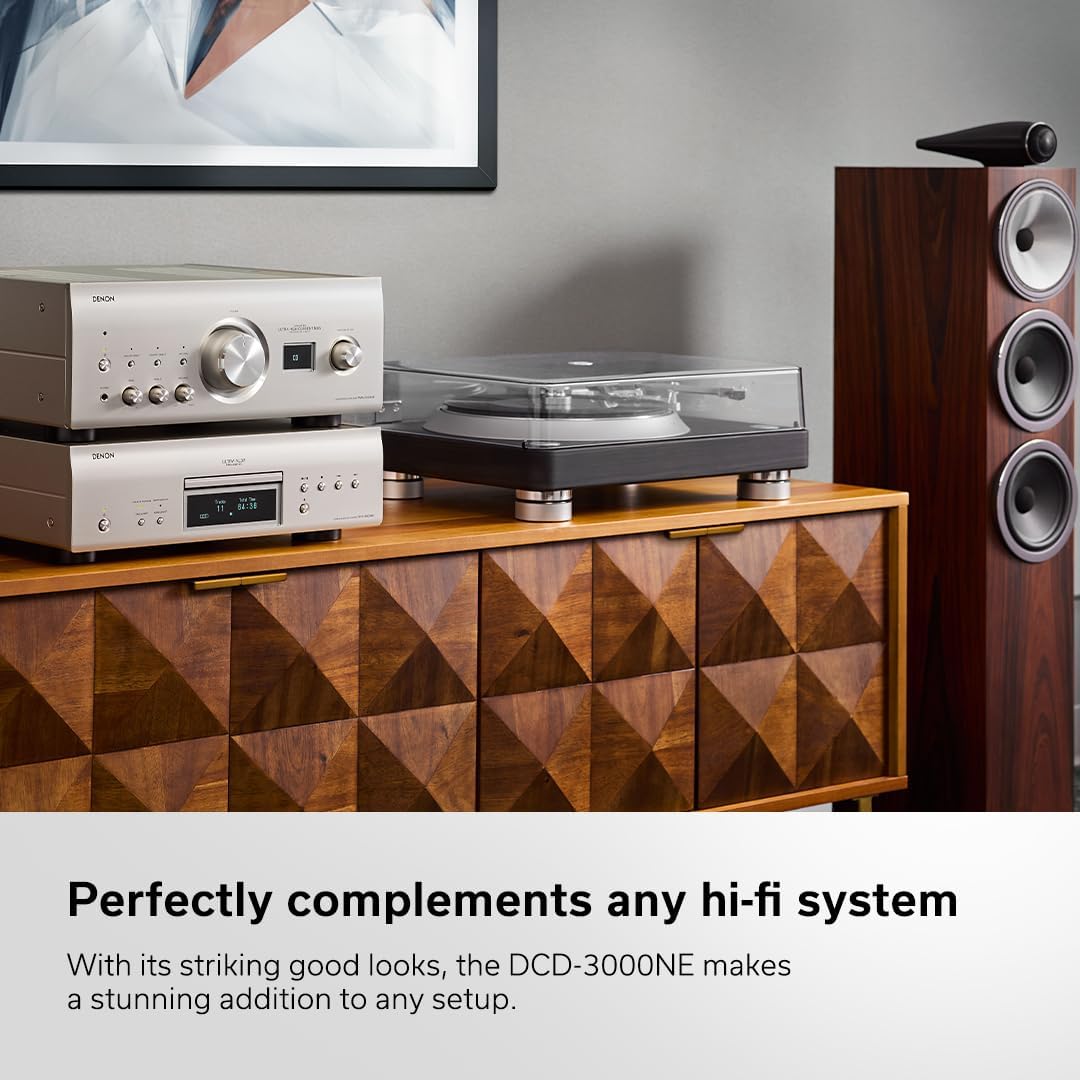
Figure 7.1: Internal circuitry highlighting the Ultra AL32 Processing.

ചിത്രം 7.2: ആന്തരിക view of the DCD-3000NE's power supply section.
8. വാറൻ്റിയും പിന്തുണയും
8.1 വാറൻ്റി വിവരങ്ങൾ
The Denon DCD-3000NE comes with a 1 വർഷത്തെ നിർമ്മാതാവിന്റെ വാറന്റി. സാധാരണ ഉപയോഗത്തിലുള്ള മെറ്റീരിയലുകളിലെയും നിർമ്മാണത്തിലെയും വൈകല്യങ്ങൾ ഈ വാറന്റി ഉൾക്കൊള്ളുന്നു. വാറന്റി ക്ലെയിമുകൾക്കായി നിങ്ങളുടെ വാങ്ങലിന്റെ തെളിവ് സൂക്ഷിക്കുക.
8.2 ഉപഭോക്തൃ പിന്തുണ
For technical assistance, troubleshooting beyond this manual, or warranty service, please contact Denon customer support. Refer to the official Denon webഏറ്റവും പുതിയ കോൺടാക്റ്റ് വിവരങ്ങൾക്കും പിന്തുണാ ഉറവിടങ്ങൾക്കുമുള്ള സൈറ്റ്.