
ആമുഖം
This manual provides instructions for the AWEI H25 Smart Watch. Please read this manual carefully before using the device to ensure proper operation and maintenance.

Figure 1: AWEI H25 Smart Watch in use.
1. സജ്ജീകരണം
1.1 പാക്കേജ് ഉള്ളടക്കം
നിങ്ങളുടെ പാക്കേജിൽ ഇനിപ്പറയുന്ന ഇനങ്ങൾ ഉൾപ്പെടുത്തിയിട്ടുണ്ടെന്ന് ഉറപ്പാക്കുക:
- AWEI H25 Smart Watch
- ചാർജിംഗ് കേബിൾ
- ഉപയോക്തൃ മാനുവൽ (ഈ പ്രമാണം)
1.2 ഉപകരണം ചാർജ് ചെയ്യുന്നു
Before first use, fully charge the smart watch. Connect the charging cable to the charging port on the back of the watch and to a standard USB power adapter (not included).
- പൂർണ്ണമായി ചാർജ് ചെയ്യുന്നതിന് സാധാരണയായി 2-3 മണിക്കൂർ എടുക്കും.
- The watch has a 230mAh battery capacity.
- Battery life is approximately 5-7 days with daily use, and up to 30 days in standby mode.

Figure 2: Battery life and performance overview.
1.3 ആപ്പ് ഡൗൺലോഡും ജോടിയാക്കലും
To utilize all features, download the companion app to your smartphone. Scan the QR code provided in the watch's interface or search for the app name (usually mentioned in the watch's initial setup screen or packaging) in your phone's app store.
- നിങ്ങളുടെ സ്മാർട്ട്ഫോണിൽ ബ്ലൂടൂത്ത് പ്രവർത്തനക്ഷമമാക്കുക.
- Open the companion app and follow the on-screen instructions to create an account or log in.
- Select "Add Device" or "Pair Device" within the app.
- The app will search for available devices. Select "AWEI H25" from the list.
- നിങ്ങളുടെ വാച്ചിലും സ്മാർട്ട്ഫോണിലും ജോടിയാക്കൽ അഭ്യർത്ഥന സ്ഥിരീകരിക്കുക.
1.4 വാച്ച് ഫെയ്സ് കസ്റ്റമൈസേഷൻ
The AWEI H25 features a 1.83-inch screen. You can customize the watch face through the companion app.
- Choose from multiple cloud-based watch faces.
- Upload your own photos to create a personalized watch face.
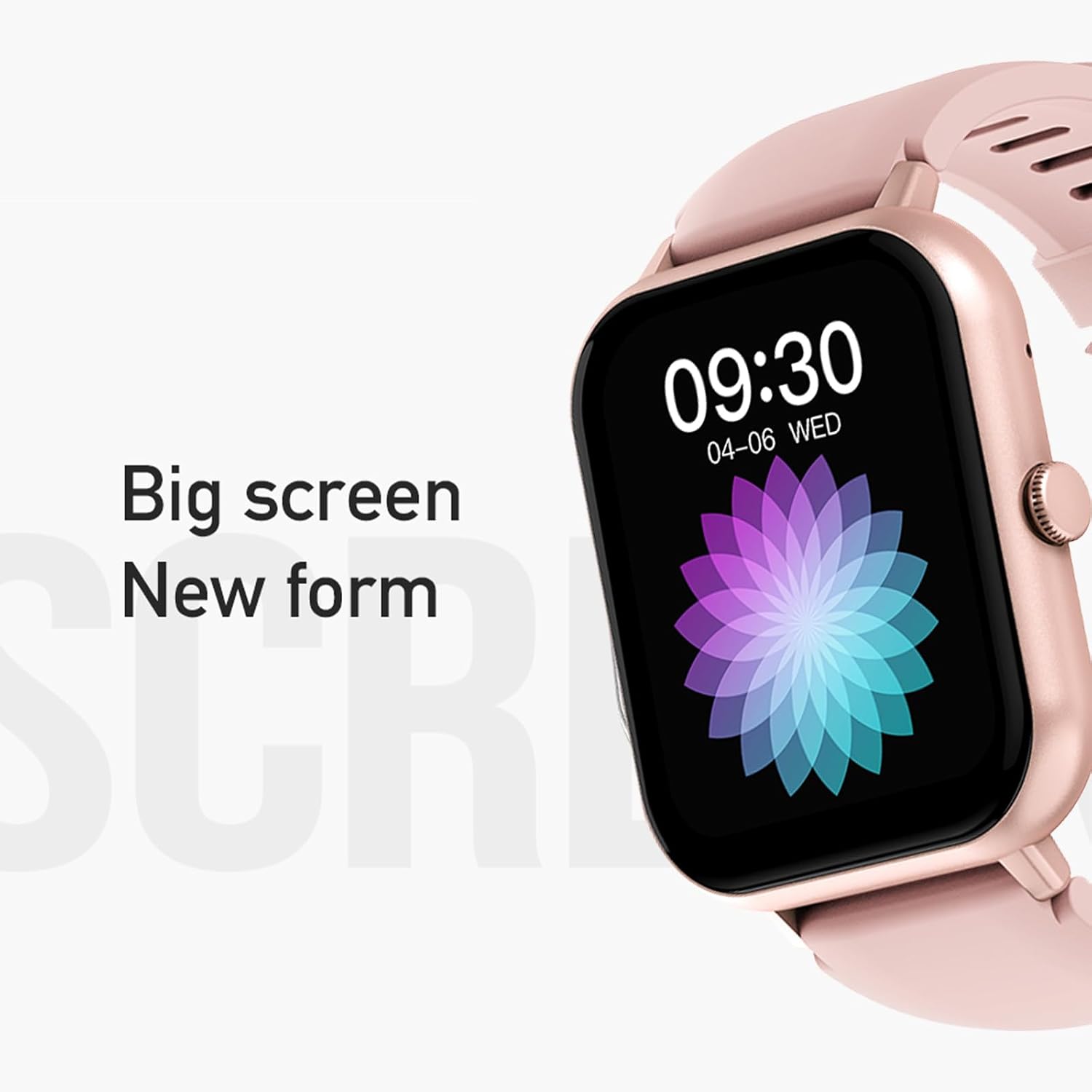
Figure 3: The 1.83-inch screen of the AWEI H25 Smart Watch.
2. പ്രവർത്തന നിർദ്ദേശങ്ങൾ
2.1 അടിസ്ഥാന നാവിഗേഷൻ
- മുകളിലേക്കും താഴേക്കും സ്വൈപ്പ് ചെയ്യുക: മെനുകളിലൂടെയും അറിയിപ്പുകളിലൂടെയും നാവിഗേറ്റ് ചെയ്യുക.
- ഇടത്തേക്ക്/വലത്തേക്ക് സ്വൈപ്പ് ചെയ്യുക: ദ്രുത ഫംഗ്ഷനുകളോ വിജറ്റുകളോ ആക്സസ് ചെയ്യുക.
- സൈഡ് ബട്ടൺ അമർത്തുക: Return to the home screen or access the app list.
- Long Press Side Button: Power on/off or access system settings.
2.2 ബ്ലൂടൂത്ത് കോൾ ഫംഗ്ഷൻ
After successful pairing with your smartphone, the watch supports Bluetooth calls.
- കോളുകൾക്ക് ഉത്തരം നൽകുന്നു: When a call comes in, tap the green icon on the watch screen.
- കോളുകൾ ചെയ്യുന്നു: ഒരു കോൾ ആരംഭിക്കാൻ വാച്ചിലെ ഡയൽ പാഡിലോ കോൺടാക്റ്റ് ലിസ്റ്റോ ആക്സസ് ചെയ്യുക.
2.3 സ്പോർട്സ് മോഡുകൾ
The AWEI H25 offers over 100 sport modes to track your physical activity.
- Access the "Sports" menu on the watch.
- Select your desired activity (e.g., Running, Walking, Hiking, Basketball, Cycling, Yoga).
- The watch will track exercise time, calories burned, and other relevant metrics.

ചിത്രം 4: ഓവർview of available sport modes.
2.4 ആരോഗ്യ നിരീക്ഷണം
The watch provides monitoring for various health metrics:
- ഹൃദയമിടിപ്പ് നിരീക്ഷണം: Continuous or on-demand heart rate measurement.
- രക്തസമ്മർദ്ദ നിരീക്ഷണം: കണക്കാക്കിയ രക്തസമ്മർദ്ദ റീഡിംഗുകൾ നൽകുന്നു.
- രക്ത ഓക്സിജൻ നിരീക്ഷണം: രക്തത്തിലെ ഓക്സിജൻ സാച്ചുറേഷൻ (SpO2) അളക്കുന്നു.
- സ്ത്രീ ഫിസിയോളജിക്കൽ സൈക്കിൾ: Track and predict menstrual cycles (requires setup in the app).
- ഉദാസീനമായ ഓർമ്മപ്പെടുത്തലുകൾ: നിഷ്ക്രിയത്വ കാലയളവുകൾക്ക് ശേഷം നീങ്ങാൻ നിങ്ങളെ അറിയിക്കുന്നു.
കുറിപ്പ്: The health monitoring features are for reference only and should not be used for medical diagnosis or treatment. Consult a medical professional for health concerns.
2.5 Smart Voice Assistant
After binding the watch to the companion app, you can use the smart voice assistant function.
- Click the voice function icon on the watch's menu screen.
- Speak your command (e.g., "What's the weather today?", "Call [Contact Name]").

Figure 5: Smart Voice Assistant interface.
2.6 അധിക സവിശേഷതകൾ
- സംഗീത നിയന്ത്രണം: നിങ്ങളുടെ സ്മാർട്ട്ഫോണിൽ സംഗീത പ്ലേബാക്ക് നിയന്ത്രിക്കുക.
- റിമോട്ട് ഫോട്ടോഗ്രഫി: നിങ്ങളുടെ ഫോണിന്റെ ക്യാമറയ്ക്ക് റിമോട്ട് ഷട്ടറായി വാച്ച് ഉപയോഗിക്കുക.
- അലാറം ക്ലോക്ക്: വാച്ചിൽ നിന്ന് നേരിട്ട് അലാറങ്ങൾ സജ്ജമാക്കുക.
- സമയ പ്രദർശനം: Standard time and date display.
- Wrist-Flip Display: Screen activates when you raise your wrist.
3. പരിപാലനം
3.1 Waterproof Rating (IP67)
The AWEI H25 Smart Watch has an IP67 waterproof rating. This means it is protected against dust ingress and can withstand immersion in water up to 1 meter for up to 30 minutes.
- Suitable for daily use such as washing hands, face, or light rain.
- ഇതിന് അനുയോജ്യമല്ല: Swimming, diving, hot showers, saunas, or high-pressure water activities.
- Avoid contact with hot water, steam, or corrosive liquids.
3.2 ശുചീകരണവും പരിചരണവും
- മൃദുവായതും ഉണങ്ങിയതുമായ തുണി ഉപയോഗിച്ച് വാച്ചും സ്ട്രാപ്പും പതിവായി തുടയ്ക്കുക.
- ആവശ്യമെങ്കിൽ, ചെറുതായി ഡി ഉപയോഗിക്കുകamp cloth with mild soap, then wipe dry.
- കഠിനമായ രാസവസ്തുക്കളോ, അബ്രസീവ് ക്ലീനറുകളോ, ലായകങ്ങളോ ഉപയോഗിക്കരുത്.
- ശരിയായ ചാർജിംഗ് ഉറപ്പാക്കാൻ ചാർജിംഗ് കോൺടാക്റ്റുകൾ വൃത്തിയായും വരണ്ടതായും സൂക്ഷിക്കുക.
3.3 ബാറ്ററി കെയർ
- ബാറ്ററി ഇടയ്ക്കിടെ പൂർണ്ണമായും ഡിസ്ചാർജ് ചെയ്യുന്നത് ഒഴിവാക്കുക.
- Do not expose the watch to extreme temperatures (very hot or very cold).
- If storing the watch for an extended period, charge it to about 50% and store in a cool, dry place.
4. പ്രശ്നപരിഹാരം
4.1 ഉപകരണം ഓണാക്കുന്നില്ല
- വാച്ച് പൂർണ്ണമായും ചാർജ് ചെയ്തിട്ടുണ്ടെന്ന് ഉറപ്പാക്കുക. കുറഞ്ഞത് 30 മിനിറ്റെങ്കിലും ചാർജറുമായി ബന്ധിപ്പിക്കുക.
- Try a long press (approx. 10-15 seconds) of the side button to force a power-on.
4.2 Unable to Pair with Smartphone
- നിങ്ങളുടെ സ്മാർട്ട്ഫോണിൽ ബ്ലൂടൂത്ത് പ്രവർത്തനക്ഷമമാക്കിയിട്ടുണ്ടെന്ന് ഉറപ്പാക്കുക.
- വാച്ച് ബ്ലൂടൂത്ത് പരിധിക്കുള്ളിലാണെന്ന് ഉറപ്പാക്കുക (സാധാരണയായി 10 മീറ്റർ).
- വാച്ചും സ്മാർട്ട്ഫോണും പുനരാരംഭിക്കുക.
- നിങ്ങളുടെ ഫോണിലെ ബ്ലൂടൂത്ത് കാഷെ മായ്ക്കുക (ബാധകമെങ്കിൽ) വീണ്ടും ജോടിയാക്കാൻ ശ്രമിക്കുക.
- കമ്പാനിയൻ ആപ്പ് ഏറ്റവും പുതിയ പതിപ്പിലേക്ക് അപ്ഡേറ്റ് ചെയ്തിട്ടുണ്ടെന്ന് ഉറപ്പാക്കുക.
4.3 Inaccurate Health Readings
- വാച്ച് നിങ്ങളുടെ കൈത്തണ്ടയിൽ നന്നായി ധരിക്കുന്നുണ്ടെന്ന് ഉറപ്പാക്കുക, അധികം ഇറുകിയതോ അധികം അയഞ്ഞതോ അല്ല.
- വാച്ചിന്റെ പിൻഭാഗത്തുള്ള സെൻസർ വൃത്തിയായും അവശിഷ്ടങ്ങളില്ലാതെയും സൂക്ഷിക്കുക.
- അളക്കുമ്പോൾ അമിതമായ ചലനം ഒഴിവാക്കുക.
- Remember that these readings are for reference and not medical grade.
4.4 Watch Not Receiving Notifications
- Check notification permissions for the companion app on your smartphone.
- വാച്ച് നിങ്ങളുടെ ഫോണുമായി ബ്ലൂടൂത്ത് വഴി ബന്ധിപ്പിച്ചിട്ടുണ്ടെന്ന് ഉറപ്പാക്കുക.
- Verify that "Do Not Disturb" mode is not active on either the watch or phone.
5 സ്പെസിഫിക്കേഷനുകൾ
| മോഡൽ നമ്പർ | H25 |
| ബ്രാൻഡ് | AWEI |
| സ്ക്രീൻ വലിപ്പം | 1.83 ഇഞ്ച് |
| ബാറ്ററി ശേഷി | 230 mAh |
| കണക്റ്റിവിറ്റി | ബ്ലൂടൂത്ത് |
| വാട്ടർപ്രൂഫ് റേറ്റിംഗ് | IP67 |
| പ്രത്യേക സവിശേഷതകൾ | 100+ sport modes, Multiple customizable dials, Smart voice assistant, Heart rate, Blood pressure, Blood oxygen monitoring, Bluetooth call function. |
| ജിപിഎസ് | GPS ഇല്ല |
6. വാറൻ്റിയും പിന്തുണയും
6.1 ഉൽപ്പന്ന വാറന്റി
The AWEI H25 Smart Watch comes with a one-year warranty from the date of purchase. This warranty covers manufacturing defects under normal use. It does not cover damage caused by misuse, accidents, unauthorized modifications, or failure to follow instructions in this manual.
വാറൻ്റി ക്ലെയിമുകൾക്കായി നിങ്ങളുടെ വാങ്ങിയതിൻ്റെ തെളിവ് സൂക്ഷിക്കുക.
6.2 ഉപഭോക്തൃ പിന്തുണ
If you encounter any issues not covered in the troubleshooting section or require further assistance, please contact AWEI customer support. Refer to the product packaging or the official AWEI webഏറ്റവും പുതിയ ബന്ധപ്പെടാനുള്ള വിവരങ്ങൾക്കായി സൈറ്റ്.