
M12/black/Standard/32G memory card
Home Smart Visual Cat Eye Camera Electronic Cateye Door Mirror with Screen Surveillance Video Doorbell
Model: M12/black/Standard/32G memory card
ആമുഖം
This manual provides comprehensive instructions for the installation, operation, and maintenance of your Home Smart Visual Cat Eye Camera Electronic Cateye Door Mirror with Screen Surveillance Video Doorbell. This wireless doorbell system offers enhanced home security and communication, featuring a visual display, two-way intercom, and infrared night vision capabilities. Please read this manual thoroughly before using the product to ensure proper functionality and safety.
സുരക്ഷാ വിവരങ്ങൾ
സുരക്ഷിതമായ പ്രവർത്തനം ഉറപ്പാക്കുന്നതിനും കേടുപാടുകൾ തടയുന്നതിനും, ദയവായി ഇനിപ്പറയുന്ന മുൻകരുതലുകൾ പാലിക്കുക:
- തീവ്രമായ ഊഷ്മാവ്, ഈർപ്പം, നേരിട്ടുള്ള സൂര്യപ്രകാശം എന്നിവയിൽ ഉപകരണം തുറന്നുകാട്ടരുത്.
- ശക്തമായ ആഘാതങ്ങൾക്ക് ഉപകരണം ഇടുകയോ ഇടുകയോ ചെയ്യുന്നത് ഒഴിവാക്കുക.
- ഉപകരണം സ്വയം ഡിസ്അസംബ്ലിംഗ് ചെയ്യാനോ നന്നാക്കാനോ ശ്രമിക്കരുത്. എല്ലാ സേവനങ്ങളും യോഗ്യതയുള്ള ഉദ്യോഗസ്ഥരെ ഏൽപ്പിക്കുക.
- ഉപകരണം വെള്ളത്തിൽ നിന്നും മറ്റ് ദ്രാവകങ്ങളിൽ നിന്നും അകറ്റി നിർത്തുക.
- Use only the specified power adapter and accessories.
- Ensure proper ventilation around the indoor monitor.
പാക്കേജ് ഉള്ളടക്കം
പാക്കേജിൽ ഇനിപ്പറയുന്ന ഇനങ്ങൾ ഉണ്ടോ എന്ന് പരിശോധിക്കുക:
- 1 x Outdoor Doorbell Unit
- 1 x Indoor Monitor with Screen
- 1 x ബാറ്ററി പാക്ക്
- 1 x മെമ്മറി കാർഡ് (32GB)
- 1 x USB ചാർജിംഗ് കേബിൾ
- 1 x Mounting Bracket and Screws
- 1 x ഉപയോക്തൃ മാനുവൽ (ഈ പ്രമാണം)
ഉൽപ്പന്നം കഴിഞ്ഞുview
Familiarize yourself with the components of your visual doorbell system:

ചിത്രം 1: The Home Smart Visual Doorbell system, showing the outdoor doorbell unit on the left and the indoor monitor with screen on the right.
Outdoor Doorbell Unit:
- ക്യാമറ ലെൻസ്: Captures video feed.
- ഇൻഫ്രാറെഡ് സെൻസറുകൾ: Enables night vision.
- കോൾ ബട്ടൺ: Activates the doorbell and initiates communication.
- മൈക്രോഫോൺ: ടു-വേ ഓഡിയോയ്ക്ക്.
- സ്പീക്കർ: ടു-വേ ഓഡിയോയ്ക്ക്.
ഇൻഡോർ മോണിറ്റർ:
- ഡിസ്പ്ലേ സ്ക്രീൻ: Shows live video feed from the outdoor unit.
- നിയന്ത്രണ ബട്ടണുകൾ: For navigation, volume, and menu access.
- മൈക്രോഫോൺ: ടു-വേ ഓഡിയോയ്ക്ക്.
- സ്പീക്കർ: ടു-വേ ഓഡിയോയ്ക്ക്.
- മെമ്മറി കാർഡ് സ്ലോട്ട്: For the included 32GB memory card.
- ചാർജിംഗ് പോർട്ട്: വൈദ്യുതി വിതരണത്തിനായി.
സജ്ജീകരണവും ഇൻസ്റ്റാളേഷനും
The system is designed for wireless installation and one-touch pairing.
1. Charging the Devices:
- Before first use, fully charge both the outdoor doorbell unit and the indoor monitor using the provided USB charging cable.
- The indoor monitor can be kept plugged in for long-term online use.

ചിത്രം 2: The indoor monitor connected to a power outlet for continuous operation.
2. Inserting the Memory Card:
- Locate the memory card slot on the side of the indoor monitor.
- Gently insert the provided 32GB memory card until it clicks into place. This card is essential for recording video and images.
3. Mounting the Outdoor Doorbell Unit:
- Choose a suitable location on your door frame or wall, typically at eye level, ensuring a clear view സന്ദർശകരുടെ.
- Use the provided mounting bracket and screws to securely attach the outdoor unit.
- Ensure the unit is protected from direct rain and extreme weather conditions if possible.
4. Pairing the Devices (One-Touch Pairing):
- Power on both the outdoor doorbell unit and the indoor monitor.
- The devices are designed for automatic, one-touch pairing. They should connect wirelessly without complex networking setup.
- If pairing does not occur automatically, refer to the troubleshooting section.
പ്രവർത്തന നിർദ്ദേശങ്ങൾ
ഒരു കോൾ സ്വീകരിക്കുന്നു:
- When a visitor presses the call button on the outdoor unit, the indoor monitor will ring and display the live video feed.
- Press the answer button on the indoor monitor to initiate two-way communication.
- To end the call, press the hang-up button.
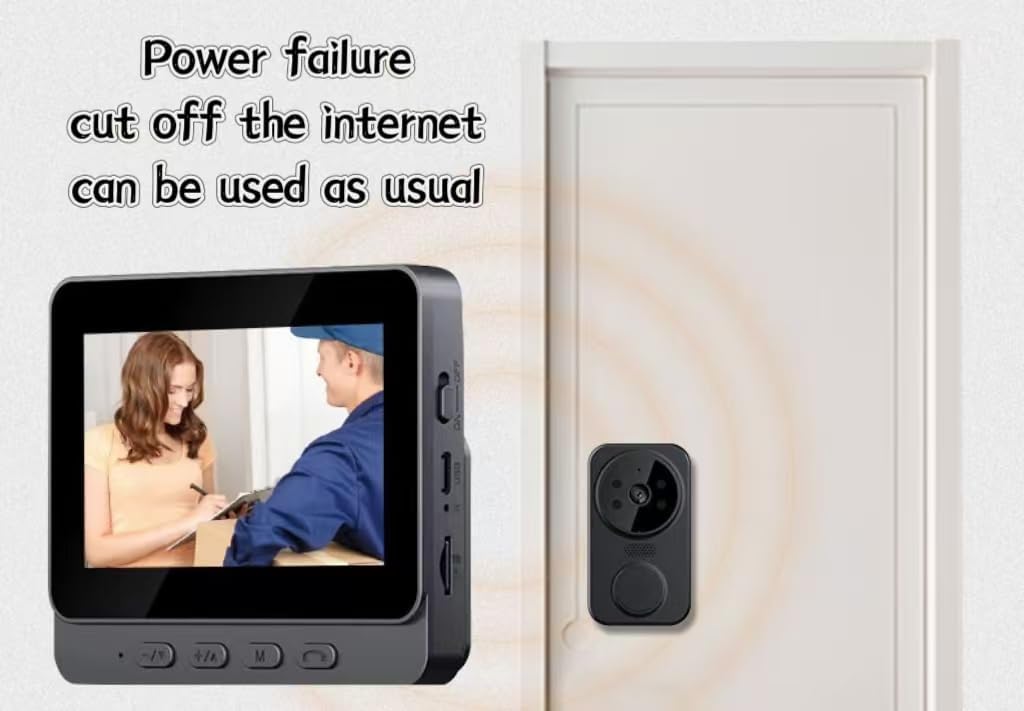
ചിത്രം 3: The indoor monitor displaying a visitor at the door, demonstrating the system's functionality even without internet connection.
ടു-വേ ഇന്റർകോം:
The system supports clear two-way audio communication between the outdoor unit and the indoor monitor, allowing for easy and fast communication with visitors.
ഇൻഫ്രാറെഡ് നൈറ്റ് വിഷൻ:
The outdoor unit is equipped with infrared sensors, providing clear visibility and recording capabilities even in low-light conditions or complete darkness.
റെക്കോർഡിംഗും പ്ലേബാക്കും:
- The system automatically records video and captures images when the doorbell is pressed or motion is detected (if motion detection is enabled).
- റെക്കോർഡ് ചെയ്ത foo ആക്സസ് ചെയ്യുകtage and images via the menu on the indoor monitor. Navigate using the control buttons.
ഓഫ്ലൈൻ പ്രവർത്തനം:
This doorbell system operates on a 2.4 template and does not require internet networking. It functions normally even during power outages or if your home internet is down.
മെയിൻ്റനൻസ്
- വൃത്തിയാക്കൽ: Use a soft, dry cloth to clean the surfaces of both units. Do not use abrasive cleaners or solvents.
- ബാറ്ററി ലൈഫ്: Monitor the battery indicator on the indoor monitor. Recharge the outdoor unit as needed. The indoor unit can remain plugged in.
- മെമ്മറി കാർഡ്: ആനുകാലികമായി റീview and delete old recordings from the memory card to ensure sufficient storage space. Format the card if necessary (refer to the indoor monitor's menu for this option).
ട്രബിൾഷൂട്ടിംഗ്
| പ്രശ്നം | സാധ്യമായ കാരണം | പരിഹാരം |
|---|---|---|
| Indoor monitor not displaying video. | Outdoor unit is off or out of range. Battery low on either unit. | Ensure both units are powered on and charged. Move units closer to each other. |
| No two-way audio. | Microphone or speaker muted. Volume too low. | Check volume settings on the indoor monitor. Ensure microphones/speakers are not obstructed. |
| രാത്രിയിൽ വീഡിയോ നിലവാരം മോശമാണ്. | Infrared sensors obstructed or dirty. | Clean the camera lens and infrared sensors on the outdoor unit. |
| മെമ്മറി കാർഡ് പിശക്. | Card not inserted correctly or corrupted. | Reinsert the memory card. If the issue persists, try formatting the card via the monitor's menu (this will erase all data). |
സ്പെസിഫിക്കേഷനുകൾ
| മോഡലിൻ്റെ പേര് | M12/black/Standard/32G memory card (11308 doorbell) |
| ബ്രാൻഡ് | ജനറിക് |
| നിറം | കറുപ്പ് |
| ഉൽപ്പന്ന അളവുകൾ (L x W x H) | 6 x 2 x 5 ഇഞ്ച് |
| ഇനത്തിൻ്റെ ഭാരം | 1 പൗണ്ട് |
| ഉൾപ്പെടുത്തിയ ഘടകങ്ങൾ | Battery Pack, 32GB memory card |
| കണക്റ്റിവിറ്റി | 2.4 Template (No Internet Networking Required) |
| ഫീച്ചറുകൾ | Two-way intercom, Wireless installation, One-touch pairing, HD camera, Noise cancelling infrared night vision, Offline operation |
വാറൻ്റിയും പിന്തുണയും
For warranty information and technical support, please contact the manufacturer or your retailer. Keep your purchase receipt as proof of purchase.
Manufacturer: qita
Ask a question about this manual
Ask about setup, troubleshooting, compatibility, parts, safety, or missing instructions. Manuals+ will review the question and use this page’s manual context to help answer it.